"What's $186 of diagnostic time?" Every service writer has heard some version of that question at the counter. The work was real. The tech spent ninety minutes tracing an intermittent electrical fault. But the invoice says "Diag 1.5 hr" and nothing else, so the customer sees a number with no story. Most of the pain in auto shop invoicing isn't typing the invoice. It's the story behind each line, the approval trail, and the fleet accounts that sit unpaid for two months. AI for auto shop invoicing helps with all three, as long as you're clear about which parts it may write and which must come from your records.
This guide walks through what a repair invoice has to contain, where AI drafting fits on a real repair order, the mistakes that turn an AI-written invoice into a liability, and how to keep commercial and fleet accounts from going stale. For a wider look at AI across the shop (phones, scheduling, marketing, parts), see the companion guide to AI tools for auto repair shops.
What a repair invoice has to carry
Start with the rules, because they decide what AI can and can't touch. Requirements vary by state, so check your own. California's are among the most detailed and make a good checklist. The Bureau of Automotive Repair's Write It Right guide says repairs must be authorized by the customer in written, oral or electronic form, with a record of who authorized them and when, and that additional work beyond the estimate needs fresh approval before you do it. On the invoice itself, each part must be described and priced and identified as new, used, rebuilt or reconditioned, labor must be described and priced separately, and parts and labor need separate subtotals before tax.
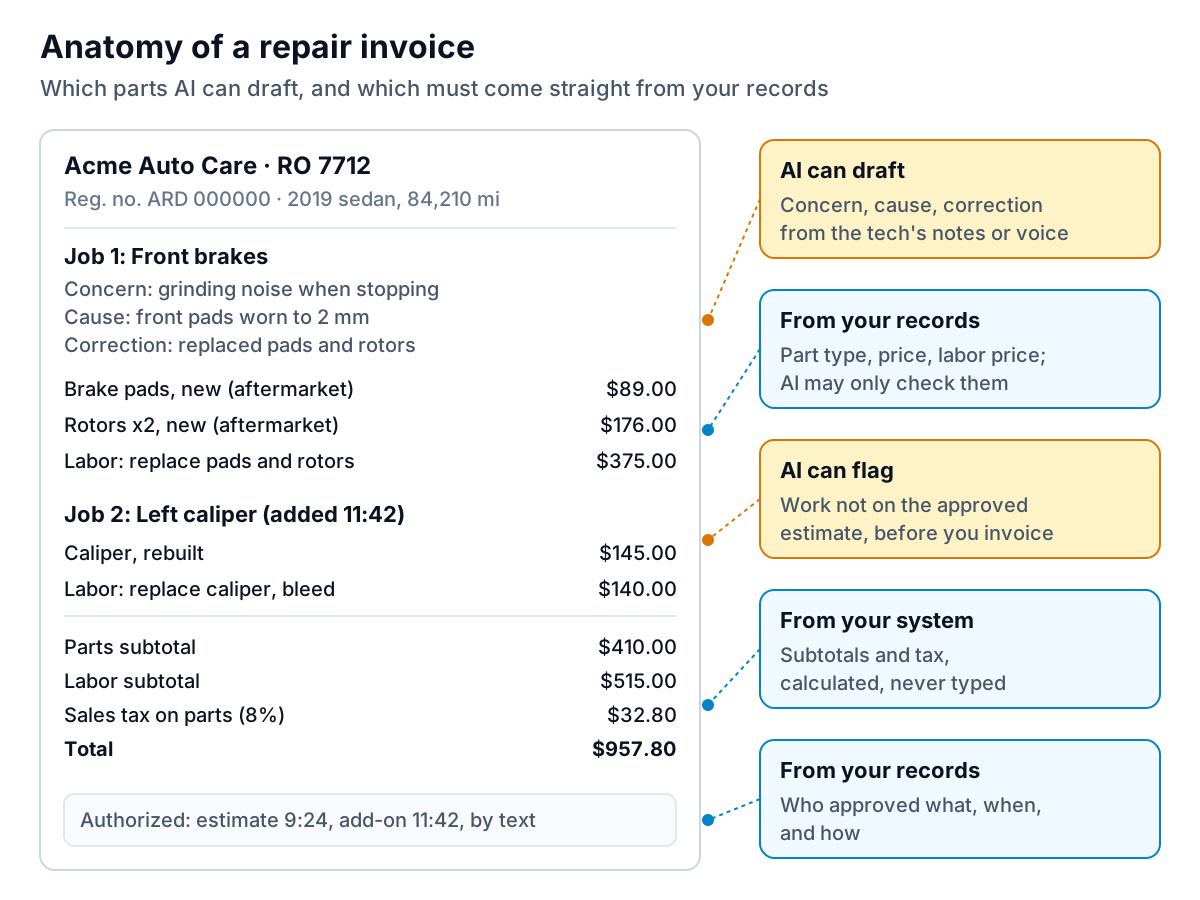
Tax rules also vary. In this example only parts are taxed, which is common but not universal. Your shop management system should hold the rule, not whoever writes the invoice.
Where AI for auto shop invoicing actually helps
Writing the concern, cause and correction
Techs write notes for other techs: "LF cal sticking, replaced, bled." Customers need "The left front brake caliper was sticking, which caused uneven wear and pulling. We replaced it with a rebuilt caliper and bled the brake system." This translation is the best use of AI on an invoice. It turns short notes or a voice memo into clear sentences. It's quick to check, because the tech knows exactly what was done, and it cuts the "what's this charge?" conversations at the counter.
Inspections and estimates
Digital vehicle inspections (DVIs) are where many shops now meet AI first. Tekmetric announced Smart DVI at its 2026 conference: techs walk the vehicle and narrate what they see, and it builds the customer-facing inspection report and pre-suggests jobs for the estimate. It was announced as coming soon, so check availability. Other systems do part of this without calling it AI. AutoLeap, for example, says its estimates let you look up parts and labor from built-in guides, attach inspection photos to the estimate, and convert approved estimates into repair orders without re-entering anything. That last step matters for invoicing: if the invoice is built from the approved work, nothing approved gets left off and nothing unapproved slips on.
Catching mismatches before the customer does
The most useful check is boring: compare the invoice with what was approved. A rule as simple as "flag any line that isn't on an approved estimate or supplement" catches the job a tech did on a hunch, the part that was swapped for a pricier one, and the supplement nobody logged. Some systems do this with rules rather than AI, and rules are fine. The point is that it runs on every repair order, not when someone remembers.
Payment and follow-up
Text-to-pay links have shortened checkout for retail customers. For fleet and commercial customers on terms, AI can sort balances by age, draft the reminder, and answer "who owes us the most?" without anyone building a spreadsheet.
Questions to ask before you switch it on
- Does the AI draft inside your shop management system, or do you copy and paste between tools? Copying is where numbers get changed by accident.
- Can the tech see and edit the draft description before it reaches the invoice?
- Does it use only the tech's notes and the job lines, or does it add "typical" steps on its own?
- Are customer messages and approvals stored on the repair order, with a time stamp?
- What happens to customer names, phone numbers and vehicle details you send it? Ask whether they're kept, and whether they're used to train models.
One repair order, start to finish
Here is how that looks on an example brake job at a sample shop. AI drafts the words at three points. People approve the work and the money at every point.
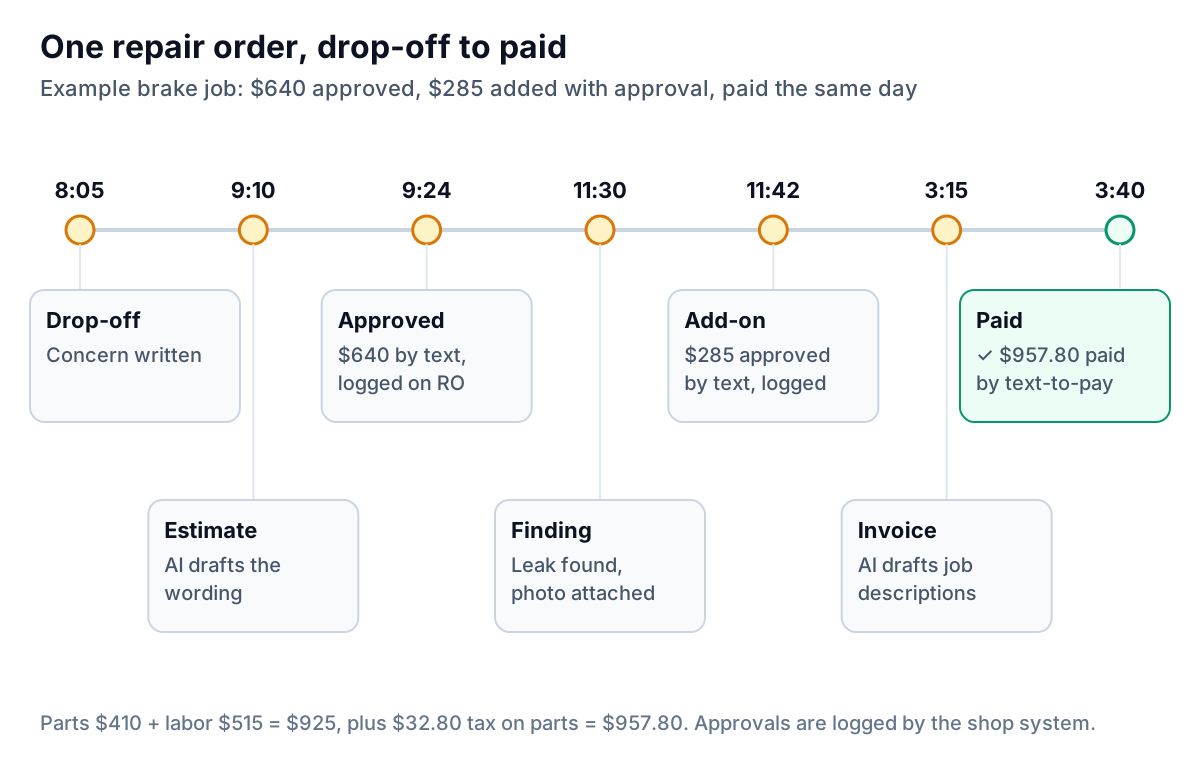
Two things make this repair order easy to collect:
- The add-on has its own approval. The tech found the caliper leak at 11:30, the service writer sent a short message with the photo and the $285 price, and the customer said yes at 11:42. That approval is on the repair order with a time and a method.
- The invoice was built from the approved jobs. No retyping, so the $640 and $285 on the invoice match exactly what the customer approved.
Here is a supplement message your system or an AI assistant could draft for the service writer to check and send:
Four ways an AI-written invoice goes wrong
- It describes work that wasn't done. A model asked to "write a professional description" of a brake job may add "inspected brake lines and hoses" because brake jobs often include it. If your tech didn't, the invoice now claims work that wasn't performed. Have the tech confirm every description and tell the AI to use only what's in the notes.
- It writes prices. Never let a model produce a part price, labor rate or tax amount. Those come from your system and your parts suppliers. If a draft contains a number the AI typed, treat it as wrong until checked.
- It drops the part type. New, used, rebuilt and aftermarket are legal details in some states, not style. Make sure your AI wording keeps whatever your system records for the part.
- Approvals live in someone's phone. If supplements are approved by text on a personal phone, the authorization isn't on the repair order. Use your shop system's messaging so the approval is logged automatically.
Fleet and commercial accounts
Retail customers mostly pay at pickup. Fleet, commercial and dealer accounts pay on terms, and that is where money gets stuck. Intuit's 2026 QuickBooks Small Business Late Payments Report found 59% of small businesses had invoices more than 30 days overdue, with an average of $17.7K owed. For a shop, the risk is that a good fleet customer keeps bringing vans in while last quarter's invoices are still open.
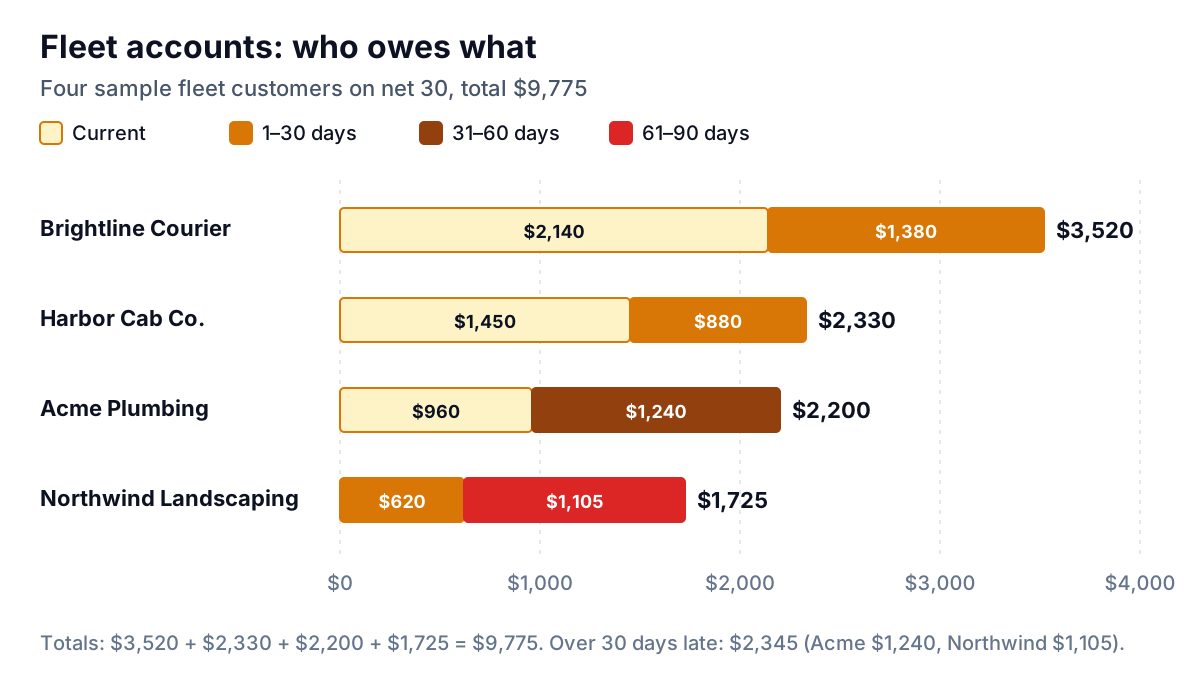
A simple fleet routine:
- Send a statement on the 1st listing every open repair order, with the RO number, vehicle or unit number and amount. Fleet managers match by unit, not by your invoice number.
- Check who approves payment. The fleet manager who drops off the vans often isn't the person who pays. Get the accounts payable contact on day one.
- Remind three days after the due date, then weekly, with a cap of four reminders before you pick up the phone.
- Decide your hold rule in advance. For example: past 60 days, new work needs payment at pickup until the account is current. Say so in your account terms, not in an angry email.
For wording, see invoice reminder emails for before, on and after the due date. If you don't yet look at your balances by age, the QuickBooks overdue invoices report guide shows how.
Where Parity fits
Many shop management systems sync invoices into QuickBooks Online, and that's where Parity's invoice chaser can help with fleet accounts. It's launching in late November 2026 with early access open now. It connects to QuickBooks Online, Xero or FreshBooks, or takes a CSV or Excel export, and shows every open invoice by age and customer. For each overdue invoice it drafts one friendly reminder in your voice, checks the amount, date and invoice number against your data, and sends nothing until you approve it. A built-in chat answers questions like "which fleet accounts are past 60 days?" with the figures cited. It doesn't write repair orders or replace your shop system. It works on the money that's already invoiced.
A first step for this month
- Pull 20 recent invoices and read them as a customer would. Count the lines with no explanation. Those are your best candidates for AI-written descriptions.
- Check your supplement approvals. For each of those 20, could you show when and how every add-on was approved? If not, fix that before adding any AI.
- Run your aged receivables for commercial accounts and total everything over 30 days late. If it's more than a week of car count, set up the fleet routine above.
AI for auto shop invoicing pays off when it writes clearer words faster and leaves the prices and approvals to your system. Start there, and the "what's this charge?" conversations get shorter.
Parity drafts a friendly, checked reminder for every overdue invoice in QuickBooks, Xero or FreshBooks, and sends it only when you approve. Get early access to Parity's invoice chaser