The phone rings while your service writer is walking a customer through a brake estimate and both techs are under cars. It rings four times, goes to voicemail, and the caller books with the shop down the road. Nobody at your shop did anything wrong. There just weren't enough hands.
That's the most useful way to think about AI tools for auto repair shop work: they take typing, phone answering and follow-up off people you can't easily replace. The Bureau of Labor Statistics counted 825,800 automotive service technician and mechanic jobs in 2025 and projects about 66,200 openings a year through 2035, many of them to replace people who retire or leave the trade. AI won't fix a car. It can make sure your techs and advisors spend their hours on cars and customers rather than on voicemail and retyping notes. This guide walks one repair order from phone call to follow-up and shows where AI helps, where it doesn't, and what to set up first.
Where AI tools for auto repair shops fit
Start with your shop management system (Tekmetric, Shopmonkey, AutoLeap, Mitchell 1 or similar). It holds your repair orders, inspections, estimates, customers and payments, so every AI tool either lives inside it or connects to it. A standalone AI tool that can't read your repair orders ends up as one more screen your advisor forgets to check.
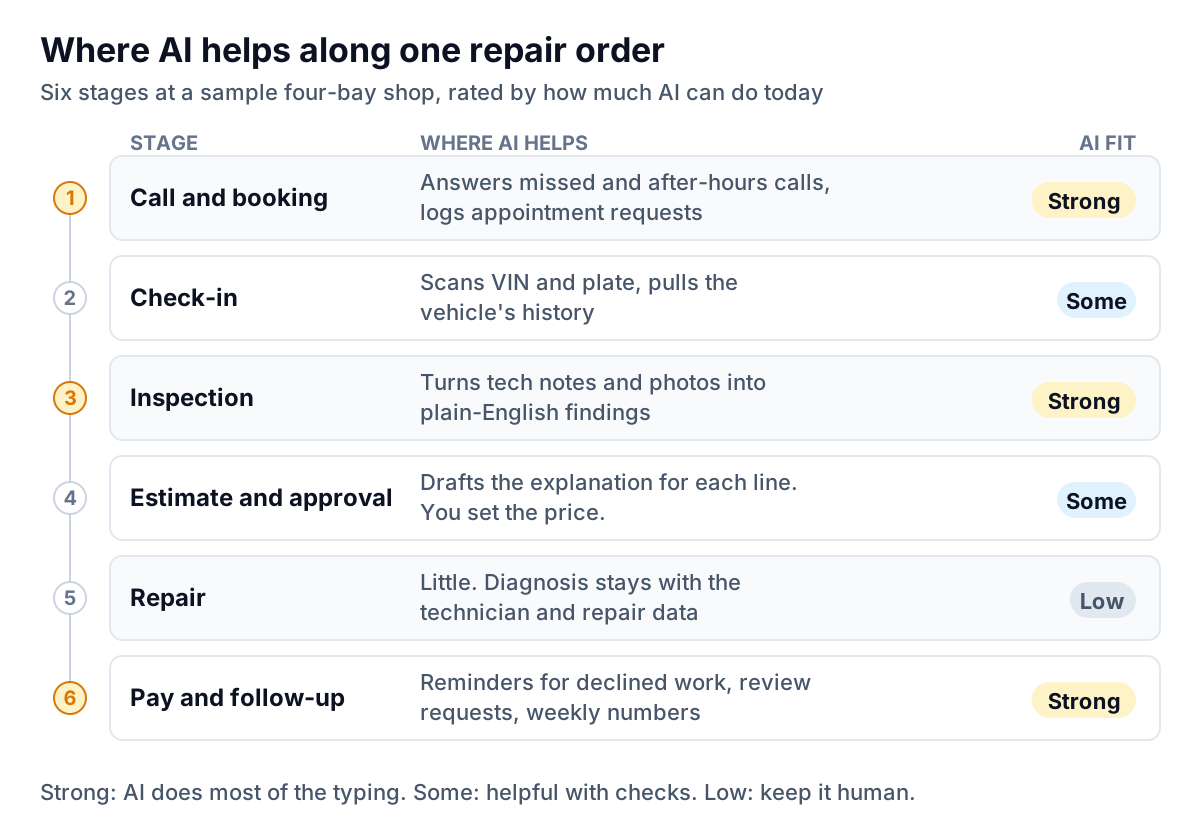
The pattern is consistent. AI is good at the work around the repair: answering, explaining, reminding and summarizing. It's weak at the repair itself. Diagnosis depends on the technician, the scan tool and the repair information database, and a language model's guess about why a 2017 F-150 is misfiring is a guess. Keep AI out of the bay and put it at the counter. The best AI tools for auto repair shop counters are the ones your advisor barely notices: the call that got answered, the message that got written, the reminder that went out on time.
The phone: an AI receptionist for the calls you miss
AI receptionists answer calls your team can't get to, usually after hours, at lunch and during the morning drop-off rush. AutoLeap's AIR is one example built for auto shops. AutoLeap says it answers calls after hours, on weekends and on holidays, gives callers information on pricing, hours and services, collects their name, number and vehicle details, and places appointment requests on the AutoLeap calendar. It can forward calls to a person during business hours and gives you a written summary of every call. Other shop systems and general-purpose AI phone services offer similar features, so ask your current vendor first.
Before you switch one on, decide what it's allowed to say:
| Let the AI handle | Route to a person |
|---|---|
| Hours, location, directions, loaner and shuttle policy | Anything about a car that's already in the shop |
| Posted prices: oil change, rotation, alignment, diagnostic fee | Quotes on repairs that need an inspection |
| Appointment requests for routine service | Complaints, comebacks and warranty questions |
| "Is my car ready?" if it can read the RO status | Tow-ins and anything that sounds unsafe to drive |
Two rules make this work. The AI should take requests, not confirm bookings your advisor hasn't seen, unless you trust your calendar rules completely. And someone should read every call summary each morning. A summary nobody reads is just a nicer voicemail.
Inspections and estimates: from tech shorthand to a message customers understand
Digital vehicle inspections (DVIs) are where most shops already have the raw material for AI. Tekmetric's DVI feature, for example, lets techs take and mark up photos and video from a phone. It saves declined findings so the advisor can follow up later. The gap is the wording. Techs write for techs. Customers need to know what's wrong, why it matters and how soon.
That's a translation job, and AI is good at it. Take this note from a sample shop's tech: "LF pads 3mm, RF 4mm. Rotors lipped, pulsation on test drive. Rec front pads + rotors. Rear 7mm OK." Here's the kind of message an AI can draft from it for the advisor to check and send:
Three guardrails:
- The technician's rating decides urgency, not the AI. If the tech marked it "soon", the message mustn't say "immediately".
- The price comes from your estimate, never from the AI. Paste or link the estimate. Don't let the model write a number.
- The advisor reads every message before it goes. This takes ten seconds and catches the one time the AI turns "rear 7 mm OK" into a recommendation.
Declined work: money already sitting in your database
Every shop declines work every day, usually for good reasons: payday is Friday, the car is going to a teenager next year, or the customer wants a second opinion. The shops that do well don't try to close everything on the spot. They follow up at the right time with the right message.
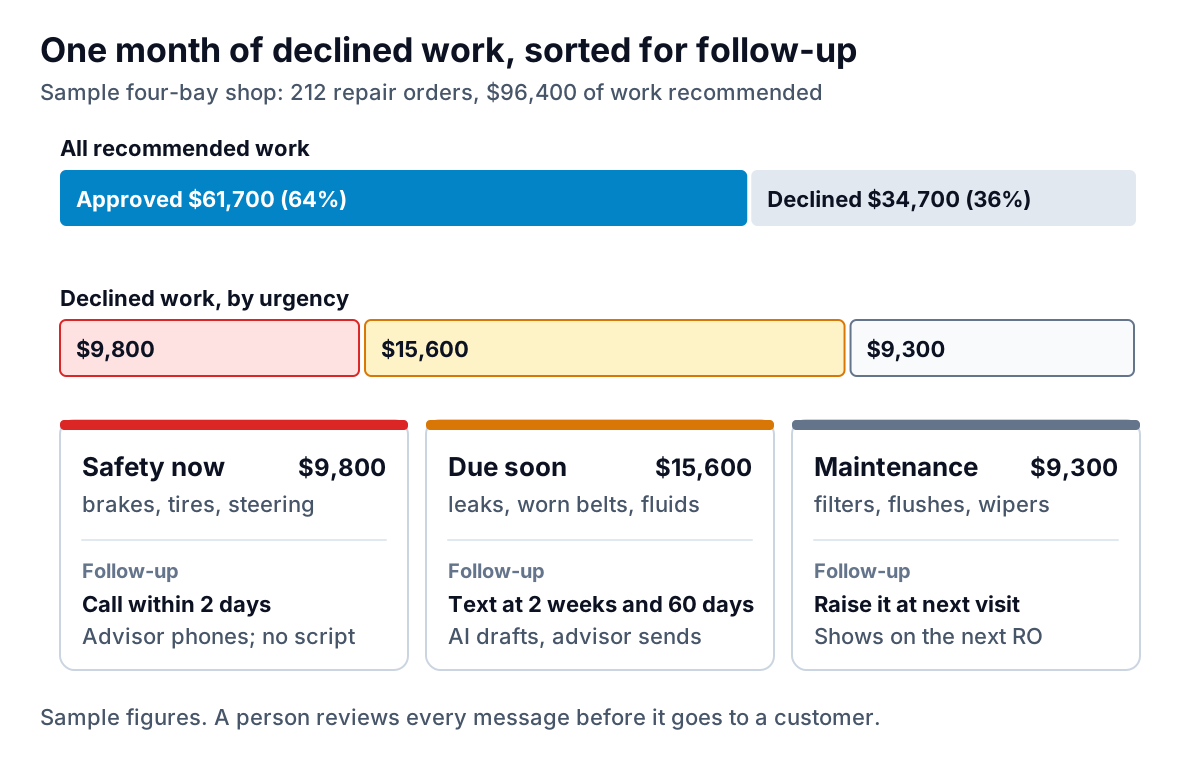
In this sample month, $34,700 of recommended work went home with the customer. Sort it before you chase it:
- Safety items ($9,800): brakes, tires, steering, anything you wouldn't want your family driving on. These get a phone call from the advisor within two days. Not a template, not a text.
- Due soon ($15,600): a slow leak, a cracked belt, overdue fluids. An AI-drafted text at two weeks and again at 60 days, each referencing the photos from the original inspection, reviewed and sent by the advisor.
- Maintenance ($9,300): filters, flushes, wipers. Mention it at the next visit. Chasing a cabin filter by text annoys more people than it converts.
AI's job here is the drafting and the sorting. It reads declined lines, groups them by the tech's urgency rating and writes a short message that names the car and the finding. Texting customers for marketing generally needs their prior consent, and opt-out rules apply. Your texting provider should handle consent records, so check how it does before you start a campaign.
The weekly numbers that matter
Every shop management system has reports. Most owners look at one number (sales) and ignore the rest until something goes wrong. Four numbers, every Monday, tell you most of what you need:
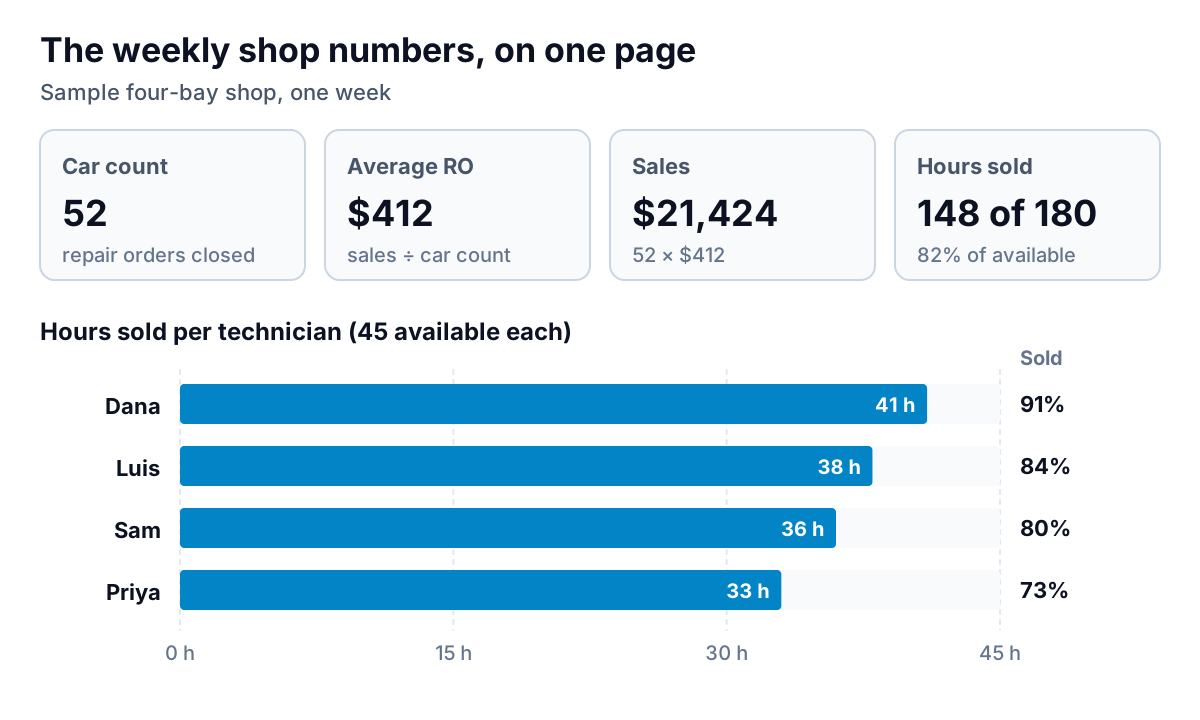
- Car count: how many repair orders you closed. A drop usually points to the phone and front counter, not the bays.
- Average repair order (ARO): sales divided by car count. It moves with inspection quality and approval rates.
- Hours sold against hours available: the clearest measure of whether your bays are earning. In the sample, Priya sold 33 of 45 hours. Before reading that as a performance problem, check whether she's getting the diagnostic work that bills fewer hours.
- Approval rate: approved dollars divided by recommended dollars (64% in the sample month). This is where better inspection messages show up.
AI helps by answering questions about these reports in plain language ("why did ARO drop in March?") instead of making you build pivots. Whatever tool you use, check its answers against the report a couple of times before you trust it.
Choosing tools, and what to watch for
Many AI tools for auto repair shop owners are sold as add-ons, so ask your shop management vendor what it already includes before you buy anything else. Most shops get more from switching on DVI photos and text approvals than from any separate AI product. Then add one tool at a time, starting with the bottleneck you feel most: missed calls, slow approvals or no follow-up.
In every demo, ask:
- Does it read and write to my shop management system, or only sit beside it?
- Can I see and edit every message before it reaches a customer?
- Where are call recordings and customer details stored, and are they used to train the vendor's models?
- What happens on the call it can't handle? Who gets it, and how fast?
- What does it cost per month, per location, and is there a contract?
Watch for tools that promise AI diagnosis from symptoms alone, and for any system that sends texts or prices without a person in the loop. One wrong message about a brake job costs more trust than a dozen good ones earn.
Where Parity fits, and a first step
Parity won't answer your phone or write inspection texts. It's an AI reporting tool. You export repair orders, sales or technician hours from your shop system as CSV or Excel, upload the file and ask for what you want: "ARO, car count and hours sold by week for the last six months, approval rate by advisor, and declined work by category". It builds a report with KPI tiles, charts and a short written summary. Every figure is checked against queries on the full dataset before you see it, and you can refine it by chat or export it to PDF for a business partner or lender. Files are deleted after the report is built.
If your invoicing and parts bills are the bigger headache, read our companion guide on AI for auto shop invoicing. If you service local business fleets, AI fleet management for small business shows what those customers' systems can send you. For dashboards across trades, see AI dashboards for service businesses.
First step for this week: pull last month's declined work from your shop system, sort it into safety, due soon and maintenance, and have your advisor phone the safety list. That needs no new software, and it'll show you quickly whether AI-drafted follow-up for the rest is worth paying for.
Upload repair orders or sales as CSV or Excel, and Parity builds ARO, car count and approval-rate charts with every number checked. Build a report from your data free