Five emails, sent on five dates, cover almost every invoice you'll ever need to nudge. One goes out a week before the due date, one on the day, and three after it. This post gives you each invoice reminder email template in full, with the day to send it, the subject line and the reason behind every line, so you can change the wording without breaking the part that makes it work.
All five use the same example, so you can see how the set fits together: Harbor Lane Design, a sample studio run by Maya, is owed $1,850 on invoice INV-2071 by her client Sam. The invoice is due on Thursday, October 15.
The five-email set and the calendar it runs on
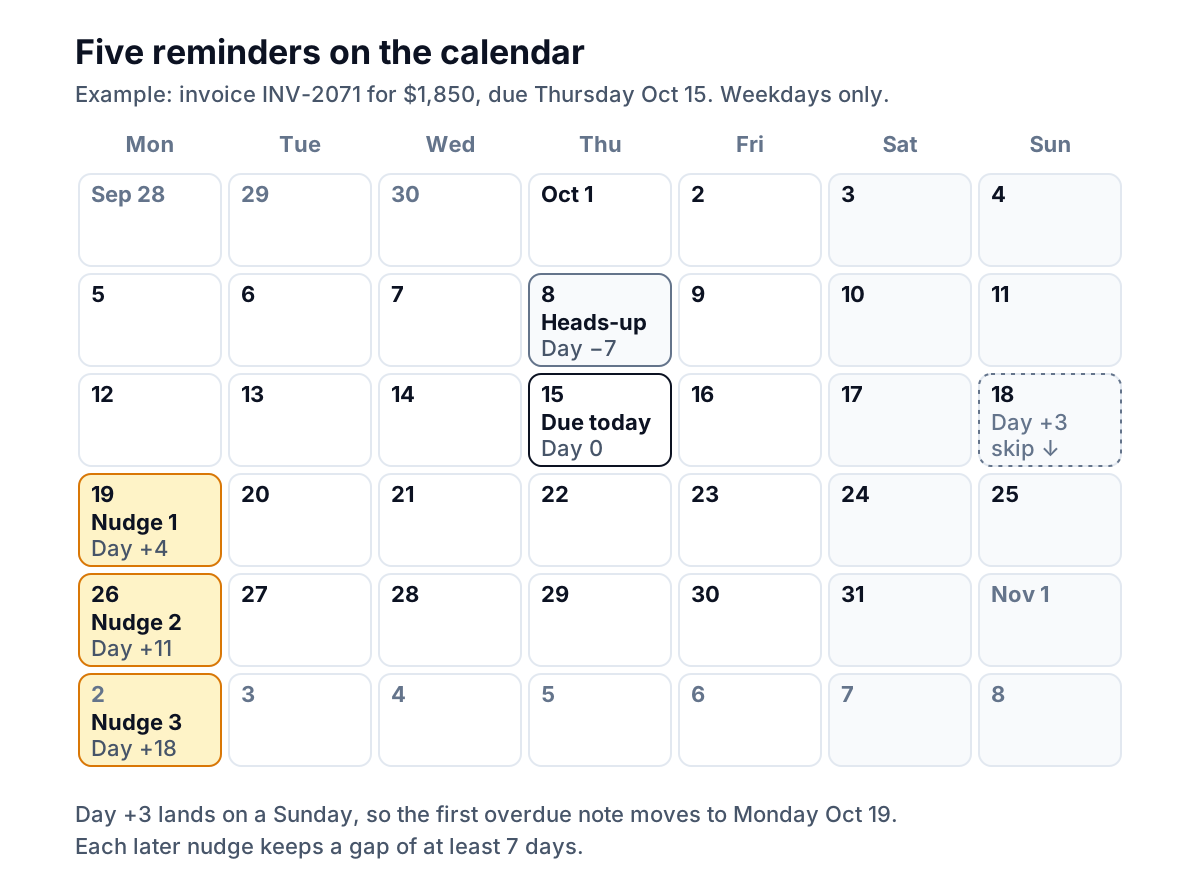
Templates get most of the attention, but timing does as much of the work. The same polite email lands very differently on day 4 and on day 40. Here is how the set lays out on a calendar:
| When to send | Its one job | |
|---|---|---|
| 1. Heads-up | 7 days before the due date (3 days on 14-day terms) | Catch a wrong contact or missing PO while it's cheap to fix |
| 2. Due today | The morning of the due date | Put the pay link in front of them on the right day |
| 3. Nudge 1 | After a 3-day grace period | Say, gently, that it's now late |
| 4. Nudge 2 | 7 days after nudge 1 | Ask what's holding it up |
| 5. Nudge 3 | 7 days after nudge 2 | Ask for a payment date |
Three timing rules hold the set together:
- Weekdays only, in the morning. If a send date lands on a weekend or a public holiday, move it to the next working day. A Sunday-night reminder looks automated even when it isn't.
- A short grace period after the due date. Bank transfers and card payments take a day or two to show up. Three days is a sensible default, and it stops you chasing someone who paid on time.
- At least seven days between overdue emails. Many businesses pay suppliers in weekly or fortnightly runs. A gap shorter than a week rarely speeds anything up.
These rules matter more than the exact wording. If you change one thing in any invoice reminder email template below, change the words, not the timing.
Before the due date: the heads-up
The heads-up is the most underrated email in the set. It isn't a reminder about money owed. It's a check that the invoice is in the right place, sent while nobody is late and nobody is embarrassed.
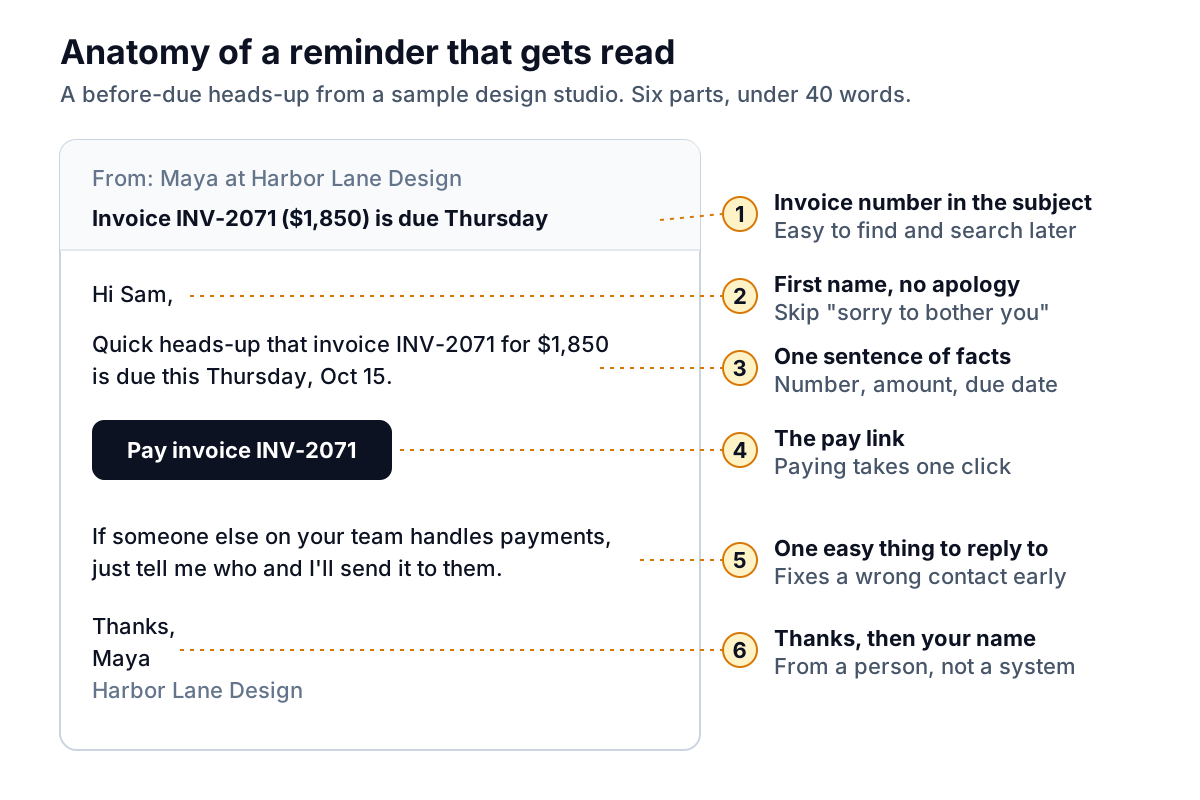
Why each part is there:
- The subject carries the invoice number and amount. Accounts payable teams search by invoice number. Put it where their search will find it.
- One sentence of facts. Number, amount, due date. No "hope you're well" paragraph above it.
- The pay link. Use the one your invoicing tool generates for that invoice, so the payment is matched automatically.
- A question that is easy to answer. "Who handles payments?" costs the client five seconds and saves you two weeks if the answer isn't Sam.
When to skip it: clients who have paid on time for months don't need a heads-up, and some will find it fussy. Keep it for new clients, large invoices and anyone who paid late last time.
On the due date: the one-liner
The due-date email is short on purpose. It's the email most likely to be read on a phone between meetings, so it needs to work in one glance.
Variation for clients who pay by check or bank transfer: replace the link line with "Our bank details are on the invoice, and I've attached it again here." Attach the PDF only if you're sure it's the current version. An old PDF with an old amount causes more trouble than no attachment.
Don't send the due-date email if you sent the heads-up less than three days ago. Two emails in the same week about money that isn't late yet starts to feel like pressure.
Invoice reminder email templates for after the due date
The three overdue emails escalate in what they ask for, not in tone. The first states that the invoice is late. The second asks a question. The third asks for a date. All three stay friendly, because a specific, friendly email gives the client an easy way to act, while a stern, vague one gives them a reason to put it off.
Nudge 1: three or four days late
"If it's already been sent, thank you" does two things. It gives Sam a graceful exit if the payment is in transit, and it signals that you assume good faith. Keep it in.
Nudge 2: about ten days late
The examples in the question matter. They tell Sam which kinds of problems you can fix, and they make it easy to reply with one line ("Oh, we need a PO, here it is").
Nudge 3: two to three weeks late
Asking for a date changes the conversation. Once Sam names one, you stop chasing until the day after it. If the date passes with no payment, you have a specific, fair reason to follow up.
Variation: one client, several open invoices
If a client has more than one invoice open, never send separate reminders on the same morning. Send one email with a short list and a total:
After nudge 3, stop using templates. A fourth email that says the same thing gets the same result. Our main guide on how to chase unpaid invoices covers the phone call, the final friendly ask and the firmer options that come after it. For situations these templates don't fit, such as a short payment or a client who has gone silent, see our annotated overdue invoice email examples.
Subject lines and the fields you fill in
An invoice reminder email template is only as good as the five or six facts you drop into it. Most reminder mistakes aren't about tone at all. They're a wrong number, an old date or a broken link.
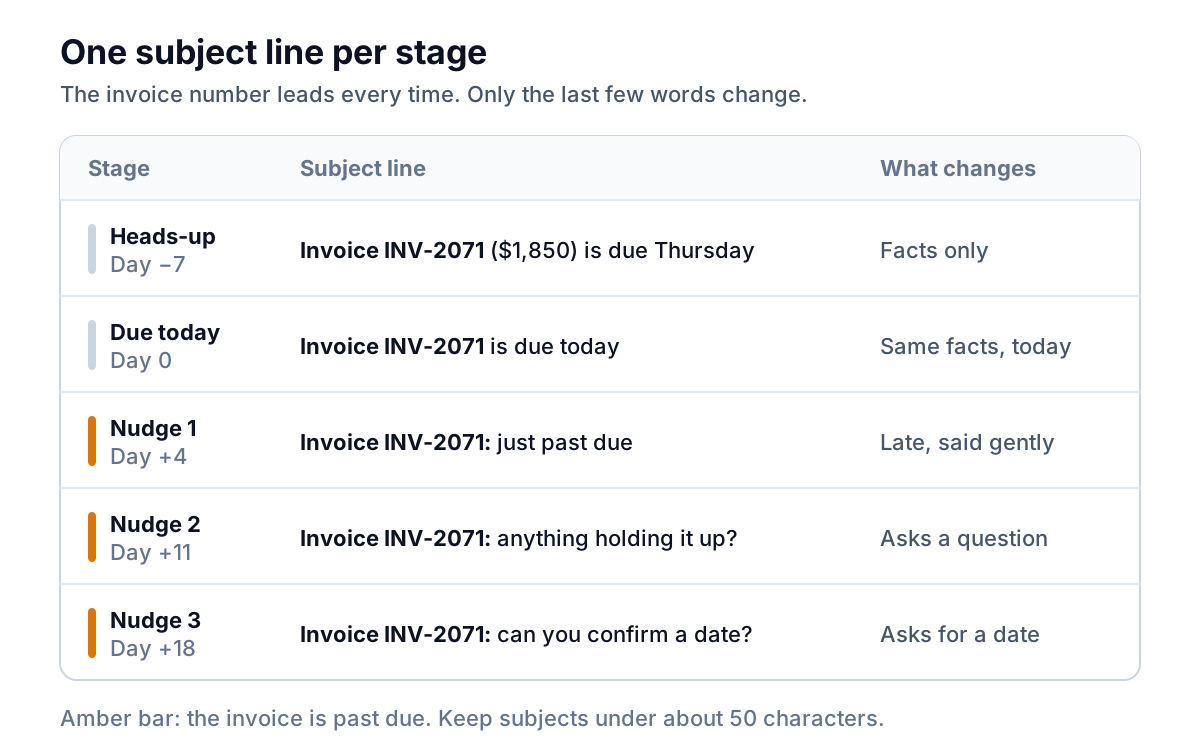
Before you send any invoice reminder email template, check each field against the invoice itself, not against your memory:
- First name. The person who pays, not just the person who hired you. Update it the moment someone tells you.
- Invoice number. Exactly as it appears on the invoice, including any prefix like "INV-".
- Amount. The amount still outstanding. If the client paid part of it, the reminder must show the balance, not the original total.
- Due date. Written out ("Thursday, Oct 15"), not as 10/15, which clients outside the US read as a different date.
- Pay link. The link for this invoice. Click it yourself once a month to make sure it still works.
- Your name and a real reply address. Replies to a no-reply address are lost, and a reply is often the most useful thing a reminder produces.
Keeping the set running without babysitting it
Five emails per invoice is easy for one invoice and tiring for twenty. You have two realistic ways to keep the set going.
Use your invoicing tool's built-in reminders. QuickBooks Online, Xero and FreshBooks can all send automatic reminders on a schedule you set. They're a fine start, especially for the before-due and due-day emails. The limits show up after the due date: each reminder is a message you write once and send on a fixed number of days, and that schedule generally doesn't know that a client has replied with a question or promised to pay on Friday. If you use QuickBooks, our guide to invoice reminders in QuickBooks Online walks through the settings.
Use a tool that drafts and waits for you. This is the approach we're building at Parity. Its invoice chaser connects to QuickBooks Online, Xero or FreshBooks, or reads PDF invoices and exports from other systems, and handles the after-due-date part of this set. Once an invoice passes a three-day grace period and is still unpaid, undisputed and not exempt, it drafts one friendly reminder in your voice, with the invoice's own pay link. Reminders stay at least seven days apart, a promised date pauses chasing until the day after, and after four reminders it stops and flags the invoice for you.
Nothing is sent until you approve it. You can approve, edit, skip or snooze each draft from a queue or a morning digest email, and the amount, due date and invoice number in every draft are checked against your books before it can go out. If your accounting tool's own reminders are switched on, Parity asks you to keep one of the two, so a client never gets chased twice. Parity launches in late November 2026.
Parity drafts each overdue reminder with the right numbers filled in, and sends only what you approve. Get early access to Parity's invoice chaser