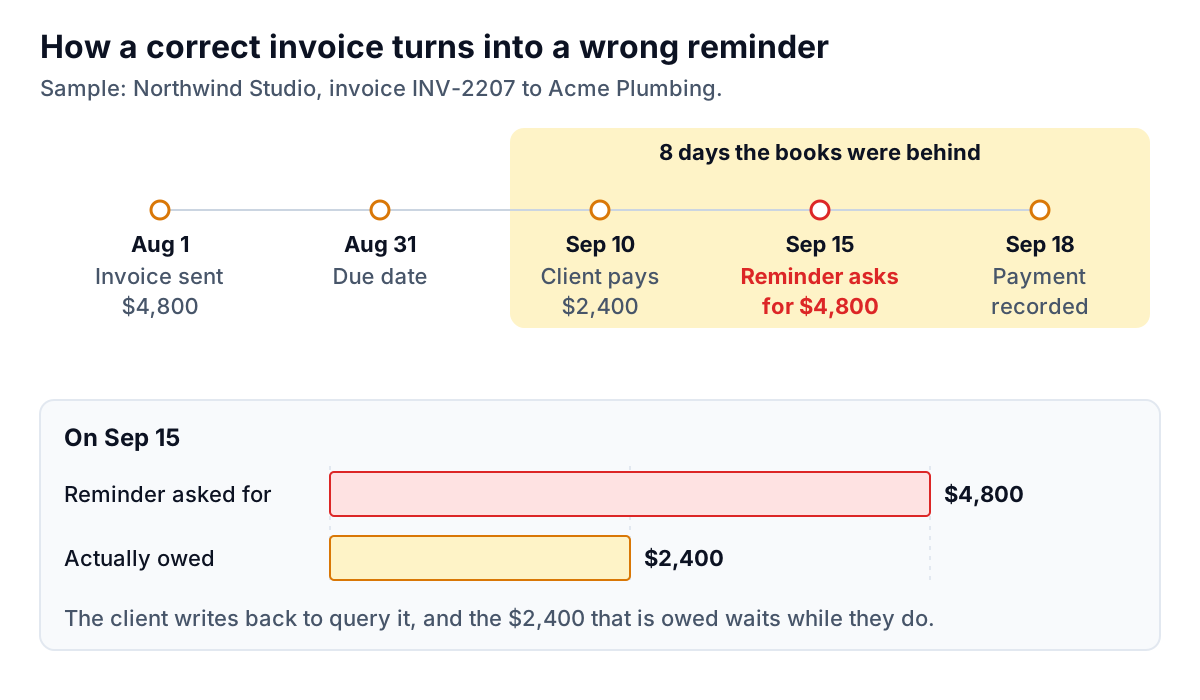
$4,800. That's what the reminder asked for. The client had paid $2,400 of it five days earlier, by bank transfer, and the payment simply hadn't been recorded yet. The email was polite, well timed and correctly addressed. It was also wrong, and a payment reminder with the wrong amount does more damage than no reminder at all. This post covers how the invoice reminder wrong amount problem happens, what it costs you, how to correct one you've already sent, and how to make sure the next one is right.
Eight ways a reminder ends up with the wrong number
Almost nobody types the wrong amount on purpose. The wrong number usually arrives from somewhere else: a stale record, a merge field, a total that includes something it shouldn't. Here are the ones we see most often in small service businesses.
- A part-payment that isn't recorded yet. The example above. The client paid, the bank has the money, and your invoicing software still shows the full balance because nobody has matched the deposit.
- A credit note that wasn't applied. You agreed to knock $300 off for a delayed deliverable and issued a credit. If it isn't linked to the invoice, the balance still shows the original figure.
- Total instead of balance due. Reminder templates often merge the invoice total rather than the amount still outstanding. On a fully unpaid invoice they're the same. On a part-paid one they aren't.
- Several invoices rolled into one figure. "You owe us $7,350" when that includes an invoice that isn't due until next week. The client checks each invoice, finds one that isn't late, and puts the whole email aside.
- Tax in or tax out. The invoice says $1,080 including tax and the reminder says $1,000. Small difference, same result: the client's accounts team can't match it.
- The wrong invoice number. A copy-pasted email from last month still says INV-2187. The amount is right, but the client looks up the wrong document, sees it was paid, and assumes you're confused.
- A miscalculated late fee. If you add a fee or interest, the arithmetic and the basis for it both have to be right. More on this below.
- The wrong due date. "Now 30 days overdue" when it's 16. It sounds like a small thing until the client replies with their own calendar.
Notice that most of these aren't typing errors. They're data problems that a careful person would still miss, because the number on screen looked right when they copied it. If you pull invoices from PDFs or exports, there are a few more ways for numbers to drift, which we cover in pulling data from PDF invoices with AI.
What one wrong number actually costs
It delays the money that is owed
Most businesses that pay suppliers do it in batches: weekly, fortnightly or monthly payment runs. An invoice that is queried gets pulled out of the run until the query is resolved. Here's what that looks like for a client on a fortnightly cycle:
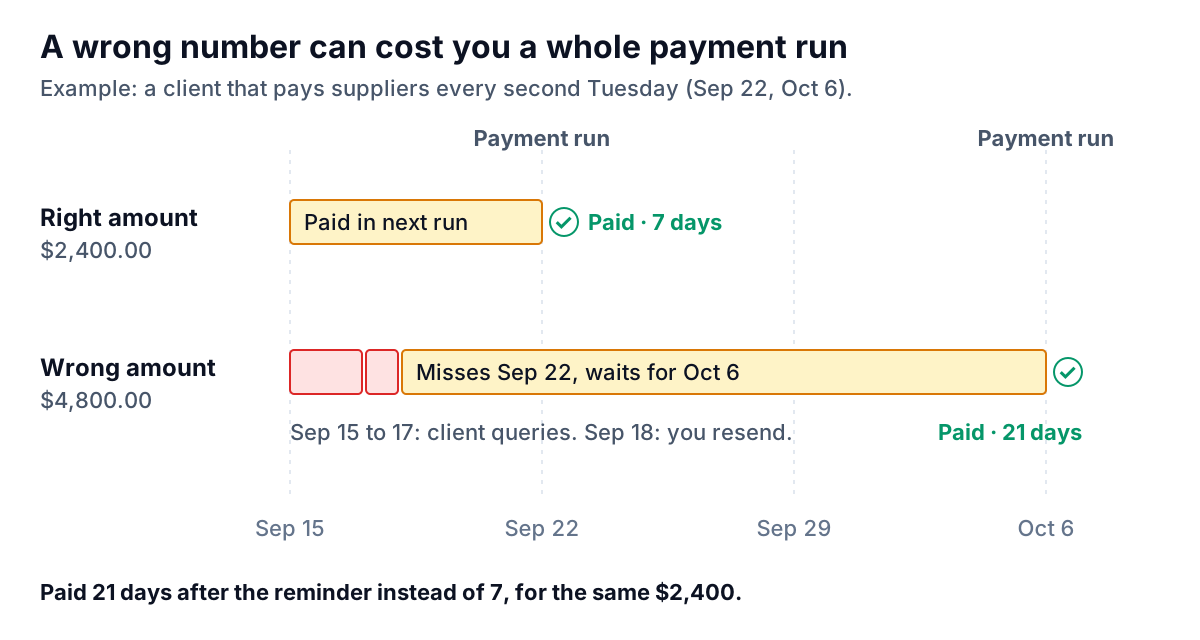
Two extra weeks on $2,400 might not sound like much, until you remember that cash timing is what makes small businesses wobble. In the QuickBooks 2026 Small Business Late Payments Report, 39% of owners said a single late payment had made it difficult to cover payroll or bills.
It changes how the client reads every future email
Once a client has caught one wrong number, they check the next one. Your reminders stop being "pay this" and become "verify this, then maybe pay it". Some accounts teams will start asking for a statement before paying anything. That is friction you created, and it lasts longer than the invoice does.
It costs you an hour you didn't plan to spend
Reading the client's reply, pulling up the payment, working out what happened, writing the correction, apologising, updating the books. For one email. And if the mistake came from a template or a sync problem, the same thing may have gone to other clients that morning.
Fees and interest raise the stakes
If your reminder adds a late fee or interest, the number needs a basis as well as the right arithmetic. In the UK, the government's guidance says businesses can claim statutory interest of 8% plus the Bank of England base rate on late business-to-business payments (unless the contract sets a different rate), plus fixed debt recovery sums of £40, £70 or £100 depending on the size of the debt. In the US there is no single equivalent. Late fees generally need to be in your contract or terms, and limits vary by state, so check your state's rules before adding one. The federal Fair Debt Collection Practices Act is aimed at third-party collectors of consumer debts, not at a business chasing its own clients. That doesn't make an inflated figure acceptable. It just means the cost is usually lost trust and slower payment rather than a regulator. This isn't legal advice. If fees or interest are a regular part of your terms, ask an accountant or lawyer once and write the answer down.
Invoice reminder wrong amount? Correct it like this
It happens to careful people. Speed matters more than polish: the longer a wrong figure sits in the client's inbox, the more likely someone has already flagged it.
- Check the real balance first. Look at the bank feed and any credits, not just the invoice screen. Don't send a correction that also turns out to be wrong.
- Reply in the same thread. A new email with a new subject gets filed separately. Replying keeps the correction attached to the mistake.
- Lead with the right number, then say briefly what was wrong. One sentence of apology is enough.
- Acknowledge their payment if a part-payment caused the error. It shows you've actually looked.
- Re-attach or re-link the invoice or statement showing the correct balance.
- Fix the cause before the next reminder goes anywhere: match the payment, apply the credit, update the template.
That's it. No long explanation of your bookkeeping. If the client had already replied with a query, thank them for catching it. For tone and wording across the rest of the sequence, see our invoice reminder email templates.
A check-before-send routine that catches most of it
If you send reminders by hand, the fix is a habit, not a tool. Run these checks at the moment you send, not when you drafted the email:
- Pull the balance from the books at send time. Never from last week's draft or a spreadsheet you exported on Monday.
- Look at the bank feed for that client since the last time payments were matched. Unmatched deposits are the most common source of wrong balances.
- Confirm credits are applied to the specific invoice, not just sitting on the customer's account.
- One invoice per reminder unless you're sending a full statement. Each number then has one source.
- Copy, don't type. Paste the invoice number, amount and pay link from the invoicing system. Retyping is where 2207 becomes 2270.
- Say "remaining balance" when it's part-paid, and mention the payment received. It tells the client you've done the work.
- Recount the days late from the actual due date, or leave the count out and just give the date.
How automated checking works
Doing that by hand for three reminders a week is fine. For 30, the checks start to slip, especially on the busy days when reminders matter most. That's where software that checks every figure against the source data earns its place.
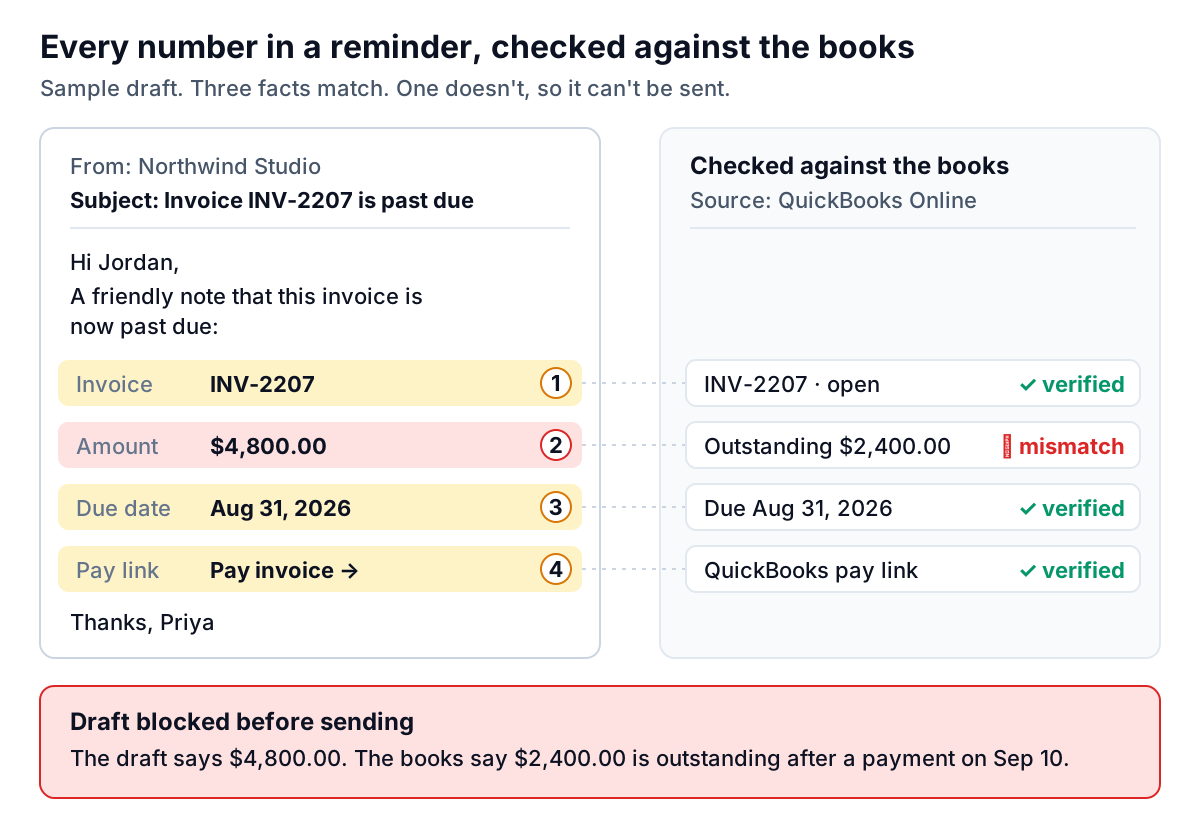
The idea is simple. Each number in the draft isn't just text. It's linked to the record it came from: this amount is the outstanding balance on this invoice, this date is its due date, this number is its invoice number. Just before sending, each link is checked against the latest data. If any figure no longer matches, because a payment arrived or a credit was applied, the draft is stopped and you see why.
This is how Parity's invoice chaser handles reminders. It launches in late November 2026 and connects to QuickBooks Online, Xero and FreshBooks, or takes PDF and spreadsheet uploads from other systems:
- The amount, due date and invoice number in every draft are tagged to the source invoice, and a verifier blocks any draft whose numbers don't match.
- Connected invoices stay current through the provider's change notifications plus an hourly sync, and if the dashboard's totals ever disagree with your provider's, it shows a warning instead of a number.
- When the provider shows an invoice paid or voided, Parity closes the thread and stops suggesting reminders.
- Each reminder covers one invoice and includes your provider's own pay link where the invoice has one.
- Nothing is sent until you approve it, so you're the last check on tone and timing. We explain why in why an AI should never send a payment reminder without your approval.
One honest limit: no checker can see a payment that hasn't reached your books yet. If a client paid by check yesterday, the data will still say unpaid. Approval and a quick look at the bank feed cover that gap. Verification covers everything else.
Parity checks every amount, date and invoice number against your books before a reminder can go out, and waits for your approval. Get early access to Parity's invoice chaser