An AI can write a better payment reminder than most of us write at 6 p.m. on a Friday. That is not the problem. The problem is that it doesn't know your client called you yesterday, that the check is in the mail, or that the person it's addressing left the company in August. That is why the most important feature in any AI invoice reminder software isn't the writing. It's the button that makes the email wait for you.
This post makes the case for approving every reminder before it goes out. It covers what auto-send gets wrong, the two extra risks an AI writer brings, what approval really costs you in minutes, and the situations where letting software send on its own is perfectly reasonable.
What auto-send gets wrong, and it isn't the wording
Scheduled reminders have been around for years. QuickBooks Online, for example, lets you turn on automatic invoice reminders at set days before or after the due date, and it sends them for unpaid invoices that match the schedule. That works because the rule is simple: unpaid on day X, send email Y.
The trouble is what the rule can't see. In a small service business, most of the information that should stop a reminder lives outside the accounting software:
- Promises made by phone or in person. The client rang on Monday and said "end of the month". Your books still say unpaid.
- Payments in transit. A check posted last week, or a bank transfer that cleared but hasn't been matched to the invoice yet.
- Disputes sitting in someone's inbox. The client emailed your project lead about a line item, not you.
- Contacts that changed. The finance person moved on, and the reminder lands with someone who can't approve payment.
- Context only you have. You're about to pitch this client for a bigger project, or they've just had a rough quarter and asked for some slack.
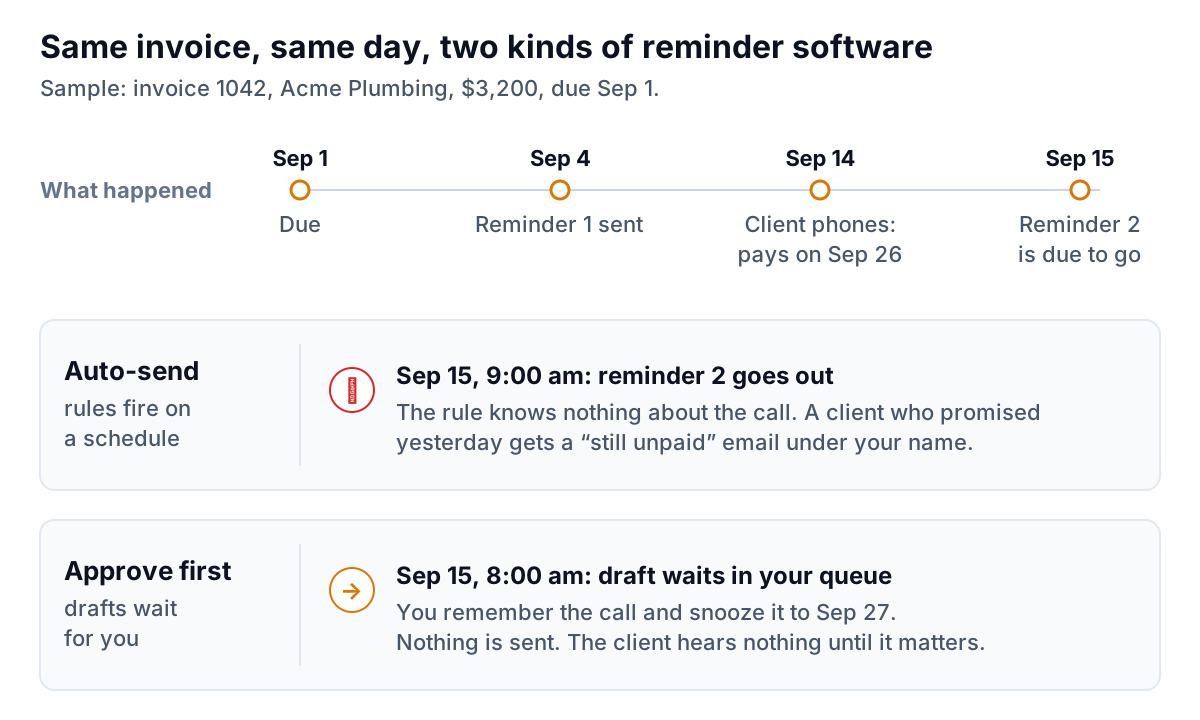
None of these are rare. If you send 20 reminders a month, at least one of them probably falls into one of these buckets. An auto-sender handles that one exactly the same as the other 19.
An AI writer adds two new risks
Template reminders are dull but predictable. They say the same thing every time, with the invoice number and amount merged in. An AI that writes each reminder fresh is more pleasant to receive, and it brings two risks that templates don't.
It can state something that isn't true
Language models sometimes produce confident statements that are wrong. Researchers at OpenAI and Georgia Tech argued in a 2025 paper, Why Language Models Hallucinate, that this happens partly because training and evaluation reward guessing over admitting uncertainty. In a reminder, a guess looks like a wrong due date, a total that includes an invoice already paid, or a "second reminder" that is actually the first. Each one is small. Each one makes the client wonder whether your books are right, and a client who doubts the number has a reason to wait.
You are responsible for what it says
In Moffatt v. Air Canada, a British Columbia tribunal held the airline responsible for wrong information its website chatbot gave a customer, and rejected the argument that the chatbot was responsible for its own actions. That was a consumer case in Canada, not a ruling about invoices. The principle is still the one to plan around: an email that goes out under your business name is your email, whoever or whatever drafted it.
Put those together and the question isn't "can AI write my reminders?" It clearly can. The question is "who reads it before my client does?"
What approval really costs you
The usual objection is time. You bought software so you wouldn't have to think about reminders. Here's the arithmetic for a fictional business, Harbor Lane Design, a five-person studio with about 60 open invoices:
| Step | Per week |
|---|---|
| Drafts waiting (overdue, not promised, not disputed) | 8 to 12 |
| Read a draft whose numbers are already checked | about 20 seconds each |
| Drafts you edit, skip or snooze | 1 or 2 |
| Total time | roughly 5 minutes |
Five minutes a week, usually from the morning digest on your phone. Compare that with writing those emails from scratch, which is what most owners actually do now, or with not sending them at all, which is what happens in a busy month.
Now the other side. Harbor Lane has one client on a $6,000-a-month retainer. That client's owner promised payment on a call and then got an automated "your account is overdue" email the next morning. Maybe they shrug. Maybe they mention it when the retainer comes up for renewal. You don't need many of those to justify five minutes a week.
What to look at in those 20 seconds
Reviewing a draft is not proofreading. If the numbers have already been checked against your books, you are only answering four questions, in this order:
- Do I know something the software doesn't? A call, a promise, a payment you saw in the bank, a conversation about a new project. If yes, snooze or skip.
- Is this the right person? Check the name in the greeting. If your contact has changed, edit the address before anything else.
- Is the timing right? A reminder that lands the day after you delivered a big piece of work reads differently from one sent during a quiet patch.
- Does it sound like me? If you would never write "kindly", take it out. Clients notice when the tone suddenly changes.
If all four answers are fine, approve it and move on. Most drafts take less time to approve than this list takes to read.
What good AI invoice reminder software does with the approval step
"Approve before sending" can be done well or badly. Done badly, it's a pile of identical emails you click through without reading, which gives you the risks of auto-send plus the chore. Done well, the reminder software does the checking and you only make the judgment calls.
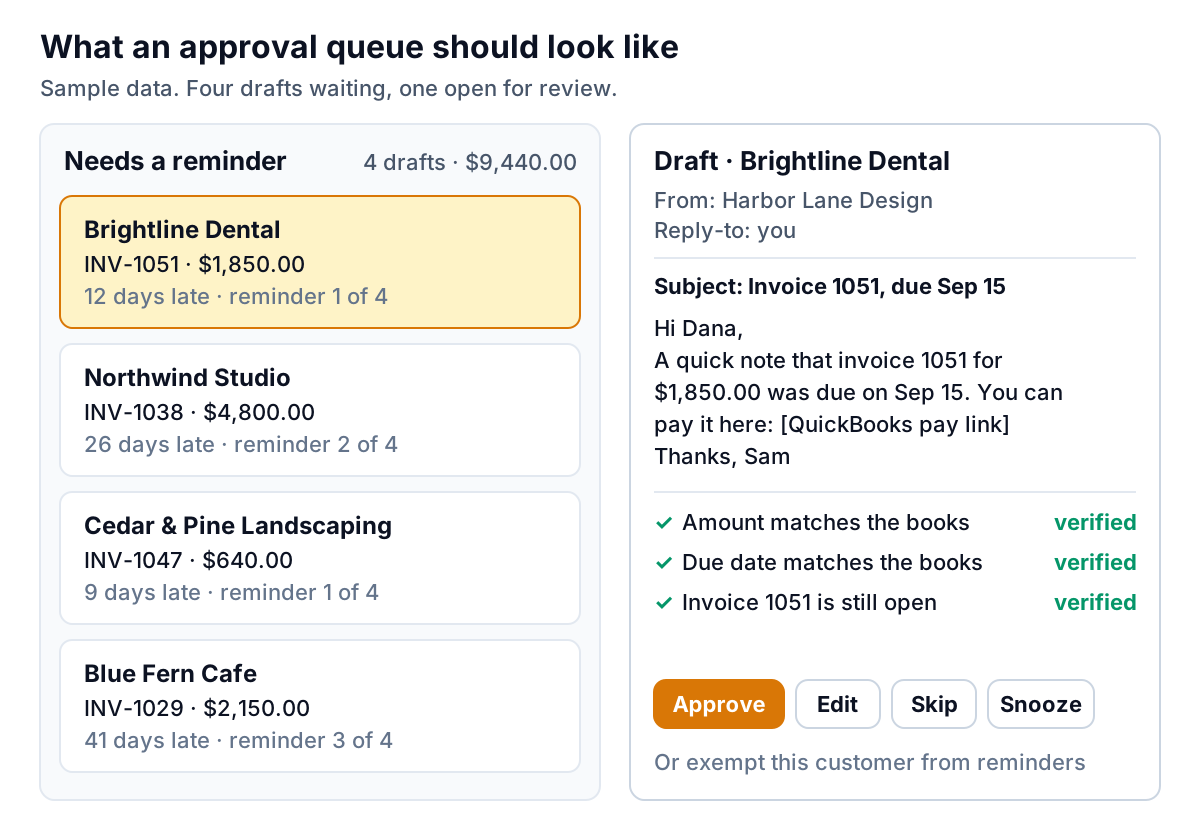
Here's what to look for:
- Numbers checked before you see them. The amount, due date and invoice number in each draft should be matched against your accounting data, so you are reviewing tone and timing, not doing arithmetic. Our post on wrong amounts in payment reminders explains why this matters.
- Only invoices that need a reminder. Paid, disputed, promised and exempt invoices should never reach the queue. If you're skipping half the drafts, the software isn't filtering enough.
- Context on each draft. Days late, which reminder number this is, when the last one went, and any reply from the client.
- Fast actions. Approve one or all, edit inline, skip, snooze to a date, or exempt a customer entirely.
- Your voice. Drafts should sound like you, not like a collections department.
- No second sender. If your accounting software's own reminders are also on, the client gets two emails for one invoice. Pick one.
- Replies that change the plan. A reply saying "paying Friday" should pause reminders until after Friday. A reply questioning the invoice should stop them. See what to do when a client promises and doesn't pay.
The fair case for auto-send
Approving everything isn't right for every business, and the larger AI invoice reminder software built for finance teams takes a more flexible view. Upflow advertises autonomy controls from suggestion-only to fully autonomous. Invoiced by Flywire says every agent starts in a propose-and-approve mode and moves to acting on its own only for the work you clear. Both are built for finance teams handling thousands of invoices, where approving each one by hand would be a full-time job.
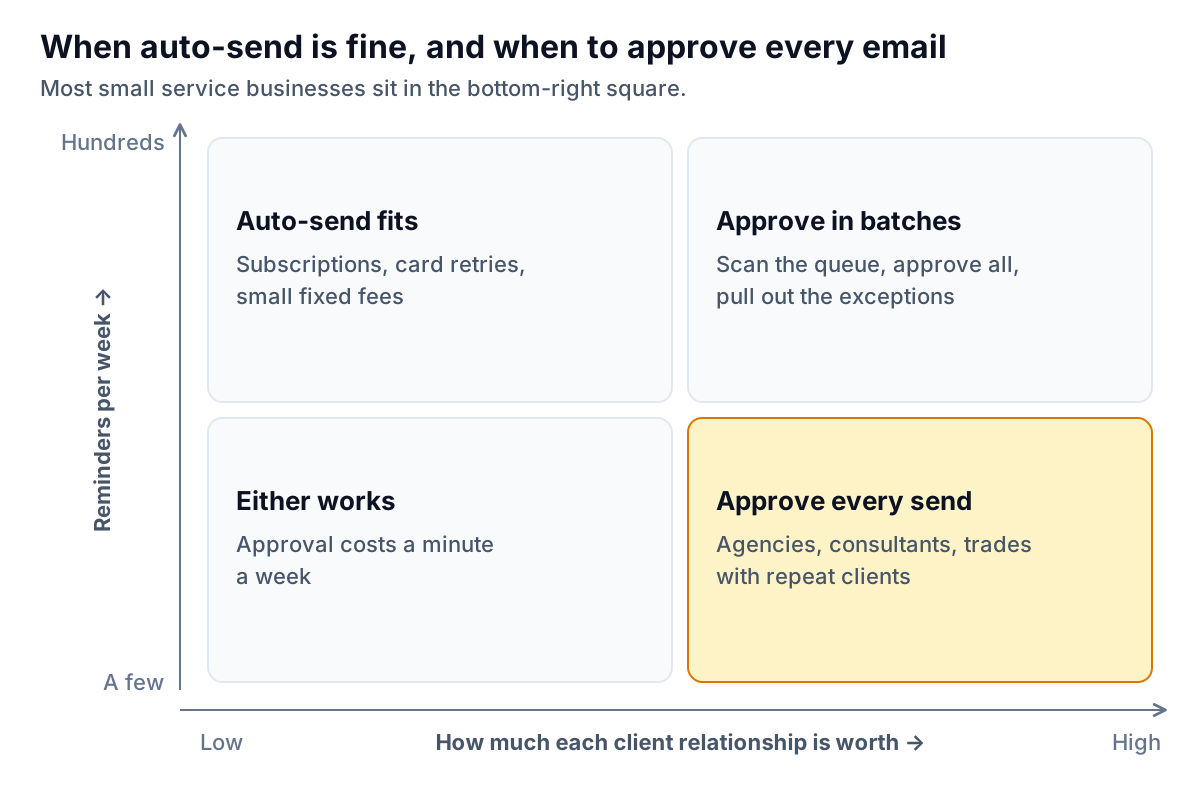
Auto-send is a sensible choice when:
- You send hundreds of small, similar invoices, such as memberships, subscriptions or fixed monthly fees.
- Customers are effectively anonymous, and none of them is a big share of revenue.
- Payment problems are mostly failed cards, not conversations.
- You have a finance person who watches the replies and exceptions every day.
If that's you, a well-configured automatic sequence is fine, and approving each email would be wasted effort. If you run an agency with 25 clients, a consultancy with eight, or a trades business where the same property managers call you every month, the numbers run the other way. For a wider look at the tools, see AI invoice chasing tools, compared.
How Parity handles approval
We built Parity's invoice chaser for the bottom-right square of that grid, so in version 1 the answer is simple: nothing is sent without your approval. There is no setting to turn that off. Parity launches in late November 2026.
- A draft appears only when an invoice is past due by your grace period (three days by default), unpaid, undisputed and not exempt, and no reminder has gone out in the last seven days.
- Each draft is one friendly email in your voice, with the invoice number in the subject and the amount, due date and your provider's pay link in the body. Every number is checked against the source data before the draft can be sent.
- You approve, edit, skip, snooze or exempt from the dashboard or from a morning digest email. Approved emails go out under your business name with you as reply-to.
- Replies are sorted automatically. A promise with a date pauses reminders until the day after that date. A dispute or question stops suggestions and comes to you. After four reminders, Parity stops and flags the invoice for you instead of sending a fifth.
- The chat panel can draft a reminder for you ("draft one for Acme on invoice 1042"), but it puts the draft in the same queue. It can't send.
If your QuickBooks, Xero or FreshBooks automatic reminders are switched on, the connection screen tells you and asks you to keep one of the two, so no client is chased twice.
Parity drafts each reminder in your voice, checks every number against your books, and waits for your approval. Get early access to Parity's invoice chaser
Whatever you use, ask one question of any AI invoice reminder software before you connect it to your client list: what happens on the morning my client has already called me? If the answer is "it sends anyway", keep looking.