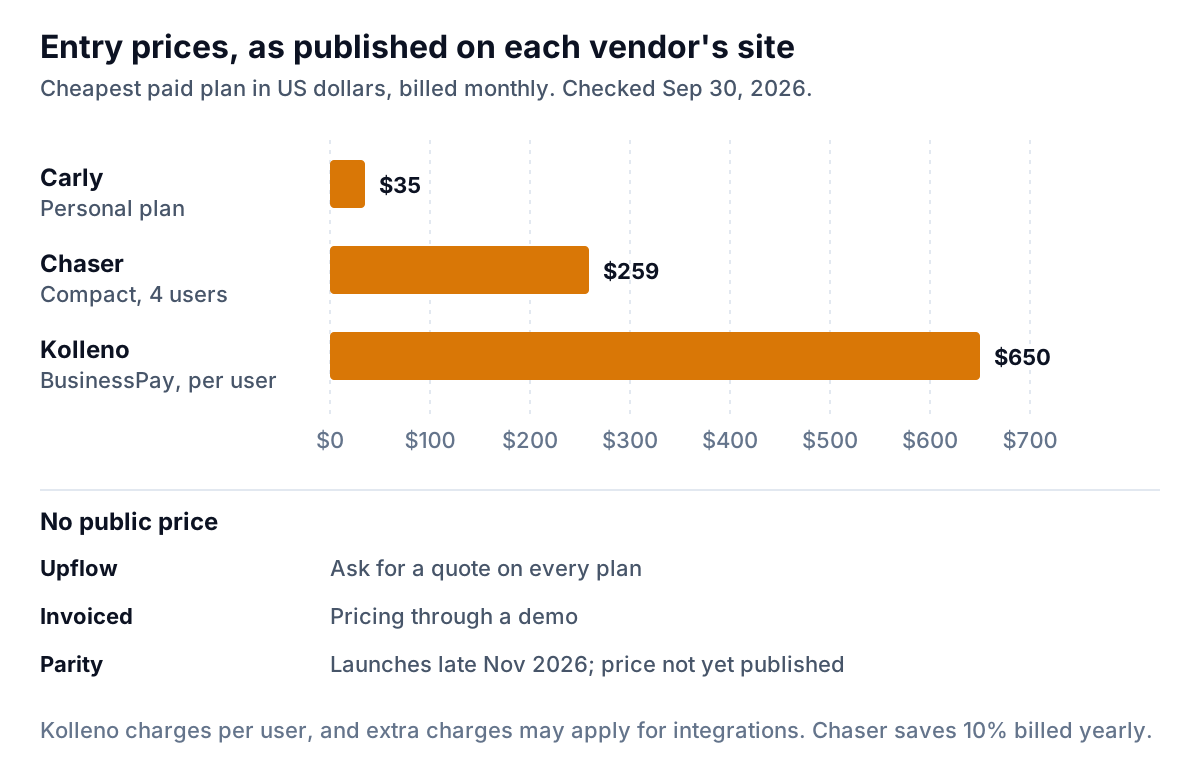
The cheapest tool in this comparison costs $35 a month. One of the others starts at $650 per user per month, and two won't show you a price until you've sat through a demo. They all say they use AI to chase unpaid invoices. They are not competing for the same customer. Before you compare features, work out which group you belong to. This guide compares five options for AI invoice chasing software: Upflow, Invoiced, Kolleno, Carly and Chaser. It uses the prices and features each company publishes on its own website, checked on September 30, 2026, and says plainly where each one is the better choice.
A note on bias: we make Parity, which builds dashboards and reports from your accounting data. It doesn't chase invoices, so it isn't one of the five. We've tried to describe each tool as its own site does, and linked every claim so you can check it.
The short version
| Tool | Built for | Starting price (USD) | Channels | Who presses send |
|---|---|---|---|---|
| Upflow | B2B finance teams | Quote only | Email, SMS, calls, letters | Configurable, suggestion-only to autonomous |
| Invoiced | Mid- to large-sized B2B | Quote only | Email, with call and letter steps | Starts at propose-and-approve |
| Kolleno | Collections teams, $1M+ turnover | $650 per user a month | Email, SMS, calls | Insights, copilot or executes |
| Chaser | SMBs and mid-market, UK-based | $259 a month | Email, SMS, calls, letters | Scheduled workflows; AI replies you send |
| Carly | Solo owners, small teams | $35 a month | Email (SMS add-on for teams) | Trigger-based, per its examples |
Five questions to answer before you compare features
Feature lists for AI invoice chasing software look alike: reminders, AI, dashboards, integrations. The differences that matter show up when you ask these questions.
- How many invoices, and who works them? A finance team chasing thousands of invoices a year needs workflows, portals and reporting. An owner chasing 30 needs something that takes ten minutes a week.
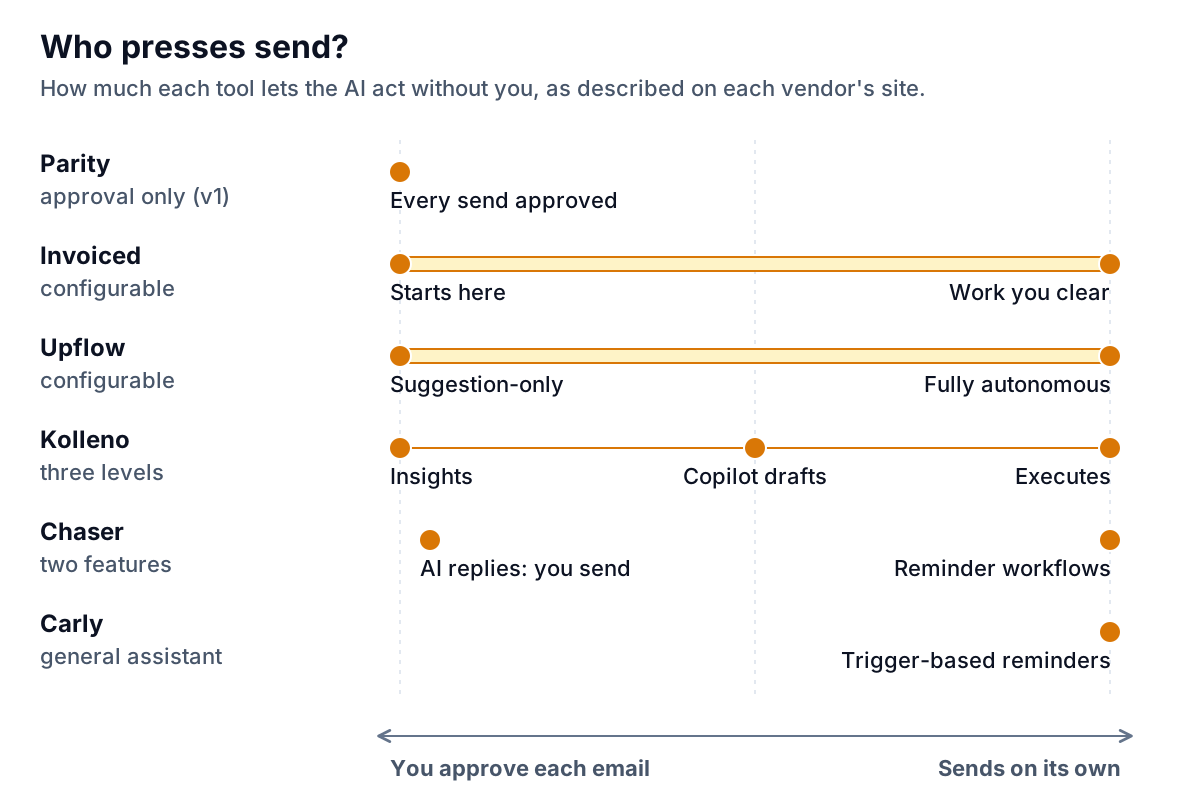
- Who presses send? Some tools let the AI act on its own once configured. Others always wait for a person. Neither is wrong, but you should choose on purpose. We make the case for approval in why an AI should never send a reminder without your approval.
- Which channels do you actually need? SMS and phone calls help with consumer-style debts and some trades. For agencies and consultants, email to the right person is usually enough.
- Where do your invoices live? QuickBooks Online, Xero, an ERP like NetSuite, or several places at once.
- Do you need the tool to take payments? Some tools process payments themselves. Others send your accounting software's own pay link.
The tools, one by one
Upflow
Upflow is accounts receivable software for B2B finance teams. Its pricing page lists five plans, from Starter (up to $10M in annual invoiced revenue and 40,000 invoices a year) to Enterprise, and every plan says "Ask for a quote". Starter includes unlimited users, email, SMS, call and letter reminders (SMS carries a usage fee), Gmail and Outlook two-way integration, and QuickBooks Online and Xero connections. NetSuite and Sage Intacct are on higher plans. Its FAQ says the Insights Agent, which answers questions about your receivables, is on all plans, while the Collections Agent is on higher tiers. Upflow's own payment gateway is a paid add-on with a $390 monthly platform fee. On its home page, Upflow describes autonomy controls "from suggestion-only to fully autonomous". There is also a free Discover plan for AR health insights.
Upflow is the better choice when you have a finance person or team, a meaningful volume of B2B invoices, and you want multi-channel outreach, customer portals and analytics in one place. Watch for: there's no public price, and the AI Collections Agent isn't on the entry plan.
Invoiced (by Flywire)
Invoiced describes itself as an AI-native invoice-to-cash platform for B2B finance teams, aimed at mid- to large-sized businesses. It combines invoicing, collections, cash application and forecasting with Flywire's payments network, and supports direct debit, cards and virtual cards. It integrates with NetSuite, Microsoft Dynamics 365, Sage Intacct, QuickBooks, Xero and Workday. No prices are published; the site routes you to a demo. Its AI agents page says every agent starts in a propose-and-approve mode, and you decide when a capability can run on its own.
Invoiced is the better choice when you want invoicing, chasing and payment collection on one platform, particularly with international customers paying in several currencies. Watch for: it's pitched at mid- to large-sized businesses, so a five-person studio may be paying for more platform than it needs.
Kolleno
Kolleno's pricing page is unusually open. BusinessPay, for businesses over $1M turnover, is $650 per user per month billed monthly ($545 billed annually), with Xero, QuickBooks and Sage Intacct, a payment portal, payment links and a collections inbox, plus 100 SMS and 100 calls. Business Plus, for over $10M turnover, is $1,245 per user per month ($995 annually) with a two-user minimum, and adds workflow automation, reconciliation and "AI Agent Support". The page notes that prices are per user and extra charges may apply for integrations and add-ons. BusinessPay offers a free trial. On its home page, Kolleno says you choose its agents' autonomy level: insights, a copilot that drafts work, or executing independently.
Kolleno is the better choice when you have a dedicated collections person, want payments and chasing in one place, and value seeing the price before you talk to sales. Watch for: per-user pricing adds up quickly, and Business Plus, where the AI agent support sits, needs at least two users.
Chaser
Chaser is a UK-based chasing tool for small and mid-sized businesses. Its pricing page shows US prices of $259 a month for Compact (annual revenue under £4M, 4 users, 30 templates, 4 automated workflows), $779 for Core and $1,169 for Complete, with 10% off yearly billing and a free trial. Features include email and SMS reminders, automated phone calls, a payment portal, payment plans, late payment fees, credit monitoring and payment prediction, with integrations for Xero, QuickBooks, Sage and others. Its AI email generator reads debtor replies, spots promises to pay and disputes, and drafts a response that you can send or tweak. Chaser Care is an add-on that gives you a human AR specialist for follow-ups and disputes, from $1,199 a month including the Compact plan.
Chaser is the better choice when you want a mature, multi-channel chasing tool with published prices, especially in the UK, or you'd like a person to do some of the chasing for you. Watch for: the Compact plan caps you at four automated workflows and 30 templates.
Carly
Carly is different from everything else here. It's a general AI assistant that handles email, calendar, follow-ups and workflows, and invoice chasing is one of many jobs it can do. Its pricing page lists a free plan with basic workflows, a Personal plan at $35 a month with 200 credits, and an Organization plan at $35 per seat. Its own guide to invoice reminders describes an agent that creates invoices in QuickBooks, Xero or Stripe, then sends reminders at day 1, 8 and 15 overdue, each firmer than the last, and stops when payment lands. It's candid that dedicated AR platforms are better for finance teams with heavy receivables.
Carly is the better choice when you're a freelancer or tiny team that wants one inexpensive assistant for your inbox, calendar and invoicing together. Check whether the reminders can wait for your approval before you switch it on for real clients, because its published example runs on triggers and escalates in tone.
How to choose AI invoice chasing software
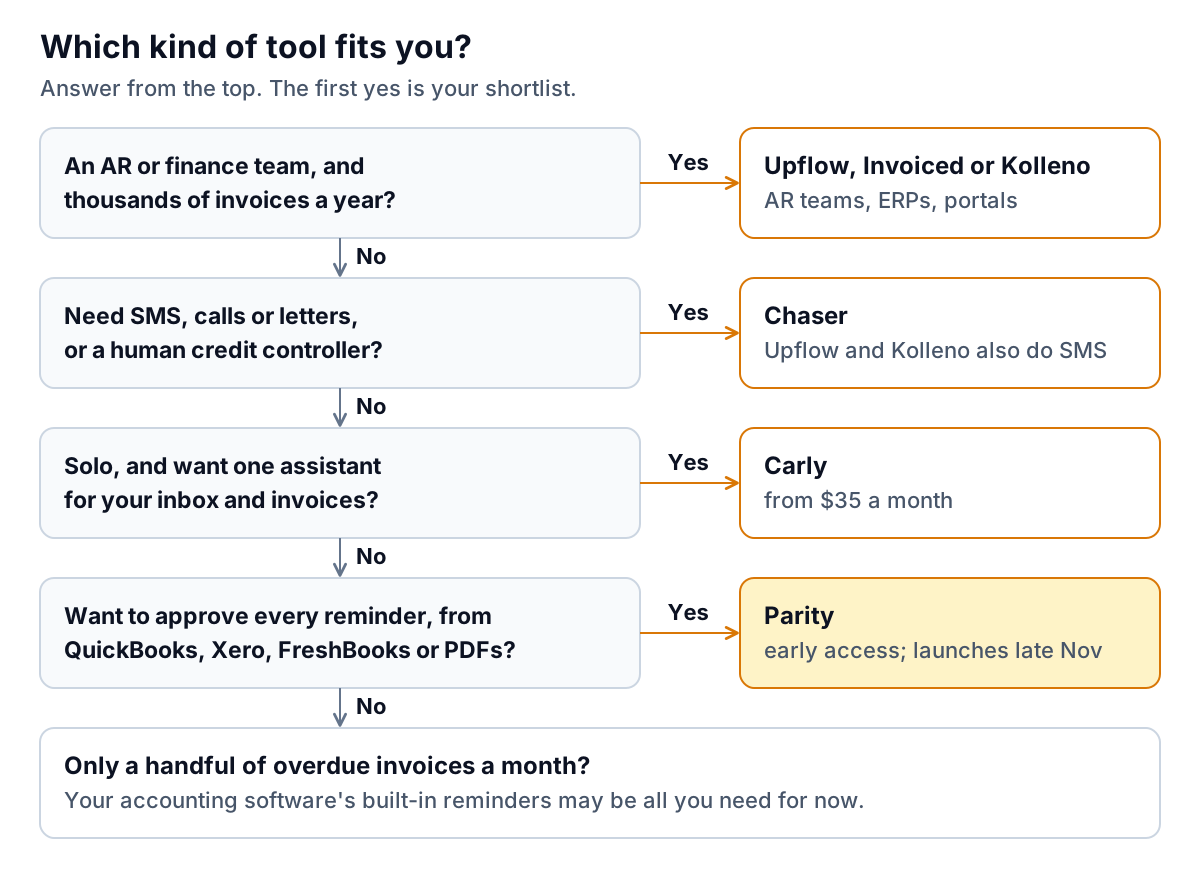
Don't forget the free option. If you only have a handful of overdue invoices a month, the reminders built into your accounting software may be enough. See our guides to QuickBooks Online invoice reminders and Xero invoice reminders for what they can and can't do.
Whichever AI invoice chasing software makes your shortlist, run these five tests during the trial before it touches a real client:
- Send a reminder to yourself. Read it as your client would. Does it sound like you, or like a collections agency?
- Part-pay a test invoice. Does the next reminder show the remaining balance, or the original total?
- Reply "paid yesterday" and "we're disputing line 3". Does chasing stop, and does the dispute reach you?
- Check for double-sending. If your accounting software's reminders are also on, will the client get two emails?
- Find the off switch. How quickly can you pause everything for one client? You will need it.
Before any tool starts chasing, know who owes what
A chasing tool can only be as accurate as the balances it reads. Before a trial, run your accounts receivable aging report, match any unapplied payments and credits, and note which clients have a dispute or a promised date. Then compare the tool's first list of overdue invoices with yours. If the two don't agree, find out why before it contacts anyone.
Knowing who owes what is the part Parity helps with. Upload an export from your accounting software (an aged receivables report or an invoice list, as a CSV or Excel file), and Parity builds a receivables dashboard: open and overdue balances, ageing buckets, who owes the most and how long clients take to pay, month by month. When you ask, it also writes a month-end report covering what you billed, what came in, who's late and what to do next. Every number is checked against the full data before you see it. Use it to decide who needs a nudge, then leave the chasing to you, your accounting software's reminders or whichever tool above you choose.
Upload your aged receivables report or invoice list, and Parity builds a receivables dashboard with every number checked against the full data, then writes the month-end report when you ask. See who owes you in one dashboard
If you're weighing software against handing the debt to someone else, our comparison of an AI invoice chaser, a collections agency and doing it yourself covers when each one makes sense.