Your bookkeeper sends over a one-page PDF called "A/R Aging Summary". It has a column of customer names, six columns of dollar amounts, and a total at the bottom right that looks like good news: $36,500 owed to you. It isn't quite good news. Read properly, that accounts receivable aging report says $21,300 of the $36,500 is already late, more than a third of it sits with one customer, and $7,200 is old enough that you should treat it as at risk.
This guide is for owners, not accountants. It walks through one example report line by line, explains what each column should make you do, and covers the few things the report hides. By the end you should be able to read your own in about five minutes.
Read an accounts receivable aging report in three passes
An aging report (also spelled "ageing" in the UK and Australia) lists everything customers owe you, split by how late each invoice is. Each row is a customer. Each column is a time bucket. The usual buckets are Current (not yet due), 1–30, 31–60, 61–90 and 90+ days past due. Every row adds up to that customer's balance, and every column adds up to the total in that bucket.
Here is a sample report for an example business, Northwind Studio, a small design agency. The customers are made up, but the shape is typical.
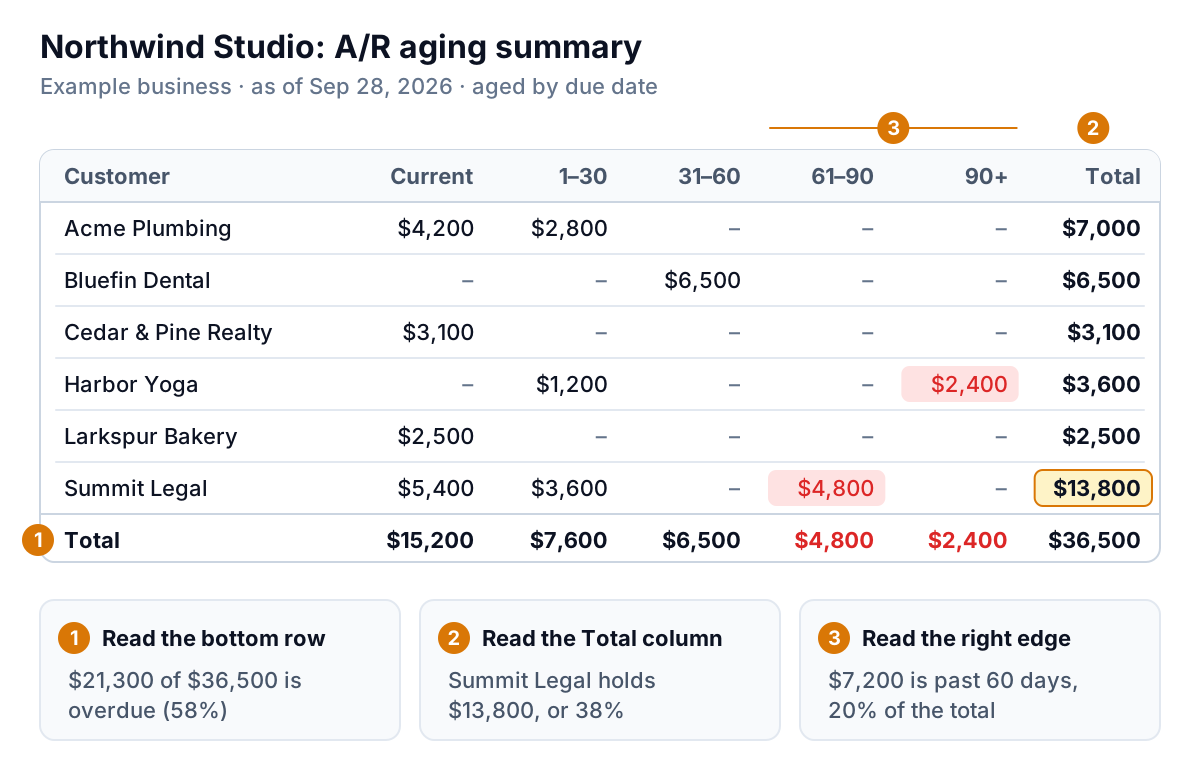
Most people read a table from the top left. Don't. Read it in this order:
- The bottom row: where is the money? Add up everything that isn't in Current. For Northwind that's $7,600 + $6,500 + $4,800 + $2,400 = $21,300, or 58% of the total. More than half of what Northwind is owed is already late.
- The Total column: who holds it? Find the biggest number. Summit Legal owes $13,800, which is 38% of everything. If Summit pays late or not at all, Northwind feels it in payroll. One customer above roughly a quarter of your receivables is worth a conversation, even if they've always paid.
- The right edge: what needs action this week? Anything in 61–90 or 90+ goes on a list with a name next to it. For Northwind that's Summit Legal's $4,800 and Harbor Yoga's $2,400: $7,200, about 20% of the total.
Three numbers come out of those passes: percent overdue, your biggest customer's share, and dollars past 60 days. Write them down each month. The trend tells you more than any single report.
What each bucket should trigger
A bucket is a prompt to act, not just a label. The chart below shows where Northwind's money sits, and the table after it gives a plain rule for each bucket.
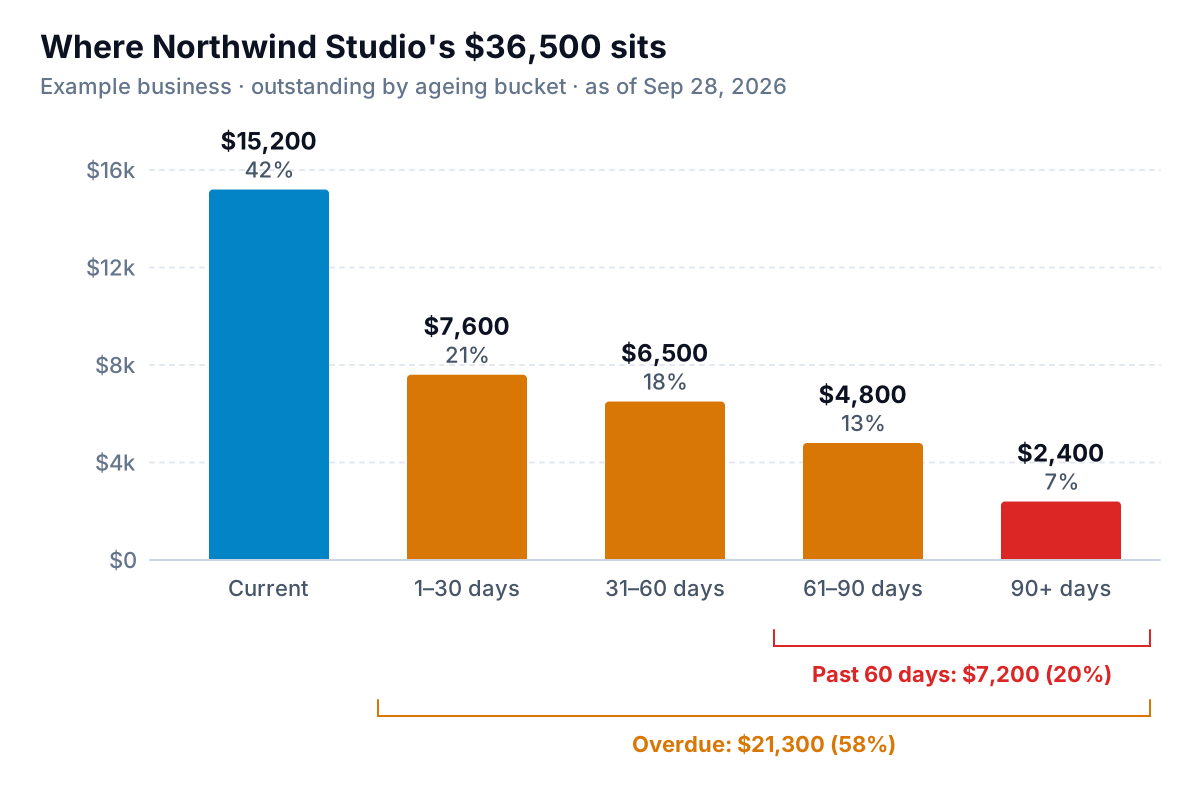
| Bucket | What it usually means | What to do |
|---|---|---|
| Current | Not due yet | Nothing, unless the invoice is large and due soon. A short "heads up, this is due Friday" note is fine for big amounts. |
| 1–30 | Forgot, sitting in someone's approval queue, or a slow payment run | One friendly reminder a few days after the due date. Most of these clear without more effort. |
| 31–60 | A process problem on their side, or a cash problem | Second reminder, then a phone call. Ask a direct question: "When is this scheduled to go out?" |
| 61–90 | Something is wrong: a dispute nobody told you about, or real cash trouble | Call the person who signs off payments. Agree a date or a payment plan in writing. Think hard before starting new work for them. |
| 90+ | At serious risk | Decide: payment plan, collections agency, small claims, or write-off. Don't let it drift into a second quarter. |
If you want exact wording for those reminders, our guide to chasing unpaid invoices has scripts for each stage.
Why the right-hand columns matter more than the total
A big total feels like money in the bank. It isn't, and the older it gets, the less it's worth. The Commercial Collection Agencies of America publishes a widely cited benchmark for how collectable a delinquent business account is by age. The Credit Research Foundation reproduces it: about 88.7% at one month past due, 68.9% at three months, 51.3% at six months and 21.4% at a year.
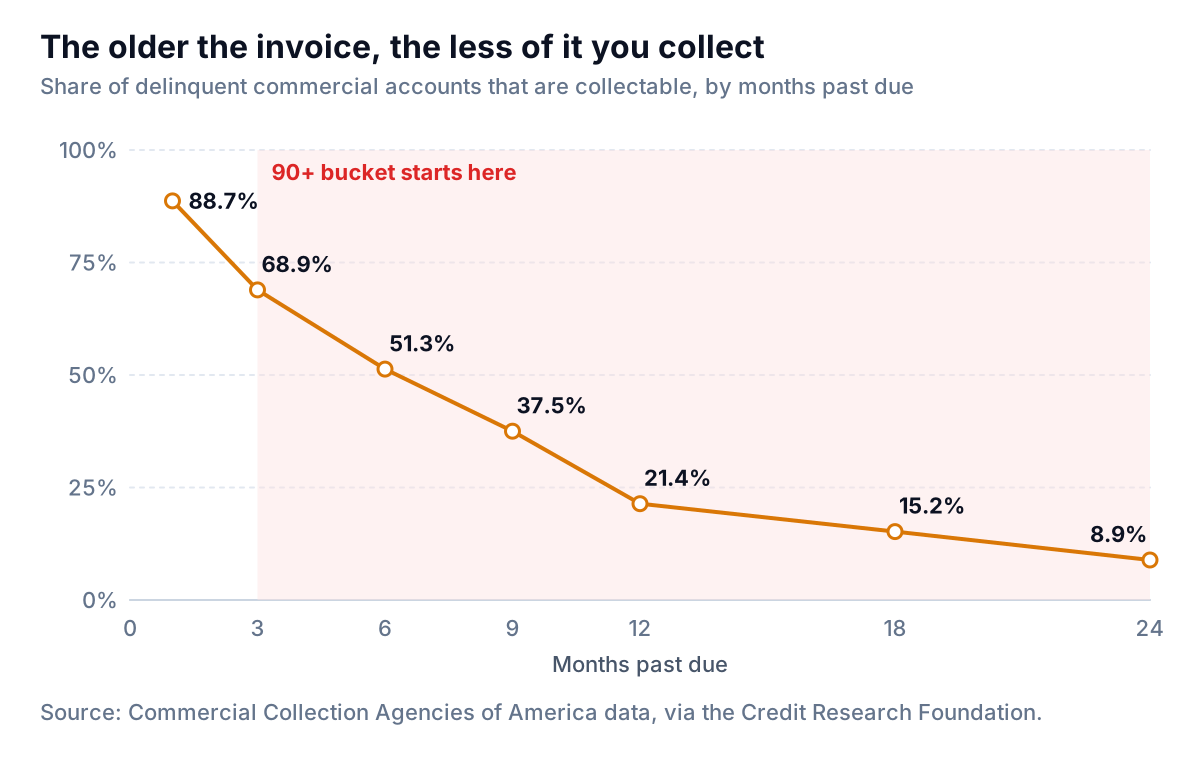
Those figures come from accounts that were already bad enough to reach a collection agency, so treat them as a direction, not a forecast for your customers. The direction is still clear: a dollar at 30 days late is worth much more than a dollar at 120. That's why the right edge of the report deserves your first ten minutes.
You are not alone in having a fat right edge. The 2026 QuickBooks Small Business Late Payments Report found that 59% of US small businesses had invoices more than 30 days overdue, up from 47% the year before, and that businesses with unpaid invoices were owed $17.7K on average. And in Atradius's 2025 survey of US businesses, 43% of B2B sales made on credit were overdue.
Four things an aging report won't tell you
The report is a snapshot of balances and dates. That's its strength and its blind spot. Before you act on a row, check these four things.
1. Which date it ages from
Most systems age by due date. QuickBooks Online's help pages say the Current column is anything not yet due, with ageing based on the due date, and that an invoice with no due date is treated as due on receipt. Xero's aged receivables reports let you choose ageing by due date or by invoice date. The two give different answers for the same invoice:
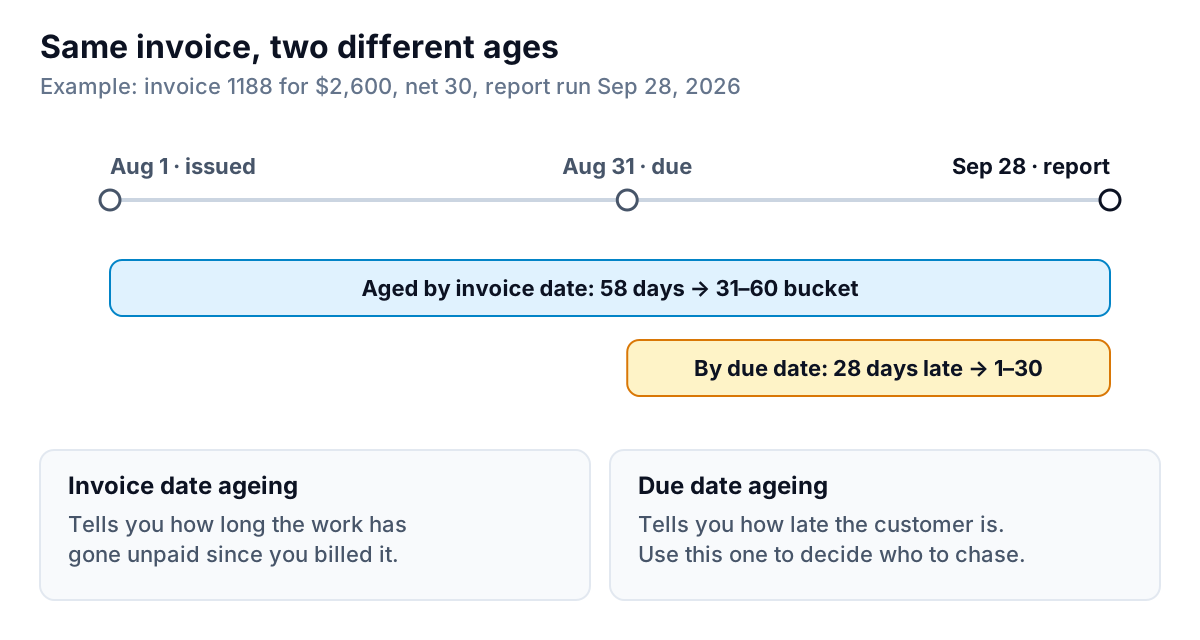
If your banker or a lender asks for an aging report, ask which basis they want. If you're deciding who to chase, use due date. A customer on net-60 terms isn't late on day 45, however old the invoice looks.
2. Whether anyone has already been in touch
Harbor Yoga's $2,400 in 90+ looks alarming. It might be a customer who promised to pay on the 15th, or one who disputed the invoice in an email you haven't answered. The report shows neither. Keep a "last contact" note per customer somewhere, even a simple one. If the invoice is disputed, the next step is a conversation, not a reminder (see what to do when a client disputes an invoice).
3. Unapplied payments and credits
A customer pays $3,000 against two invoices, and the payment gets recorded on the account but not matched to either. The aging report can then show the invoices as still open and a separate negative amount. If you see a negative number or a customer who "owes" you money you know they paid, fix the matching before you send anything. Chasing a paid invoice costs more goodwill than the reminder is worth.
4. Anything outside your accounting system
If some invoices go out from another tool, a Word template, or a job-management app, they aren't on this report at all. The report is only as complete as the system that produced it.
How to pull one in QuickBooks, Xero and FreshBooks
All three main small-business systems have a built-in accounts receivable aging report. Names change between versions, so search the reports page for "aging" or "aged" if you can't find it.
- QuickBooks Online: Reports, then the accounts receivable aging summary (one row per customer) or the aging detail (one row per invoice). The summary is the one to read monthly; the detail is the one to work from. If you need the full list of late invoices sorted by who owes most, this walkthrough of QuickBooks overdue invoice reports goes step by step.
- Xero: Reporting, then Aged Receivables Summary or Aged Receivables Detail. You can set the number and length of ageing periods, and choose due date or invoice date.
- FreshBooks: Reports, then Accounts Aging under payments reports. You can click a client or a total to see the invoices behind it.
Whichever you use, run it on the same day each month (the first Monday is easy to remember) so the numbers compare like for like.
A 15-minute monthly routine
Here is the whole thing as a checklist. It works with any of the reports above.
- Run the summary, aged by due date, as of today.
- Write down three numbers: percent overdue, largest customer's share, and dollars past 60 days. Compare with last month. For Northwind: 58%, 38% and $7,200.
- Check the top three balances against what you know. Any disputes, promises or unapplied payments? Fix the books before you contact anyone.
- Make the right-edge list. Every customer with money in 61–90 or 90+, with the amount, the oldest invoice number, and the date you last spoke.
- Assign one action per name from the bucket table above: a reminder, a call, a payment plan or a decision.
- Look at the 1–30 column and make sure each of those invoices has had one friendly reminder. This is the cheapest money you will ever collect.
Monthly is the minimum. If late payments hurt your cash flow, a lighter weekly version catches problems a month sooner; these six Monday questions are a good template.
The weak spot in all of this is the gap between reading the report and doing something about it. Most owners know who owes them; they just don't get to the emails. That gap is what we're building Parity to close. It connects to QuickBooks Online, Xero or FreshBooks (or takes PDF invoices and CSV exports), shows the same current-to-90+ buckets with balance per customer, and drafts one friendly reminder in your voice for each overdue invoice that isn't disputed or exempt. You approve, edit or skip each one, and nothing is sent without your approval. Every amount, date and invoice number in a draft is checked against your books before it can go out.
Parity launches in late November 2026, and early access is open now. Get early access to Parity's invoice chaser
Whether or not you use a tool, the habit is the point: three passes, three numbers, one action per name. An accounts receivable aging report you act on every month is worth more than a perfect one you file away.