A bookkeeper with six clients asks a simple question: can I paste a client's general ledger into an AI chat to find odd transactions, or do I need to run AI on my own computer? Most articles answer "cloud is convenient, local is private" and stop there. That misses the point. The bigger difference is usually not cloud versus local. It's which cloud plan you're on and what its terms say. Choosing AI technology solutions well means asking three questions in order: where does the data go, who can use it afterwards, and what does it cost to keep it closer to home?
This guide answers those for a small business with no IT department. It explains what each option really involves, compares the costs with worked numbers, and ends with a decision table by type of data.
Three kinds of AI technology solutions, by where they run
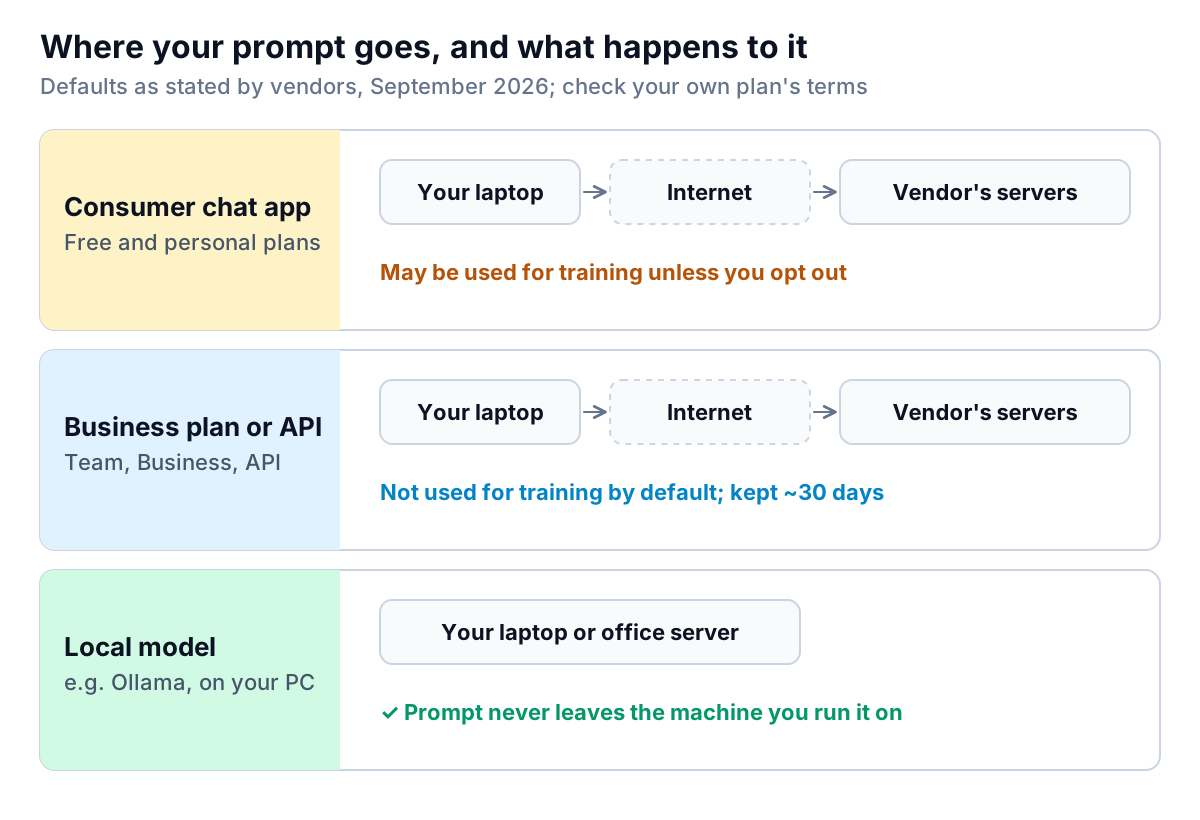
For a small business, almost every AI tool falls into one of three groups.
1. Consumer and personal plans
Free and individual subscriptions to chat assistants are built for individuals. Their privacy defaults reflect that. OpenAI's own pricing comparison lists "content is used to train our models" for its Free, Go, Plus and Pro plans, with an opt-out available. If staff use personal accounts for client work, that's the setting to check first.
2. Business plans and APIs
Team and business tiers, and the developer APIs behind most AI apps, come with different terms. Some examples, from the vendors' own pages:
- OpenAI says data sent to its API is not used to train its models unless you opt in, and abuse-monitoring logs are kept for up to 30 days by default. Zero data retention is available to approved customers.
- Anthropic says it does not train on inputs or outputs from its commercial products by default, and its Team plan lists "no default model training". The Enterprise tier adds custom data retention and a HIPAA-ready option.
- Microsoft includes Copilot Chat at no extra cost with eligible Microsoft 365 plans. The Microsoft 365 Copilot Business add-on works inside your existing Microsoft 365 tenant.
Your data still leaves the building. But it goes under a contract that limits what the vendor can do with it, usually with security certifications and data processing terms you can show a client.
3. Local models
Open-weight models such as Llama and Gemma can run on your own computer using free tools like Ollama. Its FAQ is plain about it: when you run locally, the company doesn't see your prompts or data. One catch: Ollama now also offers cloud-hosted models. If you need strictly local use, its documentation explains how to switch cloud features off (an OLLAMA_NO_CLOUD setting).
What running AI locally actually involves
Local AI is no longer a research project. Install Ollama, download a model, and you can chat with it in an afternoon. The practical limits are memory, quality and upkeep.
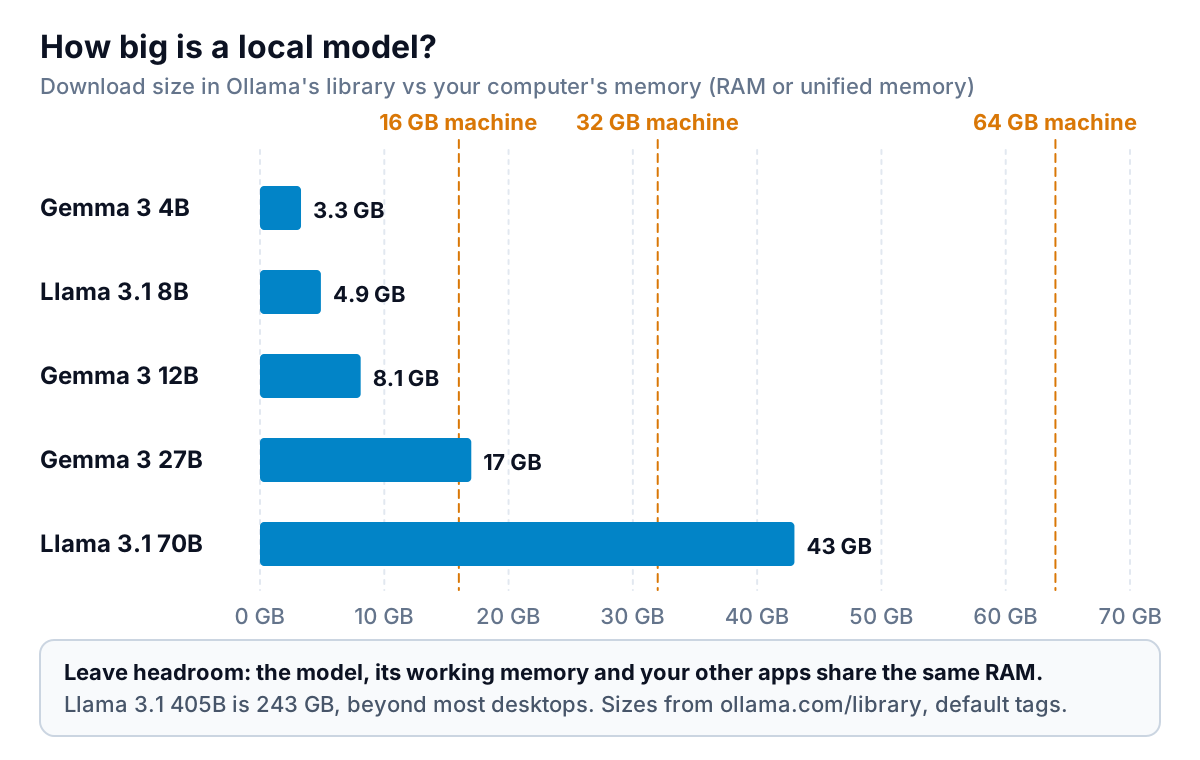
Memory. A model has to load into your computer's memory (RAM, or unified memory on Apple silicon) to run at a usable speed. A 16 GB laptop runs the 4B to 12B models comfortably. A 27B model wants 32 GB, and the 70B class needs a 64 GB machine or a server. Longer documents and several people using the model at once need more memory again. Ollama's FAQ notes that memory grows with the context length and the number of parallel requests.
Quality. Smaller open models are good at summarising, rewriting, classifying and pulling fields out of text. They're generally weaker than the largest cloud models at multi-step reasoning, long documents and careful analysis. Test on your own work before you commit. Give a local model and a cloud model the same ten real tasks and compare the results side by side.
Upkeep. Someone has to install updates, choose models, back up the machine, secure it if other people connect to it, and answer "why is it slow today?". If nobody on the team enjoys that, the cost is real even when the software is free.
The cost comparison, with real numbers
Cloud costs are per person per month. Local costs are mostly up front, plus your time. Here's an example with stated assumptions you can swap for your own.
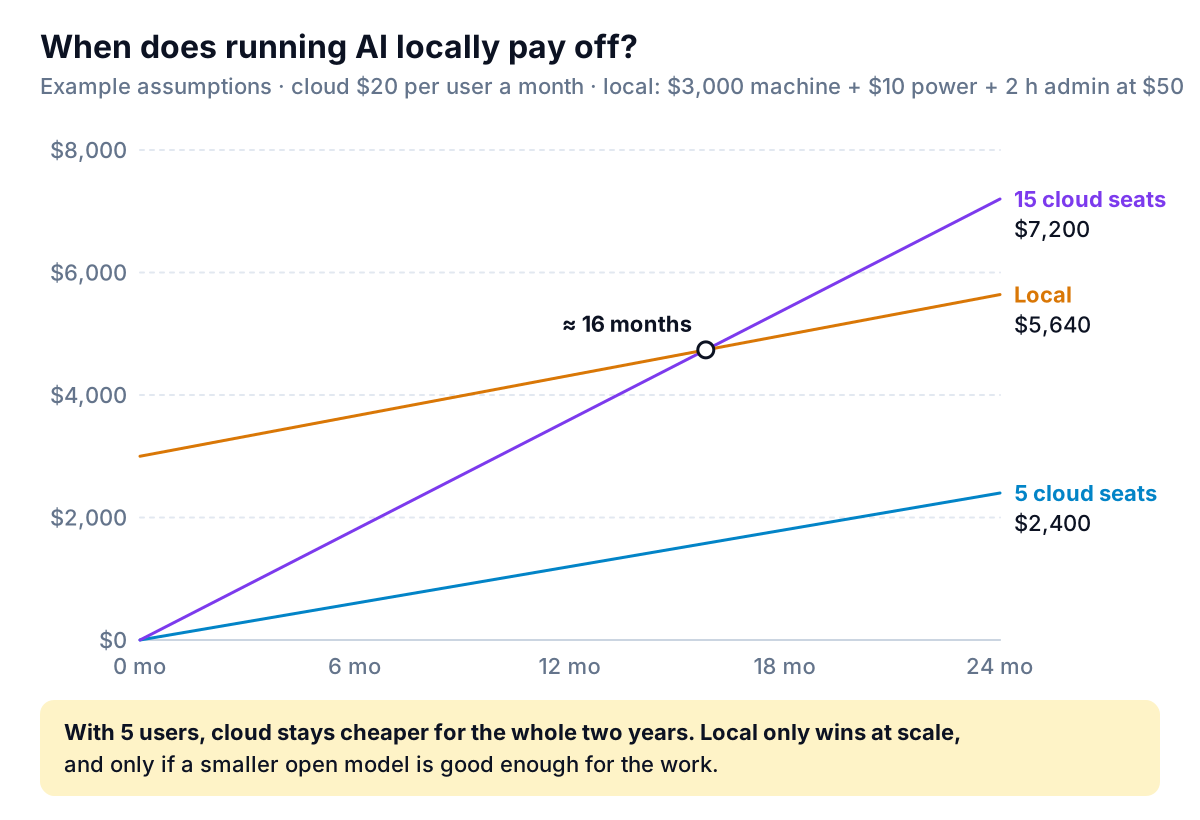
- Cloud: $20 per user a month, which matches Anthropic's listed Claude Team Standard seat on annual billing. Microsoft 365 Copilot Business is listed at $21 per user a month on annual billing, with a promotional $18 through December 2026.
- Local: a $3,000 machine with enough memory for mid-sized models (an assumption; price your own), about $10 a month of electricity, and two hours a month of someone's time at $50 an hour.
With five people, the cloud costs $2,400 over two years, against $5,640 for the local setup. Cloud wins clearly. With fifteen people, local passes the cloud at about 16 months. That's only true if one machine can serve fifteen people at an acceptable speed, and if a smaller model is good enough for their work. Neither is a given. Leave out the admin time and local looks cheaper much sooner, which is why vendor-neutral comparisons that ignore labour tend to favour local.
API pricing changes the picture again. If your use is occasional, such as a monthly report or a few hundred document extractions, pay-per-use API pricing is often cheaper than a seat. Check the vendor's current per-token rates against a month of your real volume.
Choosing by the data, not the technology
The most useful way to choose between AI technology solutions is to sort your data first, then match each type to the least risky option that does the job.
| Type of data | Example | Reasonable choice |
|---|---|---|
| Public | Website copy, product descriptions, job ads | Any tool, including personal plans |
| Internal, low-risk | Meeting notes, internal how-to docs | Business plan with no-training terms |
| Client confidential | Ledgers, contracts, pricing, payroll | Business plan with a data processing agreement, or local; check your client contracts |
| Regulated | Patient records, card data, some legal files | Only tools with the right agreement (for health data in the US, a signed business associate agreement), or local |
On regulated data, take advice for your field. For health information in the US, HHS's guidance on HIPAA and cloud computing explains when a cloud provider becomes a business associate and needs a BAA. Lawyers should read their bar's guidance on generative AI and client confidentiality. In the UK and EU, your data protection obligations apply to AI vendors the same as to any other processor.
Questions to ask any cloud AI vendor
- Is my data used to train models? Is that the default, or a setting I have to change?
- How long are prompts, files and outputs kept, and can I shorten that?
- Where is the data processed and stored?
- Will you sign a data processing agreement (and a BAA, if I handle health data)?
- Which security certifications do you hold, and can I see the report?
- When I delete a file or close my account, what happens to my data?
A sensible setup for most small businesses
For most small teams, the right answer is a cloud business plan for everyday work, a written rule about what goes into it, and local models only for specific sensitive jobs, if at all.
- Move work off personal accounts. Put everyone who uses AI for client work on a business plan, or turn off training on personal accounts as a stopgap.
- Write a one-page AI use rule. List the four data types above and which tools are allowed for each. Name a person to ask when unsure.
- Pick task tools by their data terms. Specialised tools for invoices, reports or scheduling usually run in the cloud too. Ask them the same six questions.
- Try local for one narrow job. If you have a genuinely sensitive, repetitive text task, install Ollama on one machine and test a 7B to 12B model on it for two weeks.
- Review every six months. Plans, prices and data terms change. The vendor pages linked above were current in September 2026.
Back to the bookkeeper
Here's how the opening question works out with this framework. A client's general ledger is client-confidential data, so personal chat accounts are out. The bookkeeper has three reasonable options. A business-plan chat assistant with no-training terms works well for one-off questions ("which vendors appear for the first time this quarter?"). A local 12B model on a 32 GB machine is fine for tagging transaction descriptions, as long as the totals are checked. A purpose-built reporting tool suits the monthly pack the client actually reads. None of these AI technology solutions is "the secure one". Each is secure enough for a specific job, as long as the bookkeeper's engagement letter allows it and the client knows AI is involved. One habit applies whatever the tool: never paste more than the task needs. Strip bank account numbers and personal names from an export before analysis, and you've removed most of the risk on any plan.
Parity is one of those cloud task tools, so here are its answers. For reporting, you upload a CSV or Excel file, and the agent builds a client-ready report or dashboard. Every number and chart is checked against queries on the full dataset before you see it. Files are sent encrypted and deleted after the report is built. They're never used for training, and saved dashboards are private to your account. That makes it a fit for operational and financial exports, like the bookkeeper's ledger summary, but not for regulated health records. If you're weighing a chat interface over your own documents, see our guide to AI chatbots for internal data. For the broader map of tools by task, see AI based tools for small business. And if you're connecting AI steps into workflows, our automation software comparison covers which platforms you can self-host.
Upload a spreadsheet export and get a client-ready report. Your file is deleted after the build and never used for training. Build a report from your data free