Fewer than one in five US businesses with under 20 employees reported using AI in the US Census Bureau's survey data released in May 2026. Use across all businesses hovered between 17% and 20% from December 2025 to May 2026, and retail sat at about 14%. If you're in the other 80%, you haven't missed a secret app. What's missing is usually a match between one specific, repeated task in your week and one of the AI based tools that does it well. This guide is about making that match, cheaply, and knowing within a month whether it worked.
Start with your tasks, not the tools
Lists of "the 25 best AI tools" don't help much, because the right tool depends on what eats your week. Spend 20 minutes on this instead. Write down every task you or your team did more than twice last week, roughly how long each took, and answer four questions for each:
- Is it repeated? Weekly or daily tasks pay back the setup time. Annual ones rarely do.
- Is it mostly text or numbers? Writing, summarising, sorting emails, pulling fields from documents and analysing spreadsheets are where today's AI is strongest.
- Can you check the result quickly? Checking a meeting summary against your own memory takes a minute. Checking a legal argument takes as long as writing it.
- What happens if it's wrong? A clumsy social post is cheap. A wrong amount in a client email, or a confident answer to a customer about your refund policy, isn't.
Tasks with four good answers are your candidates. For a typical service business, that's meeting notes, first drafts of routine emails and proposals, monthly client reports built from spreadsheet exports, and keeping track of who owes you money. For a shop, it's product descriptions, sales and stock reports, and customer email triage.
An example audit
Here's how that looks for an example business, Harbor Design Studio: six people doing brand and web work for local clients. The owner's list from one ordinary week:
- Client calls and meeting notes: 8 a week, about 15 minutes of write-up each. Repeated, text, quick to check, low risk. Candidate.
- Monthly client reports from Google Analytics and ad exports: 6 clients, about 3 hours each, once a month. Repeated, numbers, checkable against the source. Candidate, as long as totals are checked.
- Proposals: 2 a week, 90 minutes each. Text, but each one carries prices and promises. Candidate for first drafts only.
- Design work itself: the core of the business, judged on taste. Not a candidate for this exercise.
- Following up on overdue invoices: 20 minutes a week, plus the awkwardness. Repeated and checkable, but a wrong reminder costs goodwill. Candidate, with approval before sending.
That's four tasks worth trying and one clear "no". It took 20 minutes, and it already rules out most of the tools on any "best AI" list.
Four kinds of AI based tools
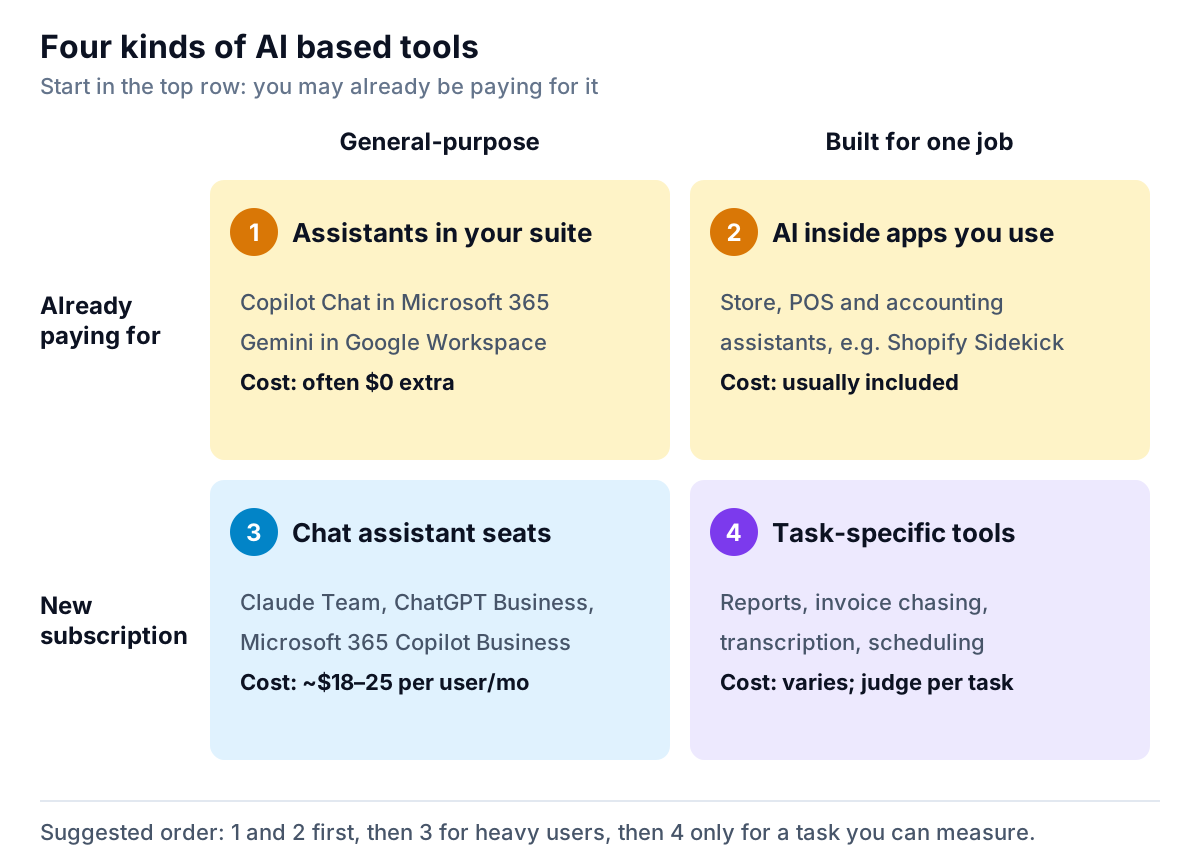
Once you know the task, the tool usually falls into one of four groups. The order matters: start where you're already paying.
1. Assistants in the suite you already pay for
Microsoft says Copilot Chat is available at no additional cost with eligible Microsoft 365 plans. Google's Workspace pricing lists Gemini in Gmail on its Business Starter plan, and Gemini across Gmail, Docs, Meet and more on Standard and Plus. If your team writes in Outlook or Gmail all day, try these first. They're already inside your security and admin setup.
2. AI inside the apps you run the business on
Store platforms, POS systems, accounting tools and CRMs keep adding assistants. Shopify's Sidekick, for example, can turn a plain-language request into a report query. These work on data that's already there, so there's nothing to export. Check your main apps' recent release notes. The feature you'd pay a new tool for may already be included.
3. A general chat assistant seat
A business seat on a chat assistant is the flexible middle option for drafting, summarising, brainstorming and light analysis. Anthropic lists Claude Team Standard at $20 per seat a month on annual billing ($25 monthly). Microsoft lists Microsoft 365 Copilot Business at $21 per user a month on annual billing, with a promotional $18 through December 2026. It's an add-on that requires a qualifying Microsoft 365 plan. OpenAI's ChatGPT Business is priced per user and starts at two users. Business tiers matter because their data terms differ from personal plans, which our guide to cloud vs local AI explains.
4. Task-specific tools
These do one job end to end: transcribe and summarise calls, build reports from spreadsheets, chase overdue invoices, schedule appointments, answer common customer questions. They cost more per task than a chat assistant, but they connect to your data, follow a fixed process and often check their own work. Judge each one on a task you can measure.
What a sensible AI budget looks like
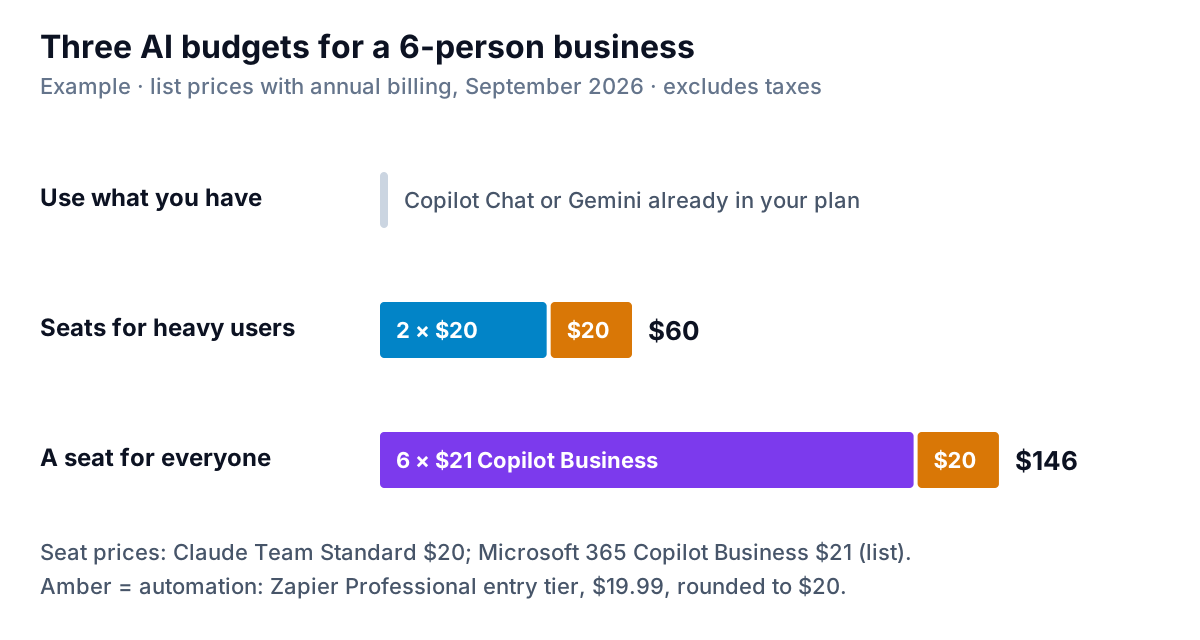
The middle option suits most small teams. Give paid seats to the two or three people who write or analyse the most, and let everyone else use the assistant already in your suite. Add one automation subscription if you have repetitive app-to-app work. Our comparison of AI automation software explains why the entry price isn't the whole story. Add a task-specific tool only when it replaces measurable hours or protects measurable money.
Where AI based tools earn their keep, and what to check
| Task | Kind of tool | What to check every time |
|---|---|---|
| Meeting and call notes | Suite assistant or transcription tool | Names, numbers and who agreed to do what |
| First drafts of emails and proposals | Chat assistant | Prices, dates, promises, and that it sounds like you |
| Client and management reports | Report builder or chat assistant with file upload | Totals tie back to the source system |
| Chasing unpaid invoices | Accounting reminders or a dedicated chaser | Invoice is still unpaid and undisputed before anything goes out |
| Product descriptions and listings | Chat assistant or store's built-in AI | Sizes, materials and claims are accurate |
| Customer email triage | Automation platform with an AI step | A person approves replies about money, refunds or complaints |
Two of those rows deserve more attention, because mistakes there cost money.
Reports. Chat assistants can analyse a spreadsheet, but on a large file some sample or summarise rather than read every row. That's fine for brainstorming and risky for a client deliverable. Our guide to AI tools for data analysis covers how to tell which is which. Parity's reporting tool, live now, is built for this job. You upload a CSV or Excel file and describe the report. It analyses every row and builds KPI tiles, charts, tables and an executive summary, and checks every number against queries on the full dataset before you see it.
Getting paid. Overdue invoices are a perfect AI task in one way, since they're repeated, text-based and easy to check, and a dangerous one in another, because a reminder with the wrong amount or sent to a client who paid yesterday damages the relationship. Our guide to chasing unpaid invoices covers timing and wording. Parity's invoice chaser, launching in late November 2026, connects to QuickBooks Online, Xero or FreshBooks. It drafts one friendly reminder per overdue invoice in your voice, checks every amount and date against the source, and sends nothing until you approve it.
Run a 30-day trial that gives you a real answer
Most AI trials fail quietly: people try a tool for a few days, feel it's "kind of useful" and keep paying. A short, measured trial avoids that.
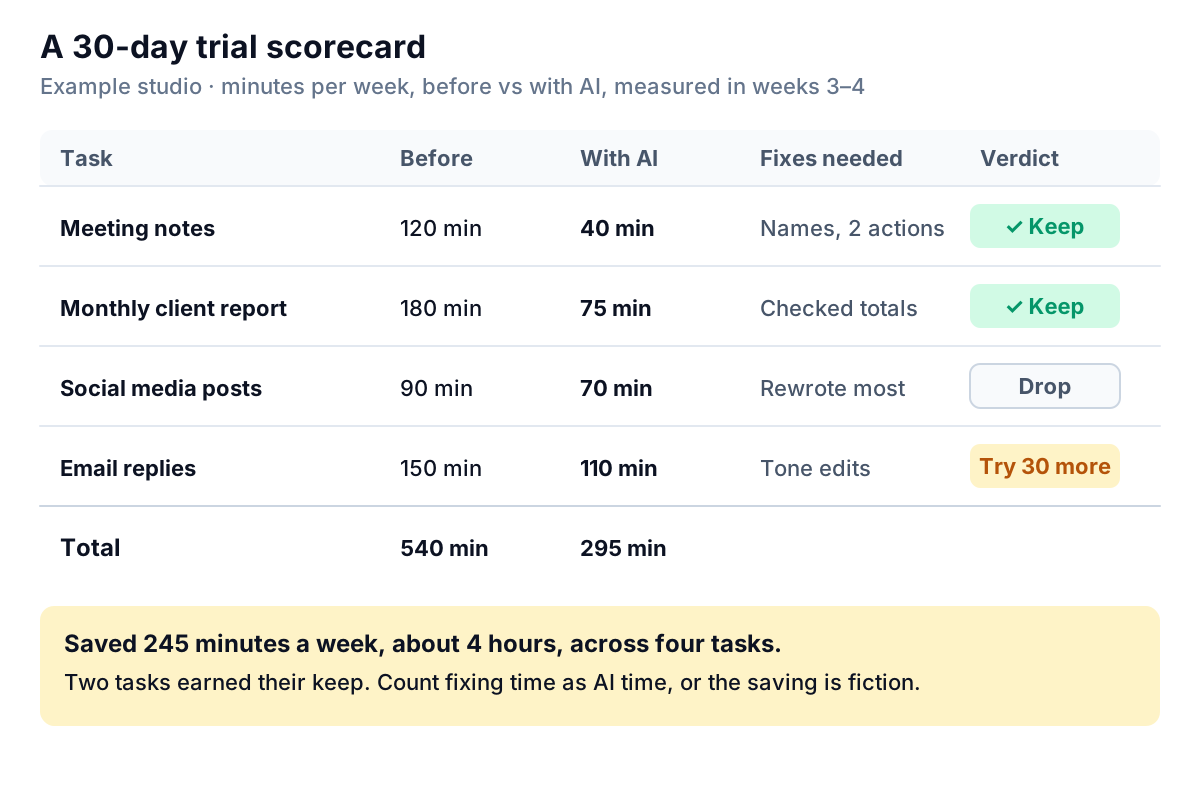
- Week 1: pick three or four candidate tasks. Time each one the normal way for a week.
- Week 2: set up the tool and learn it. Don't measure yet, because everyone's slower while learning.
- Weeks 3–4: time the same tasks with AI, including the time spent checking and fixing the output.
- Day 30: keep, drop or extend each task, using the numbers.
Three risks to settle before the trial starts
- Data. Decide which data can go into which tool. Client financials and anything regulated need a business plan with clear terms, or no AI at all. Write it down on one page.
- Accuracy. AI tools can state wrong facts confidently. Make "a person checks anything that goes to a client or customer" a standing rule.
- Ownership. Name one person who owns each tool: who has the login, who pays, and who turns it off if it misbehaves.
Mistakes to avoid
- Buying seats for everyone on day one. Usage is usually uneven. Two people will use AI daily and the rest monthly. Start small and add seats when people ask.
- Letting staff use personal accounts for client work. It feels free, but the data terms are the consumer ones. Move that work to a business plan.
- Measuring "time to first draft" instead of "time to done". If a draft takes two minutes but fixing it takes thirty, the tool didn't save time.
- Treating AI output as a source. A summary of your sales data is only as good as its link to the real figures. Ask where each number came from.
The businesses that get real value from AI based tools rarely have the most subscriptions. They picked two or three tasks, measured them, and kept only what worked. Start with the assistant you already own and one task you can time, and you'll know within a month.
Parity's invoice chaser drafts friendly, number-checked reminders from your accounting data and waits for your approval. Get early access to Parity's invoice chaser