In a twelve-person business, the same questions get asked every week. Where's the latest price list? How much notice do I give for leave? What did we quote Northwind last time? Who are our biggest clients this year? Each one takes a colleague five minutes to answer, and each one interrupts someone who was doing something else.
An AI chatbot for internal data promises to answer all of those from your own files. It can do a good job of the first three. The fourth, a question about numbers, needs different machinery, and many internal chatbots handle it badly without saying so. There's also a risk most owners don't see coming: the chatbot will happily surface files that were shared more widely than anyone realized. This guide covers how these chatbots work, what to choose, what to fix before you switch one on, and how to test it.
How an AI chatbot for internal data actually works
Most internal chatbots don't "learn" your documents. When someone asks a question, the system searches your files for the passages most likely to be relevant, hands those passages to a language model, and asks it to write an answer based on them. The technical name is retrieval-augmented generation. The plain version: search first, then summarize what was found.
That design is good at questions whose answer sits in a paragraph somewhere: policies, procedures, product details, what a contract says. It is weak at questions whose answer has to be calculated across many rows: totals, rankings, year-on-year changes. Searching a sales spreadsheet for "clients who spent less this year" finds some rows that mention clients. It doesn't add anything up.
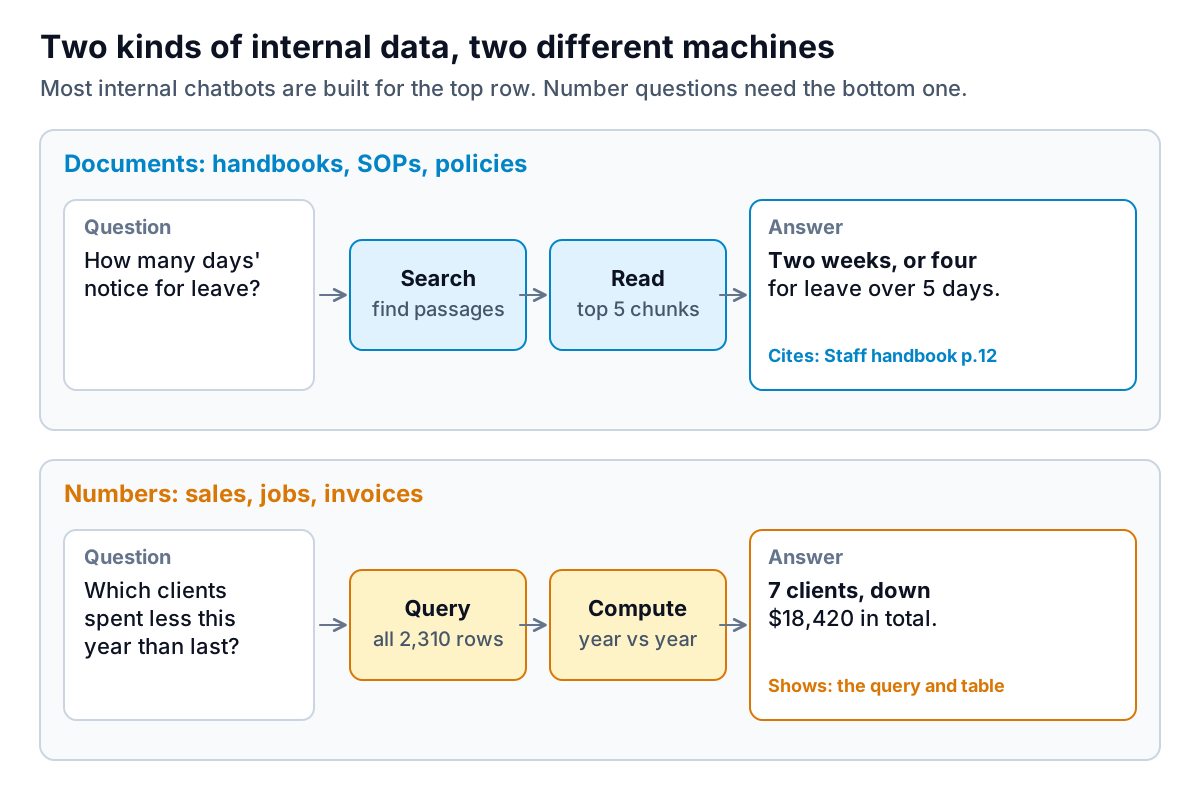
Number questions need a system that writes and runs a query or code against the full table, then reports the result and shows how it got there. Some products do both and route each question to the right path. Many don't. When you evaluate a tool, ask the vendor directly: "If I ask for a total across a 5,000-row spreadsheet, does it compute it from every row or summarize what it found?" Our guide to AI tools for data analysis explains why that difference matters and how to test it.
Your options, from built-in to built-yourself
For a small business, building your own chatbot from scratch is rarely worth it. The suites you already pay for have caught up.
If you're on Microsoft 365
Microsoft Copilot (the new name for Microsoft 365 Copilot, according to Microsoft's documentation) searches emails, chats and documents through Microsoft Graph. Microsoft says it "only surfaces organizational data to which individual users have at least view permissions", and that prompts, responses and Graph data aren't used to train its foundation models. For numbers held in Power BI, Copilot in Power BI can answer questions against a data model, but it needs paid Fabric or Premium capacity, which is a real cost for a small team.
If you're on Google Workspace or ChatGPT
Google's Gemini works across Drive, Docs and Gmail on eligible Workspace plans, and Google's notebook tool (NotebookLM, which Google's help pages now call Gemini Notebook) is useful for a fixed set of documents with answers that link back to the source passages. OpenAI's ChatGPT business plans have a "company knowledge" feature that connects to tools such as Google Drive, SharePoint and Slack, and OpenAI says it respects each user's existing permissions.
If you want something custom
Dedicated enterprise search products and custom builds on an AI platform give you more control over sources, routing and logging. They also need someone to set up and maintain them. If nobody on your team would own that, stay with the suite tool.
Whichever route you choose, notice the phrase that appears in all of these vendor descriptions: the chatbot respects existing permissions. That's the right design. It is also the reason for the next section.
Fix permissions before you switch it on
A chatbot that respects permissions shows each person only what they could already open. The trouble is that in most small businesses, "what they could already open" includes things nobody intended. A payroll spreadsheet shared with "anyone in the company" years ago, for one quick edit. A client contracts folder with a public link. Nobody stumbled on them before, because nobody went looking. A chatbot looks on everyone's behalf.
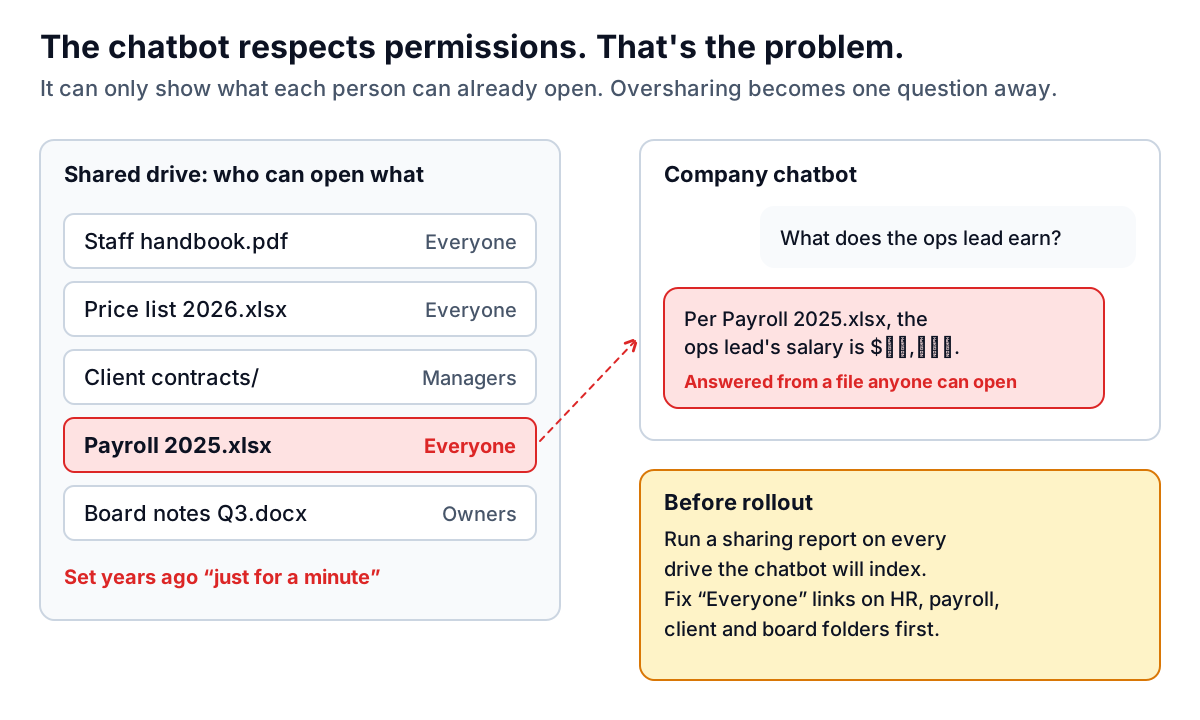
Microsoft's documentation makes the same point: it says you should use the permission models in Microsoft 365 services, such as SharePoint, "to help ensure the right users or groups have the right access to the right content." Before rollout:
- List the sources the chatbot will read. Start narrow: one handbook folder and one procedures folder is a fine first version.
- Run a sharing report on those sources. Google Workspace and Microsoft 365 admins can both see which files are shared with everyone or by link.
- Fix the sensitive folders first: payroll and HR, client contracts, board or partner notes, anything with bank or ID details.
- Exclude what doesn't need to be searchable. Most tools let you leave whole folders or sites out of the index.
- Test as an ordinary employee. Ask "what does [a colleague] earn?" and "show me [client]'s contract" from a non-admin account, and confirm the answer is "I can't find that."
Clean up what it will read
A chatbot answers from whatever it finds. If your drive holds three versions of the leave policy, it may quote the 2022 one. Spend an hour on this before the pilot:
- Archive old versions into a folder the chatbot doesn't index.
- Put a date and an owner at the top of every policy and procedure, so answers show how current they are.
- Turn scanned PDFs into text where you can. Our guide to AI tools for analyzing PDFs covers why image-only files are read less reliably.
- Write down the answers people ask for most if they only exist in someone's head. A one-page FAQ beats any chatbot searching for something that was never written.
Run a two-week pilot with 30 real questions
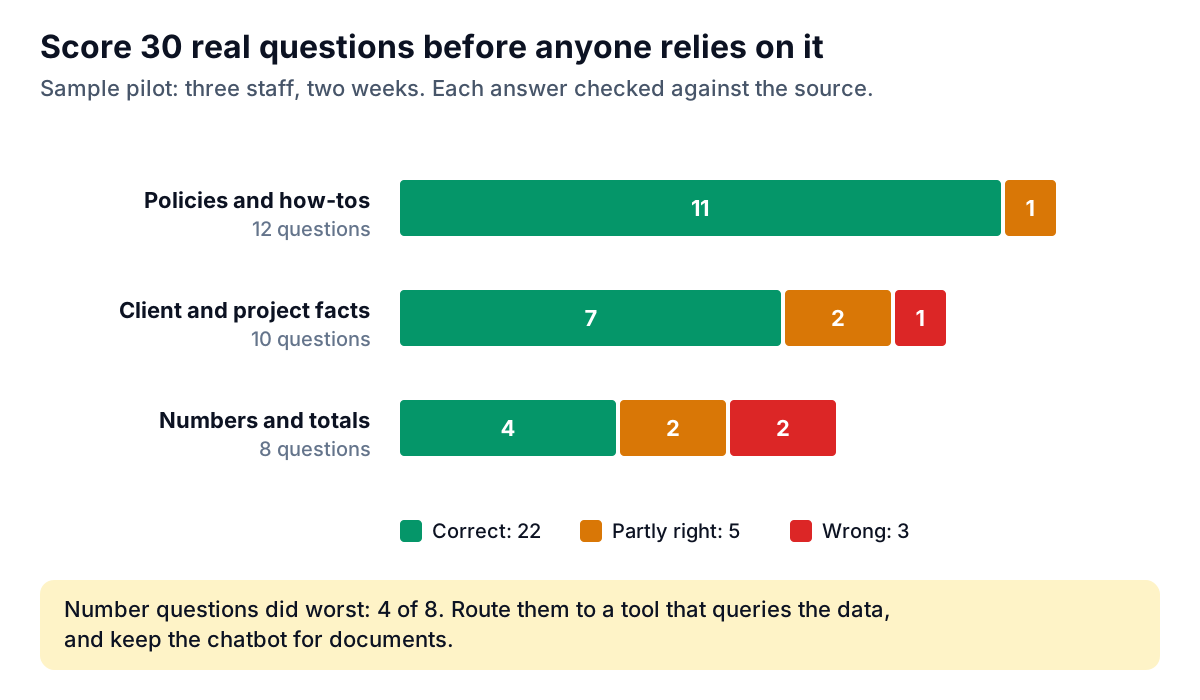
Don't announce a chatbot to the whole team on day one. Pick three people who ask a lot of questions, and collect 30 real questions from the last month: the ones they actually asked colleagues. Run each one through the chatbot and score the answer against the source document as correct, partly right or wrong.
Questions worth including in the test set
A good test set mixes easy questions with the awkward ones that trip up an AI chatbot for internal data. Make sure yours includes:
- A question with an outdated answer on the drive, such as last year's holiday policy, to see which version it quotes.
- A question whose answer is spread across two documents, such as a price list plus a discount policy.
- A question it should refuse, such as a colleague's salary, asked from a normal account.
- A question with no answer anywhere, to check it says "I couldn't find that" rather than inventing one.
- A handful of number questions: a total, a ranking and a comparison with last year.
Look at the misses by type, not just the total. In the sample, policy questions were nearly perfect, while questions about totals and rankings got only half right. That doesn't mean the chatbot failed. It means number questions should go somewhere else. Write a short note for the team: "Ask the chatbot about policies, procedures and documents. For figures, use the sales dashboard."
Set a simple bar for going wider. For example, 90% correct on document questions, and every answer showing the source it came from. If a tool can't show its sources, people can't check it, and they'll either stop using it or trust it too much.
Who is responsible for the answers
You are. A Canadian tribunal made that point about a customer-facing chatbot in Moffatt v. Air Canada (2024): the airline was held liable for wrong information its website chatbot gave about bereavement fares, and its argument that the chatbot was a separate entity was rejected. An internal chatbot is lower stakes, but the principle carries over. If it tells an employee the wrong leave entitlement or the wrong price, the business owns that mistake.
Three rules keep this manageable. Answers about pay, leave, discipline, health and safety, or anything legal should link to the source document, and staff should know to check it. Sensitive HR questions should still go to a person. And someone should own the chatbot: review a sample of questions monthly, fix the documents behind wrong answers, and remove sources that shouldn't be there.
Where Parity fits
Parity handles the numbers side, not the document side. If the questions your team asks are "which clients are down this year?" or "what's our revenue by service?", you can upload a CSV or Excel export and get a report or dashboard in which every number and chart is checked against queries on the full dataset before you see it. You refine it by chat ("split by region", "only this quarter"), with versions and undo, and saved dashboards stay private to your account. Files are sent encrypted, deleted after the report is built and never used for training. Pair it with a document chatbot, and each kind of question goes to the machine built for it. Our guide to AI dashboard builders covers setting up the numbers side.
For receivables specifically, Parity's invoice chaser, in early access ahead of a late November 2026 launch, includes a chat panel that answers questions like "who owes me the most?" and "what is past 60 days?" from your invoice data, with the figures cited.
Upload a sales, jobs or invoice export and get a dashboard with every figure checked against the full file. Build a report from your data free
A good AI chatbot for internal data saves a small team real time, as long as you treat it as a search tool for documents, fix permissions before launch, and test it on real questions first. Send number questions to something that does the counting.