A spreadsheet is a perfectly good way to track invoices, right up to the Wednesday it tells you to chase a customer who paid on Tuesday. Nothing about the sheet was wrong on Monday. It just didn't know about the payment, because nobody had typed it in yet.
That's the whole trade-off in one sentence. An invoice tracking spreadsheet is free, flexible and fully under your control. It's also a copy of the truth, and copies drift. This post shows how to build a sheet that holds up as long as possible, the signs that it has stopped holding up, and what to look for when you move on.
Build the invoice tracking spreadsheet properly first
Most sheets fail early because they're built as a list of customers with a running note, rather than a list of invoices with dates. Fix the structure and a spreadsheet will carry a small business a long way.
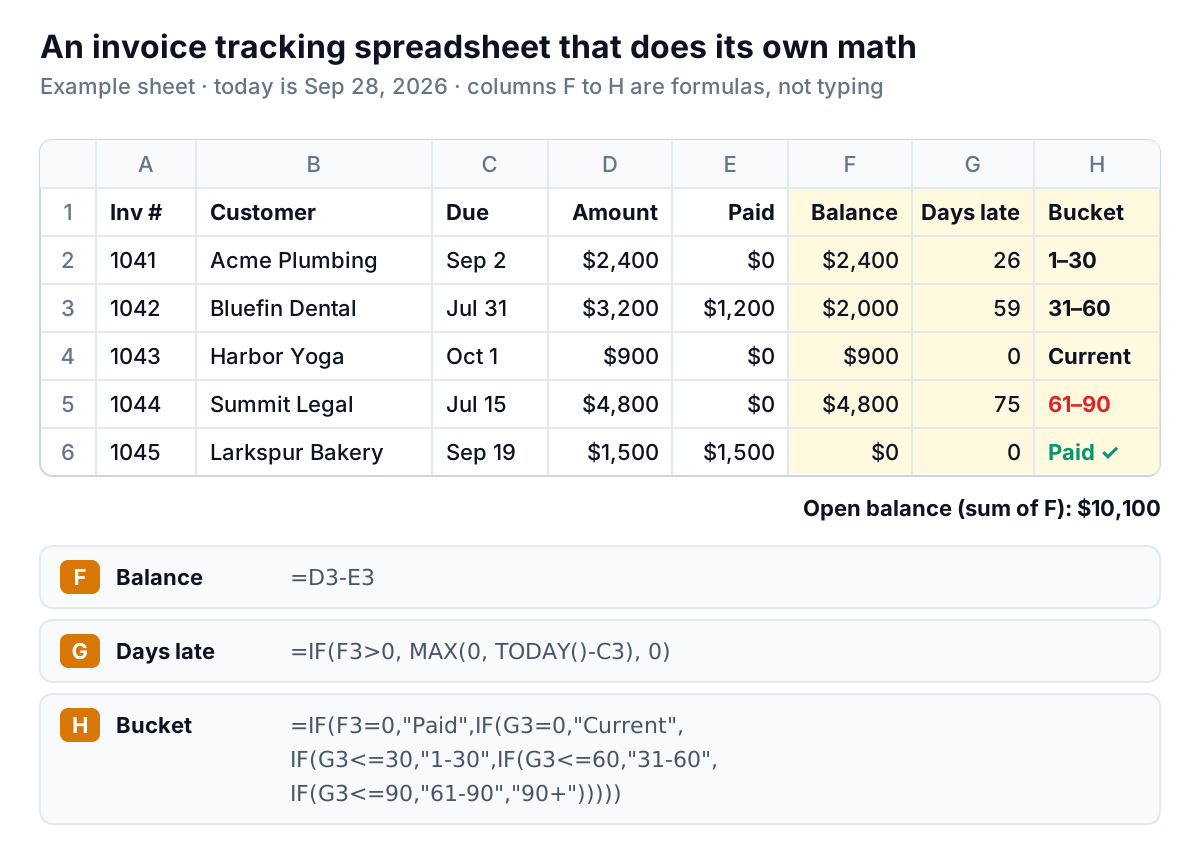
The columns
- A: Invoice number. Exactly as it appears on the invoice. This is how you'll match payments and how your customer will find it.
- B: Customer. Pick one spelling and stick to it. "Acme Plumbing" and "Acme Plumbing LLC" will split one customer into two when you total by name.
- C: Due date. A real date, not text. Not the invoice date: lateness runs from the due date.
- D: Amount and E: Paid to date. Keep paid as a running total, so partial payments work.
- F to H: formulas only. Never type a balance or a "days late" number by hand. A typed number is right on the day you type it and wrong every day after.
Add two columns you type yourself: Last contact (a date) and Next step (a few words, such as "promised 10/15" or "disputed, call Thursday"). Those two columns are what turn a list into a collections tool.
The formulas
These work in both Excel and Google Sheets, written for row 2:
- Balance (F2):
=D2-E2 - Days late (G2):
=IF(F2>0, MAX(0, TODAY()-C2), 0) - Bucket (H2):
=IF(F2=0,"Paid",IF(G2=0,"Current",IF(G2<=30,"1-30",IF(G2<=60,"31-60",IF(G2<=90,"61-90","90+")))))
Then add a small summary block: =SUMIF(H:H,"31-60",F:F) for each bucket, and a total of column F. Put conditional formatting on column G so anything over 30 turns amber and over 60 turns red. Freeze the header row. Sort by days late, largest first, whenever you sit down to chase.
Three mistakes that quietly break an invoice tracking spreadsheet
- Deleting paid rows. It tidies the sheet and throws away the history you'll want when a customer says "we always pay on time." Filter paid rows out instead.
- Subtotal rows or merged cells inside the list. They break sorting, and a total of the whole column counts those amounts twice. Keep totals in a separate block above or beside the data.
- Ageing from the invoice date. A customer on net-45 terms looks late on day 31 when they aren't, and you send a reminder that annoys a good payer.
Where a spreadsheet starts to break
A well-built sheet is accurate on the day you update it. The problems all come from the days in between, and from the moments more than one thing changes at once.
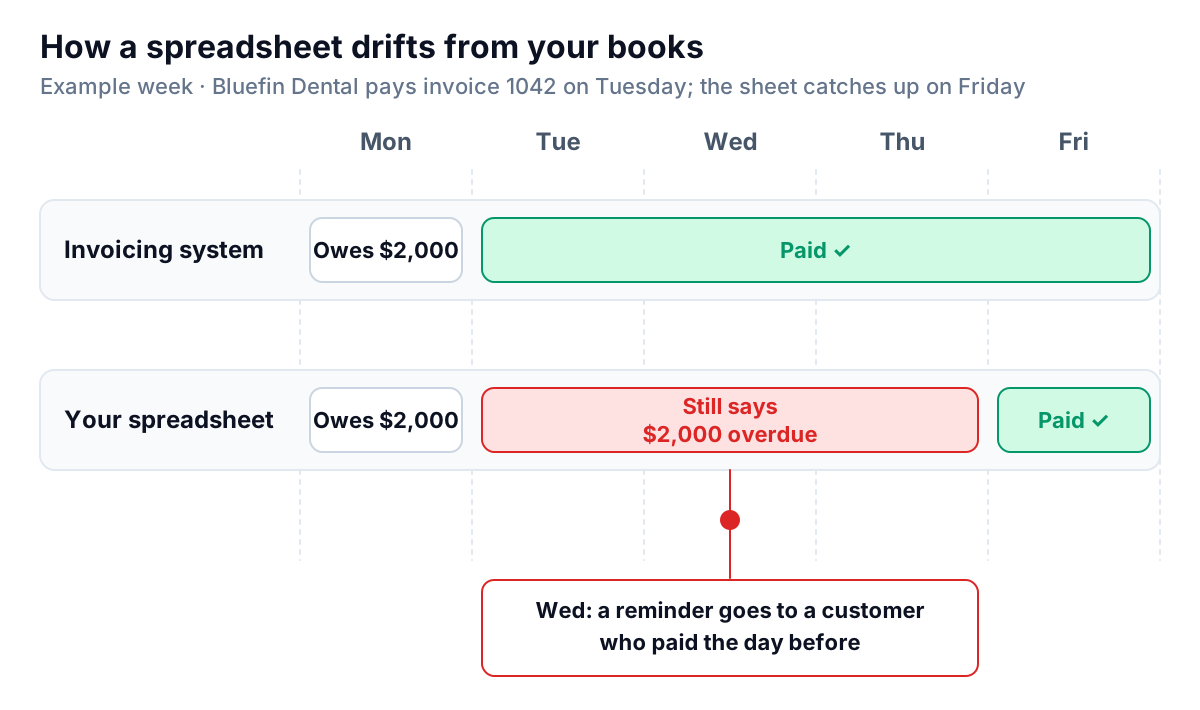
Drift
Your invoicing system knows about a payment the moment it is recorded. Your spreadsheet knows when you get round to it. Every day of lag is a day you might chase a paid customer or miss one who has just gone late.
Partial payments and lump sums
A customer pays $4,000 against three invoices totaling $5,200. Which invoices? Which one is still open, and for how much? A spreadsheet will hold whatever you type, which means it's easy to put the money against the wrong row and nothing tells you.
More than one source
Some invoices come from QuickBooks, a few from a job app, one or two from a Word template. Now the sheet is the only place they all meet, and keeping it current means checking three places. If that's you, this guide to tracking invoices across several systems covers the matching rules in detail.
Formula errors you can't see
Spreadsheets are famously error-prone. In Raymond Panko's review of spreadsheet error research, the field audits that used the most careful methods found errors in at least 86% of the spreadsheets they examined. Those were mostly large business models, not invoice lists, but the lesson carries over: a range that stops one row short of your newest invoice gives you a wrong total that looks right.
No memory
The sheet doesn't know you emailed Summit Legal on the 3rd, that they promised payment on the 15th, or that Bluefin Dental questioned the hours. Unless you type it, it isn't there, and "Next step" notes go stale fast.
What it actually costs you: a worked example
Software costs money every month. A spreadsheet costs time, and time is easy to undercount. Here is an example for a made-up studio with about 40 open invoices and 12 payments a week:
| Weekly task | How long | Minutes a week |
|---|---|---|
| Find and record 12 payments, matching each to an invoice | 2 minutes each | 24 |
| Add new invoices from your invoicing system | Batch of 8 | 10 |
| Check the sheet's total against your books and fix differences | Once | 15 |
| Decide who to chase and write 6 reminder emails | 5 minutes each | 30 |
| Total | 79 |
That's about 79 minutes a week, or close to 5.7 hours a month (79 × 52 ÷ 12 ≈ 342 minutes). If your time is worth $100 an hour, the sheet costs you around $570 a month, before counting a single mistake. Your numbers will differ, so run this table with your own. The point is to compare like with like: a monthly subscription against your hours, not against zero.
Late payment is common enough that this time isn't optional. The 2026 QuickBooks Small Business Late Payments Report found 59% of US small businesses had invoices more than 30 days overdue, and 39% of owners said a single late payment had made it hard to cover payroll or bills in the past year.
Six signs it's time to switch
There's no magic invoice count. Use these signals instead. If two or more are true, it's time to look at software. If none are, keep the sheet and add the formulas above.
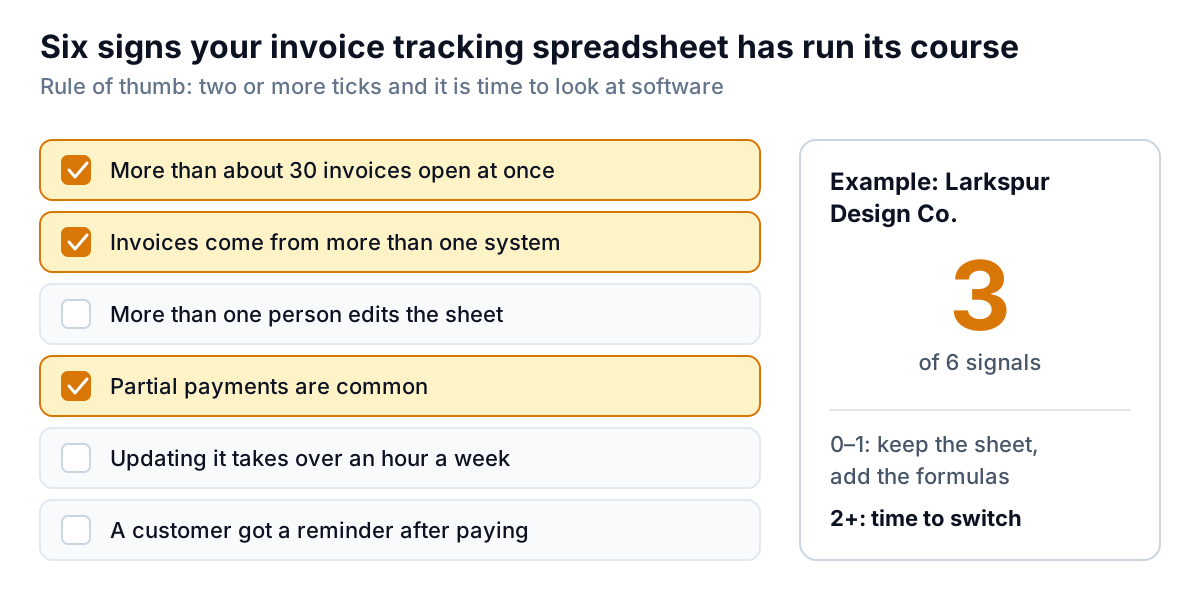
- More than about 30 invoices open at once. Past that, you can't hold the list in your head, so you depend on the sheet being current.
- Invoices come from more than one system. Every extra source is another place to copy from.
- More than one person edits it. Two people updating the same rows means overwrites and "I thought you'd done that."
- Partial payments are common. Matching lump sums to invoices by hand is where errors come from.
- Updating it takes more than an hour a week. See the table above.
- A customer has received a reminder after paying. Once is a lesson. Twice is a pattern, and customers notice.
Be honest about the other side too. A sole trader with eight clients on monthly retainers, all paying by bank transfer, may never need more than a sheet. Software is worth it when it removes typing, not when it adds another screen to check.
What to look for in software (and what you may already have)
Before you buy anything, check what your accounting system already does. QuickBooks Online, Xero and FreshBooks all track invoice balances, record partial payments and show aging reports, and each has some form of automatic payment reminder. Our guides to QuickBooks Online reminders and Xero reminders cover what those do and where they stop. For many businesses, moving the tracking into the accounting system and retiring the sheet is the whole fix.
If you outgrow that, or your invoices live in more than one place, judge any tool against this list:
- It reads from your books instead of asking you to type. If you still re-enter invoices, you've bought a nicer spreadsheet.
- It knows about payments fast, ideally within minutes of them being recorded.
- It ages by due date and shows the same buckets you're used to.
- It keeps contact history per invoice: what was sent, when, and what the customer replied.
- It stops when it should: on payment, on a dispute, on a promise date.
- You can see and approve what goes to customers. Automated emails with wrong amounts do more harm than no email.
- You can get your data out as a CSV if you leave.
How to switch without losing your history
- Pick a cut-over date, ideally a Monday at the start of a month.
- Reconcile the sheet one last time. Its total of open balances should match your accounting system. If it doesn't, find out why before moving anything.
- Save the notes. Copy the Last contact and Next step columns somewhere the new tool can see, or into each customer's notes. That history is the hardest thing to rebuild.
- Run both for two weeks. Keep updating the sheet and compare totals each Friday. When they agree twice in a row, stop.
- Archive the sheet as read-only, with the date in the file name.
This is where Parity fits, if it fits at all. We're building it for the business that has outgrown the sheet but doesn't want a heavy collections system. It connects to QuickBooks Online, Xero or FreshBooks, takes PDF invoices or a CSV or Excel export from anything else, and keeps one list with due-date ageing and balance per customer. For each overdue invoice that isn't disputed, paid or exempt, it drafts a friendly reminder in your voice. You approve, edit or skip it, and nothing goes out without your approval. Replies are sorted for you, and a promised date pauses reminders until the day after.
Parity launches in late November 2026; early access is open now. Get early access to Parity's invoice chaser
And if you're keeping your invoice tracking spreadsheet for now, that's a sound choice for a small, simple book. Just make the balance a formula, update payments the day they land, and run the six-signal check again in three months.