You sold 46 intro offers in September. That felt like a good month. The question that decides whether it was a good month is how many of those 46 people are still paying you in March, and your booking software can answer it, if you ask the right way. That's the practical case for AI for fitness studio analytics: not a prettier dashboard, but faster answers to the three or four questions that decide whether a studio grows or quietly churns.
The industry baseline is sobering. The Health & Fitness Association's 2025 Fitness Industry Benchmarking Report, covering 175 companies and more than 17,000 facilities, found member retention averaged 66.4% for the year. Put another way, a typical operator loses about a third of its members each year and has to replace them just to stand still. This guide covers where to look in your own data, three worked examples, what your booking software already does, and when it's worth going beyond it.
Three questions that matter more than the rest
Studio software can produce dozens of reports. Most owners need answers to three questions, checked monthly:
- Who is about to leave? Retention, and especially what happens in a new member's first month.
- Which classes earn their slot? Fill rate by time and day, and what each class costs to run.
- Do intro offers turn into members? The conversion path from first purchase to paid membership.
Revenue, attendance and sales follow from these. If retention is strong, the schedule fits demand and intro offers convert, revenue usually looks after itself. If one of them is broken, no marketing budget will cover it for long.
Retention: the first 30 days decide most of it
The most useful retention analysis for a studio is simple to describe. Take everyone who joined in a period, group them by how many times they visited in their first 30 days, and see what share are still active one, two, three and six months later. Here's what that looks like for a sample studio:
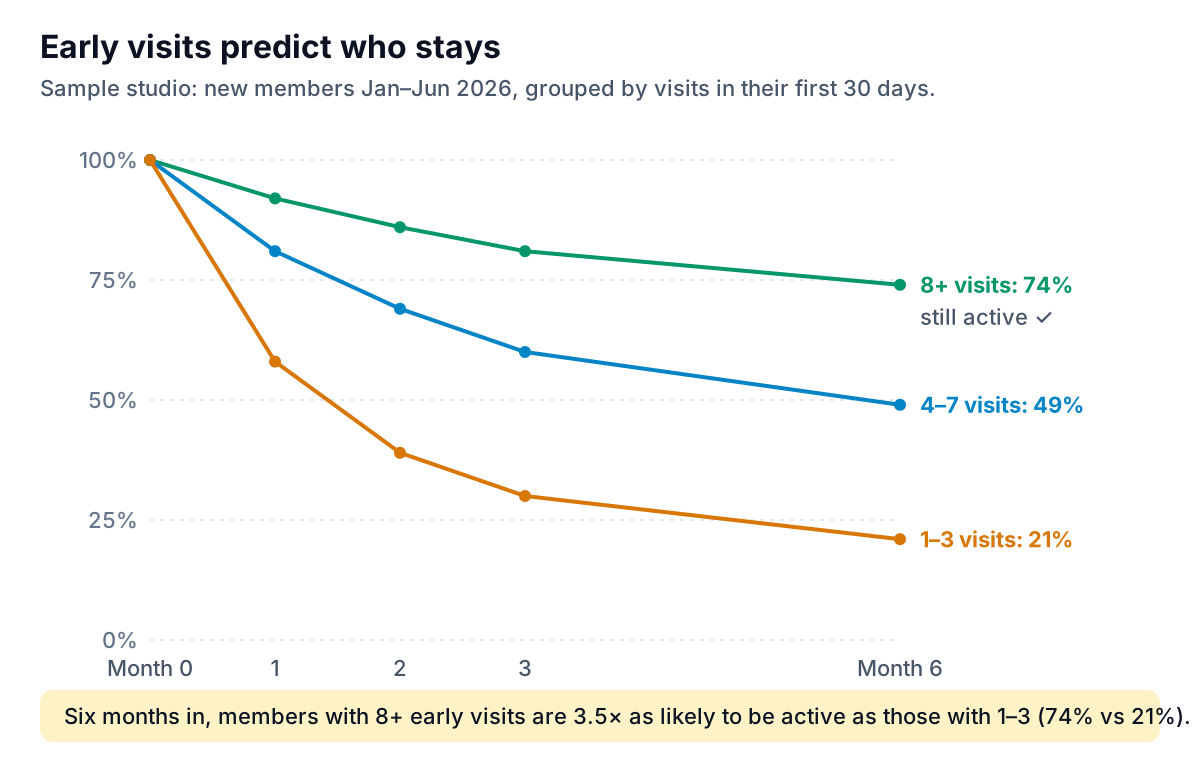
These are sample numbers, not a benchmark. Your thresholds will differ, and that's the point of running the analysis on your own data. The shape, though, is common: early habit predicts staying. Once you know your own threshold, it turns into a rule your front desk can act on.
- Find your line. Is the big drop between 3 and 4 visits, or 5 and 6? That's your first-month target.
- Flag new members below the line at day 14. Not day 30, when the habit has already failed to form.
- Act with a person, not an email blast. An instructor saying "I missed you on Thursday, want me to save you a spot?" works better than any automated sequence.
- Watch existing members for a drop in frequency. Someone who went from three classes a week to one is a stronger warning sign than someone who has always come once a week.
Some booking platforms now do part of this for you. Mindbody's AI Insights includes a Clients at Risk tool that, in Mindbody's words, "uses predictive analytics to flag clients who are likely to stop visiting, along with the projected revenue at stake," and the company says it's included on every plan. A tool like that is a good starting list. Check it against your own first-30-day analysis for a couple of months before you rely on it, so you know what it catches and what it misses.
Class fill: the heatmap that rewrites your schedule
Class utilization is the share of spots filled. Mariana Tek's Insights dashboard documentation gives a clear definition: the sum of checked-in reservations divided by the total capacity of the classes. Use checked-in, not booked, numbers. Late cancels and no-shows make a class look fuller than the room feels.
Laid out as a grid of time slots by day, six weeks of fill data shows you your schedule's strengths and weak spots at a glance:
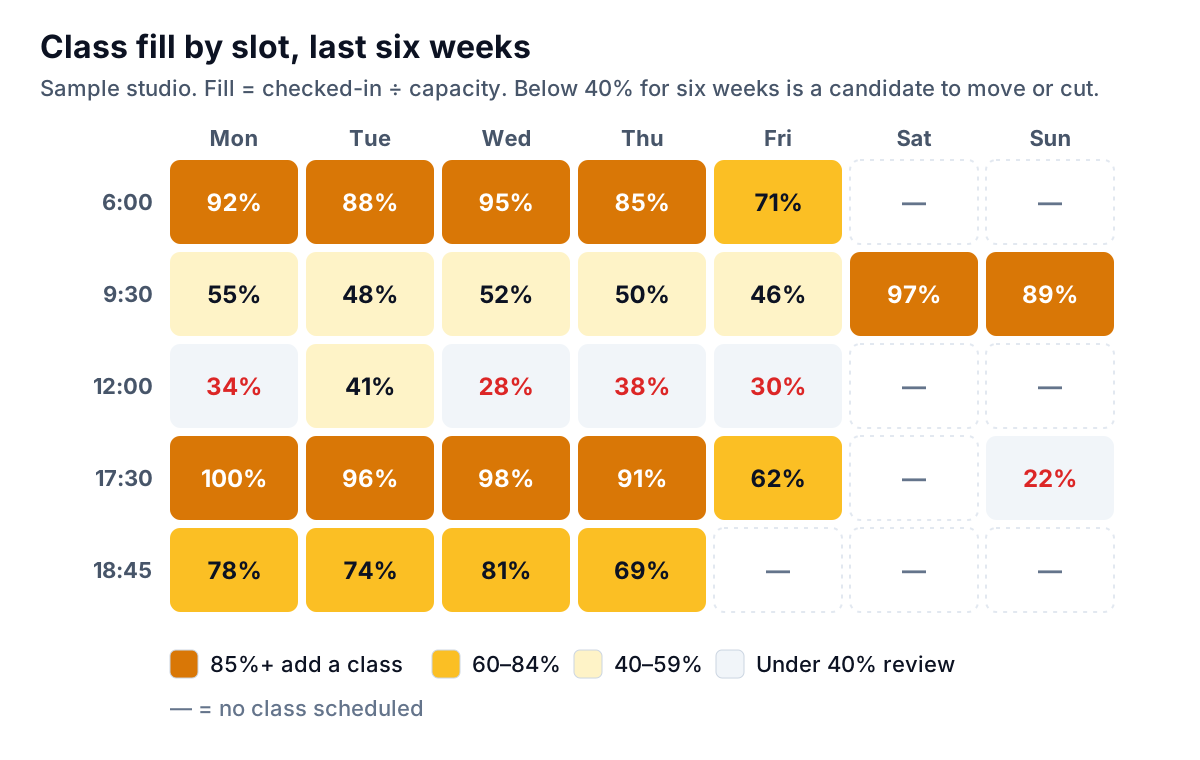
Decision rules that work for most studios (adjust the numbers to your room and margins):
- 85% or more for six weeks: people are being turned away or waitlisted. Add a class in an adjacent slot before they find another studio.
- Under 40% for six weeks: move it, change the format, or cut it. The Sunday 17:30 slot in the sample is a candidate.
- Look at the instructor too. If the same slot fills at 90% with one instructor and 45% with another, the problem may be the match, not the time.
- Count the cost. A 12:00 class at 30% of a 24-spot room is about seven people. If the instructor costs $45 a class and those seven are on unlimited memberships, ask whether that hour could be better used for private sessions or a different format.
A rough cost check for each slot
Fill rate tells you demand. To decide whether a class pays, add a rough cost. A simple version: take your monthly membership revenue, divide by total check-ins that month to get revenue per visit, then compare each class's visits with what it costs to run.
Example: a studio takes $38,000 a month in memberships and records 4,750 check-ins, so each visit is worth about $8. A 17:30 class with 23 people brings in roughly $184 of visit value against a $45 instructor fee. A 12:00 class with 7 people brings in about $56. Both cover the instructor, but one does it four times over and the other barely, before rent, heat and front-desk time. That doesn't automatically mean cutting the noon class, since it may be what keeps a group of shift workers as members. But it turns "it feels quiet" into a number you can discuss.
This is a good place for AI to help, because the follow-up questions are endless. "Is the 12:00 slot weak every weekday, or just Wednesday?" "Did the 17:30 fill change after we moved the 18:45?" Asking those in plain English instead of building a new report each time is where a chat interface earns its keep.
Intro offers: find where the money leaks
An intro offer is a marketing cost. It only pays off if people become members. Follow one month's buyers through the steps that matter:
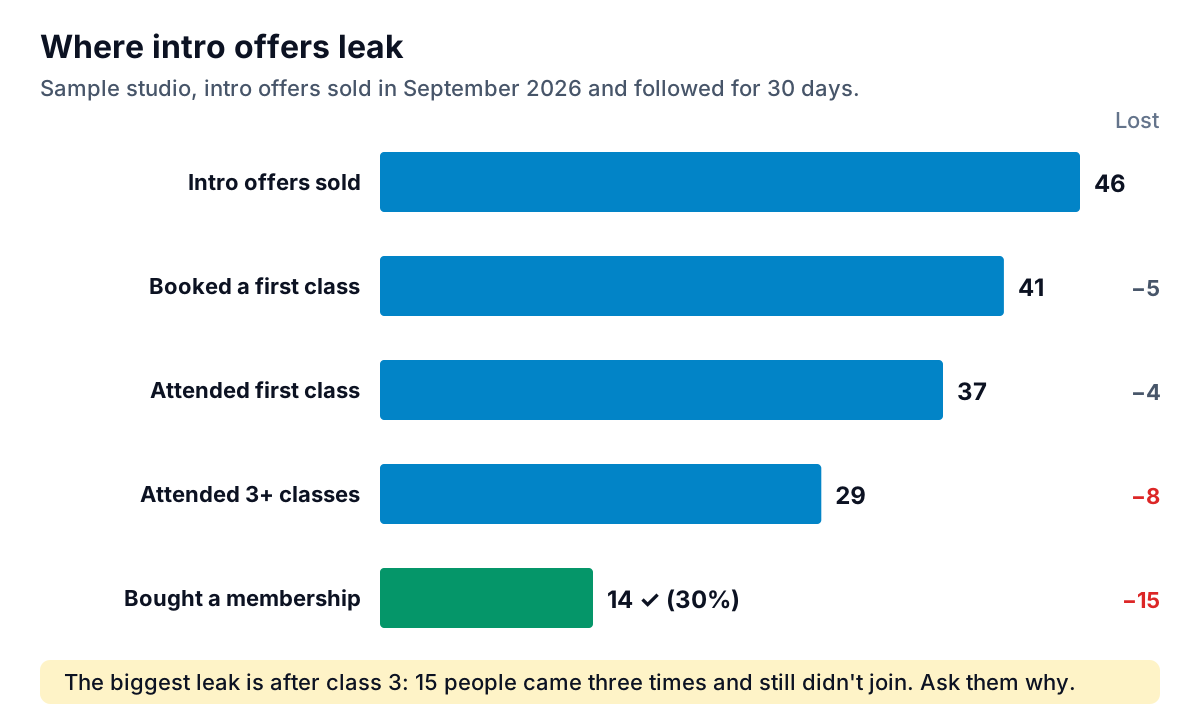
Each drop has a different cause and a different fix:
- Sold but never booked (5): a welcome problem. Call within 24 hours of purchase and book their first class with them.
- Booked but didn't come (4): nerves or friction. A text the day before with what to bring, where to park and who'll greet them.
- Came once or twice, then stopped (8): the first class didn't land. Ask instructors to learn the new person's name and check in after class.
- Came three or more times, didn't join (15): the biggest leak in this sample, and the most fixable. These people like you. Something about the offer, price or timing didn't work. Ask them directly. A short conversation before the intro period ends usually tells you more than any survey.
AI for fitness studio analytics: what your software does, and what it doesn't
Before paying for anything new, check what your booking platform already includes. Some of the AI for fitness studio analytics you want may already be in it. Most of the major ones now have analytics dashboards, and some have AI features.
| Platform | Analytics it documents | Notes |
|---|---|---|
| Mindbody | Weekly AI Insights summaries, Comparative Analytics, Clients at Risk, Big Spenders | Mindbody says these AI features are included on every plan tier |
| Mariana Tek | Insights dashboard: sales, active memberships, intro offers sold, attendance, first visits, class utilization | Aimed at boutique studios |
| Arketa | Sales, active subscriptions over time, bookings and visits, revenue by type | Filters by date range and location |
Built-in dashboards are good at what happened. They're weaker at three things:
- Custom cohorts. The first-30-day analysis above usually needs an export of visits by member and date.
- Combining data. Instructor pay from payroll, rent per hour, or a second location on a different system.
- Explaining the result. A chart of falling fill rates doesn't tell you which slot to cut.
That's where exporting to a separate tool helps. With Parity, you upload a visits or sales export as CSV or Excel and ask for what you need, for example "retention at 1, 3 and 6 months by first-month visit count, for members who joined this year". It builds the charts, tables and a written summary, and every number and chart is checked against queries on the full dataset before you see it. You can keep refining in chat ("now split by membership type"), and export a PDF for a business partner or investor. Files are sent encrypted, deleted after the report is built and never used for training.
For more on how these tools work in general, see our guides to AI tools for data analysis and AI chatbots for internal data. If you run a broader service operation with staff in the field, our service business dashboard guide covers a related set of numbers.
A 30-minute monthly review
- Retention (10 minutes). Last month's new members: how many are below your first-month visit line? Hand that list to the front desk with names attached.
- Schedule (10 minutes). Refresh the heatmap. Anything above 85% or below 40% for six weeks gets a decision, not a note.
- Intro offers (5 minutes). Last month's funnel. Which step lost the most people? Pick one fix for that step.
- One number for the team (5 minutes). Share one figure with instructors, such as the share of new members who reached your first-month line. Instructors can move that number more than anyone.
Done every month, this is what AI for fitness studio analytics should give you: fewer reports, faster answers, and a short list of people and slots to act on before the quarter's numbers are already decided.
Upload a visits export from your booking system and get checked retention, fill-rate and intro-offer charts with a written summary. Build a report from your data free