An electrician's pay app says 70% complete. Your site lead, standing in the building, says 60%. The difference on a $48,000 subcontract is $4,800, and if you pay it this month you're financing work that hasn't happened yet. No AI tool in the world can see that from the PDF. That's the honest starting point for AI invoice processing for contractors: it's very good at reading, coding and matching construction paperwork, and it still needs someone who knows the job to answer the questions only the job site can answer.
Construction invoices aren't like other businesses' bills. They come against subcontracts and purchase orders, they carry retainage, they need lien waivers, and they have to land on the right job and cost code or your job costing is fiction. Then the same thing happens in reverse when you bill the owner. This guide covers both directions, with worked examples, and ends with a short list of what to set up first.
Why construction invoices are harder
A plumber's supply-house bill and a design agency's software bill look alike to a general AI tool. To a contractor they're very different. Every bill you receive has to answer five questions before it's paid:
- Which job and cost code? A lumber yard delivery might be split across two jobs.
- Is it within the commitment? The subcontract or purchase order says how much you agreed to. Billing beyond that needs an approved change order.
- Is the percent complete real? Progress billing is a claim about the work in place.
- Is the paperwork attached? Lien waivers, certificates of insurance, and sometimes certified payroll.
- Is retainage withheld correctly? At the rate in the subcontract, and within any cap your state sets.
Getting this wrong is costly for everyone. Rabbet's 2025 Construction Payments Report estimated that slow payments cost US construction about $299 billion in 2025, that general contractors spend 65 hours a month managing payments to subs and vendors, and that both general contractors and subs named "lack of organized process" as the top reason for slow payment. That last finding is the useful one. Most of the delay is process, and process is what software helps with.
What AI invoice processing for contractors does well
Reading and coding bills to jobs
Modern extraction reads the vendor, invoice number, dates, amounts and line items from a PDF or photo, then suggests the job and cost code based on your history with that vendor. Construction-specific tools go further. Adaptive, for example, describes an AP agent that codes invoices to job and cost code, routes them for approval, catches duplicates, and blocks payment when lien waivers are missing, while your general ledger stays in QuickBooks or another accounting system. Procore Pay extends Procore's invoice management to payments and handles lien waivers on subcontractor invoices. If your volume is lower, the bill capture built into QuickBooks or Xero may be enough. The general guide to AI for invoice processing covers those options.
Matching against the commitment
This is where AI saves the most review time on subcontractor billing. Given the subcontract value, prior billing and the schedule of values, software can check every pay app in seconds: is the total within the contract, does the cost code match, is the retainage right, is a waiver attached? You spend your time only on the line that fails.
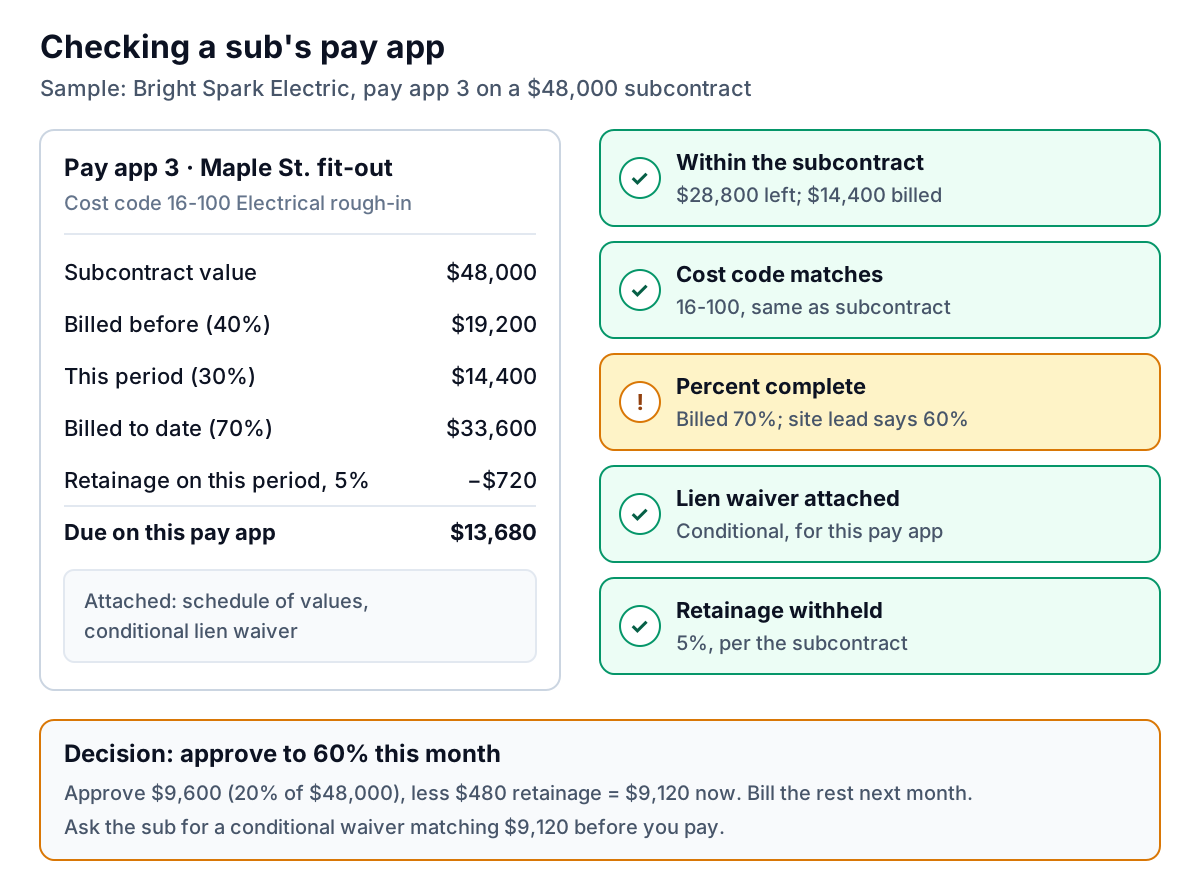
In this example the decision is simple once the flag is raised: approve to 60%, pay $9,120 now, and let the sub bill the remaining 10% next month. What matters is that the flag reached someone who could check it before the payment run.
Lien waivers and compliance documents
Chasing waivers is pure admin, and software handles it well: request the right conditional waiver with each pay app, swap it for an unconditional one after payment, and hold payment when one is missing. Waiver forms and rules differ by state, so make sure the tool uses the right statutory form where your state requires one, and ask your construction attorney if you're not sure.
Questions to ask any vendor
- Does it code to job, phase and cost code, or only to a general ledger account?
- Can it read a schedule of values and track billed-to-date per line, or only invoice totals?
- Does it check pay apps against the subcontract value and approved change orders?
- Can it hold a payment when a waiver or insurance certificate is missing?
- Does it sync with your accounting system both ways, including attachments, so your books and your job costs agree?
- How does pricing scale: per user, per invoice, per project or by revenue?
A tool that answers no to the first three is a general bill-capture tool. That may be fine for a small trade contractor with few subs, but a general contractor will outgrow it fast.
Where it still needs you
- Percent complete. AI can compare billed progress with your schedule, photos or daily logs, but it can't stand in the building. Someone with eyes on the work should confirm progress on every sizeable pay app.
- Change orders. A bill that includes extra work is only valid if the change was approved. If change orders live in email threads, the AI can't match them. Get them into one system first.
- Back-charges and disputes. If you're deducting cleanup costs or damage from a sub's payment, that's a conversation and a contract question, not an extraction task.
- Bank detail changes. Construction payments are large and regular, which makes them a target for fake "new bank account" emails. Confirm any change by phone with a contact you already know, every time.
- Legal limits. Retainage caps, prompt payment deadlines and pay-when-paid clauses vary by state and by public or private work. California, for example, caps retainage on private projects at 5% for contracts entered into on or after January 1, 2026, according to Levelset's summary. Check your state's rules and your contracts. Software should enforce them, but you have to set them correctly.
The monthly cycle, both directions
For a general contractor, invoices flow in and out on a monthly rhythm. Bills come in from subs and suppliers, you assemble your own pay application to the owner, and money flows back down. Here's an example cycle.
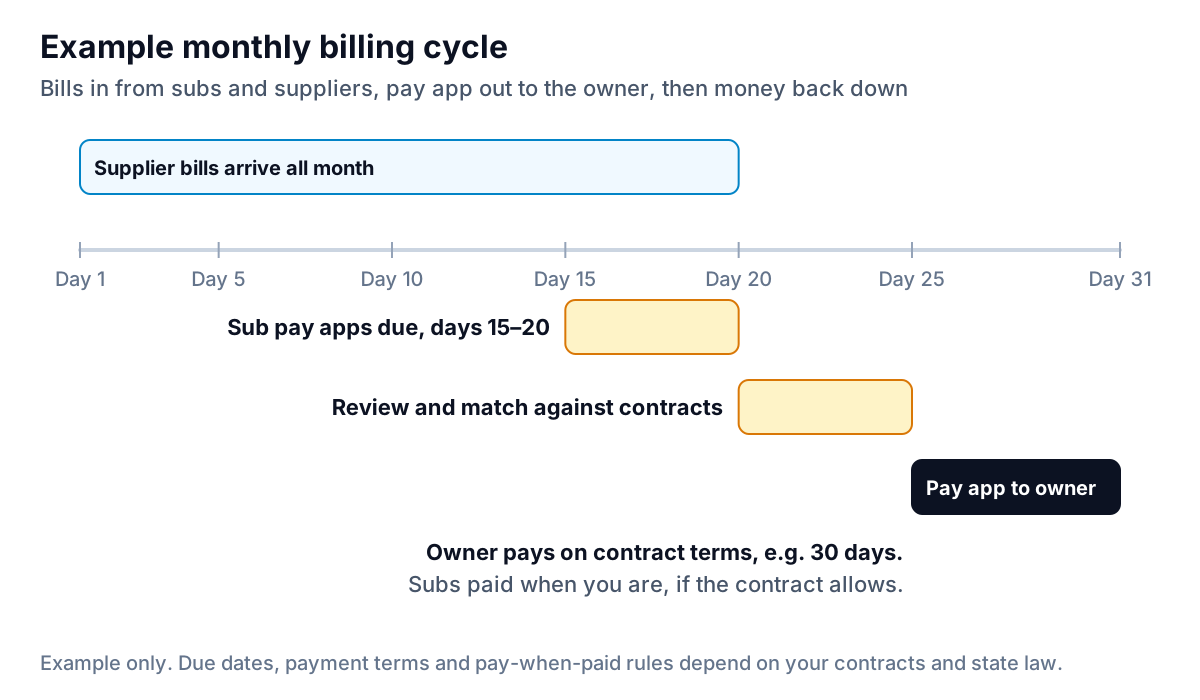
The squeeze is in days 20 to 25. Every sub pay app has to be reviewed before your own pay app can include that work, and a late or wrong pay app to the owner delays everyone's money by a month. If AI matching clears the routine pay apps on day 20, your project managers can spend days 21 to 24 on the two or three that need judgement.
Your own pay apps and retainage
On the billing side, AI helps less with creating pay applications (your project management or accounting software already builds them from the schedule of values) and more with following them up. Two things slip most often: the pay app the owner's lender is sitting on, and retainage.
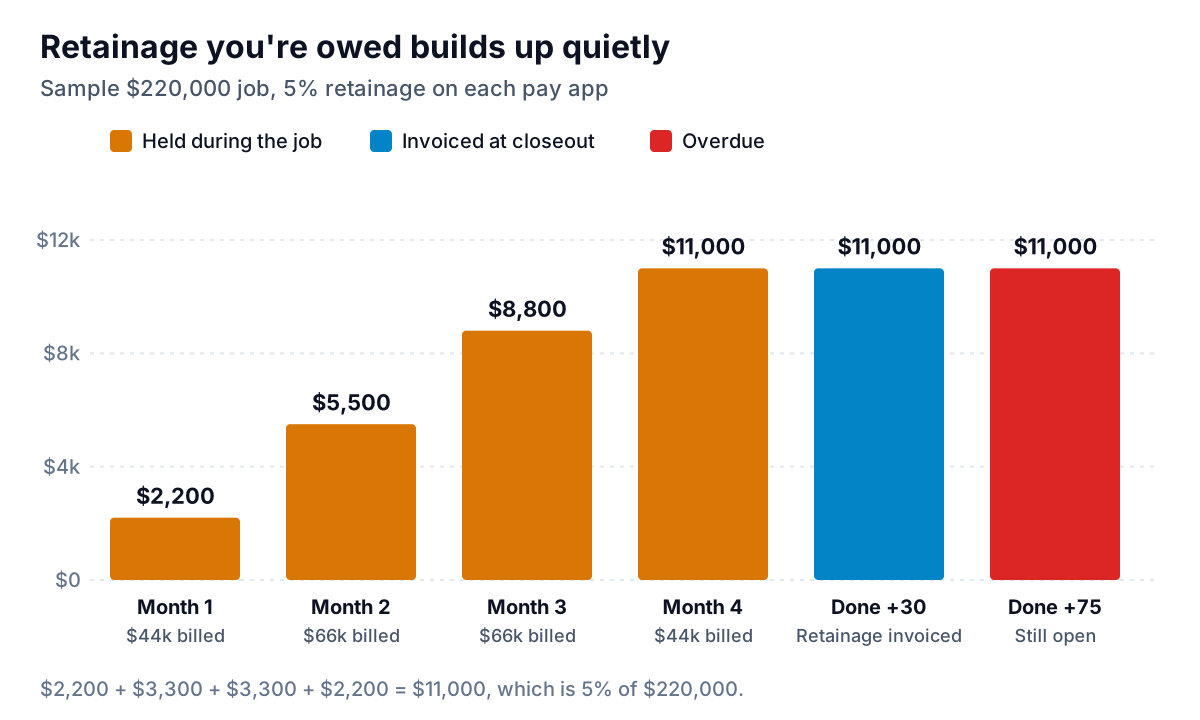
In this example, $11,000 (5% of a $220,000 job) is your profit sitting in the owner's account. Closeout drags with punch lists, warranties and documents, and the retainage invoice ends up 75 days old. The fix is simple and dull: make the retainage invoice its own line in your receivables, send it the day the closeout documents are complete, and follow up weekly like any other invoice.
Chasing what you're owed without souring the job
Contractors are often told to file liens or threaten them. Sometimes you need to, and the deadlines are strict, so talk to a construction attorney early if a payment is seriously late. But most late construction payments are stuck in someone's process, not refused. A short, specific, friendly reminder clears most of them.
Notice it offers to help, asks a question, and gives the exact amount and date. If the client disputes a line, stop reminding and resolve the dispute first. The guide on what to do when a client disputes an invoice covers that. For the full follow-up sequence, see how to chase unpaid invoices without losing the client.
This is where Parity's invoice chaser fits, and only this part. It doesn't build pay apps, track waivers or replace your construction accounting tool. It connects to QuickBooks Online, Xero or FreshBooks (or takes a CSV or Excel export) and shows every open invoice, including retainage invoices, by age and customer. For each overdue one it drafts a single friendly reminder in your voice, checks the amount, date and invoice number against your books, and sends only when you approve. If a client replies with a dispute, chasing stops and the invoice comes to you. It launches in late November 2026. For managing schedules, crews and change orders, see the companion guide on AI project management for contractors.
What to set up first
- One inbox for every bill and pay app. Ask subs and suppliers to send only there. AI can't process what's in a superintendent's truck.
- Commitments in the system. Enter every subcontract and PO with its value, cost code and retainage rate. Without them, there's nothing to match against.
- A progress sign-off. Decide who confirms percent complete, above what amount, and by which day.
- Your state's rules. Retainage cap, waiver forms, prompt payment timelines. Set them once, then let the software enforce them.
- A weekly receivables review that includes retainage, with the oldest invoice first.
Do those five and AI invoice processing for contractors stops being a demo and starts saving your project managers real hours each month, while the decisions about the work stay with the people who have seen it.
Parity drafts a friendly, checked reminder for every overdue invoice in your books and sends nothing without your approval. Get early access to Parity's invoice chaser