Five weeks into a $68,000 kitchen remodel, the job has used 62% of its budget and is 48% done. Nobody stole anything and nobody made a dumb mistake. The homeowner asked for two extra outlets and under-cabinet lights, the electrician said "sure", and the work never became a change order. Demo ran long on a 1960s house. Cabinet freight wasn't in the bid. Most contractors find this out at closeout, when the margin is already gone.
That gap between the truck and the office is where AI project management for contractors earns its keep. It won't run your jobs for you. What it does well is the typing: turning voice notes, photos and paper bills into records fast enough that the numbers are true on Monday morning. This guide covers what the AI in current contractor software actually does, the three leaks it plugs, a 20-minute weekly review that would have caught the kitchen problem in week 3, and what to buy first for a crew of 2 to 20.
What AI project management for contractors does today
Strip away the marketing and the AI features in construction project management software do four kinds of work. All four are reading and writing. None of them is judgement.
- Turning talk and photos into records. CompanyCam's AI features build field reports, checklists, photo captions and project updates from what you say and shoot on site, so a walkthrough becomes a written page without anyone typing.
- Reading documents. Buildertrend's AI tools include Bill Capture, which pulls vendor details, line items and cost codes out of bills, plus features that name and organize plan sets and pull product details from a supplier link into a selection.
- Drafting summaries. Buildertrend's Client Updates gathers information from across a project and drafts a summary "for quick review and approval". Buildertrend says it cuts the time spent compiling client updates by 97%. That's the vendor's figure, so treat it as their best case.
- Answering questions about your data. JobTread's AI Connector links your JobTread account to assistants such as Claude and ChatGPT, so you can ask in plain language for a draft budget, a schedule or a look at job performance. JobTread's own page warns that the AI can make mistakes or miss context, that you should review what it produces, and that it acts with your account's permissions.
What none of them do: decide whether your framer is falling behind, price a kind of job you've never built, or tell a homeowner no. Those stay with you. The most useful mental model is a fast office clerk who never gets tired of paperwork and sometimes mishears you.
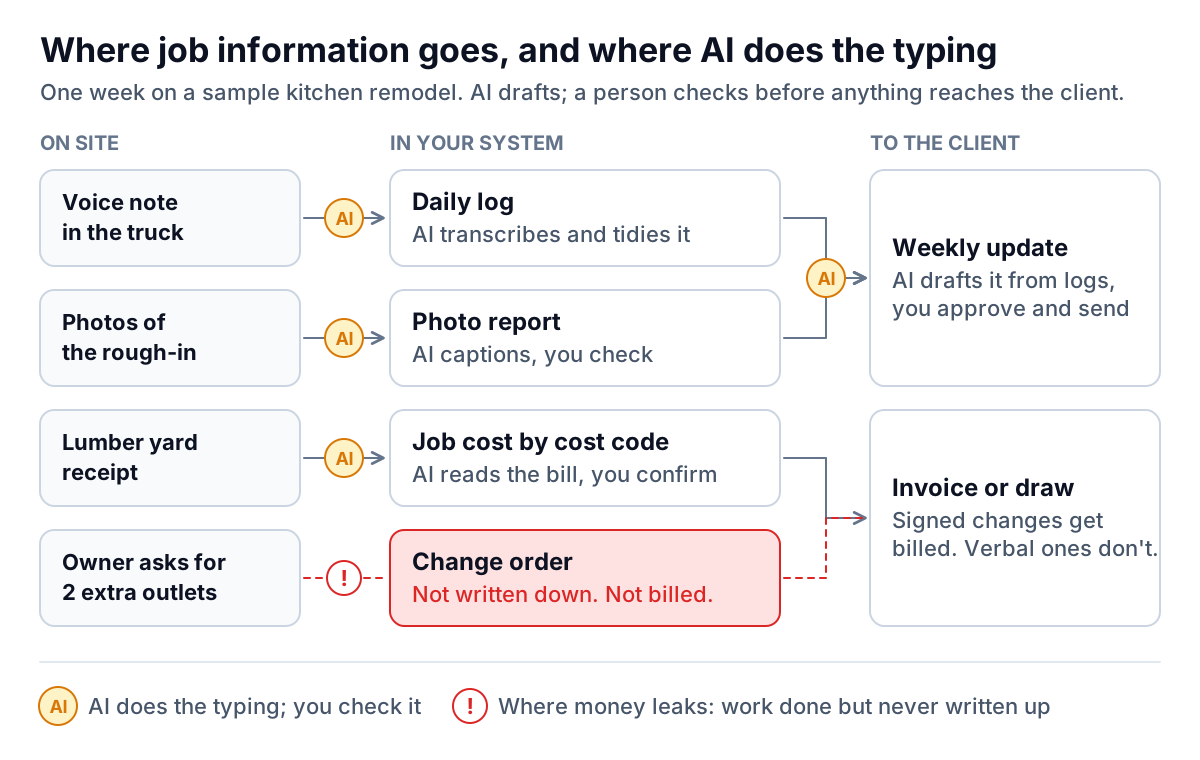
The three leaks AI project management plugs
1. The daily log nobody writes
Daily logs are the record you'll want when there's an argument about when the drywall went up or why the inspection slipped. They're also the first thing to stop when the crew is busy. A 90-second voice note recorded in the truck, transcribed and tidied by AI, gets you most of a decent log. Give your leads a fixed order to talk through:
- Date, job, and who was on site.
- What got done today.
- What's blocked, and what's needed to unblock it.
- Deliveries and inspections.
- Anything the owner asked for.
The last item matters most. Get your leads saying "owner asked for" out loud every day. It's the phrase that turns into a change order later.
2. The receipt in the console
Material costs that sit in a glovebox for three weeks make every job-cost report wrong in the same direction: too good. Bill-reading AI shrinks that delay to a day or two. Someone photographs or forwards the bill, and the software pulls out the vendor, amount, line items and a suggested cost code.
Check the cost code on anything over a few hundred dollars. The AI guesses codes from line-item text, and "2x6 PT 12ft" could be deck framing or a sill plate on a different job. One miscoded $4,000 window order makes two jobs look wrong at once.
3. The change order that stayed verbal
No software can capture a conversation it never heard. What AI can do is make writing it down cheap enough that people actually do it. A voice note like "owner wants two more outlets on the island and LED strips under the uppers" can become a draft change order with the scope written out. You add the price, and the homeowner signs on a phone in the driveway.
A weekly job-cost check you can keep up
Most small contractors look closely at job costs twice: when they bid and when they close. By closeout the information is history. The fix is a weekly comparison of two numbers per job: the share of the budget spent and the share of the work complete.
Percent complete is a judgement call, and that's fine. Estimate it by phase rather than by feel: demo done, rough-in done, drywall half hung. Then put the two numbers side by side.
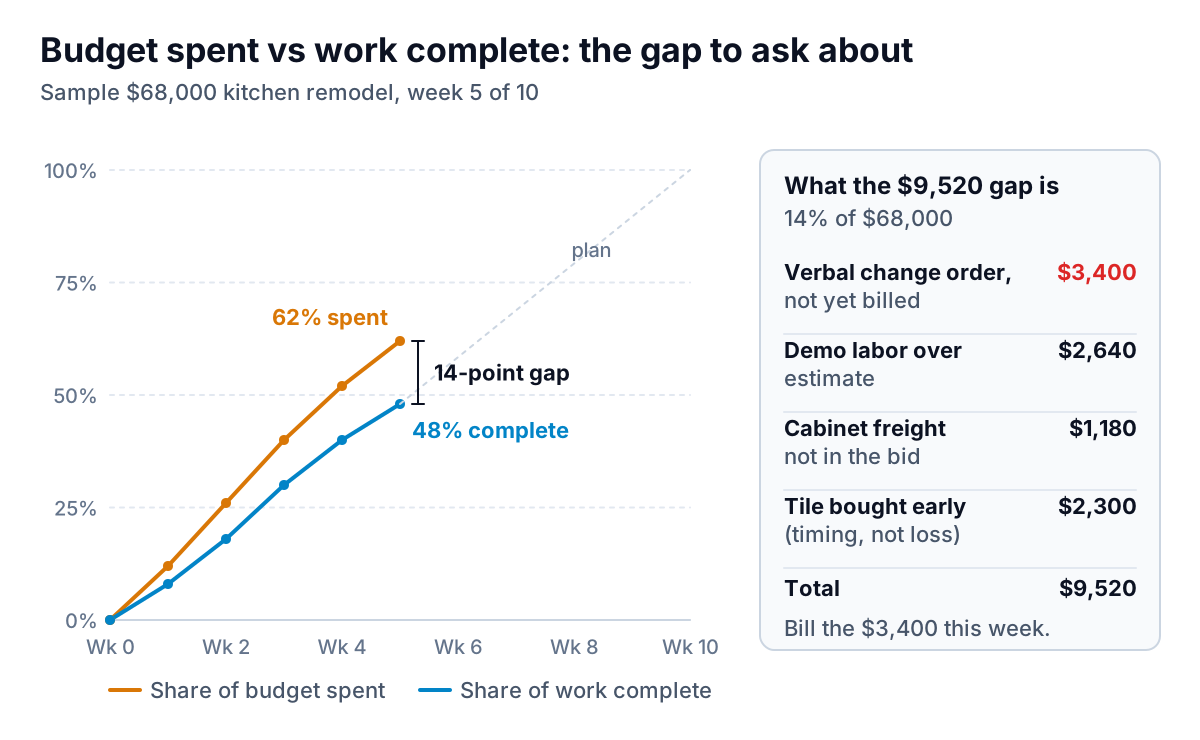
On the sample kitchen, the gap opened in week 1 and widened every week. When the owner finally sat down with it in week 5, it split into four pieces, and each had a different fix:
- $3,400 verbal change order. Write it up, get it signed, bill it with the next draw. This is the only part of the gap you can get back.
- $2,640 demo labor overrun. Gone. Add a line for older houses to your estimating template so the next bid covers it.
- $1,180 cabinet freight. Also gone. Add freight as a standard line on cabinet packages.
- $2,300 of tile bought early. Timing, not loss. It evens out when the tile goes in during weeks 6 and 7.
The AI part of this is the bookkeeping. Logs, bills and time entries arrive coded and on time, so the "spent" number is real on Monday. The judgement part, working out what the gap means, is a five-minute talk with your lead. That split is the honest shape of AI project management for contractors: the software makes good records cheap, and you still make the calls.
The Monday review: 20 minutes, every job, one screen
Put every active job in one table: budget, cost to date, percent spent, percent complete, the gap between them, and any unbilled changes. If your project management software has a job-costing report, start there. If it doesn't, export costs to a spreadsheet. You only need one row per job.
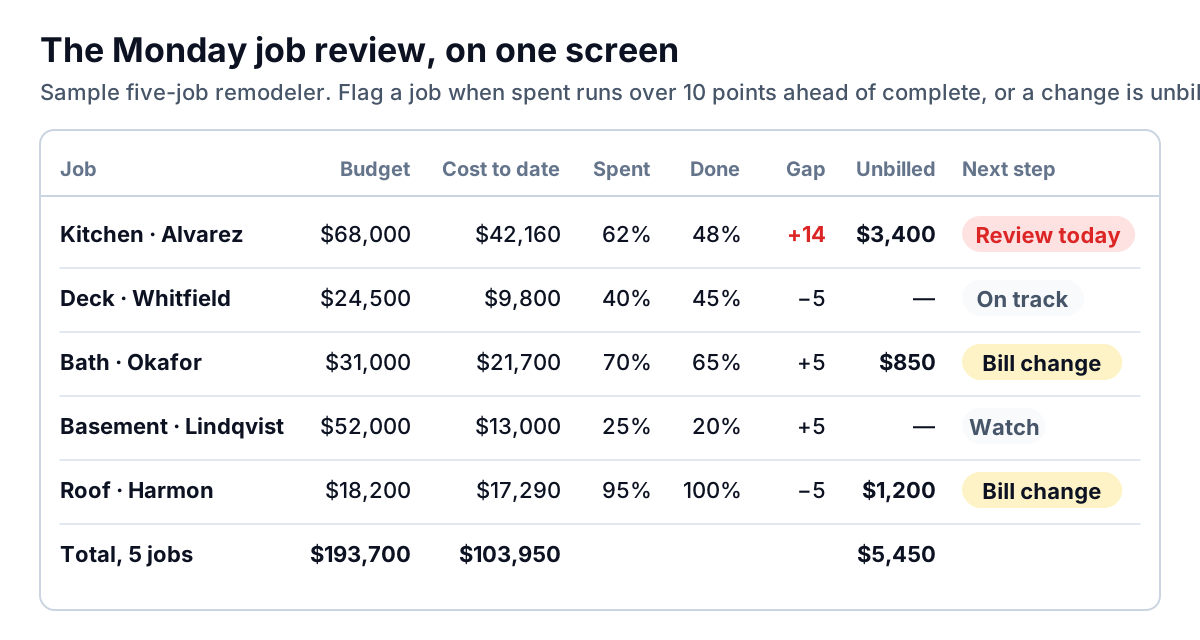
Two flag rules are enough for a small shop:
- Spent runs more than 10 points ahead of complete: talk to the lead today and break the gap down the way the kitchen example does.
- Any change that hasn't been billed: it goes on the next invoice or draw, whatever its size.
Everything else is "watch". On the sample table, that's one job to dig into and $5,450 of agreed work to bill. That's the whole meeting.
A gap that runs the other way (complete ahead of spent) isn't automatically good news. On the roof job it's because a $1,200 change was done and not yet billed. Usually it means a bill hasn't been entered yet. Either way, the review catches it.
Billing the work is only half of it. If you're then waiting weeks for the money, our guide on how to chase unpaid invoices covers the follow-up. If an owner pushes back on a change-order line, read what to do when a client disputes an invoice before you send another reminder.
Choosing AI project management tools by crew size
The right setup for AI project management for contractors depends less on features than on how many people need to put information in.
| Crew | What to use | Why |
|---|---|---|
| Owner plus 1 to 3 | A photo app with AI notes and reports, your accounting software, and one spreadsheet for the Monday table | You don't need scheduling software for three people. You need records that exist. |
| 4 to 15, several jobs at once | An all-in-one contractor platform (Buildertrend, JobTread or similar) with job costing, daily logs, change orders and a client portal | The AI summaries are only accurate when logs, bills and change orders live in the same place. |
| 15 or more, several crews | The same, plus a cost-code list everyone uses, a sync with accounting, and one person who owns the data each week | At this size, bad coding does more damage than missing features. |
Questions to ask in any demo:
- Show me a change order going from a voice note to a signed document. How many taps does it take?
- After the AI reads a bill, who approves the cost code, and where does it land?
- Can I edit an AI-drafted client update before it goes out? Buildertrend designs its updates for review and approval. Insist on that from any vendor.
- Can I export job costs, change orders and logs to CSV? You'll want your data out for your accountant and for your own analysis.
- Is my project data used to train the vendor's models? Get the answer in writing.
- Do field crew count as paid users, or only office staff?
Mistakes to avoid
- Letting AI talk to homeowners unread. A client update that says the countertops are installed when they've only been templated costs you a phone call and some trust. Read every draft.
- Auto-coding bills with no review. Spot-check the big ones weekly, as above.
- Buying for features you won't use. Detailed schedules with dependencies look great in a demo. Most remodelers really run a two-week lookahead. Buy for logs, costs and change orders first.
- Treating schedule progress as cost progress. Some tools estimate percent complete from schedule items ticked off. That tells you about time, not money. Use your lead's estimate by phase for the job-cost check.
- Rolling out everything at once. Start with daily logs for one month. Add bill capture the next month and change orders after that. Crews adopt one new habit at a time.
Where Parity fits, and a first step for this week
Parity doesn't manage projects, schedule crews or hold your change orders. It's an AI reporting tool. You upload a CSV or Excel export and describe what you want: "job cost against budget for every open job, flag gaps over 10 points, list unbilled change orders". It builds a report with KPI tiles, charts, summary tables and a short written summary. Every number is checked against queries on the full dataset before you see it. You can refine it by chat ("split by project manager"), and export it to PDF for your accountant or a lender. Files are deleted after the report is built and aren't used for training. It's useful when your project software's reports don't give you the one-screen view, or when you want a quarterly look across every job. The Excel-to-dashboard page shows how it works.
If supplier bills are piling up faster than anyone can enter them, our guide to AI invoice processing for contractors covers that side of the office.
Your first step needs no software. This Monday, open a spreadsheet and write one row per active job: budget, cost to date, your honest percent complete, and any change that hasn't been billed. If one job shows a gap of more than 10 points, you've found your reason to set up daily logs and bill capture properly. If none does, run it again next Monday. The habit is worth more than the tool.
Export job costs to CSV or Excel, and Parity builds the budget-versus-actual view with every figure checked. Build a report from your data free