Eleven minutes. That is a fair guess at how long one supplier bill takes when you do it by hand: open the email, download the PDF, type the vendor, number, dates and total into your accounting software, pick an account, check it against what you ordered, ask someone to approve it, then file the PDF. At 150 bills a month that is more than 27 hours, most of it typing numbers that already exist in a document. AI for invoice processing takes the typing away. It does not take away the judgement, and the businesses that get burned are the ones that forget the difference.
This guide is about the bills you receive from suppliers and contractors (accounts payable). It covers what the AI actually does at each step, a worked example of the time saved, the five places it still goes wrong, the main types of tool and what they cost, and a 30-day way to start without putting a wrong payment out the door.
What AI for invoice processing actually does
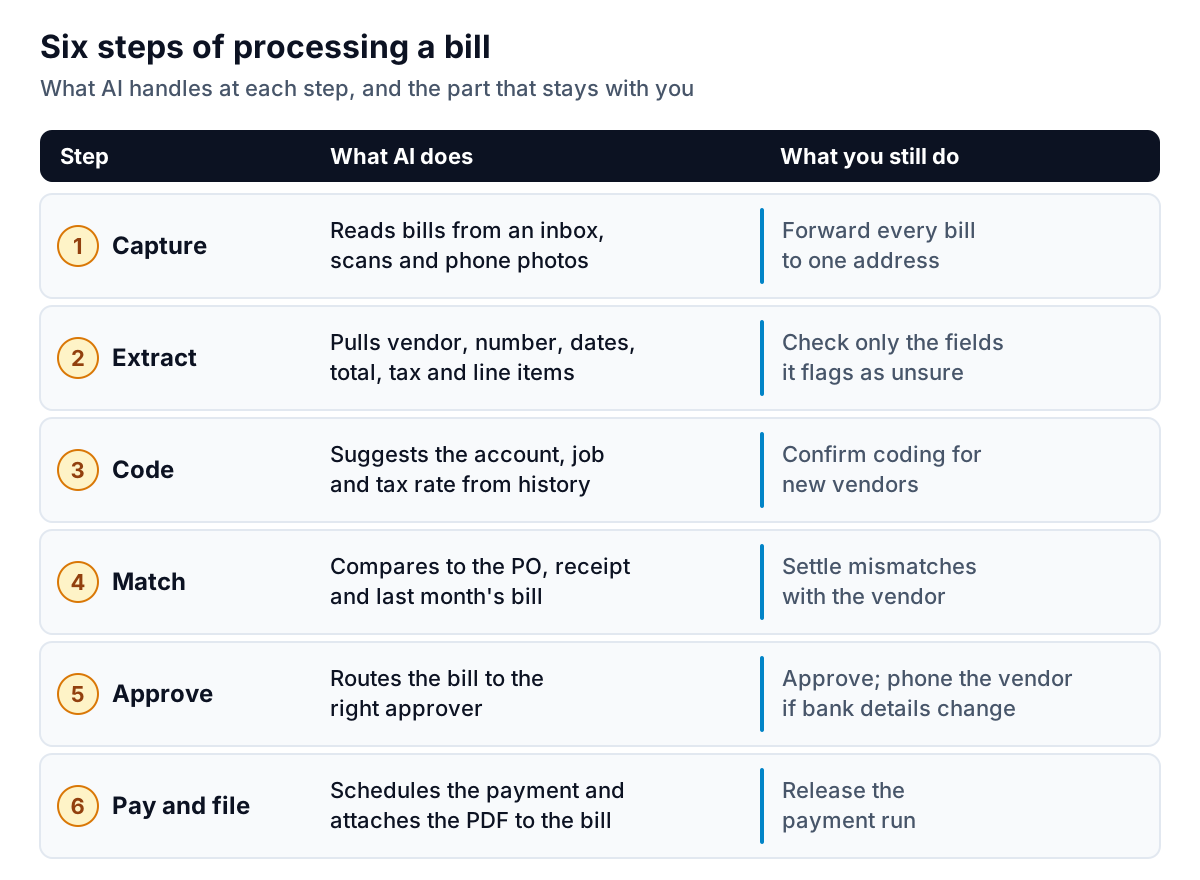
Processing a bill is six small jobs, and AI helps with each one differently. Some it nearly finishes for you. Others it only prepares.
Capture and extraction
Older tools used OCR templates: someone told the software where the invoice number sat on each supplier's layout, and it broke when the layout changed. Current models read the whole page as a person does, then return structured fields with a confidence mark on each one. The fields that matter for a bill are the vendor, invoice number, issue date, due date, subtotal, tax, total and, for some businesses, each line item.
This is now built into the mainstream accounting tools. Intuit says QuickBooks Bill Pay gives each account a dedicated email address for vendor invoices, and that it reads the invoice and fills in the bill with the vendor, number, amount, due date and line items, then puts it in a review queue. Xero says its document capture extracts data from bills and receipts on all three of its US plans. Which features you get can depend on your plan, so check before you buy anything extra.
Coding and matching
Once the fields are out, the software suggests where the bill goes: the expense account, the tax rate, sometimes the job or class. It learns this from how you coded the same vendor before, so it is good with regular suppliers and weak with new ones. Matching compares the bill to something you expected: a purchase order, a delivery receipt, or simply last month's bill from the same vendor. A $1,480 bill from a cleaning company that always charges $1,200 should stop and wait for a person.
Approval, payment and filing
Here the AI is mostly a router. It sends the bill to whoever approves that vendor or amount, reminds them, and attaches the PDF to the record so you never hunt for it at tax time. Releasing the money stays a human job, and it should.
A worked example: where 27 hours a month go
Here is an example business, Ridgeway Property Services, a 12-person maintenance firm that receives about 150 supplier bills a month. The minutes per step are illustrative estimates, not measurements, but they're close to what many small finance teams describe when they time themselves.
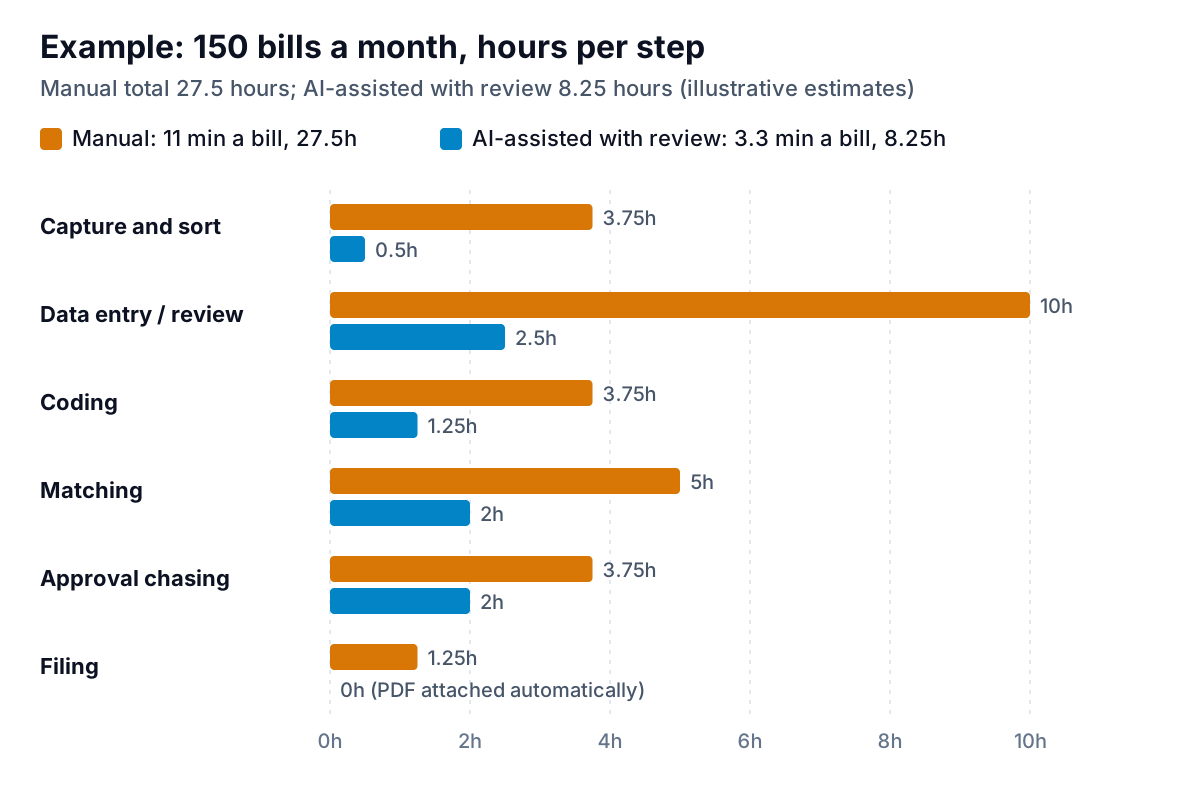
Three things stand out:
- Data entry drops from 10 hours to 2.5, not to zero. Someone still reviews the fields the AI is unsure of. Plan for about a minute per bill on average: most take seconds, a few take five minutes.
- Matching and approvals barely change. If your approver takes four days to look at a bill, AI makes the reminder automatic but cannot make the decision.
- The saving is about 19 hours a month. At a loaded cost of $35 an hour, that is roughly $670 a month. Compare that with the price of the tool before you decide.
Large-company benchmarks point the same way. Ardent Partners' 2025 research, as reported by WEX, put the average cost of processing an invoice at $9.40, against $2.78 for best-in-class teams, and the average cycle at 9.2 days against 3.1. Those are enterprise accounts payable teams, so don't apply the dollar figures to a ten-person business. The gap between average and best is the useful part, and most of it comes from fewer touches per bill.
Five places it still goes wrong
AI reads invoices well. It does not know your business. These are the errors to design around.
- Total versus balance due. A bill with a deposit already paid shows two numbers. The model sometimes picks the invoice total when you owe only the balance. Paying the total means you've overpaid and have to ask for the money back.
- Dates in the wrong format. 04/05/2026 is April 5 in the US and 4 May in the UK. A supplier abroad, or a template set up abroad, can flip your due dates. Check the first bill from any new vendor by eye.
- Duplicates. The same bill often arrives twice: once by email, once as a reminder with the PDF re-attached. Good tools flag a repeat vendor, number and amount. Make sure yours does, and never switch that check off.
- Coding that looks right but isn't. A hardware store bill might be materials for a client job or supplies for the office. The model guesses from history. Wrong coding doesn't cost cash today, but it skews your job costs and your tax return.
- Changed bank details. This one is fraud, not error. The FBI's 2025 Internet Crime Report lists 24,768 business email compromise complaints and about $3.05 billion in reported losses. A common version is a convincing email from a "supplier" with new payment details. AI extraction will read the new account number perfectly, which is exactly the problem.
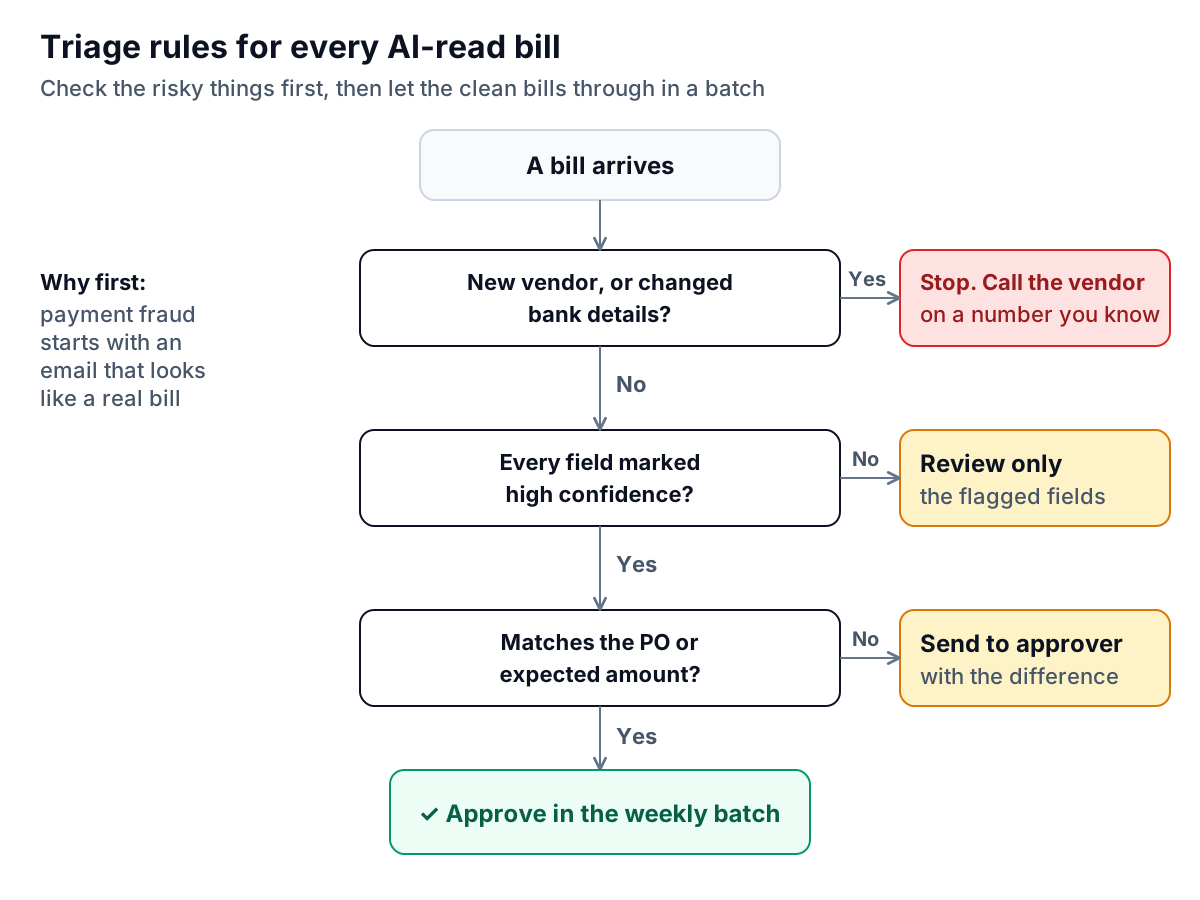
Put those five together and you get a simple triage order. Check the risky things first, check uncertain fields second, and let clean, expected bills through in one batch.
Your options, from built-in to dedicated
There are four kinds of tool. Most small businesses trying AI for invoice processing should start with the first and move only when they hit a specific limit.
| Type | Examples | Good for | Watch for |
|---|---|---|---|
| Built into your accounting software | QuickBooks Bill Pay, Xero document capture | Under a few hundred bills a month, one approver | Features vary by plan; approval routing is basic |
| Capture add-ons | Dext, Hubdoc | Bookkeepers handling many clients; receipts and bills together | Another subscription and another place to review |
| Accounts payable platforms | Bill, Ramp, Adaptive (construction) | Several approvers, purchase orders, job costing | Setup time; per-user or per-transaction pricing |
| A general AI chat tool | Pasting a PDF into a chatbot | A one-off question about a single document | No audit trail, no duplicate check, no link to your books |
Prices change often, so check each vendor's current pricing page rather than trusting a comparison article, including this one. When you compare, ask four questions:
- Does it show a confidence mark per field, and can I see the PDF beside the fields?
- Does it flag duplicate bills by vendor, number and amount?
- Does it flag a change in a vendor's bank details?
- Does it sync both ways with my accounting software, including the attached PDF?
If the answer to any of those is no, the time you save on typing comes back as time spent fixing things later.
If you work in construction, bills arrive with job numbers, retainage and lien waivers attached, and the questions are different. The guide to AI invoice processing for contractors covers that case.
A 30-day rollout that won't pay a wrong bill
Don't switch everything on at once. The safest way to adopt AI for invoice processing is to run it beside your current process for a month and measure it.
Week 1: one inbox
Set up the capture address and ask your top 20 suppliers to send bills there. Keep entering bills the old way. Every day, compare what the AI extracted with what you typed. Write down every miss and which field it was.
Week 2: review mode
Stop typing. Let the AI create draft bills and review each one fully before approving. Time yourself. If you are faster than before and the misses from week 1 are rare, move on. If one supplier's layout keeps failing, enter that supplier by hand for now.
Week 3: review only what's flagged
Now check only low-confidence fields, new vendors and anything that doesn't match the expected amount, following the triage order above. Do a full check of ten random bills on Friday to make sure the flags are catching what they should.
Week 4: decide
Count the hours saved and the errors caught. Then set your standing rules: who approves what, the amount above which a bill always gets a second look, and the phone-call rule for bank changes. Write them down where whoever does the books will see them.
The other half: invoices you send
Bills coming in are only half of your invoices. The other half is money owed to you, and it has a different problem. Nobody has to type it in, because it already sits in QuickBooks, Xero or FreshBooks, but somebody has to notice when it's late and ask for it. Intuit's 2026 QuickBooks Small Business Late Payments Report found that 59% of small businesses had invoices more than 30 days overdue, with an average of $17.7K outstanding.
The same AI ideas apply there, with the same caution. Reading data and drafting are good jobs for AI. Sending money, or sending an email to a client, needs a person to say yes. That is how Parity's invoice chaser is built. It connects to QuickBooks Online, Xero and FreshBooks, or takes PDF invoices and CSV or Excel exports from anything else, and shows what it extracted with a confidence mark so you can review uncertain rows. When an invoice is overdue it drafts one friendly reminder in your voice, checks every amount, date and invoice number against the source, and waits for you to approve it. It does not process supplier bills, so it sits beside the tools above rather than replacing them. It launches in late November 2026, and you can join early access now.
If you've been typing bills by hand, pick the tool your accounting software already includes and run the 30-day test. If your real problem is the money coming in, start with how to chase unpaid invoices without losing the client, then read why a wrong amount in a reminder costs more than it seems. For a closer look at how AI reads a PDF invoice and how to use confidence marks, see pulling data from PDF invoices with AI.
Parity puts every open invoice in one place and drafts a friendly reminder for each overdue one, sent only when you approve it. Get early access to Parity's invoice chaser