Last month, in an example two-doctor practice, 310 patients left the exam room with a new or changed glasses prescription. 186 of them bought eyewear in the optical next door. The other 124 took their prescription elsewhere, which is their right, and nobody in the practice could say whether that was normal, a bad month, or a pattern tied to one doctor's schedule.
That gap sums up the problem with most pitches for an AI solution for optometry practice owners. They talk about the exam room. But an independent optometry practice is really two businesses under one roof: a clinic that runs on recalls, vision plans and claims, and a retail shop that runs on frames, lenses and contact lens reorders. The tools, the data rules and the payback are different on each side. This guide takes them one at a time, then gives you a buying checklist that works for both.
Choosing an AI solution for optometry practice work: six areas
Start by sorting the jobs, not the vendors. Six areas cover nearly everything AI tools are sold for in eye care, and they split cleanly on two questions: does patient information flow through the tool, and who makes the final call?
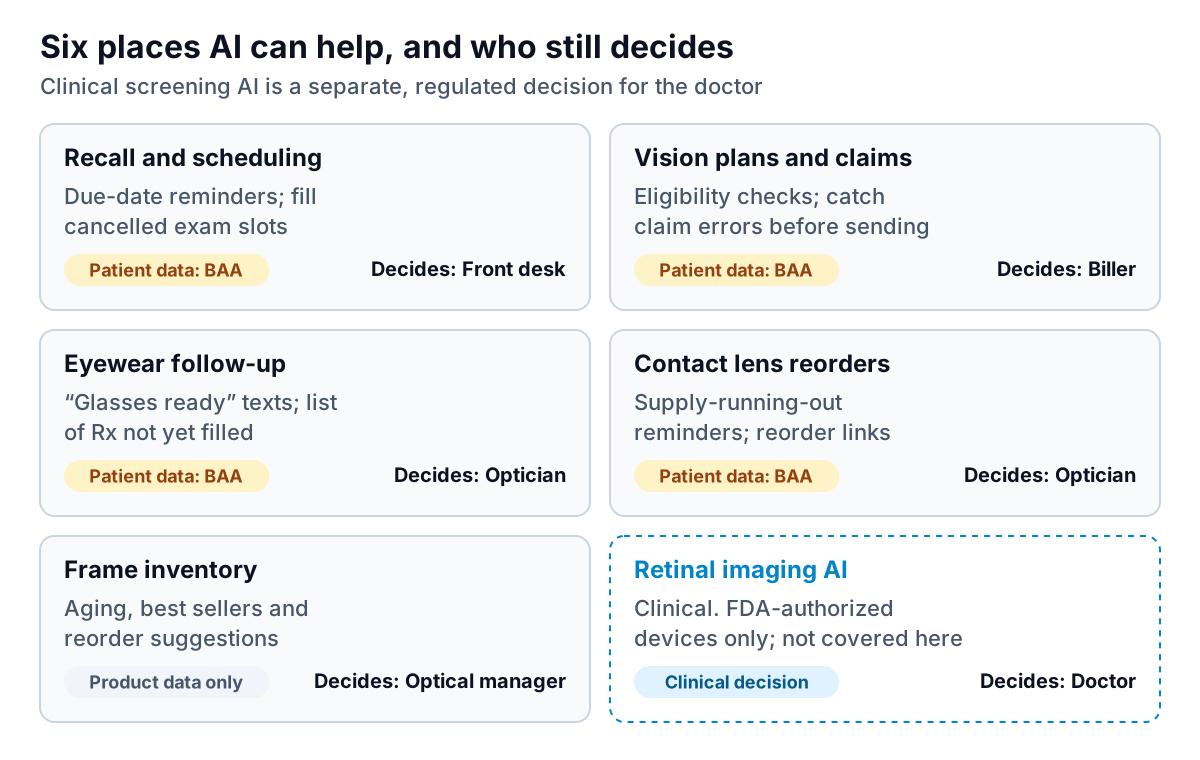
For the four areas that involve patient data, the vendor is a business associate under HIPAA. HHS's business associate guidance says a company that creates, receives, maintains or transmits protected health information on your behalf needs a signed business associate agreement (BAA), and it gives an AI chatbot handling patients' reminders and scheduling as an example. HHS's cloud computing guidance adds that this holds even if the vendor stores only encrypted data. Get the BAA signed before a single patient record moves.
A word on clinical AI
Some AI products analyse retinal images or other diagnostic data. Those are medical devices, and whether to use one is a clinical and regulatory decision for the doctor, not an operations purchase. The FDA keeps a list of AI-enabled medical devices authorized for marketing in the US, which is the place to start checking a product's status and intended use. This guide doesn't evaluate clinical tools or make claims about what they can detect; it sticks to the running of the practice.
The clinic side: recalls, vision plans and claims
Recall and scheduling
Annual and two-year exam recalls are the clinic's lifeblood, and most optometry practice management systems already send recall reminders. The upgrades worth paying for are narrower: a tool that offers cancelled exam slots to patients who are overdue for recall, and one that answers routine phone questions ("what time do you open Saturday?", "do you take my plan?") so the front desk isn't interrupted mid-check-in. Set one rule: anything about symptoms, such as sudden changes in vision, flashes or eye pain, goes to a person immediately, with no automated reply. Write that rule into the vendor's configuration and test it yourself.
Vision plans and medical claims
Eye care billing is unusual because the same patient can be billed to a vision plan for a routine exam and materials, and to their medical insurance for a medical eye problem. Each vision plan also has its own frame allowance, lens options and frequency limits. AI-assisted eligibility checks that pull the patient's plan benefits before the visit, and claim checks that catch missing information before submission, save real time. The coding decision, routine versus medical, stays with the doctor and the biller. If a tool claims to pick it for you, treat that as a red flag and talk to your billing adviser.
The optical side: capture rate and reorders
The optical is where an AI solution for optometry practice revenue can show up fastest, and where it's easiest to get the ethics wrong.
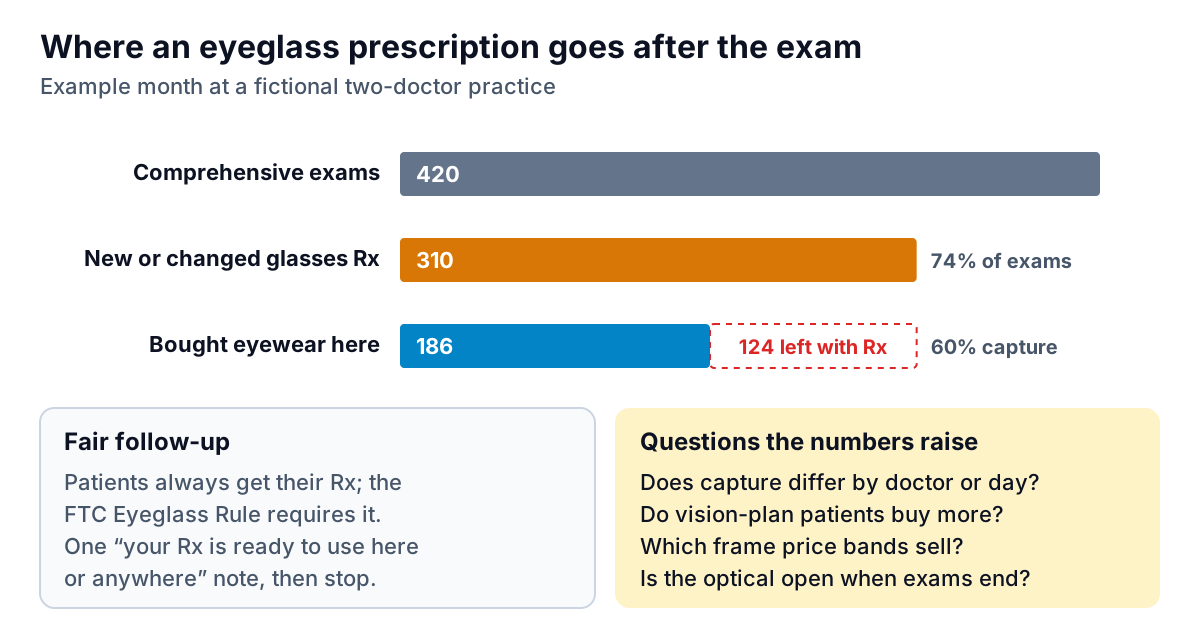
Start with the rules. Under the FTC's Eyeglass Rule, prescribers must give patients a copy of their eyeglass prescription immediately after a refractive exam, free and without requiring a purchase. The 2024 update added that prescribers with a financial interest in selling eyewear must, in certain circumstances, request the patient's signed confirmation of receipt and keep it for at least three years; similar confirmation rules already applied to contact lens prescriptions. Any follow-up tool must work inside those rules. Check your workflow against the rule text with your adviser.
Within that, AI helps in three honest ways:
- Measuring capture properly. Most practices know total optical sales but not capture by doctor, day of week, time of exam or plan type. A late-afternoon exam that ends after the optician leaves is a lost sale, and that's a staffing problem you can fix.
- One useful follow-up. A single message a few days after the exam, saying the prescription is ready to use with you or anywhere, with your frame allowance for their plan if they have one, is service. A sequence of five is pressure. Send one, then stop.
- "Glasses ready" and contact lens timing. Pickup texts and a reminder when a patient's contact lens supply is likely running low (based on what they bought and when) are useful to patients and easy to automate. Keep reorders tied to a valid prescription; your system should already track expiry dates.
Frame inventory: the easy win with no patient data
Frames are a large, slow-moving investment hanging on your walls, and they're the one area on the map with no patient information at all: style, vendor, cost, date received, date sold. That makes it the safest place to start with AI, and often the one with the quickest payback.
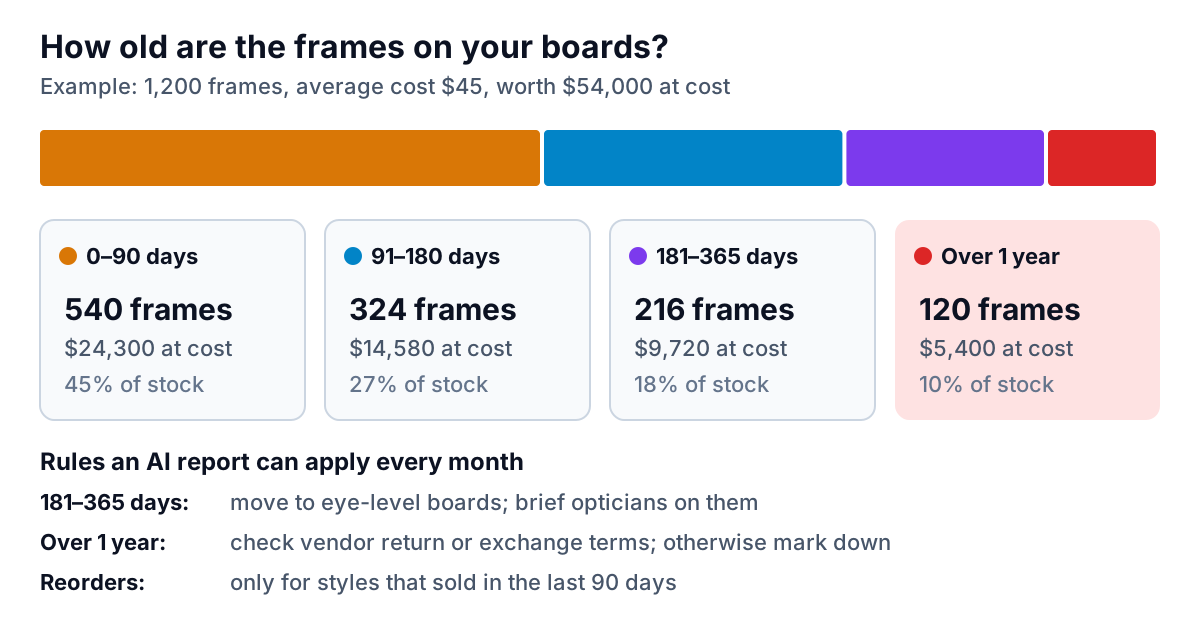
A monthly aging report answers the questions that matter: which frames are older than six months and a year, what that stock cost you, which vendors' frames sell fastest, and which price bands your patients actually buy. Then apply simple rules: give slow frames better board placement and brief the opticians on them; check vendor return or exchange terms for anything over a year before marking it down; and reorder only styles that sold in the last 90 days.
This is where Parity fits. Export your frame inventory and sales from your practice or point-of-sale system as a CSV or Excel file, upload it, and ask for "frame aging by vendor, cost tied up over 180 days, and best sellers by price band". Parity builds the report with charts, tables and a short summary, with every number checked against the full file. The same works for optical sales by month or capture rate by doctor, as long as the export holds counts and totals rather than patient rows. Parity is not a HIPAA-covered tool, so use it only with de-identified or aggregate operational data. Inventory files are ideal; patient lists, exam records and anything with names or dates of birth must stay out. HHS's de-identification guidance explains what has to be removed for data to count as de-identified.
What the optical numbers are worth: a worked example
Before you pay for any optical-side tool, put a value on the change you expect. Using the example practice above, with illustrative figures:
| Item | Today | Target |
|---|---|---|
| New or changed glasses prescriptions a month | 310 | 310 |
| Capture rate | 60% (186) | 65% (about 201) |
| Extra eyewear sales a month | – | about 15 |
| Example average optical sale | $300 | $300 |
| Extra monthly optical revenue | – | about $4,500 |
Revenue isn't profit: subtract lens and frame cost, lab fees and the optician's time to see what those 15 sales actually add. But the arithmetic tells you what a tool may cost. If a five-point capture improvement is worth a few thousand dollars a month in revenue, a tool costing a few hundred is plausible; one costing more than that needs a much bigger promise, and a trial that proves it.
Notice too where the five points probably come from. In many practices it isn't a clever message. It's the exams that finish after the optician has left, the vision-plan patients who were never told their frame allowance, and the frames that don't match what patients ask for. Measuring capture by hour, doctor and plan type points you at the fix, which may be a staffing change rather than software.
A buying checklist for both sides
Whichever AI solution for optometry practice work reaches your shortlist, put it through the same seven checks.
- Ask your practice management vendor first. Find out which recall, messaging, eligibility and inventory features you already pay for and haven't switched on.
- BAA before data. For anything touching patients, the signed BAA comes before the trial, not after the purchase.
- Integration in writing. Can it read from your system? Can it write back, for example book an appointment or mark a recall done? Get a reference practice on the same system.
- Data terms. No training on your data, a stated retention period, and your data returned in a usable format if you leave.
- A hand-off you've tested. Any patient can reach a person by asking, and symptom words go straight to staff.
- A baseline and a trial. Measure the number you expect to move, such as recall bookings, claim rejections or capture rate, for a month before, and again during a trial of at least four weeks.
- Price over 12 months. Per-provider, per-location and per-message pricing look very different once you add them up for a year.
For more on the front-desk side, the guide to AI appointment scheduling for dental offices covers recall and waitlist automation in depth, and AI tools for ENT clinics covers another specialty with a similar mix of clinic and products. For the optical as a retail business, see AI demand forecasting for small retail, or go straight to turning an Excel export into a dashboard.
Upload your frame inventory export, which contains no patient data, and get an aging report in minutes. Build a report from your data free