It's 2:40 on a Friday afternoon and a patient texts to cancel their 3:30 hygiene appointment. Your front desk has three people on hold, a crown seat running over, and a sticky note somewhere with the names of patients who said they wanted an earlier slot. The 3:30 stays empty. Nobody did anything wrong. There just wasn't anyone free to work the list in the 50 minutes that mattered.
That gap, between knowing a slot is open and getting someone into it, is where AI appointment scheduling for dental office teams earns its keep. It is not magic and it doesn't predict which patients will flake. What it does well is the fast, repetitive work: answering the phone when nobody can, sending confirmations, offering a freed-up slot to a waitlist in seconds, and nudging patients overdue for hygiene. This guide covers how to measure your own gaps first, what the tools actually do, the HIPAA questions to ask before any patient data touches them, and a realistic first month.
Measure your empty chair time before you buy anything
Vendors will quote no-show statistics at you. Published rates vary a lot by setting. One study of 7,379 pediatric visits at an academic dental clinic in Buffalo, New York found 14.3% were no-shows, rising to 24% for adolescents (International Journal of Dentistry, 2025). A suburban adult practice with a loyal patient base may look nothing like that. The only number that matters for your decision is yours.
Pull four weeks of schedule history from your practice management system and sort every unfilled hour into one of three buckets:
- No-shows. The patient didn't come and didn't tell you.
- Late cancellations that weren't refilled. The patient told you, usually inside 48 hours, and the slot stayed empty.
- Never booked. Open time that nobody filled in the first place, often a recall problem rather than a scheduling one.
The split tells you which tool to buy. Here's a sample office's four weeks of hygiene schedule:
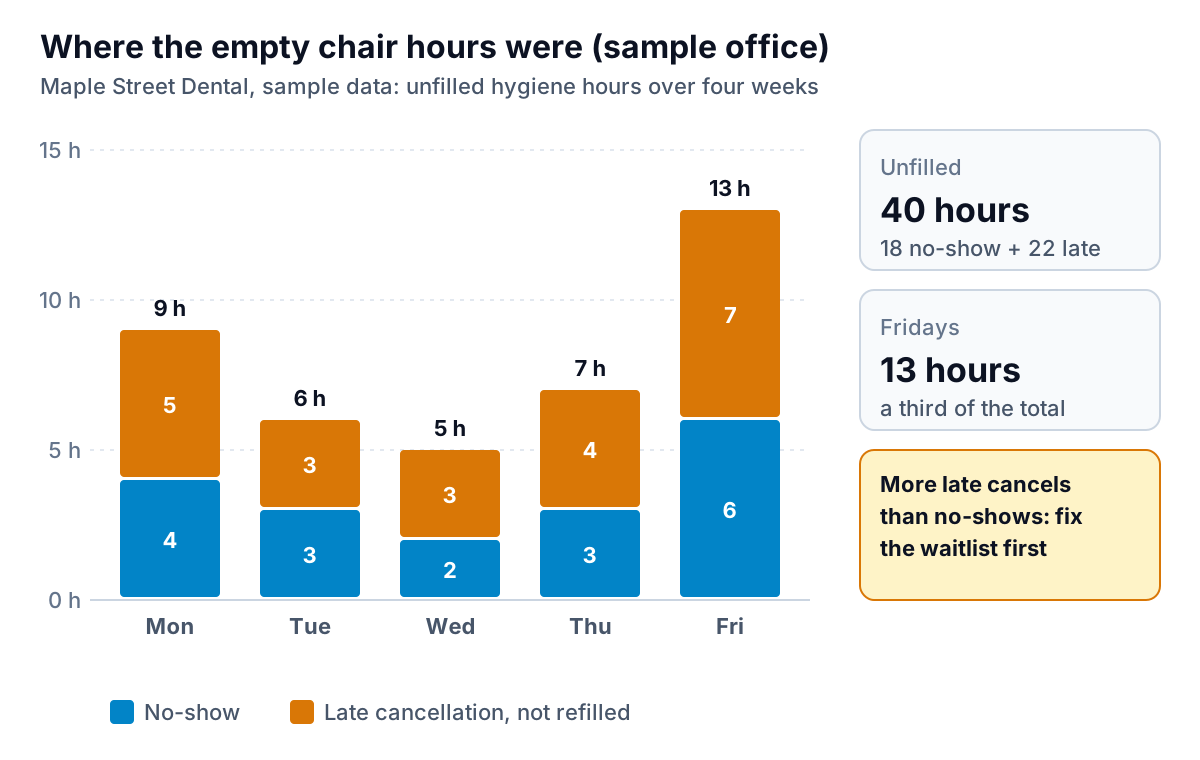
This office lost 40 hygiene hours in four weeks. If its production per hygiene hour were $180 (a made-up figure; use your own), that's $7,200 of open time in a month. But the useful part is the split. Twenty-two of those hours were late cancellations: the patient did the right thing and told the office, and the slot still went empty. A better confirmation sequence won't fix that. A faster way to refill it will. And Fridays account for a third of the problem, which says something about when to staff the phones and when to send the waitlist offer.
You can build this table in a spreadsheet in an hour. Keep it to counts: day, appointment type, hours, reason. No names, no phone numbers, no reasons for the visit. You'll want the same table again in 60 days to see whether anything changed.
What AI appointment scheduling for dental office teams actually does
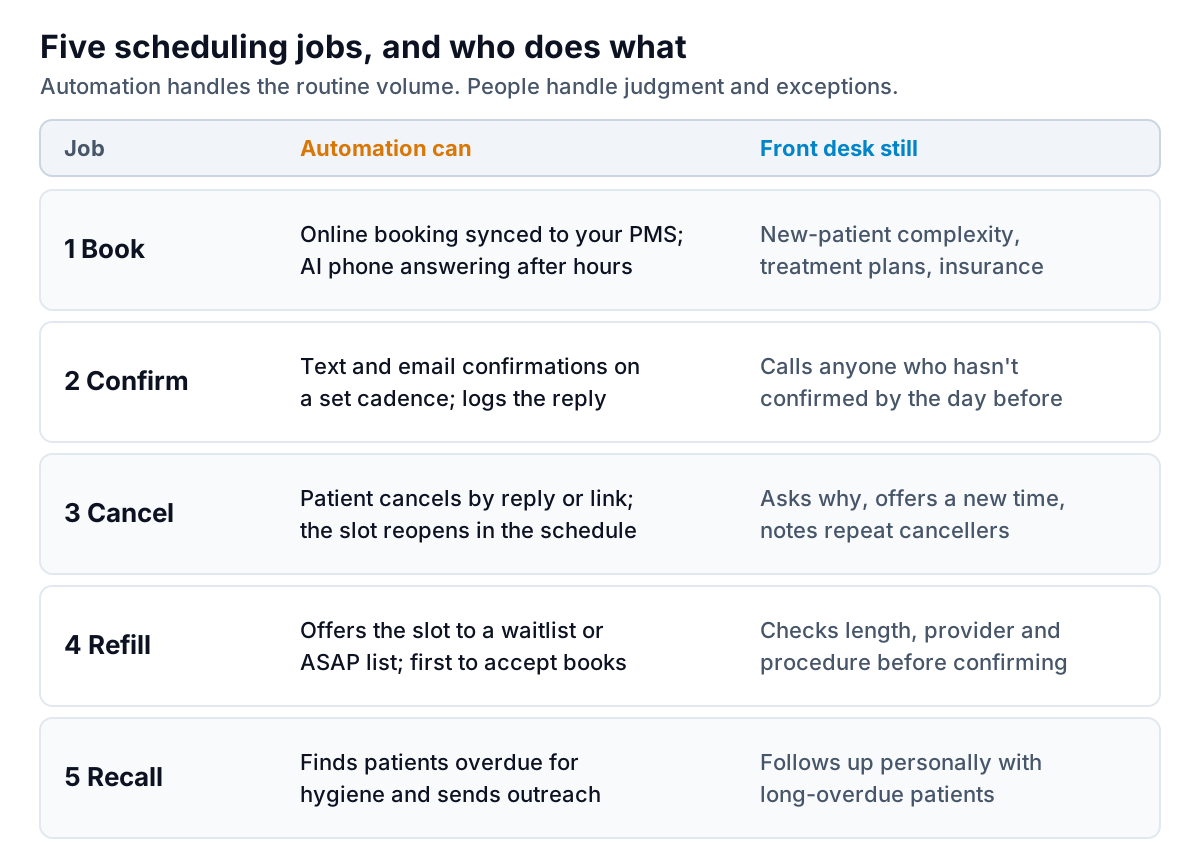
Strip away the marketing and there are five jobs. Most products do two or three of them well. Some do all five with varying depth.
1. Booking: online and by phone
Online booking that writes directly into your practice management system (PMS) is widely available. The newer piece is AI phone answering: a voice agent that picks up when your team can't, answers common questions, and books into open slots. The value is highest after hours and during the lunch hour, and for practices that miss a lot of calls. Ask how it handles a caller it can't help, such as someone describing pain or a complex treatment question. It should hand off to a person or take a message, not improvise.
2. Confirmations
Automated text and email confirmations on a set schedule are the oldest piece of this category and still one of the most useful. The AI part is mostly in reading free-text replies ("can we do Thursday instead?") and turning them into a task. A sensible starting cadence is a confirmation request a week out and a reminder two days out, with a call from a person to anyone who hasn't replied by the day before. Adjust it to your patients.
3 and 4. Cancellations and refills
This is where the sample office above would get its 22 hours back. When a patient cancels, the slot reopens and the system offers it to patients on a waitlist or "ASAP" list by text, first to accept gets it. A person should still check that the appointment length, provider and procedure type actually fit before confirming. A 90-minute scaling and root planing doesn't fit in a 60-minute prophy slot.
5. Recall
Finding patients who are overdue for hygiene and contacting them fills the "never booked" bucket. It's less urgent than a same-day refill, but it's often where the most recoverable time sits over a year.
The tools, and what to ask each one
Three examples of how vendors package AI appointment scheduling for dental office teams, as described on their own sites at the time of writing. Features and pricing change, so confirm with a demo.
- Weave is a patient communication platform with phones, texting, automated appointment reminders and confirmations, online scheduling requests, and an AI receptionist it says can answer calls and texts around the clock and book appointments into qualified practice management systems. Weave publishes a business associate addendum on its legal pages.
- NexHealth focuses on online booking that syncs with your records system, automated waitlist filling for last-minute cancellations, recall booking and automated reminders. It lists integrations with more than 70 systems, including Dentrix, Eaglesoft and Open Dental.
- Arini is an AI receptionist built for dental practices. It describes handling inbound calls, online scheduling and outbound campaigns, plus reminders and confirmations by text and voice.
Your PMS may already include some of this. Check what your current Dentrix, Eaglesoft, Open Dental or other subscription offers before you add a separate tool, since every extra system is another integration to maintain and another vendor holding patient data.
Whichever you look at, ask these questions in the demo:
- Does it write to my PMS in real time, or create requests my team has to approve? Both are valid. Requests are safer while you learn; real-time is faster.
- How does it handle procedure length and provider rules? Ask them to show you a waitlist offer for a slot that only fits some appointment types.
- What happens when the AI phone agent can't help? Listen to recordings of real handoffs, not a scripted demo call.
- How do patients opt out of texts, and how is consent recorded? Texting rules apply to reminders too. Your vendor should explain how it handles consent and opt-outs, and your compliance advisor can confirm what applies to you.
- Will you sign a BAA, and does it cover every subcontractor that touches our data? If the answer is anything other than yes, stop there.
HIPAA and BAAs: the non-negotiables
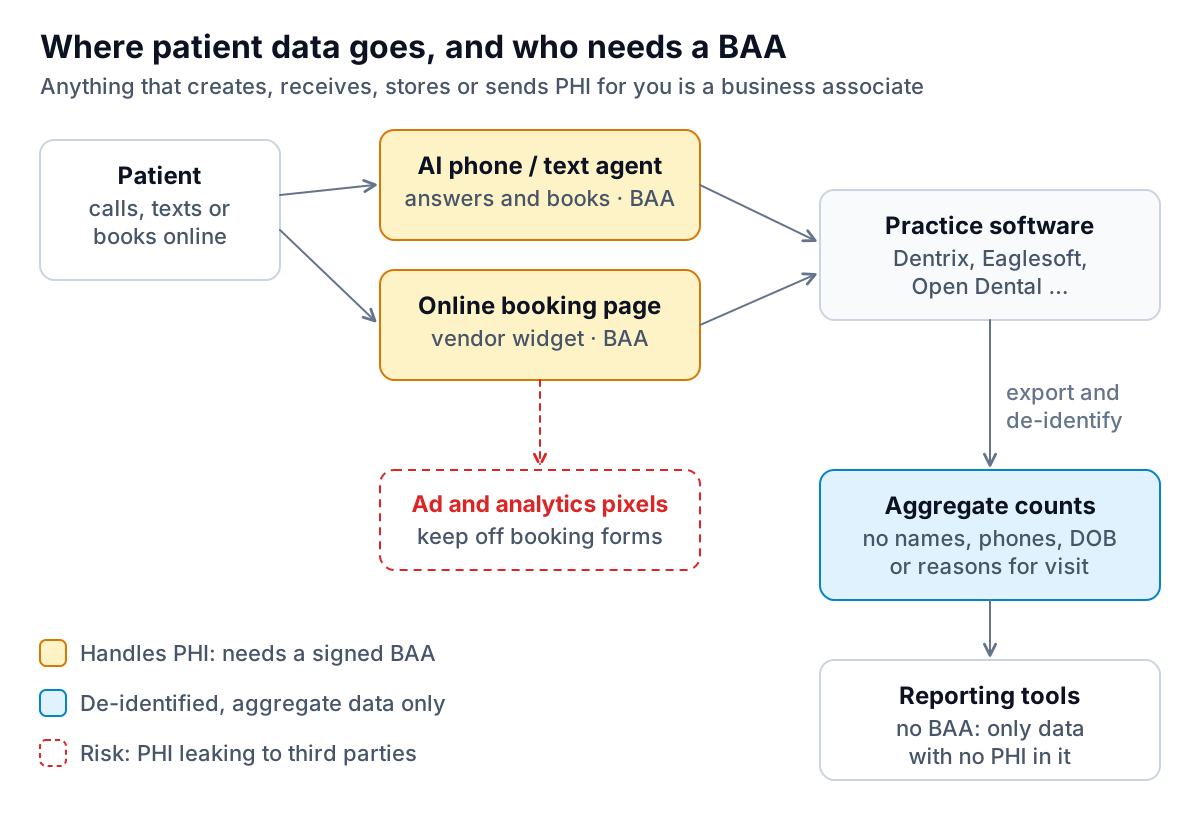
Every scheduling tool in this article handles protected health information: names, phone numbers, appointment times and often the reason for the visit. Under HIPAA, a vendor that creates, receives, maintains or transmits PHI on your behalf is a business associate, and you need written assurances, in the form of a business associate agreement, before you share PHI with it (HHS guidance on business associates). HHS has also said that a cloud provider storing PHI is a business associate even if the data is encrypted and the provider can't read it (HHS guidance on cloud computing).
Three things practices often miss:
- Appointment reminders themselves are allowed. HHS says providers may communicate with patients about their care, including leaving reminder messages, but should limit the detail they leave (HHS FAQ). "You have an appointment with Maple Street Dental on Tuesday at 10" is fine. The procedure name usually isn't needed.
- Tracking pixels on booking pages. HHS's Office for Civil Rights has warned that tracking technologies on scheduling pages can capture details a patient types in, such as an email address or reason for the visit (OCR bulletin on online tracking). A 2024 federal court ruling narrowed part of that guidance, but the safe practice hasn't changed: keep advertising and analytics pixels off any page where patients enter their details, and ask your web developer to confirm it.
- General-purpose AI chatbots. Pasting a patient's message into a consumer chatbot to "help write a reply" is a disclosure of PHI to a vendor without a BAA. Make a written rule that it doesn't happen.
A realistic first 30 days
The usual mistake with AI appointment scheduling for dental office workflows is switching everything on in week one. Each automation changes how patients experience your office, and you want to know which change caused which result.
- Week 1: baseline and paperwork. Build the four-week gap table above. Shortlist two vendors. Get BAAs reviewed before any trial with real patient data.
- Week 2: confirmations only. Turn on automated confirmations with your chosen cadence. Keep the day-before call for anyone unconfirmed. Watch reply handling closely.
- Week 3: waitlist refill. Build the ASAP list properly: patients who genuinely want an earlier slot, with their appointment type and how much notice they need. Turn on automated offers, with a person approving each booking at first.
- Week 4: phones, if the numbers support it. If your missed-call report shows real volume after hours or at lunch, trial the AI phone agent on those hours only. Review recordings every day for the first week.
At day 60, rebuild the gap table and compare. If late-cancellation hours fell and no-shows didn't, you know where the gain came from and what to work on next.
Reporting on the results without touching PHI
The before-and-after comparison is the part most practices skip, because pulling it together by hand is tedious. It doesn't need patient data at all. Appointment counts by day and type, unfilled hours by reason, production by service line and payer mix are aggregate operational numbers.
That kind of export is what Parity's reporting tool is built for. You upload a CSV or Excel file, describe the report you want ("unfilled hygiene hours by weekday and reason, this month against the baseline"), and it builds a dashboard with charts and a short summary, with every number checked against the full file before you see it. To be clear about the limits: Parity is not a HIPAA-covered tool, so never upload patient data to it. Only upload de-identified or aggregate operational data, with no names, contact details, dates of birth, chart numbers or visit reasons. If you aren't sure whether a file qualifies, HHS publishes guidance on de-identification, and your compliance advisor can help.
Other healthcare practices face the same scheduling and reporting questions. The guides to AI tools for physiotherapy clinics and AI for optometry practices cover them from their angle, and the dashboard guide for service businesses shows which weekly numbers are worth tracking.
Upload an aggregate, de-identified schedule export and get a verified report on where the empty chair hours are. Build a report from your data free
Start with the gap table. It costs nothing, takes an hour, and it will tell you whether you need a phone agent, a better waitlist or a recall push, before any vendor tells you.