It's 6:40 on a Thursday evening. You saw fourteen patients today, and three of them hit their tenth treatment day, which means three progress reports on top of eleven daily notes. One patient's plan of care still hasn't come back signed from the referring physician. Two people cancelled tomorrow morning and nobody has filled the gaps yet.
That's the problem the good AI tools for physiotherapy clinic work actually solve. Not exercise prescription, not diagnosis, not "AI-powered recovery." The paperwork and the gaps around the treatment. This guide sorts the tools by the job they do, shows which ones touch patient data and need a business associate agreement, walks through the Medicare deadlines that software can track for you, and ends with a 30-day plan you can run without buying anything big.
Start with the hours, not the tools
Before you book a single demo, write down where the non-treatment hours go in a normal week. For most outpatient clinics the list looks like this:
- Daily notes. Every visit needs one, and a lot of them get finished after hours.
- Evaluations, progress reports and discharge summaries. Longer documents on a clock set by the payer.
- Home exercise programs. Building them, printing or sending them, and answering "is this the right one?" messages.
- The schedule. Reminders, reschedules, filling cancellations, chasing people who quietly stopped coming.
- Billing. Coding timed units, prior authorizations for some plans, denials, patient balances.
Put a rough number of hours next to each line for a week. If notes come to eight hours per therapist and scheduling comes to six hours for the front desk, you've just found your first two purchases, in that order. If you skip this step, you'll buy whatever had the best demo.
AI tools for physiotherapy clinic work, sorted by job
Almost everything on the market falls into five groups. Here is what each does, and what to check before you trust it.
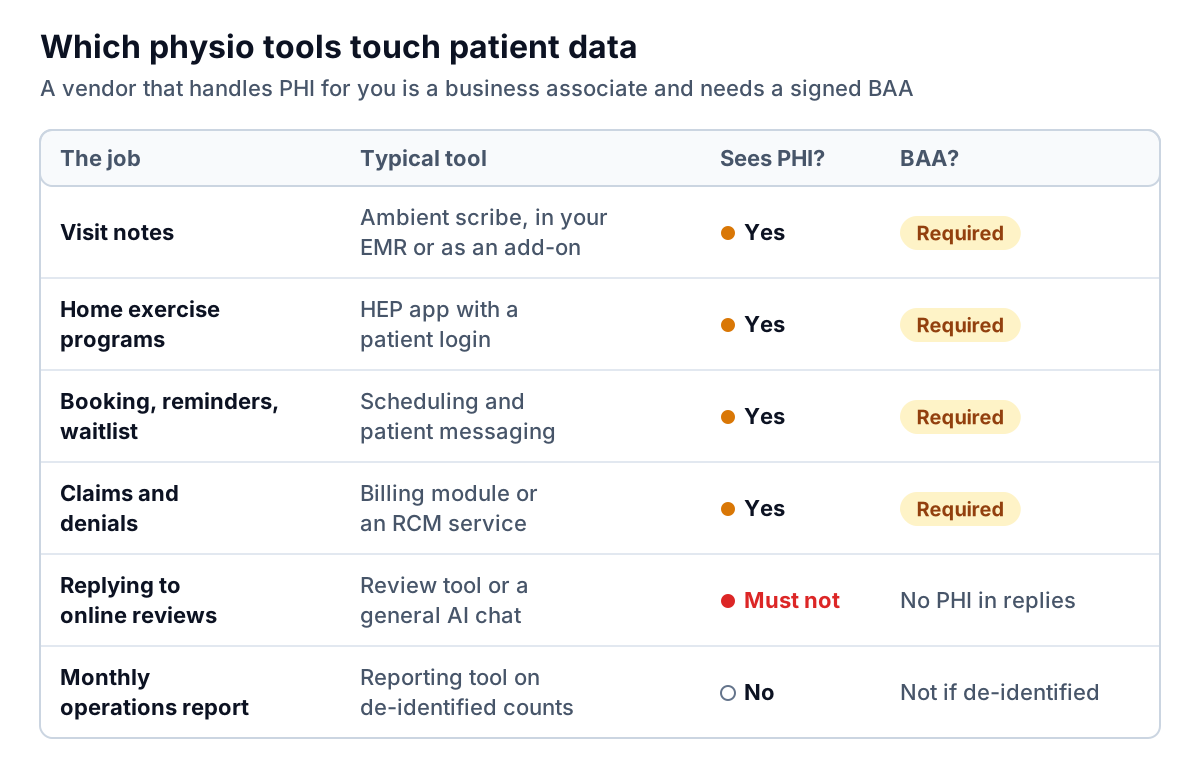
1. Ambient scribes and note assistants
These listen to the visit (or to your dictation afterwards) and draft the note in your template. Most physio EMRs now offer one built in. WebPT, for example, lists an AI voice-to-text scribe, note templates and real-time documentation feedback among its AI features, and standalone scribes plug into several EMRs.
What to test in a trial, using your own real visits:
- Hands-on time. A lot of a physio visit is quiet manual work. Does the draft still capture what you did and why, or only what was said out loud?
- Your template. Does it fill your evaluation and daily-note sections, or produce a generic summary you have to cut and paste?
- Edit time. Time yourself. If you spend six minutes fixing a draft that would have taken you seven to write, it isn't worth the subscription.
- Retention. How long are audio and transcripts kept, and are they used to train the vendor's models? Get the answer in writing.
The note is still yours. You sign it, and you're accountable for every line, including any timed units the software suggests.
2. Home exercise program apps
HEP platforms send patients video exercises and record whether they did them. Physitrack, for instance, describes an exercise library, an app that records adherence and reported discomfort, and telehealth features. Its own guide tells US buyers to confirm current HIPAA documentation and the BAA directly with the company before purchase, which is good advice for every vendor on this list.
The real value for a clinic is the adherence signal. A patient who hasn't opened their program in nine days is a cancellation waiting to happen. Ask whether the app can flag that to the treating therapist, not just store it.
3. Scheduling, reminders and waitlists
Automated reminders and online rebooking are the least glamorous tools here and often the fastest payback. Look for two-way text replies ("reply C to confirm"), a waitlist that offers freed slots to the next patient automatically, and a rule that flags anyone who hasn't booked their next visit within a few days of their last one. Appointment reminders count as part of treatment, so HHS says they don't need a separate authorization. Keep the message content minimal anyway.
4. Billing and coding checks
Billing modules increasingly read the note and suggest CPT codes or warn when billed units aren't supported by the documentation. Treat these as a second pair of eyes, not an answer. Ask the vendor how a suggestion is explained (does it point to the sentence in the note?) and who carries the risk if it's wrong. The answer is always you.
5. General AI chat assistants
Useful for writing a blog post on ankle sprains, a staff policy or a reply to a five-star review. Not for anything with a patient in it, unless your plan comes with a BAA and you've checked what it covers. More on reviews below.
The Medicare paperwork clock is where software earns its keep
If you see Medicare Part B patients, every episode runs on a set of deadlines. Missing one doesn't hurt the patient, but it can cost you the claim. The rules come from chapter 15 of the Medicare Benefit Policy Manual and the CMS Therapy Services page:
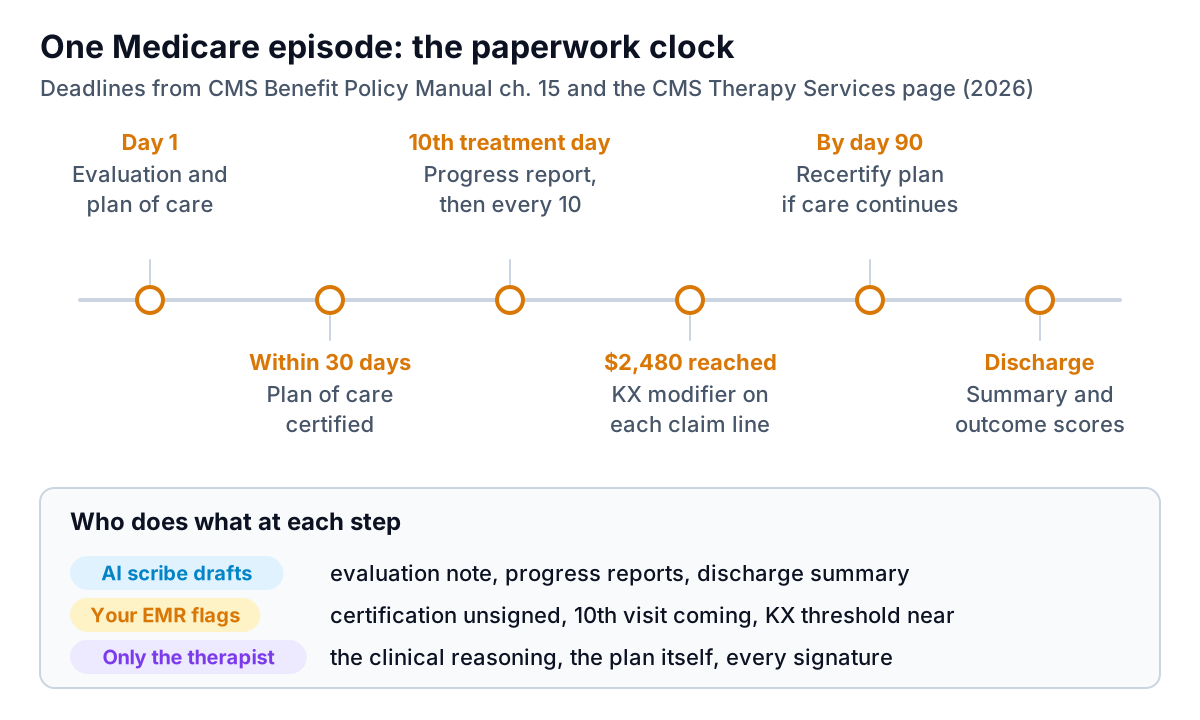
- Certification. The plan of care should be certified by the physician or non-physician practitioner, and the manual treats certification within 30 days of the initial treatment as timely.
- Progress reports. At least once every 10 treatment days. Days the patient doesn't come in don't count as treatment days.
- Recertification. At least every 90 days if treatment continues, or sooner when the plan changes significantly.
- The KX threshold. For 2026, CMS sets it at $2,480 for PT and speech-language pathology combined. Above that, claims need the KX modifier to confirm the services are medically necessary and documented, or they're denied. There's also a separate $3,000 targeted medical review threshold.
This is pure tracking work, and it's where a rules-based flag in your EMR beats any amount of clever AI. What you want: a list every morning of unsigned certifications older than 21 days, patients on their eighth or ninth treatment day, and patients approaching the KX amount. If your current system can't produce that list, ask your vendor before you shop for a new one. Your Medicare Administrative Contractor's guidance is the final word on the details, so check it when anything is unclear.
HIPAA before you trial anything
A trial with real patient data is not a trial in HIPAA's eyes. It's a disclosure. Get these right first.
Sign the BAA before the first real visit
Any vendor that creates, receives, keeps or sends protected health information for you is a business associate, and HIPAA requires a written contract with it. HHS publishes sample business associate agreement provisions that show what that contract must cover. Its cloud computing guidance goes further: a cloud provider that stores your patients' data is a business associate even if the data is encrypted and it holds no key. "We encrypt everything" doesn't replace a BAA.
Add the new tool to your risk analysis
The Security Rule expects you to assess risks to electronic patient data and update that assessment as things change. A new scribe that records audio in treatment rooms is a change. HHS has guidance on risk analysis and a free assessment tool for small practices.
Tell patients when you record
Some states require everyone's consent before a conversation is recorded. Check your state's rules and your professional association's guidance, put the scribe in your intake consent, and give patients an easy way to say no on the day.
Keep patients out of review replies
AI review responders are tempting. But replying to a bad review with details of someone's care is a disclosure, and HHS has taken action over exactly that. A New Jersey provider paid $30,000 to settle after disclosing patient information in responses to negative online reviews. Your reply template should never confirm that the reviewer is a patient.
Watch the tracking code on your booking page
HHS guidance on online tracking technologies warns that analytics and ad pixels on pages where people book appointments can send health information to the tracking vendor. If your new online booking widget lives on your website, ask who else's code runs on that page.
The leak most clinics never measure: unfinished plans of care
Here's a number almost no clinic owner can quote: what share of patients finish the plan of care you wrote for them? The chart below is an example clinic, but the shape is common.
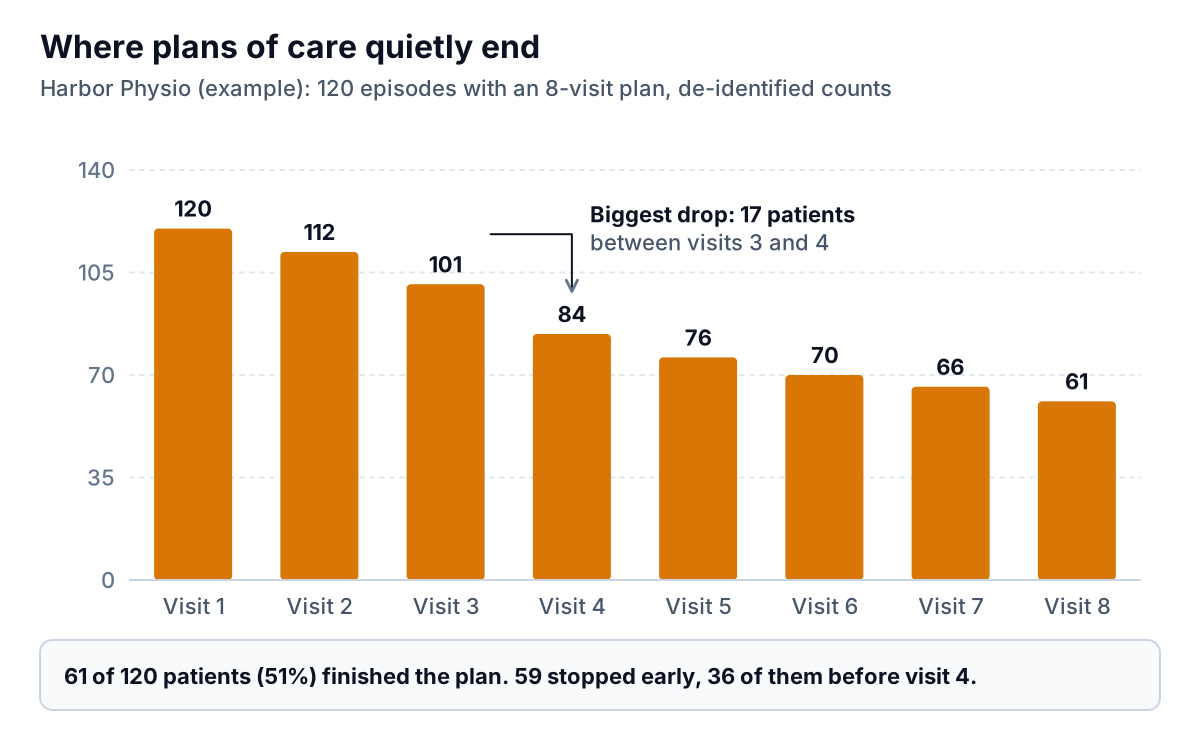
In this example, 59 patients stopped early and 36 of them were gone before visit 4. That's where to look first. Maybe those patients never had visits 4 to 8 booked before they left visit 3. Maybe their pain eased and nobody explained why the rest of the plan mattered. Either way, it's a fixable process problem, and the fix (book the full plan up front, flag anyone with no future visit) is the kind of rule your scheduling tool can run.
You can build this chart from your EMR's visit export. Do the counting there first, so what leaves the system is a table of numbers, not patients: episodes started per month, and how many reached visit 2, 3, 4 and so on. Split it by therapist, referral source or payer type if your export allows.
That aggregate table is the kind of file Parity is built for. You upload a CSV or Excel file, describe the report you want ("completion rate by therapist, by month"), and it builds the charts, KPI tiles and a written summary, with every number checked against the full dataset before you see it. One honest limit: Parity is not a HIPAA-covered tool, so only use it with de-identified or aggregate operational data like the counts above, never with patient names, dates of birth, visit dates or chart notes. HHS explains what counts as de-identified in its de-identification guidance. If you're not sure whether a file qualifies, ask your privacy officer before uploading it anywhere.
For more on choosing the handful of numbers worth watching every month, see our guide to an AI dashboard for a service business. Chiropractors face a very similar mix of visits, notes and plans, covered in AI workflow for a chiropractic office.
A 30-day first step that doesn't need a big purchase
You don't have to change your whole stack. Run this in one month:
- Week 1: time audit. Every clinician logs after-hours note time for five days. The front desk logs time spent on reminders, reschedules and filling gaps.
- Week 2: switch on what you already pay for. Check your EMR's settings for reminders, waitlist, a scribe or note assistant, and deadline alerts. Many clinics pay for features they never turned on.
- Week 3: one scribe trial, done properly. BAA signed, risk analysis updated, consent wording added, one or two volunteer therapists. Time the edits.
- Week 4: measure plan-of-care completion. Build the drop-off chart above from de-identified counts. Pick one fix (booking the whole plan before the patient leaves the first visit is a good start) and measure again in 60 days.
Then judge any of these AI tools for physiotherapy clinic use with numbers, not demos: minutes saved per note, gaps filled per week, completion rate before and after. If you also struggle with no-shows, our piece on AI appointment scheduling covers reminder timing and waitlists in more depth, and most of it transfers to a physio front desk.
Export de-identified visit counts from your EMR, upload them, and get a checked report with charts and a written summary. Build a report from your data free
One last point. None of these tools should touch the clinical reasoning: what you assess, what you treat and when someone is ready for discharge. The best AI tools for physiotherapy clinic owners hand you back the evening, not the judgement. This guide is general information, not legal or billing advice, so check payer specifics with your MAC or billing advisor and privacy questions with a HIPAA professional.