Friday, 5:55 p.m. The last patient has gone, the front desk is reconciling copays, and the chiropractor has 14 unsigned notes from the afternoon. Two Medicare claims from Tuesday are still waiting because nobody added the right modifier, and a patient halfway through a twelve-visit plan hasn't been seen in three weeks, though nobody has noticed yet.
That's a normal week in a small practice, and it's where an AI workflow for chiropractic office work earns its keep. Not by "transforming care", but by taking the drafting, checking and list-making off people who should be treating patients or talking to them. This guide follows one patient visit around the loop, from booking to the next appointment, and shows at each step what software can draft and who still has to decide.
Follow one visit around the loop
Every chiropractic visit goes through the same five steps: book, intake, the visit and its note, the claim, and the follow-up that leads to the next booking. Most offices bolt tools onto one step at a time and never look at the whole loop, which is how you end up with online booking that doesn't know about benefit limits, or notes that don't support the codes on the claim.
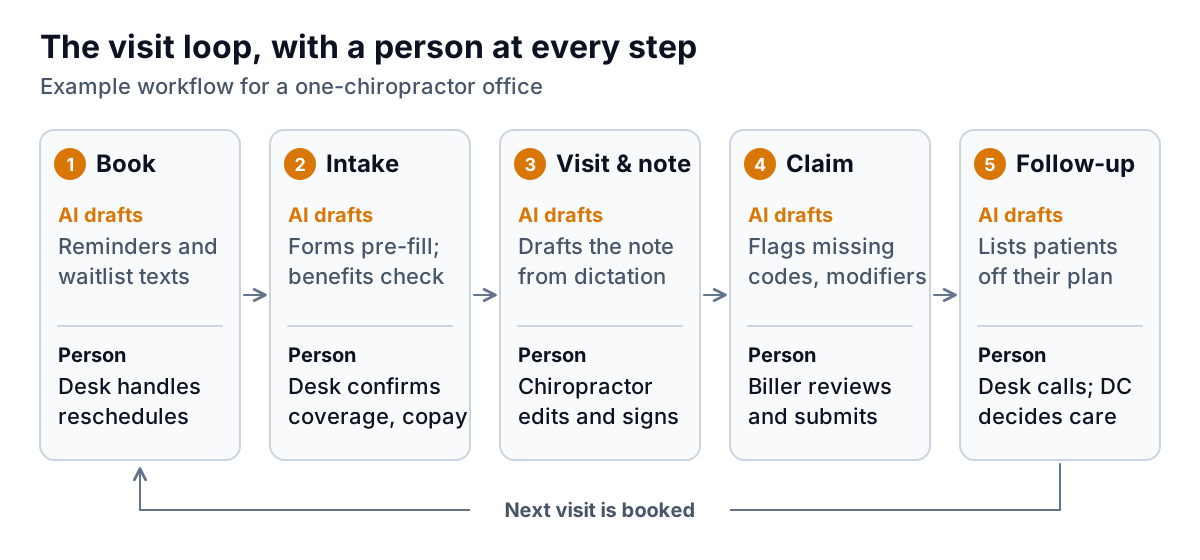
Before you buy anything, spend one week writing down where time goes at each step. A simple tally works: the front desk marks every phone call, insurance check and reschedule, and the chiropractor notes how long documentation takes after hours. In an example one-doctor office seeing about 120 visits a week, the pattern is often something like this:
| Step | Example weekly time | Mostly clerical or judgment? |
|---|---|---|
| Booking, reminders, reschedules | 6 hours (front desk) | Clerical |
| Intake forms and benefits checks | 5 hours (front desk) | Clerical, with exceptions |
| Visit notes after hours | 5 hours (chiropractor) | Judgment; drafting is clerical |
| Claims and denials | 4 hours (biller) | Mixed |
| Follow-up on missed plans | Usually 0, because nobody has time | Clerical list, judgment call |
These numbers are illustrative; yours will differ. What matters is that you have your own before you change anything, because they're the baseline for deciding whether a tool worked.
Build the AI workflow for chiropractic office front-desk work first
The front desk is the safest place to start. Mistakes are visible and cheap to fix, and the work is high-volume and rule-based.
Booking and reminders
Most chiropractic practice management systems already send appointment reminders. The AI layer worth adding is a waitlist that fills itself: when a patient cancels at 8 a.m., the system texts patients who asked for an earlier slot and books the first one who confirms, with the desk seeing the change. The rule to set: it may fill a gap only with an existing patient of the same visit type and length. New-patient exams, which take longer, stay with the desk.
Intake and benefits checks
Digital intake forms that pre-fill from last time save the patient time and the desk re-typing. The bigger time sink is benefits: commercial plans often cap chiropractic visits per year or require a referral, and every plan has its own copay. An eligibility tool can run the electronic check before the visit and flag patients who are near their visit limit. The desk still confirms anything unusual by phone and talks to the patient about cost. A flag that says "8 of 12 covered visits used" before the patient arrives is worth more than finding out from a denial a month later.
Medicare patients need extra care at this step. Medicare Part B covers only manual manipulation of the spine to correct a subluxation; it doesn't cover other services a chiropractor orders, such as X-rays or massage. Your intake workflow should flag Medicare patients so the desk can explain what will and won't be covered before the visit, not after.
Visit notes: AI drafts, you sign
Documentation is where chiropractors lose their evenings, and where AI note-drafting tools (often called ambient scribes) are being sold hardest. They listen to the visit or to your dictation afterwards and produce a structured draft of the note. Used carefully, that can turn a ten-minute note into a two-minute review. Used carelessly, it produces confident notes describing exams you didn't do, which makes this the step in an AI workflow for chiropractic office work that needs the firmest rules.
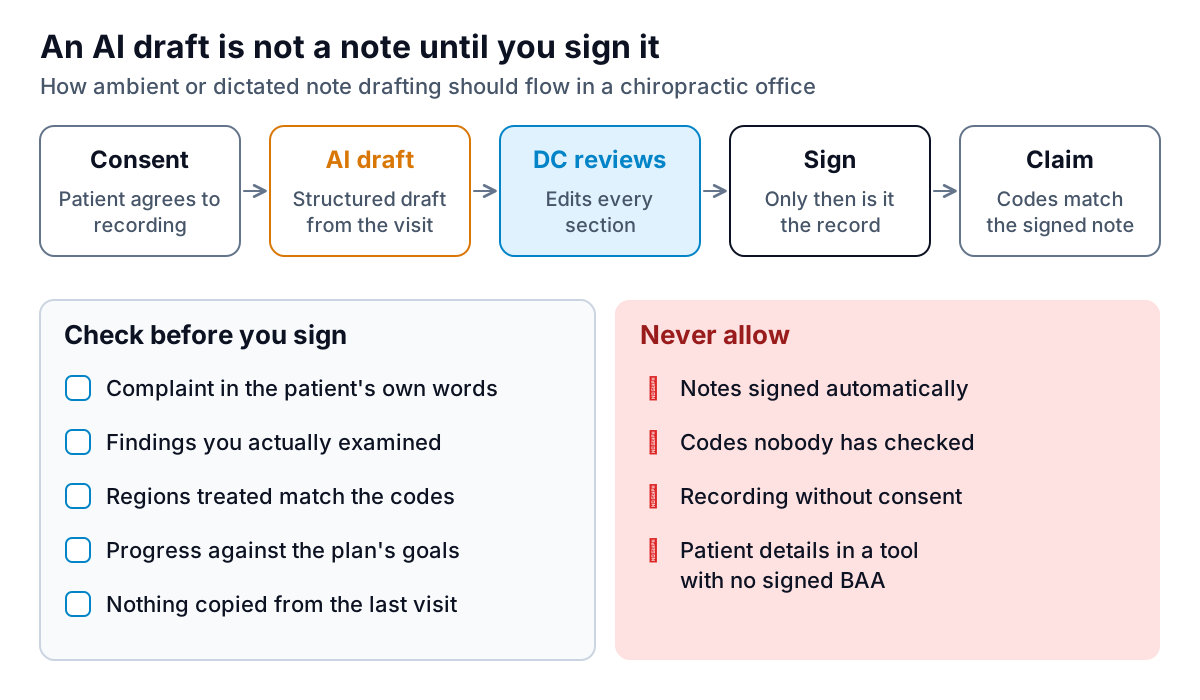
Four rules make the difference:
- Get consent before recording. Tell patients the visit is recorded for note-taking, and let them say no. Recording-consent laws vary by state, so check your state's rules with your attorney or association.
- Review every section, every time. The draft may mishear a region ("lumbar" for "thoracic") or fill a finding from habit. You're signing that you did what it says.
- Watch for copy-forward. Notes that look the same visit after visit are a documentation red flag. Progress against the plan's goals should be visible in each note.
- The vendor needs a BAA. HHS's business associate guidance names transcription vendors and app vendors providing transcription to physicians as examples of business associates. The same logic applies to a scribe tool in your office.
Questions to ask a note-drafting vendor
- Will you sign a BAA, and which subcontractors (speech-to-text, AI model providers) handle our recordings?
- How long are audio recordings kept, and can we set them to delete once the note is signed?
- Are our recordings or notes used to train your models? We want "no" in writing.
- Does the draft show which sentences came from the conversation and which from a template?
- Can it write into our practice management system, or do we copy and paste?
Note that an AI scribe drafts documentation. It doesn't diagnose, choose treatment, or decide whether care is necessary, and any vendor suggesting otherwise is selling something you shouldn't buy.
Claims: let software find gaps, not pick codes
Claim scrubbing, checking a claim for missing or inconsistent information before it goes out, is a natural job for software and many billing systems already do some of it. The useful AI addition is reading the signed note alongside the claim and flagging mismatches: spinal regions treated in the note versus the manipulation code billed, a missing modifier, a diagnosis that doesn't support the service.
For Medicare, the specifics matter. According to the Medicare coverage article on chiropractic services, the AT modifier must be on the claim when the chiropractor is providing active or corrective treatment, must not be used for maintenance therapy, and maintenance therapy isn't covered. Claims without it are treated as maintenance and denied. A flag such as "Medicare claim, no AT modifier, note describes active treatment: review" saves a denial. But whether care is active or maintenance is the chiropractor's clinical judgment, so the tool may raise the question and must never answer it. Your billing adviser is the right person for coding policy.
A simple weekly routine for the biller: work the flagged claims first, then look at last week's denials grouped by reason. If one reason keeps coming back, fix it upstream at intake or in the note template rather than claim by claim.
Follow-up without pressure
The step most offices skip is the one software makes easiest: a weekly list of patients who started a care plan and then stopped booking. It's a filter on data you already have: plan start date, visits planned, visits completed, last visit, next booking.
What to do with the list is a human decision. Some patients feel better and stopped on purpose. Some couldn't afford it. Some are unhappy. A short personal call from the desk ("Dr. Patel asked me to check how your back is doing and whether you'd like to rebook") does more than an automated sequence, and the chiropractor decides whether further care makes sense. Keep any message about the patient's own care plan, avoid sales language, and don't let a tool send automated "we miss you" offers to the list.
Measure the week with numbers, not patient files
Once the pieces are running, you need a weekly view that tells you whether the loop is working: how many visits, how many new patients, how many no-shows, what was collected, and how the payer mix is moving. None of that requires names, dates of birth or notes. Your practice management system can usually export daily counts by visit type and payer, and that's enough.
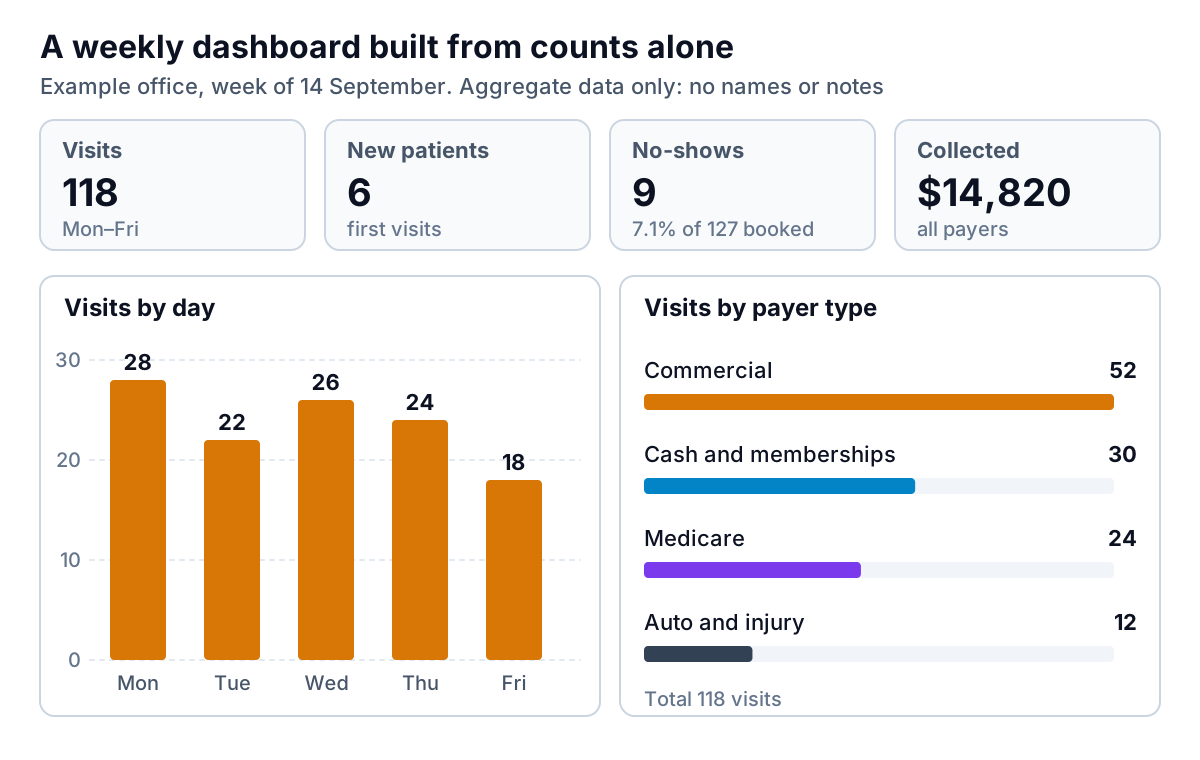
This is where Parity fits. Upload a CSV or Excel export of daily counts and collections, ask for "weekly visits, no-show rate and collections by payer type, compared with last month", and it builds a dashboard like the one above, with KPI tiles, charts and a short written summary, every number checked against the full file. Parity is not a HIPAA-covered tool, so use it only with de-identified or aggregate operational data: visit counts, revenue by service, payer mix. Don't upload patient lists, appointment exports with names, or notes. HHS's de-identification guidance explains what counts as de-identified.
A sensible order to roll it out
- Month one: baseline tally, then reminders and the self-filling waitlist.
- Month two: intake forms and eligibility flags, including the Medicare flag.
- Month three: note drafting on a trial, with consent and a BAA, reviewing every note.
- Month four: claim mismatch flags and the weekly follow-up list.
One change a month lets you see what each piece did to your numbers. That's the whole point of treating your AI workflow for chiropractic office tasks as a loop rather than a pile of apps. For related reading, the guide to AI tools for physiotherapy clinics covers similar plan-of-care follow-up, AI appointment scheduling for dental offices goes deeper on waitlists and reminders, and dashboards for service businesses covers the weekly numbers in more detail.
Upload aggregate visit and collections data, with no patient details, and describe the report you want. Build a report from your data free