It's 10:40 on a Tuesday. Two phone lines are blinking, a fax with three new scripts is curling out of the machine, the drive-through bell has gone twice, and the pharmacist is trying to finish a final check while a technician asks whether a prior authorization came back. None of these jobs is hard on its own. The trouble is that they all land on the same four people at once.
That's the right place to start an AI workflow for pharmacy work: not with a product demo, but with the queue. Where does a prescription wait, who touches it, and which of those touches are clerical rather than clinical? Once you can answer that, it becomes obvious where software can take a step off your team's plate, and just as obvious where it must not be allowed anywhere near the decision.
This guide walks through that map step by step, shows how to measure the interruptions you already have, picks four workflows that are reasonable to automate first, and ends with a six-week pilot you can run without betting the store. If you are further along and comparing vendors, the companion piece on choosing an AI solution for your pharmacy covers contracts, pricing and scorecards.
Map one prescription before you build an AI workflow for pharmacy tasks
Take a single new prescription and follow it from arrival to pickup. In most community pharmacies it passes through seven steps. Write down who does each one today, how long it usually waits there, and what goes wrong most often.
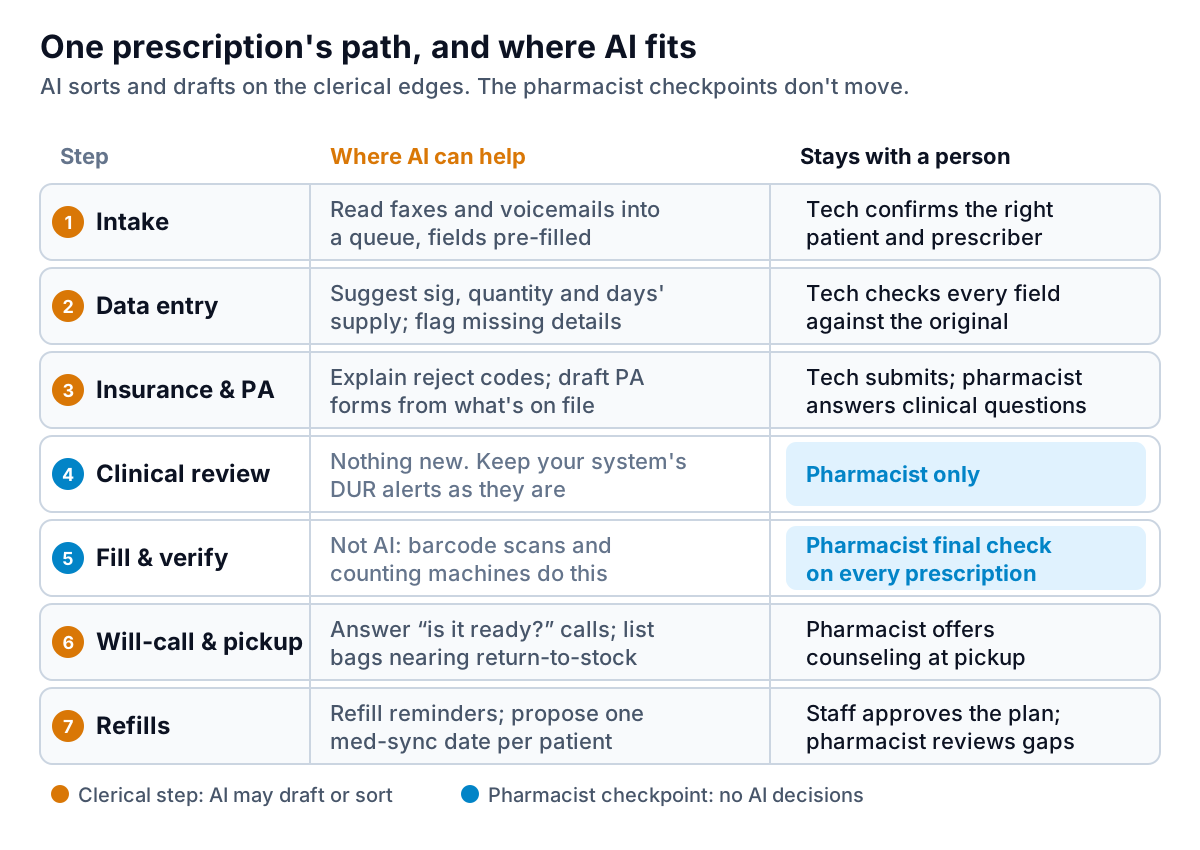
The pattern you'll see is that each step has a clerical edge and a judgment core. Reading a faxed script and typing the drug name, strength and prescriber into your system is clerical. Deciding whether that dose makes sense for this patient is judgment. A refill reminder is clerical. Deciding what to tell a patient who says the new tablets make them dizzy is judgment.
A sensible rule for the whole project: AI may draft, sort, summarise or route. A person confirms anything that changes a prescription record, and the pharmacist owns anything clinical. If a vendor's pitch blurs that line, for example "our assistant handles drug interaction questions", that is a reason to walk away, not a feature. Your state board of pharmacy also sets rules on what technicians and automated systems may do, so check those before you change who does what.
Questions to answer for each step
- What arrives here, and in what form (e-prescription, fax, phone, walk-in)?
- Who touches it, and for how long?
- What is the most common reason it gets stuck?
- Is the stuck part clerical (missing information, waiting on a call back) or clinical?
- What would a mistake here cost: a re-type, a rejected claim, or harm to a patient?
Only the steps where the stuck part is clerical and a mistake is cheap to catch belong on your shortlist.
Count a week of interruptions
Your map tells you where AI could fit. A count tells you where it's worth the money. The single most useful count in most pharmacies is the phone, because calls interrupt every other step on the map.
For one normal week, keep a tally sheet by each phone. Every time someone answers, they make one mark under a reason: refill request, "is it ready?", price or insurance, prescriber's office, clinical question, other. If you can, also note roughly how long the call took. Your phone system may already report total calls and hold times; the tally adds the "why".
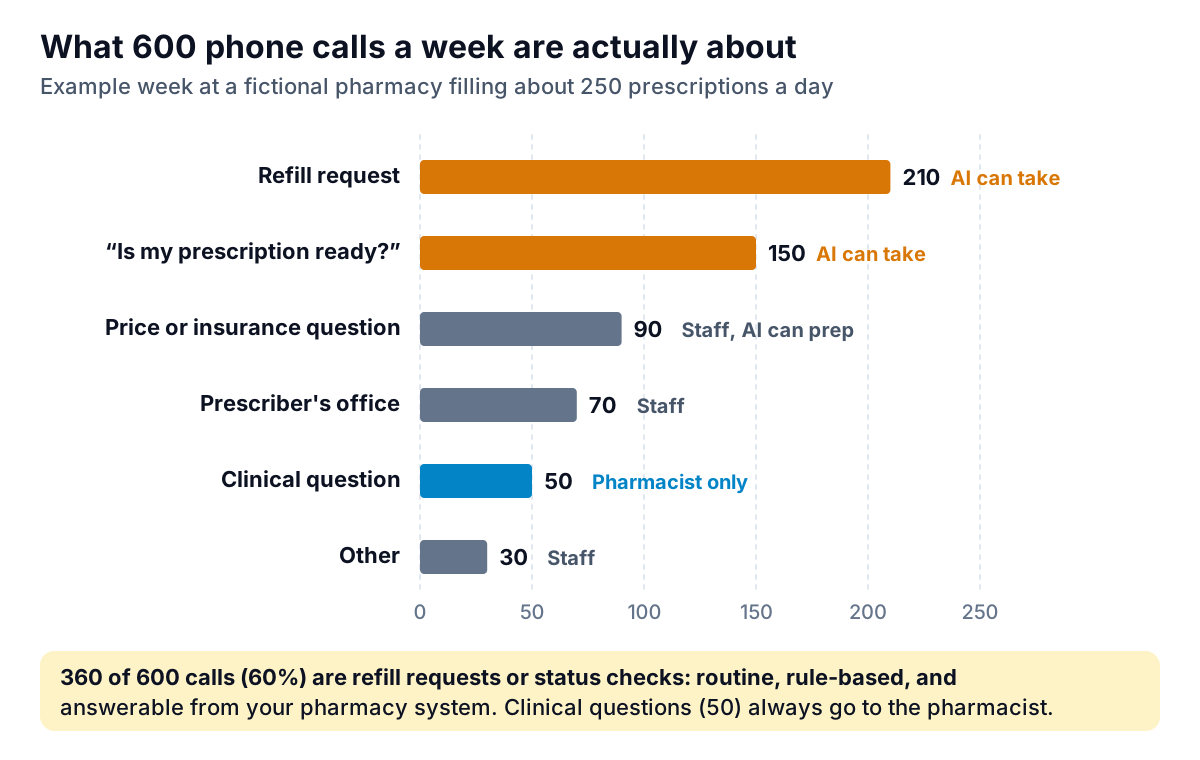
Here is how to turn the tally into a decision, using the example above. Say the 360 refill and status calls average two and a half minutes each, including the time to look the patient up. That's 900 minutes, or 15 staff hours a week, spent answering questions your pharmacy system already knows the answer to. At an example loaded cost of $24 an hour for a technician, that's about $360 a week, or roughly $1,500 a month. That figure is your ceiling: a tool that takes those calls is worth considering only if it costs meaningfully less than that and doesn't create new work.
Do the same arithmetic for the other candidates. How many faxed scripts arrive a day, and how long does each take to type? How many claims reject, and how long does each take to resolve? You'll usually find one or two workflows that dwarf the rest, and that's how you choose the first AI workflow for pharmacy staff to live with.
Four workflows worth automating first
These four come up in almost every community pharmacy. Each has a clear clerical edge, a clear human checkpoint and a failure you can catch before it reaches a patient.
1. Refill and "is it ready?" calls
What the AI does: answers the phone, identifies the caller, looks up the prescription in your pharmacy management system, queues a refill request or reads back a status ("ready for pickup", "waiting on your doctor"). Checkpoint: anything outside those two intents, any mention of symptoms or side effects, and anyone who asks for a person goes straight to staff. Failure to watch: callers stuck in a loop, or a refill queued for the wrong patient. Ask how the system verifies identity before it reads anything back.
2. Fax and voicemail intake
What the AI does: reads incoming faxes and voicemails, pulls out the patient, prescriber, drug, strength and directions, and drops a pre-filled entry into your intake queue. Checkpoint: a technician compares every field against the original image before it becomes a prescription record, exactly as they would if they had typed it. Failure to watch: look-alike drug names and handwritten numbers. Pre-filled fields make people skim, so audit a sample each week.
3. Rejected claims and prior authorization prep
What the AI does: translates a reject code into plain English and the likely fix (wrong days' supply, refill too soon, prior authorization required), and drafts a prior authorization request from information already on file. Checkpoint: a technician submits; clinical questions on the form go to the pharmacist or the prescriber. Failure to watch: a draft that fills a clinical field with a guess. Treat any field the tool couldn't source from the record as blank.
4. Will-call cleanup and refill timing
What the AI does: lists bags that have sat in will-call long enough to need a reminder or a return to stock, sends pickup reminders, and proposes a single monthly pickup date for patients on several maintenance medicines (medication synchronization). Checkpoint: staff approve the reminder list and the sync plan; the pharmacist reviews any patient who keeps missing pickups. Failure to watch: reversing a claim too late. Return-to-stock timing is usually set by your PBM contracts, so build the list around those terms rather than a vendor's default.
The guardrails: BAAs, data and who answers what
Almost every workflow above handles protected health information (PHI): names, dates of birth, drug names, phone numbers. That puts the vendor under HIPAA's business associate rules. According to HHS guidance on business associates, a business associate is a person or company that creates, receives, maintains or transmits PHI on your behalf, and HHS lists a third-party AI chatbot that handles patients' reminders or scheduling as an example. Before any PHI flows, you need a signed business associate agreement (BAA).
Two points catch pharmacies out:
- Encryption doesn't remove the need for a BAA. HHS's guidance on HIPAA and cloud computing says a cloud provider that stores your ePHI is a business associate even if it holds only encrypted data and has no key.
- Consumer chat tools are not a workaround. Pasting a patient's name and medication list into a free chatbot to "draft a letter" sends PHI to a company with no BAA. Write it into your staff policy in one sentence: no patient details in any AI tool that isn't on the approved list.
Beyond the contract, set three operating rules before go-live. Every automated conversation is logged and searchable. A caller can always reach a person by saying so. And the tool has a written list of topics it must hand off, starting with symptoms, side effects, dosing and anything about a child. This isn't legal advice; your compliance adviser and state board are the right people to sign off on the details.
Run a six-week pilot on one workflow
Pick the single workflow with the biggest number from your count and the cheapest mistakes. For most pharmacies that is refill and status calls. Then run it like an experiment rather than a rollout.
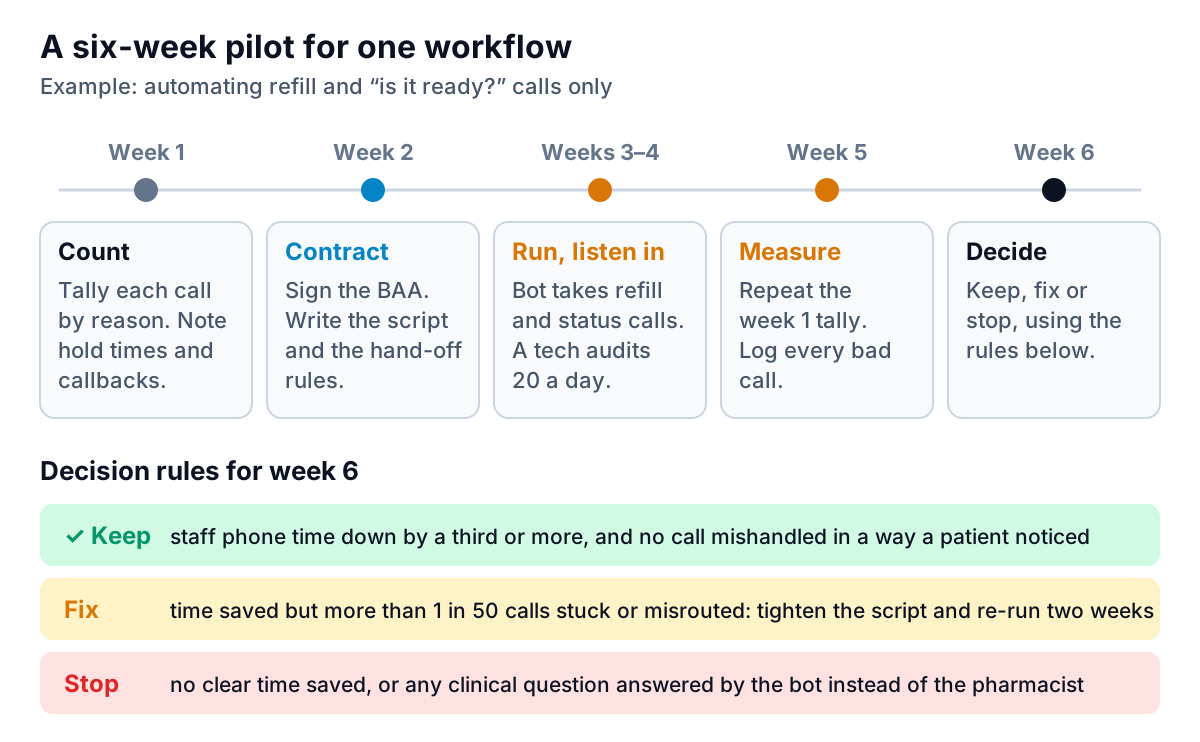
A few details make the difference:
- Scope it narrowly. Refill and status only. Every other intent hands off. You can widen it later.
- Tell your team what's changing and why. The goal is fewer interruptions during verification, not fewer technicians. Ask them to flag every odd call.
- Audit daily. A technician listens to or reads 20 automated calls a day during weeks three and four. That's tedious, and it's how you find the loop that traps elderly callers or the misheard prescription number.
- Measure the same way twice. Repeat the week-one tally in week five. Compare total calls answered by staff, minutes per call, and callbacks.
- Write the decision down. Keep, fix or stop, with the numbers. If you stop, you've lost six weeks and a small fee, not patient trust.
Keep measuring after the pilot
An AI workflow for pharmacy operations drifts. Prescribers change fax formats, a PBM changes its reject codes, a phone-system update breaks the hand-off. A short weekly review catches it: calls handled by the bot versus staff, hand-offs, refill requests queued, intake entries corrected by technicians, and will-call bags returned to stock.
None of those weekly numbers needs patient names. Most pharmacy systems and phone systems can export counts by day and category, and that aggregate table is enough to see a trend. If you want it turned into a readable weekly report, Parity can build one: upload the CSV of counts, ask for "bot versus staff calls by week, with hand-off rate", and you get charts and a written summary where every figure has been checked against the full file. Parity is not a HIPAA-covered tool, so use it only with de-identified or aggregate operational data like call counts, prescription volume by day or revenue by category. Never upload patient-level exports. HHS's de-identification guidance explains what has to be removed for data to count as de-identified.
The same habit works for the front store: if you sell over-the-counter products, the guide to AI demand forecasting for small retail covers reorder planning from sales history. And if the phone is your biggest pain, the patterns in AI appointment scheduling for dental offices (hand-offs, identity checks, logging) carry over closely.
Upload an aggregate export, with no patient details, and describe the report you want. Build a report from your data free