Here's a month that confuses a lot of founders. Fernleaf, an example subscription app invented for this guide, took $14,200 in card payments in September. Its bank received $12,980.40 from Stripe. The Billing overview says MRR is $11,640. And the accountant wants a figure for "revenue" that matches none of them.
Nothing is broken. Stripe reports measure different things, date them differently and leave different items out. Once you know which report answers which question, the numbers line up and you can explain them to anyone. This guide covers the free reports, what Stripe's MRR and churn figures actually count, what to export, and when it's worth paying for more.
Why your Stripe reports never agree
Start with the money. Fernleaf made 410 successful charges in September and started the month with an empty Stripe balance. Here is where the $14,200 went:
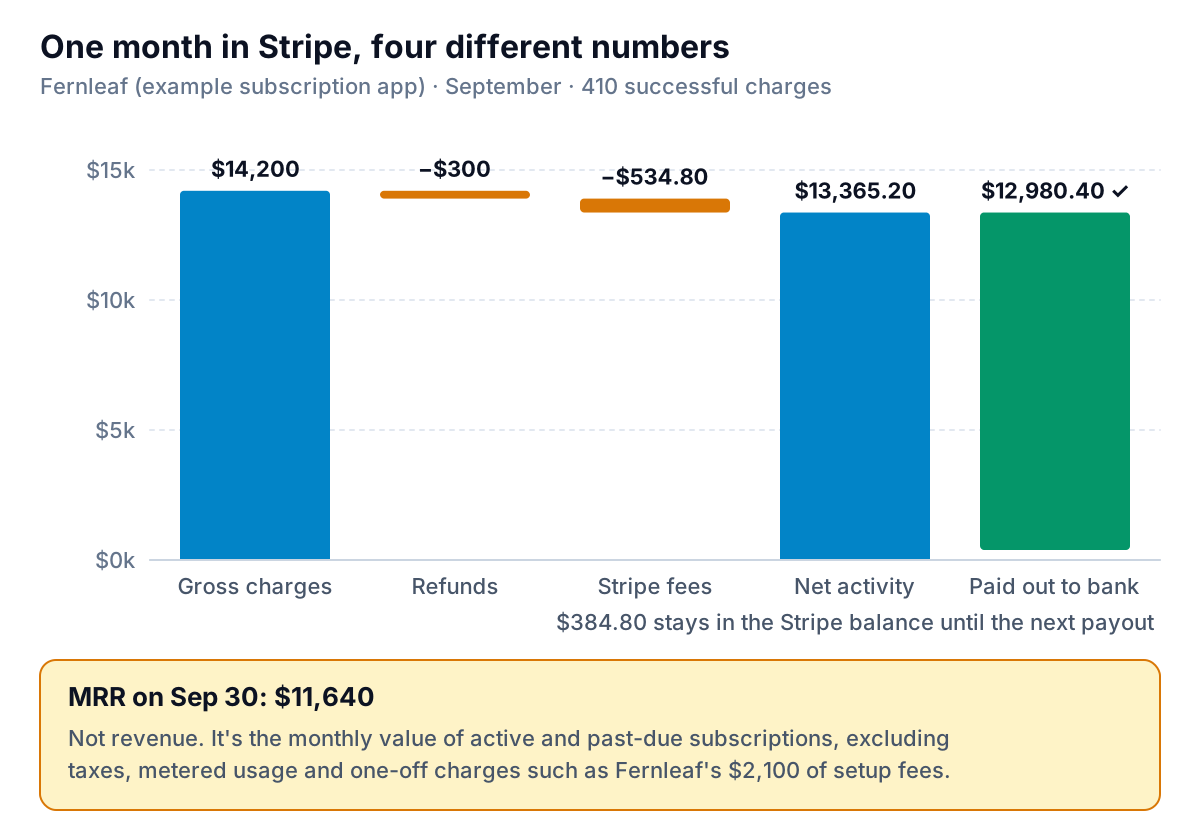
- Gross charges, $14,200. Every successful payment: $12,100 of subscription invoices and $2,100 of one-off setup fees.
- Fees, $534.80. Stripe's standard US price for domestic cards is 2.9% + 30¢ per successful transaction. On $14,200 across 410 charges, that's $411.80 + $123.00. International cards, manually entered cards and currency conversion each add a surcharge, so your real rate may be higher.
- Net activity, $13,365.20. Charges minus the $300 of refunds and the fees. This is what Stripe actually owes Fernleaf for September.
- Payouts, $12,980.40. What reached the bank in September. Payouts lag the charges behind them, so $384.80 of late-September money was still in the Stripe balance on the 30th and went out in October.
- MRR, $11,640. A different kind of number altogether: the monthly value of the subscriptions running on September 30. It ignores the $2,100 of setup fees, and annual plans count at one-twelfth of their price.
So "revenue" for your accountant is usually closest to gross charges less refunds, adjusted for whatever your books treat as income. "Cash" is payouts. "Growth" is MRR. Keep the three apart and most arguments about Stripe numbers disappear.
The free Stripe reports, and which one to pull
Stripe's reports documentation lists two free financial reports, the Balance report and the Payout reconciliation report, which you view in the Dashboard's reporting section or download as CSV. A separate Fees report itemises what Stripe, the card networks and partners charged. Stripe's own guide to choosing a report boils the choice down to how you think about your Stripe balance:
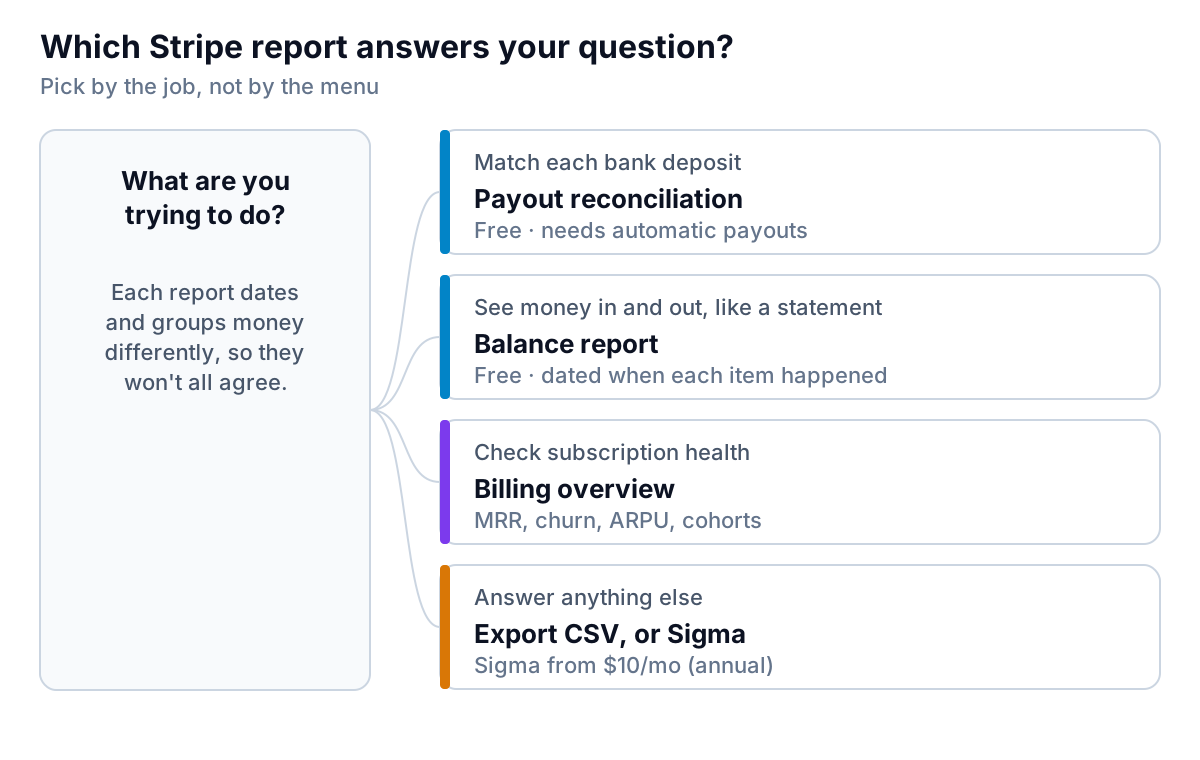
Balance report: Stripe as a bank account
The Balance report works, in Stripe's words, like a bank statement. It has three parts: a balance summary (opening balance, activity, payouts, closing balance), the balance change from activity grouped by category (charges, refunds, fees, disputes and so on), and the payouts. Items are dated when they happened in Stripe. Stripe notes that it doesn't link payouts to the payments inside them. Use it for the monthly "where did the money go" view.
Payout reconciliation: matching your bank deposits
The Payout reconciliation report breaks each payout into the charges, refunds and fees it contains, so you can tick off every bank deposit against your books. Two limits matter. It's only available if you use automatic payouts. And instant payouts can't be matched to transactions, so Stripe says reconciling those is up to you. If you pull instant payouts often, expect to do more of this by hand.
Three settings that move numbers between months
- Time zone. Stripe's report options let you report in your account's time zone or in UTC, and the choice changes which day each transaction falls on. A $49 charge at 9:30 pm Pacific on September 30 happens at 4:30 am UTC on October 1. Run September in UTC and it's in October. Use your account's time zone, and use the same one every month.
- Complete days only. The same page says Dashboard reports include only complete days, and a day's data is normally ready by 12:00 pm the next day. Don't run month-end on the morning of the 1st and expect the 31st to be finished.
- Dating rules. The Balance report dates each item when it was created; Payout reconciliation dates it by when its payout took effect. A charge on September 29 paid out on October 2 sits in September in one report and October in the other.
Stripe also groups transactions by a reporting category rather than raw transaction type. For example, it splits generic adjustments into disputes, dispute reversals and failed refunds. Those category names are what you'll see in the activity section, and they're the right level for mapping to your chart of accounts.
What Stripe's MRR and churn figures actually count
If you sell subscriptions through Stripe Billing, the Billing overview shows MRR, MRR growth, active subscribers, ARPU, subscriber churn, churned revenue, trial conversion and retention by cohort. It's the quickest health check you have. It's also where definitions catch people out, so read Stripe's billing analytics documentation before you quote a number to an investor.
MRR
Stripe defines MRR as the monthly-normalized value of all active and past due subscriptions. It leaves out taxes, subscribers on free plans and metered (usage-based) products. Stripe's MRR support article adds that one-off invoices aren't counted, because MRR looks forward. Three consequences:
- Past-due subscriptions still count. A customer whose card has been failing for two weeks is in your MRR until the subscription is cancelled or marked unpaid. If failed payments are rising, MRR can look healthier than your cash.
- Usage revenue is missing. If part of your price is metered, standard MRR understates the business. Stripe lists usage MRR as a preview feature you have to sign up for.
- Discounts are your choice. Under Configure on the Billing overview you can choose whether recurring and one-time discounts are subtracted. Permanent recurring discounts are always subtracted. Changes take 24 to 48 hours to show. Pick a setting and leave it, or your trend line will jump for no business reason.
Churn
Stripe's subscriber churn rate is not the simple "lost customers divided by starting customers" that most spreadsheets use:
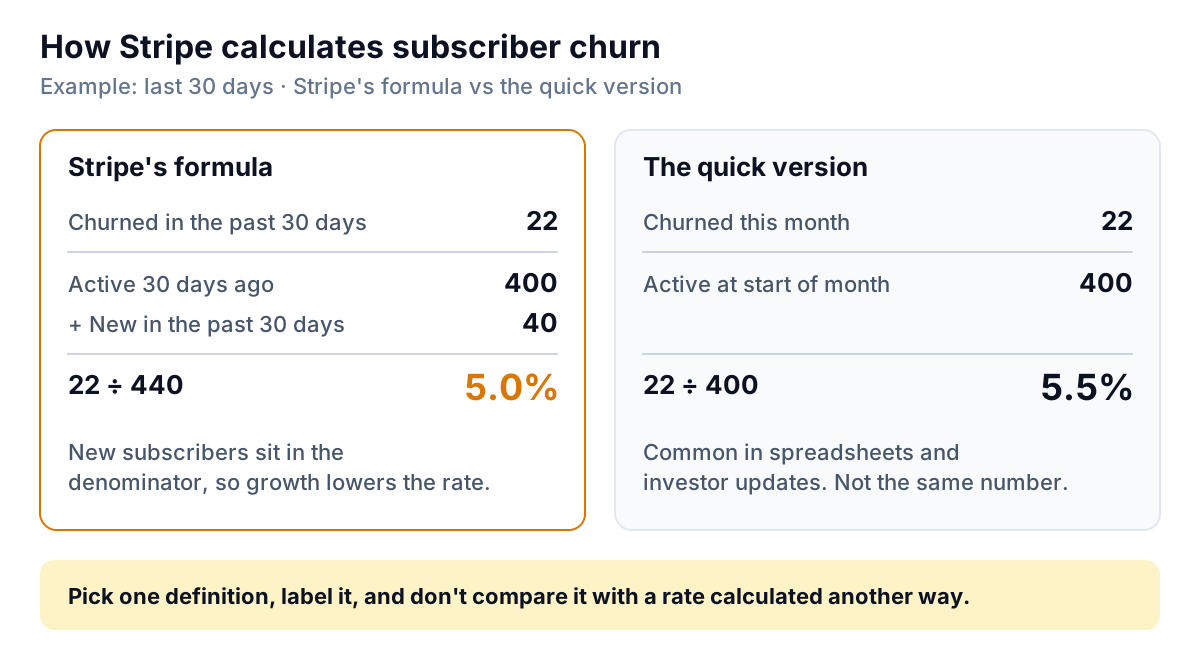
Stripe divides subscribers who churned in the past 30 days by the subscribers who were active 30 days ago plus those who joined in the past 30 days. In the example above that's 22 ÷ 440, or 5.0%. The quick version, 22 ÷ 400, gives 5.5%. Neither is wrong, but if last quarter's investor update used one and this quarter's uses the other, you've just reported an improvement that didn't happen. Note too that it's a rolling 30 days, not a calendar month.
Two more details from the same documentation. Stripe's lifetime value figure is ARPU divided by subscriber churn rate, which Stripe itself calls an estimate. And filtering or grouping charts by product or price isn't available if you process subscriptions in more than one currency.
How fresh is it? Stripe's billing analytics FAQ says data is available within an hour in most cases.
What to export from Stripe, and when
The Dashboard answers the standard questions. For anything else, export a CSV and work with it in a spreadsheet or another tool. Here's what to pull for each job:
| Job | Export | Notes |
|---|---|---|
| Month-end bookkeeping | Balance report, summary and itemized activity | Account time zone, full month, run after midday on the 1st |
| Matching bank deposits | Payout reconciliation, itemized | Automatic payouts only; itemized CSVs can include your metadata |
| Sales by customer or product | Payments list from the transactions page | Filter by date, then choose your columns on export |
| Subscription model or investor update | Billing overview: Subscription metrics summary, MRR per subscriber per month, Customer MRR changes | The definitions above apply; write down your discount setting |
Stripe's support page on exporting payments describes the payments export: filter the list, click Export, and choose your settings and columns. The report options page adds that you can schedule reports to run daily, weekly or monthly with your choice of columns, and Stripe emails you when each one is ready. A monthly scheduled Balance report, arriving on the 2nd, takes one chore off the list.
When to pay for Sigma or Revenue Recognition
Stripe sells two add-ons that small businesses ask about.
- Sigma lets you write custom reports over your Stripe data in SQL or by asking in plain language. The Sigma pricing page starts at $10 a month on an annual plan, or $15 a month billed monthly, for up to 250 charges a month, plus a per-charge fee above that. Plans step up with volume, to $450 a month at the top tier. There's a 30-day free trial.
- Revenue Recognition automates accrual accounting for subscriptions: deferred revenue, recognised revenue and the waterfall your accountant builds by hand. Pricing starts at $25 a month for up to $10,000 of monthly volume, plus a percentage above that, and rises with volume.
Decision rule: if you find yourself rebuilding the same spreadsheet from exports every month to answer a question the free reports can't, Sigma's entry tier probably costs less than your time. If your accountant is spending hours each month spreading annual plans across months, ask them whether Revenue Recognition would replace that work. If neither is true, the free reports plus a monthly export are enough.
A monthly Stripe reports routine
Here's the whole thing as a checklist you can run on the 2nd of each month:
- Run the Balance report for last month in your account time zone. Note gross charges, refunds, fees and payouts.
- Check fees as a percentage of charges. Fernleaf's was 3.8% ($534.80 on $14,200), because 30¢ is a big slice of small charges. If yours creeps up, look at the international and manually entered share.
- Reconcile payouts to the bank with the Payout reconciliation report, and set aside any instant payouts to match by hand.
- Read the Billing overview: MRR, new versus churned MRR, subscriber churn and how much MRR is sitting in past-due subscriptions.
- Export the Subscription metrics summary and keep a copy, so next month's comparison uses the same definitions.
- Write three sentences: what came in, what went out, and what changed in subscriptions. That's the core of a monthly KPI report.
The slow part is turning those exports into something you can read in one place and send to someone else. Parity connects to Stripe directly and builds a dashboard from it: headline numbers with their trends, charts, what explains the changes, and a table of what needs attention, such as failed payments or a jump in refunds. Every number and chart is checked against queries on the full dataset before you see it. Ask, and it writes a client-ready monthly report from the same data, for a co-founder, investor or board. You refine either by chat, share a read-only link, or export to PDF or Excel. It doesn't replace Stripe's own definitions; when you quote MRR, say whose definition it is. If you'd rather start from a file, the same works with an exported CSV (see building reports from Excel and CSV exports), and the layout ideas in our small business dashboard guide apply either way.
Connect Stripe and Parity builds a checked dashboard of charges, payouts and subscriptions, with the changes explained. Connect Stripe free
Whatever you use, write down which report and which definition each number came from. Stripe reports are accurate. The confusion comes from comparing numbers that were never meant to match.