Eleven hours. That's how much non-clinical admin a solo therapist in our example logged in one ordinary week, and that's before a single progress note. Three hours on insurance, two and a half on scheduling, two on intake paperwork, and the rest scattered across payments, inquiries and estimates for self-pay clients.
Most of that time follows rules: send this form when that happens, check this before the first session, remind people two days ahead. Rules are what AI automation for mental health practice admin does well. Judgement is what it does badly. This guide shows how to tell the two apart, which workflows to automate first, the exact rules to set, and the guardrails a therapy practice needs that a dental office or a gym doesn't. If you're choosing a note-taking assistant, that's a different decision, covered in our guide to AI tools for a mental health practice.
Start with a one-week admin audit
Don't start with software. Start with a week of honest timekeeping. Every time you or your admin do a non-clinical task, write down the task and the minutes. At the end of the week, group the entries and split each group into two piles: the part that follows a fixed rule and the part that needed a person to think.
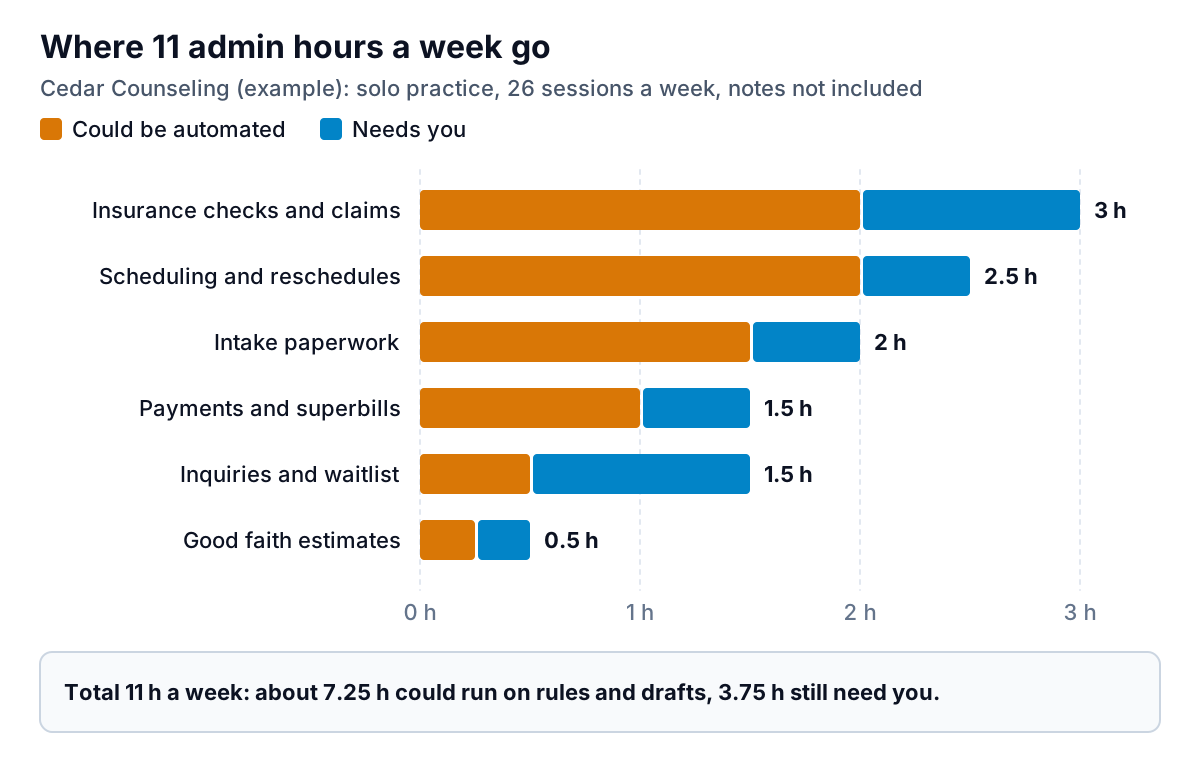
In this example, about 7.25 of the 11 hours run on rules. That's the ceiling for what automation can give back, and it's a useful number to hold vendors to. If a tool promises to save you ten hours a week and your audit shows seven automatable hours in total, someone is guessing.
Notice the one bar that's mostly blue. Inquiries and the waitlist need you, because deciding whether someone is a good fit for your practice, or needs a higher level of care, is a clinical call. Automation can acknowledge an inquiry in seconds. It shouldn't decide what happens next.
Pick tasks with two questions: how often, and how much harm
For each task in your audit, ask how often it happens and how much harm a mistake would do. A wrong reminder time is an annoyance. A wrong estimate is a dispute. A missed crisis message is a disaster. Plot them and the order of work falls out.
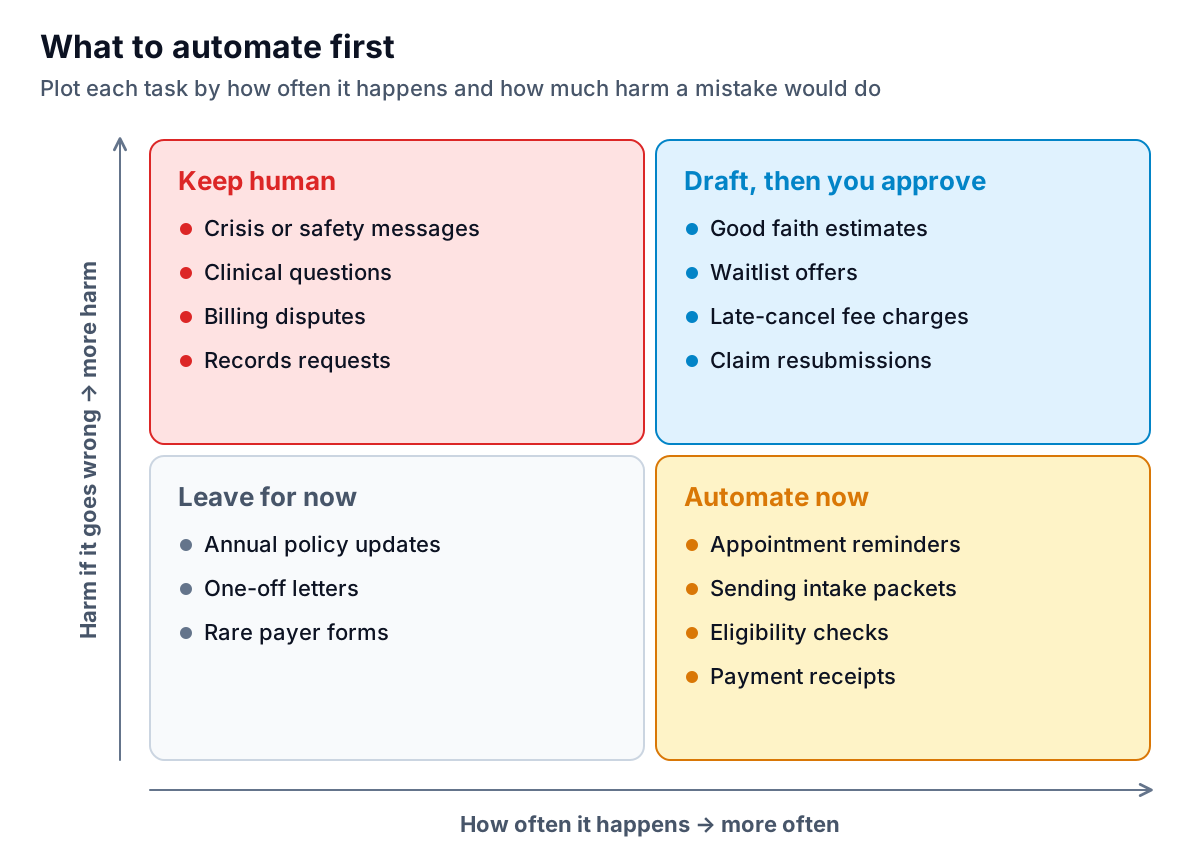
- Automate now: high volume, low harm, fixed rules. Reminders, sending intake packets, eligibility checks and receipts.
- Draft, then approve: the software prepares it, you click send. Estimates, waitlist offers, fee charges, claim resubmissions.
- Keep human: anything where context changes the right answer. Crisis messages, clinical questions, disputes and records requests.
- Leave for now: rare, low-stakes jobs aren't worth the setup time.
AI automation for mental health practice intake, step by step
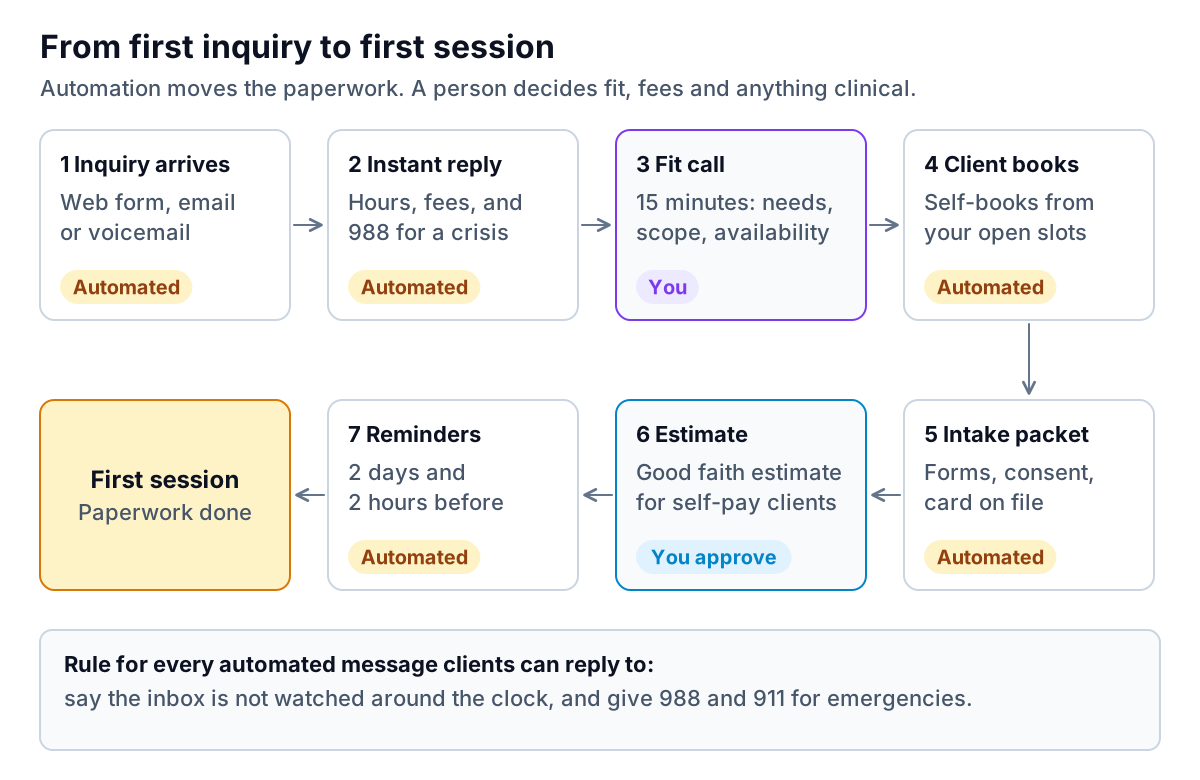
Intake is where most practices lose the most time and the most clients. A slow reply to an inquiry often means that person books with someone else. Here's a pipeline that keeps the speed of automation and the judgement of a clinician.
The instant reply
The first automated message is the most important one, because you can't control what the person wrote. Someone in crisis may use your contact form. Every auto-reply should say the inbox isn't watched around the clock and point to emergency help. The 988 Suicide & Crisis Lifeline takes calls and texts 24/7. Here's wording you can adapt:
Note the last line of the body. Asking people to keep health details out of email reduces how much sensitive information sits in your inbox before any agreement is in place.
Reminders that don't reveal too much
Appointment reminders are part of treatment, so HIPAA doesn't require a separate authorization for them. But in a therapy practice, the reminder itself can reveal something sensitive. Three rules:
- Keep content minimal. Day, time, clinician first name and how to confirm. HHS suggests limiting what's left in messages to what's needed to confirm the appointment.
- Offer a neutral sender name. "Cedar Counseling" on a shared family phone may be more than a client wants seen. Many systems let you show a plain name or just the clinician's first name.
- Honour contact preferences automatically. If a client asks to be contacted only by email, or only at a work number, the reminder system has to respect that every time, not just when someone remembers.
Two reminders, two days and two hours before, is a sensible default. Our guide to AI appointment scheduling goes deeper on timing, confirmation replies and filling cancelled slots from a waitlist.
Waitlist offers
When a regular slot opens up, the tempting automation is "text the whole waitlist, first to reply gets it." In a therapy practice that rewards whoever checks their phone fastest, not whoever needs the slot most, and it tells several people they missed out. A better rule: the system builds a shortlist of waitlisted clients whose stated availability matches the slot, and you choose who gets the offer. The offer itself, with a 24-hour hold and a one-tap accept, can then go out automatically. This is the kind of small design choice that separates sensible AI automation for mental health practice work from automation copied from a gym or a hair salon.
Money workflows: eligibility, claims, estimates and fees
Billing tasks follow rules, but the cost of a mistake is higher, so set them up carefully.
Eligibility checks
Run an automatic eligibility check when a client books their first session and again at the start of each month. Flag anything that changed: a new plan, a terminated policy, a visit limit or a deductible that resets in January. A flagged result goes to a person. The check itself shouldn't need one.
Claims
Set your billing software to hold claims that are missing a field your payers often reject, such as an authorization number or a rendering provider. Route denials into one queue with the reason attached. Resubmitting a corrected claim can be drafted automatically, but a person should approve it, because the fix sometimes means changing what was billed.
Good faith estimates for self-pay clients
Under the No Surprises Act, uninsured and self-pay clients are entitled to a good faith estimate of expected charges. CMS's provider guidance sets deadlines tied to scheduling: when a service is booked at least 3 business days ahead, the estimate is due within 1 business day of scheduling; when booked at least 10 business days ahead, within 3 business days. For recurring services like weekly therapy, one estimate can cover up to 12 months if it clearly states the expected frequency and number of sessions. If a final bill comes in at least $400 above the estimate, the client may be able to use a federal dispute process.
That's an ideal "draft, then approve" job. Your system fills in the template from your fee schedule and the planned frequency. You check the numbers and send it. Set a reminder for month eleven so a new estimate goes out before the old one runs out. These rules are hedged summaries, so check CMS's provider pages or your billing adviser for your situation.
Late-cancellation fees and superbills
Superbills for out-of-network clients are pure routine: generate them monthly and send them through your secure portal. Late-cancellation fees are not routine, even with a signed policy. The client who cancelled at 9 a.m. might have had a rough night you'd want to know about. Let the system draft the charge and hold it for you.
Guardrails a therapy practice can't skip
- A BAA with every tool that touches client information. That includes the reminder service, the form builder and the email platform. HHS's sample BAA provisions show what the contract should cover.
- No tracking pixels on booking or contact pages. HHS guidance on online tracking technologies warns that analytics on appointment pages can disclose health information. The fact that someone is booking therapy is sensitive.
- A monthly sample review. Read ten automated messages from the past month. Check they went to the right person, said what you intended, and that nothing stalled in a queue.
- An off switch. Know how to pause every automation at once. If something misfires, you want to stop it in one minute, not one afternoon.
- No AI on the clinical side of the line. Automations send, remind and fill in forms. They don't screen, assess, triage or answer clinical questions.
Measure whether it worked
Pick four numbers and check them monthly for a quarter: admin hours per week (rerun the audit), days from first inquiry to first session, late-cancellation and no-show rate, and the share of claims accepted on first submission. If the hours drop but days to first session go up, an automation is slowing people down and needs fixing.
These are counts, not client records, which makes them safe to analyse outside your practice platform. Parity builds that kind of report: you upload a CSV or Excel export, describe the view you want ("no-show rate by weekday, last six months"), and it produces charts, KPI tiles and a written summary, with every number checked against the full dataset before you see it. Parity is not a HIPAA-covered tool, so only upload de-identified or aggregate operational data, such as weekly session counts, cancellation totals or revenue by payer type, never names, dates of birth, diagnoses or session content. HHS's de-identification guidance explains the standard. The habit that keeps you safe is to total things up inside your practice platform before you export. For ideas on which numbers belong on a small practice's monthly page, see AI dashboard for a service business.
Upload monthly totals (inquiries, sessions, cancellations, claims) and get a checked report that shows what changed. Build a report from your data free
Good AI automation for mental health practice admin is mostly invisible. Clients get quick replies and sensible reminders, the paperwork is done before the first session, and you get your evenings back without giving up the parts of the job that need a clinician. This guide is general information, not legal, billing or clinical advice. For state rules and HIPAA questions, check with your licensing board, professional association or a healthcare attorney.