The most important setting in your AI note tool may be one you've never looked at. In July 2026, ClearHealthCosts reported that SimplePractice had started retaining de-identified session transcripts by default for clinicians who switched on its Note Taker from mid-June, to improve its AI. Earlier users stayed opted out, and anyone can opt out. Nothing was hidden. But a therapist who clicked "enable" in July agreed to something different from a colleague who clicked it in May.
That is the real work of picking AI tools for mental health practice use. The features are easy to compare. The defaults, the consent conversation and the data trail take longer. This guide covers what's on the market, how to judge a note assistant, how HIPAA treats psychotherapy notes, where the law already draws lines on client-facing AI, and a scorecard you can put to any vendor.
What AI tools for mental health practice owners are actually buying
Strip away the marketing and almost every product falls into one of four groups:
- Note assistants. They listen to a session (or to your dictation afterwards) and draft a progress note. Some are built into practice platforms such as SimplePractice; others are standalone tools that paste into your EHR.
- Admin automation. Reminders, intake packets, eligibility checks, claims and payment follow-up. Less exciting, often more time saved. We cover this side in detail in AI automation for a mental health practice.
- Practice insight. Reports on caseload, cancellations, payer mix and revenue per clinician.
- Client-facing AI. Chatbots, "AI companions" and between-session support apps that talk to clients directly.
These carry very different levels of risk. The useful question isn't "is this tool good?" but "how close does it get to what clients say in the room?"
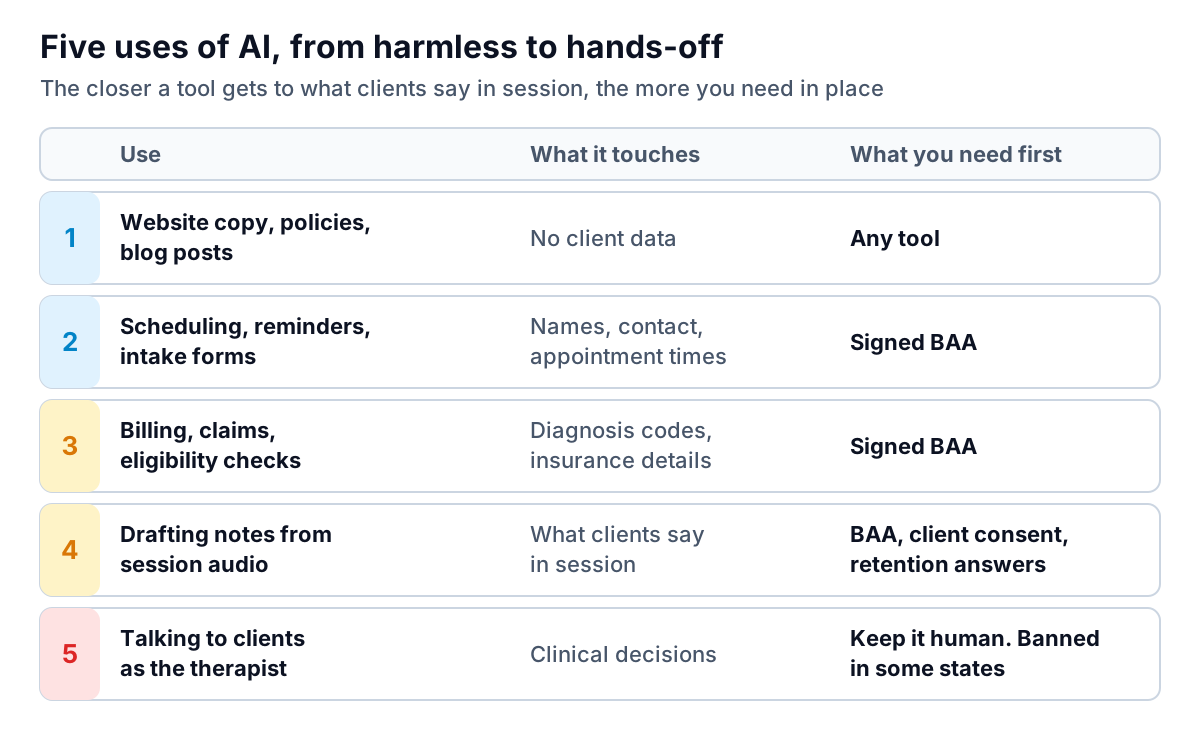
Anything from rung 2 up handles protected health information, so the vendor is a business associate and needs a signed agreement with you. HHS publishes sample BAA provisions showing what one must cover, and its cloud guidance is clear that encrypting the data doesn't remove the need for one. If a vendor won't sign a BAA, the conversation is over, however good the demo was.
Note assistants: the choice that deserves the most care
Note assistants are where most of the time savings are, and most of the risk. A session isn't a sales call. Clients say things they've never said to anyone. Before you switch one on, follow the data through each step.
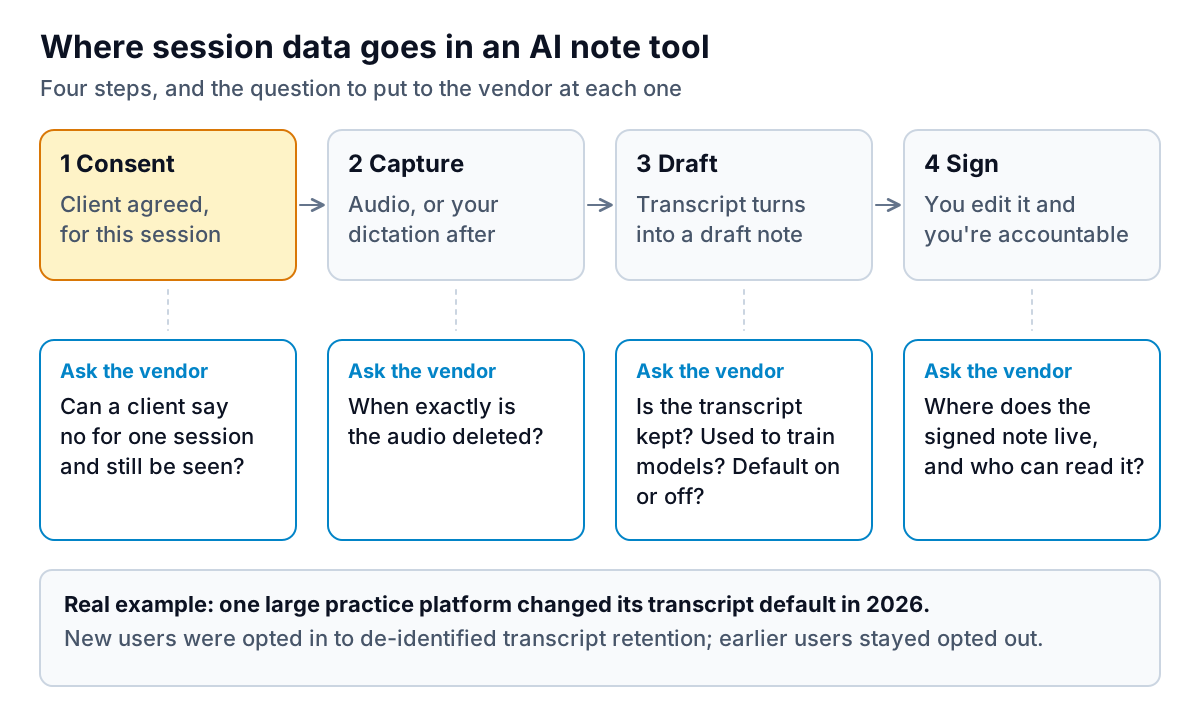
Consent is a conversation, not a checkbox
The APA's ethical guidance on AI in professional practice (updated July 2025) puts transparency and informed consent first: tell clients clearly how AI is used and let them decline or withdraw. In practice that means three things:
- Put it in your written consent, in plain words: what is recorded, by whom, how long it's kept, and that you write and sign the final note.
- Ask again out loud before the first recorded session, and make saying no easy. Some clients will agree on paper and feel differently on a hard day.
- Offer a per-session opt-out that costs the client nothing. "Let's not record today" should take two seconds.
SimplePractice publishes a guide and template for telling clients about AI notes, which is a reasonable starting point even if you use another product. A short version you can adapt:
"With your permission, I use a tool that listens to our session and drafts my notes. The audio is deleted once the draft is made. I read, correct and sign every note myself. You can say no now, or at the start of any session, and it won't change your care in any way."
Only say "the audio is deleted" if your vendor's documentation confirms it, and check how long transcripts are kept too. They can be a separate setting with a separate default, as the SimplePractice example shows.
Judge the draft on your own sessions
Run a two-week trial with consenting clients and look at three things: does the draft reflect your theoretical framework or flatten everything into generic language? Does it ever put words in a client's mouth? And how long do your edits take? If you're rewriting most of each note, the tool is adding risk without saving time.
Built into your platform, or standalone?
A note assistant inside the practice platform you already use has real advantages: one BAA instead of two, no copying and pasting between systems, and drafts that land straight in the right client's chart. The trade-off is that you take the vendor's defaults and pace of change, as the transcript example above shows.
A standalone tool may write better notes for your modality, or suit a group practice where clinicians use different platforms. But it adds a second business associate, a second place where session content lives and a copy-paste step where a draft can end up in the wrong chart. If you go standalone, ask how drafts reach your EHR and whether anything is left behind in the tool once you've signed.
Either way, write down a simple trial result before you decide, for example: "Ten consenting sessions, average edit time four minutes against eleven minutes writing from scratch, one draft with a misattributed quote." That one line is worth more than any comparison chart, because it measures AI tools for mental health practice work on your caseload, not a vendor's demo.
Psychotherapy notes, progress notes and where the AI draft lands
HIPAA has a special, narrow category called psychotherapy notes, and it's easy to assume your AI-drafted notes fall into it. They usually don't.
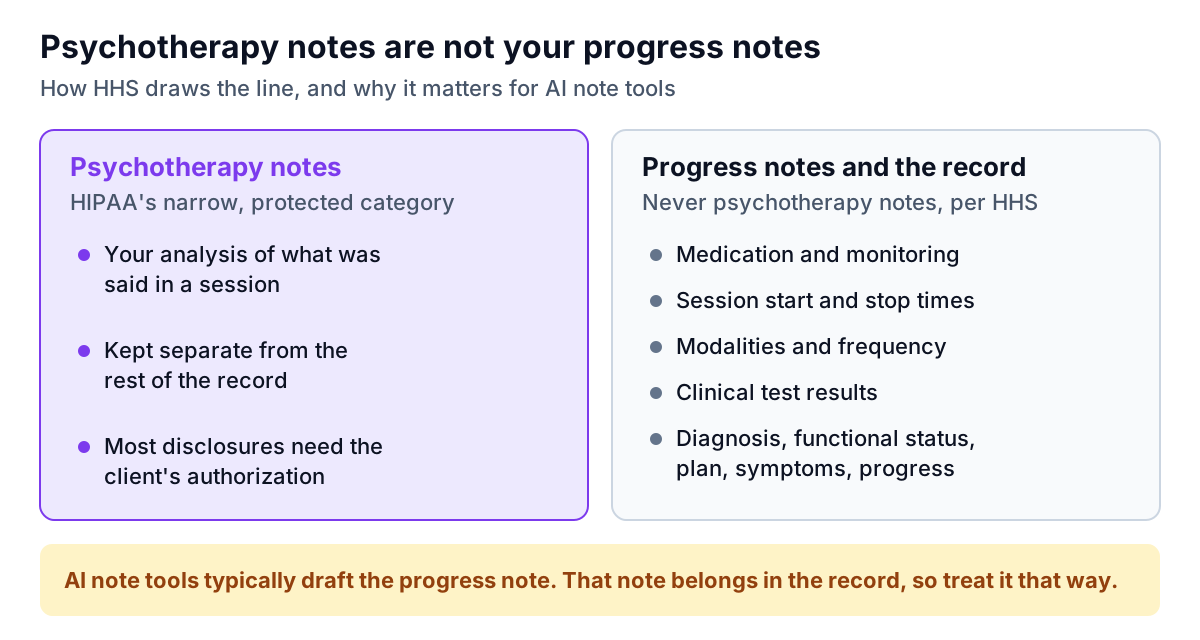
According to HHS, psychotherapy notes are a mental health professional's notes analysing session conversation, kept separate from the rest of the record. Most disclosures of them need the client's authorization. But medication, session times, modalities, test results and summaries of diagnosis, plan, symptoms and progress are never psychotherapy notes. That's exactly what a progress note contains.
So a drafted progress note is part of the record, with the access rights that come with it. If you also keep separate process notes, think hard before putting them into any AI tool, and find out how that tool would store them. If you work in a federally assisted substance use disorder program, a further set of rules, 42 CFR Part 2, applies on top of HIPAA, including its own category for SUD counseling notes. Talk to your compliance adviser before adding AI there.
Client-facing AI: where the lines are already drawn
Rung 5, AI that talks to clients as if it were the therapist, is where states have started to legislate. Illinois's Wellness and Oversight for Psychological Resources Act, signed in August 2025, bars AI from providing therapy or making therapeutic decisions, while allowing licensed professionals to use it for administrative and supplementary support. Other states have considered similar rules, so check where you and your clients are located.
Even where it's legal, three practical rules hold:
- Any automated message a client can reply to must route crisis language to a human and give the 988 Suicide & Crisis Lifeline (call or text 988). An auto-reply that answers a crisis message with "Thanks, we'll get back to you within two business days" is a real harm.
- Don't let a general AI chatbot reply to online reviews with anything that confirms the reviewer is a client. HHS settled with a New Jersey mental health provider that disclosed patient information in replies to negative reviews.
- Check the tracking code on your booking page. HHS warns that pixels and analytics on appointment pages can send health information to third parties. For a therapy practice, the fact that someone booked is itself sensitive.
A vendor scorecard you can run in one afternoon
Send these questions to every vendor on your shortlist. Ask for answers in writing, with links to their documentation.
| Question | Good answer | Red flag |
|---|---|---|
| Will you sign a BAA? | Yes, standard, before any real client data | "We're HIPAA compliant, so you don't need one" |
| When is session audio deleted? | A specific trigger and time, in the docs | "Securely stored" with no time |
| Are transcripts kept, or used to train models? | Clear setting, default stated, opt-out per client | Buried in terms, or changes without notice |
| Can a client opt out for one session? | One click, no workaround needed | Only at account level |
| Who at the vendor can read notes? | Named roles, access logged | "Our team" with no detail |
| What happens to data if we leave? | Export, then deletion with confirmation | No deletion commitment |
| Does any feature talk to clients directly? | Admin messages only, crisis routed to you | Open-ended "support" chat |
Then add the tool to your HIPAA risk analysis. A solo practice still needs one, and a new recording tool is exactly the kind of change it should capture. The same BAA-first approach applies in every outpatient setting. Our guide to AI tools for a physiotherapy clinic walks through it for a busier front desk.
Where reporting tools fit, and where they don't
The last group, practice insight, is the one most owners skip. Yet questions like "which weekday has the most late cancellations?", "what share of revenue is self-pay?" and "how full is each clinician's caseload?" are answered from operational counts, not clinical content.
That's where Parity fits. You upload a CSV or Excel export, describe what you want to see, and it builds a report with charts, KPI tiles and a written summary. Every number is checked against the full dataset before you see it. You can refine it in chat ("split by clinician") and export a PDF. But Parity is not a HIPAA-covered tool. Use it only with de-identified or aggregate operational data, such as sessions per week, cancellation counts by weekday or revenue by payer type, never with client names, dates of birth, diagnoses or anything from a note. HHS explains what de-identified means in its de-identification guidance, and the simplest safe habit is to total things up in your practice platform before you export.
If you're weighing up a chat assistant for your own internal documents instead, such as policies, fee schedules or the staff handbook, see AI chatbot for internal data. The same rule applies: no client information unless there's a BAA.
Upload aggregate counts, like sessions, cancellations and revenue by payer, and get a checked report in minutes. Build a report from your data free
The best AI tools for mental health practice use are the ones your clients would be comfortable with if they read the settings page. Start there, and the feature comparison gets much shorter. This article is general information, not legal or clinical advice. For state law, consent and privacy questions, talk to your licensing board, your professional association or a healthcare attorney.