Before you try AI for legal document drafting, know two numbers. The first is $5,000. In June 2023 a federal judge in New York fined two lawyers and their firm $5,000 after they filed a brief citing six court decisions that did not exist. ChatGPT had produced them (Mata v. Avianca). It was treated as a freak event at the time. It wasn't, and that's the second number. A public database that tracks court decisions dealing with AI-hallucinated material in filings listed more than 2,000 of them worldwide by the end of September 2026 (AI Hallucination Cases database).
Yet the same technology is quietly saving small firms real hours on engagement letters, NDAs, leases and first-draft contracts. The difference between those two outcomes is not which product a firm bought. It's which kind of work they gave it, and how they reviewed what came back. This guide is about using these tools in a solo or small practice: the three kinds of tool, where each one helps, the review pass that catches the errors, and what the ABA's ethics guidance asks of you. It is general information, not legal or ethics advice. Your state bar's rules and opinions govern your practice.
"AI drafting" means three different things
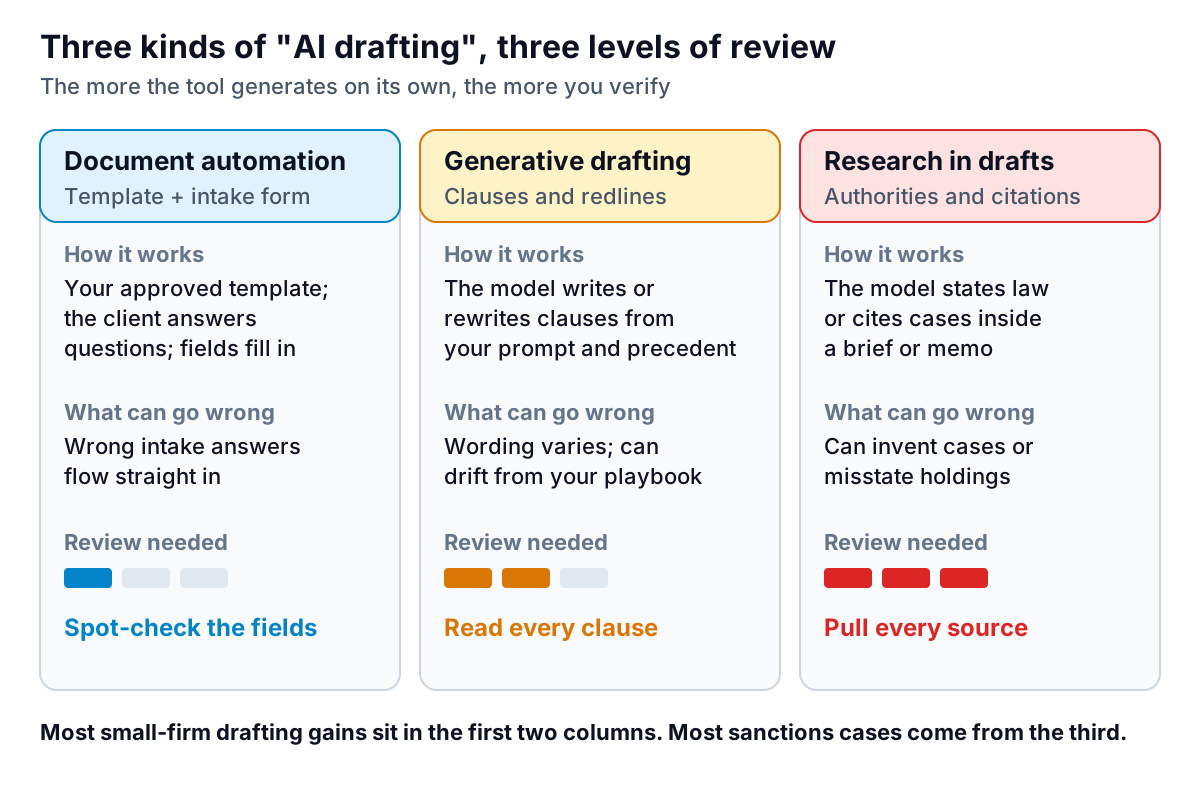
Vendors use the same words for very different products. Before you compare any of them, sort them into one of three groups, because each needs a different level of review.
Document automation
This is the oldest and safest group. You build a template from your own approved document, add conditional logic ("if the client is married, include this clause"), and the client or a paralegal fills in a questionnaire. The output is predictable: the same answers always produce the same document. Gavel is one example. Its site describes turning intake questionnaires into finished Word and PDF documents, with templates for practice areas such as estate planning, family law and real estate, and integrations with Clio and DocuSign. (Gavel's site also notes it has been acquired by Relativity.) Strictly, much of this isn't generative AI at all. It is still the best place for many small firms to start, because the review burden is low and the gain on high-volume documents is large.
Generative drafting and redlining
Here a language model writes or rewrites text: a new indemnity clause, a tenant-friendly version of a landlord's lease, a redline of a counterparty's markup against your positions. Spellbook is a well-known example. Its site describes redlining contracts with tracked suggestions, flagging risky or non-standard terms, drafting clauses and full agreements from scratch or from your precedent library, playbooks that encode your firm's standards, and benchmarking against market terms. It works inside Microsoft Word and lists other integrations, including Google Docs. Gavel also offers a Word-based review and drafting product called Gavel Exec. The output here is fluent and varies from run to run, so every clause needs a lawyer's read.
Research inside a draft
The highest-risk use is any draft where the model states the law or cites authority: a brief, a motion, a research memo, even a "consistent with applicable case law" sentence in a contract. Tools built on legal databases do better than general chatbots, but they are not error-free. Stanford researchers who tested legal research tools from LexisNexis and Thomson Reuters found they produced incorrect or misgrounded answers in roughly 17% to 33% of test queries (Stanford RegLab). That study dates from 2024 and the products have changed since, but the lesson holds: pull and read every authority before it goes in a filing.
Where AI for legal document drafting saves a small firm time
The best early uses are high-volume, lower-stakes documents where you already have a good precedent and the variation between matters is mostly facts:
- Engagement letters and fee agreements, built by document automation from your approved version.
- NDAs, simple services agreements and leases, drafted from your precedent and then redlined against your playbook.
- First-pass review of a counterparty's markup: a summary of what changed and which changes cut against your client, so you start negotiating from a list instead of a blank page.
- Plain-language explanations for clients, such as a one-page summary of what their new lease means, which you then edit.
- Alternative wording when a clause isn't landing in negotiation: "give me three narrower versions of this non-solicit."
Uses to hold back on, at least until you have a policy and a track record: anything going to a court, anything that relies on the model's knowledge of current law in your jurisdiction, and novel transactions where there is no good precedent to anchor the draft. Reading long PDFs, such as a 90-page set of loan documents, is a related but different task. The guide to AI tools that analyze PDFs covers what those tools do well and where they slip.
The review pass: what to check in an AI draft
An AI first draft fails in predictable ways. Fluent prose hides them, because the sentences read well even when the substance is wrong. Here's a sample excerpt with five common errors, all of which a careful review would catch:
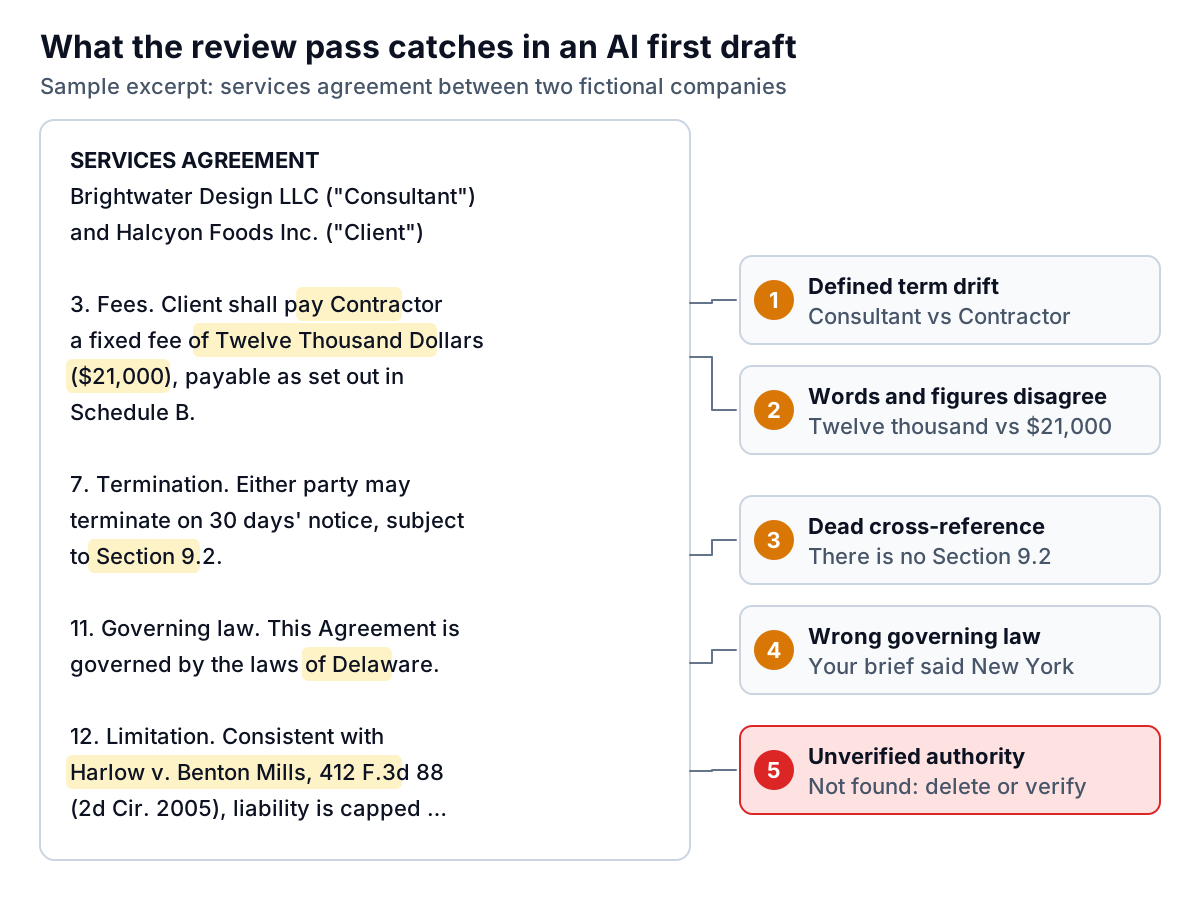
Turn those into a checklist and run it on every AI-assisted document:
- Parties and defined terms. Search each defined term. Is it defined once, used consistently and capitalised everywhere?
- Numbers and dates. Fees, caps, notice periods, deadlines. Where an amount appears in both words and figures, do they match? Do the dates fit the deal timeline?
- Cross-references. Click or search every "Section X". Generative tools renumber freely and leave stale references behind.
- Jurisdiction-specific terms. Governing law, venue, statutory notice language and anything your state requires in a particular form.
- Authorities. Every case, statute and regulation, pulled from a primary source and read. If you can't find it, it goes.
- What's missing. Compare against your playbook or checklist for this document type. Models tend to produce what you asked for and omit what you didn't think to ask for.
Confidentiality, privilege and ABA Formal Opinion 512
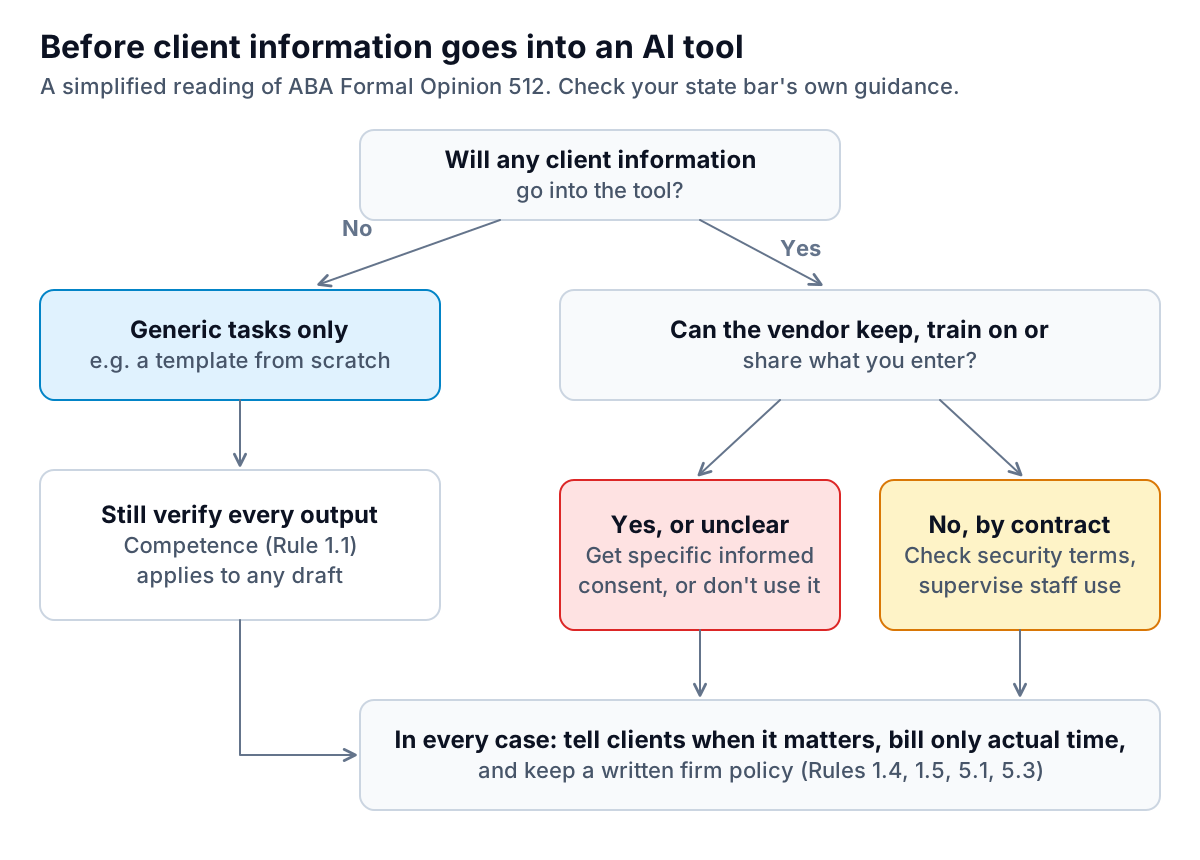
In July 2024 the ABA issued Formal Opinion 512, its first ethics opinion on generative AI. It doesn't create new rules. It applies the existing Model Rules: competence (1.1), confidentiality (1.6), communication (1.4), candor and meritorious claims (3.1, 3.3), supervision (5.1, 5.3) and reasonable fees (1.5). Summaries from the National Conference of Bar Examiners and others highlight a few points that matter for drafting:
- Competence. You need a reasonable understanding of what the tool can and can't do, and the depth of your review depends on the task. A brainstorm needs less checking than a document going to a client or a court.
- Confidentiality. Before you put information relating to a client's representation into a tool that may use it beyond your matter (the opinion's "self-learning" concern), you need the client's informed consent. The opinion indicates boilerplate language in an engagement letter is not enough.
- Fees. If you bill hourly, bill the time you actually spent, not the time the task used to take. Time spent learning a general-purpose tool generally isn't billable to a client.
- Supervision. Managing lawyers should set clear firm policies and train lawyers and staff on them.
Privilege is a separate and still-developing question. In February 2026, in United States v. Heppner, a federal judge in New York held that documents a criminal defendant created on his own with a consumer AI tool were protected by neither attorney-client privilege nor the work product doctrine. The court pointed in part to the tool's terms, which allowed the provider to use and disclose user data (Proskauer summary). That case involved a client acting alone, not a lawyer using a vetted tool. But it is a strong reason to keep client matters out of consumer AI accounts and to read the data terms of any tool you adopt.
Many state bars have issued their own AI guidance, and some differ from the ABA on details. Check yours, and ask your malpractice carrier whether it has requirements or recommendations of its own.
A one-page firm AI policy
If anyone in the firm uses AI for legal document drafting, Opinion 512's supervision point is easiest to meet with a short written policy that people actually read. One page is enough to start:
- Approved tools. Name them. Everything else is off-limits for client work, including personal accounts on consumer chatbots.
- What may go in. For each approved tool, say whether client-identifying information is allowed, based on its data terms, and when client consent is needed.
- Required review. The checklist above, with who signs off. A lawyer reviews every AI-assisted document before it leaves the firm.
- Authorities. No citation is filed unless a person has pulled and read the source.
- Billing. How AI-assisted work is recorded and billed, consistent with Rule 1.5.
- Client communication. When and how the firm tells clients it uses AI, and where that appears in the engagement letter.
If you're deciding whether a tool should run in the cloud or on your own machines, the guide to cloud versus local AI walks through the trade-offs. Firms considering an internal assistant over their own precedent bank should read the guide to AI chatbots for internal data before connecting anything.
The firm's own numbers are a safer place to start
Not every useful AI job in a law firm touches client confidences. Running the practice produces plenty of data that can be analysed without names or matter details: hours by practice area, realisation and collection rates, work in progress by month, receivables by age. That is where Parity's reporting tool fits. You upload a CSV or Excel export, for example from your billing system, describe the report you want ("realisation by practice area, last four quarters"), and it builds a dashboard with charts and an executive summary. Every number is checked against queries on the full file before you see it. Files are deleted after the report is built and are never used for training.
Apply the same discipline as above: strip client names, matter descriptions and narrative time entries from the export before you upload it, so the file carries the firm's numbers and nothing that relates to a client's representation. If unpaid bills are the issue, the guide to the accounts receivable aging report explains how to read one.
Upload a de-identified billing or time export and get a verified dashboard of hours, realisation and receivables. Build a report from your data free
Used with the right tool for the job and a firm review habit, AI for legal document drafting gives a small firm back real hours. Used without them, it puts your name on someone else's mistake.