A prospect who read your proposal on a Sunday night and found their own company name spelled wrong will not tell you why they went with someone else. They will just go quiet. That is the real risk of using AI for proposals, and it is not the one most people worry about. The draft rarely sounds robotic. It sounds fine. The problem is that "fine" is easy to send without reading closely, and a proposal is a document where one wrong number or one invented claim costs the deal.
An AI proposal generator for consultants can cut the time you spend writing a proposal sharply. It cannot decide your price, your scope or what you have actually done before. This guide shows how to split the work so you get the speed without the risk: which sections to hand over, the brief that makes the draft specific, the tools worth looking at, and the five-minute check that stops embarrassing mistakes.
What AI is good at in a proposal, and what it isn't
A consulting proposal has two kinds of content. There are decisions: what you'll do, what you won't, what it costs, how success is measured. And there is the prose that explains those decisions: the recap of the client's situation, the description of your approach, the timeline. Language models are good at the second kind. They are fast, they don't get tired of rewriting the same "our approach" section for the fortieth time, and they adapt tone well when you give them examples.
They are bad at the first kind, for a simple reason. The facts that drive those decisions aren't in the model. It doesn't know the client said "we can't touch the ERP until January." It doesn't know you lost money on the last fixed-fee job like this. It will fill those gaps with something plausible, and plausible is what gets you in trouble.
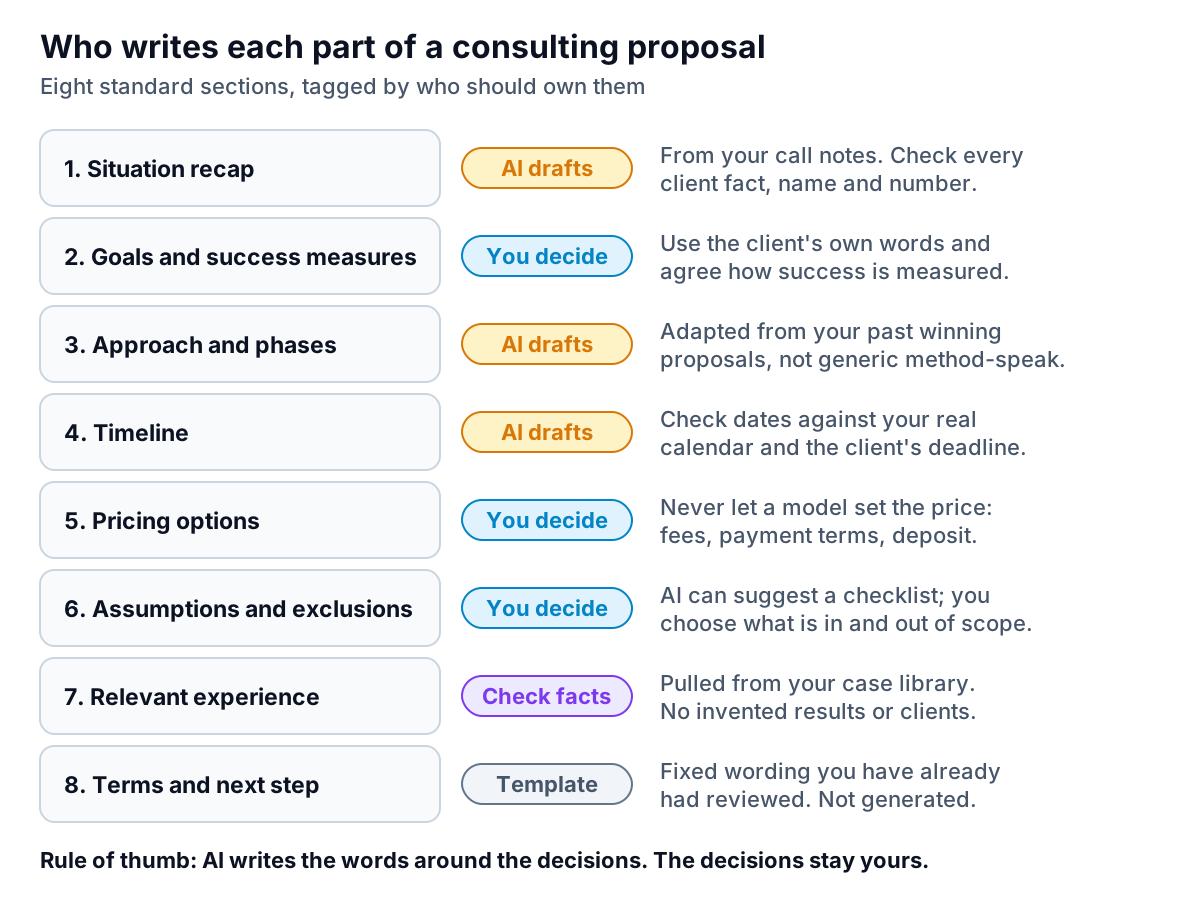
Three sections deserve the most suspicion:
- Relevant experience. Ask a model for "three case studies showing results in retail operations" and it will write three. Unless you gave it the cases, they are invented. Keep a case library (a document with one paragraph per real project, the result and whether the client agreed to be named) and tell the tool to use only that.
- Pricing. Never ask a model what to charge. It has no idea what your utilisation looks like, what this client's budget signal was, or how much risk sits in the scope. Write the price yourself, then let the AI explain the options in plain language.
- Assumptions and exclusions. This is the section that protects you from scope creep. AI can suggest a checklist of common exclusions ("travel billed at cost", "client provides data access within five working days"), which is useful. But you choose which ones apply.
The brief that makes an AI draft specific
Most disappointing AI proposals come from a thin prompt: "Write a proposal for an inventory optimisation project for a retail client." The model has nothing specific to work with, so it writes something generic and confident. The fix is not a cleverer prompt. It is better input.
After every discovery call, spend fifteen minutes filling in a short brief. Use the client's own words wherever you can, because those phrases are what make a proposal feel like it was written for them.
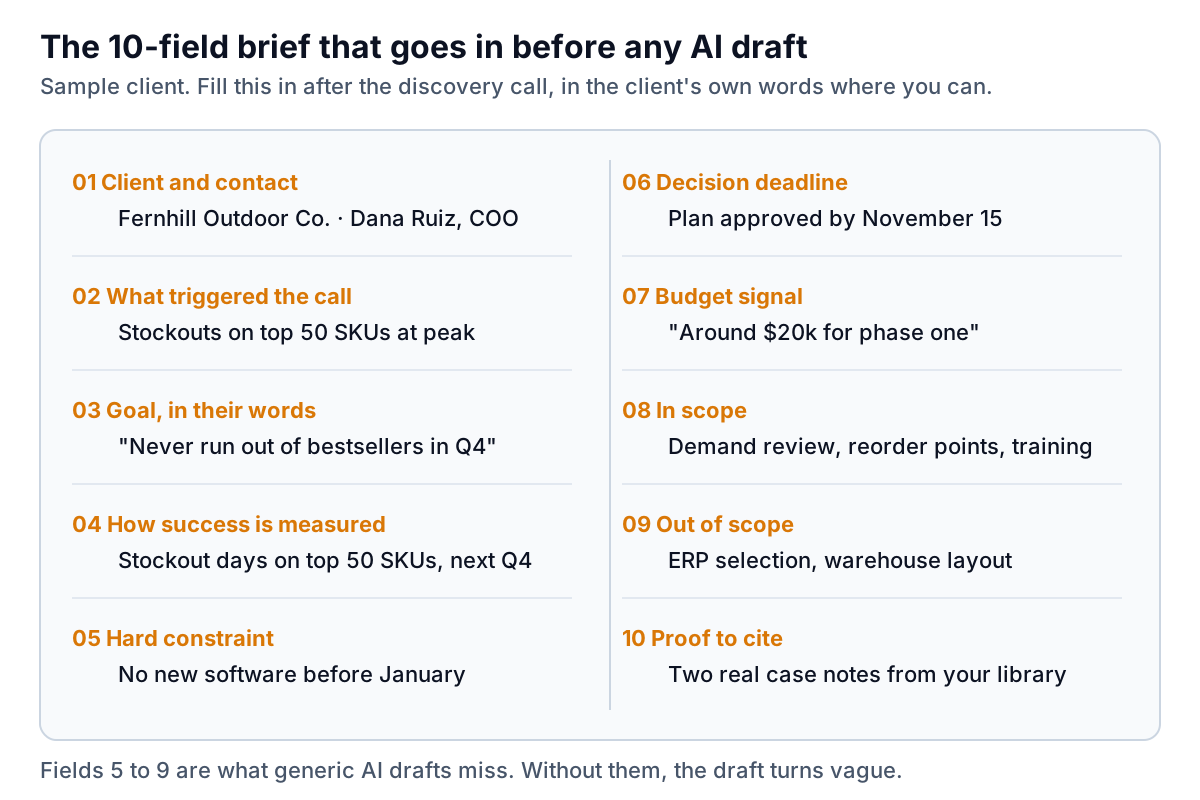
Then the instruction to the AI can be short, because the brief does the work. Something like:
Using the brief below and the two attached past proposals as a style guide, draft sections 1, 3 and 4 of a proposal: situation recap, approach and phases, and timeline. Use the client's wording from fields 2 and 3. Do not mention pricing, do not describe any past project that isn't in field 10, and flag anything you had to assume with [CHECK].
The [CHECK] instruction is worth stealing. It makes the model show you where it guessed instead of hiding the guess in smooth prose. You will still read every line, but your eye goes to the right places first.
Where the time actually goes
It helps to be honest about what an AI proposal generator for consultants saves. In a typical proposal, most of the hours go into writing and rewriting prose. That part shrinks a lot. Pricing doesn't shrink at all, because it was never a writing problem. Checking grows a little, because you now have to verify text you didn't write.
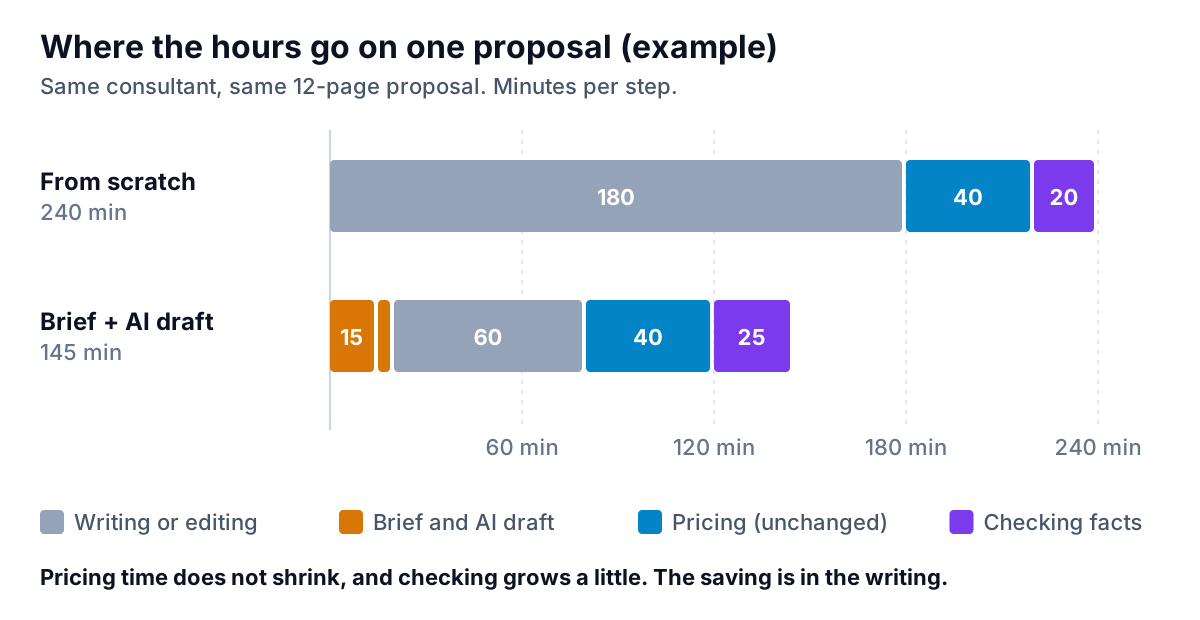
In this example a solo consultant goes from 240 minutes to 145 for the same proposal. That is about an hour and a half back per proposal. If you send six a month, it is roughly a working day. The bigger gain is often speed to send: a proposal that lands the day after the call arrives while the prospect still remembers what they told you. Your own numbers will differ, so time your next two proposals and see.
Choosing an AI proposal generator for consultants
There are two broad routes. Which one fits depends on how many proposals you send and whether you need things like e-signature and view tracking.
Route 1: a general AI assistant plus your own template
ChatGPT, Claude, Gemini or Microsoft Copilot in Word, with a well-built template and the brief above. This is the cheapest option and often the best one for a solo consultant sending a handful of proposals a month. You keep the formatting in your own Word or Google Docs template and paste in the drafted sections. The downside is that everything around the writing (sending, signing, tracking, follow-up) is still manual.
Route 2: proposal software with AI built in
Dedicated proposal tools combine templates, a content library, pricing tables, e-signature and engagement tracking, and most now include AI drafting. Two examples, as described on their own sites at the time of writing:
- Qwilr builds proposals as interactive web pages rather than PDFs. It lists an AI Creator that turns a website URL into a starting template, interactive quotes, built-in e-signature, notifications when a buyer reopens the proposal, payment collection through QwilrPay, and CRM integrations including HubSpot, Salesforce and Pipedrive.
- Proposify offers AI-assisted proposal generation, a content library of reusable sections, interactive quoting where the client can change quantities or add-ons, e-signatures, and analytics on how long a prospect spends on each section.
Pricing for both is per user and changes often, so check their current plans. Similar tools exist (PandaDoc and Better Proposals are two other common names), and the right choice depends mostly on which CRM you use and whether your clients prefer a web page or a PDF.
| If you… | Start with | Why |
|---|---|---|
| Send fewer than 5 proposals a month | General AI assistant + your template | Lowest cost; you keep full control of formatting |
| Send 5 to 20 a month, mostly similar scopes | Proposal software with AI drafting | Content library and pricing tables save more than the AI does |
| Need to know when a prospect reads it | Proposal software | View tracking is the trigger for a well-timed follow-up |
| Write bespoke, high-value proposals | General AI assistant + brief | Templates matter less; the thinking is the product |
If you are weighing AI tools across your whole practice, not just proposals, the overview of AI based tools for small businesses and the comparison of AI automation software cover where proposals fit alongside scheduling, email and bookkeeping.
The five-minute check before you send
Whatever tool you use, run this check on every proposal. It catches the mistakes that cost deals, and it takes less time than the email apologising for them.
- Names. Search the document for the client's company name and contact name. Check spelling and that no other client's name survived from a reused section. This is the most common error in reused proposals, with or without AI.
- Numbers. Every fee, date, duration and percentage. Do the phase prices add up to the total? Does the timeline end before the client's deadline? Does "six weeks" in the summary match the eight weeks in the timeline table?
- Claims. Every statement about your past work must match your case library. Delete any result you can't back up with a real project.
- [CHECK] markers. Search for them. Resolve or delete each one.
- Scope boundaries. Read the exclusions out loud. If the client asked about something in the call that isn't covered, say so explicitly in or out.
The pattern behind this list is the same one that runs through good use of AI anywhere in a business: let the model draft, but never let unchecked numbers reach a client. It applies just as much after you win the work, when the monthly reports start.
After the yes: reports and getting paid
A proposal promises outcomes. For many consultants the next recurring writing job is the report that shows progress against those outcomes, built from whatever data the client sends you each month. That is where Parity's reporting tool fits. You upload the client's CSV or Excel export, describe the report you need, and it builds a client-ready report or dashboard with KPI tiles, charts, summary tables and an executive summary. Every number and chart is checked against queries on the full dataset before you see it, so the figures you send match the file. The client reports page shows what that looks like, and the guide to AI reporting for agencies covers the monthly reporting habit in more detail.
The other job after the yes is getting paid on the terms your proposal set out. Put the payment terms, deposit and invoice schedule in the proposal itself, so there is no surprise when the first invoice arrives. If a client still pays late, the guide on how to chase unpaid invoices walks through the follow-up without damaging the relationship.
Upload a client's spreadsheet and get a verified, client-ready report you can refine by chat and export to PDF. Build a report from your data free
Used this way, an AI proposal generator for consultants is a fast drafting assistant, not a salesperson and not a pricing advisor. One last rule. If you wouldn't be comfortable saying a sentence out loud on a call with the client, it shouldn't be in the document, however good the AI made it sound.