At 9:40 on a Monday morning, the lobby is full, the board says the wait is over an hour, and two people have already walked out. At 2 p.m. on Wednesday, the same center has three empty rooms and a provider catching up on charts. Same staff, same building, completely different day.
Most of the useful AI tools for urgent care center operations attack one of those two problems: the queue patients feel, and the mismatch between when patients arrive and when staff are on the floor. A smaller set takes charting off providers' evenings. This guide walks through a visit step by step, shows where AI fits and where it must not, covers the HIPAA checks for each tool, and ends with a first step you can take using data you already have.
Start with the minutes patients actually feel
Break a typical walk-in visit into segments and the problem usually jumps out. In the example below, the patient spends 80 minutes door to door, and only 14 of them with a provider.
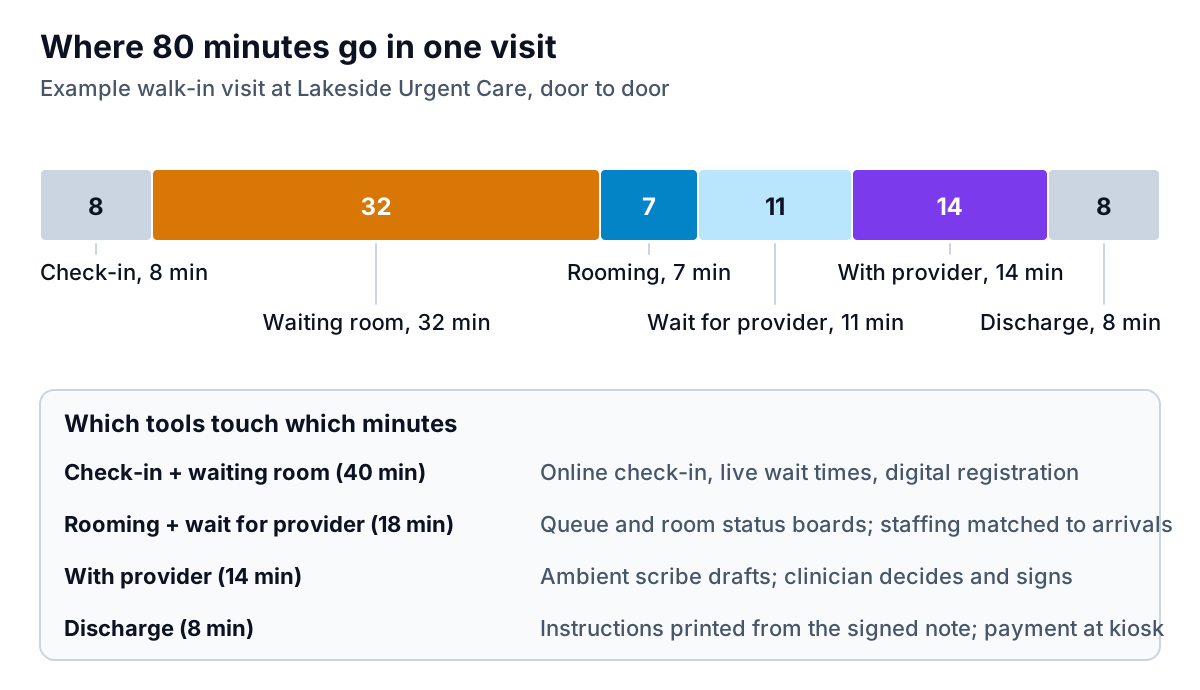
Forty of those 80 minutes are check-in and waiting. That's why the first tool most centers buy is online check-in with live wait times, and why it often matters more to patients than anything clinical software does. Platforms such as Solv and Experity's patient engagement software (formerly Clockwise.MD) let patients book or save a spot online, register on their phone and get a text when a room is ready, so more of the wait happens at home.
When you evaluate one, ask:
- How accurate are the wait estimates? A promised 20 minutes that becomes 50 is worse than no estimate. Ask how the estimate is calculated and whether it adjusts as providers clock in and out.
- Does it write into your EMR? Registration typed twice is not automation.
- How are walk-ins and online patients merged? Someone has to decide whether the online patient arriving at 10:05 goes ahead of the walk-in who's been there since 9:50. The rule should be written down and visible to staff.
- What tracking code runs on the booking page? More on this below. It's a real HIPAA issue.
AI tools for urgent care center visits, step by step
Here's a visit in eight steps, with where software can automate, where it can draft or suggest, and where clinicians decide.
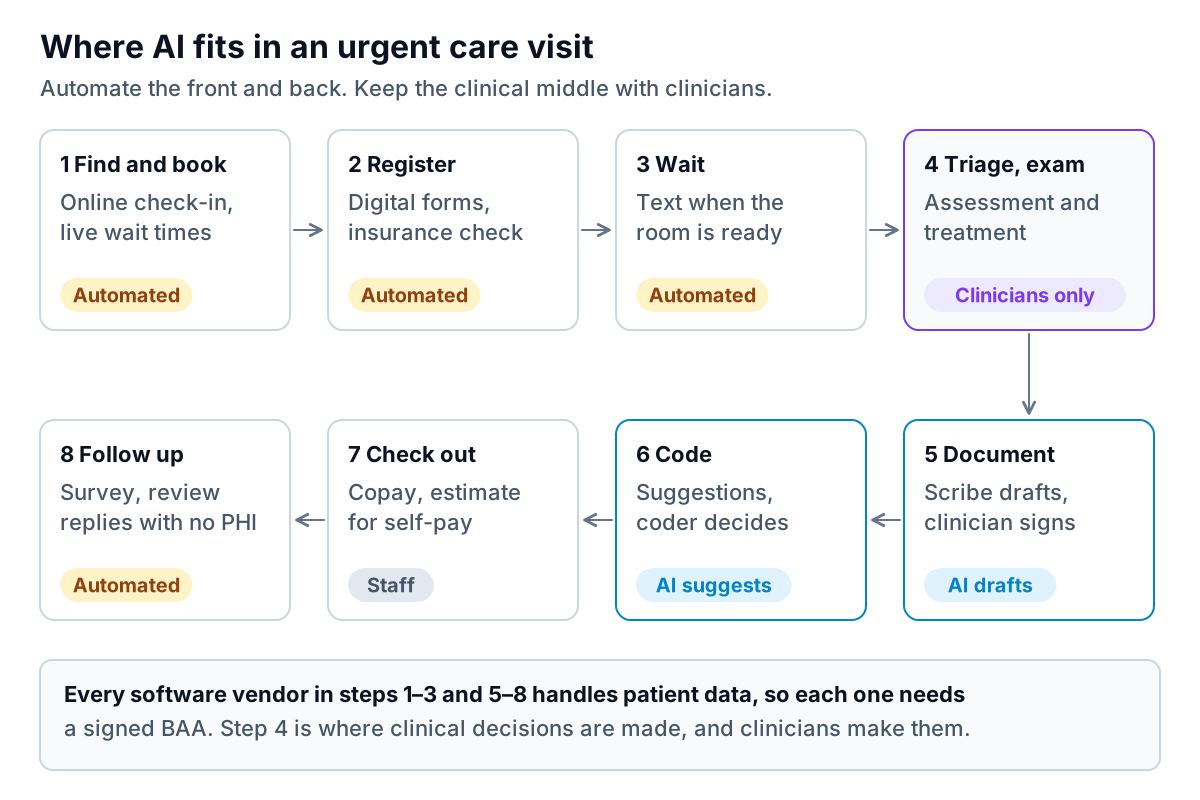
Registration and insurance
Tools that read an insurance card photo and run an eligibility check before the patient reaches the desk save real minutes, and they cut the claims that bounce because a plan changed in January. Check how the tool handles a failed match: it should flag the patient to staff, not quietly register them as self-pay.
Triage and the exam: clinicians only
Some products advertise symptom checkers or AI triage. Anything that suggests what's wrong with a patient or how urgently they need care is clinical territory, and some of it is regulated as a medical device. The FDA keeps a list of AI-enabled medical devices it has authorized. If a vendor's tool makes clinical suggestions, ask its regulatory status and have your medical director decide whether and how it's used. Operational software shouldn't make that call.
Documentation
Ambient scribes listen to the visit and draft the note. Urgent care has a particular case for them because visits are short and numerous, so charting piles up fast. Experity, for example, announced in October 2025 that its AI Scribe was live across its urgent care customers. Standalone scribes also connect to other EMRs. In a pilot, measure three things per provider: charts open at end of shift, edit time per note, and errors caught in review. The provider still signs every note and owns what it says.
Coding
Coding assistants read the signed note and suggest visit levels and procedure codes. Treat the suggestion like one from a new coder: useful, checkable and never automatically final. Ask the vendor to show which part of the note supports each suggestion.
Checkout and estimates
Self-pay patients are common in urgent care. Under the No Surprises Act, uninsured and self-pay patients are entitled to a good faith estimate. Walk-ins aren't usually scheduled days ahead, but CMS guidance says that when someone asks for an estimate, it's due within 3 business days of the request. A clear posted self-pay price list and an estimate template in your PM system handle most of this. Check CMS's provider requirements or your billing adviser for details.
Discharge instructions
Some scribes and EMRs can turn the signed note into plain-language discharge instructions, and some can translate them. That's a genuine help when the lobby is full and the patient's first language isn't English. But discharge instructions are clinical communication: what to watch for, when to come back, when to go to the emergency department. Treat the AI version as a draft that a clinician reads before it's printed, and check how the tool handles translation of medication names and return precautions. A good test during a pilot is to have a bilingual staff member review twenty translated instructions and count the errors. If there are any in the return precautions, the feature isn't ready for your center yet, however good the rest looks. Of all the AI tools for urgent care center use, this is the one where a quiet error is most likely to reach a patient unnoticed.
Follow-up and reviews
Automated surveys and review requests are low risk. Automated review replies are not. HHS has settled with several providers over replies that disclosed patient information, including a dental practice that paid $10,000 after responding to Yelp reviews. Any AI reply template should thank, apologise and invite the reviewer to call, without confirming they were ever a patient. Results callbacks and anything about a patient's condition stay with clinical staff.
Staff to arrivals, not to habit
The second big lever doesn't need AI at all to start, just your own check-in counts. Average them by weekday and hour over a few months and you get a picture like this one:
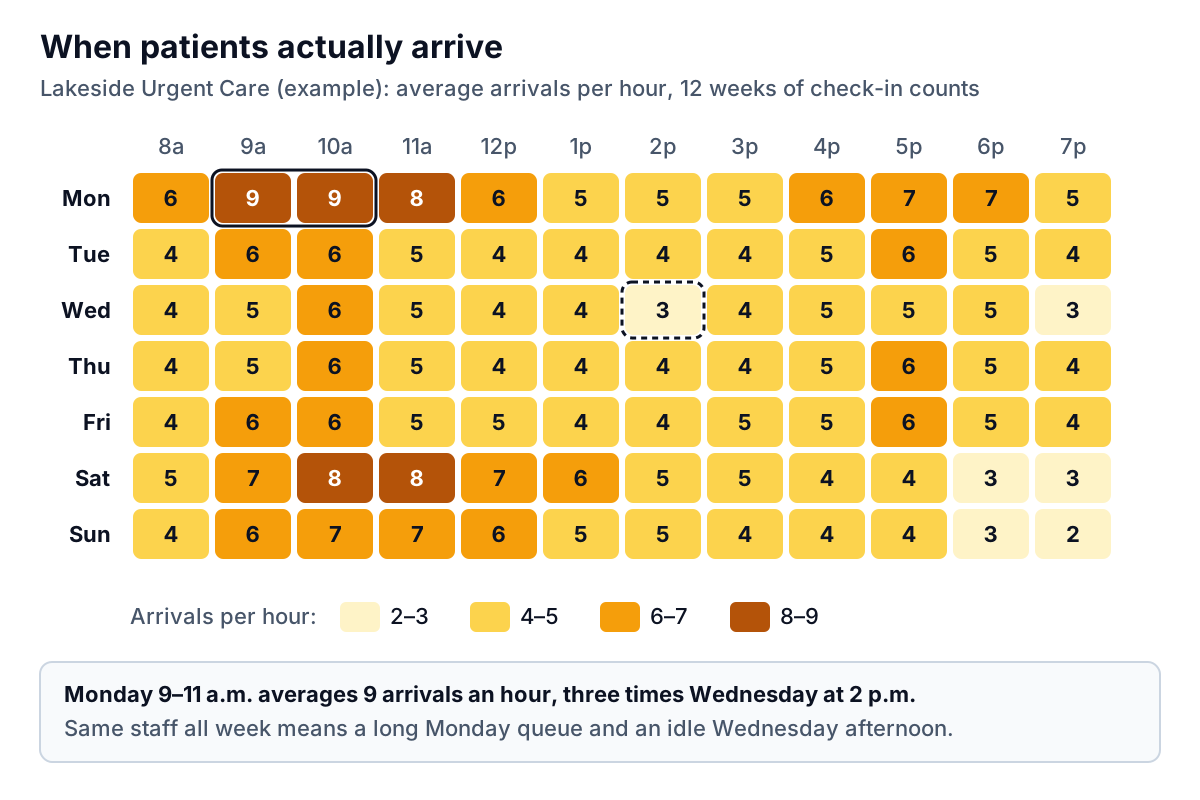
Here's how to turn that into a schedule, as a worked example. Say your providers average 3 patients an hour in your own data (use your number, not this one). Monday at 9 and 10 a.m., 9 arrivals an hour needs three providers to keep the queue from growing. Wednesday at 2 p.m., 3 arrivals needs one. If you currently run two providers all day, you're short on Monday morning and over on Wednesday afternoon, and the total provider-hours may barely change when you fix it. The same grid tells you when to schedule a second front-desk person and when the X-ray tech can take lunch.
Some urgent care EMRs and workforce tools forecast this for you. But the grid above is easy to build from an export, and building it yourself first tells you whether a forecasting product is worth paying for. This is where Parity can help. Export check-in counts by date and hour, with no patient names, dates of birth or reasons for visit, and upload the CSV or Excel file. Describe what you want ("average arrivals by weekday and hour, last 12 weeks, plus the busiest ten slots") and you get a heatmap, KPI tiles and a written summary, with every number checked against the full dataset first.
For more on which numbers to put on one page each week, see AI dashboard for a service business, and for a broader look at analysis tools, AI tools for data analysis.
The HIPAA checks for every urgent care tool
- A signed BAA before real patient data. Any vendor that creates, receives, keeps or sends patient information for you is a business associate. HHS publishes sample BAA provisions, and its cloud guidance says a provider storing encrypted data is still a business associate.
- Tracking code on booking pages. HHS's bulletin on online tracking technologies uses an appointment booking page as an example of where analytics can capture health information. "Save my spot" pages are exactly that. Check every pixel and analytics script on them, and either get a BAA from the tracking vendor or remove it.
- Your risk analysis. New recording devices in exam rooms and new patient-facing apps are changes your Security Rule risk analysis should cover.
- Patient notice for scribes. Tell patients when a visit is being recorded and let them decline. Recording consent rules vary by state, so check yours.
Costs and how to judge payback
Pricing models vary, so ask every vendor for an all-in annual figure for your number of sites and providers. You'll typically see per-provider or per-location monthly subscriptions for scribes and check-in tools, per-visit fees for some engagement products, and a percentage of collections for outsourced billing. Ask what's included: setup, EMR integration, training and the BAA itself.
Then judge payback with your own pilot numbers, not the vendor's case studies. A simple worked example for a scribe: if a pilot shows 4 minutes saved per visit across 60 visits a day, that's 4 hours of provider time a day. Whether that's worth the price depends on what those hours become: fewer charts after close, shorter waits on peak days, or one fewer provider shift on quiet afternoons.
A realistic first step
- This week: export 12 weeks of check-in counts by hour and build the arrivals grid. Compare it to your provider and front-desk schedule.
- Next two weeks: audit your booking page for tracking code, and switch on any text-when-ready or online check-in features your EMR already includes.
- Next month: pilot one scribe with two providers, with a BAA signed, patient notice in place and the three measurements above.
Specialty clinics face a different mix, with longer visits and more prior authorizations. If that's closer to your situation, see our guide to AI tools for an ENT clinic.
Upload de-identified check-in counts and get an arrivals heatmap, the busiest slots and a written summary, every number checked. Build a report from your data free
The best AI tools for urgent care center teams make the lobby shorter and the evenings earlier, and leave every clinical decision with the people trained to make it. This article is general information, not legal, billing or medical advice. Check payer and privacy questions with your billing adviser, compliance lead or a healthcare attorney.