The chart that nearly ended Umber Ceramics' wholesale business had two vertical axes. Umber is an example studio pottery we'll follow through this guide, and its owner built the chart in October to show her business partner the year: revenue as bars on the left axis, gross margin as a line on the right. Excel had scaled the right axis from 50% to 62%, so the margin line started near the top and fell through the bars like a stone. "We're growing into a loss," her partner said, and suggested dropping the stores that buy at wholesale prices.
Gross margin had fallen, from 58.0% to 53.6%, while gross profit dollars rose 20%. The best gross margin chart for a small business is usually not one chart but three: margin as a line under a separate revenue chart, a scatter of products by revenue and margin, and a bridge that splits the change into volume, mix, price and cost. This guide builds each one from Umber's two years of numbers, in Excel or Google Sheets, and explains why the dual-axis version told the wrong story.
What you want a gross margin chart to answer
Gross margin is gross profit as a share of revenue; if you need the calculation or what goes into cost of goods sold, our guide on how to calculate gross margin covers it. Here we only need the number, month by month and product by product. Owners ask three questions of it:
- Is margin holding as we grow? The answer needs revenue and margin on the same timeline.
- Which products earn their place? That needs each product's margin and its size together.
- Why did margin move? That needs the change split into causes you can act on.
Margin and revenue: two charts on one timeline
Here is Umber's last 24 months, drawn as two charts stacked on top of each other with the months lined up.
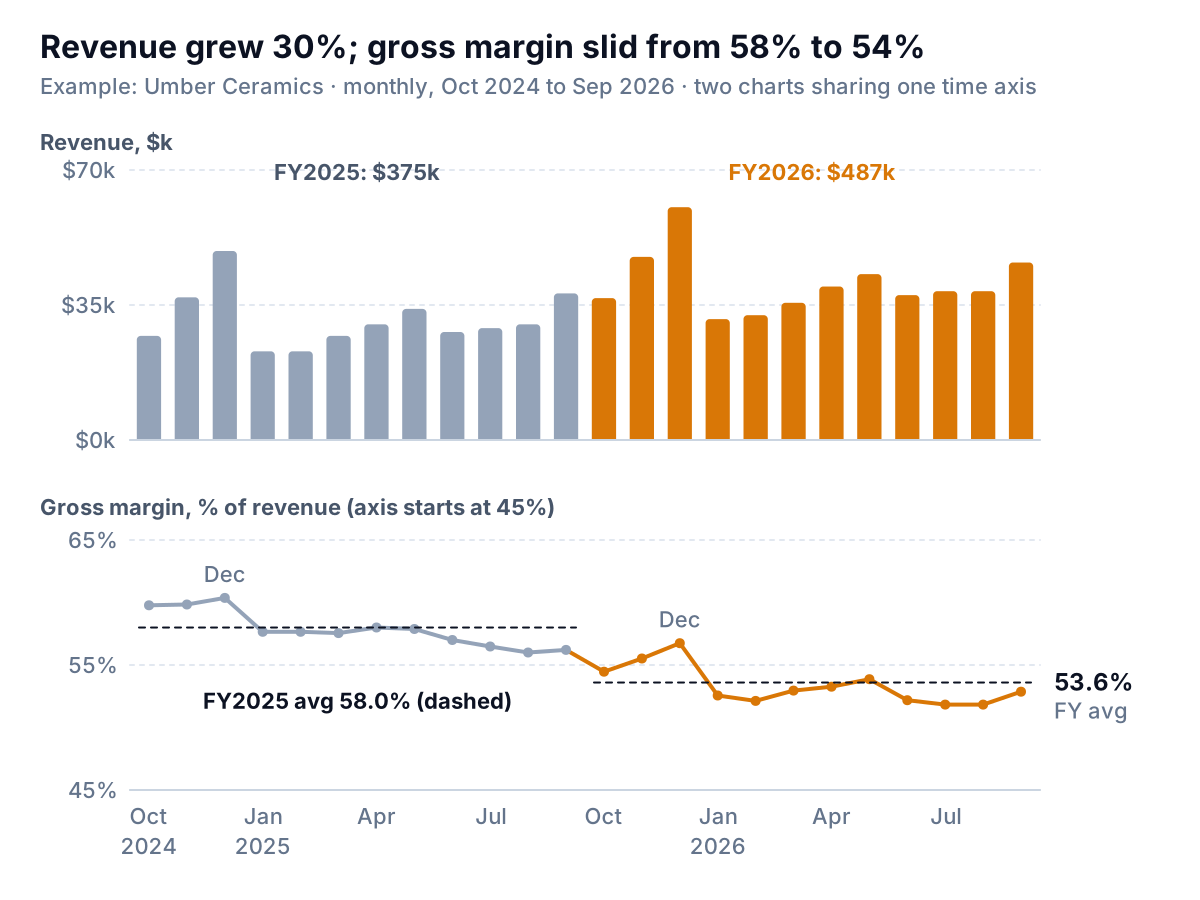
Read the top chart for size and the bottom for quality. Revenue grew 30%, from $375,000 to $487,400. Margin slid from 58.0% to 53.6% for the year, and it peaks every December, when the studio's shop and website sell most and the stores buy least. A December margin above the rest of the year isn't the business improving. It's the mix of customers changing for a month.
Why two charts instead of one with two axes? Because dollars and percentages don't share a scale, and any scale you pick for the second axis is arbitrary. Stephen Few's 2008 essay "Dual-Scaled Axes in Graphs" concluded that he couldn't think of a case where a separate graph wasn't the better solution, and recommended placing related graphs close together so their patterns can be compared without inviting false comparisons of size. Datawrapper's "Why not to use two axes" makes the same point and suggests side-by-side charts or an indexed chart instead.
The same data on two axes, twice
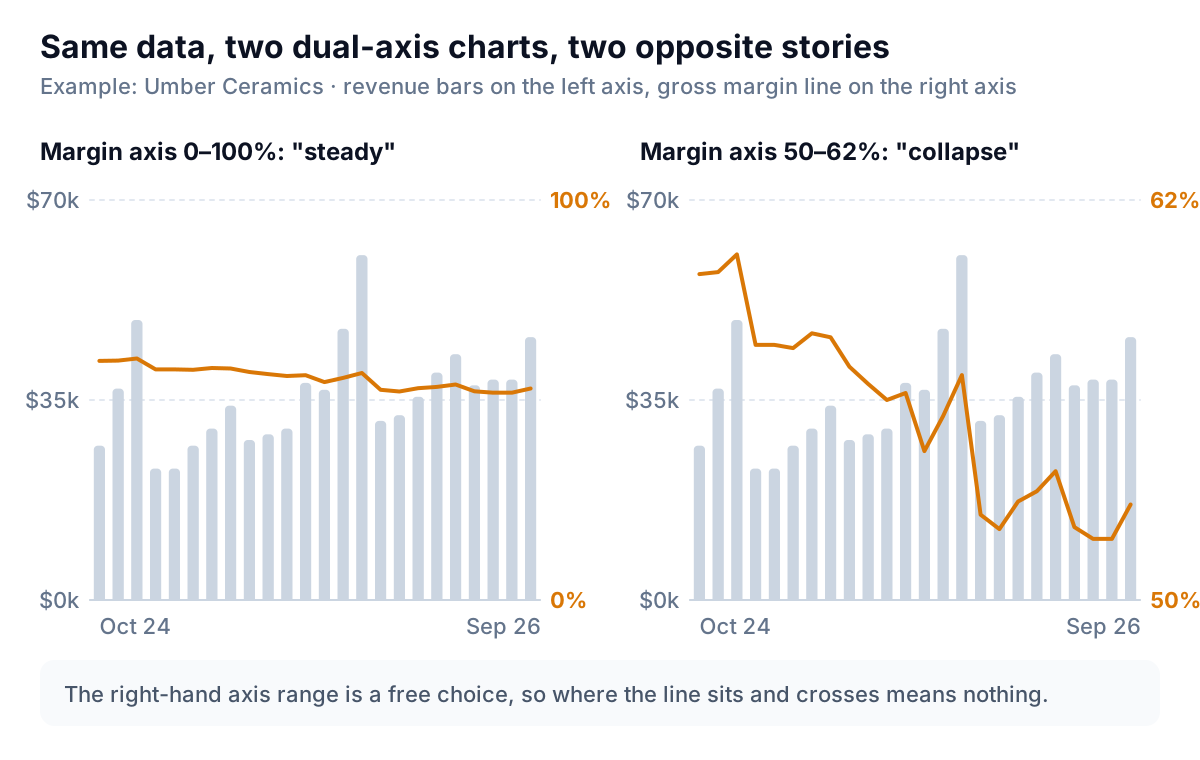
On the left, the margin axis runs from 0% to 100% and the line barely moves. On the right, it runs from 50% to 62%, the scale Umber's owner got, and the line plunges and crosses below the revenue bars. Both charts are accurate. Neither crossing point means anything, because the two axes were never tied to each other. Your eye still reads the crossing as "margin fell below revenue". Few makes exactly this point about intersecting lines on dual axes.
If someone insists on one chart, there are two honest options. Index both series to 100 in the first month and plot them on one percentage axis, or put margin in a small line under the revenue chart, as in the first figure. Datawrapper has since added dual-axis charts, and its 2026 post on changing its mind still says they're easily misread by general audiences. Your business partner is a general audience.
Axis rules for the margin line
- The margin line doesn't have to start at zero. A line's message is its slope, and margin moves within a narrow band. Say where the axis starts, as the first figure does ("axis starts at 45%").
- Keep the range honest. Set it once, wide enough to hold a couple of years of normal movement, and leave it fixed month to month. Letting the software auto-scale to each month's data turns a half-point wobble into a cliff.
- Revenue bars do start at zero. A bar's length is its value.
- Add the yearly average as a dashed line. It shows the step down without needing a third chart.
- Compare months with the same month last year. If your margin has a seasonal pattern, as Umber's does, December 2025 (56.7%) should be judged against December 2024 (60.4%), not against November.
Products by revenue and margin: a scatter, not a ranking
A bar chart of margin by product ranks percentages and hides size. A bar chart of revenue by product hides margin. Plot both, one dot per product, and the products sort themselves.
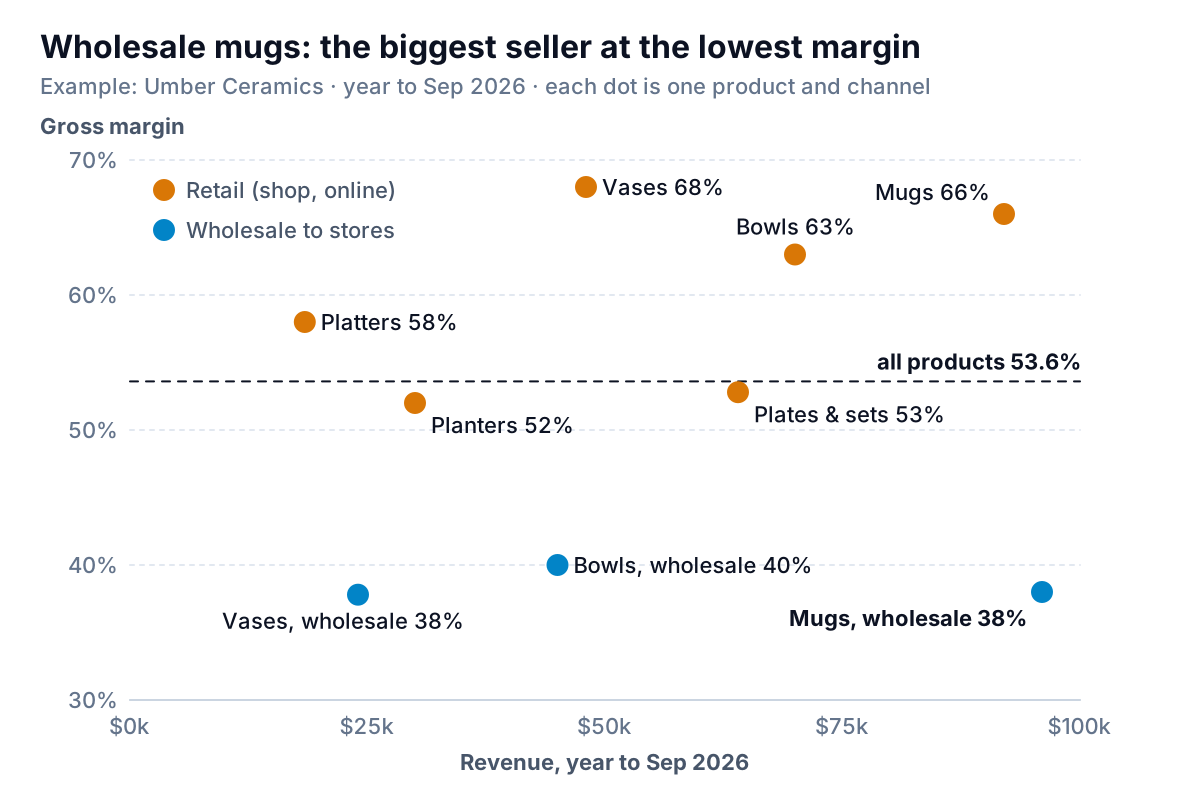
The same mug appears twice. Sold in the studio shop or online, it earns 66%. Sold to a store at a wholesale price, it earns 38%. Wholesale mugs are now Umber's single biggest line at $96,000, so they pull the average down more than anything else. All three wholesale lines sit in the bottom band, and they grew from 20% of revenue to 34% in a year.
That isn't proof wholesale is bad. Wholesale mugs earned $36,500 of gross profit, more than retail plates or retail vases, with no shop staff or website costs attached to each sale. The scatter's job is to show where each line sits so the decision is made on purpose. The full argument about percentages against dollars is in our post on gross margin vs gross profit.
Rules for a product scatter:
- Revenue or units across, margin up. Size on the horizontal axis and quality on the vertical reads naturally.
- Label every dot directly. Up to about a dozen products, names beside the dots beat a legend. Beyond that, label the outliers and the biggest few.
- One reference line at the overall margin. It splits the chart into above and below average without inventing quadrant names.
- Color by channel only if channel is the story. Here it is. Otherwise use one color.
Why margin moved: the price, volume and mix bridge
The first chart shows that margin fell, and the scatter suggests why. A bridge puts dollar amounts on the reasons. It starts from last year's gross profit and adds or subtracts one effect at a time until it reaches this year's.
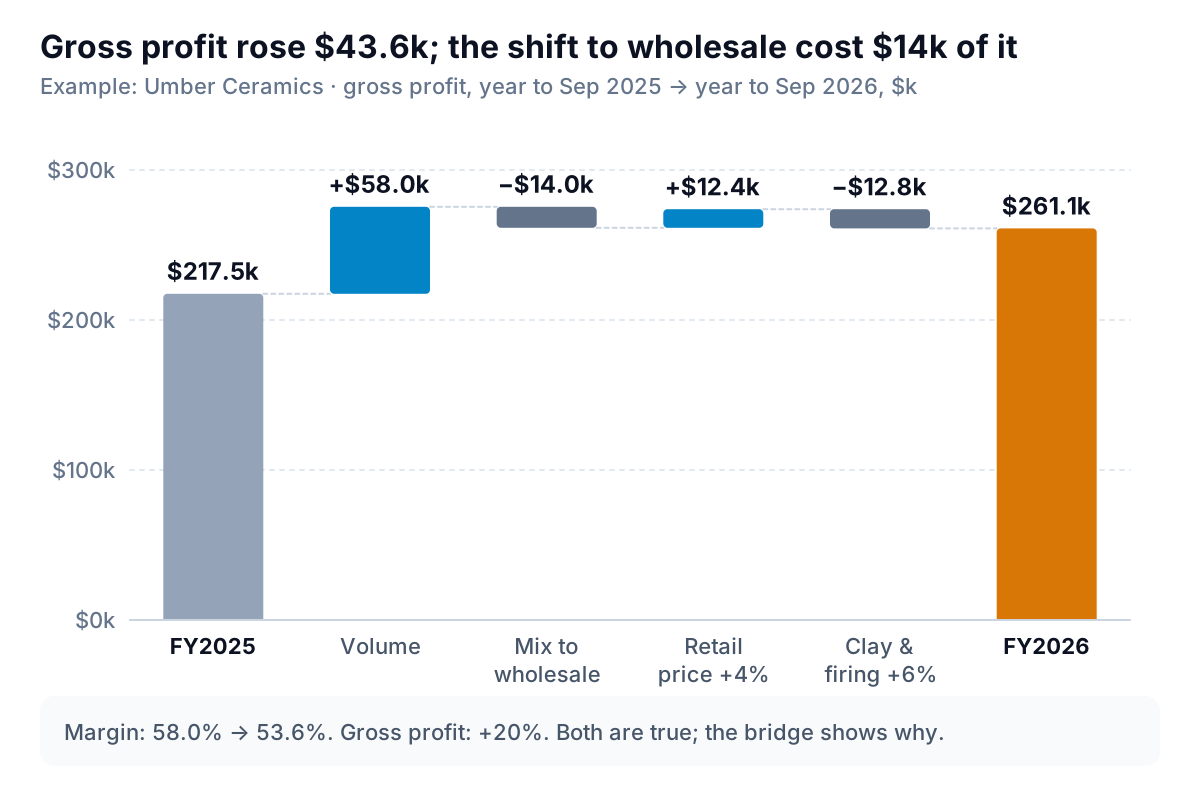
Here is how each bar is worked out for Umber, which has two channels: retail (margin 62% last year) and wholesale (42%). Last year it sold $300,000 retail and $75,000 wholesale, for gross profit of $217,500, or 58.0%. In October 2025 it raised retail prices 4% and kept wholesale prices the same, and its cost per piece rose 6% with a new clay contract and higher kiln electricity.
| Effect | Calculation | Amount |
|---|---|---|
| Volume | Extra sales at last year's prices ($475,000 − $375,000) × last year's 58.0% | +$58,000 |
| Mix | This year's sales at last year's prices and each channel's own margin ($310,000 × 62% + $165,000 × 42% = $261,500), minus the same sales at the blended 58.0% ($275,500) | −$14,000 |
| Price | Retail revenue from the 4% rise ($322,400 − $310,000) | +$12,400 |
| Cost | 6% on this year's cost at last year's rates ($310,000 × 38% + $165,000 × 58% = $213,500) | −$12,810 |
| Gross profit this year | $217,500 + 58,000 − 14,000 + 12,400 − 12,810 | $261,090 |
Two things stand out. The price rise and the cost rise roughly cancel, so pricing isn't the problem. And the fall in margin from 58.0% to 53.6% is mostly mix: more of the business now comes from the lower-margin channel. The fix for that, if it needs one, is the wholesale price or the wholesale minimum order, not retail.
The order you apply the effects in changes the size of each bar a little; volume first, then mix, then price, then cost is a common convention. Choose one and use it every year. For a business with many products, run mix across product lines instead of channels, using the same formula with one term per line.
To draw it, put the six labels in one column and the amounts in the next (start, four changes, end) and use the built-in waterfall chart. Microsoft lists Waterfall among Excel's available chart types, and our waterfall chart in Excel guide walks through setting the first and last bars as totals. Google Sheets has a waterfall chart as well.
Building the other two charts
Shape the data as one row per month with four columns: month, revenue, cost of goods sold, and gross margin as =(B2-C2)/B2. Avoid averaging monthly margins to get a yearly one; take total gross profit ÷ total revenue for the year.
The two-panel revenue and margin chart
- Select the month and revenue columns and insert a column chart. Then select the month and margin columns and insert a line chart.
- Make both charts exactly the same width and line them up one above the other, so each month sits in the same place. Delete the top chart's month labels if they repeat.
- On the margin chart, set the vertical axis minimum and maximum by hand (Umber uses 45% to 65%) and write the range in the chart title. In Google Sheets, the Vertical axis section under Customize lets you set min and max, per Google's line chart help.
- Add a helper column with the yearly average on every row of that year, and plot it as a second, dashed line.
Excel makes it easy to put both on one chart with a secondary axis; Microsoft's page on adding a secondary axis shows the Combo option. It's easy to make. That's the reason to decline it.
The product scatter
Make one row per product with revenue and margin. In Excel, select the two number columns and insert a scatter chart. To show product names, add data labels, open Format Data Labels and tick Values From Cells, then select the column of names; Microsoft's page on adding data labels documents the option.
A Google Sheets scatter chart labels points with values, not names. The workaround is a bubble chart: Google's scatter and bubble chart help says the first column of a bubble chart is a label shown on the bubble, followed by X, Y, a series column (each series gets its own color) and size. Put the product name first, revenue, margin, the channel as the series, and the same number in the size column for every row so all the bubbles match.
Five ways a gross margin chart misleads
- Two axes, one chart. The crossing points and relative heights are set by whoever picked the axis ranges.
- Margin alone. A falling line with no revenue chart beside it reads as decline even when profit dollars rose 20%.
- An auto-scaled axis. A narrow range picked by the software turns a normal monthly wobble into a crisis. Fix the range.
- Averaged percentages. The average of twelve monthly margins isn't the year's margin, and the average of product margins isn't the business's. Add dollars, then divide.
- Mix read as pricing. When margin drops and the product or channel mix moved, check the bridge before anyone raises prices.
Keeping the three charts current
The two-panel chart takes a monthly paste of revenue and cost of goods sold. The scatter and the bridge need sales and cost by product and channel, which usually means a sales export joined to cost prices. Parity can build them from your data: connect QuickBooks Online, Shopify or Square, or upload a CSV or Excel export, and ask for "revenue and gross margin as two aligned charts, a scatter of products by revenue and margin, and a gross profit bridge for volume, mix, price and cost". It builds a dashboard with headline numbers and their trends, charts, what explains them and a table of what needs attention, and every number and chart is checked against queries on the full dataset before you see it.
Upload a year of sales and costs and get checked gross margin charts, by month and by product, with the bridge that explains them. Build a report from your data free
Umber kept its stores. The bridge showed the partner that wholesale cost $14,000 of gross profit through mix and brought in a good share of the $58,000 from volume. The next conversation was about a wholesale price rise, and it started from the two-panel chart.