In September, Harbor Lane Bakery made a $2,600 profit and its checking account fell by $3,500. The owner, who runs the bakery with two staff and a part-time bookkeeper, had the Profit and Loss open and couldn't see why. The answer was on the QuickBooks balance sheet the whole time, in four lines she'd never looked at. (Harbor Lane is an example business, invented for this guide. Its numbers add up, and you'll see all of them.)
Most owners run the QuickBooks balance sheet once a year, when the accountant asks for it. That's a waste, because it's the report that shows where your cash went, whether your books can be trusted, and how much room you have before money gets tight. This guide shows how to run it in the most useful form, the six lines to check before you believe anything on it, three numbers worth working out each month, and how to read two month-ends side by side to find the missing cash.
Run the QuickBooks balance sheet the useful way
Intuit's help article on running a Balance Sheet report gives the path: go to Reports, then Standard reports, and select Balance Sheet. That gets you one column of balances as of today. Three changes make it far more useful.
- Set the date to a month end. A balance sheet is a snapshot on one date. "Today" mixes half a month of activity into everything. Pick the last day of the month you've just closed.
- Show more than one date. A single column tells you very little. Intuit's article says the Balance Sheet Comparison report shows year-over-year columns: search for it, choose Custom dates from the Report period dropdown, set From and To, and refresh. For month-by-month columns, the newer report screen has Display columns by and Compare to in the report header, according to Intuit's guide to the modern report view, and Display columns by offers days, weeks, months or calendar quarters.
- Check the accounting method. Use accrual unless your accountant tells you otherwise. Intuit's page on cash and accrual reporting explains that you can switch the method on one report under Accounting method (or in the General section of Customize) without changing the company default. A cash-basis balance sheet leaves out invoices and bills that haven't been paid, which is exactly what you're trying to see.
Then save it. Intuit's customizing reports guide says to select Save customization or Save as, name it, and you'll find it under Custom reports. Call it something like "Balance sheet, month ends, accrual" so you run the same view every time.
Which version your plan includes
Intuit's list of reports included in each subscription (updated August 2026) shows these differences:
| Report | What it shows | Plans that include it |
|---|---|---|
| Balance Sheet | Every balance sheet account on a date | Free and Lite (one of only three standard reports there), Simple Start, Essentials, Plus |
| Balance Sheet Comparison | Two dates side by side | Simple Start, Essentials, Plus |
| Balance Sheet Detail | The transactions behind each balance | Simple Start, Essentials, Plus |
| Balance Sheet Summary | Higher-level totals only | Essentials, Plus |
Intuit's table covers Simple Start, Essentials and Plus; Advanced sits above Plus. If you're on Free, you can still compare two month ends by running the Balance Sheet twice and exporting both.
Six lines to check before you trust it
A balance sheet always balances, because QuickBooks makes it balance. That doesn't mean the numbers are right. Before you read anything into it, check six lines. Here's Harbor Lane's balance sheet for August and September with them marked:
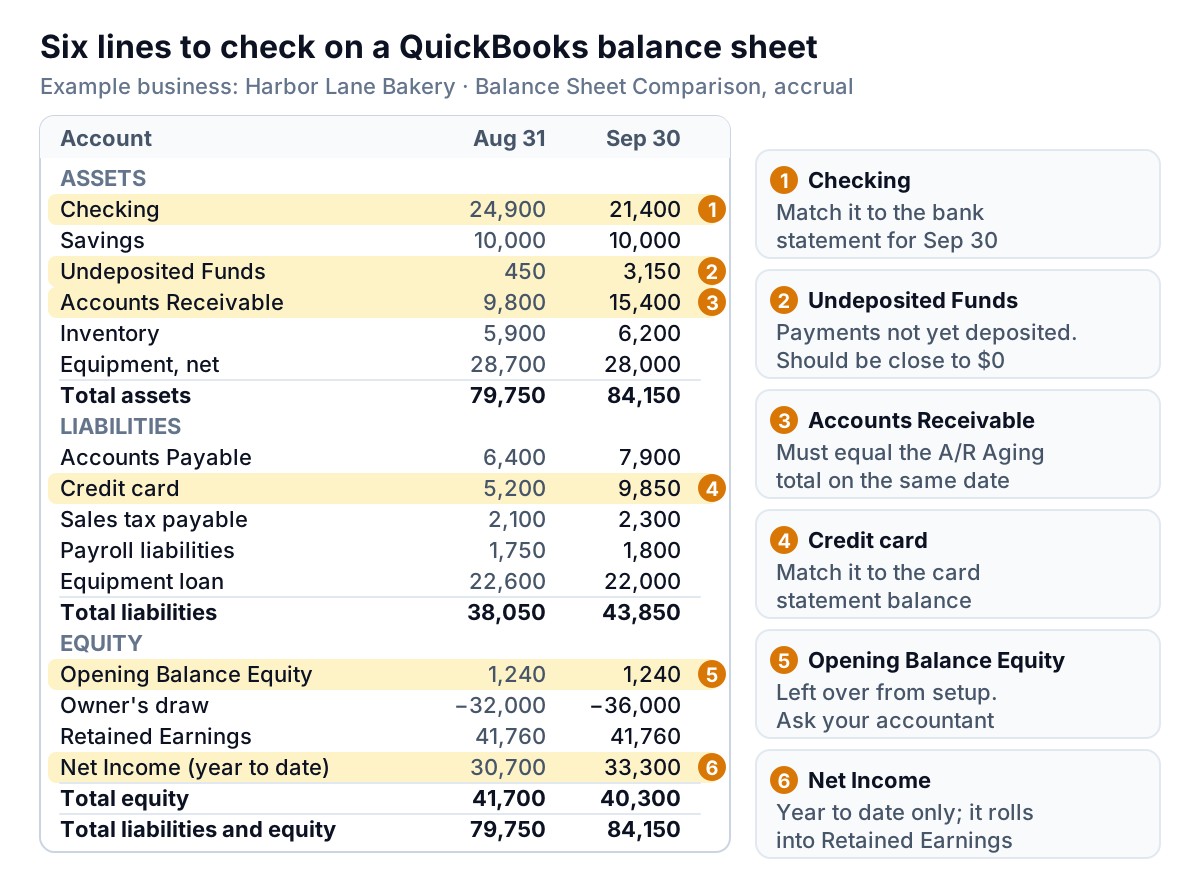
- Checking and savings. Each bank line should equal the bank statement balance on the same date, give or take payments that haven't cleared. If you reconcile monthly, this is already done. If you don't, this is the line most likely to be wrong.
- Undeposited Funds. This is a holding account for payments you've recorded but haven't yet recorded as deposited. Intuit's article on depositing payments into Undeposited Funds says it can be renamed, so look in your chart of accounts for the detail type "Undeposited Funds". Payments sitting there appear in the Bank Deposit window, ready to be grouped into a deposit. Harbor Lane's balance jumped from $450 to $3,150. Either $3,150 of cheques is in a drawer, or, much more often, those payments reached the bank and someone recorded the deposit separately, so the same money is counted twice: once in checking and once here.
- Accounts Receivable. This must equal the total of your A/R Aging report on the same date. Intuit's balance sheet article warns that for a past date you have to set the aging report's Aging method to Report period, or the totals won't match. A gap means unapplied payments or credits. Our guide to the accounts receivable aging report covers reading the aging itself.
- Credit cards and loans. Like the bank lines, each should match its statement. Card balances that creep up month after month are worth a conversation of their own.
- Opening Balance Equity. QuickBooks uses this account to offset the opening balances you enter when you set up bank, card and other accounts, according to Intuit's guide to entering opening balances. A balance left there long after setup usually means something from day one was never finished. Don't move it yourself; ask your accountant where it belongs.
- Net Income. On the balance sheet this is profit for the fiscal year to date, not the month. Intuit's article on retained earnings explains that when a new fiscal year starts, QuickBooks moves last year's net income into Retained Earnings automatically, without a visible transaction. So Net Income resets to zero at the start of each year and Retained Earnings jumps. That's normal.
Three numbers to work out from the balance sheet
Once the lines are right, the QuickBooks balance sheet gives you three numbers that no other report does. Here they are for Harbor Lane, using the figures above. Current assets are cash, Undeposited Funds, receivables and inventory. Current liabilities are everything due within a year except the equipment loan.
| Number | How to work it out | Aug 31 | Sep 30 |
|---|---|---|---|
| Working capital | Current assets − current liabilities | $51,050 − $15,450 = $35,600 | $56,150 − $21,850 = $34,300 |
| Cash cover | Checking and savings ÷ current liabilities | $34,900 ÷ $15,450 = 2.26 | $31,400 ÷ $21,850 = 1.44 |
| Debt to equity | Total liabilities ÷ total equity | $38,050 ÷ $41,700 = 0.91 | $43,850 ÷ $40,300 = 1.09 |
Working capital barely moved, so on the usual measure the bakery looks fine. The other two tell a different story. Cash in the bank now covers its short-term bills 1.44 times, down from 2.26, in one month. And the business now owes more than the owner has in it. Neither is a crisis on its own. What matters is the direction: if cash cover keeps falling and debt to equity keeps rising for two or three more months, the bakery is funding itself on its credit card.
Two rules keep these numbers honest. Work them out from the same month-end date every time. And if Undeposited Funds is inflated, as Harbor Lane's probably is, your current assets are overstated by the same amount, so fix that line first. There's no universal "good" level for any of these ratios; your lender or accountant can tell you what they look for in your industry.
Profit up, cash down: read two month ends side by side
Back to the owner's question. How does a $2,600 profit become a $3,500 drop in the bank? Every change between two balance sheets either brought cash in or used it. Line them up and the gap explains itself.
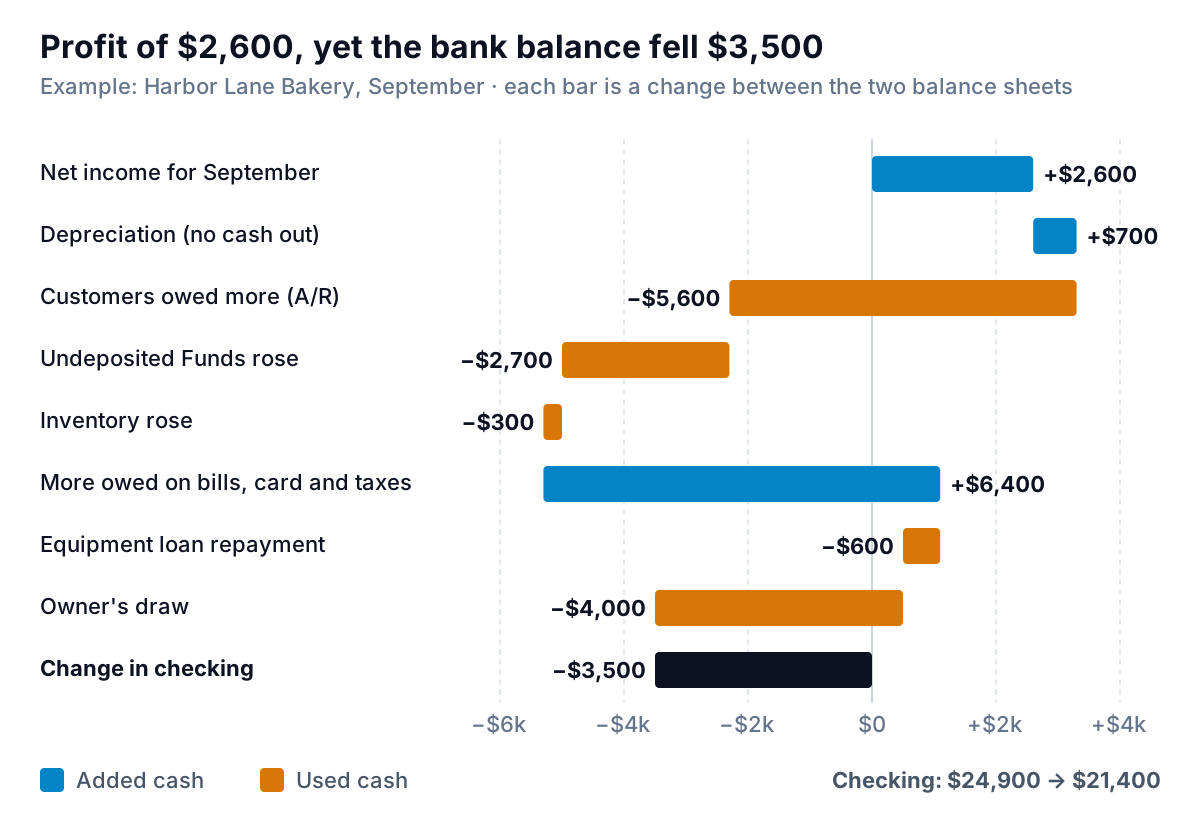
Reading the chart from the top:
- Profit and depreciation added $3,300. Depreciation is the $700 drop in the equipment's book value. It's a cost on the P&L but no cash left the business, so it's added back.
- Customers held on to $5,600. Receivables rose from $9,800 to $15,400. The bakery sold to cafés on account and they hadn't paid yet. That's profit on paper, not cash.
- Undeposited Funds "used" $2,700. If those payments really are double-counted, this bar is a bookkeeping error, not real cash. Once it's fixed, both this bar and the checking balance will change.
- The card and suppliers lent $6,400. Bills, the credit card, sales tax and payroll liabilities all went up. That's cash the bakery kept by paying later. It has to be paid back.
- The loan and the owner took $4,600. A $600 equipment loan repayment and a $4,000 owner's draw. Neither touches profit; both leave the bank.
Add them up and you get exactly −$3,500, the change in checking. You can do this with any two balance sheets in ten minutes, and it answers "where did the money go?" more directly than any other report. QuickBooks' Statement of Cash Flows does the same job in a standard format if your plan includes it; our guide to QuickBooks reports covers that one, and the cash flow forecast guide shows how to look forward instead of back.
When the balance sheet looks wrong
Intuit's balance sheet article covers the common causes. Here they are, in the order worth checking:
- It doesn't match another report. The balance sheet is cumulative: it carries every balance from the day you started. Intuit's example is a sales tax account with $50 in March and $60 in April. A balance sheet dated April shows $110, while an April-only report shows $60. Both are right.
- It doesn't match an account's register. If your fiscal year doesn't start in January, Intuit suggests either running the report for your fiscal period or checking the first month of your fiscal year under Settings, Account and settings, Advanced, in the Accounting section. Talk to your accountant before changing it.
- Assets don't equal liabilities plus equity. This is rare. Intuit's advice is to click into each account to see its transactions, then narrow the date range from year to date, month by month, to find the day the report went out of balance, and from there the transaction that caused it.
- Retained Earnings looks odd. Because the year-end move is invisible, you can't click Retained Earnings to see what's in it. Intuit's retained earnings article says to run the Profit and Loss for All Dates and select the Net Income amount. If the numbers still differ, someone posted entries directly to Retained Earnings: open your chart of accounts (All apps, Accounting, Chart of accounts), find Retained Earnings and choose Run report from the Action column to see them.
If something is still wrong after those checks, stop and get your bookkeeper or accountant to look. Moving balances between equity accounts can change your tax figures, and that isn't a job to guess at.
Turning the balance sheet into something you'll check monthly
The QuickBooks balance sheet is the source of truth for what the business owns and owes, and Simple Start and every plan above it include the comparison view you need. Its limits are about what it doesn't do: it lists balances but doesn't tell you which ones moved for a reason, it doesn't put cash next to receivables and profit on one screen, and it won't calculate cash cover or the waterfall above for you. Most owners who do this monthly keep a spreadsheet next to it.
Parity is one way to skip the spreadsheet. Connect QuickBooks Online and it builds a dashboard from your books: headline numbers with their trends, charts, what explains the changes, and a table of what needs attention. You can refine it by chat, for example "show cash, receivables and Undeposited Funds at each month end" or "explain why cash fell when profit rose", and every number and chart is checked against queries on the full dataset before you see it. When you ask, it writes a client-ready report from the same data, such as the monthly update for a business partner or lender. It doesn't change your books, so the six checks above are still yours (or your bookkeeper's) to make. If you want to see what belongs on a finance screen more broadly, our financial dashboard guide lays it out.
Connect QuickBooks Online and get a checked dashboard of cash, receivables and profit, with the changes explained. Connect QuickBooks free
Whatever tool you use, the routine is the same: two month ends side by side, six lines checked, three numbers written down. Do it for three months and you'll see problems while they're still small.