Most free rent roll templates are a tidy list: unit, tenant, rent, lease dates, a total at the bottom. That's a record, not a tool. On the first of the month you still have to work out by hand who hasn't paid, how much rent you're giving up to vacancies and discounts, and how many leases end before spring. Most owners don't, so they find out when a tenant hands in notice.
The rent roll template on this page does that arithmetic for you. You type one row per unit; formulas flag every unit that needs a decision and build a summary of occupancy, rent collected and lease expirations by month. Below we explain every column and formula, using a filled-in example building, so you can adapt it or build your own.
Download the rent roll template (.xlsx). It opens in Excel, Google Sheets and Numbers, with no macros and no links to other files.
What's in the rent roll template
The workbook has five tabs:
- How to use: the steps and definitions below, in short.
- Example rent roll and Example summary: Harbor Lane Apartments, a made-up 16-unit building with four studios, eight one-bedroom and four two-bedroom apartments, as of October 1, 2026.
- Your rent roll and Your summary: the same layout and formulas, empty, with room for 100 units.
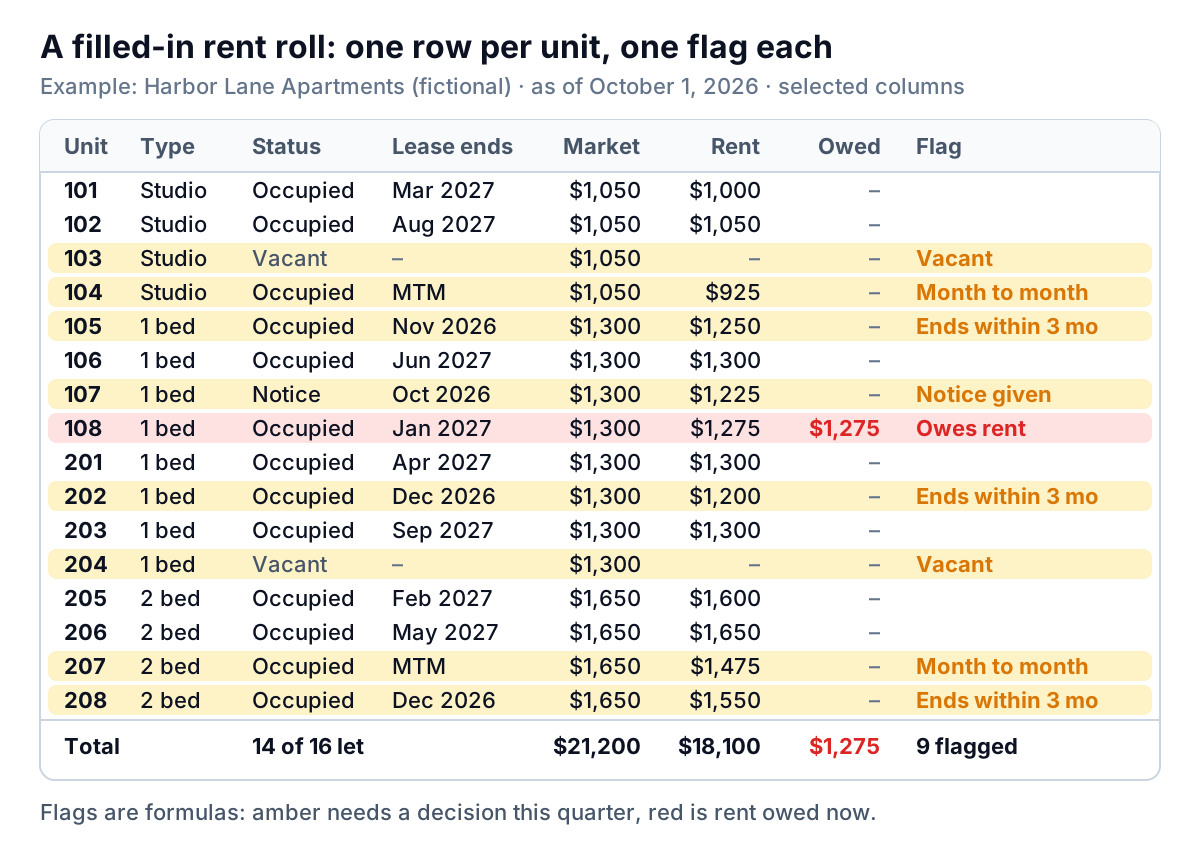
Here is the example as you'd see it on the first of the month. Some columns are hidden in this picture to make it fit; the workbook has all 17.
If you want the background first (what a rent roll is for, and how a buyer or lender reads one), our guide to what a rent roll shows and how to check it covers that. This post is about building and keeping one.
The input columns, and the rules that keep them honest
Columns A to M are the ones you type. They're shaded in the workbook. There's no single official format for a rent roll, but the core set here matches what lenders and tax authorities ask for. New York City's Department of Finance, for example, publishes rent roll column definitions for owners filing income and expense statements, and they cover the same ground.
| Column | What goes in it | Rule |
|---|---|---|
| Unit, Type, Sq ft | Unit number, a type label, size | One row per unit, not per tenant. Vacant and non-paying units (a caretaker's flat, a model unit) get a row too. |
| Status | Occupied, Notice or Vacant | Use only these three words. The column has a drop-down so a typo can't break the counts. |
| Tenant | Name on the lease | Leave blank when vacant. |
| Lease start, Lease end | Dates from the signed lease | Leave Lease end blank for a month-to-month tenant. The formulas read a blank as "MTM". |
| Market rent | What the unit would let for today | Your estimate. Set it from current listings for similar units nearby, and update it a few times a year, not every month. |
| Lease rent | What the tenant agreed to pay | The figure in the lease, before any discount. |
| Concession per month | Discounts and free rent | Spread a free month over the lease: one free month on a 12-month lease at $1,200 is $100 a month. |
| Deposit held | Refundable security deposit | Only money you expect to give back. A "deposit" that will be used as the last month's rent is prepaid rent. |
| Paid this month | Rent received for the as-of month | From your bank or rent ledger, not from memory. |
| Balance owed | Everything the tenant owes | Includes earlier months. This is the column most rent rolls leave out. |
Three of these rules matter more than the rest.
Three rent columns, not one. Market rent, lease rent and concession look like overkill for a small building. Without all three you can't tell the difference between a unit that's cheap because the lease is old, one that's cheap because you gave a discount to fill it, and one that's simply let at market. Each needs a different decision at renewal.
Deposits are not income. The IRS says in Publication 527 not to include a security deposit in income if you plan to return it, but to treat a deposit that will be used as a final rent payment as advance rent. Keep the two apart on the rent roll as well. Tax rules differ by country and state, so ask your accountant how to treat yours.
Status is a fact, not a forecast. "Notice" means the tenant has told you in writing they're leaving, and is still there. Don't mark a unit Notice because you think a tenant might go.
The formula columns: what each one works out
Columns N to Q are formulas, already filled down 100 rows. Don't type over them. Each starts with IF(A5="","",…) so empty rows stay blank. Here is what they calculate, using row 5 as the example:
- Loss to lease (N):
=IF(D5="Vacant",0,H5-I5). Market rent minus lease rent on an occupied unit. Unit 207, a two-bedroom let at $1,475 against a market rent of $1,650, shows $175. - Vacancy loss (O):
=IF(D5="Vacant",H5,0). The full market rent of an empty unit. - Months to lease end (P):
=IF(G5="","MTM",(YEAR(G5)-YEAR($B$2))*12+MONTH(G5)-MONTH($B$2)). Calendar months between the as-of date in B2 and the lease end. A lease ending October 31 with an as-of date of October 1 shows 0. - Flag (Q): one word or phrase for the most urgent issue, checked in this order: Vacant, Owes rent, Notice given, Month to month, Lease end passed, Ends within 3 mo, Low deposit (a deposit smaller than one month's lease rent).
The flag shows only the top issue on purpose. Unit 202 in the example has a $600 deposit on $1,200 rent, but its lease also ends in December, and the renewal is the more pressing decision. When you renew, you can ask for the deposit to be topped up, where your local rules allow it.
All four formulas are already filled down in both rent roll tabs. Download the rent roll template (.xlsx) and click any cell in columns N to Q to see them.
The summary sheet: from potential rent to cash in the bank
The summary tab reads the rent roll and needs no typing, apart from listing your unit types once. Its centre is a short stack of subtractions:
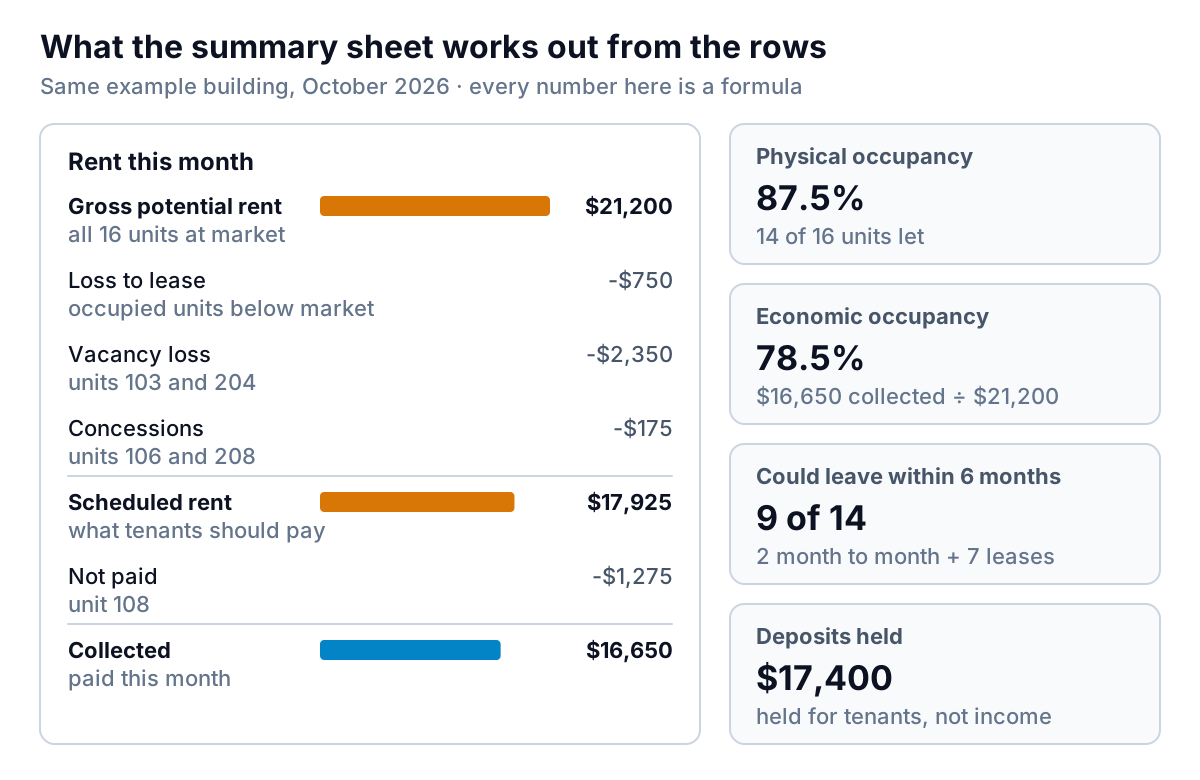
Line by line, with the example's numbers:
- Gross potential rent
=SUM(H5:H104): every unit at market, $21,200. - Less loss to lease (sum of column N), $750, vacancy loss (column O), $2,350, and concessions (column J), $175.
- Scheduled rent = $21,200 − $750 − $2,350 − $175 = $17,925. That's what tenants should pay this month.
- Collected
=SUM(L5:L104): $16,650. The $1,275 shortfall is unit 108, which hasn't paid. - Economic occupancy = collected ÷ gross potential rent = $16,650 ÷ $21,200 = 78.5%.
Set that next to physical occupancy, 14 let units out of 16, or 87.5%. The nine-point gap is the money: two empty units, old rents, discounts and one unpaid month. If the gap widens from one month to the next while the unit count stays the same, look at the rent and payment columns, not at marketing.
The risk block underneath adds balances owed ($1,275 across one unit), deposits held ($17,400), month-to-month tenants (two) and fixed leases ending in the next six months (seven). Together that's 9 of 14 occupied units that could leave by the end of March. If any tenant owes more than a month, the aging report guide shows how to sort what's owed by how late it is; the same buckets work for rent.
A unit-mix table on the right uses COUNTIF, COUNTIFS and AVERAGEIFS to show units, occupied units, average market rent and average lease rent by type. In the example, occupied studios average $992 against a $1,050 market rent, about 6% below, the widest gap of the three types in percentage terms. That's where to look first at renewal time.
Lease expirations: the table to read every month
The expiration table counts leases ending in each of the next twelve months and adds up the rent on them. Each month's row uses COUNTIFS and SUMIFS with two date conditions (lease end on or after the first of the month, and before the first of the next) plus a third that leaves out vacant units. A last row adds month-to-month tenants, since they can leave at short notice.
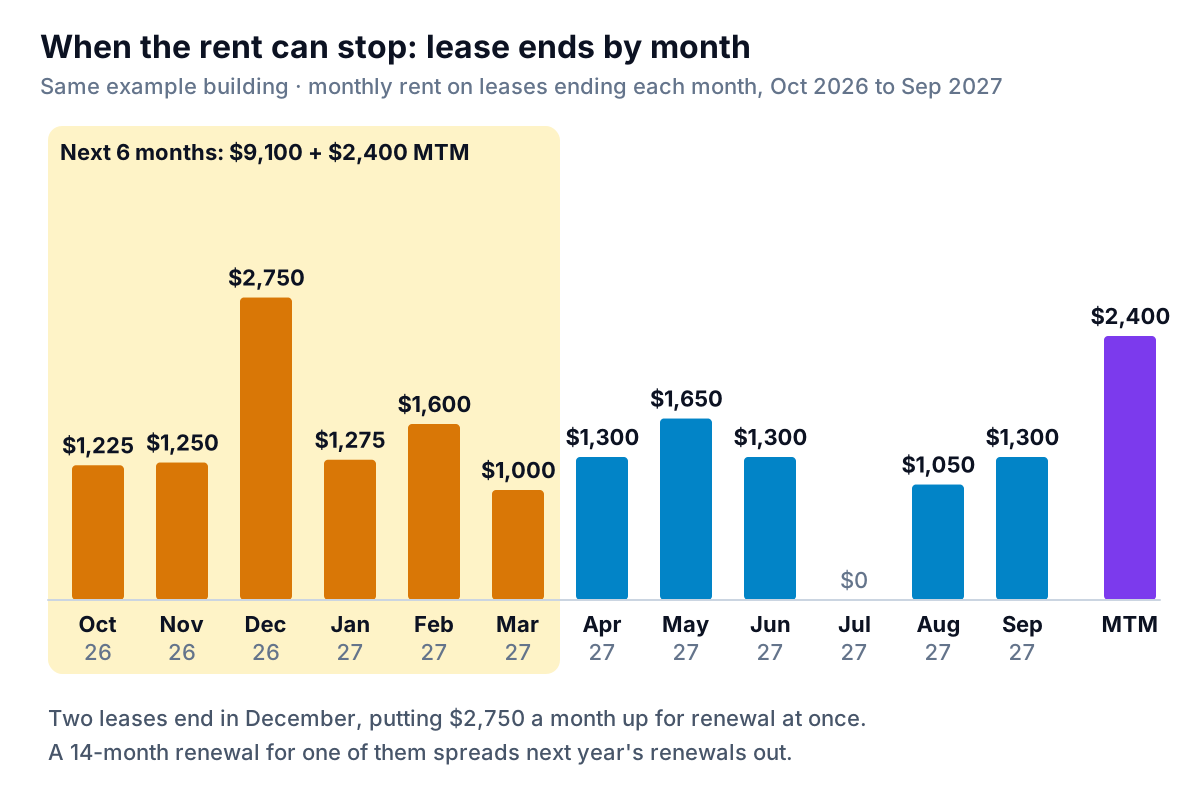
Read it for clusters. Harbor Lane has two leases ending in December, $2,750 of monthly rent up for renewal at once, and none in July. Offering one of the December tenants a 14-month renewal moves that lease end to February 2028 and evens out next year. Small buildings feel clusters most: two empty units out of sixteen is an eighth of the building.
Then plan the renewals themselves. A simple rule: contact each tenant 90 days before the lease ends (check what notice period your lease and local law require), decide the new rent using the market and lease rent columns, and record the outcome on the row the day you hear back.
Keeping the rent roll current in 15 minutes a month
A rent roll goes stale quietly. Here is a routine for the first working day of each month:
- Save a copy of the file. Save last month's workbook under a new name with the month in it ("Harbor Lane 2026-11"), so the old one stays as a record. Copying the whole file keeps the summary pointed at the right rent roll; copying single tabs can leave it reading last month's.
- Change the as-of date in B2. Every months-to-end figure and the expiration table move with it.
- Update status for move-outs, move-ins and notices received. Change lease dates and rents for renewals.
- Enter payments. Fill "Paid this month" from the bank statement or rent ledger, then update "Balance owed".
- Clear the flags. Work down column Q. Every "Owes rent" gets a call, every "Ends within 3 mo" gets a renewal decision, and every "Lease end passed" gets fixed.
- Check the summary against the bank. Collected rent on the summary should match rent deposits for the month, give or take timing. If it doesn't, a payment is on the wrong row.
If you ever refinance, keep the signed leases filed by unit number. Lenders compare the rent roll with the leases: Fannie Mae's multifamily guide, for instance, requires lenders to complete a lease audit to reconcile the rent roll with the property's signed leases before committing to a loan, and on buildings of 10 to 100 units the lender has to review at least 5 leases or 10% of them, whichever is more. A rent roll you update monthly from the leases passes that check without a scramble.
The rent roll is also the starting point for your cash flow forecast: scheduled rent, less the vacancies you expect from the expiration table, is next quarter's income line.
What this template can't do
It's a monthly snapshot, and that has limits worth knowing:
- It isn't a ledger. It holds one month's payment and a running balance per unit, not each tenant's payment history. Keep that in your accounting or property software.
- It's residential-first. Commercial leases need columns for rent steps, each tenant's share of taxes and common area costs, and free-rent periods. Add them to the right of column M and extend the formulas if you need them.
- Market rent is your opinion. Every loss-to-lease and vacancy figure depends on it. Write down how you set it.
- One property per workbook. For several buildings, keep one workbook each, or add a Property column and filter.
If you'd rather not maintain formulas at all, Parity can work from the rent roll you already have. Upload the spreadsheet, or a CSV or Excel export from your property management software, and it builds a dashboard: headline numbers such as occupancy and rent collected with their trends, charts, what explains them, and a table of what needs attention, such as unpaid balances and leases ending soon. Every number is checked against queries on the full file before you see it. You can refine it by chat, share a read-only link with a partner or lender, and update it next month with a newer file. If you ask, it writes the monthly owner report from the same data. It doesn't read PDFs, so export to a spreadsheet first.
Upload your rent roll and see occupancy, rent collected and the leases ending soon, with every number checked against your file. Upload your rent roll free
Whichever way you keep it, use the same test each month: can you say, in one sentence, how much rent you collected against how much you could have, and which three units need a decision before next month? If the rent roll template can't tell you that, add the column that would.