The owner of Anvil Metalworks, an example business we'll use in this guide, has a lease quote on her desk: $2,400 a month for a CNC plasma table that would cut gate panels in a third of the time. Anvil sells about 38 steel garden gates a month at $1,200 each. Would the lease leave her closer to losing money, and by how much?
A break-even point graph answers that in one picture. It plots revenue and total cost against units sold; the point where the two lines cross is the break-even point, and the gap between that point and what you actually sell is your margin of safety. For Anvil today, break-even is 30 gates a month, so she has 8 gates of room. With the lease it's 34. This guide builds the chart in Excel step by step, shows what happens when price or costs change, and covers the places a break-even chart can mislead.
Download the practice workbook (.xlsx). It has Anvil's inputs, the chart table, a native Excel break-even chart and a what-if sheet you can overwrite with your own numbers.
Reading the break-even point graph
The math behind the chart is short. Each gate sells for $1,200 and costs $560 in variable costs (steel, powder coating, hardware, consumables, delivery and card fees), so each one contributes $640 toward fixed costs. Fixed costs (rent, two salaried fabricators, insurance, a lease, the van, utilities) are $19,200 a month. Break-even is fixed costs ÷ contribution per unit, the formula the SBA's break-even guidance gives: $19,200 ÷ $640 = 30 gates, or $36,000 of revenue. If contribution is new to you, our contribution margin guide covers it, and the same calculation in sales dollars.
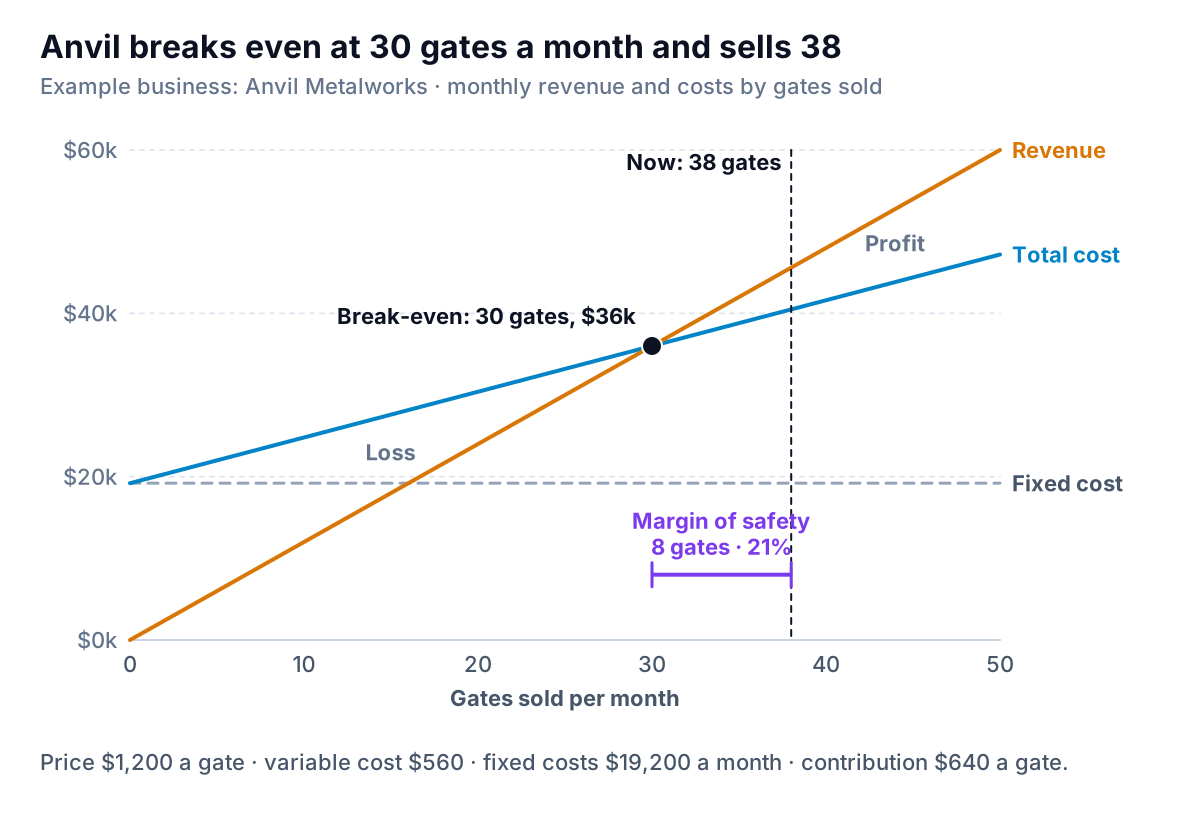
Four things to read off it:
- The fixed cost line is flat at $19,200. It's what the month costs before you sell anything.
- The total cost line starts at $19,200 and rises by $560 per gate. Its slope is the variable cost.
- The revenue line starts at zero and rises by $1,200 per gate. It's steeper than the cost line, which is why the two eventually cross. If it weren't, there would be no break-even point at any volume.
- The gap between revenue and total cost is profit (to the right of the crossing) or loss (to the left). At today's 38 gates it's $45,600 − $40,480 = $5,120 a month.
The margin of safety is the distance from break-even to today's volume: 8 gates, or 21% of sales. That's the number to remember. It says Anvil could have a month 21% slower than normal and still not lose money. A slow January that drops sales by a quarter would mean a loss.
How to build a break-even chart in Excel, step by step
The workbook does all of this, but here are the steps so you can build one from scratch for your own business.
1. Put the inputs in cells, not in formulas
One cell for price, one row per variable cost with a total, one row per fixed cost with a total, and one cell for a normal month's volume. Then the results, each as a formula: contribution (=price − variable cost), break-even units (=fixed costs / contribution), the same rounded up with ROUNDUP(…,0) because you can't sell 27.4 gates, break-even revenue, margin of safety in units and as a percentage of current volume, and profit at current volume. Add one check: profit at the exact break-even should be zero.
2. Build the chart table
Five columns: units (0, 5, 10 … 50), revenue (=units × price), fixed cost (the fixed total in every row), total cost (=fixed + units × variable cost) and profit. Make the unit range run well past your current volume, about one and a half times it, so the crossing sits in the middle of the chart.
3. Insert a scatter chart, not a line chart
Select the units, revenue, fixed cost and total cost columns. Choose Insert, then Insert Scatter (X, Y) or Bubble Chart, then Scatter with Straight Lines. Microsoft lists "scatter with straight lines" among the scatter subtypes on its chart types page.
This matters more than it looks. Microsoft's guide to scatter versus line charts explains that a line chart's horizontal axis is a category axis: it spaces the rows evenly whatever numbers are in them. A scatter chart's horizontal axis is a value axis, so 25 sits halfway between 20 and 30. If your table has uneven steps, a line chart bends straight lines.
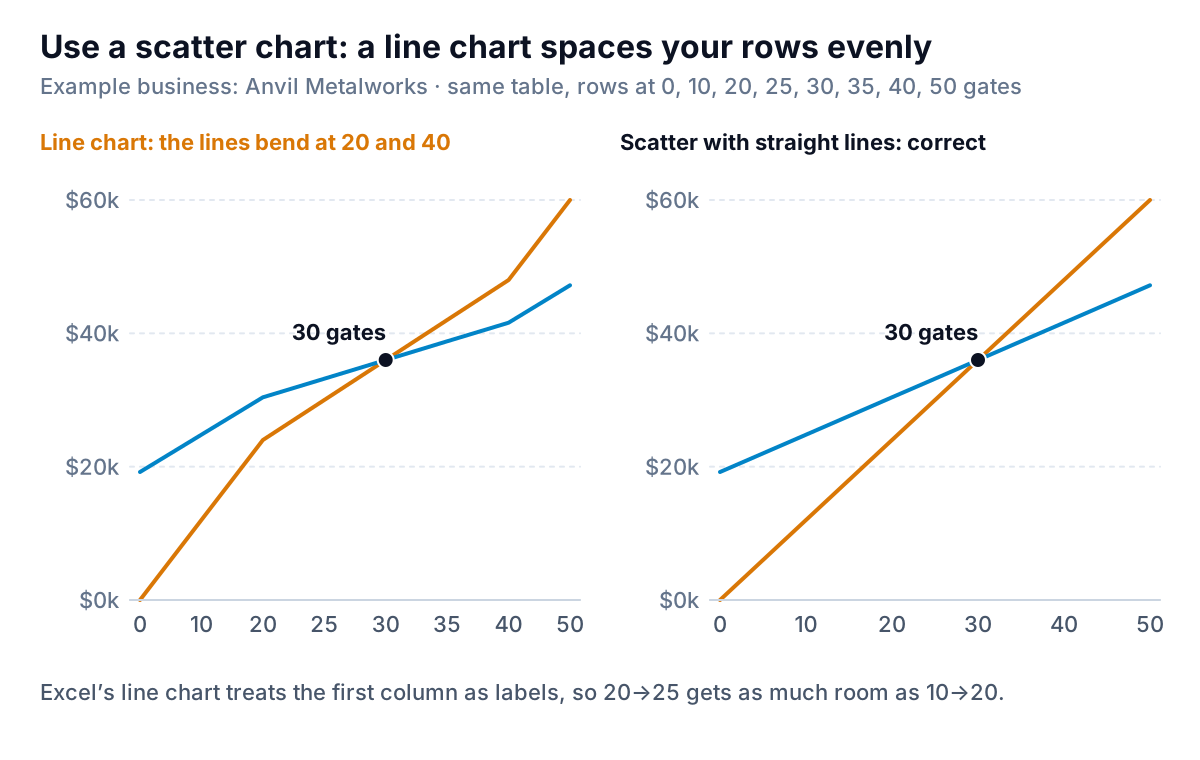
With an even step (0, 5, 10…) the line chart happens to look right, which is why the mistake survives. Add one extra row at 25 or 38 to mark something, and the lines kink. Use scatter from the start.
4. Mark the break-even point and today's volume
- Right-click the chart, choose Select Data, then Add. For the series X value, pick the exact break-even units cell; for Y, the break-even revenue cell. Format this series with a large marker and no line.
- Add another series with two points: X = current volume in both, Y = 0 and Y = the top of your revenue column. Format it as a dashed line with no markers. That's the "now" line.
- Label the lines directly (revenue, total cost, fixed cost) and delete the legend. Add axis titles: "Units sold per month" and "$ per month".
- Write the takeaway as the title: "Anvil breaks even at 30 gates a month and sells 38".
Because every point refers to the input cells, change the price or a cost and the lines, the break-even marker and the margin of safety all move.
In Google Sheets
Use the same table and choose Insert, then Chart, then Scatter chart. Google's scatter chart help shows that under Customize, then Series, you can add a trendline to each series. Because each series' points already lie on a straight line, a linear trendline draws exactly that line. Then mark the break-even point as its own series.
What happens when price or fixed costs change
A break-even chart earns its keep when you're about to change something. Here are the two changes Anvil's owner is weighing.
| Scenario | Contribution per gate | Break-even (gates) | Profit at 38 gates | Gates needed to keep $5,120 profit |
|---|---|---|---|---|
| Today | $640 | 30 | $5,120 | 38 |
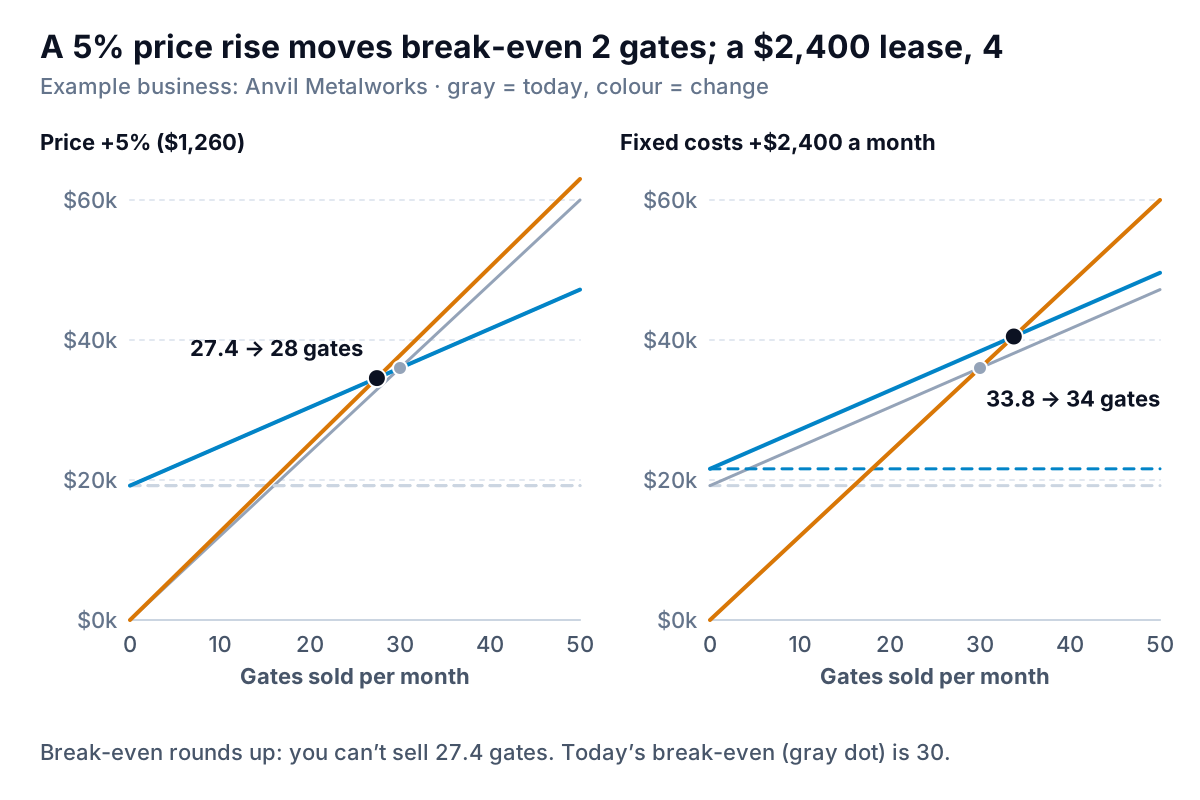
| Price +5% ($1,260) | $700 | 27.4 → 28 | $7,400 | 34.7 → 35 |
| Plasma table lease (+$2,400 fixed) | $640 | 33.75 → 34 | $2,720 | 41.75 → 42 |
| Steel +10% (+$31 a gate) | $609 | 31.5 → 32 | $3,942 | 39.9 → 40 |
Read across and the decisions sharpen:
- The lease cuts the margin of safety from 8 gates to about 4. It pays for itself only if the faster cutting lets Anvil sell 4 more gates a month (42 instead of 38) or take on panel work it currently turns down. If the extra capacity would sit idle in winter, the lease makes every slow month a loss.
- The price rise means Anvil could sell 3 fewer gates a month (35 instead of 38) and still make today's profit. If a 5% increase loses fewer than 3 sales a month, it's worth it.
- Dearer steel is a cost Anvil doesn't choose, but the chart shows its size: $1,178 less profit a month at the same volume, and two more gates to break even. That's a case for passing some of it on.
The workbook's What if sheet runs these scenarios from the same inputs and has a blank row for your own.
A simpler view: the profit-volume chart
The classic break-even chart has three lines and asks the reader to judge the gap between two of them. A profit-volume chart draws that gap directly: one line of profit against units, starting at minus your fixed costs and crossing zero at break-even.
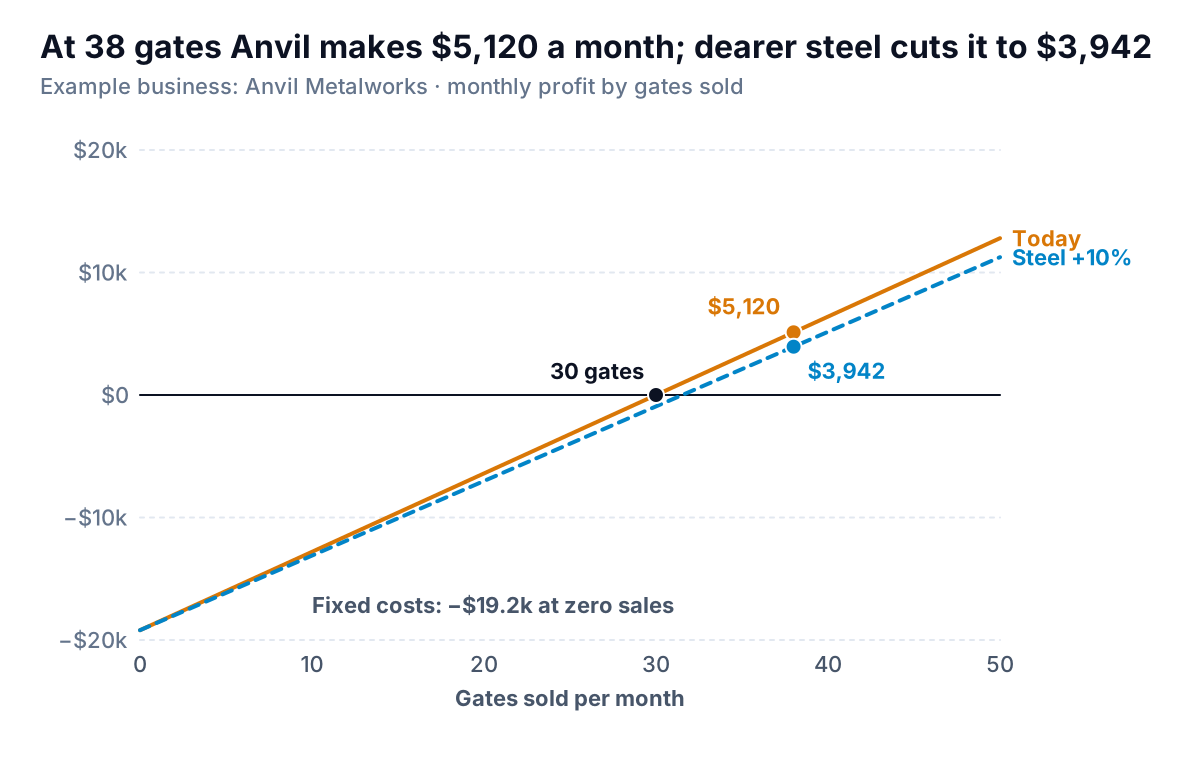
It's easier to read for anyone who isn't an accountant, and it compares scenarios better: each scenario is one line, and you read profit at any volume straight off the axis. Build it from the profit column in the same table, again as a scatter chart. Use the classic chart when you want to show how costs are built up; use profit-volume for decisions.
Where a break-even chart misleads
The chart is only as good as four assumptions behind it, all of which are true enough for a small range of volumes and wrong at the edges:
- Straight lines. The chart assumes every gate sells at the same price and costs the same to make. In practice, a big order may need a discount, steel may get cheaper by the tonne, and a busy month may mean overtime. Draw the chart for a realistic range (Anvil's 20 to 50 gates), not from zero to infinity.
- Fixed costs stay fixed. They do, until they don't. At 50 gates a month Anvil would need a third fabricator, and fixed costs would jump by several thousand dollars. If your volume range crosses a step like that, add it to the fixed cost line as a step, or chart the two ranges separately.
- One product, or a steady mix. Anvil mostly sells one kind of gate. If you sell many products with different margins, units stop meaning much. Put sales dollars on the horizontal axis and use the contribution margin ratio instead (break-even sales = fixed costs ÷ CM ratio, as in the contribution margin income statement). The chart then holds only while the mix holds.
- The costs are classified honestly. Is the owner's own pay a fixed cost? It should be, or break-even will look lower than the business really needs. Are the fabricators paid per gate or per month? Salaried wages are fixed; piece rates are variable. Getting this wrong moves the crossing more than any price change.
And one reading mistake: a break-even chart uses a typical month, while real months vary. If January brings 24 gates and June brings 50, the average of 38 hides a loss-making winter. Plot your actual monthly volumes as dots along the horizontal axis and you'll see how many months land left of the crossing. Those are the months to plan for, and a cash flow chart shows how deep they take the bank balance.
Parity can take a CSV or Excel export of your sales and costs, or connect to QuickBooks Online, and build a dashboard of the numbers behind this chart: units, average price, variable and fixed costs by month, and how far each month landed from break-even, with every number checked against the full data. You can ask it by chat to treat a cost as fixed or variable and see the result change.
Upload your sales and cost data and get a checked dashboard with your contribution, fixed costs and margin of safety. Build a report from your data free
Anvil's owner didn't sign the lease. She asked the leasing company for a six-month term instead, raised prices 5% on the spring catalogue, and set a rule: if three months in a row come in above 42 gates, the lease goes back on the table. The break-even chart didn't make the decision. It made the trade-off visible enough to decide.