On Friday 13 February 2026, the bank balance of Gable Roofing, a fictional roofer, was $8,700. A $21,000 shingle order for the spring season was due three weeks later. The owner had a cash flow chart on the office wall, a neat column chart of receipts and payments by month, and it hadn't warned him, because it answered a different question from the one he needed answered.
A cash flow chart should answer one question first: will the bank balance stay above the minimum you need, and if not, when will it drop below? That takes a line of the month-end balance, actual then forecast, with your minimum cash level drawn across it. Bars of money in and money out come second, a waterfall explains a single month, and a weekly view catches the lows that month-end numbers hide. This guide builds all four from Gable's numbers, shows how to make them in Excel and Google Sheets, and covers the ways each one can mislead you.
Four questions about cash, and the chart for each
The reminder you need is short: a cash flow forecast is your expected receipts and payments, month by month, rolled forward from today's bank balance. The forecast is the table. The charts are how you read it, and different questions need different charts.
| The question you're asking | The chart that answers it | How often to look |
|---|---|---|
| Will we stay above our minimum cash, and when is the low point? | Month-end balance line, actual solid and forecast dashed, with a minimum cash line | Every month, and whenever a big payment moves |
| Are we bringing in more than we pay out? | Receipts above zero, payments below, balance line on the same axis | Monthly |
| Where did this month's cash go? | Waterfall from opening to closing balance | When a month surprises you |
| How low does it really get between month-ends? | Weekly (or daily) balance line | In the tight season |
The rule for choosing: if the decision is "can we afford it, and when?", use the balance line. If the decision is "what do we change?", use the in-and-out bars or the waterfall.
The cash flow chart to build first: balance against a floor
Here is Gable's month-end balance for the last twelve months, followed by six months of forecast. It's the chart that would have shown last winter's problem coming in October.
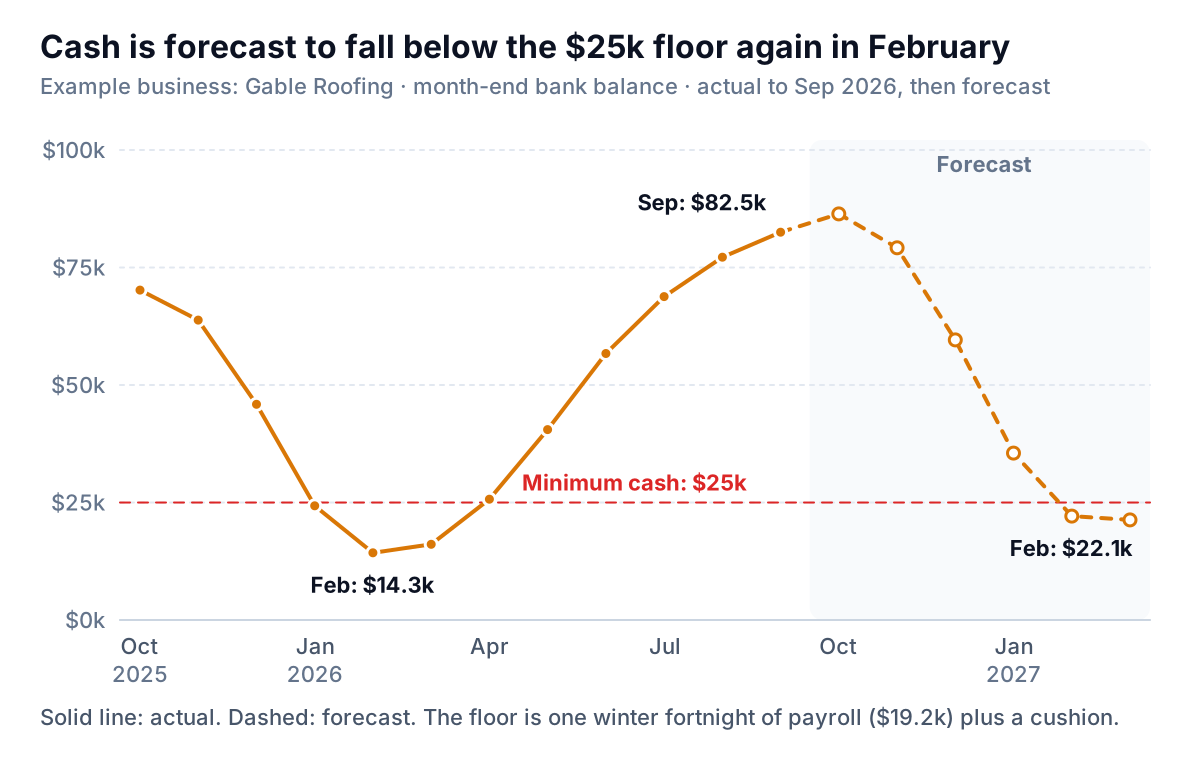
Four details make this chart work:
- A floor line. Gable's minimum is $25,000: one fortnight of winter payroll ($19,200) plus a cushion for a late customer. Pick yours the same way, from a payment you can't miss, and draw it in red. The question the chart answers is no longer "is cash going up?" but "how far above the floor are we, and for how long?"
- Actual solid, forecast dashed. Readers must see at a glance which numbers have happened. Join the two lines at the last actual month so there's no gap.
- A zero baseline. Line charts don't strictly need one, but for cash the distance to zero is the point. An axis starting at $10,000 makes a dip to $14,300 look like the bottom of the world.
- A title that says what happens. "Cash is forecast to fall below the $25k floor again in February" gives the reader the decision. "Cash flow 2025–2027" makes them work it out.
Read Gable's chart and the decision is plain. The forecast repeats last winter's dip, a little less deep: $22,100 in February and $21,300 in March. The owner has four months to act: split the March shingle order, take deposits on spring jobs booked in winter, line up a credit facility while the balance looks healthy, or hold back part of the autumn owner draws. Any of those, decided now, costs less than a call to the bank in February.
Money in, money out: one axis, not two
The chart on Gable's wall was the most common cash chart there is: receipts and payments as side-by-side columns, with the bank balance added later as a line on a second axis because it looked "too small" next to the columns. That second axis is the problem.
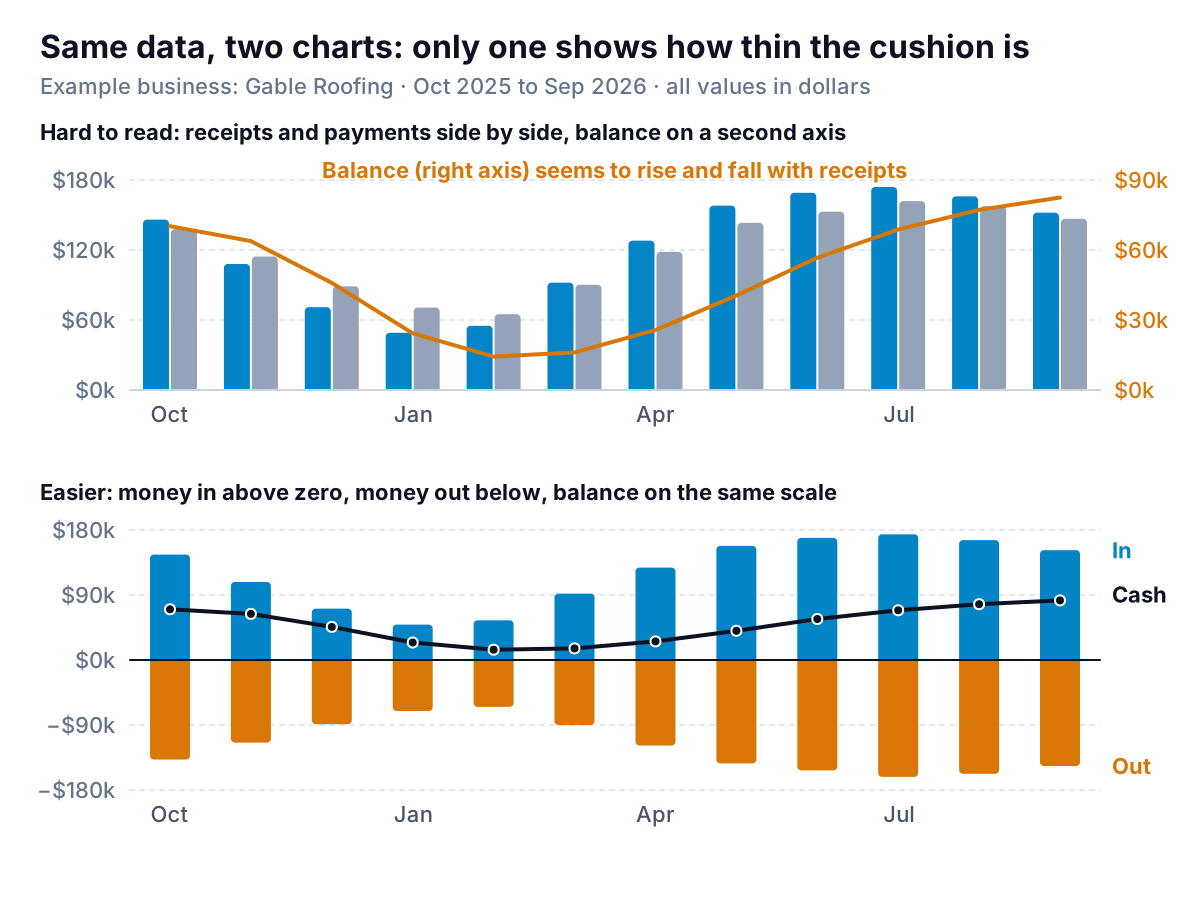
In the top chart, the right axis runs from $0 to $90,000 and the left from $0 to $180,000. Excel chose those scales, and they make the balance line climb and fall alongside the receipts as if the two were the same size. As Datawrapper's post on why not to use two axes puts it, the scales of a dual-axis chart are arbitrary, so whoever sets them decides how closely the two lines seem to move. Here they hide the fact that Gable's cushion in February was less than one week of summer payments.
Everything in a cash chart is in dollars, so it doesn't need a second axis. The bottom chart puts receipts above zero, payments below zero and the balance on the same scale. Now three things are visible at once:
- The winter receipts ($49,000 in January) are less than a third of the summer peak ($174,000 in July).
- Payments fall in winter too, but only to $65,000–$90,000, because the crew is still paid.
- The balance line is small next to the flows. A single slow month moves it a long way.
A simpler alternative is one net cash flow column per month (receipts minus payments), above or below zero. It loses the size of each side but makes a run of negative months impossible to miss: Gable had four in a row, November to February.
Where did the month's cash go? A cash waterfall
The balance line tells you January was bad: down $21,600. It doesn't tell you why. A waterfall chart does: start at the opening balance, add each inflow, subtract each outflow, and end at the closing balance.
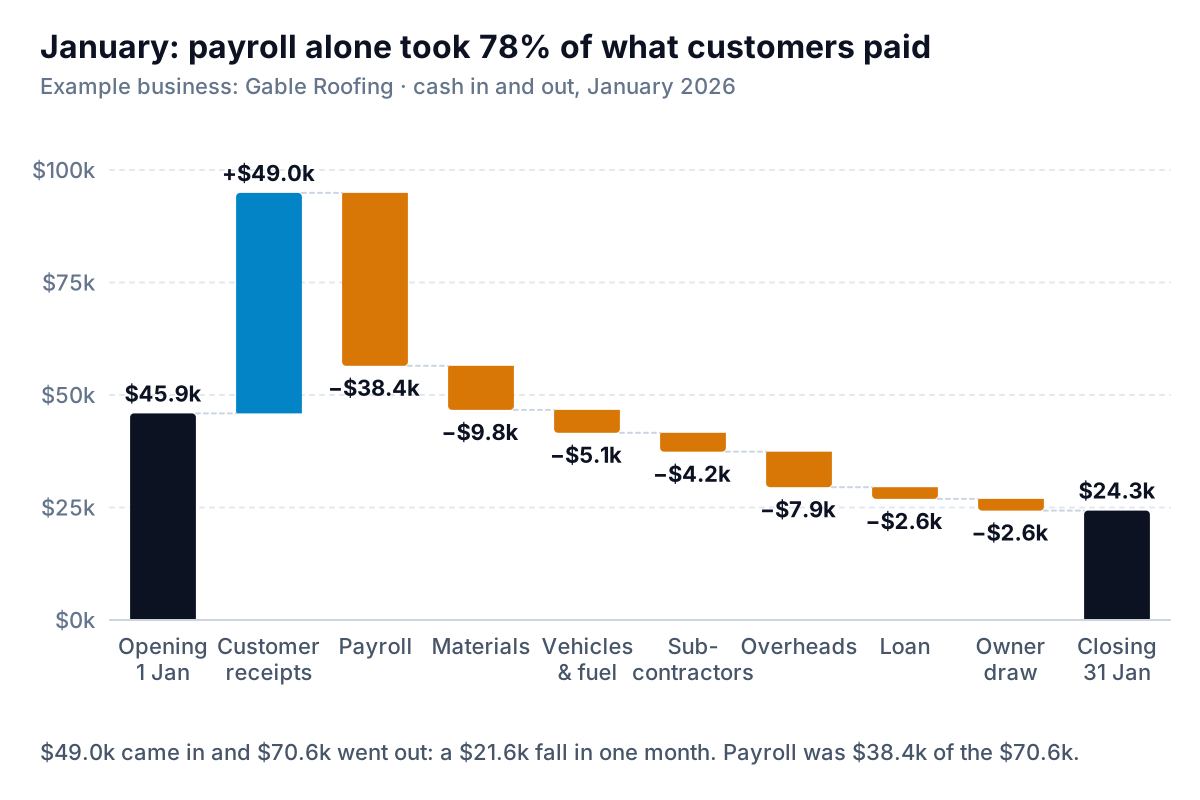
Payroll took $38,400 of the $49,000 customers paid, or 78%. Materials, vehicles, subcontractors and overheads took most of the rest, and the loan repayment and owner draw tipped the month into a $21,600 fall. Cutting the owner draw entirely would have saved $2,600. The real issue is a full crew on payroll in a month with a third of summer's work: a question about winter work (repairs, gutters, maintenance contracts), not overheads.
Three rules for a cash waterfall:
- Use cash categories, not P&L lines. Loan repayments and owner draws aren't expenses on a profit and loss statement, but they leave the bank account, so they belong here. Depreciation is the reverse: an expense, not a payment. If you want to chart revenue down to profit instead, that's a different chart, covered in our guide to the P&L chart.
- Keep it to eight or ten bars. Group the small payments into "Overheads" or "Other". A waterfall with twenty thin bars stops explaining anything.
- The ends must match the bank. Opening and closing bars are the real balances, $45,900 and $24,300 here. If the steps don't add up to the difference, something is missing or double-counted.
Month-end balances hide the real low point
Every chart so far uses month-end balances, and that's normal for a monthly forecast. But Gable's money doesn't run out on the last day of the month. It runs out on the Friday after a payroll run, the day the insurance instalment goes out, or the week a big supplier is paid.
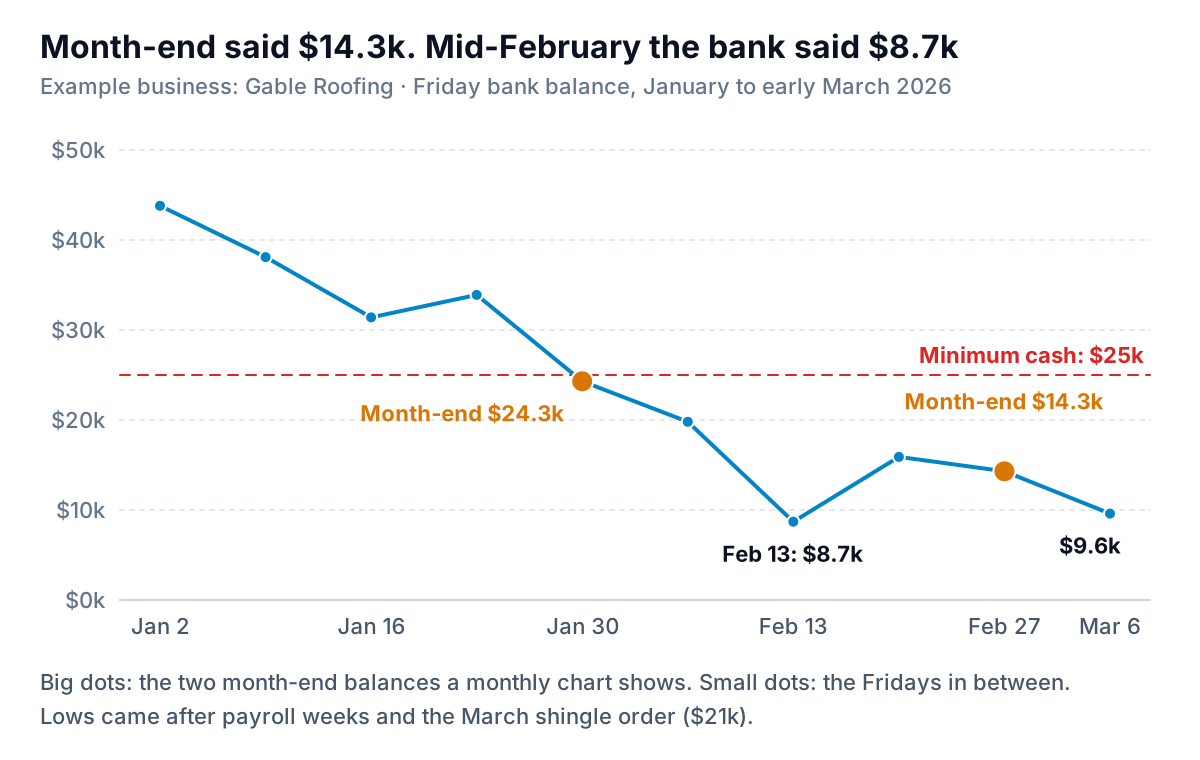
The monthly chart said the low was $14,300. The real low was $8,700 on 13 February, after a payroll week, and $9,600 on 6 March, the week the shingle order was paid. Both were well under the $25,000 floor, and both were invisible in month-end data.
The rule: when the monthly forecast puts you within one or two months' payroll of your floor, switch to a weekly view for that stretch. A 13-week cash flow is built for exactly this: receipts by customer, payroll by pay date, bills by due date. Chart it as a line of Friday balances against the same floor line. The rest of the year, monthly is enough.
How to build a cash flow chart in Excel or Google Sheets
Every chart above comes from one table. Shape it first, one row per month, and the charts take a few minutes each.
| Column | What goes in it | Example (Jan 2026) |
|---|---|---|
| A: Month | The first day of the month, as a real date | 1/1/2026 |
| B: Status | Actual or Forecast | Actual |
| C: Receipts | Money that arrived in the bank | 49,000 |
| D: Payments | Money that left, as a positive number | 70,600 |
| E: Payments (chart) | =-D2, so payments plot below zero | −70,600 |
| F: Closing balance | =F1+C2-D2 (first row: opening balance + C − D) | 24,300 |
| G: Actual line | =IF(B2="Actual",F2,NA()) | 24,300 |
| H: Forecast line | =IF(B2="Forecast",F2,NA()), plus the last actual month typed in so the lines join | #N/A |
| I: Minimum cash | The same number in every row | 25,000 |
Take receipts and payments from your bank account, not your profit and loss. In QuickBooks Online, the built-in Statement of Cash Flows starts from net income and, according to Intuit's help page, runs only on the accrual basis. That's useful for explaining profit versus cash, but for this table a bank account export, summed by month, is closer to what actually moved.
The balance line in Excel
- Select columns A, G, H and I.
- Choose Insert, then the line chart icon, and pick Line with Markers. Microsoft lists it among the line subtypes on its page of available chart types.
- Right-click the forecast series, choose Format Data Series, and under Fill & Line set a dash type. Give it the same colour as the actual line.
- Format the minimum cash series as a thin red line with no markers, and label it directly instead of using the legend.
- Check the vertical axis starts at zero, then replace the chart title with your takeaway.
In and out bars with the balance
Select A, C, E and F. Choose Insert, then Combo, then Create Custom Combo Chart (Microsoft calls the subtype "Custom combination"). Set Receipts and Payments (chart) to Stacked Column and Closing balance to Line, and leave every Secondary Axis box unticked. Because one series is positive and the other negative, the stacked columns put receipts above zero and payments below it in the same slot.
The waterfall
Excel 2016 and later have a built-in waterfall: Microsoft's waterfall chart steps are Insert, then Insert Waterfall, Funnel, Stock, Surface, or Radar Chart, then Waterfall. Lay out one month as labels and signed values (receipts positive, payments negative, opening and closing as the balances), then right-click the first and last bars and choose Set as Total. Our waterfall chart guide covers subtotals and the workaround for older Excel.
Google Sheets
Select the same columns and choose Insert, then Chart, as Google's chart help describes. For the balance line, pick Line chart under Setup, then format each series under Customize, then Series. For in-and-out bars plus a balance line, Sheets gained Clustered Column - Line and Custom Combo types in a July 2026 update. Google's combo chart help shows how to set each series to Column or Line under Customize, then Series. Keep the balance on the left axis with the others. With payments as negatives, the receipt and payment columns sit side by side, one above zero and one below, which reads just as well. Sheets also has a waterfall chart, with subtotals set under Customize, then Series.
How a cash flow chart misleads, and the fix for each
- Cumulative net cash flow instead of the balance. A line that starts at zero and adds each month's net flow has the right shape but the wrong height. It can't show the floor, because it doesn't know where you started. Always chart the real bank balance.
- Profit drawn as cash. A chart of monthly net profit labelled "cash flow" misses customer payment delays, loan repayments, owner draws and stock bought ahead. Gable's balance rose by $20,500 over the twelve months, and it still hit $8,700 in February.
- Forecast and actual in the same style. Readers treat a solid line as fact. Dash the forecast and shade it.
- Two axes for numbers in the same unit. If everything is in dollars, one axis. The scale should show how big the balance is next to the flows, not hide it.
- Too short a window. Use at least twelve months of actuals, so last year's low sits next to this year's forecast.
- Month-end only in a tight season. When you're close to the floor, the low point is in the middle of the month. Go weekly.
If you'd rather not rebuild the table every month, Parity can connect to QuickBooks Online or take a bank or accounting export as a CSV or Excel file, and build a cash dashboard from it: the balance trend, money in and out, what explains the change and what needs attention, with every number checked against the full data before you see it. You can ask it by chat to add your minimum cash line or split out the forecast months, then share a read-only link with your bookkeeper or partner.
Connect your books or upload a bank export and get a checked cash chart and the dashboard around it. Build a report from your data free
Whatever you build it in, the test is the same one Gable's owner now uses each October: put the dashed line next to last winter's solid one, read off the lowest month, and decide what has to move before that month arrives. If the chart on your wall can't tell you that, it's the wrong chart.