Mosaic Tile Studio, an example business we'll use throughout, made $146,200 of net profit in the year to September 2026, up 37% on the year before. Revenue grew 16%. The owner's year-end P&L chart, a column of revenue next to a column of profit, looked like a victory. It hid the one number she needed to act on: clay and glazes had gone from 12.9% of revenue to 15.8%, and at this year's sales that drift was costing about $35,000 a year.
A good P&L chart isn't one chart. It's three, each answering a different question: a waterfall from revenue down to net profit (where did the money go?), a line of margins by quarter (are we keeping more of each dollar?), and cost lines as a percentage of revenue (which cost is growing faster than sales?). This guide builds all three from Mosaic's numbers, shows how to get the data out of QuickBooks or a spreadsheet, and covers the P&L charts that look informative and aren't.
What a P&L chart has to answer
A quick reminder rather than a lesson: the profit and loss statement lists revenue, subtracts cost of goods sold to reach gross profit, subtracts operating expenses to reach operating profit, and subtracts interest (and tax, if the business pays it) to reach net profit. Charting it well means picking the question first:
- "Where did the revenue go?" One period, revenue broken down into costs and profit. A waterfall.
- "Are we keeping more or less of each dollar?" Margins over time. A line chart in percent.
- "Which cost is out of line?" Each cost as a share of revenue, over time. Small multiples: one small line chart per cost, all on the same scale.
- "Are we growing?" Revenue over time. That belongs on a revenue chart rather than a P&L chart, and it's the question most P&L charts answer by accident.
The trap is charting the statement line by line: twenty columns of dollars, one per account. Every bar is accurate and none of them answers a question. Start from the question, then pick the few lines that answer it.
The whole year in one picture: a P&L waterfall
A waterfall starts with revenue, steps down by each group of costs, stops at gross profit as a subtotal, keeps stepping down through overheads, and ends at net profit. Each bar starts where the previous one ended, so the chart is the P&L read from top to bottom.
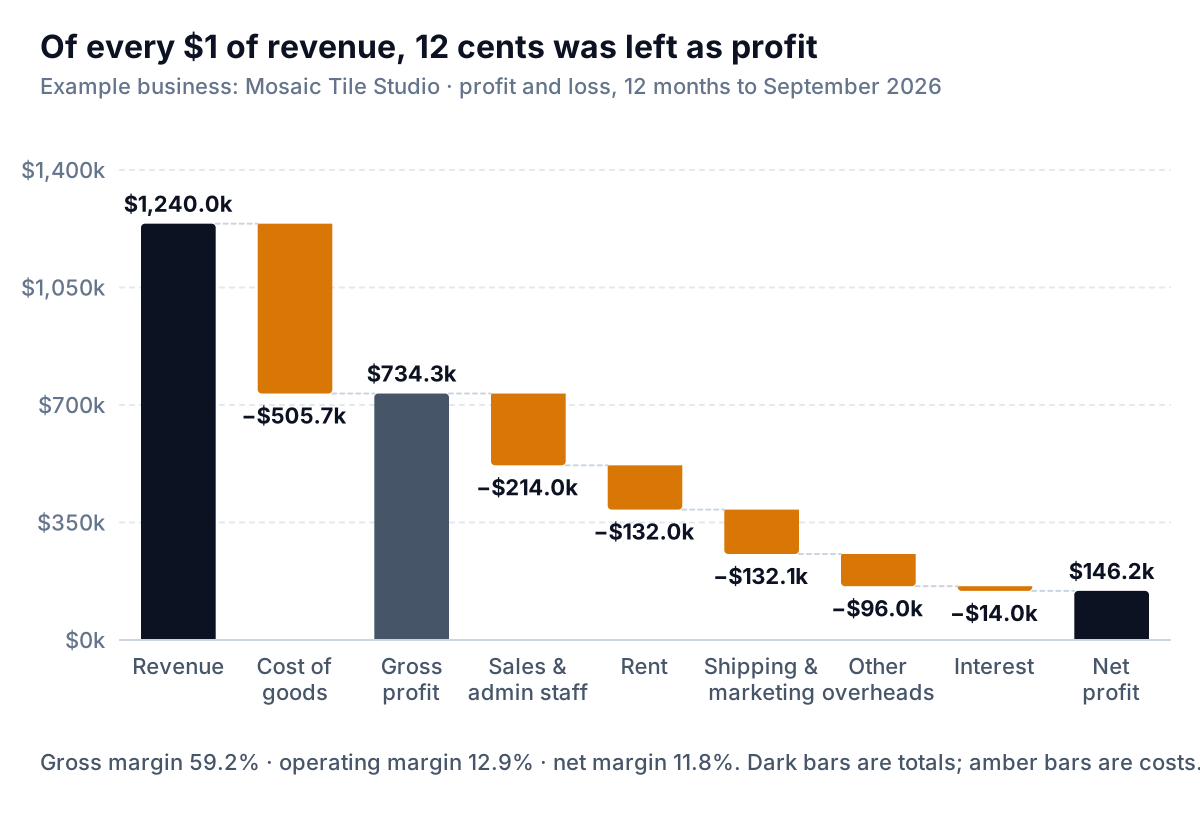
Read it left to right and you get the shape of the business in five seconds. Cost of goods (clay, glazes, kiln energy and the production team's wages) takes 40.8 cents of every dollar. Sales and admin staff take 17.3 cents, rent 10.6, shipping and marketing 10.7, other overheads 7.7 and interest 1.1. That leaves 11.8 cents of profit.
Three choices make a P&L waterfall readable:
- Seven to ten bars. Group accounts into the categories you make decisions about. Mosaic's books have 31 expense accounts; the chart has six cost bars. Our guide to the expense breakdown chart covers how to group them and when an "Other" bar is too big.
- Subtotals as full bars. Gross profit (and operating profit, if you show it) should start at zero, not float. In Excel that's the Set as Total option; in Google Sheets, subtotals are added under the chart's Series settings.
- A period long enough to mean something. A single month of a seasonal business can show a loss that's perfectly normal for January. Use the last twelve months, or the quarter compared with the same quarter last year.
What the waterfall can't do is show change. It's one period. Put this year's next to last year's and you're comparing the heights of floating bars, which is hard. For "what changed between last year and this year?", use a bridge instead: last year's profit, the effect of each change, this year's profit. Our waterfall chart in Excel guide builds both, with the clicks and the older-Excel workaround.
Margins over time: are you keeping more of each dollar?
Margins turn the P&L into percentages of revenue: gross profit ÷ revenue, operating profit ÷ revenue, net profit ÷ revenue. As lines by quarter, they answer the question the waterfall can't.
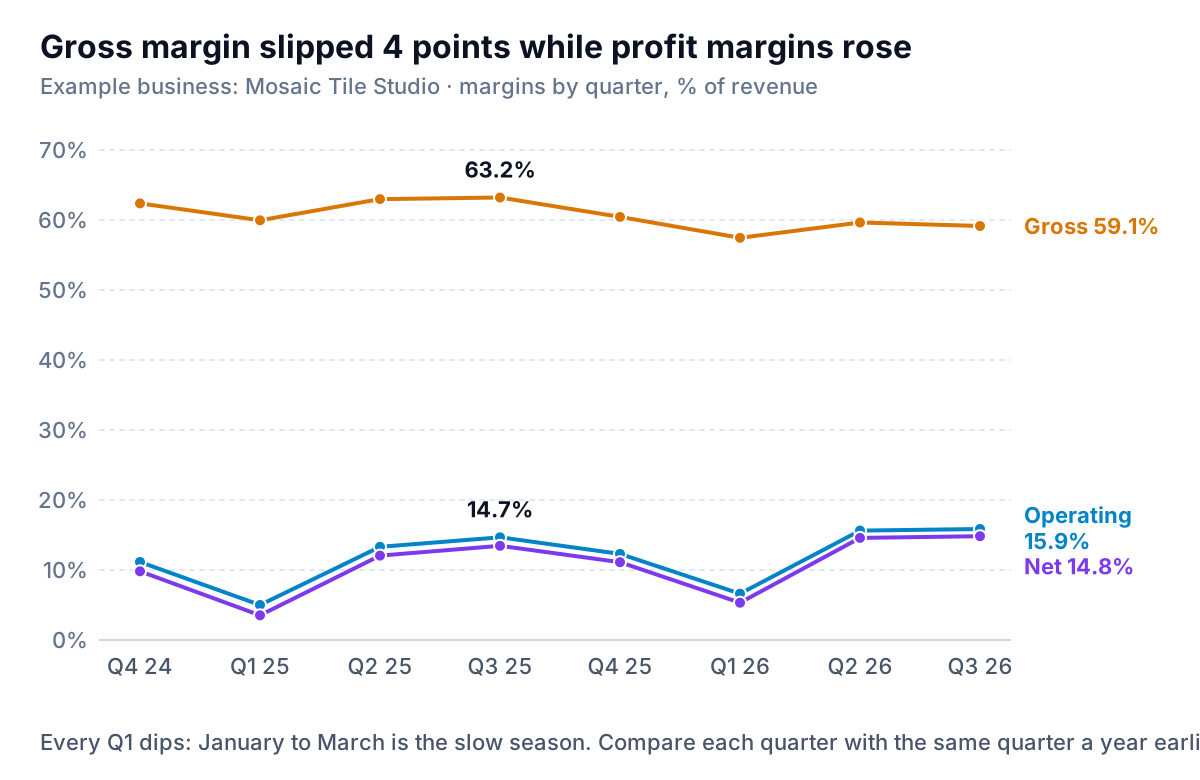
This is where Mosaic's story shows. Comparing the same quarter a year apart (Q3 2025 against Q3 2026), gross margin fell from 63.2% to 59.1%. Operating margin rose from 14.7% to 15.9%. Both are true at once because rent and the admin team cost roughly the same whatever the sales, so when revenue grows 16%, those costs shrink as a share of it. Growth made the bottom of the P&L look better while the top got worse. If sales flatten, the gross margin problem stays and the overhead help disappears.
How to make this chart honest:
- One axis, in percent, from zero. All three lines are percentages of the same revenue, so they share an axis. Starting at zero keeps a 4-point slide looking like 4 points, not a cliff. If the lines are bunched, it's fine to start the axis higher for a gross margin chart on its own, but say so in the subtitle.
- Quarters, not months, for a small business. Monthly margins swing with one big order or one late supplier bill. Quarters are steadier. If you want monthly points, chart a trailing three-month margin.
- Compare like with like. Mosaic's margins dip every first quarter because January to March is slow and overheads don't shrink. A fall from Q4 to Q1 is the season; a fall from Q1 last year to Q1 this year is news.
- Don't put revenue on a second axis. Revenue in dollars and margin in percent tempt a dual-axis chart, and the crossing lines it produces mean nothing. Put revenue in its own chart, directly above, with the same quarters.
Costs as a share of revenue: the chart that found the clay problem
The margin chart tells you gross margin slipped. It doesn't say which cost did it. For that, chart each cost line as a percentage of revenue, the same idea as a common-size income statement, drawn over time.
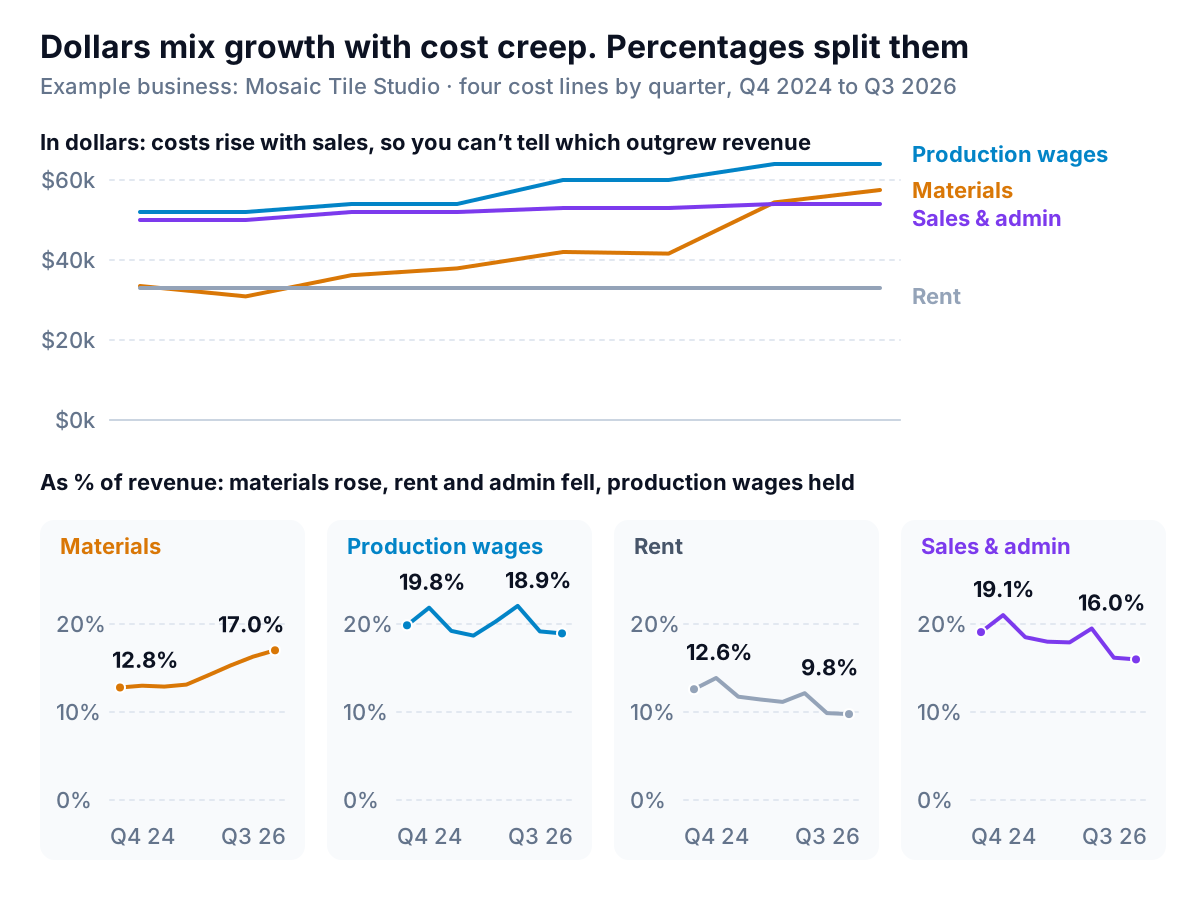
In dollars (top), every cost climbs because the business is busier, and you can't tell whether any of them climbed too much. Materials does rise faster than the others, but you'd need to know revenue grew 16% to judge it. As a share of revenue (bottom), the answer jumps out: materials went from 12.8% of revenue in Q4 2024 to 17.0% in Q3 2026. Production wages held at about 19–22%. Rent and the sales and admin team fell as revenue grew, which is what fixed costs should do.
That's what sent Mosaic's owner to her clay and glaze invoices. Two suppliers had raised prices twice in eighteen months, and a new glaze range used pricier pigments. Across the year to September, materials were 15.8% of revenue against 12.9% the year before. At $1,240,000 of revenue, the gap is about $35,000. The fix is a price review on the lines that use the expensive glazes, and a quote from a second clay supplier, not a cut to marketing.
Why small multiples rather than four lines on one chart? With the costs at different levels (rent near 10%, wages near 20%), one shared chart squeezes the small movements together and the lines tangle. Four small charts, each with the same 0–25% scale, let you compare slopes at a glance. Keep the scale identical across the panels. If each panel picks its own axis, a half-point wobble in rent looks like the same trend as a four-point rise in materials.
Getting the numbers and building the P&L charts
All three charts come from one table with one row per period (month or quarter) and one column per P&L line. You don't need the whole chart of accounts, just the groups you'll chart.
From QuickBooks Online
Run the Profit and Loss report, or the ready-made Profit and Loss by Month. Intuit's guide to customizing reports shows setting Display columns by to months and collapsing sub-accounts into one line, then exporting to Excel. Intuit's list of reports by plan also includes Profit and Loss by % of Total Income, which gives you every line as a share of revenue for a single period. For the trend, you still need the monthly report and a formula. Our guide to QuickBooks reports covers which plans include what.
Shape the table
Turn the export so periods run down the rows: Quarter, Revenue, Materials, Kiln energy, Production wages, Gross profit, Rent, Sales and admin, Shipping, Marketing, Other, Operating profit, Interest, Net profit. If the export is monthly, add a Quarter column and total with SUMIFS. Then add helper columns for the percentages, such as =C2/$B2 for materials as a share of revenue, formatted as percent. Add a check column that rebuilds net profit from the pieces and compares it with the report. If it's off by a dollar, an account is missing from your groups.
Build each chart
- Waterfall (Excel 2016 or later): lay out one period as labels and signed values (revenue positive, costs negative, gross profit and net profit as the totals). Microsoft's waterfall instructions: Insert, then Insert Waterfall, Funnel, Stock, Surface, or Radar Chart, then Waterfall. Then right-click each total bar, choose Format Data Point and tick Set as total. In Google Sheets, choose Insert, then Chart, and pick Waterfall; Google's waterfall help covers adding subtotals.
- Margin lines: select the quarter column and the three margin columns, then Insert, line chart, Line with Markers. Format the vertical axis as percent with a minimum of 0. Delete the legend and label each line at its right-hand end.
- Cost small multiples: neither Excel nor Sheets has a small-multiples chart type. Build one line chart for the first cost, set the vertical axis maximum by hand (0.25 for 25%), then copy it three times and point each copy at a different column through Select Data. In Sheets, set the same minimum and maximum under Customize, then Vertical axis. Line the four up in a row.
P&L charts that look useful and aren't
| The chart | What goes wrong | Use instead |
|---|---|---|
| Revenue and net profit columns side by side | Profit is so much smaller than revenue that its changes look flat | Net margin line, plus revenue on its own chart |
| Revenue bars with margin on a second axis | The scales are arbitrary, so where the line crosses the bars means nothing | Two charts stacked, same periods |
| Stacked area of every cost | Only the bottom layer sits on a flat baseline; the upper layers are hard to judge | Small multiples of cost as % of revenue |
| Cost lines in dollars only | Growth makes everything rise, hiding which cost outgrew sales | The same lines as % of revenue |
| Month-by-month margin for a seasonal business | Every slow month looks like a crisis | Quarters compared with the same quarter last year |
| Year-on-year % change for small lines | A $900 software line "up 60%" grabs the eye over a $35,000 materials drift | Change in points of revenue, or in dollars |
One more source of misleading charts isn't a chart choice at all. If a cost moves between groups (shipping booked as cost of goods one year and as an overhead the next), gross margin jumps and nothing real changed. Fix the mapping from accounts to chart groups once, write it down, and note any change in the chart's subtitle.
The same charts sit naturally next to a cash flow chart in a monthly pack. Profit and cash answer different questions, and an owner needs both.
Parity builds this kind of P&L dashboard from QuickBooks Online, or from an Excel or CSV export of any accounting tool: headline margins with their trends, charts like these, what explains the change and a table of lines that need attention, with every number checked against the full data. You can ask it to show costs as a share of revenue or compare against the same quarter last year, and export the result to PDF or Excel.
Connect your books or upload a P&L export and get margins, a waterfall and cost trends, checked line by line. Build a report from your data free
Mosaic's owner now looks at one page each quarter: the waterfall for the last twelve months, the margin lines, and the four small cost charts. The profit column still goes in the annual report. It just isn't the chart she decides from.