A client opens your monthly report looking for two answers. Did the thing they pay you for work? And why is the invoice the number it is? If the first page answers both, the rest of the report gets read as evidence. If it opens with a list of tasks, it gets skimmed, and the questions arrive later by email, usually in the week the retainer is up for renewal.
This client report template is built around those two answers. It's a spreadsheet with six short sections: a headline, results against the targets you agreed, the client's spend and cost per result, the work you did (pulled from a time log), the retainer hours and what to invoice, and next month's plan with the decisions you need from the client. It suits marketing agencies, consultants and bookkeepers on a monthly retainer, and a filled-in example shows every part working.
Download the client report template (.xlsx). It opens in Excel, Google Sheets and Numbers, with no macros, and has a worked example plus a blank copy with the same formulas.
What's in the client report template
The workbook has five sheets: "How to use", an "Example" report with its "Example work log", and "Your report" with "Your work log", which are empty and ready to fill. Yellow cells are inputs. Everything else is a formula, so the totals, statuses and invoice amount can't drift from the figures underneath.
The example is a fictional two-person agency, Signal & Co, reporting September 2026 to a fictional client, Copperline Plumbing. The retainer is $3,000 a month for 30 hours, with extra hours at $110. Here's the page the client sees first:
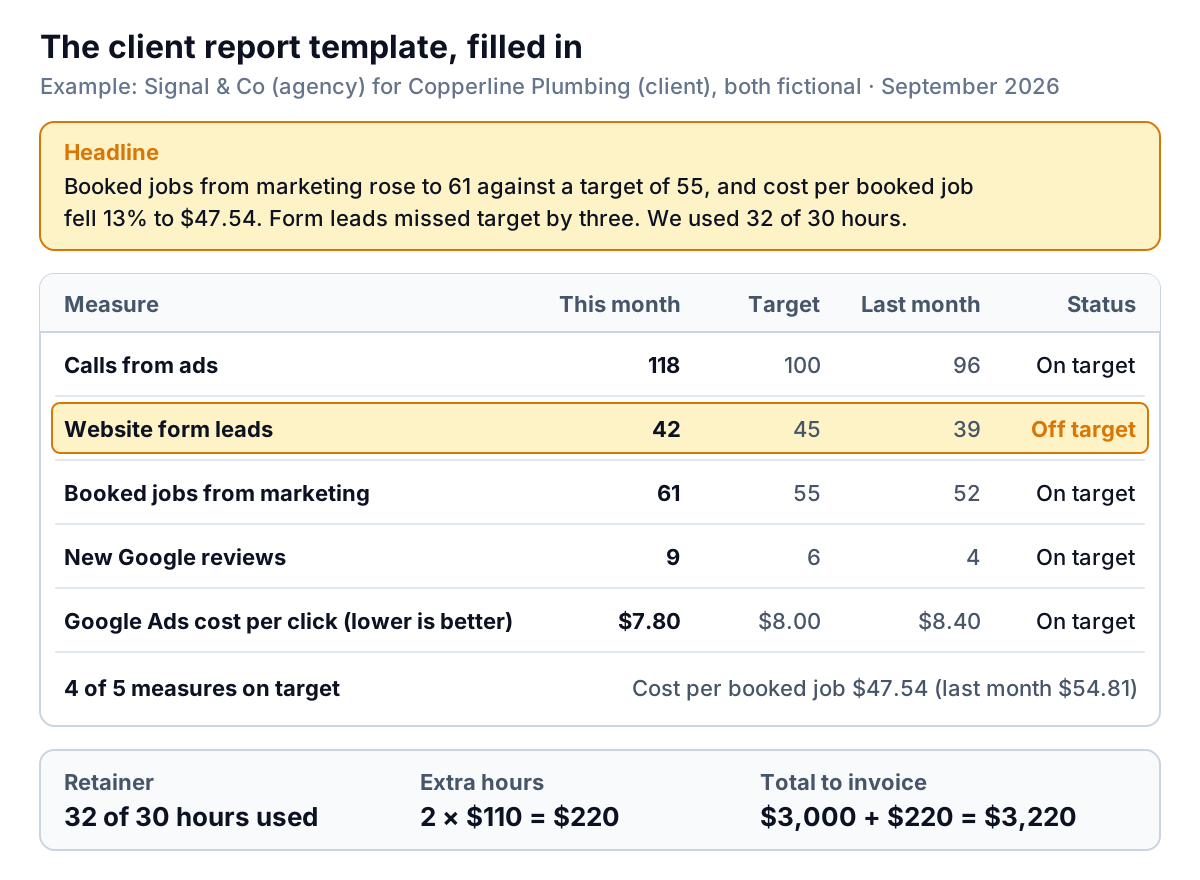
The six sections, in the order they appear:
- Headline. Two or three sentences. You write it last and the client reads it first.
- Results against target. Three to six measures the client cares about, with this month, target, last month and a status.
- Client spend and cost per result. What the client spent (on ads, materials or whatever your work directs) and what each result cost.
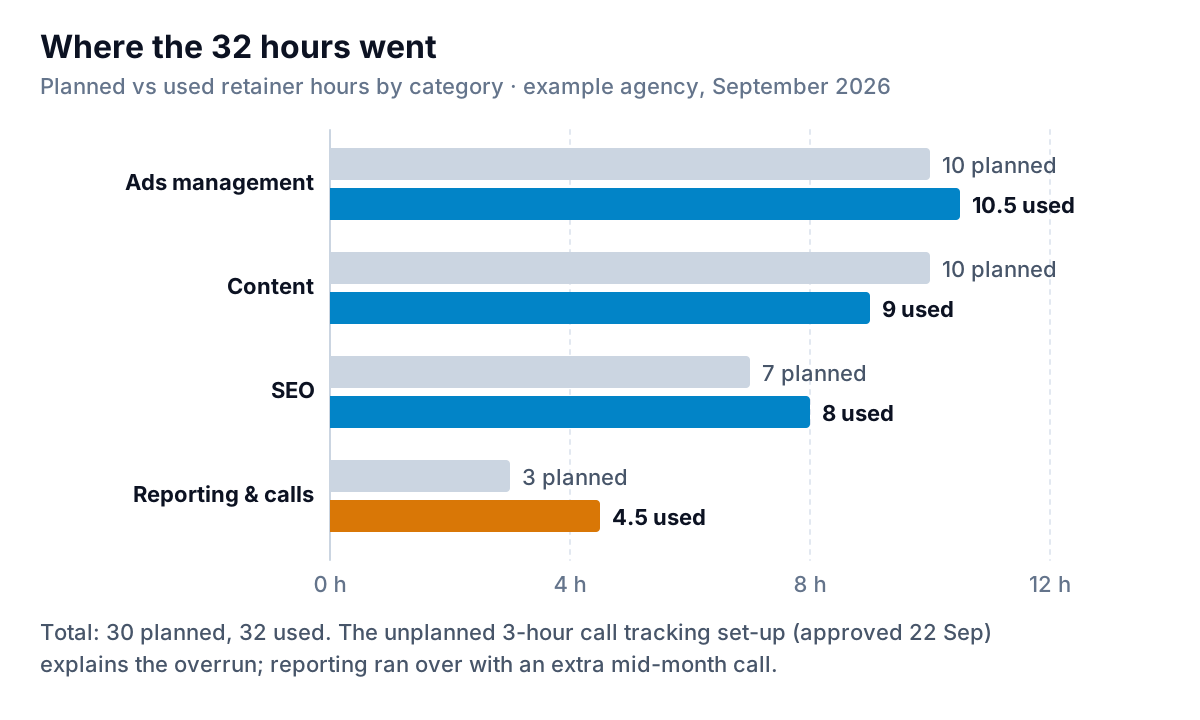
- Work this month. Planned and used hours by category, and tasks done and in progress, totalled from the work log.
- Retainer. Hours included, used and remaining, extra hours, the amount to invoice and your effective hourly rate.
- Next month. Planned work, decisions you need from the client and anything that might not go to plan.
Results against target: measures the client chose
The most useful thing you can do for a client report happens before the first one: agree three to six measures and a target for each. If you choose the measures alone, you'll pick the ones you control (posts published, hours logged). The client cares about the ones that touch their business: calls, bookings, sales, cash. Write the agreed list into section 2 and keep it the same every month, so the report becomes a series rather than a new story each time.
Each measure row has these columns:
- Better if. Higher or Lower. Most measures are "higher is better"; costs per click, per lead or per job are "lower".
- This month, Target, Last month. Typed in.
- vs target = this month ÷ target − 1. Calls from ads: 118 ÷ 100 − 1 = +18%.
- vs last month = this month ÷ last month − 1. Calls: 118 ÷ 96 − 1 = +22.9%.
- Status fills itself in: "On target" when this month is at or above target (or at or below it, for a Lower measure), otherwise "Off target". Under the table, a count gives the score: 4 of 5 on target.
- Note. One short line of context for the client, such as "Call tracking live from 22 Sep".
Be exact about where each number comes from, and say so in the note if it might surprise the client. Google Business Profile's "Calls" metric, for instance, counts clicks on the call button on the profile, not completed phone calls. Google Ads can measure calls from ads and calls from website visits as conversions, counted by rules you set up. Both are useful; neither is the same as a booked job. That's why the example's third measure, booked jobs from marketing, comes from Copperline's own job list. Whenever you can, make at least one measure come from the client's own records. It's the number they trust.
Spend and cost per result
Section 3 holds the client's money: ad spend of $2,900 against a $3,000 budget (96.7% used), and the result it bought. You name the result ("booked jobs") and type the count, and the template works out cost per result: $2,900 ÷ 61 = $47.54, down 13% from $2,850 ÷ 52 = $54.81 last month. This is the line a client's finance person looks for. Put it on the first page.
The work log and the retainer hours
Most agencies and consultants track time somewhere. The template asks for one row per task: date, category, task, hours and status (Done or In progress). The example log has 15 rows. The report then counts:
- Hours used per category =
SUMIFS(log hours, log category = this category). - Tasks done and tasks in progress =
COUNTIFSon category and status. - Difference = hours used − planned hours, so the client sees where the time went against the plan.
The retainer section turns those hours into an invoice:
| Line | Formula | Example |
|---|---|---|
| Hours used | Total from the work log | 32 |
| Hours remaining | MAX(0, included − used) | 0 |
| Extra hours | MAX(0, used − included) | 2 |
| Extra hours fee | Extra hours × rate | 2 × $110 = $220 |
| Total to invoice | Retainer fee + extra hours fee | $3,000 + $220 = $3,220 |
| Effective hourly rate | Total to invoice ÷ hours used | $3,220 ÷ 32 = $100.63 |
The last line is for you, not the client. If your effective rate keeps falling below your quoted rate because you absorb unbilled hours, the retainer is underpriced, and three months of this column is the evidence you need to reprice it.
Writing the headline
The headline is the part of a client report most likely to be read in full, and the part most often wasted on enthusiasm. Here's the same month written two ways:
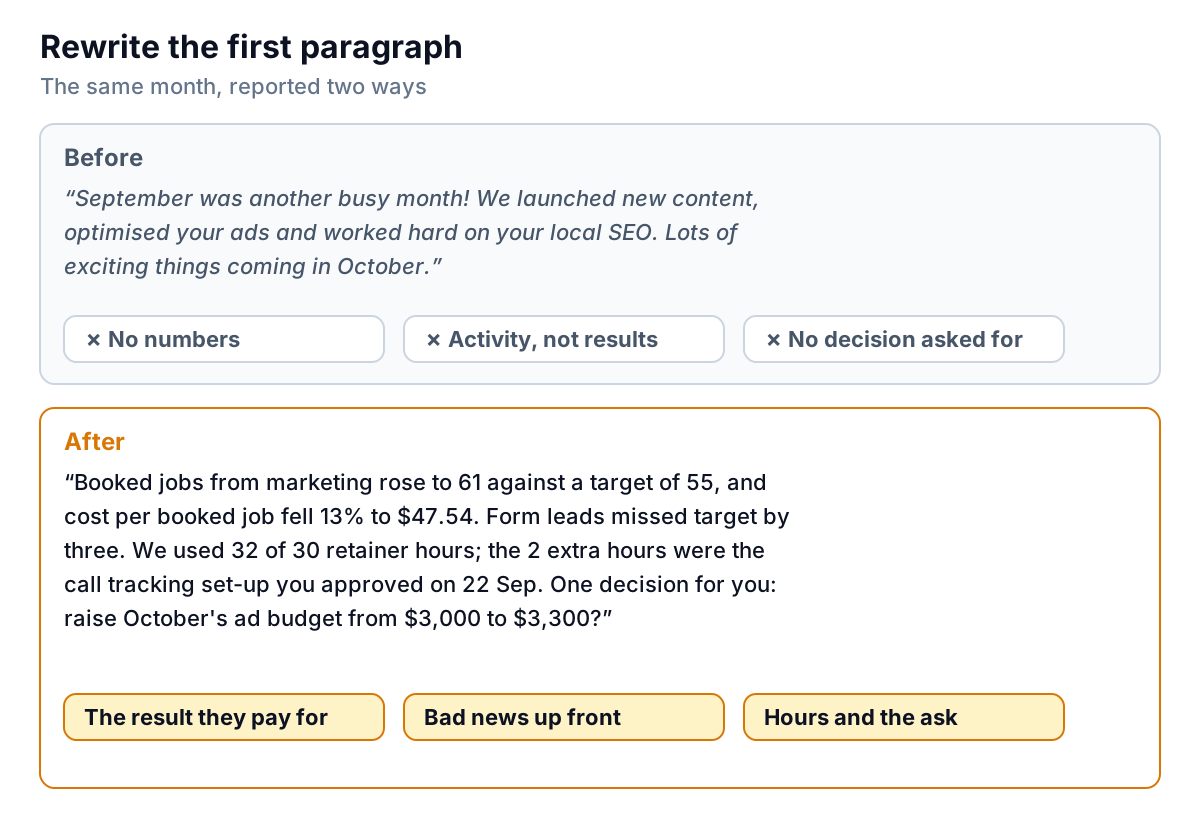
Four rules produce the second version:
- Start with the result they pay for. For Copperline, that's booked jobs, not clicks or posts.
- Put the miss in the first paragraph. Clients forgive a missed target; they don't forgive finding it on page three. One sentence is enough: "Form leads missed target by three."
- Mention hours whenever they're over or well under. Under is news too: it means you have time for something the client wants.
- End with the decision you need. One question, with a number in it: "Raise October's ad budget from $3,000 to $3,300?"
For more ways to open a report, see our executive summary examples.
Adapting it for agencies, consultants and bookkeepers
The structure stays the same; the measures in section 2 change. Some starting points to agree with the client:
| You are | Measures to consider | "Result" for cost per result |
|---|---|---|
| Marketing agency | Leads or calls, booked jobs or sales, cost per lead, new reviews | Booked jobs or sales |
| Consultant on a project retainer | Milestones done vs planned, open issues, decisions waiting on the client | Milestones delivered |
| Bookkeeper | Working days to close the month, transactions waiting to be categorised, receivables over 60 days, cash at month end | Usually not needed; leave section 3 empty |
For bookkeepers, the client report often goes alongside the month's financial statements. Keep it short and point to what needs the owner's attention, such as the customers who are slowest to pay; our accounts receivable aging report guide covers how to read that list. For marketing clients, the marketing report template adds spend and profit by channel if the client wants that level of detail.
Sending it
Pick a day and keep it, such as the fifth working day of the month. Send the report as a PDF or a link, with a covering email short enough to read on a phone:
What this client report template can't do
- It doesn't pull numbers from ad platforms, analytics or accounting software. You type them in, so keep a note of where each one came from.
- It doesn't prove cause and effect. A rise in booked jobs could be your work, the season or a competitor closing. The note column and headline are where you explain, honestly.
- It holds one client and one month per file. For many clients, copy the file per client and keep the measure list fixed for each.
When copying numbers in takes longer than writing the report
With two or three clients, a client report template in a spreadsheet is fine. With ten, the hour per client spent exporting and pasting is the part to remove. Parity builds a dashboard from each client's data: connect QuickBooks Online, Stripe, Shopify, HubSpot, Square or Google Sheets directly, or upload a CSV or Excel export from anything else. You get headline numbers with their trends, charts, what explains them and a table of what needs attention, and every number is checked against queries on the full dataset before you see it.
Ask it to write the client report from that data and it drafts the monthly report, ready to refine by chat ("lead with booked jobs", "add cost per booked job against last month"). You can share it with the client as a read-only link with an optional password or end date, or export it to PDF or Excel, and save it as a template so next month you only update the file. Our guide to AI reporting for marketing agencies covers how agencies set this up across clients.
Connect a client's data or upload an export, and get a checked report you can share as a link. Build a report from your data free
Whichever tool you use, the test of a client report is the reply it gets. "Thanks, yes to the budget" means it worked. "Can we jump on a call to go through this?" usually means the first paragraph didn't answer the two questions.