For two weeks in September, the floor model of the spindle-back dining chair at Pallet Furniture Co. had a "sold out, back soon" card on it. Pallet is a made-up furniture store used as the example here, and the card cost it 22 chairs at $189, or $4,158 of sales that went to someone else. The owner's monthly stock report never showed a problem. Every month-end count was above zero.
The fix was an inventory chart, but a different one from the report: one line per item, counted weekly, drawn against the point where it should be reordered. An inventory chart answers one question about stock at a glance, and each question needs its own chart. This guide gives the three that matter to a small retailer, how to build each one in Excel or Google Sheets, and the ways each can mislead. There's a practice workbook with Pallet's data and all three charts built if you want to follow along.
Three questions, three inventory charts
Stock raises three different worries, and they don't share a chart:
| The question | The chart | Data it needs |
|---|---|---|
| When do I order this item? | Units on hand over time, with the reorder point as a flat line | One item, one row per week |
| Which shelves hold cash too long? | Days on hand by category, as sorted horizontal bars | One row per category: 12-month cost of goods sold and average stock |
| Is stock going stale? | Stock at cost by age bucket, stacked by month | One row per month end, one column per bucket |
The first chart is for items, weekly. The other two are for the whole shop, monthly. A single "inventory" chart that tries to answer all three usually ends up as a line of total stock value, which answers none of them. Our inventory dashboard guide covers how these sit together on one screen with a reorder list; this post is about drawing each chart well.
Stock level against the reorder point
Here's the chair, week by week from April to early October.
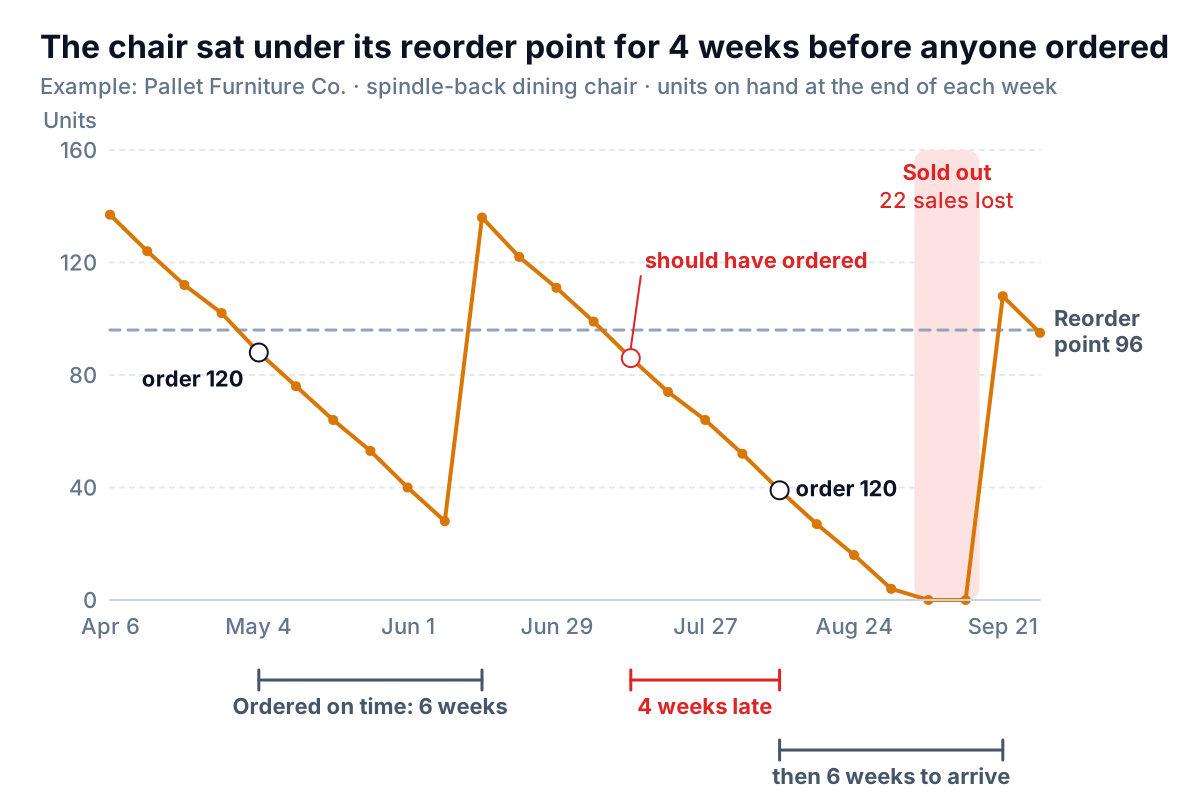
A healthy stock line looks like a saw: a steady slope down as the item sells, then a jump when a delivery lands. Pallet sells about 12 of these chairs a week and the supplier takes 6 weeks, so the reorder point is 12 × 6 + 24 units of safety stock = 96. In May the line crossed 96, an order for 120 went out that week, and the delivery arrived six weeks later with 28 chairs still on the floor. That's the system working.
In July the line crossed 96 again in the week of July 13, and nobody ordered until the week of August 10. The supplier still needed six weeks. Stock ran to zero in the week of September 7 and stayed there until the delivery in the week of September 21.
The chart makes three things obvious that a stock list doesn't:
- How late you were, not just that you were low. The horizontal distance between the crossing and the order is the delay, in weeks.
- Whether the safety stock is right. If deliveries usually land with stock well above the safety level, the buffer is too big. If they land near zero, it's too small or the lead time has crept up.
- Whether the order size fits. Teeth that are very tall and far apart mean big, infrequent orders and more cash on the floor. Short, close teeth mean frequent small orders.
The reorder point formula, safety stock and how much to order are covered in the inventory dashboard guide; here they only need to be a number you can draw.
Why it has to be weekly
Here's the same chair drawn from month-end counts only, which is what most monthly stock reports give you.
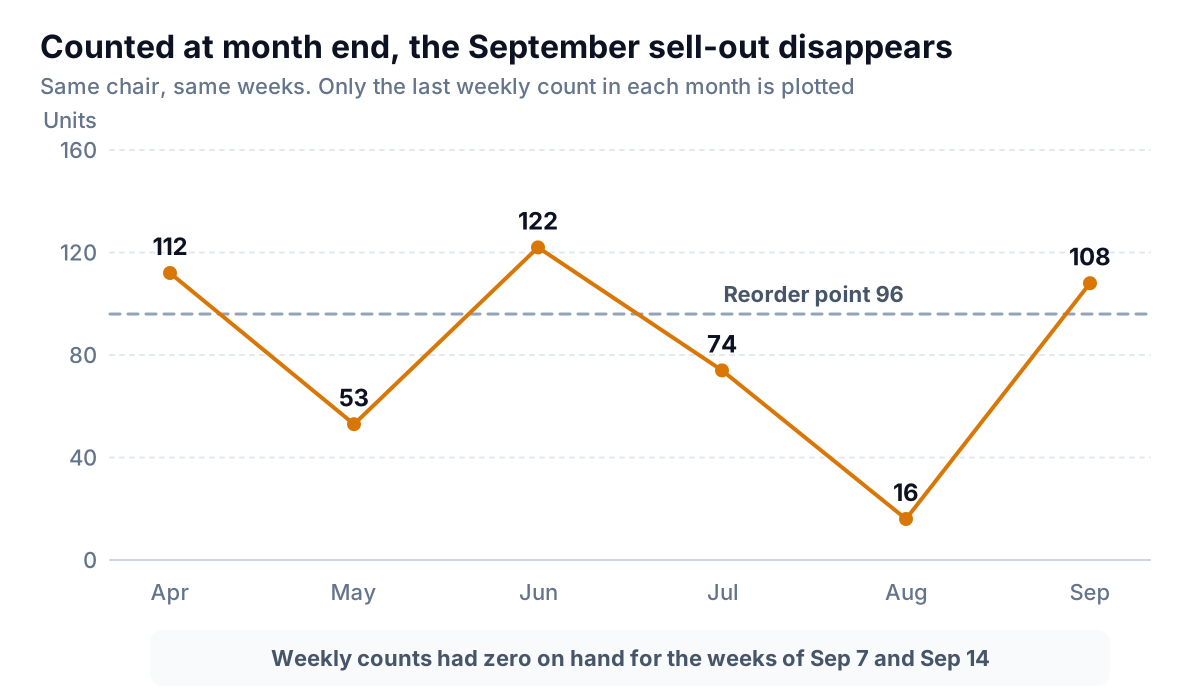
Nothing on this chart is wrong. It's just sampled too rarely. The August count caught the chair at 16, low but not out, and by the end of September the new delivery had arrived. The stockout happened in between. If an item can go from your reorder point to empty in less than a month, a monthly chart can't show you running out. Chart it at least as often as it takes to sell your safety stock: at 12 a week and 24 in safety stock, that's every two weeks at most, and weekly is easier to remember.
Add a lost-sales column if you can. Units sold during a stockout read as zero, which looks like weak demand rather than empty shelves.
Build it in Excel or Google Sheets
Shape the data first: one row per week, with the date in column A and these columns beside it.
- Units sold, lost sales, received, ordered this week: typed in, or pasted from your till's weekly sales export and your delivery notes.
- On hand: a running balance. If your opening count is in L2, the first row is
=$L$2+D2-B2and every row after it is the row above plus received minus sold:=F2+D3-B3, filled down. - On order:
=G2+E3-D3, the previous week's open orders plus this week's order minus what arrived. - Reorder point: the same number on every row, pointing at one settings cell (
=$L$6). Repeating it is what lets the chart draw a flat line. - Action:
=IF(F3<=H3,IF(G3>0,"on order","ORDER"),""). At Pallet this column says ORDER four weeks running in July and August, the delay you can see on the chart.
In Excel, select the date, on-hand and reorder-point columns, then go to Insert and pick a line chart; Microsoft's chart walkthrough covers Insert > Recommended Charts and the All Charts tab if you can't see it. Right-click the reorder point line, choose Format Data Series, and make it gray and dashed so the stock line stays the hero. In Google Sheets, select the same columns, choose Insert > Chart, and under Setup pick a line chart; the line chart help page lists the options under Customize. Sheets also offers a stepped area chart, which needs at least two series. Stock really does move in steps when a delivery lands, so it's a fair choice if you prefer it.
Days on hand by category: where cash sits longest
The second question is about money, not items. Pallet holds about $486,000 of stock at cost, averaged over the year, and its 12-month cost of goods sold is $2.4 million. The whole store turns its stock in about 74 days. That figure is the shop's days inventory outstanding, and the post on it covers the averaging choices. What matters for the chart is that 74 is an average of very different shelves.
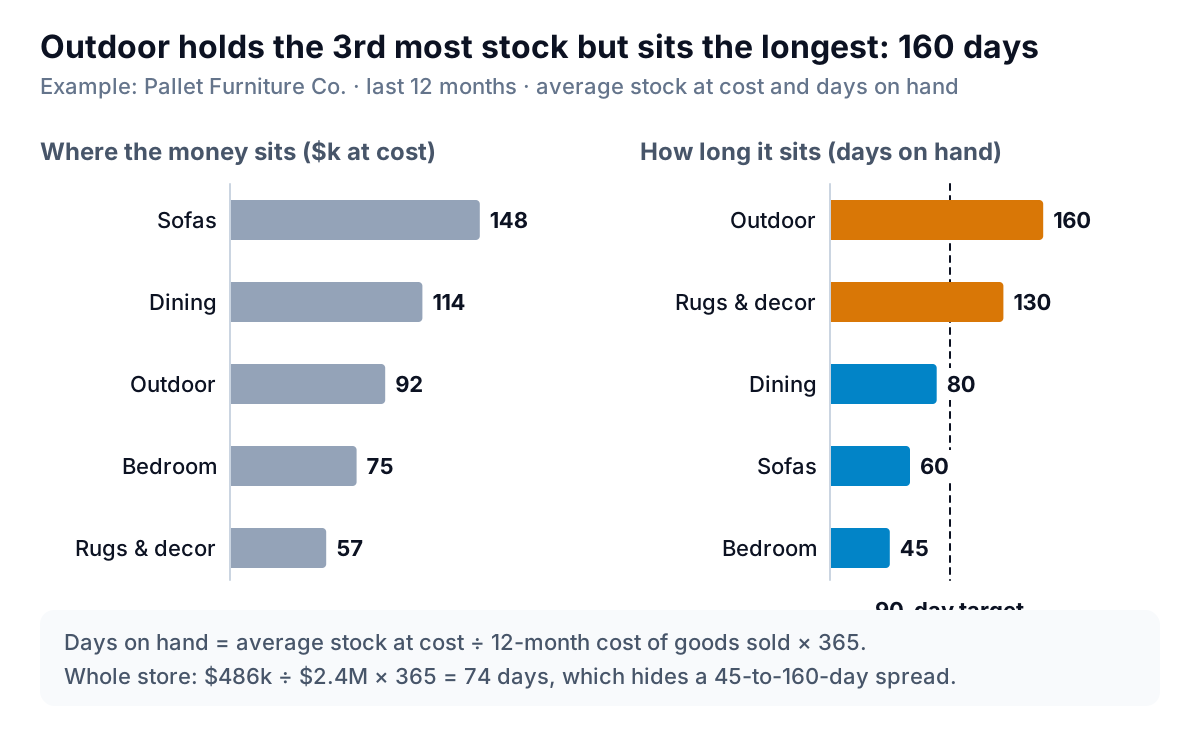
The left panel is the chart most stock reports show: value by category. It points at sofas, the biggest pile of money. The right panel is the useful one. Sofas sell through in 60 days, inside the owner's 90-day target. Outdoor furniture takes 160 days and rugs and decor 130. Together those two hold $149,000 that moves less than half as fast as the rest of the shop, which averages about 61 days.
Rules for this chart:
- Horizontal bars, sorted longest first. Category names are long and read easily on the left. Sorting turns the chart into a ranking.
- A target line, not a color rainbow. One dashed line at your target and one accent color for the bars past it. Everything else stays one neutral color.
- Bars start at zero. A bar's length is its value. Cutting the axis at 40 days would make bedroom look like it barely moves.
- Use cost on both sides. Stock at cost divided by cost of goods sold. Stock at retail flatters the shelf.
- Watch the season. Outdoor at 160 days in September includes stock bought for a summer that's over. Compare it with the same month last year before cutting the range.
To build it, put one row per category with 12-month cost of goods sold in B, average stock at cost in C, and =C2/B2*365 in D. Sort by D, largest to smallest, and insert a bar chart. Excel draws bar chart categories from the bottom up, so the first row ends up at the bottom; in the axis options, tick "Categories in reverse order" to put the longest bar at the top (the practice workbook already has this set). In Google Sheets the bar chart keeps your row order, with labels in the first column.
Aged stock: is it going stale?
The third chart answers the question the other two miss: is stock that has stopped selling quietly piling up? Group your stock at cost by days since each item last sold, and chart one stacked bar per month end.
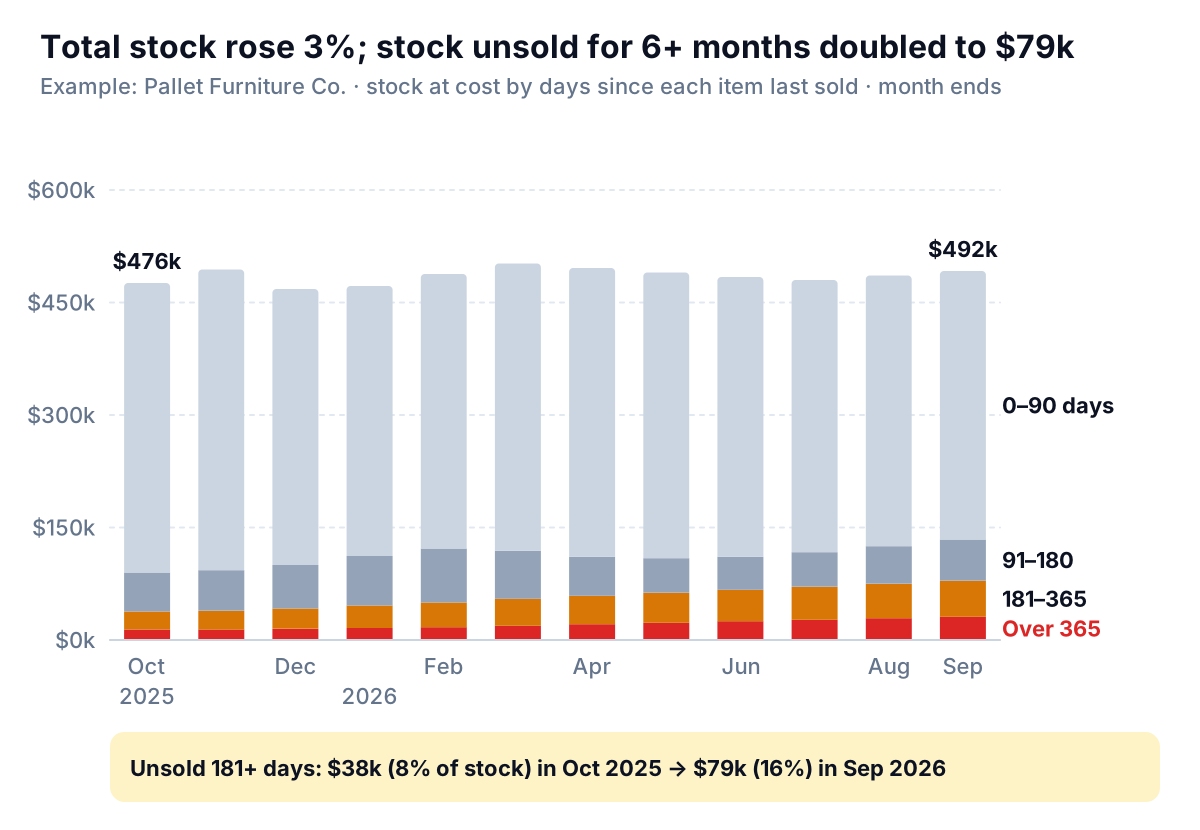
A line of total stock value at Pallet would show almost nothing: $476,000 last October, $492,000 this September, up 3%. Inside the bars, stock that hasn't sold in more than six months went from $38,000 to $79,000, from 8% of the shop to 16%. Meanwhile the fresh stock, sold within 90 days, shrank from $386,000 to $358,000. The total held steady because slow stock replaced fast stock.
The design choice that makes this readable is the stacking order. People judge position along a common baseline more accurately than lengths floating at different heights. Only the bottom segment of a stacked bar sits on the baseline. So put the bucket you need to watch there: over 365 days at the bottom in red, 181 to 365 above it in amber, and the healthy stock on top in a pale gray that doesn't compete. If you stack fresh stock at the bottom, the bars still add up, but the old stock floats at a different height every month and the growth is hard to see.
Build it with one row per month end and the buckets as columns, oldest first, then insert a stacked column chart. Excel stacks the first series at the bottom, so column order sets stacking order. In Google Sheets choose Insert > Chart and pick the stacked column type under Setup; Google's chart types list shows stacked and 100% stacked variants. Label the series at the end of the last bar rather than in a legend, so nobody has to match colors.
Dollars or percentages?
Use dollars stacked, as here, when the total matters too. Switch to a 100% stacked chart only when stock levels swing a lot through the year: a store that doubles its stock before the holidays will see old-stock dollars look smaller in November just because everything else grew. If you go to percentages, write the total above each bar, so a shrinking shop with a rising share of old stock doesn't pass for a healthy one.
How inventory charts mislead
Each mistake below makes a real stock problem disappear:
- Sampling too rarely. Month-end counts hide stockouts that start and end within a month, as the chair showed.
- Charting units sold as demand. During a stockout, sales drop to zero and the chart says nobody wanted the item. Record lost sales.
- Stock at retail value. It overstates the cash tied up by your markup and makes days on hand look worse than it is. Value stock at cost.
- One total line. Total stock value can stay flat while the mix inside it goes stale. Split by age or category before you call it stable.
- A store-wide average. 74 days hid a range from 45 to 160. Chart the categories, and keep tiny categories grouped, since one big order can swing a small one by months.
- Forgetting what's on order. A stock line below the reorder point isn't a problem if a delivery is already booked. Put an on-order column next to the chart, or the next person orders twice.
Keeping the charts current
The weekly stock line takes ten minutes a week per item to maintain by hand: export sales, add deliveries, check the flag. The two monthly charts take longer, because the aged buckets need days since last sale for every item, which most tills can export but few chart. The Excel chart types guide covers when each built-in type fits.
Parity can build these from your data. Connect Shopify, Square or QuickBooks Online, or upload a stock or sales export from any other system, and describe what you want ("weekly units on hand for my top 20 items against a reorder point of 12 a week times a 6-week lead time, days on hand by category, and stock at cost by days since last sale"). It builds a dashboard with the headline numbers and their trends, charts, what explains them and a table of what needs attention, and every number and chart is checked against queries on the full dataset before you see it. Next week, update it with a newer export.
Upload your stock and sales export and get checked inventory charts, from reorder lines to aged stock. Build a report from your data free
Pallet's owner now looks at one thing first on Monday: any top-20 item whose line is under the dashed one with nothing on order. In the week of July 13 that would have been one chair, and an order placed that week would have arrived in late August, before the shelf ran out.