In September, Halyard Analytics, an example software business we'll follow in this guide, signed six customers to its annual Growth plan at $2,490 each. The founder's spreadsheet, which totalled the month's subscription payments, showed monthly recurring revenue jumping by $14,940. Stripe's Billing overview put the new MRR from those six customers at $1,245.
Stripe was right. Monthly recurring revenue (MRR) is the monthly value of the subscriptions running right now: each one's price converted to a month, added up. An annual plan counts at one-twelfth of its price, however it was paid. The spreadsheet had measured cash collected, which is a useful number, but not this one.
This guide covers the formula, the five movements that explain every change in MRR, what to leave out, and how to build the movements yourself from a Stripe export so you can check them. Then it shows what to do when each movement changes. If you're comparing Stripe's own numbers with each other (charges, payouts and MRR), our Stripe reports guide explains why they never match.
The monthly recurring revenue formula
There are two ways to write it, and you want both.
The snapshot: MRR = the sum of every active subscription's monthly price. A $249 monthly plan adds $249. A $2,490 annual plan adds $207.50. A $599 quarterly plan would add $199.67.
The roll-forward: this month's MRR = last month's MRR + new + expansion + reactivation − contraction − churn.
- New MRR: customers paying for the first time. At Halyard in September: $3,438 from 23 customers (the six annual plans at $207.50, five monthly Growth plans at $249 and twelve Starter plans at $79).
- Expansion MRR: existing customers paying more: upgrades, extra seats, add-ons. $1,890.
- Reactivation MRR: customers who had cancelled and came back. $249, one returning Growth customer.
- Contraction MRR: existing customers paying less without leaving: downgrades, fewer seats. $720.
- Churned MRR: customers who cancelled. $2,790.
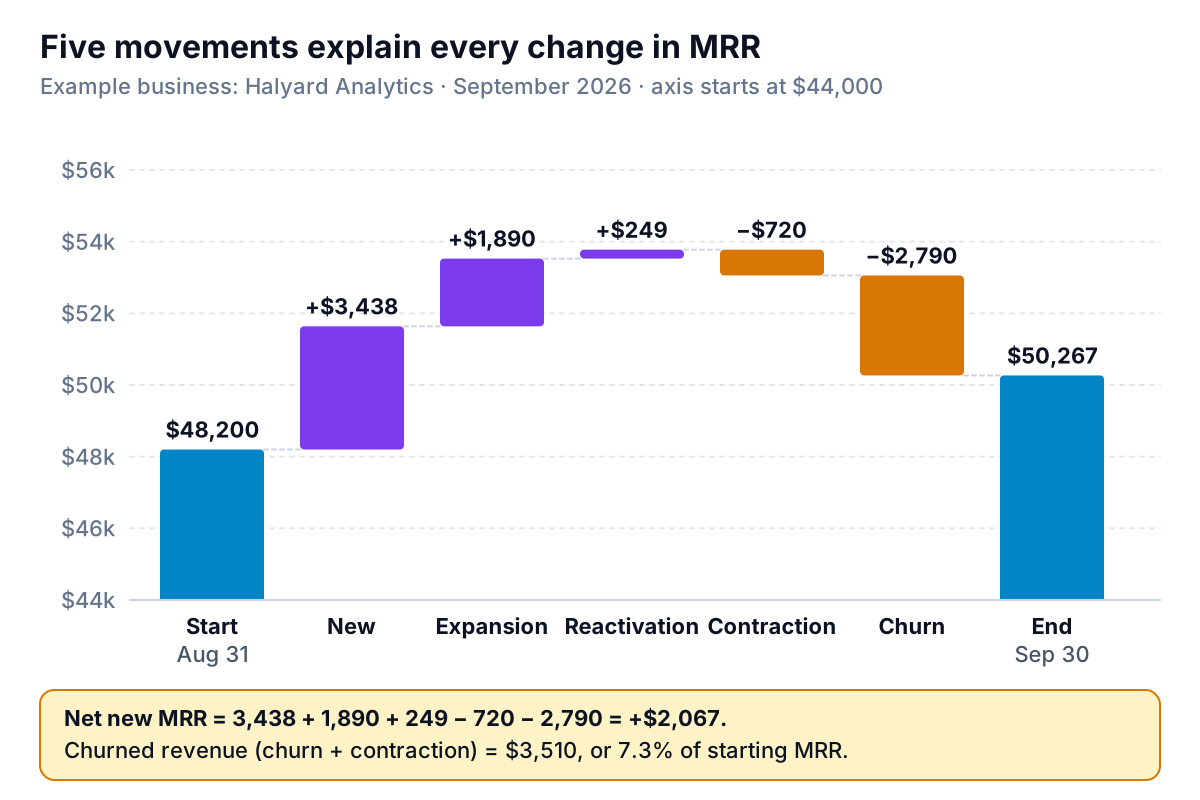
These are the same five movements Stripe uses. Its billing analytics documentation defines MRR growth as starting MRR plus new, reactivation and expansion MRR, minus contraction and churn, with a sixth line for foreign exchange if you bill in more than one currency.
The snapshot and the roll-forward must agree. Halyard started September at $48,200 and ended at $50,267, so the five movements have to add up to +$2,067. If yours don't, a customer has been counted twice or not at all, and that's worth finding before you send the number to anyone.
Why bother with the roll-forward when the snapshot is simpler? Because a business adding $2,067 a month can be doing it in very different ways. Halyard's September could be strong sales hiding heavy churn, or slow sales with loyal customers. Only the movements say which.
What counts as MRR, and what to leave out
MRR is meant to show the revenue that will repeat next month if nothing changes. Anything that won't repeat, or isn't yours, stays out.
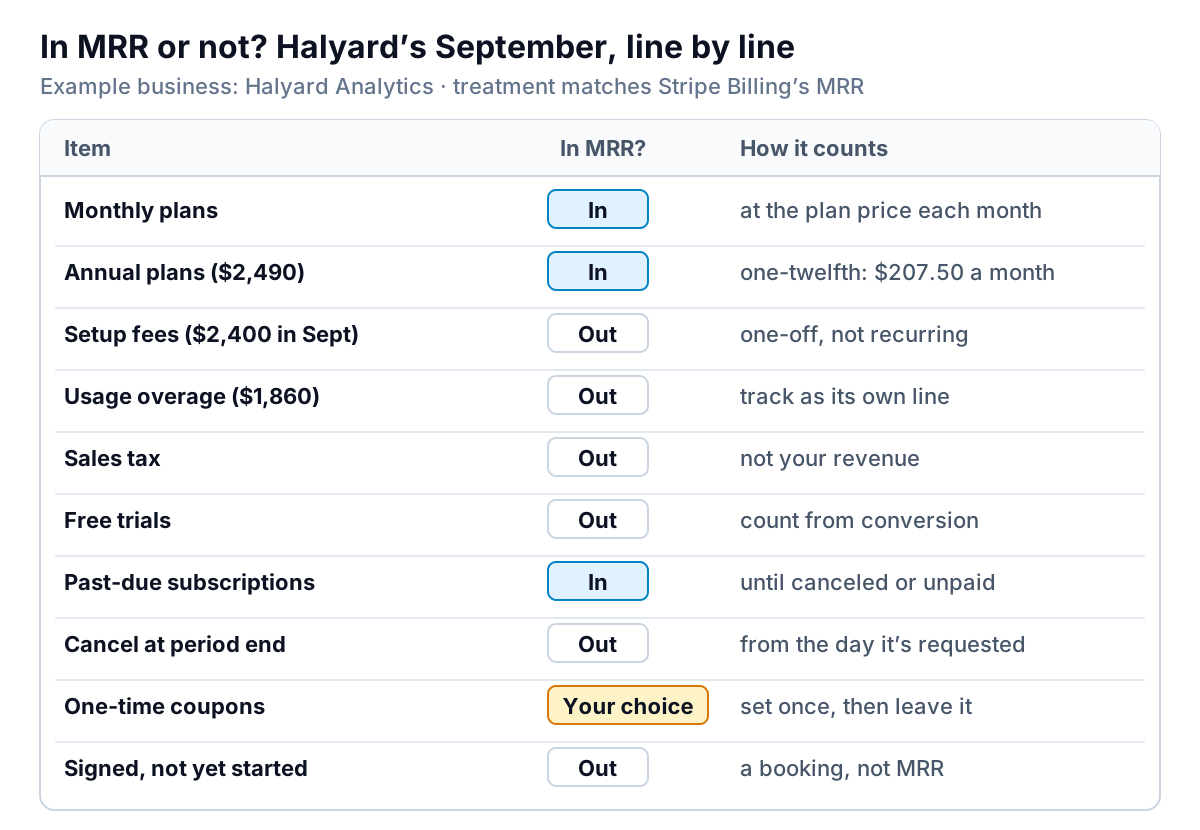
Most of these follow directly from Stripe's definitions. Its billing analytics documentation says MRR excludes taxes, free plans and metered (usage-based) products, and that trialing items are left out until the trial ends. Stripe's support article on MRR adds the details that catch people out:
- One-off invoices are excluded, because they can't be relied on to repeat. Halyard's $2,400 of onboarding fees in September are revenue, but not MRR.
- Cancellations leave MRR when they're made. If a customer cancels on September 3 with "cancel at period end", Stripe drops them from MRR on September 3, even though they've paid until the 30th. A spreadsheet that waits for the last invoice will show churn a month later than Stripe does.
- One-off refunds don't change MRR unless they come from a change in the plan's price.
- MRR isn't GAAP revenue. It's a measure of predictable recurring revenue, not what goes on your profit and loss statement.
Usage revenue is the hard case. Halyard charges $0.02 per report beyond the plan's allowance, which came to $1,860 in September. It does repeat, roughly, but it moves with how busy customers are. Stripe leaves it out of standard MRR and lists usage MRR as a preview feature. Halyard reports it on its own line next to MRR, so a busy month for customers doesn't look like a sales win. If usage is a large part of your price, do the same and say so whenever you quote MRR.
Discounts need one decision. Stripe always subtracts permanent recurring discounts, and lets you choose whether to subtract one-time and other recurring discounts under Configure on the Billing overview. Our Stripe reports guide covers that setting and past-due subscriptions. Choose once and leave it, or your MRR trend will move for no business reason.
Build the MRR movements from a Stripe export
Stripe already calculates the movements. You'd build them yourself for three reasons: to check Stripe's figures before they go in an investor update, to apply a rule of your own (counting usage, for example), or because some subscriptions are billed outside Stripe, say as monthly retainers invoiced from QuickBooks.
- Export MRR by customer by month. On the Billing overview, Report downloads include "MRR per subscriber per month" (each subscriber's MRR at each month end) and "Customer MRR changes" (a log of every new subscriber, upgrade, downgrade, reactivation and churn). Stripe notes that these prebuilt reports date everything in UTC while its charts use your account's time zone, so a change on the evening of the 30th in the US can land in a different month. Expect small differences at month boundaries.
- Lay it out one row per customer. Customer in column A, last month's MRR in B, this month's in C. Add column D, "paid before?": TRUE if the customer had MRR in any month before last month. For customers billed outside Stripe, add rows by hand with the same columns.
- Label each change. Use the formula in the figure below in column E, and
=C2-B2in column F. - Sum by label.
=SUMIFS(F:F,E:E,"Churn")and so on for each movement. Then check that the five sums equal this month's total minus last month's. If they don't, look for duplicate customer IDs first.
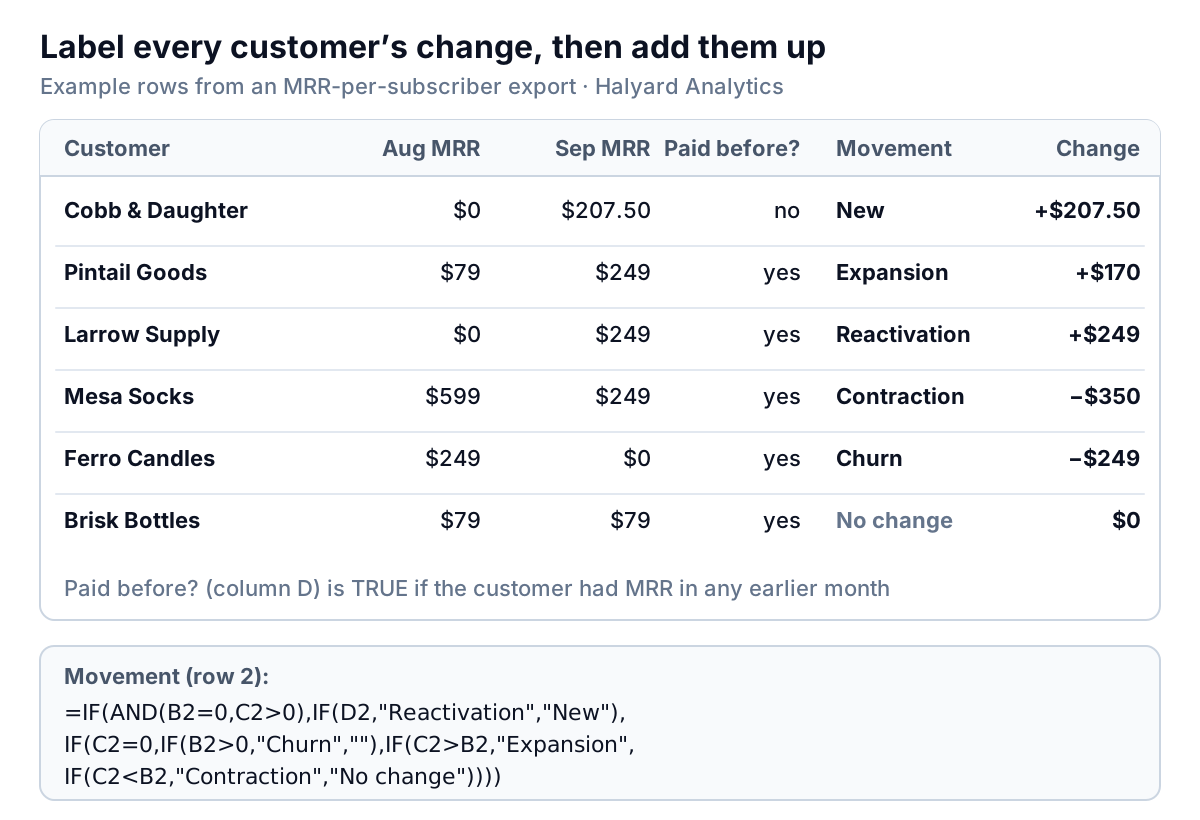
Two edge cases to decide once. A customer who downgrades and upgrades within the same month shows only the net change, because you're comparing month-end snapshots. That's fine for monthly reporting. And a customer who leaves and returns within the same month never shows as churn at all, which is also fine: they didn't leave.
If you'd rather not build it, the Stripe export on its own is a good input for a dashboard. The step that matters is the check: movements add up to the change in the total.
Reading the five movements: what to do when each one moves
Look at each movement as a share of starting MRR, and compare it with the last three to six months rather than with last month alone. Halyard's September, as a share of $48,200:
| Movement | September | % of starting MRR | If it moves the wrong way, look at |
|---|---|---|---|
| New | $3,438 | 7.1% | Trial conversion, lead volume, and whether new customers are choosing smaller plans |
| Expansion | $1,890 | 3.9% | Whether customers are hitting plan limits, and whether the upgrade path is obvious |
| Reactivation | $249 | 0.5% | Win-back emails to customers who left for a reason you've since fixed |
| Contraction | $720 | 1.5% | Which plan customers are leaving and what they say when they downgrade |
| Churn | $2,790 | 5.8% | Split by reason: failed payments, small customers in their first months, or long-standing accounts |
Churn deserves the closest look, because it's the one that compounds. Halyard's 5.8% of MRR lost in one month means that if nothing else changed, about half of today's MRR would be gone within a year. The first thing to check is how much of it was involuntary: cards that failed and were never updated. That part is often fixable with better retry and card-update settings rather than a better product.
Then check where churn comes from by customer age. If most of it is customers in their first two or three months, the problem is onboarding or fit. If it's long-standing customers, it's something that changed: a price rise, a competitor, a feature that stopped working. A cohort analysis using MRR instead of customer counts shows this directly.
For a year-long view of the same movements, measured on a fixed group of customers, see our sibling guide to net dollar retention. It answers a different question: how much of the revenue you had a year ago are you still getting from those same customers?
Mistakes that make MRR look better than it is
- Counting annual plans in full in the month they're paid, as Halyard's spreadsheet did. It makes a strong sales month look like a step change in the business, then shows "churn" eleven months later when the payment doesn't repeat.
- Counting setup fees, consulting and one-off projects. Andreessen Horowitz's guide to startup metrics lists these non-recurring fees as a common error when founders annualise a month.
- Counting bookings. A contract signed in September that starts in November is a booking. It becomes MRR in November.
- Keeping cancelled customers until their last invoice. Your MRR then disagrees with Stripe's for a month after every cancellation.
- Letting free trials in. A trial has no price yet. Count it when it converts.
- Changing definitions between reports. If June's update included usage and September's doesn't, you've reported a drop that didn't happen.
MRR × 12 gives annual recurring revenue (ARR). It's a reasonable shorthand for a subscription business, but it's not the same as revenue for the year, and it's very different from multiplying your best month by twelve. Our run rate guide shows when each of those numbers is the right one to quote.
Keeping MRR and its movements in one place
Monthly recurring revenue is most useful as a twelve-month picture: the total, the five movements stacked under it, and churn split by reason. That's tedious to rebuild from exports each month, which is usually why the roll-forward stops being kept.
Parity connects to Stripe directly, or takes a CSV or Excel export from any billing tool, and builds a dashboard from it: headline numbers with their trends, charts, what explains the changes, and a table of what needs attention, such as the customers who downgraded or cancelled this month. Every number and chart is checked against queries on the full dataset before you see it. Ask by chat for "MRR roll-forward by month, with usage on its own line", share a read-only link with a co-founder, or ask it to write the monthly investor update from the same data. When you quote MRR, still say whose definition it is.
Connect Stripe and get a checked dashboard of MRR with new, expansion, contraction and churn for every month. Build a report from your data free
Halyard's founder now sends one line a month alongside the total: "MRR $50,267, up $2,067: $5,577 in from new, upgrades and returns, $3,510 out from downgrades and cancellations." It's five numbers instead of one, and anyone reading it can see whether the business is selling more, keeping more, or both.