Last November, Indigo Lane Boutique, an example women's clothing shop we'll follow in this guide, emailed a 20%-off code to every customer on its list. 410 people used it, and the code brought in $61,500 of sales. It also gave away $15,375 in discounts, and when the owner looked at who had redeemed it, 260 of the 410 had shopped in the previous 60 days. Most of them were coming in for the holidays anyway. The fix is retail customer segmentation: sorting customers into a few groups by what they've actually done (how recently they bought, how often, how much) so each group gets a different message, and the discount goes only where it changes behaviour.
This guide builds those groups from a point-of-sale export, first with a simple grid you can make in an hour, then with RFM scores, and then sets out what to do with each segment and how to tell whether it worked.
Start with the data your till already has
You don't need a loyalty platform. You need one export: every transaction for the last 12 months with a date, a customer ID and an amount. Square, Shopify POS, Lightspeed and most other systems can produce it. Our guides to Square reports and Shopify reports show where the exports live.
The first number to check is how much of your sales has a customer attached at all. At Indigo Lane, $640,600 of $880,000 in sales over the 12 months to September 30, 2026 came from transactions linked to a customer profile: 72.8%. The other $239,400 was anonymous cash or card. Segmentation can only see the 72.8%, so if your share is low, raise it before you segment. Offer emailed receipts at checkout, ask for a phone number or email for exchanges, and make it worth a customer's while to give one.
Then clean the export:
- Merge duplicate profiles. The same person under two emails splits their visits and makes a regular look like two one-time buyers.
- Remove returns and staff purchases, or net returns against the original sale.
- Treat one transaction as one visit. If your system splits a payment across two cards into two transactions, combine them by customer and date.
The nine-box grid: retail customer segmentation in an hour
Before any scoring, sort customers on two questions: when did they last buy, and how many times have they bought in the last 12 months? Three bands for each gives you nine boxes. For a boutique that sees regulars every month or two, Indigo Lane's bands are 0–90, 91–180 and 181–365 days since the last visit, and 1, 2–3 and 4+ visits.
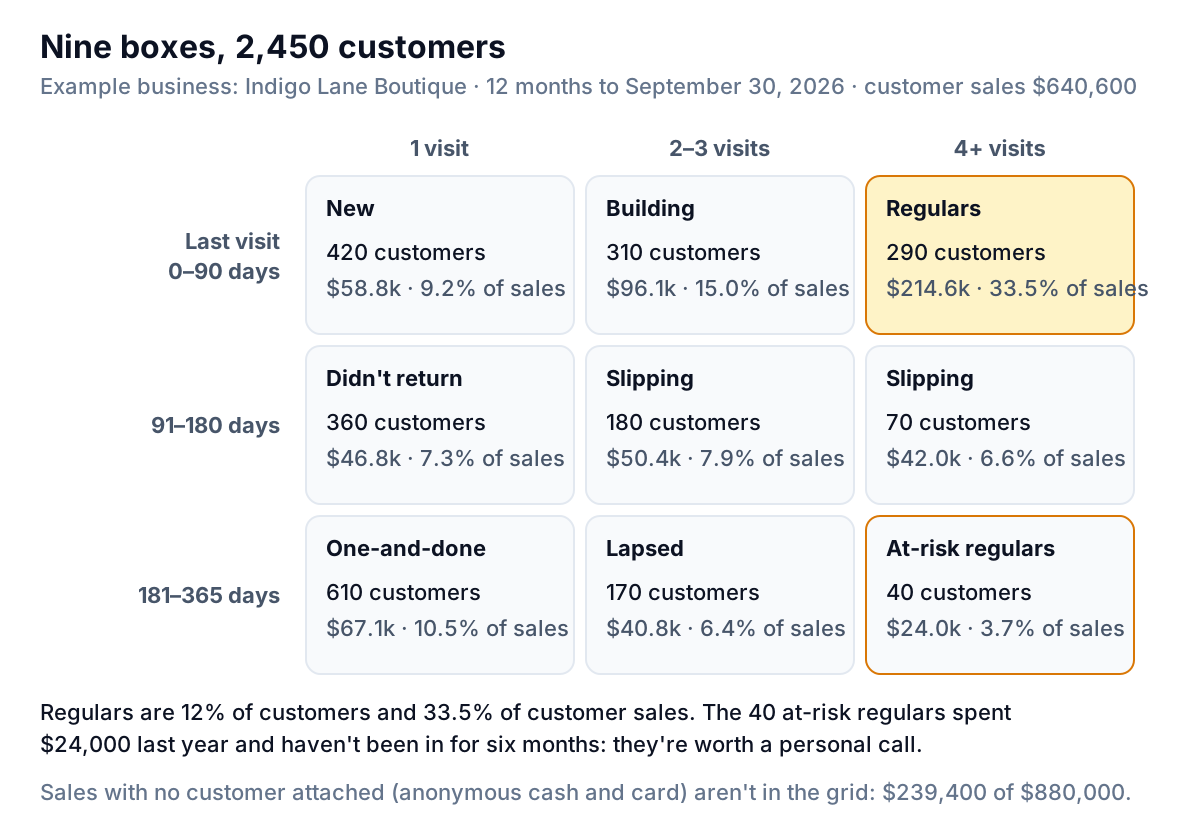
Three things stand out in the grid:
- A small group carries the shop. 290 regulars, 12% of identified customers, brought in $214,600, a third of customer sales. Losing ten of them hurts more than losing a hundred one-time buyers.
- The biggest box is the cheapest one. 610 people bought once, six or more months ago, and spent $110 on average. They're on the list, but they're not the opportunity.
- Some regulars have gone quiet. 40 customers came in four or more times last year and haven't been back for six months. Between them they spent $24,000. That box gets the most personal attention.
You can build this grid with three columns per customer (last visit date, visit count, total spend) and a pivot table with recency bands down the side and visit bands across the top. For many small shops, the grid is enough segmentation to change what you do next month.
RFM scoring when you want more detail
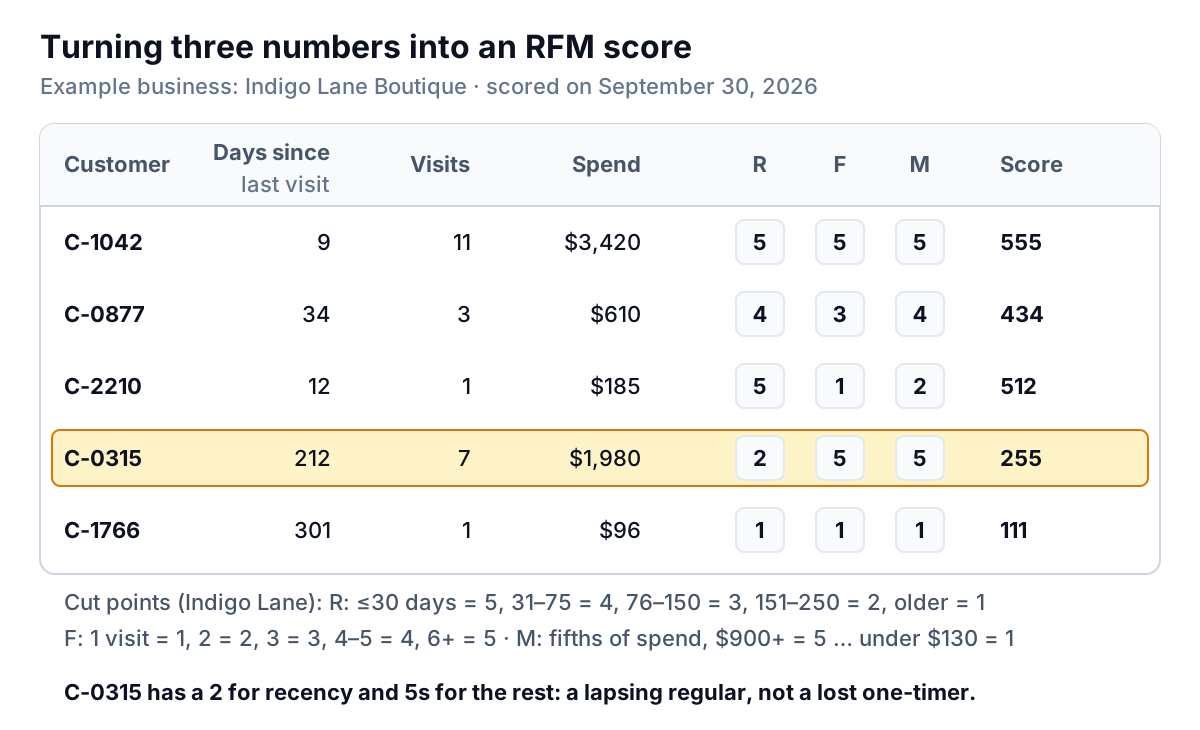
RFM stands for recency, frequency and monetary value. Instead of three bands, each customer gets a score from 1 to 5 on each measure, and the three digits together make a code: 555 is someone who bought recently, often and a lot; 111 is the opposite. It separates customers the grid lumps together, such as a regular who spends $3,000 a year and one who spends $400.
Building the scores in a spreadsheet
With transactions on a sheet called Tx (date in column A, customer ID in B, amount in C) and one row per customer on another sheet, with the scoring date in a cell named AsOf:
| Column | Formula (row 2) | What it gives |
|---|---|---|
| Days since last visit | =AsOf-MAXIFS(Tx!A:A,Tx!B:B,A2) | Recency in days |
| Visits | =COUNTIFS(Tx!B:B,A2) | Frequency |
| Spend | =SUMIFS(Tx!C:C,Tx!B:B,A2) | Monetary value |
| R score | =6-MATCH(B2,{0,31,76,151,251}) | 5 for 0–30 days, down to 1 for 251+ |
| F score | =MATCH(C2,{1,2,3,4,6}) | 1 visit = 1, up to 6+ visits = 5 |
| M score | =MATCH(D2,{0,130,250,450,900}) | Fifths of spend, $900+ = 5 |
| Code | =E2&F2&G2 | e.g. 255 |
MATCH with a sorted list and no third argument finds the largest value that's less than or equal to the one you're scoring, which turns a number into a band without a chain of IFs. To set the cut points as true fifths of your own customers, use =PERCENTILE.INC(D:D,{0.2,0.4,0.6,0.8}) on the spend column and round the results to tidy numbers.
If your system already does it
Check before you build. Shopify's customer reports include an RFM customer analysis that scores each customer 1 to 5 on each measure, relative to your own store (a 5 means the top 20% on that measure), and assigns one of 11 named groups from the recency score and the average of the frequency and monetary scores. Its segment editor can also filter on rfm_group, number_of_orders, last_order_date and amount_spent. Square's customer directory comes with smart groups for Regulars and Lapsed: by default, regulars are customers who've visited three times in the last six months, and lapsed are regulars who haven't visited in the last six weeks. You can edit both to suit your shop's rhythm.
What to do with each segment
A segment is only useful if it changes what you do. Indigo Lane's playbook gives each group one action, one channel and a rule about discounts:
| Segment | Customers | Action | Discount? |
|---|---|---|---|
| Regulars (recent, 4+ visits) | 290 | Early look at new arrivals, a private shopping evening, a note when their usual brands land | No. Access, not price. |
| Building (recent, 2–3 visits) | 310 | New arrivals in sizes and brands they've bought before | No |
| New (recent, 1 visit) | 420 | A thank-you within a week; a styling invitation at about 30 days | Small, second-visit only |
| Slipping (91–180 days, 2+ visits) | 250 | A personal note from the owner with something picked for them | Test it (below) |
| At-risk regulars (181+ days, 4+ visits) | 40 | A phone call or handwritten card. Ask what changed. | Yes, if it brings them back |
| Didn't return, lapsed, one-and-done | 1,140 | Seasonal newsletter only | Only in clearance |
The pattern: spend effort in proportion to what a group is worth and what it's likely to do without you. Regulars don't need a discount to come in; they need a reason to come in sooner. The people who've drifted are where an offer can change the outcome. Before you email any segment, check your consent records and the rules that apply where your customers are. In the US, the FTC's CAN-SPAM compliance guide covers what a commercial email has to include and says opt-out requests must be honored within 10 business days. Other countries are stricter, so ask a professional if you're unsure.
Test the offer with a holdout group
The November blast looked like a success because $61,500 came in on the code. But nobody knew how much of it would have come in anyway. The way to find out is to hold some customers back: send the offer to most of a segment, send nothing to a random slice, and compare.
In August, Indigo Lane tried it on the 250 slipping customers. It sorted them in random order, sent a personal note with $20 off a purchase over $100 to the first 200, and held back the other 50.
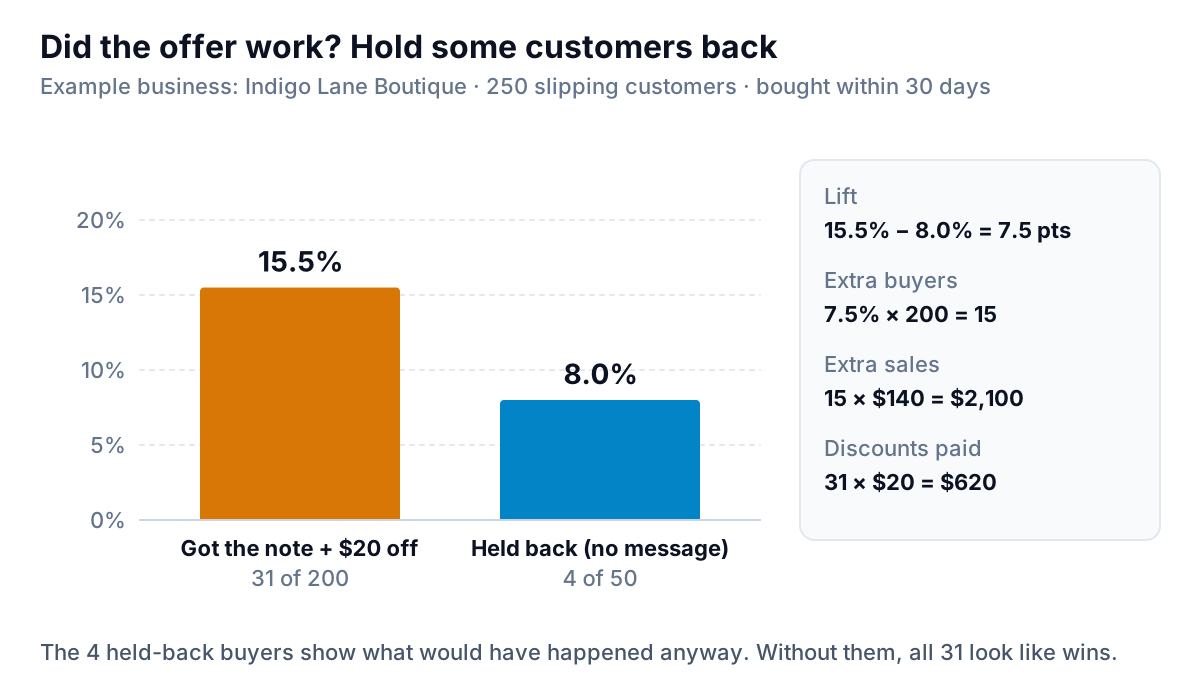
Within 30 days, 31 of the 200 bought (15.5%), against 4 of the 50 who got nothing (8.0%). The lift is 7.5 percentage points, or about 15 extra buyers out of 200. At an average purchase of $140, that's roughly $2,100 of sales that wouldn't otherwise have happened, for $620 of discounts (31 redemptions at $20, because people who would have bought anyway still used the code). Worth doing, and worth knowing it's $2,100 and not the $4,340 that 31 purchases at $140 would suggest.
A few rules make the test trustworthy: pick the holdout at random (not "the ones without email addresses"), decide the time window before you send, and keep the holdout at least 40 or 50 people. With very small groups, a difference of one or two purchases swings the result, so treat a single small test as a hint and repeat it before you change the whole plan.
Mistakes that make segments useless
- Segmenting once. Customers move between boxes every month. Refresh the grid or scores monthly, or at least before each campaign.
- Using lifetime numbers. A customer who spent $5,000 four years ago and nothing since isn't a top customer. Fix the window (12 months suits most shops) and keep it the same each time.
- Too many segments. If you can't name a different action for a segment, merge it with its neighbour. Six groups you act on beat eleven you don't.
- Ignoring anonymous sales. If 40% of your sales have no customer attached, your segments describe the minority who share contact details. Say so when you report on them.
- Confusing segments with cohorts. Segments group customers by what they do now. Cohorts group them by when they first bought, to see whether newer customers stay longer than older ones. Both are useful; our cohort analysis guide covers the second.
Segment counts also belong next to your other shop numbers. If the number of regulars falls two months in a row while traffic holds, the shop is converting fewer visitors into repeat buyers, a pattern the retail KPI guide helps you spot from the sales side.
Upload a transactions export or connect Square or Shopify, and Parity builds a checked dashboard of who your regulars are, who's slipping and what each group spends. Build a report from your data free
Indigo Lane's plan for this November is different from last year's. Regulars get a private evening and first pick of the holiday stock. The 40 at-risk regulars get a call from the owner. And the discount goes only to the slipping group, with 50 people held back so that next January the shop will know what it bought.