Reed diffusers made up about 5% of Birchbark Candles' sales last year, and the owner of this example candle maker had a reorder for 400 glass bottles on her desk, with the cancel box half ticked. Her sales by product chart, a pie with 14 slices, showed diffusers as two thin wedges somewhere near the bottom. A sales by product chart should answer a specific question: what sells most, how concentrated sales are, which lines are growing, or how the mix is moving. A pie answers none of them well. Drawn as a small chart per product line, diffusers turned out to be the fastest-growing thing she made, up from $3,000 to $13,700 in a year. She kept the order.
This guide gives one chart for each of those four questions, built from Birchbark's 12-month product sales of $250,000, with the steps in Excel and Google Sheets and the ways each chart can mislead.
Four questions behind every sales by product chart
Before choosing a chart, write down the question. For product sales there are usually four, and they need different charts:
- What sells most? A ranking. Use a sorted horizontal bar chart.
- How much depends on a few products? Concentration. Add a running total to the same bars.
- Is each line growing or shrinking? Trend. Use small multiples, one little chart per product line.
- Is the mix shifting? Composition over time. Use 100% stacked columns, and check them against the dollar totals.
The Financial Times' Visual Vocabulary poster groups charts the same way, by the relationship you want to show (ranking, part-to-whole, change over time) rather than by chart type. It's a good page to keep open when a question doesn't fit any of the four.
What sells most: a sorted bar, not a pie
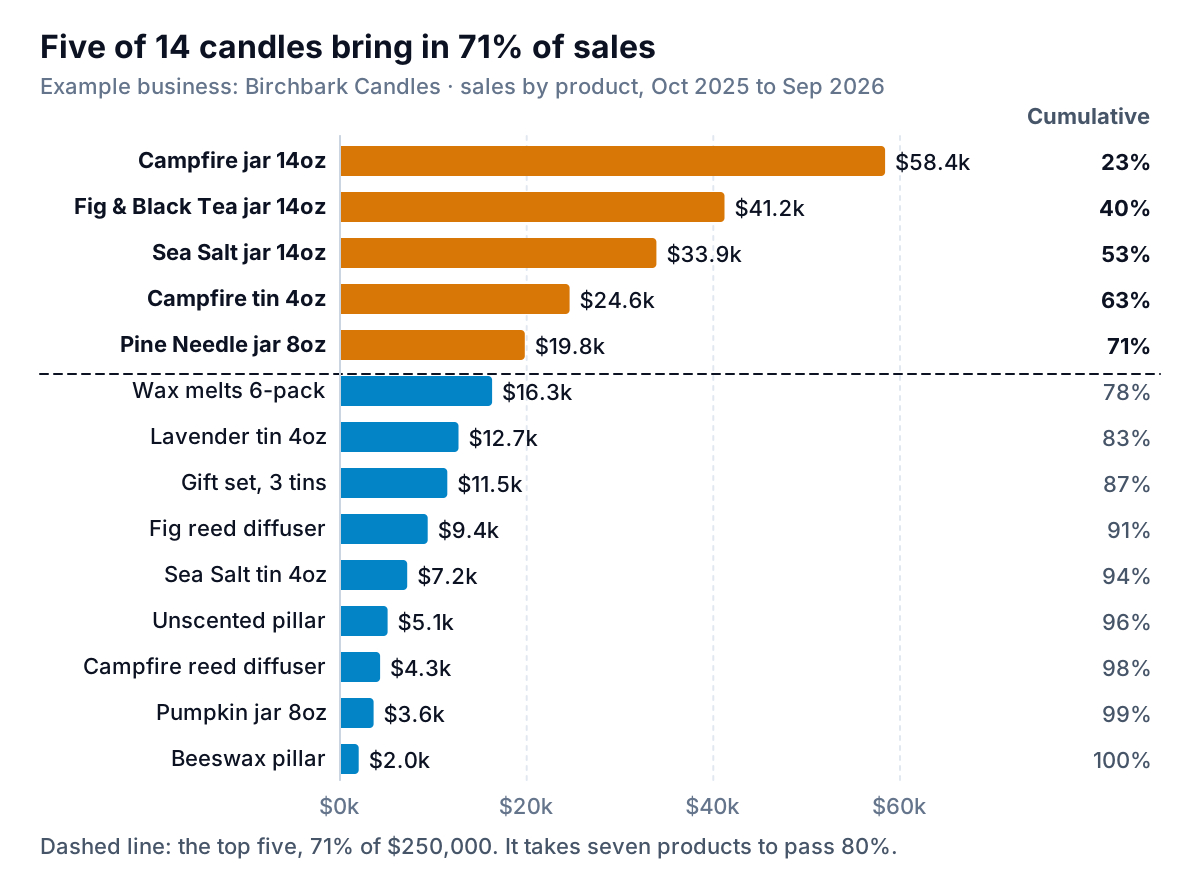
Here are Birchbark's 14 products, October 2025 to September 2026, sorted from best to worst seller.
Why this beats the pie, in three changes:
- Length instead of angle. In William Cleveland and Robert McGill's graphical perception experiments, people judged lengths and positions on a common scale more accurately than angles or areas. With 14 slices, the Sea Salt tin ($7,200) and the unscented pillar ($5,100) are near-identical slivers in a pie; as bars, one is plainly 40% longer.
- Sorted, not alphabetical. An alphabetical or SKU-order chart makes the reader do the ranking. Sorting does it for them, and the top five stand out without a word of explanation.
- Horizontal. Product names like "Fig & Black Tea jar 14oz" fit on the left of a horizontal bar. On a column chart they'd be tilted or cut off.
A rule for long lists: chart the top 10 to 15 products and put the rest in one "Other" bar at the bottom, below the sorted ones, even if it's bigger than some of them. If "Other" is the biggest bar on the chart, your cut-off is too tight or your products need grouping into lines first.
Chart revenue by default. Switch to units when the decision is about stock or production time, and to gross profit when it's about which products to push. A $58 gift set and a $14 tin can sell the same dollars from very different numbers of pours.
How concentrated is it? Add the running total
The right-hand column in the chart is a cumulative share: each product's sales plus everything above it, divided by the total. That's the core of a Pareto analysis, which our Pareto analysis guide walks through step by step with the formulas, so here's only what the chart says.
Birchbark's top five products bring in 71% of sales. It takes seven to pass 80%. That's a fairly concentrated range, though not the textbook 80/20. The useful reading is the reverse: the bottom seven products together make $43,100, or 17% of sales. Each one needs its own wax, fragrance oil, label, photos and shelf space.
Before cutting anything from the tail, check three things the bar chart can't show:
- Seasonal products. The Pumpkin jar sells only from September to November. Ranked over 12 months it looks weak ($3,600), because nine of those months it isn't on sale. Compare seasonal products over the months they're actually sold.
- Products that sell other products. The three-tin gift set ($11,500) is how many buyers first try the tins, which went on to grow 40%. A ranking by its own sales misses that.
- New products. The Campfire reed diffuser ($4,300) launched with the line in March 2025. A product that's still ramping up belongs in the trend chart, not the cut list.
Building it
Start with a pivot table: product in Rows, Sum of sales in Values, sorted largest to smallest. Copy it as values, add the running share with =SUM($B$2:B2)/SUM($B$2:$B$15), then insert a clustered bar chart. Excel draws bar charts bottom-up, so tick Categories in reverse order on the vertical axis to put the best seller on top.
Excel also has a built-in Pareto chart. Microsoft's Pareto chart article gives the path as Insert > Insert Statistic Chart > Pareto (under Histogram), in Excel for Microsoft 365, 2021 and 2024. It sorts the products, groups identical names and draws the cumulative line for you, so you can point it at raw order lines. It draws vertical columns, though, which suits short names better than long ones. Google Sheets has no Pareto chart type; the Pareto guide shows the combo-chart workaround.
Is each line growing? Small multiples, not one tangled chart
Ranking tells you where sales are. It doesn't tell you where they're going. For that, group the 14 products into their five lines and chart each line's quarterly sales over two years.
The first instinct is one line chart with five lines on it. At Birchbark that chart is useless: jars run from $25,000 to $67,500 a quarter, so diffusers and pillars lie flat along the bottom, crossing each other, and the only visible story is that jars spike every Christmas. Small multiples fix it: the same simple chart repeated once per line, side by side.
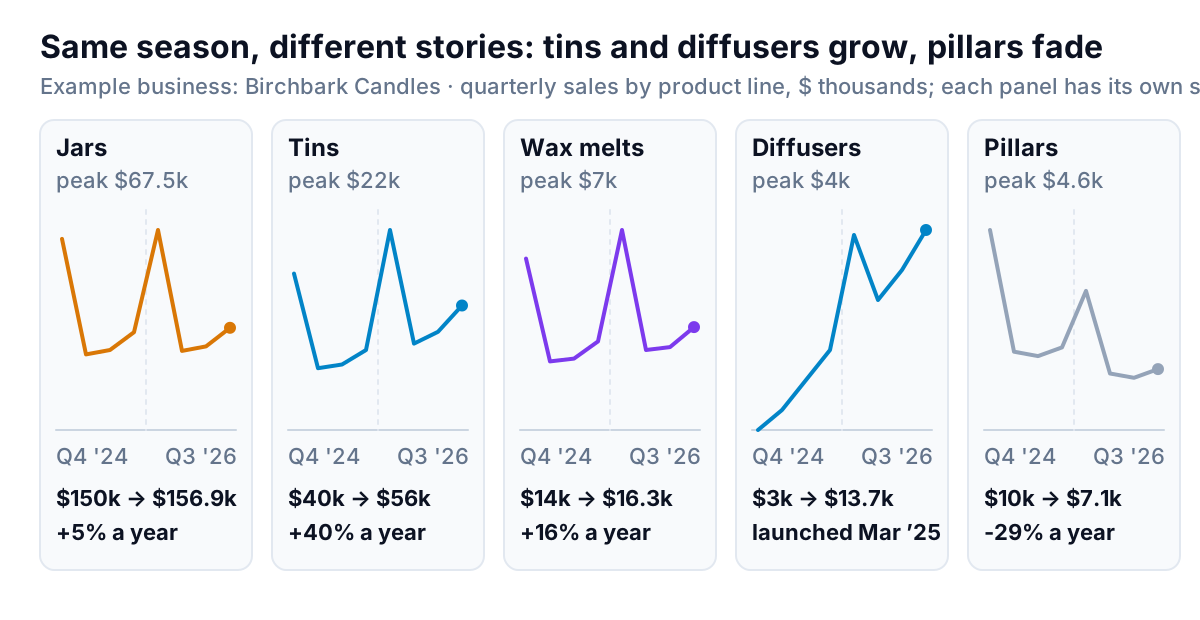
Now each line tells its own story. Jars repeat last year's shape a little higher (+5%). Tins are up 40%. Wax melts are up 16%. Pillars fell 29%, from $10,000 to $7,100. And diffusers, the line about to be cut, rose from $3,000 in their launch year to $13,700, with every quarter of 2026 above the one before even though candle sales overall fall after Christmas.
The design choice that matters here is the scale. These panels each have their own vertical scale, labelled with the peak, so you can see each line's shape. That's right when the question is "which way is each line heading?". If the question is "which line is biggest?", use one shared scale, and accept that small lines go flat; or go back to the sorted bars. Say which one you've used in the chart's subtitle, because readers assume a shared scale unless told otherwise.
Building small multiples
- Excel, quick version: lay out one row per product line and one column per quarter, then use Insert > Sparklines > Line to put a tiny chart in the cell at the end of each row. Microsoft's article on sparkline axes explains the choice: "Same for All Sparklines" for a shared scale, or "Automatic for each sparkline" for each row's own.
- Excel, full version: build one line chart for the first product line, format it, copy it four times and change each copy's data range. Keep the size, fonts and axis settings identical, or the panels stop being comparable.
- Google Sheets:
=SPARKLINE(B2:I2)draws a line chart in a cell, and Google's SPARKLINE help lists options such asyminandymaxif you want every row on the same scale.
Is the mix shifting? 100% stacked columns, read with care
Birchbark's owner also wanted to know whether the business was becoming less of a jar-candle company. That's a share question, and the chart for share over time is the 100% stacked column.
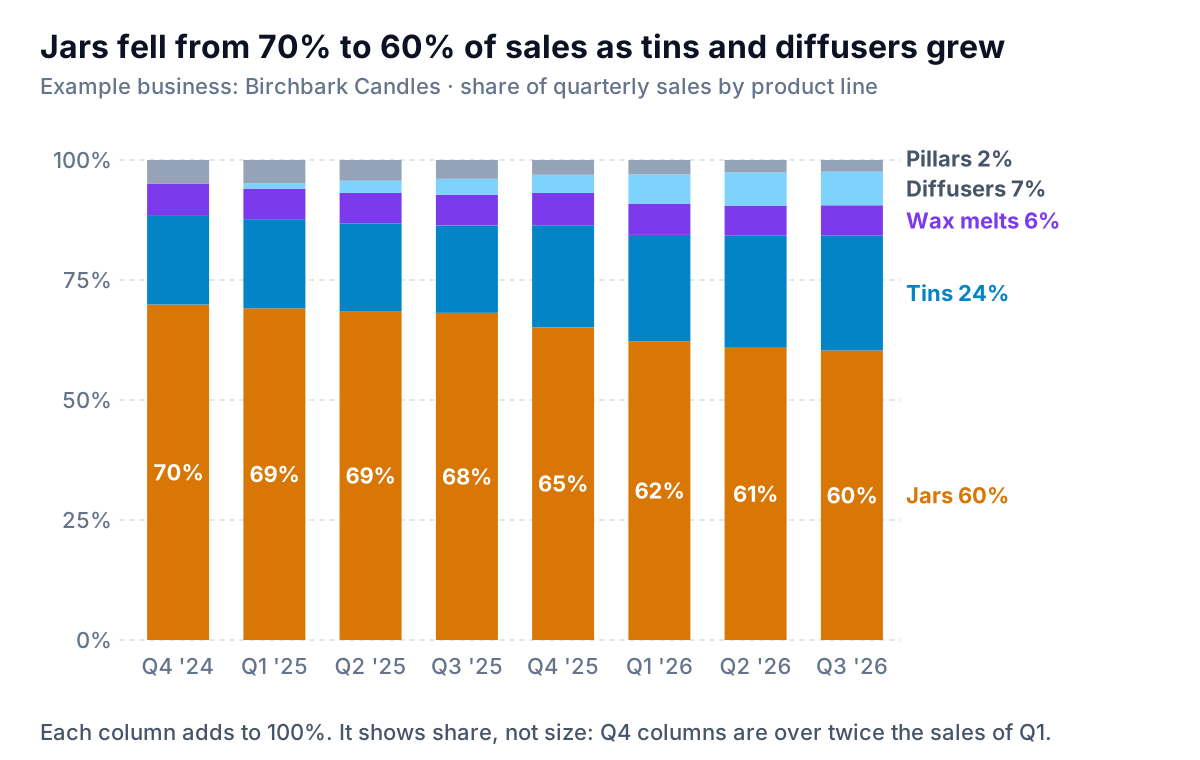
Jars fell from 70% of sales in the last quarter of 2024 to 60% in the third quarter of 2026. Tins grew from 19% to 24%, diffusers from nothing to 7%. The business is changing shape. Microsoft's own chart type guide describes this chart as showing each series' share of a 100% total, which is precisely its limit: it hides size. Christmas quarters are more than twice as big as spring ones, but every column is the same height.
That's how a share chart can scare you. "Jars fell ten points" sounds like jars are in trouble. They aren't:
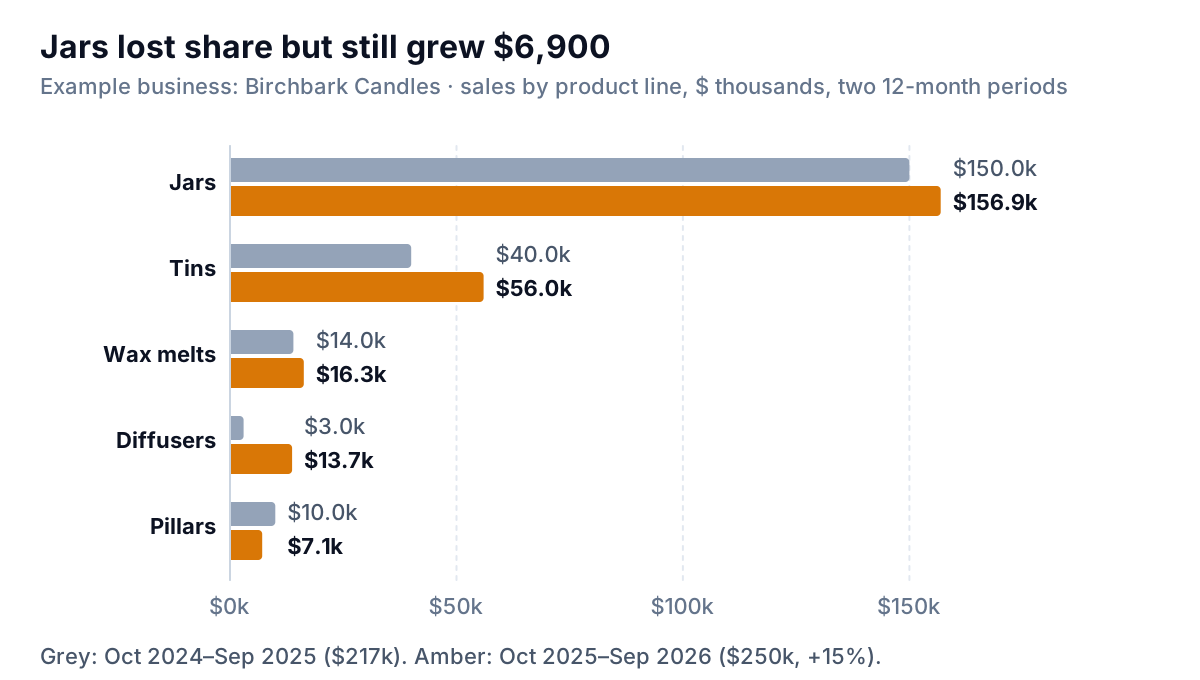
Jar sales grew $6,900. Their share fell because total sales grew 15% and the newer lines grew faster. Always pair a 100% chart with the totals, either as a second chart like this one or as a total printed above each column.
Rules that keep a 100% stacked chart readable:
- Five segments at most. Group the rest into "Other". Beyond five, the colours get hard to tell apart and the middle segments can't be compared.
- Biggest or most important segment at the bottom. Only the bottom segment sits on a flat baseline; every other segment floats, so its changes are hard to judge.
- Quarters or months, not days. Short periods with few sales make the mix jump about with single orders.
- Direct labels on the last column instead of a legend, so the reader doesn't match colours back and forth.
In Excel, choose 100% Stacked Column from the column chart button on the Insert tab. In Google Sheets it's listed among the chart types as "100% stacked column chart".
Shaping product sales data before you chart it
Most of the time on these charts goes into the data, not the chart. Five habits save it:
- Start from order lines, one row per product per order, with quantity, net sales (after discounts) and date. Order totals can't be split by product.
- Merge variants. "Campfire 14oz", "Campfire jar 14 oz" and an old SKU name are one product. Clean names once in a mapping table and use
XLOOKUPagainst it. - Add a product-line column in the same mapping table. Lines are what you'll chart over time; products are too many.
- Take refunds off in the month they happen, by product, or a returned gift set will sit in the ranking as a sale.
- Keep shipping and gift wrap out, or put them in their own "Not a product" line. They'll otherwise appear as a best seller.
If your orders come from Shopify, Square or Stripe, Parity can do the shaping for you: connect the store, or upload an order export from any other tool, and ask for sales by product with the lines you use. It builds the dashboard with the ranking, trend and mix charts, every number checked against queries on the full dataset before you see it, and you can refine it by chat ("group the tins into one line", "show units instead of revenue"). Our retail sales report guide covers where product charts fit in a monthly report, and the sibling guide on the sales map covers the other common split, sales by place.
Connect your store or upload an order export and get ranked, trended and mix charts by product, checked against the full data. Build a report from your data free
Birchbark now opens its quarterly review with the small multiples, not the ranking. The ranking changes slowly and everyone already knows the Campfire jar wins. The panels are where decisions come from: this quarter they said to double the diffuser order, give the tins a second scent, and stop reordering beeswax for pillars until the autumn numbers come in.