The owner of Flint Leather Goods, an example online shop in Bozeman, Montana that we'll follow through this guide, had a $4,000 booth deposit half paid for a Texas holiday market. Her reason was a sales map: a year of orders shaded by state, and Texas glowed darker than anywhere except California. A sales map shades or marks each place by how much you sold there, and the honest version compares those sales with something that explains them, usually population. Divided by the number of people who live there, Texas came out below the national average. She kept the deposit for a market in Denver instead.
This guide shows how to build a sales map that answers a real question, in Excel and Looker Studio, how to shape the data first, and when a ranked bar chart does the job better than any map.
The sales map that pointed at Texas
Flint sold $612,000 of wallets, belts and bags online in the 12 months to September 2026, across 5,015 orders. Both panels below use exactly the same orders. The left one shades each state by total sales. The right one shades by sales per 100,000 residents.
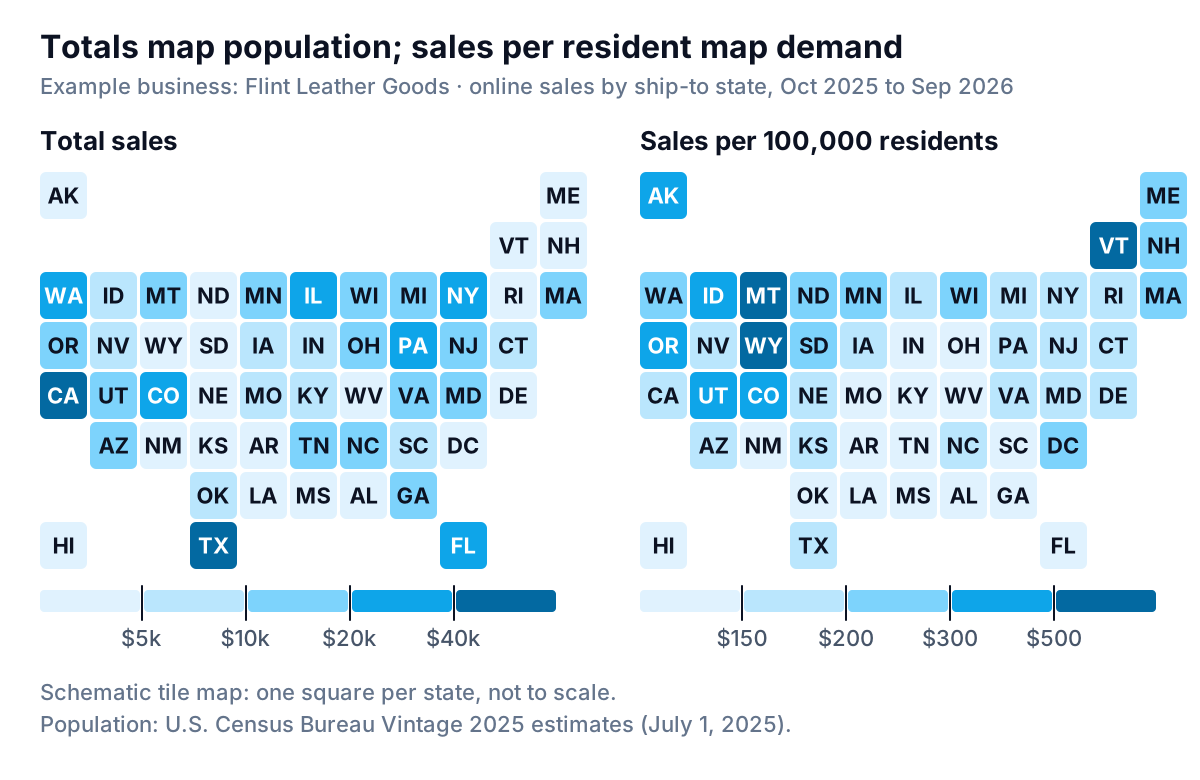
The left map is a population map with a sales label on it. California, Texas and New York hold 26.6% of U.S. residents according to the Census Bureau's Vintage 2025 state estimates, and they produced 25.3% of Flint's sales. Of course they're dark. Almost any business that ships nationally would get roughly the same picture.
The right map asks a better question: where do people buy more than their numbers alone would explain? Now the Mountain West lights up. Montana, the home state, sells $1,284 per 100,000 residents, seven times the U.S. average of $179. Colorado sells $424, Oregon $332. Texas, second by total, sells $156: fine, but a below-average market for this brand. Florida, fourth by total, is the weakest big state at $110.
Cartographers have said this for years. The Axis Maps cartography guide puts it bluntly: if you make a choropleth (a map with areas shaded by value), you must map only standardized data, meaning rates, ratios or per-person figures rather than raw counts. Totals still matter, but they need a different chart, which we'll get to.
Shape the sheet before you draw anything
Every map tool wants the same thing: one row per place, one column per number. Get the sheet right and the chart takes two minutes.
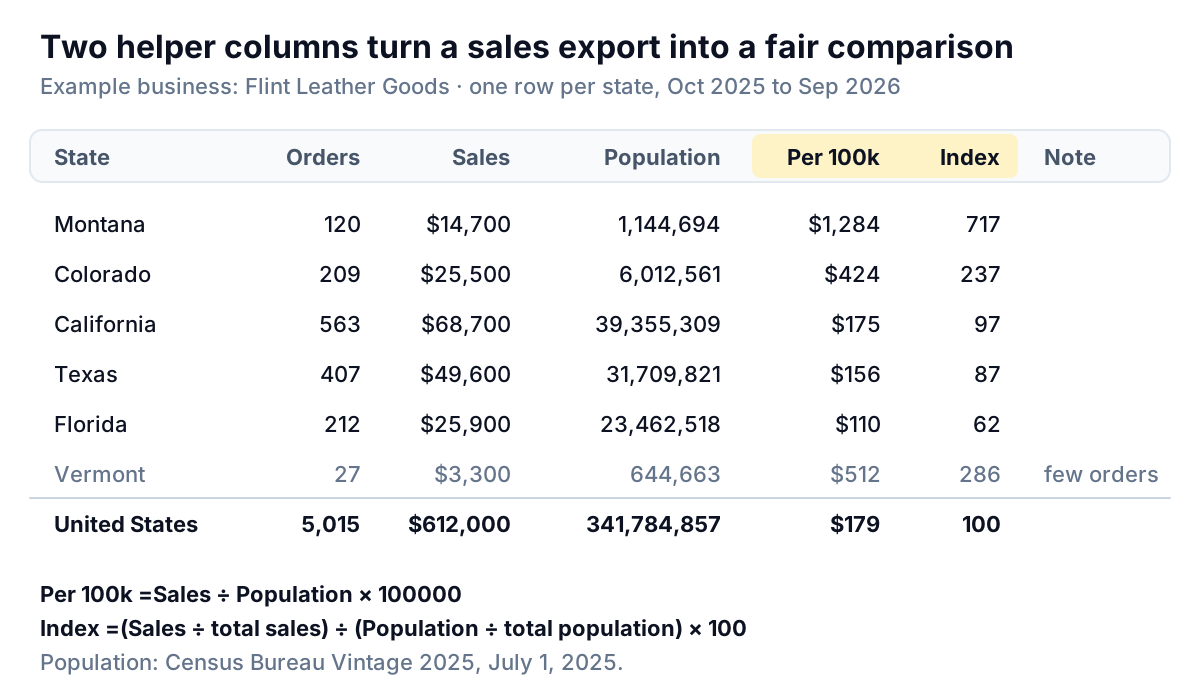
- Export orders with the ship-to state. Most store and accounting tools include a shipping state or province column. Use ship-to, not bill-to, because ship-to is where the product went. Remove test orders and fully refunded orders, and decide what to do with international orders (Flint keeps them on a separate tab).
- Summarise to one row per state. A pivot table does this: state in Rows, sales as Sum, order number as Count. Copy the result to a new tab as values.
- Spell states out in full ("Montana", not "MT" or "Mont.") and keep the District of Columbia as its own row. Excel's guide to map charts warns that place names can map incorrectly, and that adding a country column helps when a name exists in more than one country. Add a "Country" column with "United States" in every row.
- Add population. Download the Census Bureau's state totals table from the page linked above (the July 1, 2025 column is the latest) and pull each state's figure in with XLOOKUP. Note the vintage in a cell, because the Bureau revises its estimates each year.
- Add the two helper columns. Sales per 100,000 residents is
=C2/D2*100000with sales in C and population in D. The index is=(C2/$C$53)/(D2/$D$53)*100, where row 53 holds the totals. An index of 100 means a state buys exactly its population share; 200 means twice that. - Flag small states. Add a column that says "few orders" when the order count is under a threshold you choose. Flint uses 100. Vermont's $512 per 100,000 comes from 27 orders; three extra gift orders at Christmas would move it by 10%.
If you sell through shops rather than online, the same sheet works with a different divisor: sales per stockist, per salesperson or per active customer in each state. Choose the thing that explains how big a state ought to be for your business. Population suits a direct-to-consumer brand. Number of stores suits a wholesaler.
How to build a sales map in Excel or Looker Studio
Excel: Filled Map
Microsoft's article on creating a map chart in Excel lists the steps and the catches. Map charts need a Microsoft 365 subscription, and creating one (or adding data to it) needs an internet connection, because Excel looks the places up through the Bing Maps service.
- Select the state column and the one number you want to map, for example State and Per 100k. Map charts show one value at a time.
- Go to Insert > Charts > Maps > Filled Map. Optionally, first convert the states with Data > Data Types > Geography so Excel recognises them.
- Excel inserts a value map (a two- or three-colour gradient) when the column is numeric, or a category map when it's text.
- Double-click the map to open the format pane. Under Series options, set Map area so the map zooms to the states with data rather than the whole world, and set Map labels if you want state names on it.
- Write a title that says what the map shows: "Sales per 100,000 residents, Oct 2025 to Sep 2026", and put the Census vintage in a note.
For the index column, a three-colour gradient centred on 100 reads well: one colour for states under their population share, another for states over it. If you'd rather have a few clear bands than a smooth gradient, add a text column such as "Under 75", "75–125" and "Over 125" and map that instead. Excel then draws a category map with one colour per band.
Looker Studio: Geo chart
Looker Studio's geo chart reference needs three settings: a geo dimension, one metric and a zoom area.
- Connect the summarised sheet (Google Sheets works well). In the data source, give the state field a geo type. The geo dimension reference calls U.S. states "Country subdivision (1st level)" and accepts full names or ISO codes such as US-MT. It notes that geo charts don't support FIPS codes, so don't use those.
- In the toolbar, click Add a chart and choose the geo chart.
- On the Setup tab, set the geo dimension to the state field, the metric to your per-capita field, and the Zoom area to the United States.
- Compute per-capita sales as a calculated field,
SUM(Sales) / SUM(Population) * 100000, rather than averaging a pre-computed column. Averages of ratios go wrong as soon as a filter groups several states. - On the Style tab, set the min, mid and max colours. Keep one hue, light to dark, unless you are mapping the index, where a split around 100 makes sense.
Looker Studio also has a Google Maps bubble map, where a Size field sets each bubble. That's the right home for total sales: bubbles show amounts, shading shows rates.
Google Sheets has a geo chart too, configured under Customize > Geo, where you choose the region and the colours. It's fine for a quick look, but it has fewer settings than either of the tools above.
Rank it: the chart that does the comparing for you
A map is good at one thing: showing that neighbouring places behave alike. It's weaker at telling you by how much one state beats another. In their 1984 study of graphical perception, William Cleveland and Robert McGill found that people judge values more accurately from positions on a common scale than from areas or colour shading. Flint's owner could see that Colorado was "darker" than Texas. She couldn't see that it was 2.7 times higher.
So the map gets a partner: a ranked bar chart of the same per-resident number, limited to states with enough orders to trust.
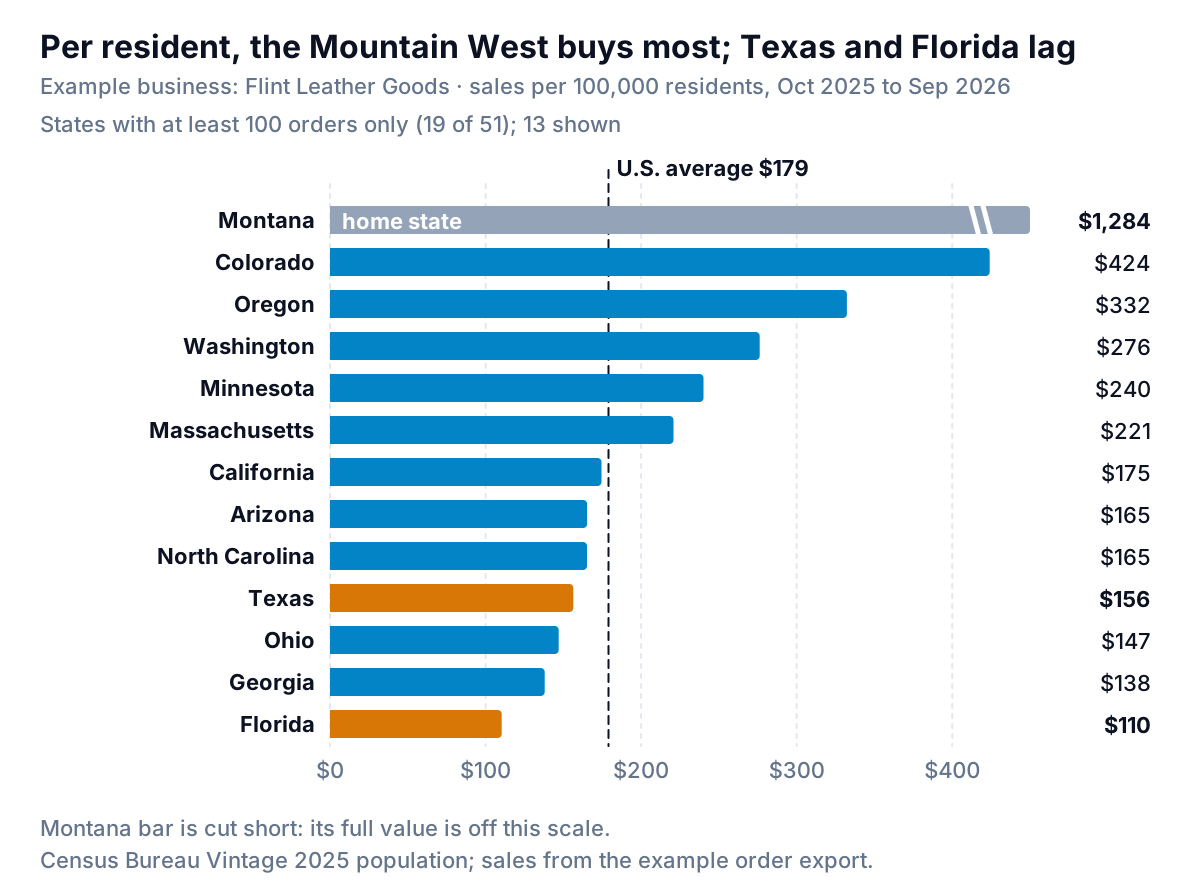
Three choices make this chart useful:
- A floor on orders. Only the 19 states with at least 100 orders get ranked. The other 32 go in a footnote. Without the floor, Wyoming (29 orders) and Vermont (27) would sit near the top, and a few gifts would decide next year's ad budget.
- The home state set apart. Montana's $1,284 reflects local word of mouth and walk-in pickups, not online demand you can buy elsewhere. Flint shows it in grey and cuts its bar short so the other states aren't squashed against the axis.
- A reference line. The U.S. average turns each bar into a verdict: above the line, the brand over-performs; below it, there's room to grow, or no fit.
Read Flint's chart and the plan writes itself. The Pacific Northwest and Colorado behave like home: outdoorsy buyers who like heavy leather. That's where the Denver market and the next ad test went. Texas and Florida get a different question: is the range wrong for a hot climate, or have buyers there just never seen it? A one-month ad test in Austin answers that for far less than a market booth.
When a map is the wrong answer
Lisa Charlotte Muth's Datawrapper guide on what to consider when creating choropleth maps makes a fair point: they work best when the data has a clear regional pattern, and if it doesn't, another chart type usually works better. Flint's data has a pattern (the Mountain West), so the map earns its place. Plenty of businesses don't.
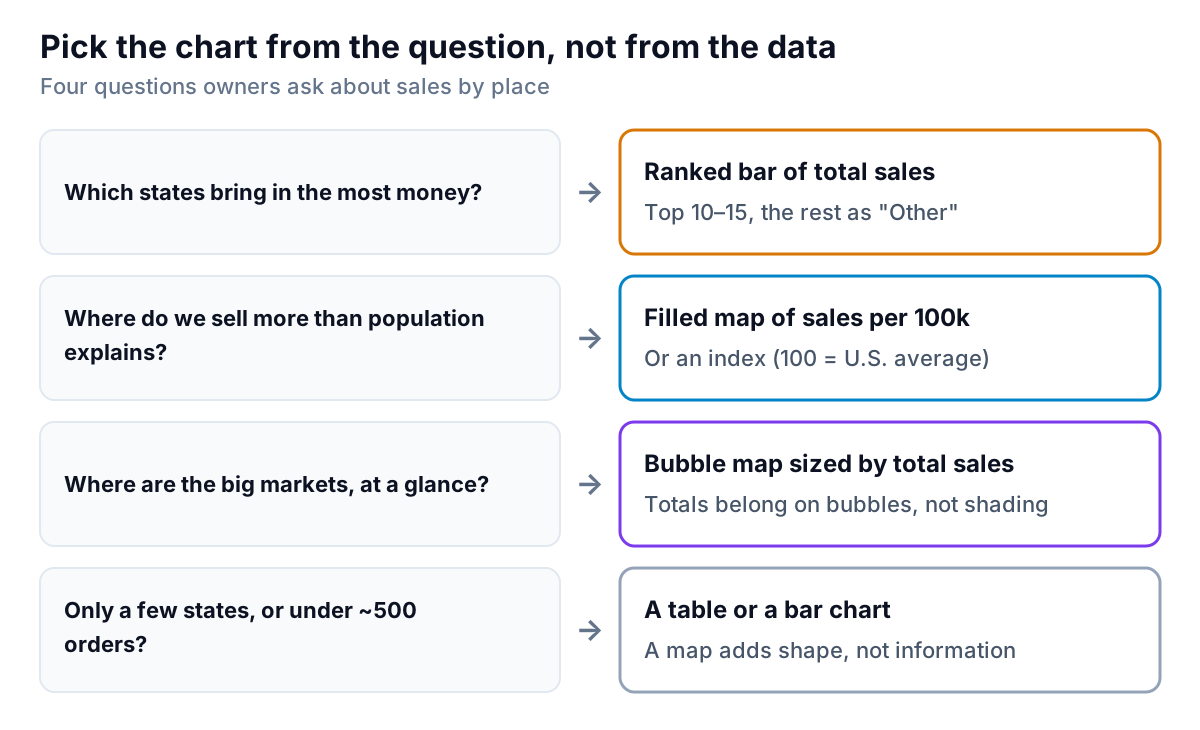
Skip the map when:
- You sell in a handful of states. A regional plumbing supplier with customers in three states needs three numbers, not a map of 47 empty ones.
- The order count is small. As a rule of thumb, with fewer than about 500 orders a year most states have too few to shade fairly, and the map shows noise. Use a table of the top states and a single "everywhere else" row.
- The question is "who", not "where". If three wholesale accounts make up most of a state's sales, the state isn't the story; the accounts are. A customer list sorted by sales answers it better, and our sales report guide shows how to explain those movements customer by customer.
- The question is about time. "Is Colorado growing?" is a line chart of Colorado's monthly sales, not a map. Maps compare places at one moment.
And if you want to show size on a map, use bubbles. A bubble sized by total sales shows that California is the biggest market without colouring the whole state as if every Californian were a keen buyer. Keep the circle's area, not its width, proportional to sales; most tools do this by default, but check the size legend.
Five ways a sales map misleads
- Big states look important. Montana and Texas cover more of the page than New Jersey, so their colour gets more attention whatever its value. A tile-grid map like Flint's gives every state the same square, which fixes this at the cost of real shapes. Label it as a schematic.
- The colour breaks decide the story. Move the top band from $500 to $300 and five more states turn dark. Pick breaks that mean something (the U.S. average, double the average) and keep them fixed from one period to the next.
- Ship-to isn't always the buyer. Gifts go to relatives in other states. In December especially, a state's sales can say more about where people's parents live than about your marketing.
- One big order paints a state. A single $6,000 corporate gift order would push a small state to the top band. Look at the order count beside every per-resident figure.
- Old population numbers. Fast-growing states change by several percent in a few years. Use the latest Census vintage and say which one you used.
A sales map also answers only one question per period. If the real question is which products sell where, start from the product side; our guide to the sales by product chart covers ranking and mix. If it's whether this month's sales are on track, a sales dashboard with pacing is the better place to look.
Keeping the map current
The work in a sales map is in the sheet, not the chart: exporting orders, cleaning state names, matching population and refreshing it every quarter. That's the step Parity takes off your hands. Connect Shopify, Stripe or Square, or upload an order export from any other tool, ask for sales by state per 100,000 residents with the Census population you provide, and it builds the dashboard, with every number checked against queries on the full dataset before you see it. When next quarter's orders arrive, you update it with the newer file instead of rebuilding it.
Upload your order export and get sales by state, totals and per resident, with every figure checked against the full data. Build a report from your data free
Flint's map now lives on the second page of its quarterly review, after the ranked bars, not before them. The bars set the budget. The map does one job: it reminds everyone that Montana's neighbours buy like Montana, and that the next booth deposit should go to a city in the mountains, not the biggest state on the page.