$349,000. That was the open pipeline at Garnet Event Rentals, an example tent, table and staging rental business, on the first Monday of October 2026: 69 open deals, only 13% below its May peak. The owner read the number in HubSpot and moved on. A sales pipeline chart would have stopped him. It shows open deals by stage, in value and in count, and, in the version most small teams skip, how that picture changes from one month to the next. Garnet's version showed that the early-stage part of the pipeline had shrunk by 40% since March, which meant a thin January was already on its way.
This guide builds the four pipeline charts a small sales team needs, each tied to one question, with the HubSpot reports that produce them and the spreadsheet steps if you'd rather build them from an export.
Four questions, four sales pipeline charts
A pipeline report that tries to answer everything in one chart ends up as a funnel graphic nobody can read. Split it by question:
| The question | The chart | Built from |
|---|---|---|
| Where are our open deals right now? | Bars by stage, value and count side by side | Today's open deals |
| What is the pipeline likely to be worth? | Open value with weighted value overlaid | Today's open deals and your win rates |
| Is the pipeline filling or draining? | Stacked columns of monthly snapshots | A saved copy of the pipeline each month |
| Where do deals drop out? | Stage-to-stage conversion bars | One batch of deals followed to the end |
The first two describe one moment. The third compares moments. The fourth follows a group of deals over time. Mixing those up is the most common pipeline chart mistake, and it's why a "pipeline funnel" so often looks wrong.
Draw the pipeline by stage twice: value and count
Garnet's HubSpot pipeline has four open stages: Enquiry (a request with a date and a guest count), Quote sent, Date on hold (the client asked to reserve the date) and Contract out.
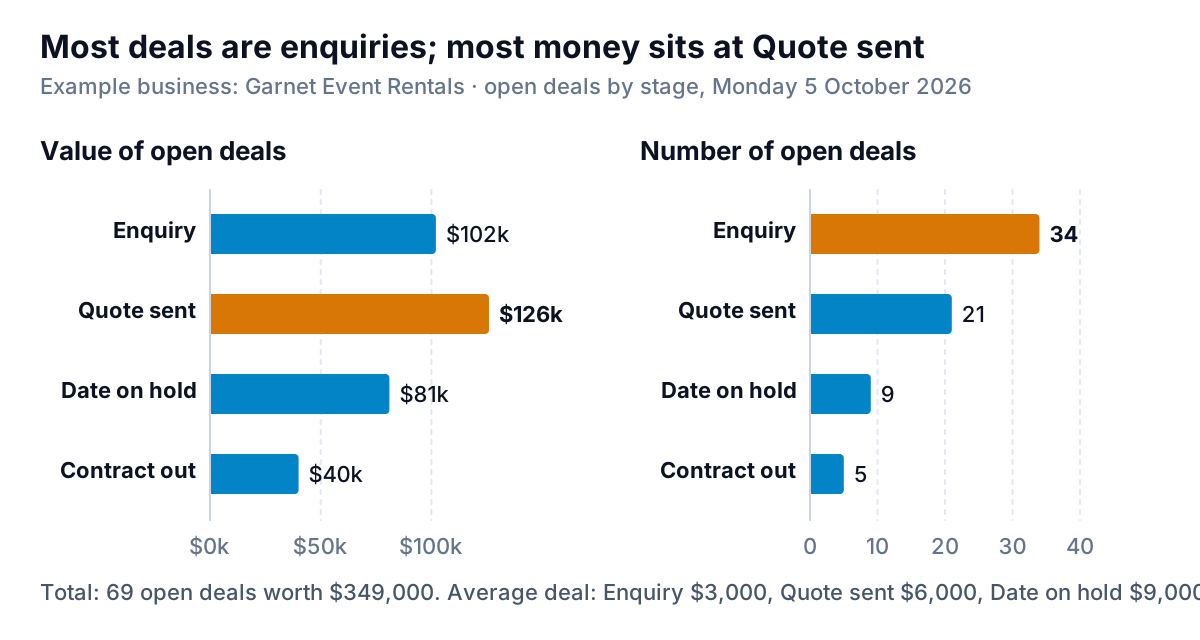
The count panel says the pipeline is mostly enquiries: 34 of 69 deals. The value panel says the money sits at Quote sent: $126,000. Both are true because deals grow as they move. An enquiry is entered at a rough $3,000; once Garnet has measured the site and priced the tent, flooring and lighting, the average quote is $6,000, and a held date averages $9,000 (bigger events book further ahead). Show only value and the team thinks the early pipeline is thin. Show only count and it thinks the late pipeline is tiny.
Three design rules for this chart:
- Keep the stages in process order, top to bottom. Most bar charts read best sorted by size, but here the order carries meaning, so sorting would hide it.
- Use horizontal bars, so stage names read without tilting your head.
- Leave won and lost deals out. They aren't pipeline. A bar for "Closed won" next to open stages makes the pipeline look bigger than it is.
Weight it before anyone plans around it
$349,000 open is not $349,000 coming. Each stage converts at a different rate, and the honest headline number is the weighted pipeline: each deal's amount times the chance that deals at its stage go on to win. Our HubSpot pipeline guide explains how to set those probabilities from your own closed deals rather than HubSpot's defaults; here we only chart the result.
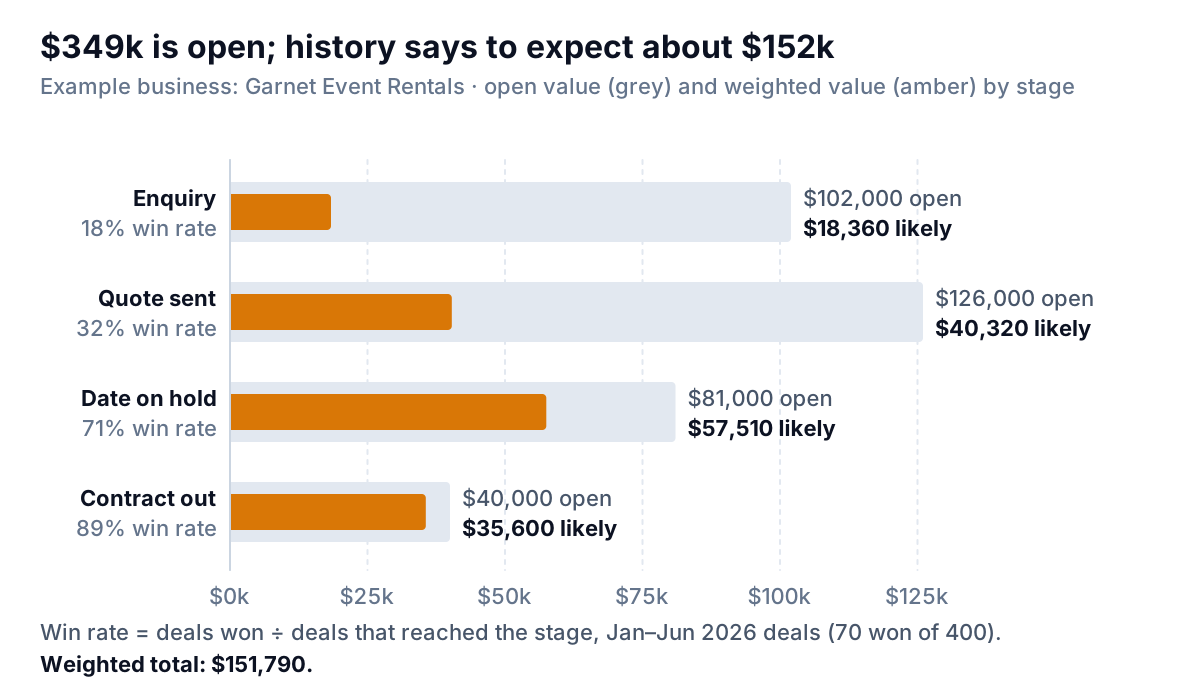
Garnet's win rates come from the 400 deals created between January and June 2026: 70 were won, so an enquiry has a 70 ÷ 400 = 17.5% chance (rounded to 18%), a quote 70 ÷ 220 = 32%, a held date 70 ÷ 99 = 71% and a contract 70 ÷ 79 = 89%. Weighted, the pipeline is worth $151,790, less than half the open total.
Drawing the weighted bar inside the open bar does something two separate charts can't: it shows how much of each stage is air. Quote sent has the biggest open bar and only the third-biggest weighted one. For planning crew and trucks, the $57,510 at Date on hold matters more than the $126,000 at Quote sent.
The snapshot chart: is the pipeline filling or draining?
The first two charts describe one Monday. They can't tell you whether this Monday is better or worse than last month's, because HubSpot's deal records only hold where each deal is now. To see the pipeline change, you need copies of it from earlier dates: snapshots.
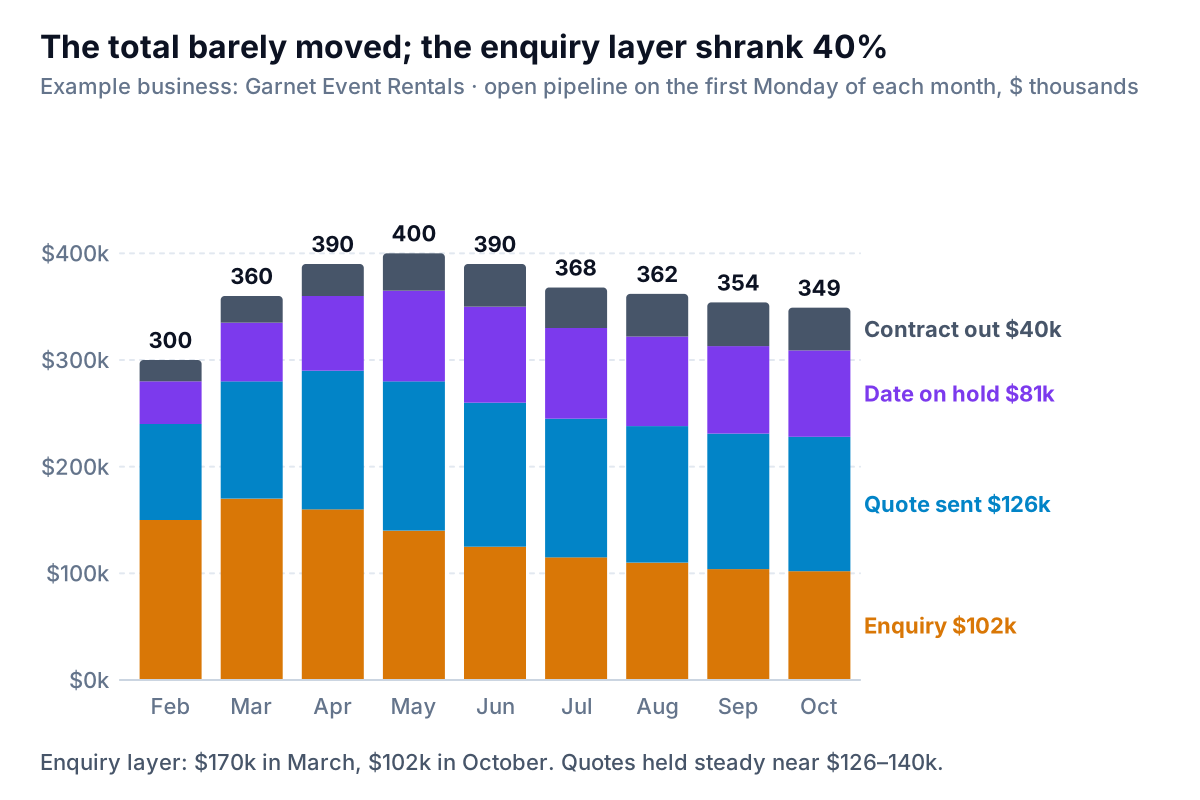
Read the layers, not the tops. Garnet's total peaked at $400,000 in May and has eased to $349,000, which looks like a normal end of the wedding season. But the bottom layer, enquiries, has fallen every month since March: $170,000 to $102,000. Quotes held steady because the team kept converting a shrinking stream of enquiries. For Garnet, an enquiry takes about three months to become an event, so a 40% drop in enquiries today shows up as a weak January and February in the bookings. The total won't show the problem until it has already happened.
That's why this chart belongs on the monthly report: the early stages are a leading indicator, and the late stages are almost revenue already. If your business is seasonal, compare each snapshot with the same month last year rather than with last month, or every autumn will look like a crisis.
How to capture snapshots
- In HubSpot: the sales analytics suite lists a Historical snapshots report that shows deal counts at past points in time, broken down by stage, amount or forecast category. HubSpot lists the suite for Sales Hub Starter, Professional and Enterprise; check what your own account shows.
- By hand, which works on any plan: on the first Monday of each month, export open deals and paste them under the previous months on a "Snapshots" tab, with a column holding that day's date. Never overwrite an old snapshot. After three months you have a trend; after twelve, a seasonal comparison.
Stage-to-stage conversion, and why it isn't a funnel
The last question is where deals drop out. The tempting chart is a funnel drawn from today's open deals: 34 at the top, 5 at the bottom. That funnel is wrong. Today's 5 contracts didn't come from today's 34 enquiries; they came from enquiries made months ago. And in value terms the shape breaks altogether, because Quote sent ($126,000) is bigger than Enquiry ($102,000).
Conversion needs a cohort: a batch of deals created in the same period and followed until each one is won or lost. Garnet uses deals created January to June 2026, which have nearly all finished.
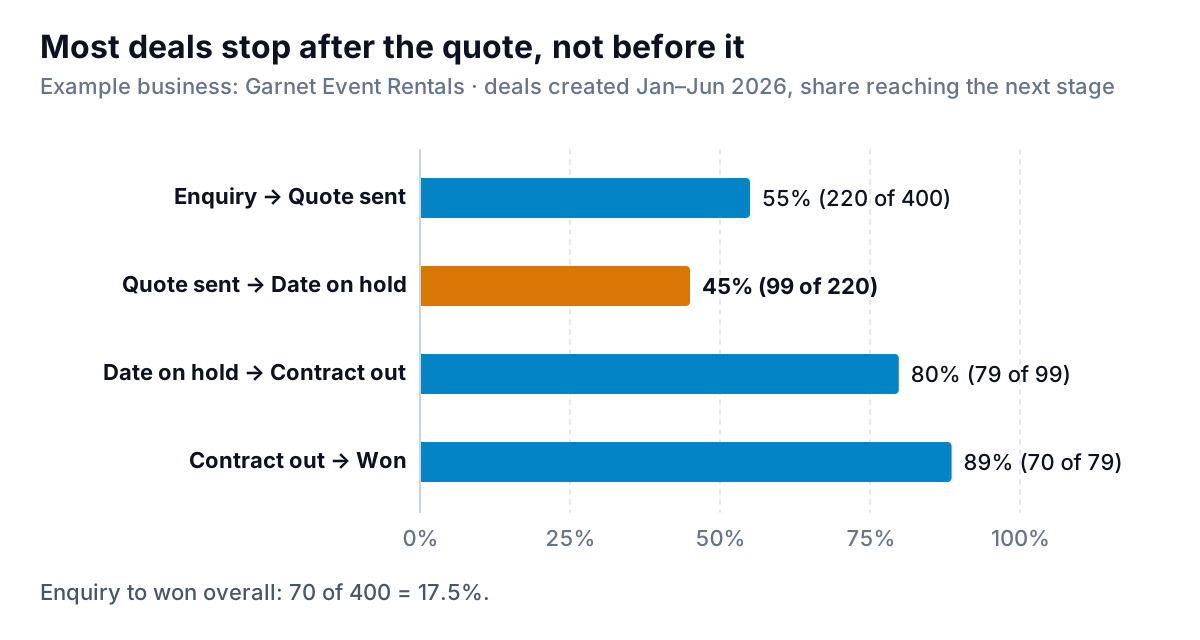
Plain bars with step percentages beat a funnel shape here for one reason: each step gets its own bar on the same 0–100% scale, so you can compare steps directly. In a funnel, every layer's width depends on all the layers above it, and the step that matters is hard to see. Garnet's chart is clear: 55% of quotes never turn into a held date. That's where to look. Is the quote too slow (Garnet's take two days), too expensive for small parties, or missing a simple "hold the date for $200" option? Each is cheaper to test than buying more enquiries.
If you do want a funnel shape for a client deck, Microsoft's article on funnel charts gives the path, Insert > Insert Waterfall, Funnel, Stock, Surface or Radar Chart > Funnel, which needs Office 2021 or later or Microsoft 365. Feed it cohort counts (400, 220, 99, 79, 70), never today's open deals.
In HubSpot, the Deal funnel report in the same sales analytics suite shows deal counts across stages with stage conversion rates and time in each stage. For your own cohort analysis outside HubSpot, you need the date each deal entered each stage. HubSpot's stage calculated properties ("Date entered", "Date exited" and time-in-stage for each stage) provide it, but they need a Professional or Enterprise subscription and are turned off for new pipelines until an admin switches them on.
Building the pipeline charts from a HubSpot export
Any CRM that exports deals to CSV or Excel can feed these charts. In HubSpot, HubSpot's export guide starts from CRM > Deals: open the view you want, click Export, choose the file format, and under Customize decide which properties to include. Include deal name, deal stage, amount, create date, close date and pipeline.
- Add a stage table on its own tab: stage name, stage number (1 to 4) and win rate. Pull both into the export with XLOOKUP. Stage number fixes the sort order; without it, Excel lists stages alphabetically.
- Add a weighted column:
=C2*G2, amount times win rate. - Build a pivot table (see our pivot table guide): stage number and stage in Rows, Sum of Amount, Count of Deal Name and Sum of Weighted in Values. Filter out won and lost.
- Chart value and count separately as two clustered bar charts, side by side. Don't put them on one chart with two axes; the bars would look comparable when they're in different units. Excel draws bar charts from the bottom up, so tick Categories in reverse order in the vertical axis options to put Enquiry at the top.
- For the weighted overlay, chart open and weighted value as a clustered bar, then set series overlap to 100% and make the open bar a pale grey so the weighted bar sits inside it.
- For snapshots, pivot the Snapshots tab with snapshot date in Rows, stage in Columns and Sum of Amount in Values, then insert a stacked column chart. Put the earliest stage at the bottom, where the eye compares it most easily against a flat baseline, because that's the layer you most need to read.
Two checks before you share them: does the pivot's open total match HubSpot's board total for the same pipeline, and do any open deals have close dates in the past? Past-dated deals inflate every one of these charts. Clear them first.
The pipeline charts sit naturally beside the rest of your sales numbers. Our sales dashboard guide covers month-to-date pacing, the companion sales target chart post covers actual against target, and the weighted pipeline from this guide is the bridge between the two.
What Garnet did with the charts
The snapshot chart changed the October meeting. Instead of chasing the $126,000 of quotes harder, the team worked on both ends: it wrote to the 150 corporate clients who had booked before, offering January dates for staff parties at last year's prices, and it added a "hold the date" deposit to every quote to lift the 45% step. Both show up on next month's charts without anyone writing a new report: the bottom layer of the snapshot chart, and the second bar of the conversion chart.
If you'd rather not rebuild the pivot every month, Parity connects to HubSpot directly (or takes a deal export) and builds a pipeline dashboard: headline numbers with trends, charts by stage, what explains the changes, and a table of what needs attention, such as deals with past close dates. Every number is checked against queries on the full dataset before you see it, and you can refine it by chat, for example "add weighted value by stage using these win rates".
Connect HubSpot and get your pipeline by stage, value and count, with every number checked against your full deal data. Connect HubSpot free
One rule to take away: never show a pipeline total without the layers under it. The total tells you how much is open. The layers tell you whether there will still be something open in three months.