"April is down 12% on last year." That line in the May report sent the owner of Fjord Coffee Subscriptions, a fictional subscription business, into a weekend of digging through cancellations. She didn't find any unusual ones. Fjord ships every Tuesday, April 2025 had five Tuesdays and April 2026 had four. Per shipment, April was up 9.5%, in line with every other month that year.
A year over year comparison chart puts each period of this year next to the same period last year, so you can see whether the business is ahead, by how much, and whether the gap is growing. It's one of the most useful charts a small business can keep, and one of the easiest to get wrong, because months aren't equal. This guide covers the three forms of the chart (overlaid lines, clustered columns, percentage-change bars) and when to use each. Then it gets into what makes the comparison unfair: trading days, weeks that don't line up, 53-week years and half-finished months.
For the growth formula itself, and choosing between month, year-to-date and trailing-twelve-month comparisons, see our guide to year over year growth. This post is about the chart.
Three year over year comparison charts, three questions
Fjord's 2025 and 2026 monthly sales can be charted three ways. Each answers something different.
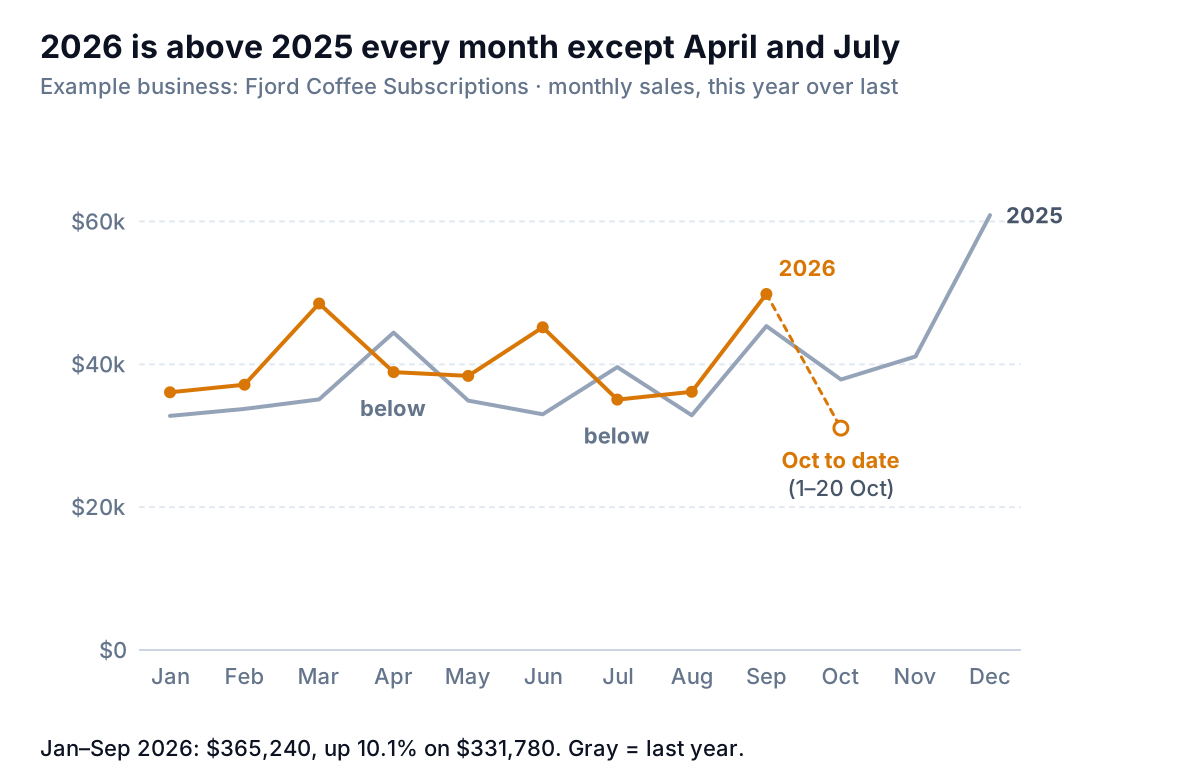
Overlaid lines: "are we tracking ahead of last year?" One line per year, January to December on the horizontal axis. This is the default year over year comparison chart, and the one in the figure. Twelve points per year is easy to follow, last year in gray runs on to December so you can see what's coming, and the current month can be flagged as partial. Fjord's 2026 line sits above 2025 in seven of nine months, and January to September is up 10.1%, from $331,780 to $365,240.
Clustered columns: "what were the amounts?" A pair of bars per month. Good for a short run (one quarter, or a handful of products) where the reader wants to see each amount. Over nine or twelve months the pairs become a picket fence. You can see which bar is taller, but not by how much.
Percentage-change bars: "by how much?" One bar per month, this year ÷ last year − 1, above or below a zero line. It's the most direct answer to "how are we doing against last year?" and it makes problems jump out, which is exactly why the calendar traps below matter.
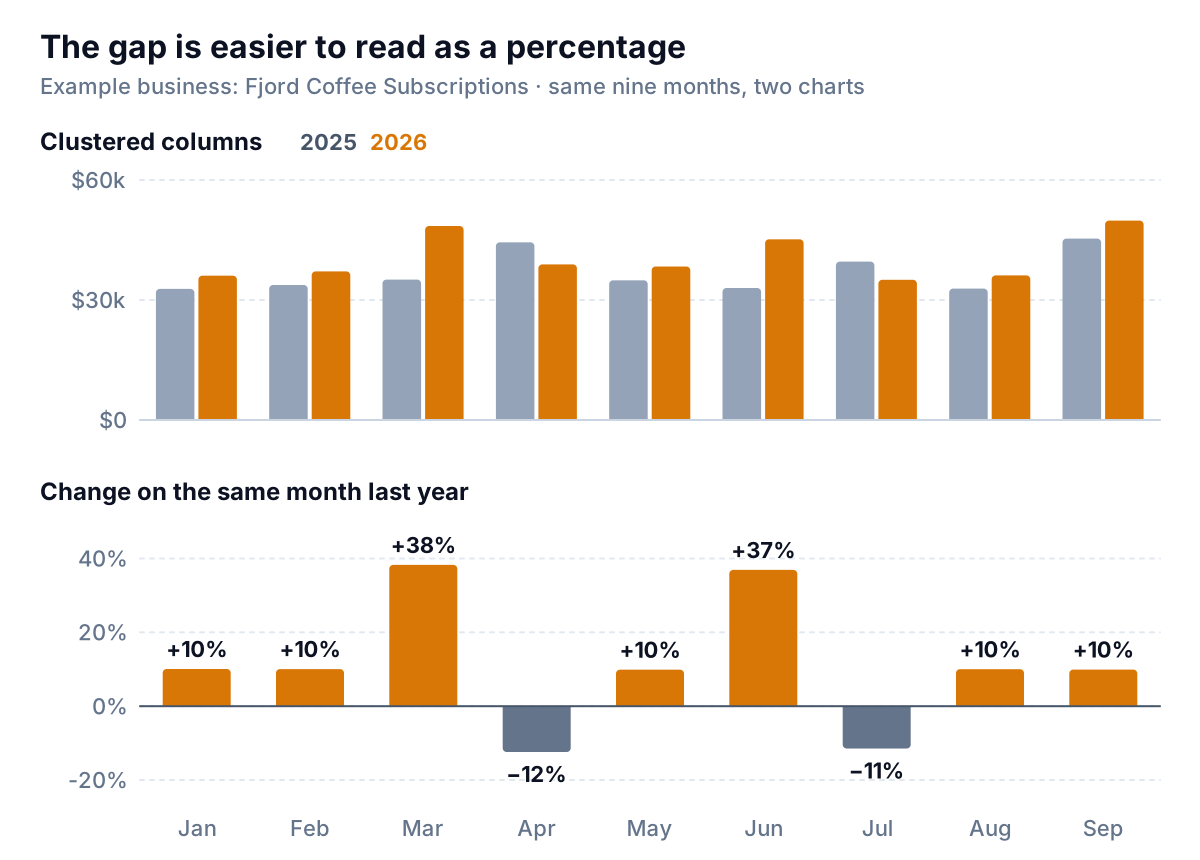
Decision rule: for a monthly review, use overlaid lines with percentage-change bars directly underneath, months lined up. Use clustered columns only when there are six or fewer pairs. Don't put the percentage on a second axis over the columns. Two scales on one chart let the line cross the bars wherever the axis settings happen to put it.
How to build the chart in Excel, Sheets or Looker Studio
Shape: months down, years across
Most exports arrive as one row per order or per day. The chart needs one row per month of the year and one column per year:
| Month | 2025 | 2026 | YoY % |
|---|---|---|---|
| Mar | 35,090 | 48,510 | +38.2% |
| Apr | 44,430 | 38,910 | −12.4% |
| Oct | 37,870 | (partial) |
To get there, add helper columns to the raw data, =YEAR(A2) and =MONTH(A2), then fill the grid with =SUMIFS(Sales,Year,C$1,Month,$A2), using a month number in a hidden column. A pivot table with Month in rows and Year in columns does the same in a few clicks. The YoY column is =IF(C2="","",C2/B2-1).
Leave this year's unfinished months empty, not zero, or the line will dive to the axis. In Excel, =NA() in those cells makes the chart skip them.
Excel
- Select the Month, 2025 and 2026 columns, then Insert > Recommended Charts > All Charts > Line. Microsoft's chart guide covers the dialog. Because the years are columns, Excel draws one line per year. If it draws one line per month instead, use Switch Row/Column.
- Format last year's line gray and this year's in your accent colour. Delete the legend and type "2025" and "2026" at the line ends.
- For the bars, select Month and YoY % and insert a column chart. The axis crosses at zero by default, so falls hang below it.
Google Sheets and Looker Studio
In Sheets, select the grid and choose Insert > Chart, then Line chart under Setup (Google's chart help). Google's line chart page expects labels in the first column and one numeric column per line, which is the grid above. Series colours are under Customize > Series.
Looker Studio can skip the reshaping. On a time series chart, set a comparison date range of Previous year in the Setup tab's date range section. Google's page on report date ranges says the comparison appears as a line in a different colour. The same page describes advanced date ranges that compare periods aligned by day of the week, which matters for the next section.
Why April fell 12%: count the trading days
Fjord's percentage bars swing from −12% to +38%. A chart like that sends owners hunting for causes. Before you hunt, count the days the business could sell.
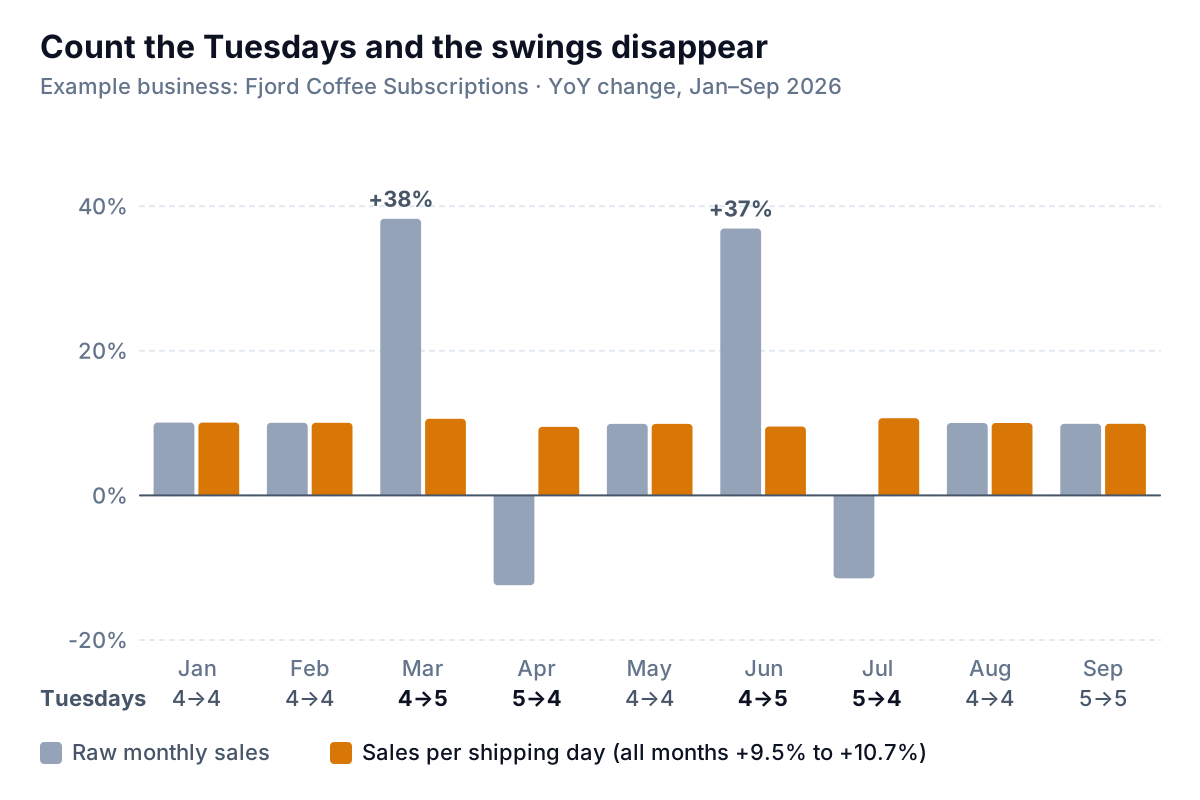
Fjord ships on Tuesdays, so each month has four or five shipping days. March 2026 had five Tuesdays against four in March 2025: +38% in raw sales, +10.6% per shipping day. April went the other way. So did June and July. In the months with the same number of Tuesdays both years, raw and per-day growth are identical.
Every business has its own version. A café or shop has more takings in a month with five Saturdays. A business that invoices on working days loses a day to every public holiday that lands on a weekday. The rule is the same:
- Count the trading days (or shipping days, or working days) in each month for both years.
=NETWORKDAYS(start,end,holidays)counts working days. For a single weekday, a shortSUMPRODUCTonWEEKDAYover the month's dates does it. - If the counts differ, chart sales per trading day, or show both bars as in the figure.
- Put the day counts under the axis labels, so nobody has to ask.
Weekly charts, 364 days and the 53-week year
Weekly year over year charts avoid the month-length problem but bring their own. Compare a week with the week 52 weeks earlier, which is 364 days, not 365, so Tuesday lines up with Tuesday. In Excel, label weeks with ISOWEEKNUM, which Microsoft's function reference describes as returning the ISO week number for a date, with weeks starting on Monday. Then chart week numbers across and years as lines.
The catch is that some years have 53 weeks. Under the ISO week-date rules, a year gets a 53rd week when it starts on a Thursday, or on a Wednesday in a leap year. January 1, 2026 was a Thursday, so 2026 has an ISO week 53, December 28, 2026 to January 3, 2027, and 2025 has none to compare it with. Retailers on the National Retail Federation's 4-5-4 calendar face the same issue in their fiscal years. NRF restates a 53-week year against the next by pushing each week back by one, or the 53rd week can simply be left out. For a small business chart, pick one:
- Show week 53 on its own with "no comparison" in the label.
- Or, for the following year's chart, compare each week with the week 364 days earlier and ignore week numbers altogether.
Either is fine. Just don't let a 53-week year sit next to a 52-week year as an annual total without a note, because that's about 2% more selling time.
Partial months and other ways the comparison lies
Today is October 21. Fjord's October so far is $31,070 from three shipping days. Here are three ways to compare it with last year.
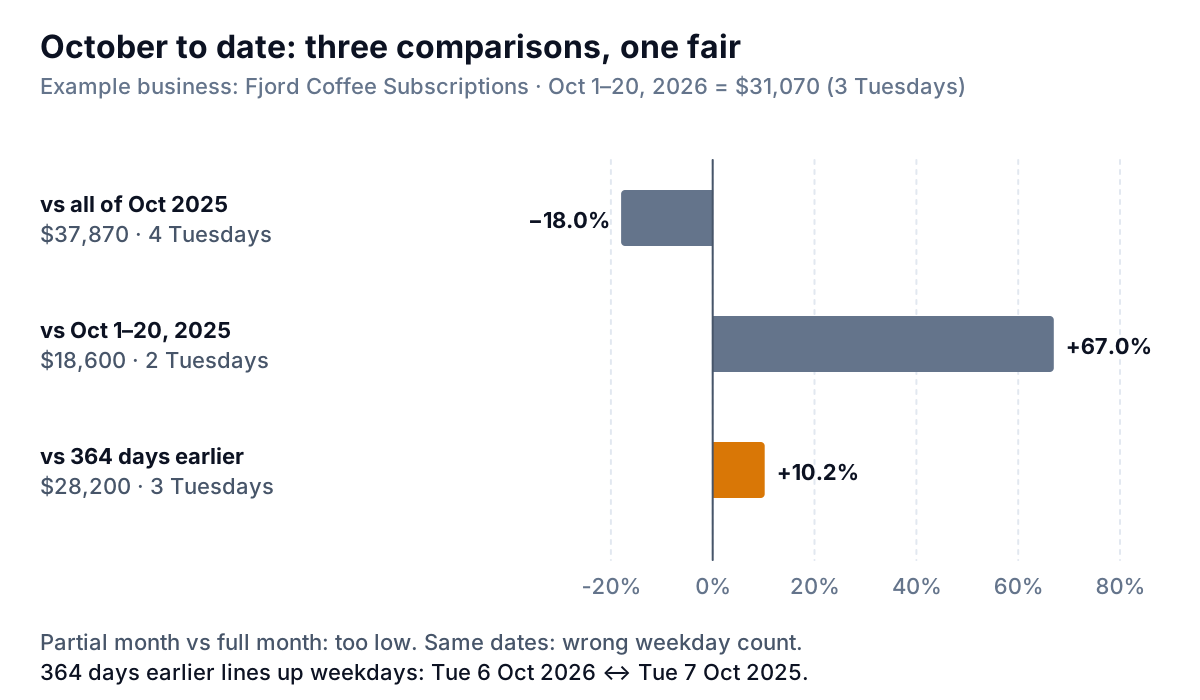
- Against all of October 2025: −18.0%. Twenty days against thirty-one. Always wrong, and the most common mistake on dashboards that show "this month vs last year" in the middle of a month.
- Against October 1–20, 2025: +67.0%. Better in principle, but those dates held only two Tuesdays last year.
- Against the 20 days 364 days earlier: +10.2%. Same weekdays, same number of shipping days. This is the fair one.
On the overlaid line chart, mark the current month as "to date" and leave it off the percentage bars until it closes. That's what the open circle in the first figure does.
Three more ways a year over year chart misleads:
- A small base. A product that sold $300 last March and $900 this March is up 200%. Show dollars beside percentages for anything small. Our sales growth chart guide covers this small-base trap in detail.
- Seasonality read as trend. Year over year comparisons remove the season, which is their strength. But if you overlay the lines and then compare December with September on the same line, you're reading the season, not the business. The seasonality chart guide is for that question.
- A changed definition. If Fjord had started recording shipping fees as revenue in 2026, every month would be "up". Note any change in what's counted on the chart itself, or restate last year.
Keeping the comparison honest every month
Fjord's report now has the overlaid lines, the percentage bars per shipping day, and a single sentence under them: "Up 10.1% year to date; up 9.5% to 10.7% in every month on a per-shipment basis; October to date +10.2% on the same Tuesdays." Nobody spends a weekend chasing April any more.
The work that keeps it honest is the counting: shipping days, partial months, which weeks line up. If you'd rather not redo it each month, Parity builds a dashboard from your sales export or a connected store or payment account, with headline numbers and their trends, charts, what explains them and what needs attention. Every number is checked against queries on the full dataset before you see it, and you can ask it by chat to compare on the same weekdays or show per-day figures.
Upload your sales export and get year over year charts checked against every row. Build a report from your data free
Whatever tool you use, check the calendar before you trust a swing in a year over year chart. Most of the scary ones are a Tuesday.