Kelp Swimwear's sales fell from $74,800 in August 2026 to $42,100 in September, a 44% drop in one month. The owner of the online shop, an example business, drafted an email to her ads agency asking to cut spend in half. Then she looked at last year. September 2025 had fallen 36% from August. So had every September before it.
A seasonality chart puts that pattern in front of you before you react to it. It lines up several years of the same months so you can see which rises and falls happen every year, how big they are, and whether this year is following the pattern or breaking it. There are four useful forms: the month-of-year overlay, the seasonal index, the cycle (subseries) plot and the seasonally adjusted line. This guide builds each one from four and three-quarter years of Kelp's monthly sales, then shows how to make them in Excel or Google Sheets.
Spoiler: September was fine. The month that needed attention was June, and on the ordinary sales chart it looked like one of the best months of the year.
Lay the years on top of each other
The first seasonality chart is the simplest. Put January to December on the horizontal axis and draw one line per year. Forecasting texts call it a seasonal plot. Hyndman and Athanasopoulos's Forecasting: Principles and Practice describes it as plotting the data against the individual seasons in which they were observed.
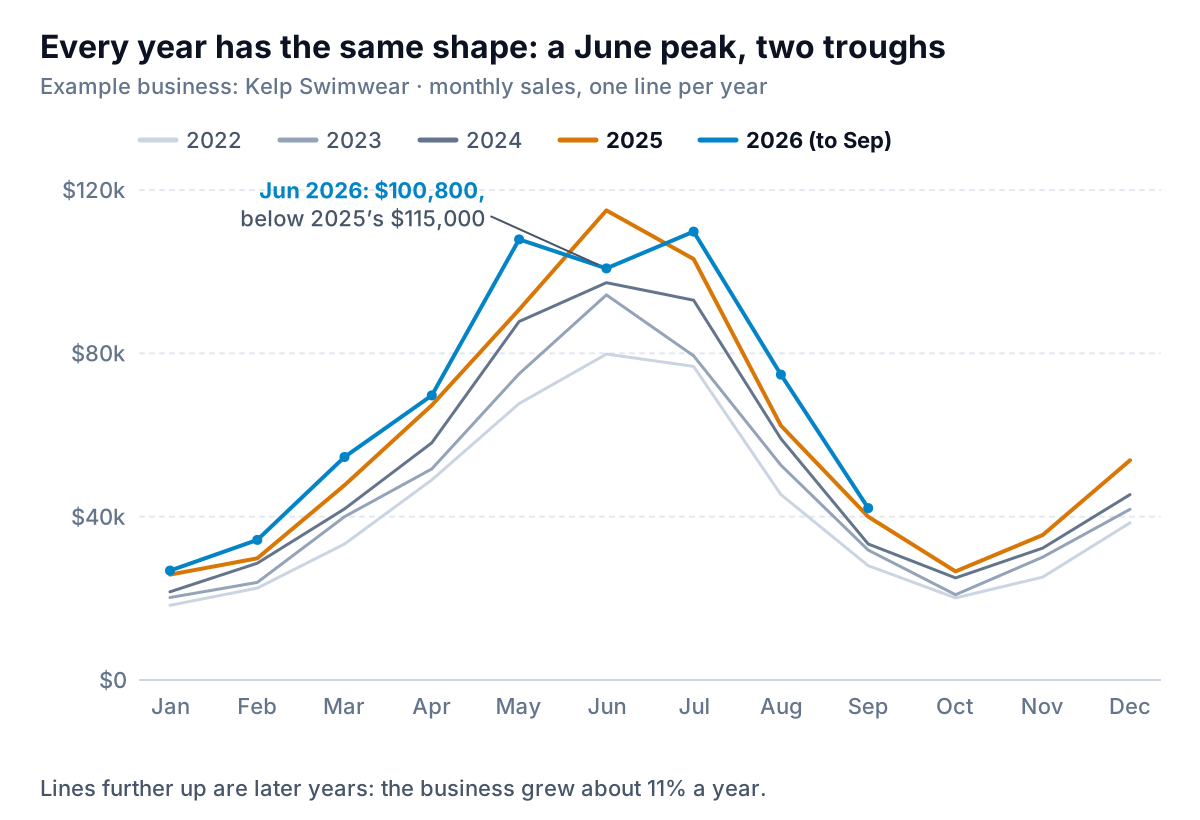
Three things to read, in this order:
- The shape. Every year climbs from January to a June peak, falls hard through August and September, bottoms in October, and lifts in November and December. That's the season. September's fall belongs to it.
- The spacing. Later years sit above earlier ones in almost every month. That's growth: Kelp's annual sales went from $504,600 in 2022 to $697,600 in 2025, roughly 11% a year.
- The crossings. When this year's line drops below last year's, something changed that isn't the season. 2026 is above 2025 in eight of nine months. June is the exception: $100,800 against $115,000.
Keep it to five lines at most. Draw older years in gray, darker as they get more recent, and the current year in a strong colour. A legend is acceptable here, because five line-end labels would pile on top of each other in December, but keep it in year order.
Put a number on the season: the seasonal index
The overlay shows the shape. The seasonal index measures it: how much a given month sells compared with an average month, where 100 is average.
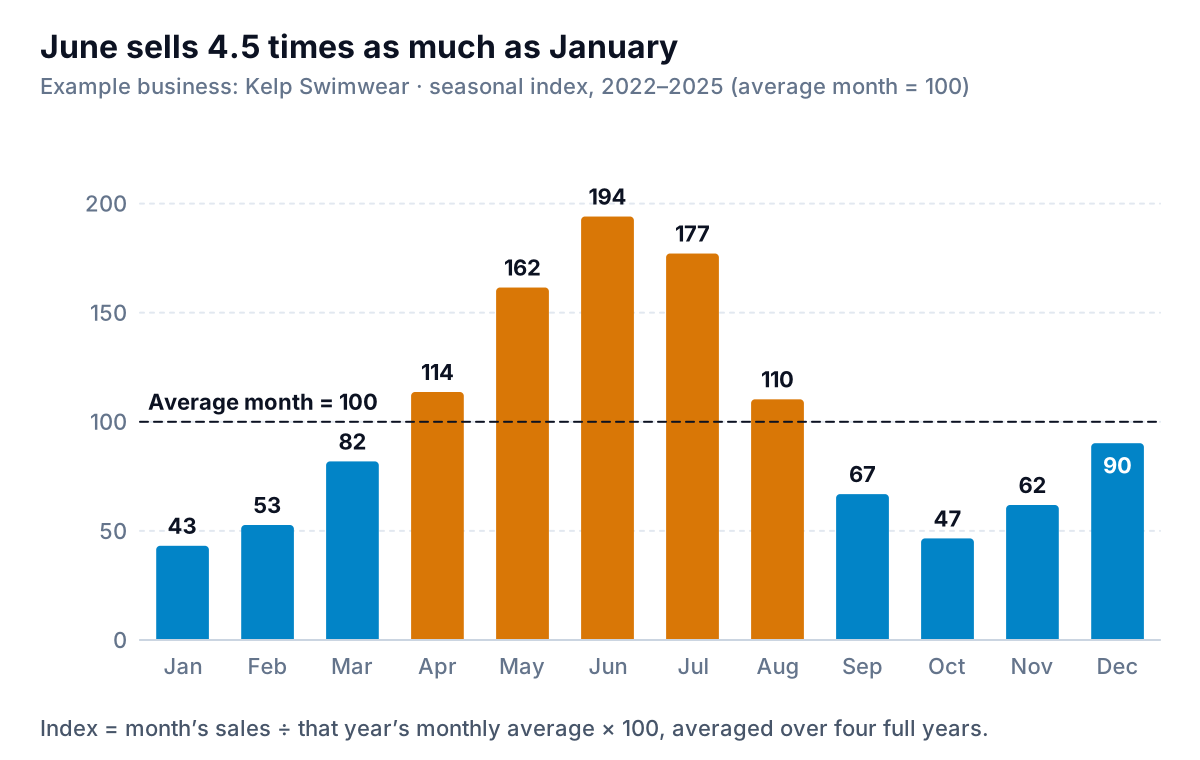
Here's the simple version, which is enough for most small businesses:
- For each full year, divide each month's sales by that year's monthly average. In 2025 Kelp sold $697,600, an average of $58,133 a month. June 2025 was $115,000, so its ratio is 1.978, or 197.8.
- Do the same for every full year. June scores 189.8 in 2022, 201.5 in 2023, 187.3 in 2024 and 197.8 in 2025.
- Average them: June's seasonal index is 194. If the twelve averages don't add up to exactly 1,200, scale them so they do.
Dividing by each year's own average takes out most of the growth between years, so a rising business doesn't make later months look more seasonal. Use at least three full years. One year's index is that year's accidents.
The index is the most practical seasonality chart, because it turns into plans. If Kelp expects $760,000 in 2027, an average month is $63,333 and June should bring about $63,333 × 1.94 = $122,900, while January brings about $27,400. Staff rotas, stock orders and cash planning all follow from those two numbers. Our guide to creating a sales forecast goes further.
The cycle plot: is each month still growing?
The third form is less familiar and very useful for catching a problem early. A cycle plot, or seasonal subseries plot, gives each month its own small panel. Inside the panel, that month's values run left to right by year, with a line for their average. In Forecasting: Principles and Practice's section on subseries plots, the authors say it's especially useful for spotting changes within particular seasons.
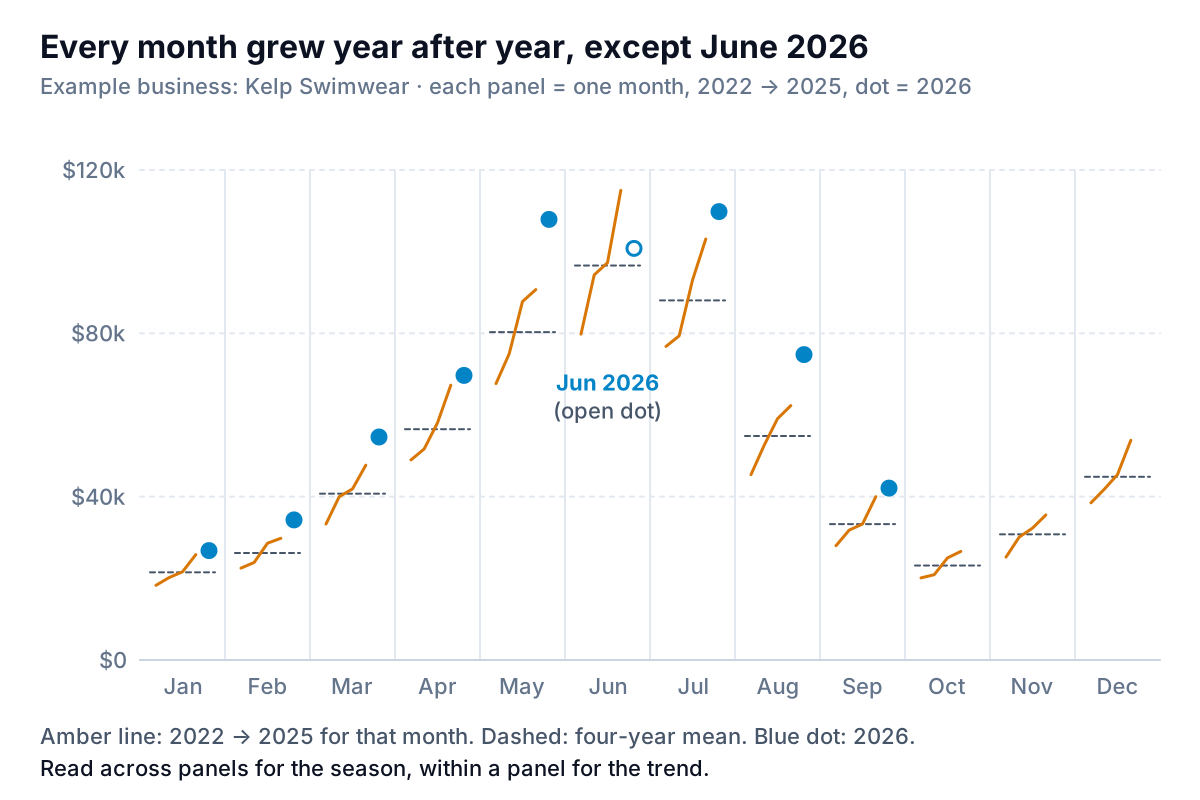
Two readings in one chart. Across the panels, the heights trace the season: low in winter, peaking in June. Within each panel, the slope is that month's own trend. Every Kelp panel rises from 2022 to 2025, and every 2026 dot sits above the 2025 value, except June.
That's the June problem, and it's visible here in a way the ordinary sales chart hides. June 2026 was still one of Kelp's five biggest months ever, so on a monthly sales chart it looks fine. Against its own history it's the only month of 2026 that shrank. The cause turned out to be stock: the best-selling one-piece sold out in late May and wasn't back until July.
Separate the season from the trend
The last form answers "how is the business doing, really, this month?" Divide each month's sales by its seasonal index (as a fraction) to get seasonally adjusted sales: what the month would have been without its season.
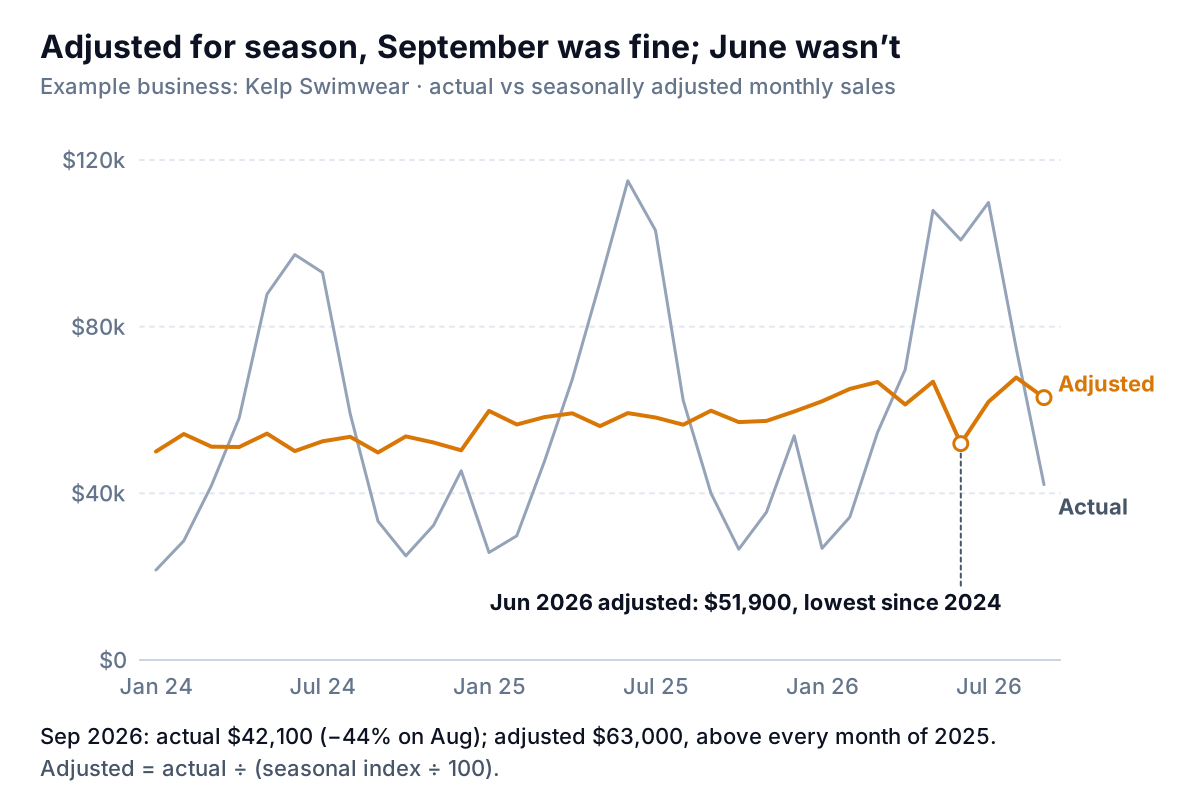
September 2026: $42,100 ÷ 0.669 = about $63,000. That's above every month of 2025 on the same basis, so the 44% fall from August was the season and nothing else. The ads email went unsent. June 2026: $100,800 ÷ 1.941 = $51,900, the lowest adjusted month since 2024. That's the month that deserved the email, and it went to the supplier.
Statistical agencies do this with far more care. The US Census Bureau publishes X-13ARIMA-SEATS, its seasonal adjustment software, which also handles trading-day and holiday effects. For a small business with a handful of years of data, the simple index is enough to stop you reacting to the calendar, as long as you remember it's an estimate. Treat a single adjusted month that moves 5% either way as noise, and act when two or three move the same way. If you only need the direction of the business, a trailing-12-month total also cancels the season, with some lag; our revenue chart guide shows it. For how fast the adjusted line is growing, see the sales growth chart.
Build a seasonality chart in Excel or Google Sheets
Shape the data
Start with one row per month: a real date in column A, sales in B. Add =YEAR(A2) in C and =MONTH(A2) in D. Then build a grid with months 1 to 12 down the side and one column per year, either with a pivot table (Month in rows, Year in columns, Sum of Sales in values) or with =SUMIFS($B:$B,$C:$C,G$1,$D:$D,$F2). In Google Sheets, a Sheets pivot table does the same.
The four charts
- Overlay: select the grid and insert a line chart. In Excel, Insert > Recommended Charts > All Charts > Line (Microsoft's chart guide). In Sheets, Insert > Chart and pick Line chart under Setup (Google's chart help). Leave this year's future months blank so the line stops.
- Seasonal index: under each full year's column, add a ratio column:
=G2/AVERAGE(G$2:G$13)*100. Average the ratio columns across years for each month, then make a column chart with a reference line at 100. - Cycle plot: neither Excel nor Sheets has one built in. The workaround is a single line chart over a reshaped column: sort by month and then year (Jan 2022, Jan 2023, Jan 2024, Jan 2025, then Feb 2022…) and insert one blank row between months. Excel shows empty cells as gaps in a line chart by default, per Microsoft's page on empty cells in charts, so each month becomes its own short segment. Add a second series with each month's average repeated across its rows for the mean lines.
- Seasonally adjusted line: in the original table, add
=B2/(INDEX(Index,D2)/100), where Index is the 12-row range of seasonal indexes, and chart actual (gray) and adjusted (colour) together on one axis starting at zero.
When seasonality gets mistaken for trend
Most seasonal mistakes come from comparing a month with the wrong thing.
- Month-on-month changes in a seasonal business. "Down 44% on August" is true and meaningless for Kelp. Compare with the same month last year, or with the adjusted line. Our year over year comparison chart guide covers the first, including the calendar traps.
- A trendline through raw monthly data. A straight trendline through, say, 21 months that start in January and end in September gets pulled by where in the season the data starts and ends. Fit trends to the adjusted line or to annual totals.
- An index from one year. One year's index includes that year's one-offs: a heatwave, a viral post, a stockout. Use three or more years, and rebuild the index each January.
- Moving events. Easter and Black Friday move between dates, and a promotion that moved from May to April moves the season with it. When an event changes month, note it on the chart and expect the index for both months to be off that year.
- Partial years in the averages. Including 2026's January to September in the index calculation would overweight the spring and summer. Use full years only.
If you'd rather not rebuild the grid and the index each month, Parity can work from your store or accounting export, or a direct Shopify or QuickBooks Online connection. It builds a dashboard with headline numbers and their trends, charts, what explains them and what needs attention, every number checked against queries on the full dataset. Ask it for the same month in previous years or sales adjusted for season, and refine it by chat. For store-specific report names, see our Shopify reports guide.
Upload a few years of monthly sales and get seasonal charts checked against your full dataset. Build a report from your data free
Kelp's owner now keeps the cycle plot pinned above her monthly numbers. It's the chart that flags a month like June while the ordinary sales chart is still showing six figures.