In March 2026 the revenue chart at Harrow Hardware, an example store (not a real one), had one bar taller than any before it: $138,400. The owner read it as proof that spring had come early and started pricing a second Saturday cashier. Then her bookkeeper pointed at one invoice. A school district had bought $34,000 of shelving and paint for a renovation, once. Without it, March was $104,400, up a healthy but ordinary 7% on the March before.
A revenue chart shows how your sales income has moved over time, and the one you pick decides which question it can answer. Monthly columns tell you how a month did. A trailing-12-month line tells you whether the business is growing. A cumulative line against last year tells you whether you're ahead. None of them tells you that a bar contains a one-off unless you write it on the chart. This guide builds all three from 33 months of Harrow's numbers, shows where each one misleads, and gives the steps in Excel, Google Sheets and Looker Studio.
If you want to follow along, download the practice workbook. It has Harrow's data shaped one row per month, the helper formulas, the three charts below built natively in Excel, and an empty sheet for your own months.
Four questions, four revenue charts
Most revenue charts go wrong before anyone opens Excel, because nobody said what question the chart is for. Here are the four an owner asks most, and the chart that answers each one.
| The question | The chart | What to read |
|---|---|---|
| How did last month do? | Monthly columns, 13 to 24 months | The latest bar against the same month a year earlier |
| Is the business growing? | Trailing-12-month (TTM) line | The slope, and any month it turns down |
| Are we ahead of last year? | Cumulative year-to-date line, this year against last | The gap between the two lines |
| What happened in that month? | Any of the above, annotated | The note on the bar |
Three neighbouring questions get their own posts, so this one stays short on them. If you want growth as a rate (percent per year, indexed lines, log scales), see the sales growth chart guide. If you want every month of this year laid over the same month last year, that's the year over year comparison chart. And if your real question is "is this dip just the time of year?", start with the seasonality chart.
One more thing before charting: decide what "revenue" means in your numbers. Use the same definition every month, net of refunds and discounts and without sales tax, as set out in how to calculate revenue. A chart can't fix a column that is cash in some months and invoices in others.
Monthly columns, and when a line works better
For "how did the month do?", columns are the default for a reason. Each month is a separate total, and a column's length shows it directly. Lengths that share a baseline are easy to compare, which is why bars and lines beat pies and bubbles for comparing amounts. (Our guide to Excel chart types sorts the rest by question.) The Financial Times' Visual Vocabulary lists the column chart for change over time and notes that it is usually best with one series at a time.
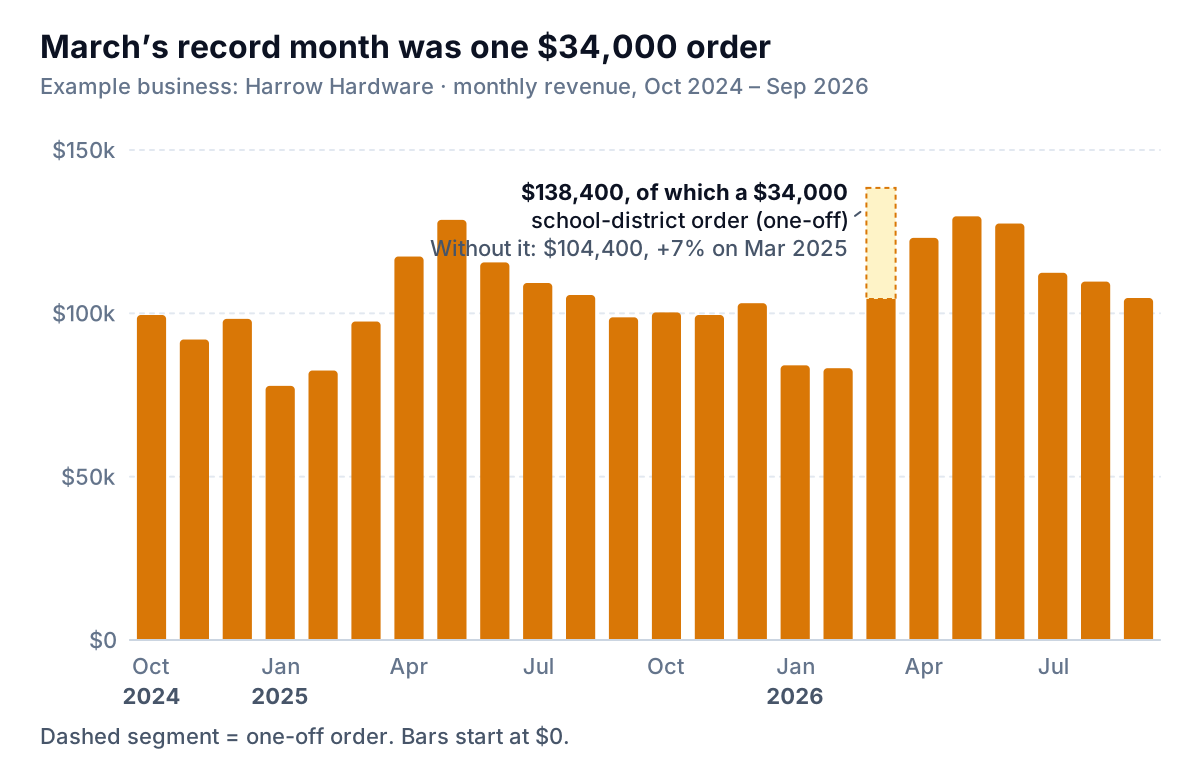
Read it in this order. First, the latest bar against the bar twelve to the left: September 2026 was $104,700 against $98,800 a year earlier, up 6.0%. Second, the shape: Harrow's spring peak in April to June and its January–February trough repeat every year, so a low February is not news. Third, anything that sticks out, and whether you can explain it.
Choose the window on purpose. Thirteen months is the minimum, so the latest month has its twin from last year on the same chart. Twenty-four shows two full seasons, which is what Harrow uses. Beyond about 36 monthly columns the bars get thin and the labels crowd. That's the point to switch to a line, which shows a long run of points without clutter.
A line also wins when you have more than one series. Two years of revenue as clustered columns makes 24 pairs of bars that nobody can compare. Two lines, last year in gray and this year in colour, read at a glance. That's the core of the year over year chart.
The trailing-12-month line: is the business growing?
Monthly revenue is a bad answer to "are we growing?" because seasonality swamps the trend. Harrow's monthly line runs from $77,800 to $138,400 and back. The question it can't answer is whether the business is any bigger than a year ago.
A trailing-12-month (TTM) total fixes that. Each point is the sum of that month and the eleven before it, so every point contains exactly one January, one April and one December. The season cancels out, and what's left is the trend.
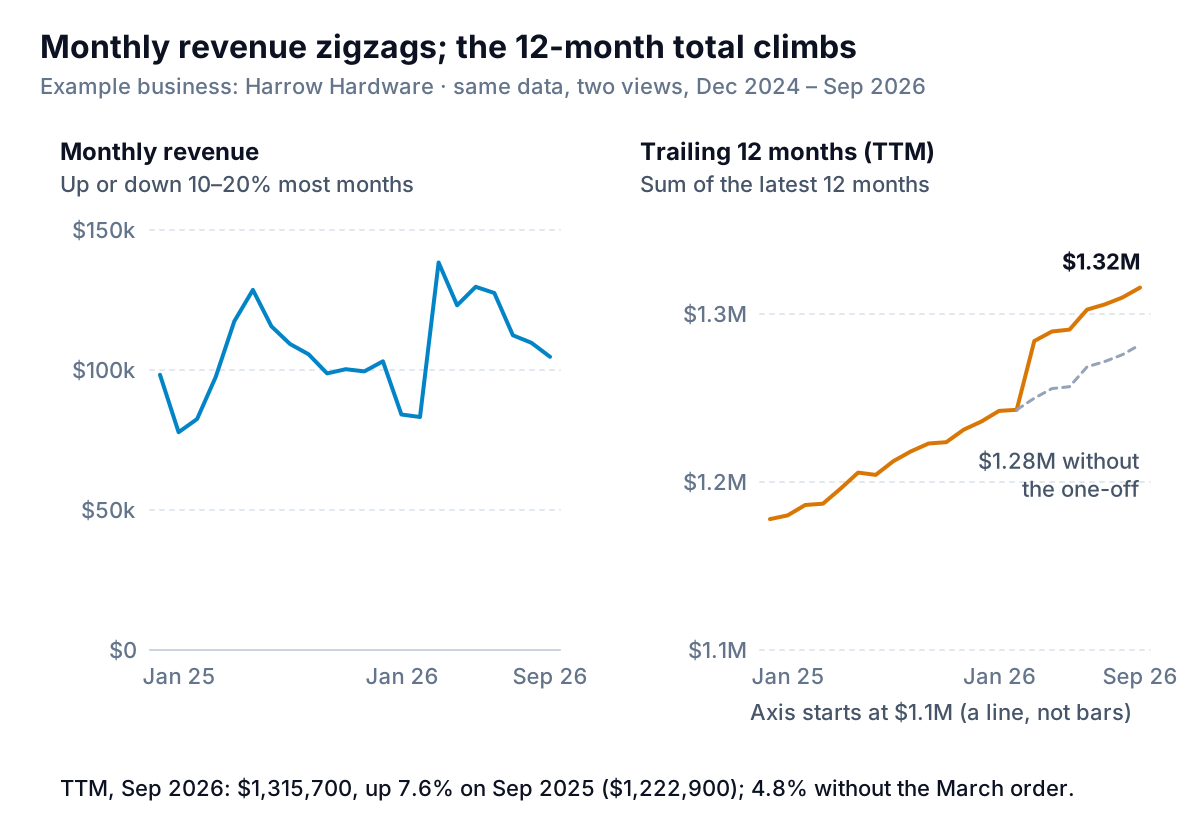
Harrow's TTM revenue was $1,315,700 in September 2026, up 7.6% on the $1,222,900 of September 2025. Notice the step in March 2026. The one-off order lifts every TTM point for twelve months, and in March 2027 it drops out and the line will step down by $34,000. If you don't plan for that, next spring's TTM chart will show a fall that isn't one. The dashed gray line in the figure is the fix: TTM of everyday revenue, with the one-off excluded. On that basis Harrow grew 4.8%, which is the honest number to plan staffing around.
Two cautions. A TTM line is slow by design: a bad month moves it by one-twelfth, so it confirms a turn months after the monthly bars show it. Keep the monthly chart next to it. And because a TTM line is a line, its axis doesn't have to start at zero. Harrow's starts at $1.1M, so the change is visible, and the axis says so plainly. Bars are different, as the mistakes section below shows.
Cumulative year to date, against last year
"Are we ahead of last year?" is the question a cumulative chart answers. Each point is revenue from January 1 to the end of that month. Plot this year and last year on the same axes, January to December, and the gap between the lines is how far ahead or behind you are.
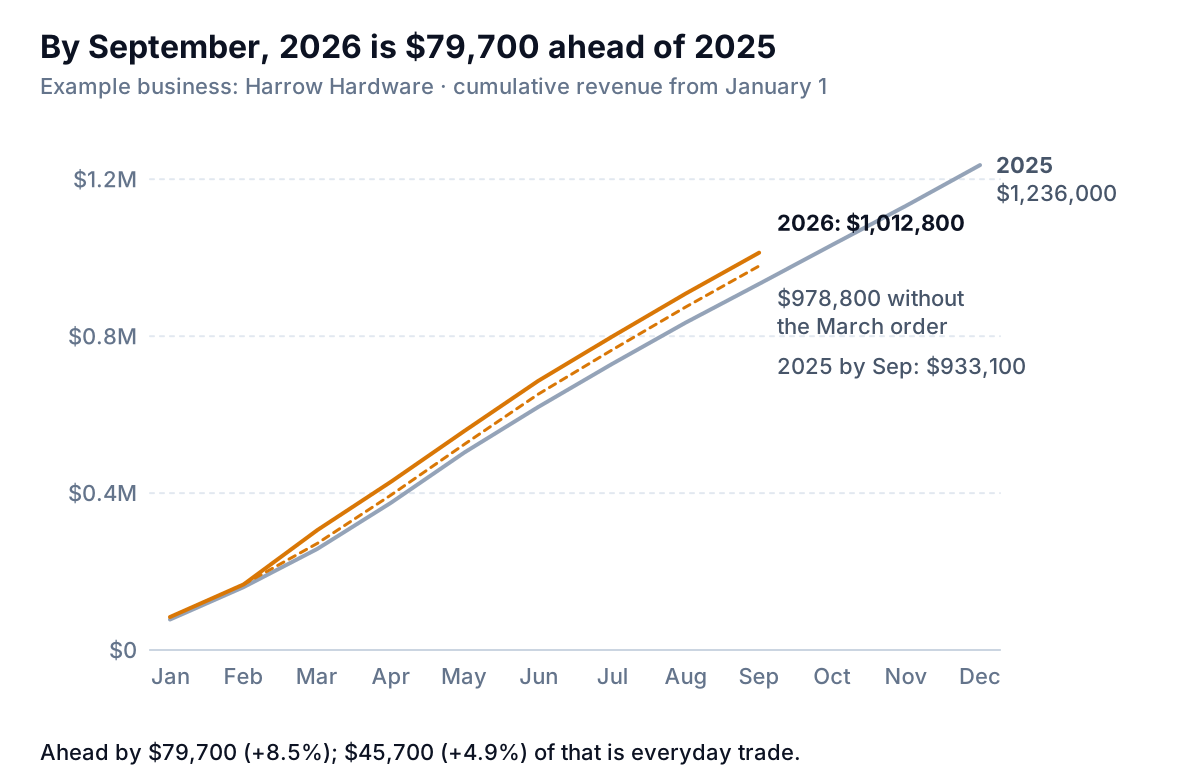
By the end of September 2026, Harrow had taken $1,012,800 against $933,100 by the same point in 2025: $79,700 ahead, or 8.5%. Take out the school-district order and the lead is $45,700, or 4.9%. The 2025 line runs on to $1,236,000, which gives the owner a target: if October to December simply match last year's $302,900, 2026 ends at $1,281,700 of everyday revenue, plus the one-off.
The trap with cumulative charts is that they always rise. A cumulative line on its own looks like success even in a terrible year, because adding positive months can only go up. Never show one without last year, a budget or a target beside it. Watch the slope as well as the gap: if this year's line is above but flatter than last year's in recent months, the lead is shrinking.
How to build a revenue chart in Excel, Google Sheets or Looker Studio
Shape the data first
Every chart above comes from one table with one row per month. Put a real date in column A (the first of the month, not the text "Mar"), net revenue in B, and one-offs in C. Then add helper columns, all of which are in the workbook:
- Everyday revenue:
=B13-N(C13).N()turns a blank one-off cell into zero. - Trailing 12 months: in the 12th row of data,
=IF(COUNT(B2:B13)=12,SUM(B2:B13),""), copied down. The ranges move with each row. - Year and month number:
=YEAR(A2)and=MONTH(A2). - Year to date:
=SUMIFS($B$2:$B$34,$F$2:$F$34,F2,$G$2:$G$34,"<="&G2), which adds every month in the same year up to this one.
For the cumulative chart, reshape into a second small table: months January to December down the side, one column per year. Fill months that haven't happened yet with =NA(). Excel skips #N/A points, so the line stops at September instead of diving to zero.
Excel
- Select the month and revenue columns and choose Insert > Recommended Charts, then the All Charts tab and Column. Microsoft's guide to creating a chart from start to finish covers the dialog.
- Check the vertical axis starts at zero. Select the axis, open Format Axis > Axis Options and type 0 in Minimum, as in Microsoft's page on changing the vertical axis scale. When values are close together, Excel's automatic minimum can start above zero.
- Annotate the odd month. Click the series, then click the single bar so only it is selected, and add a data label to that point. Microsoft's data labels guide explains labelling one point. Then type your note into the label ("incl. $34k one-off order").
- For the TTM and year-to-date charts, select those columns and insert a line chart the same way. Delete the legend and type the series names at the line ends with text boxes. A label next to the line is quicker to read than a legend.
Google Sheets and Looker Studio
In Google Sheets, select the range and choose Insert > Chart, then pick the chart type under Setup, per Google's help on adding and editing a chart. Google's column chart page puts labels in the first column and numbers in the others, which is the shape above. Under Customize, the Vertical axis section sets a minimum and the Series section adds data labels. There's no single-point label as tidy as Excel's, so the simplest annotation is a note in the chart title or subtitle.
In Looker Studio, a time series chart does the cumulative view without helper columns. The time series reference lists a Cumulative option per series on the Style tab. Setting the comparison date range to Previous year on the Setup tab adds last year as a second line, according to Google's page on report date ranges. A cumulative series over the current year is your YTD line. Google's pages don't say how the comparison line behaves with Cumulative switched on, so check both lines against your own table the first time.
Five ways a revenue chart lies
Each of these is easy to do by accident and easy to fix.
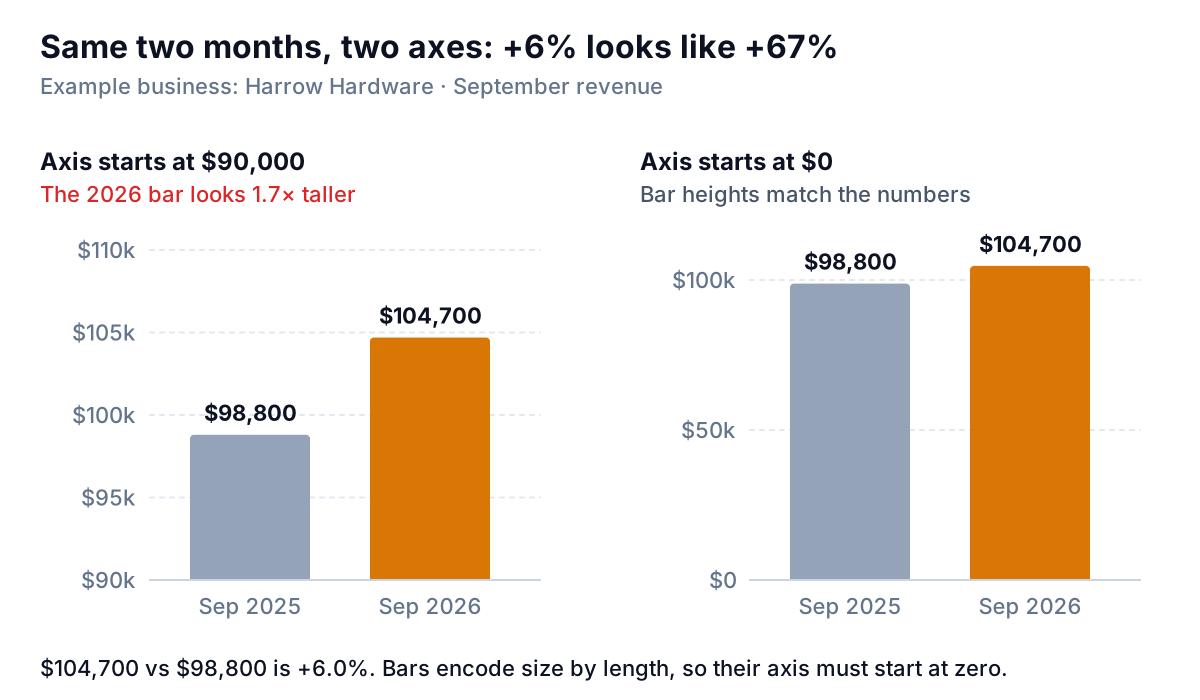
- A bar chart with a cut axis. In the left panel the 2026 bar is 1.7 times the height of 2025's for a 6% rise. Bars show size by length, so their axis starts at zero. If the change is too small to see from zero, it's either genuinely small or you want a line, a TTM chart or a growth-rate chart instead.
- An unlabelled one-off. Harrow's March bar told the wrong story until it had a note. Split the bar (as in the first figure) or label it, and show a TTM line without the one-off when you plan.
- A cumulative line with nothing to compare. It always goes up. Add last year, the budget or a target.
- Two scales on one chart. Revenue in bars on the left axis and margin or order count as a line on the right axis invites the reader to compare heights that mean nothing. The crossing points move with whatever minimum and maximum you choose. Use two charts stacked with the months lined up.
- Mixed definitions. Cash received in some months, invoices in others, or sales tax included after a system change. The chart will show a jump that's an accounting change. Note the break on the chart, or restate the earlier months.
Then the cosmetic ones that still cost understanding: 3D columns (the depth makes heights hard to read), a legend for a single series, and a title that says "Revenue" when it could say what happened. "March's record month was one $34,000 order" is a title someone remembers.
Putting the three together
For a monthly review, Harrow's owner now looks at one page: the 24 monthly columns with notes, the TTM line beside it, and the cumulative line against last year underneath. Three charts, three questions, and a sentence under each with the number that matters: September up 6.0% on last year, TTM up 4.8% on everyday trade, and $45,700 ahead year to date before the one-off.
Keeping that page current is mostly the shaping work: adding the month, checking the definition hasn't drifted, and extending the chart ranges. If you'd rather not, Parity builds the same kind of page from QuickBooks Online, Shopify, Square, Stripe or a CSV or Excel export: headline numbers with trends, the charts, what explains them, and a table of what needs attention, with every number checked against queries on the full dataset before you see it. You can then ask it to mark a one-off or add last year's line, and update it with next month's file.
Connect your books or upload a sales export and get revenue charts with every number checked against your data. Build a report from your data free
Whichever way you build it, write the takeaway in the title before you share the chart. If you can't say in one sentence what the chart shows, it's probably answering the wrong question.