Sprocket Bike Shop, an example business, not a real one, sold $521,000 in 2025, its best year since opening. It was also its second-slowest year for growth: up 6.5%, against 79.8% in 2020 and 39.4% in 2019. The owner's sales chart, eight blue columns rising left to right, showed the first fact and hid the second.
That's the difference between a sales chart and a sales growth chart. A sales chart shows how big sales are. A sales growth chart shows how fast they're changing: as a percentage each year, as lines indexed to a common starting point, or on a log scale where equal slopes mean equal growth rates. This guide uses eight years of Sprocket's sales to show each one, when to use it, and the trap of percentages calculated on tiny bases. It finishes with the Excel and Google Sheets steps.
We won't re-derive the growth formula here. If you want it with the calendar traps, see year over year growth. For charting revenue itself (monthly columns, trailing-12-month lines), see our revenue chart guide.
Level or rate: what a sales growth chart should show
Put the two side by side and they tell different stories from the same eight numbers.
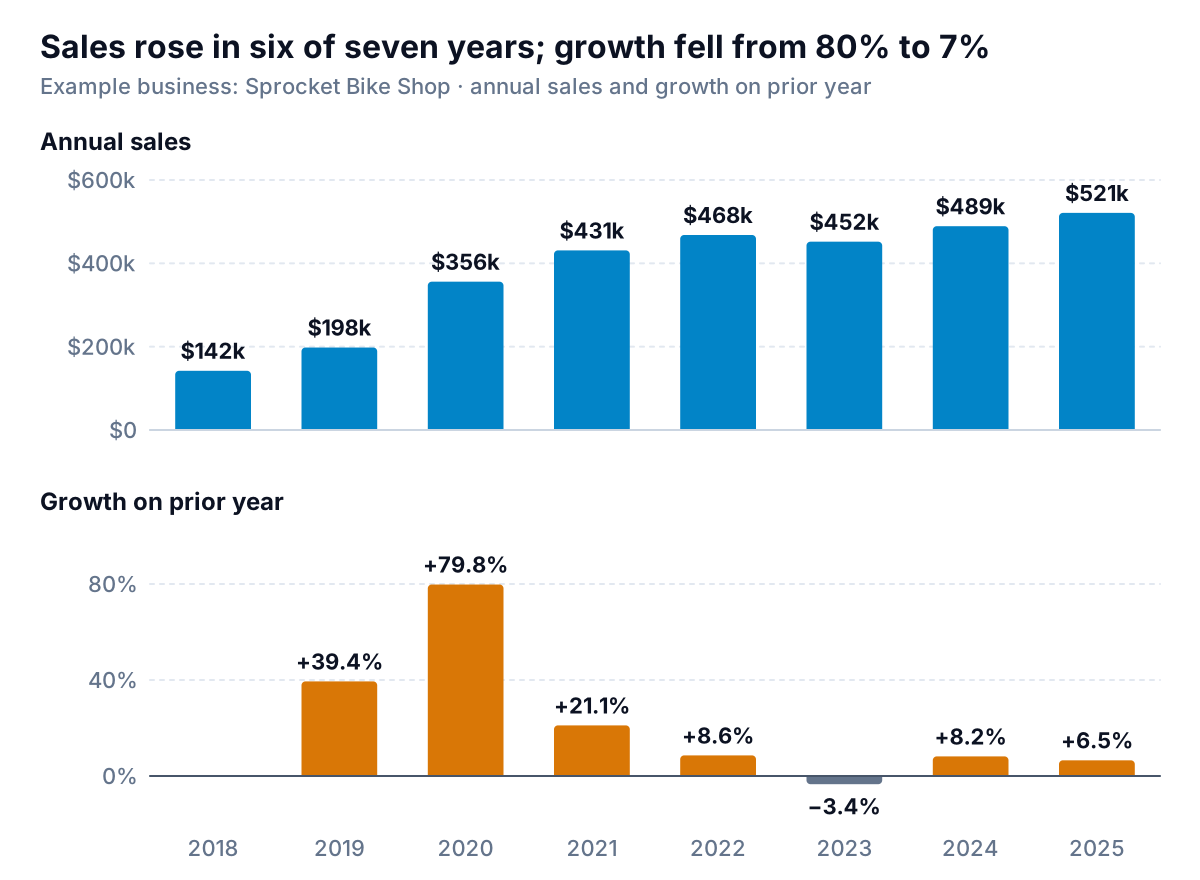
The top chart answers "how much did we sell?" and it looks like steady success. The bottom chart answers "how fast are we growing?" and it shows a business that grew fast, then settled. The 2020 jump looks like the start of something on the sales chart. On the growth chart it's clearly an exception, followed by four years in single digits or below.
Neither is wrong. Use the level chart when the question is about size: "can we afford a second mechanic?", "how much stock do we need?". Use a growth chart when the question is about momentum: "is the business speeding up or slowing down?", "is this year's marketing working better than last year's?". When you're presenting to a lender or a partner, show both, stacked, with the years lined up. That's the layout in the figure, and it fits on one page of a sales report.
The rest of this guide covers three ways to chart growth, each for a different version of the question:
| Your question | Chart |
|---|---|
| Is growth speeding up or slowing down? | Growth-rate bars, one per year (or per month against the same month last year) |
| Which part of the business is growing fastest? | Indexed lines, every series set to 100 in the same base year |
| How has the growth rate changed over a long history? | Sales on a log scale |
Growth-rate bars: the simplest sales growth chart
Each bar is one period's sales against the period before: this year ÷ last year − 1. For annual data that's all there is to it. Sprocket's bars run +39.4%, +79.8%, +21.1%, +8.6%, −3.4%, +8.2%, +6.5%.
For monthly data, compare each month with the same month last year, not with the month before. Month-on-month growth in a bike shop is mostly the weather: April beats March every year. Comparing with the same month a year ago removes the season. If you want this year's months laid over last year's to see the gap, that's a year over year comparison chart, and if the season itself is the question, see the seasonality chart guide.
Rules for drawing them:
- Bars from a zero line, both directions. A fall is a bar below zero, not a short bar. The FT's Visual Vocabulary lists the diverging bar for exactly this: values that can be positive or negative from a fixed reference point.
- Colour a fall differently, but not alarm red. A 3.4% dip after a boom is information, not an emergency. Sprocket's chart uses slate gray.
- Label every bar. With seven or eight bars there's room, and growth rates are read as numbers.
- Leave the first year blank. 2018 has no prior year in the data, so it gets no bar. Don't put a zero there.
- Add the average as a reference, if it's honest. The compound annual growth rate (CAGR) from 2018 to 2025 is (521,000 ÷ 142,000)^(1/7) − 1 = 20.4% a year. From 2022 to 2025 it's 3.6%. Pick the window that matches the decision, and say which one you used. A CAGR that starts in the business's first full year flatters it.
Indexed lines: whose sales grew fastest?
Sprocket's owner wanted to know which part of the shop was carrying it. Bikes sell about $230,000 a year and e-bikes under $100,000, so on a dollar chart the bike line sits far above everything else and the small lines are squashed at the bottom. Indexing fixes that. Divide each year's sales by the same series' sales in a base year and multiply by 100. Every line starts at 100, and the height after that is growth: 120 means up 20% since the base year.
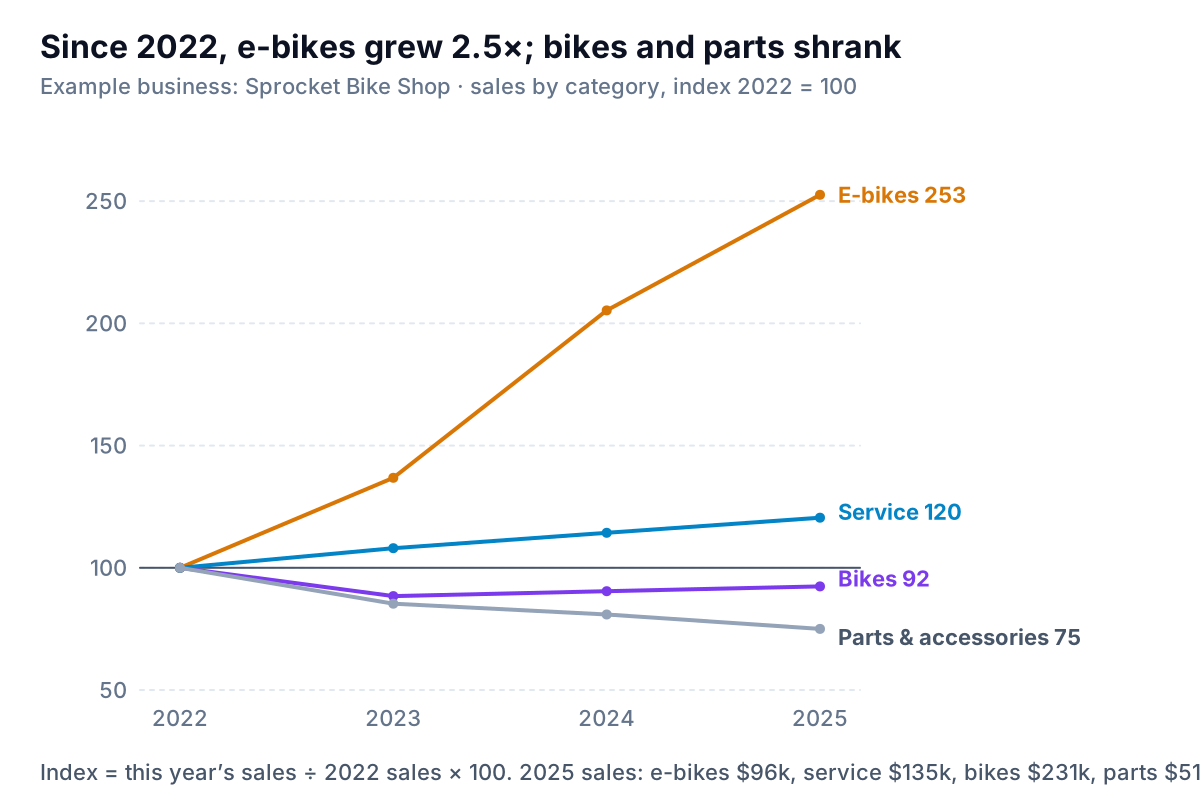
Now the shape is obvious. E-bike sales went from $38,000 in 2022 to $96,000 in 2025, an index of 253. Service rose steadily to 120. Bike sales fell after 2022 and have been creeping back, at 92. Parts and accessories fell every year, to 75, which is worth a question about pricing or online competition.
Three decisions make or break an indexed chart:
- The base year. It sets the story. Indexed to 2020, a boom year for bikes in Sprocket's data, every category would look as if it had stalled. Choose an ordinary year, say which one in the subtitle, and stick with it.
- A base that isn't tiny. Bike fitting started in 2024 with $2,000 of sales. Indexed to 2024 it would be at 400 in 2025 and dwarf the rest. It's left off this chart for the reason in the next-but-one section.
- Dollars somewhere nearby. An index hides size, so put the latest dollar figures in the caption or a small table. Index 253 on $96,000 and index 92 on $231,000 lead to different decisions.
Indexing is also the fair way to put two series with different units on one chart: sales and customer count, or your sales and a local benchmark. A second vertical axis would let you stretch either line to look like the other.
Log scale: long histories without the distortion
On an ordinary (linear) axis, the same percentage growth makes a bigger step every year, because it's a percentage of a bigger number. Over a long history that makes recent years look dramatic and early years look flat. A log scale spaces the gridlines by multiplication instead: $100k, $200k, $400k, $800k sit equal distances apart. Datawrapper's How to read a log scale: Growth rate puts it simply: log scales show relative values instead of absolute ones.
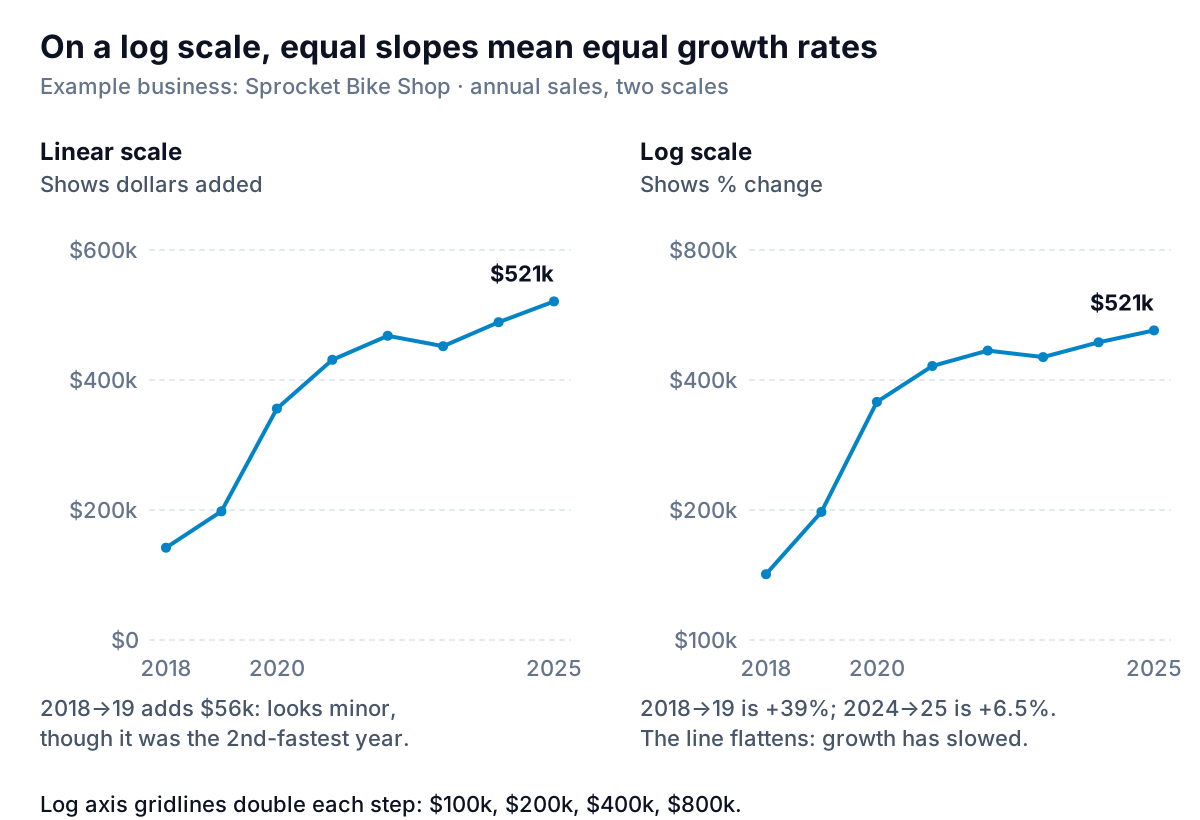
On the linear chart, 2018 to 2019 looks like a modest step: $56,000. On the log chart it's one of the steepest segments, because it was +39%. After 2021 the log line flattens, which is the slowdown in growth rates seen in the first figure, drawn as a shape.
When to use one: a history of five years or more, or a business that has grown several times over. When not to: an audience that hasn't seen one before, without a note on the axis. Always write "log scale" in the axis title and use gridline values that double or multiply by ten. A log axis can't show zero or negative numbers, per Microsoft's axis scale page, so it's for sales, not profit.
The small-base trap: +300% that barely mattered
Here's the chart that fooled Sprocket's owner into planning a second fitting studio.
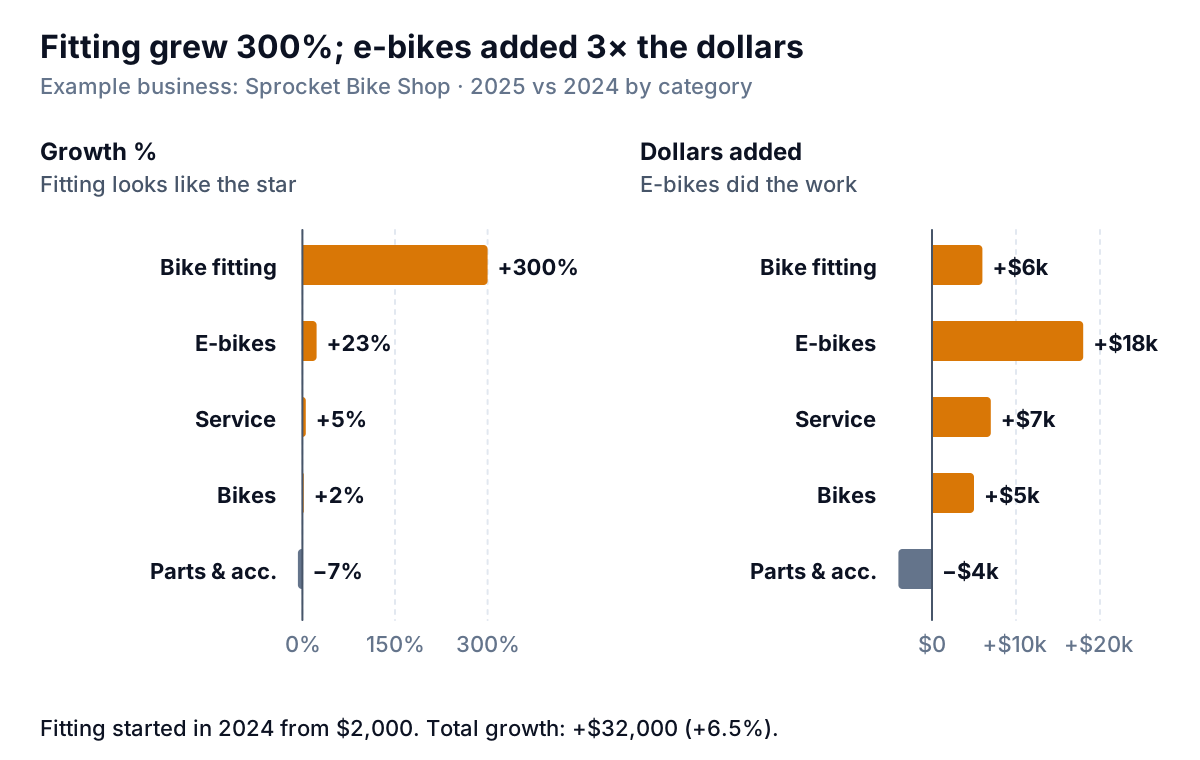
Bike fitting went from $2,000 in its first year to $8,000: +300%. E-bikes grew 23%, but added $18,000. Of the $32,000 Sprocket added in 2025, fitting contributed $6,000. A growth-rate chart can't show this, because it divides by the starting value and a small start makes any gain look huge.
Decision rules that stop it happening:
- Show dollars added next to any percentage growth chart by category, product or location. Sort both by dollars.
- Don't show a growth rate for anything under about 5% of total sales in the base period. Write "new" or the dollar change instead. The threshold is a judgement call. Pick one and apply it to every line.
- Never index or compute growth from zero or a part year. Fitting's 2024 was its launch year, so its "growth" partly measures a full year against a partial one.
Build a sales growth chart in Excel or Google Sheets
Shape the data as one row per year (or per month), with one column per series. Then add helper columns next to it:
- Growth: in row 3,
=B3/B2-1, formatted as a percentage, copied down. Leave row 2 empty. - Index:
=B2/B$2*100, copied down and across. The$locks the base year. Change the base year by changing that one row reference. - Dollars added:
=B3-B2. - CAGR:
=(B9/B2)^(1/7)-1for eight years of data (seven intervals). The exponent is 1 ÷ the number of years between the first and last values.
Excel
- For growth bars, select the year and growth columns, then Insert > Recommended Charts > All Charts > Column, as in Microsoft's chart guide. To colour the one negative bar, click the series, click that bar alone, and change its fill.
- For indexed lines, select the year and index columns and insert a Line chart. Delete the legend and label each line at its right-hand end.
- For a log scale, select the vertical axis, open Format Axis > Axis Options and tick Logarithmic scale. Microsoft's axis scale page has the steps for Microsoft 365, 2024 and 2021.
Google Sheets and Looker Studio
In Sheets, Insert > Chart, then choose Column or Line under Setup (Google's chart help). Google's line chart page lists a Log scale option in the Customize tab's Vertical axis section, alongside the minimum and maximum. In Looker Studio, the time series chart has a Log scale option under the Left Y-Axis style settings.
If you build these from an accounting or point-of-sale export every year, Parity can do the shaping. Upload the file or connect QuickBooks Online, Shopify or Square, and it builds a dashboard with headline numbers and their trends, charts, what explains them and what needs attention, every number checked against queries on the full dataset. Ask it for growth by category with dollars alongside, and refine by chat.
Upload your sales export and get growth charts checked against every row of your data. Build a report from your data free
For Sprocket, the four charts led to one decision. The fitting studio stayed a corner of the service bay. The money went into e-bike stock and a second e-bike mechanic, where the dollars were.