"We're up 12%," the bookkeeper at Corvid Coffee Roasters, an example café and roastery we'll follow in this guide, wrote under September's numbers. The owner had a different figure in her head: under 5%. They were both right. September 2026 sales were 12.0% higher than September 2025, while January to September was up 4.8% and the last twelve months 3.6%. Year over year growth is the change in a number against the same period a year earlier, as a percentage: (this year − last year) ÷ last year. The arithmetic is the easy part. The hard part is choosing which periods to compare, and knowing what's hiding inside the result.
This guide covers the formula, the three ways to apply it (one month, year to date, trailing twelve months), how to set it up in Excel, the calendar effects that inflate or deflate a month, and how to tell real growth from price rises and one-off wins.
The year over year growth formula
YoY growth = (current period − same period last year) ÷ same period last year
For Corvid's September: ($73,920 − $66,000) ÷ $66,000 = $7,920 ÷ $66,000 = 12.0%. The same thing written another way is current ÷ prior − 1, which is shorter in a spreadsheet: 73,920 ÷ 66,000 − 1 = 0.12.
Comparing with the same period a year earlier, rather than the month before, takes out ordinary seasonality. A coffee shop always sells more in December than in February; comparing December with November tells you about the holidays, while comparing December with last December tells you about the business.
Five edge cases come up often enough to decide in advance:
- Last year was zero. Growth from nothing has no percentage. Show the dollar change and write "new" in the growth column.
- Last year was negative (a loss, for instance). Dividing by a negative number flips the sign, so a loss shrinking from −$10,000 to −$5,000 shows as −50%, which reads as getting worse. Show the dollar change, or describe it in words ("loss halved").
- A partial period. Halfway through October, October-to-date can't be compared with all of last October. Compare the same dates (October 1–19 against October 1–19 last year), or wait for the month to close.
- A change in how the books are kept. If you moved from cash to accrual accounting, or started recording sales tax or tips differently, last year's figures aren't on the same basis. Restate last year, or note the break beside the number.
- A very small base. A product line that sold $200 last September and $1,000 this September grew 400%. True, and useless for decisions. Show growth in percentages only where last year's figure is big enough to matter.
One month, year to date or trailing twelve months?
The same formula gives three different answers depending on the window, and each answers a different question.
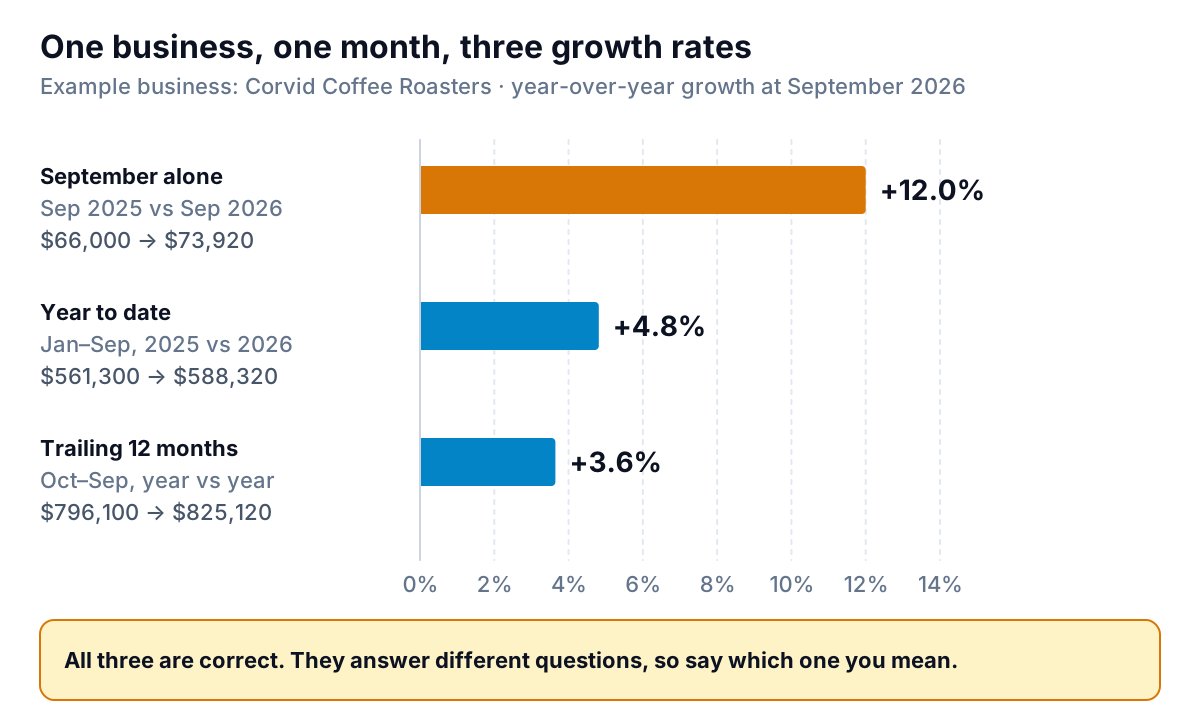
| Window | Compares | Corvid at September 2026 | Use it for |
|---|---|---|---|
| Single month | Sep 2026 vs Sep 2025 | +12.0% | Spotting a change early; checking one event (a new product, a closure) |
| Year to date (YTD) | Jan–Sep 2026 vs Jan–Sep 2025 | +4.8% | Progress against this year's budget or targets |
| Trailing twelve months (TTM) | Oct 2025–Sep 2026 vs Oct 2024–Sep 2025 | +3.6% | The underlying trend; any month of the year, with no seasonal bias |
A single month is noisy. One extra weekend, a late delivery or a holiday shifting by a week can move it several points, as September did here. Year to date smooths that out but resets every January, so in February it's still a two-month comparison. Trailing twelve months always covers a full year, which makes it the steadiest read on the trend. Corvid's TTM is lower than its YTD because last year's October to December, the busiest stretch, grew less than 1%, and that quarter is inside the TTM window but not the YTD one.
Look at the months side by side and September stands out:
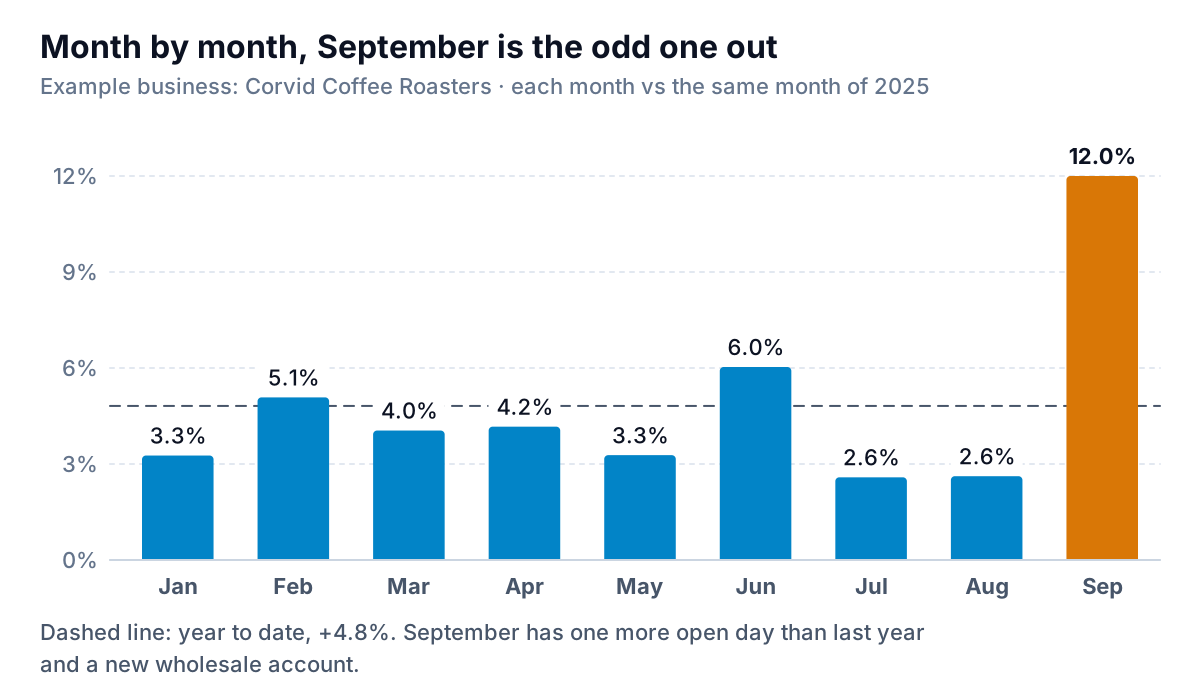
A practical rule: report TTM growth as the headline in a monthly report, YTD growth against the budget, and the single-month figure only with a sentence saying what drove it. Our monthly report template has room for all three. If you want to annualise a short period rather than compare it, that's a run rate, which is a different calculation with its own traps.
Calculating year over year growth in Excel
Lay the data out as one row per month: the first day of the month in column A (as a real date, not text) and revenue in column B. Corvid's 24 months run from October 2024 in row 2 to September 2026 in row 25. Then, for the row you're reporting on:
| What | Formula (row 25 = Sep 2026) | Result |
|---|---|---|
| Single month YoY | =B25/B13-1 | 12.0% |
| Same, without relying on row positions | =B25/INDEX($B$2:$B$25,MATCH(EDATE(A25,-12),$A$2:$A$25,0))-1 | 12.0% |
| YTD this year | =SUMIFS($B$2:$B$25,$A$2:$A$25,">="&DATE(YEAR(A25),1,1),$A$2:$A$25,"<="&A25) | $588,320 |
| YTD last year | =SUMIFS($B$2:$B$25,$A$2:$A$25,">="&DATE(YEAR(A25)-1,1,1),$A$2:$A$25,"<="&EDATE(A25,-12)) | $561,300 |
| TTM this year | =SUMIFS($B$2:$B$25,$A$2:$A$25,">"&EDATE(A25,-12),$A$2:$A$25,"<="&A25) | $825,120 |
| TTM last year | =SUMIFS($B$2:$B$25,$A$2:$A$25,">"&EDATE(A25,-24),$A$2:$A$25,"<="&EDATE(A25,-12)) | $796,100 |
Divide each "this year" by its "last year" and subtract 1 for the growth rate, then format the cell as a percentage. EDATE moves a date by whole months, so EDATE(A25,−12) is September 1, 2025, and SUMIFS adds up the months between two dates. The lookup version is safer than B25/B13 because a missing or duplicated month won't silently shift the comparison by a row. Wrap any of them in IFERROR(…,"") if some months have no prior year.
To get the monthly figures out of your books, run a profit and loss report by month for the last 24 months and export it. In QuickBooks Online, the Profit and Loss Comparison report (Reports, then Standard reports) compares a period with the same dates last year and can add a % change column. Our QuickBooks reports guide covers the rest of the reporting menu.
Calendar effects that move a month
Here's what was inside Corvid's 12.0%.
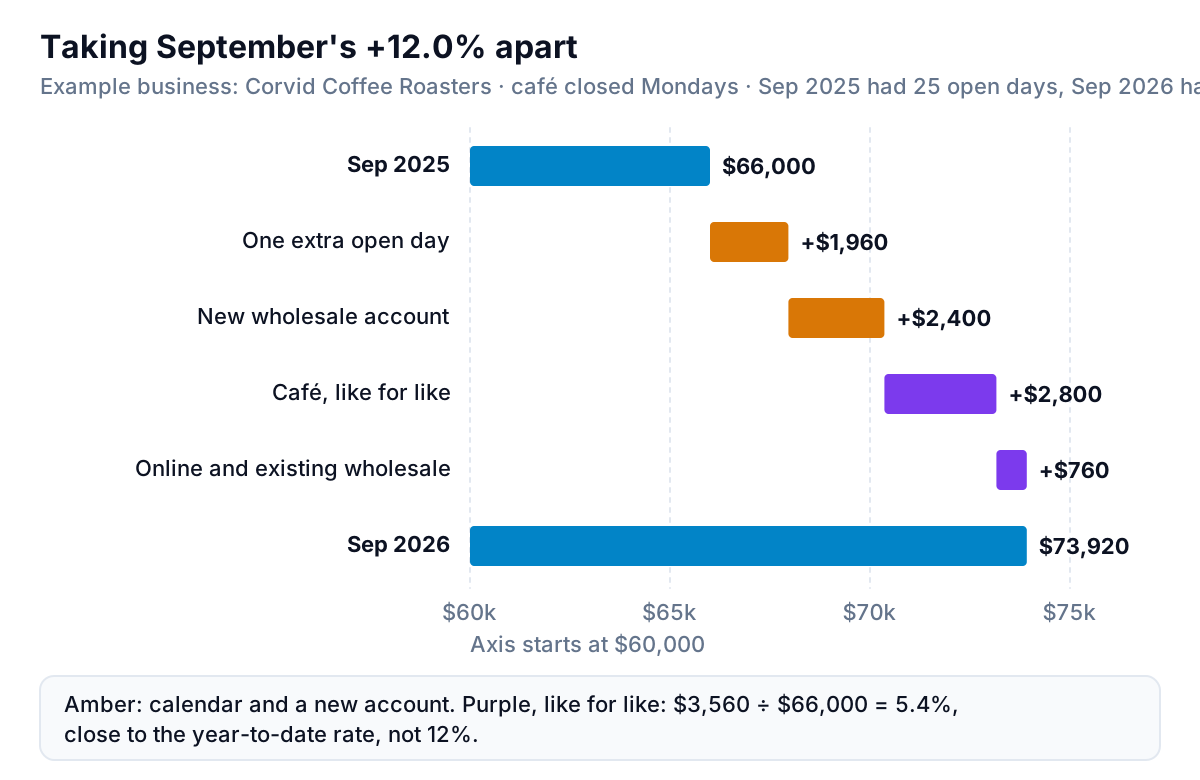
The café is closed on Mondays. September 2025 had five Mondays, so 25 open days; September 2026 had four, so 26. At this September's café takings of $50,960 over 26 days, $1,960 a day, the extra day is worth about $1,960, or 3 of the 12 points. Nothing about the business changed; the calendar did.
Calendar effects to check before you trust a single month:
- Trading days and weekdays. Months have different numbers of each weekday from year to year. If Saturdays are your big day, a month with five of them will beat one with four. The US Census Bureau adjusts its monthly retail sales for trading-day and holiday differences for exactly this reason. You can do a rough version yourself: compare sales per open day.
- Moving holidays. Easter can fall in March or April, and Lunar New Year in January or February. When a holiday changes month, two months' growth rates move in opposite directions.
- Leap years. February 2028 will have 29 days, about 3.6% more than February 2027, before anything else happens.
- 53-week years. Businesses that close their books on a weekly calendar get an extra week every five or six years. The National Retail Federation's 4-5-4 retail calendar adds a 53rd week when needed (2023 was the most recent) and restates the following year so holidays line up.
The fix is to state the effect rather than hide it: "September up 12.0%; about 9% after adjusting for one extra open day." Over a year or a trailing twelve months, most of these effects cancel out, which is another reason TTM makes the better headline.
Real growth or a higher price?
Calendar effects aren't the only thing inside a growth rate. Two more make a business look like it's growing faster than it is.
Price. Corvid raised prices by about 5% in January 2026. Year-to-date sales are up 4.8%. Divide one by the other, 1.048 ÷ 1.05 − 1, and volume is down about 0.2%: the same number of cups and bags, sold at higher prices. That's still a fine result if costs rose less than 5%, but it isn't customer growth, and the plan for next year should know the difference. If you sell items in units, track units and average price beside revenue so you can split the two.
New and lost accounts. The new wholesale account that started in September added $2,400 that didn't exist last year. Retailers handle this with "like-for-like" or "same-store" growth: compare only what was there in both periods. For a small business, that means growth excluding new customers, products or locations opened in the last year, shown beside the total. Corvid's like-for-like September growth was ($2,800 + $760) ÷ $66,000 = 5.4%.
When year over year growth moves
A growth rate that changes direction is a prompt to look, not a verdict. A short routine for when it moves more than a couple of points:
- Check the calendar first. Count open days, weekends and holidays in both periods. It's the cheapest explanation and often the right one.
- Check last year. A strong month this year may be a weak month last year. If last September had a week-long road closure, this September's growth is a recovery, not a trend. This "base effect" fades a year later, so expect the growth rate to fall back then.
- Split price from volume where you can, as above.
- Separate new from existing customers, products or channels.
- Then compare with the plan. Growth that's real but below budget is a budget vs actual conversation: was the budget wrong, or did something underperform?
Growth also compounds. Two years of 10% and 5% is 1.10 × 1.05 − 1 = 15.5%, not 15%. Small difference here, but it matters when you're comparing with a figure from two or three years back.
Connect QuickBooks Online or upload a sales export and Parity builds a checked dashboard of growth by month, year to date and trailing twelve months, with what explains each change. Build a report from your data free
At Corvid, the bookkeeper's September note now has three lines: TTM up 3.6%, YTD up 4.8%, September up 12.0% with one extra open day and a new wholesale account. It takes ten seconds longer to read, and nobody has to argue about which number is right.