On the first of August, the owner of Jasper Climbing Gym had a "come back, we miss you" offer half written: two free weeks for anyone who'd cancelled. July had brought 36 cancellations, the most in two years, and the churn rate had jumped from 4.8% in June to 5.7%. Then she put two years of months on one churn chart and the panic went away. July is always the worst month, because members head outdoors for the summer, and this July was better than the last one. Jasper is an example business, a bouldering and rope gym with about 640 members, and its numbers run through this guide.
A churn chart shows what share of your customers or members leave each period, usually as a monthly rate over time. The rate itself is simple: cancellations in the month divided by members at the start of the month. Getting a chart of it that you can make decisions from is less simple, because monthly churn is noisy, seasonal, and blind to who is leaving. This guide covers the three charts that fix that, how to build each one in Excel or Google Sheets, and the rules for telling a real change from a bad month.
What you want to know, and which churn chart tells you
Owners ask three questions about churn, and no single chart answers all three:
- Is churn getting better or worse? A monthly churn rate line with a 3-month rolling line on top.
- Are we growing despite it? A member movement chart: joins as bars above zero, cancellations below, and member count in a panel above.
- Who leaves, and how soon? A survival curve: of the members who joined in a given quarter, what share is still active after 1, 3, 6 and 12 months.
The first is the one to look at monthly. The second belongs in a monthly report to a partner or lender. The third is the one that changes what you do, because it tells you which members to work on and when.
Chart 1: the churn rate, with a rolling line
Here's Jasper's monthly churn for 24 months. The gray points are each month's rate. The amber line is the 3-month rolling rate.
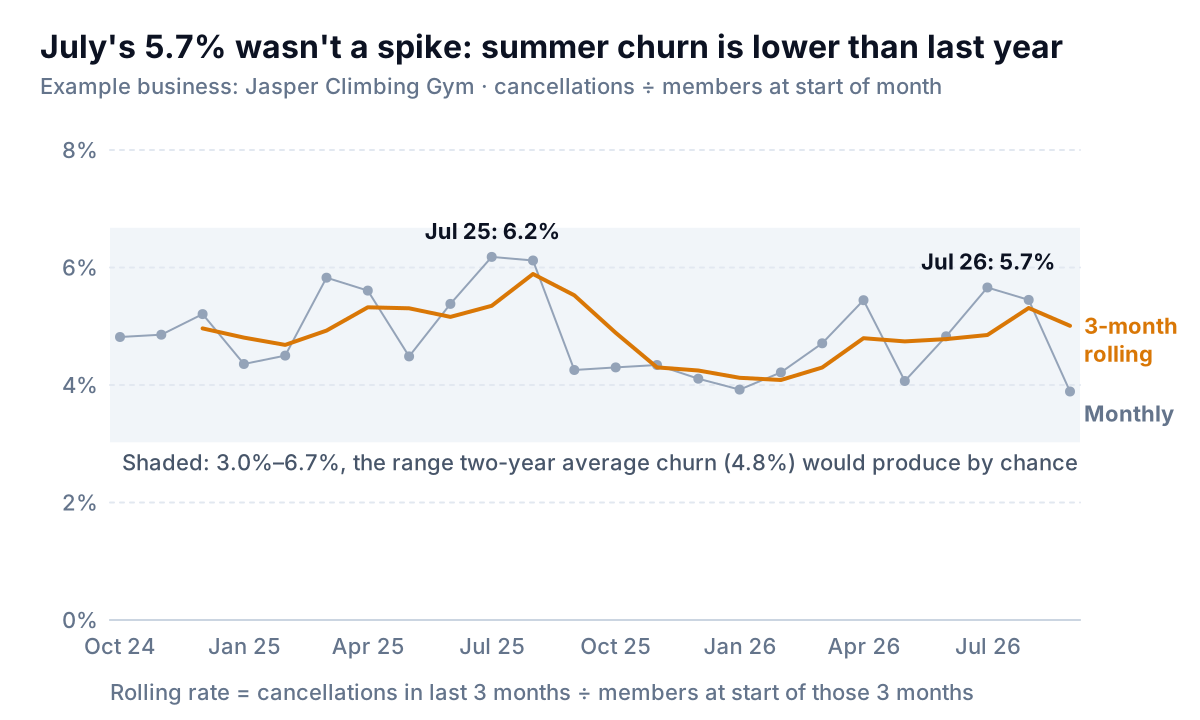
Read the gray points alone and the story is a zigzag: 4.1% in May, 5.4% in April before that, 4.8% in June, 5.7% in July. Read the amber line and there are two clear facts. Churn rises every summer (and a little after each New Year rush, as January joiners drop out). And summer 2026 is running lower than summer 2025: the rolling rate was 4.9% at the end of July against 5.3% a year earlier, and 5.3% at the end of August against 5.9%.
Why three months, and how to calculate it properly
A monthly churn rate for a business with a few hundred customers moves around a lot by chance alone. Jasper loses about 30 members a month. If its true churn were exactly 4.8%, a month with 636 members would still come in anywhere from about 3.1% to 6.5% (two standard errors either way, using the usual binomial formula; the NIST engineering statistics handbook covers the interval and its better-behaved Wilson version). The shaded band on the chart does the same sum for an average-sized month: 3.0% to 6.7%. One member is 0.16 points. A 1-point move in a single month, which is what sent Jasper's owner to her keyboard, is six members.
Three months triples the base and cuts that noise by about 40%, while still reacting within a season. Twelve months is smoother still, but it hides a problem for most of a year.
Calculate the rolling rate by pooling, not by averaging the three rates. In a sheet with members at start of month in column B and cancellations in column D, the rolling rate in row 4 is:
=SUM(D2:D4)/SUM(B2:B4)
Pooling weights each month by its size, which matters when membership is growing. Excel's built-in moving-average trendline (Chart Elements > Trendline > More Options > Moving Average, described in Microsoft's trendline guide) averages the plotted points instead, so it treats a 450-member month and a 640-member month alike. The difference is small at Jasper but grows with how fast you're changing size. A helper column also gives you a number you can quote, which a trendline doesn't.
Building the chart
- Shape the data as one row per month: month, members at start, joins, cancellations, members at end (
=B2+C2-D2), monthly churn (=D2/B2), and the rolling churn from the formula above, starting in the third row. - Select the month, monthly churn and rolling churn columns and insert a line chart (in Excel, Insert > Line; in Google Sheets, Insert > Chart, then pick Line chart under Setup > Chart type, as Google's chart help describes).
- Make the monthly series thin and gray with markers, and the rolling series thick and coloured. The rolling line is the one you read; the points are there to show the spread.
- Start the y-axis at 0%. A churn axis that runs from 3.5% to 6.5% turns a 1-point wobble into a cliff.
- Label July of both years. If your business is seasonal, the comparison that matters is the same month last year, not last month.
Chart 2: joins up, cancellations down
A churn rate can improve while the business shrinks, and worsen while it grows. To see both flows at once, chart them as bars on either side of zero, with the member count in its own panel above.
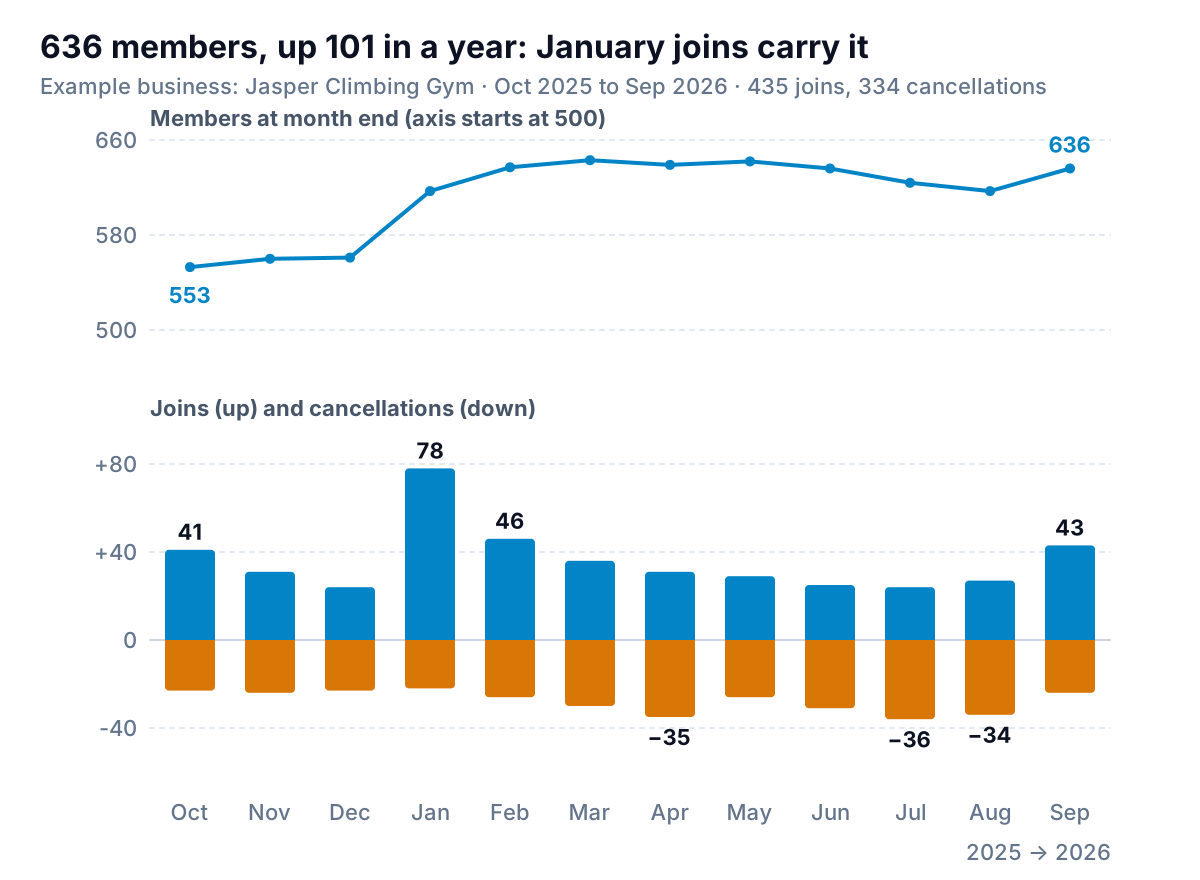
Over the year, Jasper took in 435 members and lost 334, ending at 636, 101 more than a year earlier. The chart shows where that came from. Joins arrive in two waves, January and September, and cancellations come in two waves too: April (the January joiners giving up) and July and August (the outdoor season). In every summer month, Jasper loses more members than it gains. The business grows because the January and September waves more than refill the bucket.
That tells the owner where the money is. A 1-point cut in summer churn is worth about six members a month for three months. Keeping a few more of the 78 January joiners past April is worth more, which is what the third chart is for.
To build the bottom panel, add a helper column with cancellations as negative numbers (=-D2), select joins and that column, and insert a Stacked Column chart. Excel stacks positive values above zero and negative ones below it. Put members in a separate line chart directly above, with the same months, rather than on a second axis. Two y-axes on one chart invite the reader to compare the heights of a line and some bars that have nothing to do with each other.
Chart 3: the survival curve by join month
A monthly churn rate blends members in their second week with members in their fifth year. Long-time members rarely leave; new ones often do. So the overall rate moves whenever the mix moves, even if nothing about the gym has changed. A survival curve separates them: group members by when they joined, and plot the share of each group still active after a given number of months.
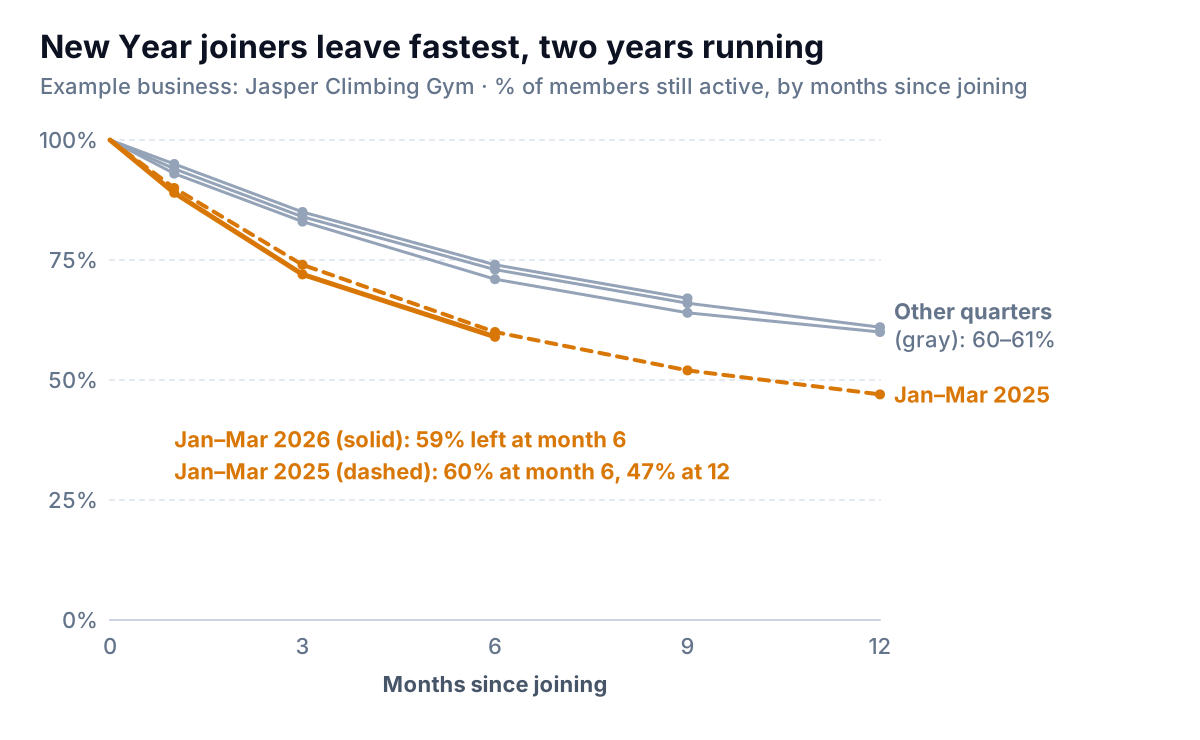
The New Year crowd is a different population. Of the 150 members who joined from January to March 2025, 111 were still there after three months, 90 after six and 70 after twelve: 47%. Members who joined in other quarters kept about 60% after a year. And 2026's January crowd is tracking the same curve, 59% at six months against 60% the year before, so whatever Jasper tried this year for new joiners hasn't changed much yet.
That points to a specific fix: the first three months of a January membership. A beginner course included in the first month, a check-in at week six, a "bring a friend" pass in February. Whatever Jasper tries, the survival curve is how it'll know: next spring's amber line should sit above this one at month 3.
Group by quarter, not by month, unless you have big cohorts. Jasper's April 2025 joiners numbered 30. One person leaving is more than 3 points, and a monthly curve that small mostly draws noise.
Building a survival curve from a member list
You need a list with one row per member: join date and, if they've left, cancel date. Your membership or billing software can usually export this. Then add three helper columns:
- Join quarter:
=YEAR(B2)&" Q"&ROUNDUP(MONTH(B2)/3,0) - Months active:
=DATEDIF(B2,IF(C2="",TODAY(),C2),"m"), where C is the cancel date. - Still active:
=IF(C2="",1,0)
The share of a quarter still active at month m is the count of that quarter's members whose months active is at least m, divided by the quarter's size, with COUNTIFS doing the counting. One rule matters more than the formulas: only include a point once every member of that quarter has had the chance to reach it. Jasper's January to March 2026 curve stops at month 6, because March joiners have only just got there. Extending it with members who haven't had time to leave makes the newest groups look loyal when they're just young. (Statisticians call these members "censored" and have methods to use them; for a small business chart, stopping the line is simpler and honest.)
Plot it as a line chart with months since joining on the x-axis, 0% to 100% on the y-axis, and one line per join quarter. Colour the groups you're talking about and leave the rest gray. The cohort retention chart post covers the heatmap version of the same idea, which suits shops where customers drift rather than cancel.
Four ways churn charts mislead
- Charting cancellations instead of the rate. Jasper's 36 July cancellations were its most in two years, but it also had about 100 more members than a year earlier. As a business grows, the count of cancellations grows with it. Always divide.
- Calling one month a trend. With a few hundred customers, a one-month move of a point or more happens by chance regularly. Wait for the rolling line, or for the same month last year to disagree.
- Comparing to last month in a seasonal business. July against June will look bad every year at a climbing gym. July against last July is the honest comparison.
- Letting the mix move the rate. A big January intake raises churn in March and April without anything going wrong. The survival curve shows whether January joiners are leaving faster than last year's January joiners, which is the question that matters.
Subscription software businesses face the same issues with revenue on top; our MRR guide covers revenue churn, and the fitness studio analytics guide covers the other numbers a gym or studio should watch.
A monthly routine for the churn chart
On the first working day of the month, once last month's cancellations have gone through:
- Add the month's row: members at start, joins, cancellations. Check members at end matches your billing system's active count; if it doesn't, a freeze or a failed payment is being counted differently.
- Read the rolling line against the same point last year. Note the gap in points.
- Check whether the monthly point is outside the band. If it is, look at who left: which join quarter, which membership type.
- Once a quarter, extend the survival curves by one point and compare the newest group with the same quarter last year.
Parity can build these charts from your data. Connect Stripe or Square directly, or upload a member export as a CSV or Excel file, and ask for "monthly churn with a 3-month rolling rate, joins and cancellations, and survival by join quarter". It builds a dashboard with the headline numbers and their trends, the charts, what explains them, and a table of what needs attention, and every number is checked against queries on the full dataset before you see it. Next month, update it with the newer export.
Upload your member or subscription export and get a checked churn dashboard with the rolling rate and survival by join month. Build a report from your data free
Jasper's owner deleted the win-back email. She spent the time on something the charts pointed to instead: a free intro session for every January joiner in their third week. Whether it worked will show up next April, in one amber line. Related reading in this series: new vs returning customers for shops without memberships, and funnel charts for where people drop out before they ever join.