Is 32% bad? That was the share of Wicker Home Goods' November sales that came from returning customers, the lowest of the year and 11 points down on October. The owner's first reading was that loyal customers had stopped buying. They hadn't: returning customers spent $34,000 in November, $5,000 more than in October. New customers, pulled in by Black Friday, spent $71,000, and they shrank the share. Splitting sales into new vs returning customers is one of the most useful cuts of a store's numbers, but only if the chart shows the dollars as well as the share. Wicker is an example business, a Shopify store selling baskets, throws and kitchenware, and its numbers run through this guide.
This post covers which chart to use for which question, how to pull the split out of Shopify (the report names have changed, and the obvious one doesn't give you sales), how to build it in Excel or Google Sheets, and why four tools can give you four different "returning" figures for the same month.
What the new vs returning customers split can answer
Three questions come up, and each wants a different chart:
| Question | Chart | Why this one |
|---|---|---|
| Where does each month's revenue come from? | Stacked columns of net sales, returning at the bottom, new on top | Shows the total and both parts, all on a zero baseline |
| Are existing customers spending more over time? | A line of returning-customer sales (or returning customers) per month, compared with the same month last year | Isolates the loyal base from whatever new-customer marketing did |
| Are we relying on new customers more or less? | Share of sales from returning customers, as a line, always shown under the dollar chart | The ratio is useful context, but alone it hides which side moved |
Most stores need the first chart every month and the other two in a quarterly look back. If you're short of space, the stacked columns alone are the best single picture.
Chart 1: stacked columns of net sales
Here are Wicker's twelve months. Each column is net sales for the month, with returning customers' sales in blue at the bottom and new customers' in amber on top.
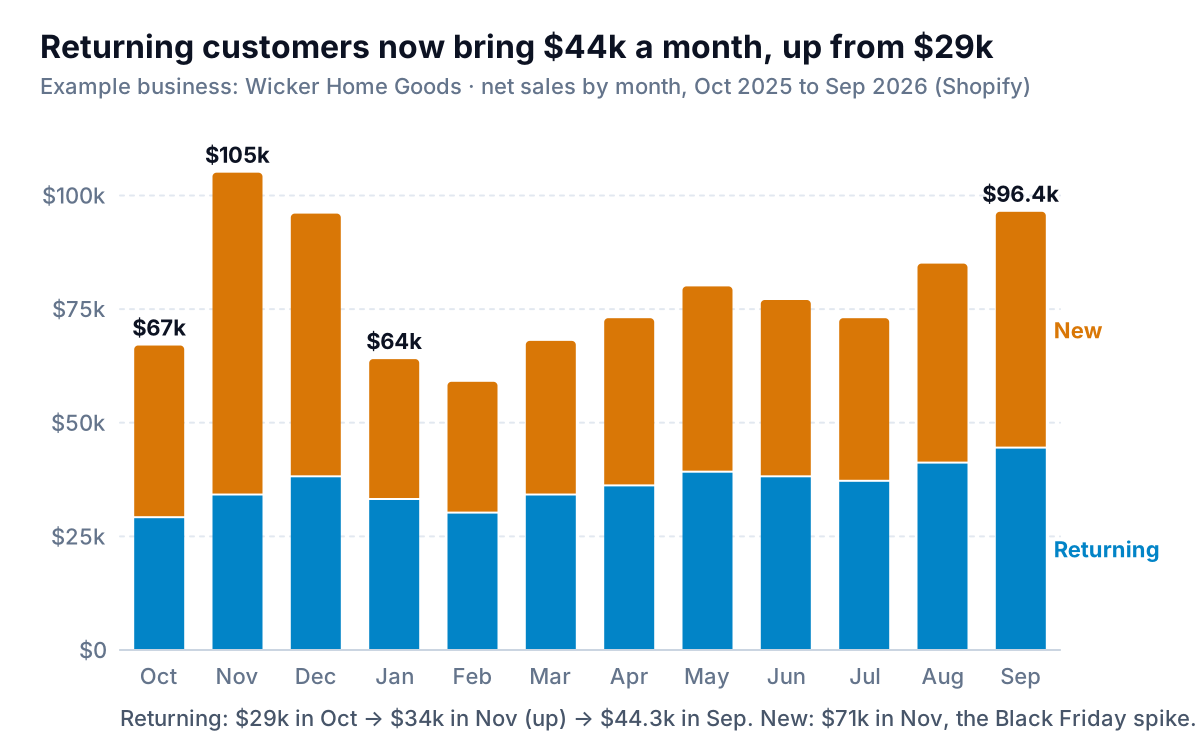
Read the blue first. It rises from $29,000 in October to $38,000 in December, dips after the holidays, and then climbs steadily to $44,300 in September. Over the year, returning customers spent $433,300, 46% of Wicker's $943,400 in net sales. The amber is the volatile part: $71,000 in November, $29,000 in February. That's normal for a store whose new customers mostly arrive through promotions and gift seasons.
Two design choices matter here. First, put the steadier series at the bottom. Only the bottom segment of a stacked column sits on a common baseline; the one on top floats, so its changes are hard to judge. Whichever series you care most about tracking goes on the bottom. Second, use stacked columns with dollars, not 100% stacked columns. A 100% chart throws away the size of the month, which is the first thing anyone asks.
Chart 2: why the share line can't stand alone
The share of sales from returning customers is a popular dashboard number. Charted on its own, it misleads in a specific, predictable way.
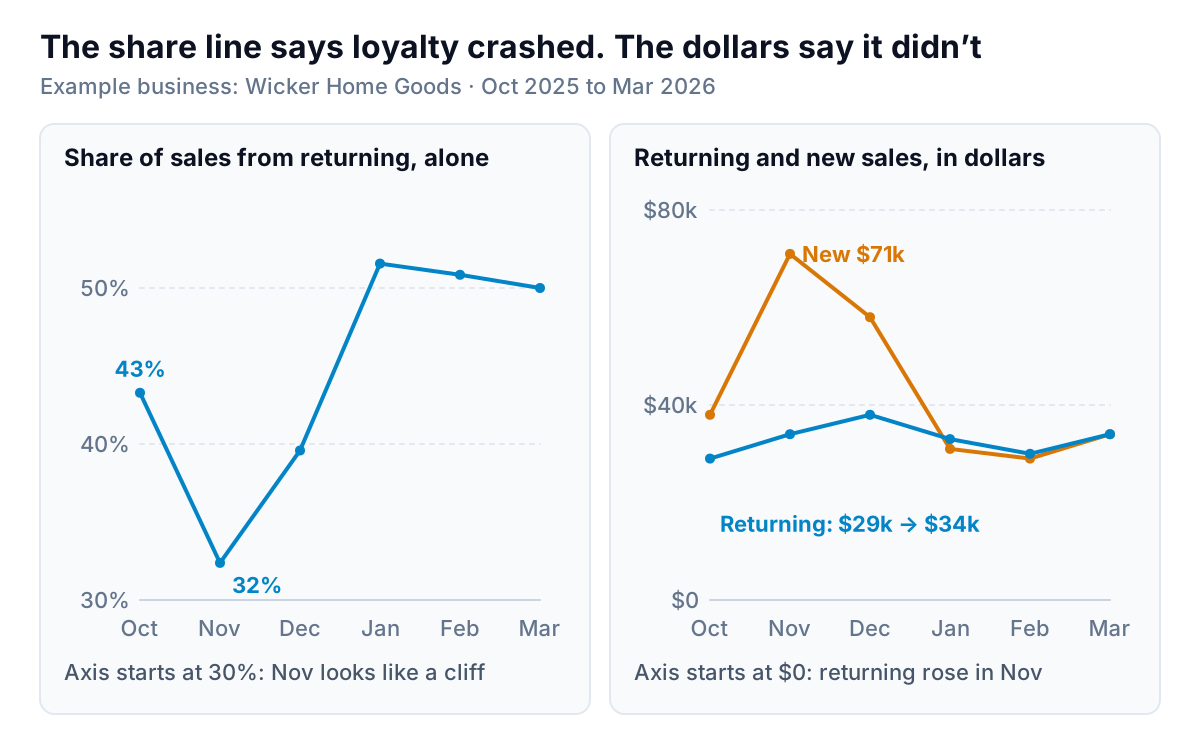
A share has two moving parts. When it falls, either the top fell or the bottom grew, and the line can't tell you which. In November, Wicker's share fell because new-customer sales nearly doubled. In January it rose to 52%, which looks like a loyalty triumph, but returning sales actually dipped from $38,000 to $33,000; new sales just fell further. The axis on the left panel makes it worse: starting at 30% turns an 11-point move into a cliff.
The rule: never show the returning share without the dollars next to it. If you have room for only one, show the dollars. If you show the share, put it in a small panel under the stacked columns, with the same months, rather than on a second y-axis over the bars. A line on a second axis invites readers to compare its height with the bars, and the two scales have nothing to do with each other.
The same caution applies to Shopify's returning customer rate. Shopify's analytics field definitions describe it as returning customers as a percentage of all customers who placed orders. A busy month for new customers pushes it down even if every regular came back. To judge whether customers are really coming back more, follow groups of first-time buyers over time instead; that's the cohort retention chart.
Getting the split out of Shopify
Shopify has a report literally called "New vs returning customers", and it's the obvious place to start. But according to Shopify's customer reports documentation, it shows the number of first-time and returning customers for a period, grouped by whatever unit you choose (day, week, month and so on). It counts people, not sales. Its sales reports (Total sales over time, Total sales by product and the rest) don't split by customer type out of the box.
To get sales by customer type, build an exploration:
- Go to Analytics > Reports and click New exploration. Shopify's guide to data explorations says this is available on all plans.
- In the Metrics menu, add Net sales, then Orders.
- Add two dimensions: a month time dimension, and "New or returning customer", which Shopify defines as a label for whether an order is from a new or returning customer.
- Set the date range to the last 12 or 24 months and save it, so next month is one click.
- Export it as a CSV if you want to chart it yourself, or use the Visualization menu to change the chart Shopify draws.
Use net sales, not total sales. Total sales includes tax and shipping, which belong to neither customer type in any useful sense. Our Shopify reports guide explains the three "sales" figures and which reports hold what.
Building the chart in Excel or Google Sheets
The export will usually be long: one row per month per customer type. Turn it into one row per month with a column for each type.
- Excel: insert a pivot table with Month in Rows, "New or returning customer" in Columns and Sum of Net sales in Values. Then insert a PivotChart and choose Stacked Column, one of the column subtypes Microsoft lists in its chart types reference. Excel stacks the first series at the bottom, so move "Returning" to the left of "New" in the pivot table (right-click its label and use Move). Our pivot chart guide covers keeping it updated.
- Google Sheets: build the same pivot table, select it, and choose Insert > Chart, then "Stacked column chart" under Setup > Chart type. It's in Google's list of chart types.
- The share line: add a helper column,
=C2/(B2+C2)with returning sales in C and new in B, and chart it as its own line chart beneath the columns, with the same months and a y-axis from 0% to 100%.
Format the columns with no gaps between segments, label the series at the right-hand end instead of in a legend, and write the takeaway as the title: "Returning customers now bring $44k a month, up from $29k", not "Sales by customer type".
Four definitions of "returning", one September
Ask "what share of our business is returning customers?" and you'll get a different answer depending on what's being counted.
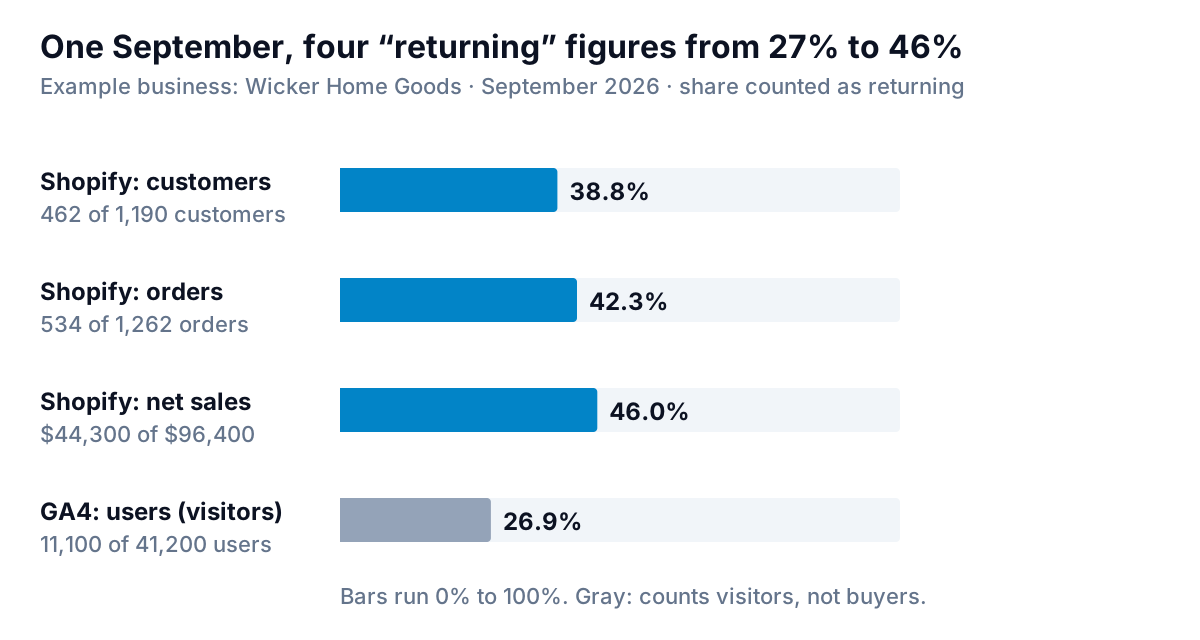
In Wicker's September:
- Customers: 462 of 1,190 customers who ordered were returning: 38.8%. This is Shopify's returning customer rate. Shopify counts a customer as returning when they place an order and their history already includes at least one order. Customer reports use the full order history, not just the selected period.
- Orders: 534 of 1,262 orders carried the "returning" label: 42.3%. That's higher than the customer share because regulars order more often, and because a first-time buyer's second order in the same month is, by Shopify's definition, from a returning customer.
- Net sales: $44,300 of $96,400: 46.0%. Higher again, because Wicker's returning customers spent $82.96 per order against $71.57 for new ones.
- Website users: Google Analytics reported 26.9% returning. That's a different thing entirely. Google's dimensions and metrics reference defines returning users as users who have initiated at least one previous session. It counts browsers and devices visiting the site, most of whom never buy, and unless you've set up user IDs, it can't recognise a loyal customer on a new phone.
Pick one definition for your chart, write it in the subtitle, and don't mix sources in one series. For a store, net sales by Shopify's order label is the most useful for the revenue chart, and customer counts suit a second chart on how many people you're keeping.
Reading the chart: three patterns and what to do
Once the stacked columns are up, most months fall into one of three patterns.
- Both parts growing. Wicker's spring and summer. New customers are arriving and the returning base is spending more. Keep doing what you're doing, and check the cost of the new customers against what they're worth; our ecommerce KPI guide shows how to set a ceiling on it.
- New up, returning flat for three months or more. The store is filling a leaky bucket. Usually the fix is the second order: a reason to come back (a refill, a matching item, a new season's range) within the window when a first-time buyer still remembers you.
- Returning up, new falling. Comfortable for a while, then a problem, because every customer base shrinks without new arrivals. Look at what changed in acquisition: ad costs, a channel that dried up, a search ranking lost.
Compare each month with the same month last year rather than the month before. Black Friday makes November a different animal, and a store with gift-season peaks will always see the returning share drop at the end of the year.
Keeping it current
The exploration and pivot are quick to build once. The work is in repeating it monthly, and in noticing when the definition quietly changed (a migration, a new sales channel whose orders aren't tagged to customers).
Parity connects to Shopify directly and builds a dashboard from your store's data: the headline numbers with their trends, charts such as net sales by new vs returning customers, what explains the changes, and a table of what needs attention. You can also upload a CSV or Excel export from another platform. Every number is checked against queries on the full dataset before you see it, and you can refine it by chat ("put returning customers at the bottom and show the share in a panel underneath").
Connect your store and get a checked dashboard with sales split by new and returning customers. Connect your store free
Wicker's owner kept the November promotion and stopped worrying about the 32%. What she watches now is the blue segment against the same month last year, because that's the money that comes back without an ad. Next in this series: churn charts for subscription and membership businesses, and funnel charts for where shoppers drop out before their first order.