In January, the bank asked Tamarack Outfitters, an example outdoor shop we made up for this guide, for three documents before it would renew a $25,000 line of credit: an income statement, a balance sheet and a cash flow statement for 2025. The owner had the first two in QuickBooks within minutes. The third raised a question she couldn't answer from either: the shop made $27,100 last year, so why was there $25,700 less in the bank?
A financial statement template answers both requests at once. It's one workbook that holds the income statement, the balance sheet and the cash flow statement, linked so a number you enter once flows to every place it belongs, with check cells that tell you whether the three agree. This one has Tamarack's year filled in as an example and an empty copy with the same formulas for yours.
Download the financial statement template (.xlsx). It opens in Excel, Google Sheets and Numbers, and has no macros.
What's in the financial statement template
Seven tabs. How to use is a one-page guide. Then come three example tabs (P&L, balance sheet and cash flow for Tamarack) and three matching tabs for you, with every formula and no figures. Amber cells are inputs. Grey and white cells are formulas. Blue cells pull a number from another tab, and they're the links this post is about.
| Tab | What you enter | What it calculates |
|---|---|---|
| P&L | One period's revenue, cost of sales, operating expenses (with depreciation on its own row), other income, interest and any income tax | Gross profit, operating profit, net income (row 40), each line as a % of revenue, and a one-cell summary of every check (B6) |
| Balance sheet | Two dates: the day before the period starts and its last day. Every balance, plus owner distributions for the period (row 36) | Totals, the change on every line, closing retained earnings, and three check cells (rows 41 to 43) |
| Cash flow | Nothing | Operating, investing and financing cash flows by the indirect method, calculated closing cash, and the cash check (row 38) |
The cash flow tab has no inputs at all, and that's deliberate. A cash flow statement for a small business can be built entirely from the other two statements: start from net income, adjust for depreciation, then turn every change on the balance sheet into a cash movement. The SEC's beginners' guide to financial statements describes the same three sections (operating, investing and financing activities) and notes that cash flows are related to net income but not equal to it. The template makes that relationship visible.
The three links that make the statements tie
Here is Tamarack's year as the example tabs show it. The numbered arrows are the links.
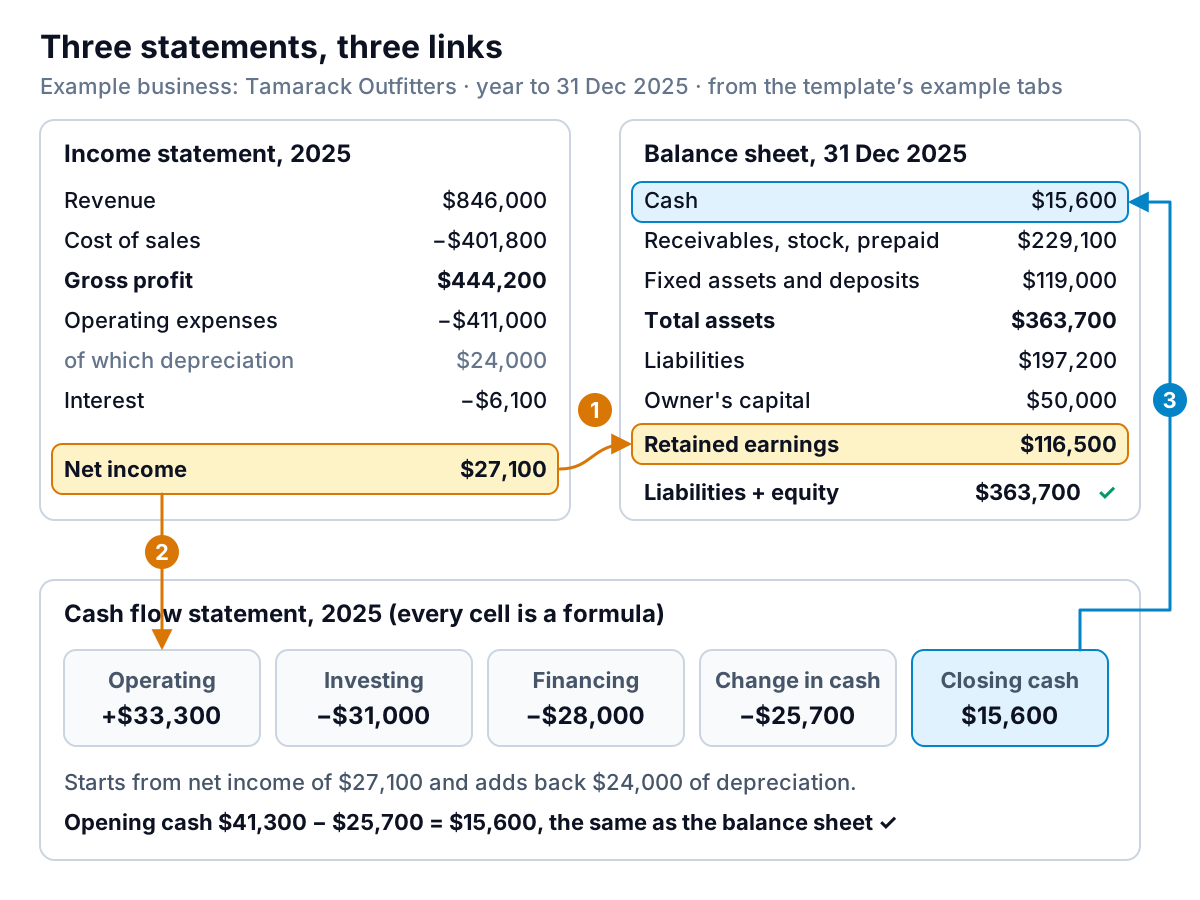
Link 1: net income becomes retained earnings
The closing retained earnings cell isn't an input. It's a formula: opening retained earnings plus this year's net income from the P&L, minus what the owner took out.
C34 = B34 + C35 − C36, where C35 is ='Example P&L'!B40.
For Tamarack: $109,400 + $27,100 − $20,000 = $116,500. This is the link that most often breaks in home-made workbooks, because people type the retained earnings figure from their accounting system instead of calculating it. Then a change to the P&L never reaches the balance sheet, and nothing warns you.
Link 2: net income starts the cash flow
Row 9 of the cash flow tab is the same net income, and row 10 adds back depreciation from P&L row 33. Depreciation is an expense that reduces profit but doesn't spend any cash in the year; the cash went out when the equipment was bought. Tamarack's $24,000 is the year's share of the cost of its rental kayaks, bikes, fixtures and van. (The IRS explains the tax side of depreciation in Publication 946; your books may use different lives, which is normal.)
Link 3: every balance sheet change becomes a cash line
Every other cash flow line is the change in one balance sheet row, closing minus opening, with the sign set by which side of the balance sheet the row is on:
- Assets that rise use cash. Inventory went from $188,000 to $214,500, so the cash flow shows
=-('Example balance sheet'!C12-'Example balance sheet'!B12), or −$26,500. - Liabilities that rise keep cash in. Accounts payable went from $52,400 to $61,900: +$9,500 that Tamarack still owes suppliers and hasn't paid yet.
- Fixed assets are investing. The cost of fixed assets rose from $162,000 to $193,000, so $31,000 of equipment was bought.
- Loans and owner money are financing. The line of credit rose $10,000, the term loan fell $18,000, and $20,000 went to the owner as distributions.
The tab adds these to opening cash ($41,300) and ends with calculated closing cash: $15,600. The balance sheet, typed in from the bank reconciliation, also says $15,600. That match is the main check, and it's why the third arrow in the figure is blue.
Filling it in from your books, in order
Do it in this order. Each step depends on the one before it.
- The P&L for the period. In QuickBooks Online, open Reports, find Profit and Loss, set the dates, and export to Excel, as Intuit's guide to running reports describes. Map your accounts to the template's lines and keep depreciation on row 33 by itself. If your books bundle it into another line, ask your bookkeeper for the figure.
- The opening balance sheet. Run the Balance Sheet report as of the day before your period starts (31 December 2024 for a 2025 year) and fill in column B, including retained earnings. Intuit notes that the report's equity total includes net income for the fiscal year to date, so on a year-end date check whether your software shows that year's profit as a separate net income line. If it does, add it to retained earnings for the opening column.
- The closing balance sheet. Run it again as of the period's last day and fill in column C, except retained earnings, which is calculated. Enter accumulated depreciation as a positive number; the formula subtracts it.
- Distributions. Enter what the owners took out during the period in row 36, as a positive number. Sole proprietors call these draws; S corporation owners call them distributions. A salary paid through payroll is not a distribution. It's already in wages on the P&L.
- Read the checks. Cell B6 on the P&L tab says "All checks pass ✓" or tells you which tab to look at.
Using Xero or another system? Every accounting package has a profit and loss report and a balance sheet report that can be run for any date. Those two reports are all the template needs. From a spreadsheet you keep yourself, the same is true, as long as you track balances (what's in the bank, what customers owe, what you owe) as well as income and spending. If you only track income and spending, start with our profit and loss statement template and add a balance sheet once you can list your balances.
What Tamarack's three statements say together
The bank's question was fair. Profit was $27,100. Cash fell $25,700. The gap is $52,800, and the cash flow tab accounts for every dollar of it.
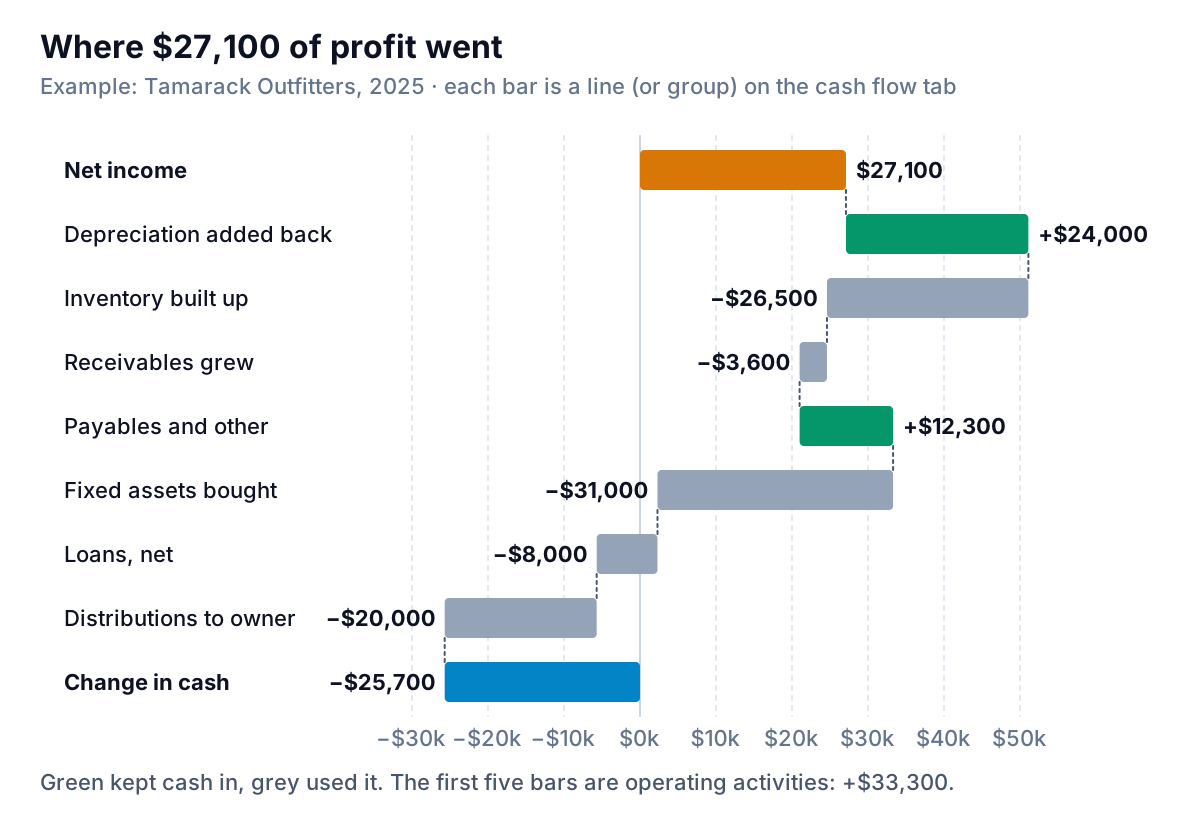
Read it top to bottom and three decisions explain the year:
- The shop bought ahead. Inventory rose $26,500. Some of that is planned stock for spring, some may be slow sellers. The balance sheet can't say which; an item-level stock report can.
- It grew the rental fleet. $31,000 of new kayaks and bikes came out of cash, not out of profit. Only this year's depreciation on them reached the P&L.
- It paid down the term loan with the line of credit. The term loan fell $18,000 while the line of credit rose $10,000. That's the detail a lender will ask about, because short-term borrowing is now paying for long-term debt.
The operating section is healthier than the bottom line suggests. Cash from operations was $33,300, which is $6,200 more than the profit, because the $24,000 depreciation add-back outweighed the stock build. Cell B40 on the cash flow tab shows that gap, and it's not a check: positive means operations produced more cash than profit, negative means profit is sitting in stock or unpaid invoices. For more on reading the two statements side by side, see balance sheet vs income statement. To plan the next twelve months of cash rather than explain the last twelve, use a cash flow forecast.
The check cells, and what to do when one fails
There are four check cells, and they aren't independent. Knowing which one fails first tells you where to look.
- Opening balance sheet balances (balance sheet B41). Assets minus liabilities and equity on the opening date. This one only tests the numbers you typed in column B.
- Closing balance sheet balances (C41). Because closing retained earnings is calculated from the P&L, this check also tests that your P&L and your closing balance sheet came from the same books for the same dates. If the opening check passes and this one fails, the P&L is the first suspect.
- Depreciation matches (D43). The P&L depreciation minus the rise in accumulated depreciation. It differs when you sold or scrapped an asset during the year, which removes its accumulated depreciation from the books.
- Cash ties (cash flow B38). Calculated closing cash minus balance sheet cash. If both balance sheets balance and depreciation matches, this check passes by arithmetic, unless you added a balance sheet row without adding a cash flow line for it.
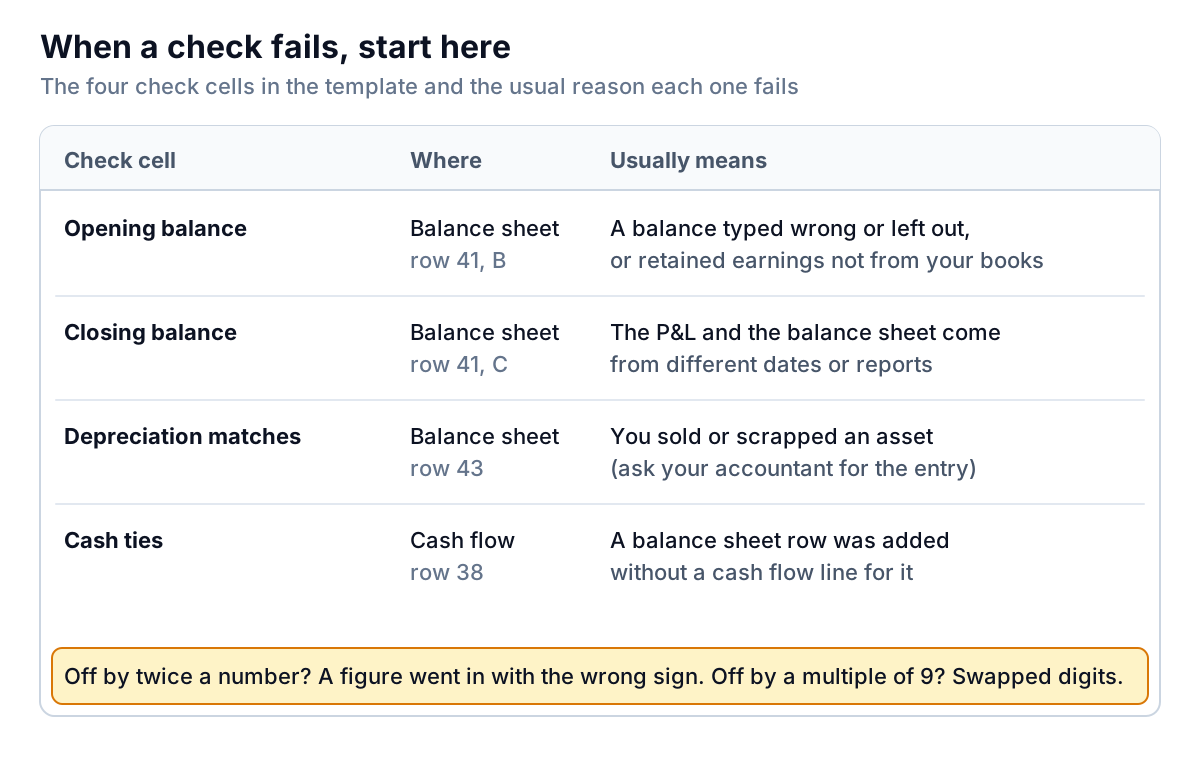
Two more tricks for finding a difference. If the gap is exactly twice a number on the sheet, that figure went in with the wrong sign (accumulated depreciation and distributions are the usual culprits). If the gap divides evenly by 9, two digits are probably swapped.
The blank tabs pass every check while they're empty, because zero equals zero. Before you trust the template with your own year, we filled the blank tabs with Tamarack's numbers and got identical results, then ran 200 random sets of balanced books through them: every check passed, and changing a single closing balance made the balance sheet and cash checks fail as they should.
What this template can't do
- It can't make your books right. It shows whether the figures you copied agree with each other. A balance sheet that balances can still have the wrong inventory count in it.
- One period, two dates. It covers a year (or a quarter, or a month) as a single column. For monthly trends use the P&L template's twelve columns.
- No asset sales or non-cash deals. Selling equipment creates a gain or loss and removes cost and depreciation from the books; buying a van with a loan that the dealer arranges never touches your bank. Both need adjustments the template doesn't make. Ask your accountant for the entries.
- Indirect method only. It doesn't list cash received from customers and paid to suppliers (the direct method). Lenders and owners mostly read the indirect method anyway.
- Not audited statements, not a tax return. The SBA notes that private companies aren't required to follow GAAP, and many small-business statements don't. If a lender asks for reviewed or audited statements, or for tax returns, this workbook doesn't replace them. Where your accountant's statements differ, theirs win.
- Corporation income tax. There's an income tax line on the P&L for C corporations, but no separate tax payable on the balance sheet. Put unpaid tax in accrued liabilities.
When the workbook stops being enough
The template is good for a year-end pack and for answering a lender. It gets slow when you want the same three statements every month, by location, or with the story of what changed written out for someone else to read.
That's where Parity fits. Connect QuickBooks Online, or upload the Profit and Loss and Balance Sheet exports from any other system, and Parity builds a dashboard of the numbers: headline figures with their trends, charts, what explains the movements, and a table of what needs attention. Ask it to, and it writes a client-ready report from the same data, such as the monthly pack for a partner or lender. Every number and chart is checked against queries on the full dataset before you see it, and you can export the result to Excel or PDF.
Connect QuickBooks Online or upload your exports, and ask for the report you need. Build a report from your data free