Twenty minutes into the meeting, the loan officer turned past page eleven of a fourteen-page QuickBooks printout and asked the owner of Tundra Snow Removal, an example business we'll follow here, a simple question: "What's your worst month for cash, and how do you get through it?" The answer was on page nine, in a column of month-end balances nobody found in time. She left without a decision on her $96,000 plow truck.
The printout followed the order the software produces reports, not the order a lender asks questions. That's the core of how to present financial data: work out the questions your reader will bring, answer the most important one on the first page, then show four to six charts in the order the remaining questions come, each with a title that states its point. The full statements go at the back, for checking. This guide rebuilds Tundra's pack that way, page by page.
Start with what the reader has to decide
Every audience for your numbers is deciding something, and the decision sets the questions. Before you open a spreadsheet, write down who's reading and what they'll ask first:
| Reader | What they're deciding | Their first question |
|---|---|---|
| Lender | Lend, how much, on what terms | Can you repay, even in a bad year? |
| Business partner | Whether to change anything | Was this month good or bad, and why? |
| Board | Approve, question or redirect a plan | Are we on budget, and what needs our vote? |
| Investor | Whether to put in more, or stay in | Is the model working, and how long does the cash last? |
The lender's version matters most for a small business because the stakes are concrete. The SBA notes that most 7(a) term loans are repaid monthly "from the cash flow of the business", and that the documents you'll need depend on the loan and the lender, so ask yours what they want before you build anything. Whatever they ask for, they will be reading for one thing: whether your cash flow covers the payment, in a good year and a bad one.
For a board, the structure is different (decisions first, then the finance pack, then the leader's report) and our guide on how to write a board report covers it. For a monthly report to a partner, the monthly KPI report layout works better. The rest of this guide uses Tundra's loan pack, but the same steps apply to all four readers.
How to present financial data in four to six pages
Tundra plows and salts parking lots for offices, a hospital and two apartment complexes. Most customers sign a seasonal contract (a fixed price for the winter, billed in five monthly installments from November to March); the rest pay per push. The owner wants a third truck to take on a new route.
Her new pack has five pages, one chart each, in the order the lender's questions come:
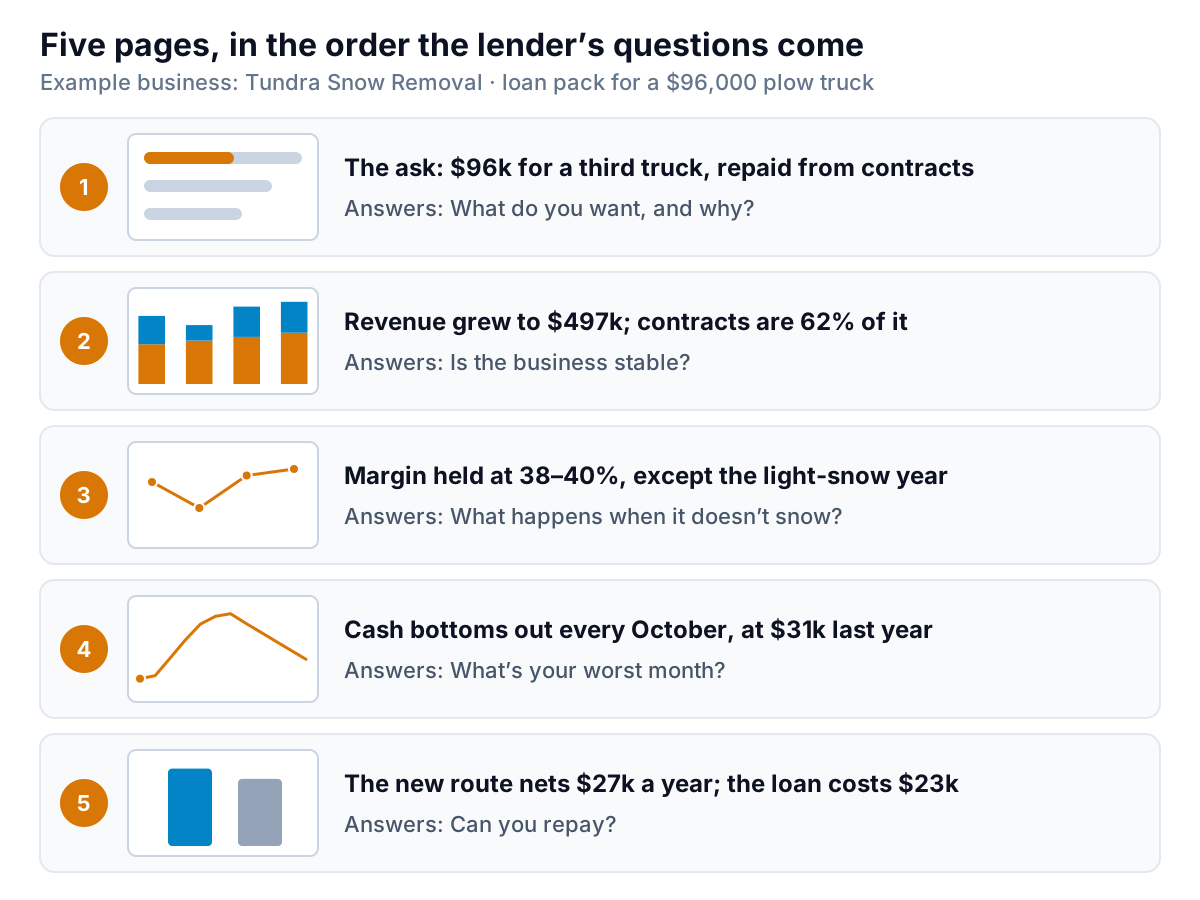
- The ask. No chart. Three sentences: what she wants ($96,000 over five years for a plow truck), what it's for (a new route with $58,000 a year of signed contracts) and how it gets repaid (from those contracts). Lead with this. A lender reading pages two to five already knows what they're testing.
- Is the business stable? Revenue by season, split into contracts and per-push work. Revenue grew from $412,000 to $497,000 over four seasons, and contracts are 62% of the latest one.
- What happens when it doesn't snow? Gross margin by season: 38%, 34%, 39%, 40%. The dip is 2023–24, a light winter, when per-push work fell to $94,000. Operating profit that season was $11,000, the worst of the four, and still positive. Showing the bad year yourself is more convincing than waiting to be asked.
- What's your worst month? The month-end cash balance for the last twelve months. Cash bottoms out every October, before the first contract installments, at $31,000 last year.
- Can you repay? At an example rate of 8% over five years, the truck costs about $1,950 a month, or $23,400 a year. The new route's contracts bring $58,000 a year; after the driver, fuel and salt for that route ($31,000), $27,000 is left to cover the payment, before any per-push work.
Six charts is a sensible ceiling for a meeting. Four is better for a monthly report. To choose, write each question a reader might ask on a sticky note, sort them by how much the decision depends on the answer, and keep the top five. Anything below the cut either goes in the appendix or nowhere.
Notice what's missing: a balance sheet chart, an expense pie, a chart of every customer. They're true, and nobody at the bank needed them to decide. If a lender asks, the full statements are in the appendix.
Cut the numbers the way the business runs
Tundra's old pack showed revenue by calendar year, because that's the default in the accounting software. For a snow business, it's nearly meaningless:
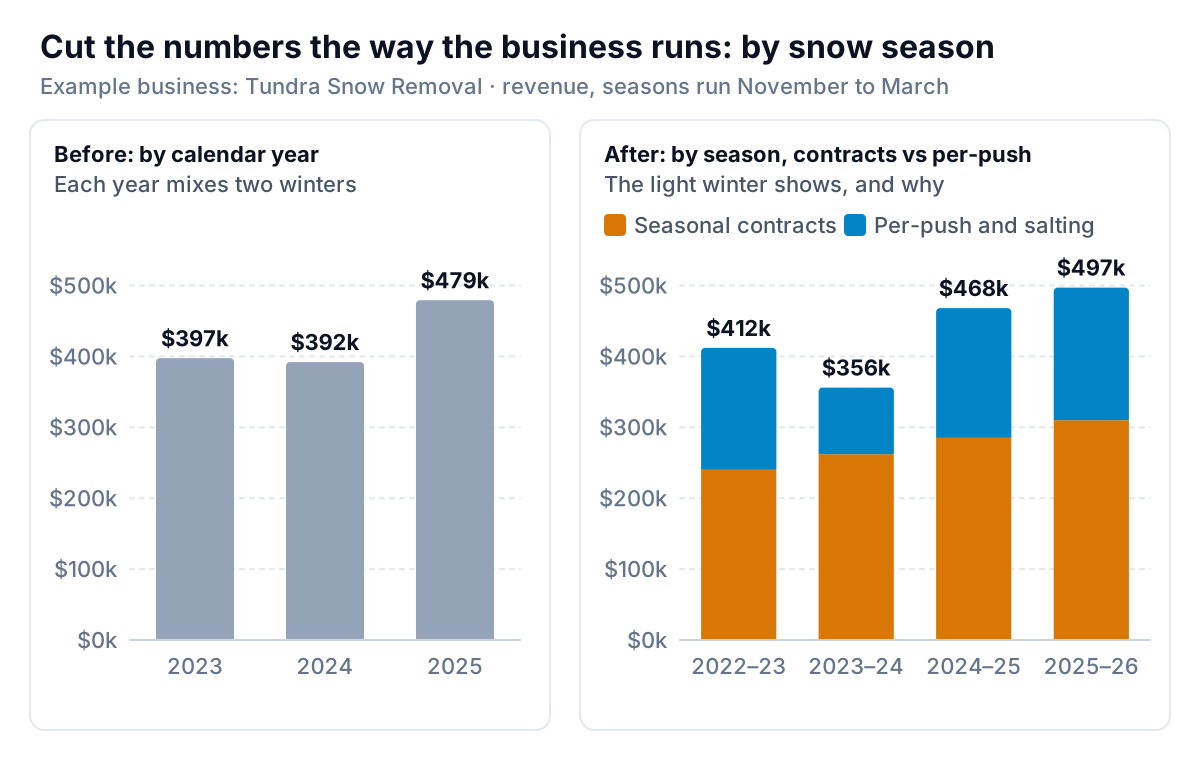
On the left, 2024 looks like a small dip and 2025 like a sudden jump. On the right, the real story is visible: one light winter, 2023–24, when per-push work nearly halved, cushioned by contracts that kept growing. The calendar view isn't false; it just answers a question nobody asked.
The same principle applies to most businesses. Present by the period the business runs on:
- Seasonal businesses: by season or by fiscal year, or compare each month with the same month last year.
- Fast-growing or uneven businesses: trailing twelve months, so every point is a full year.
- Anything with recurring revenue: split recurring from one-off, as Tundra splits contracts from per-push.
Whatever cut you choose, show at least four periods. One season can't tell a lender whether a number is normal.
Write titles that say the point
Most chart titles describe what's on the chart: "Cash Balance Oct 2025 – Sep 2026". The reader then has to work out what it means, and may get a different answer from yours. A title that states the point does that work for them.
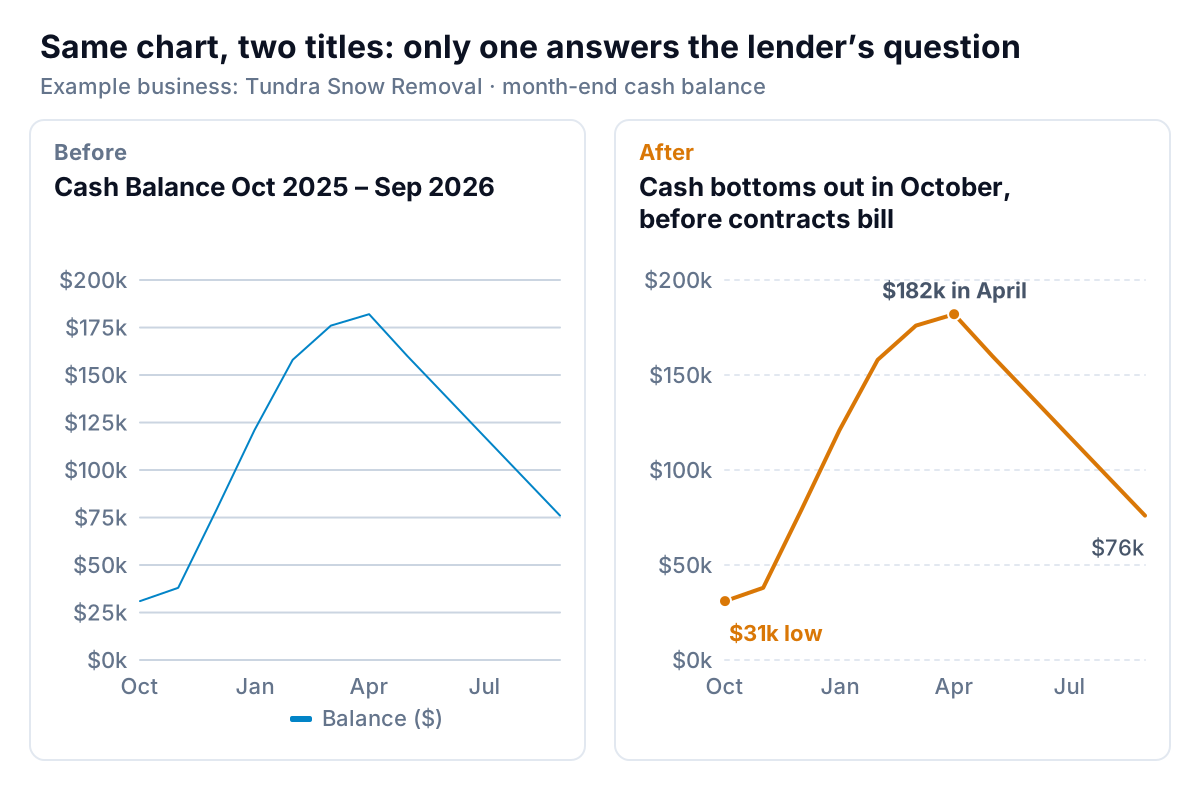
Datawrapper's guide to chart text puts it well: the title should carry "the one key statement that you want your reader to remember". A few rules for writing them:
- Make it a sentence with a number in it. "Cash bottoms out in October, at $31k" beats "October is our tightest month".
- Check the title against the chart. If the title says 62% and the chart's labels add up to 61%, the reader stops trusting both. Every number in a title should be one you can point to.
- Put the period and units in the subtitle ("Month-end cash balance, $ thousands, Oct 2025 – Sep 2026") so the title can stay short.
- Label the points the title talks about. The low, the peak, the latest month. Not every point.
- Drop what the reader doesn't need. A legend for one series, gridlines every $25,000, three decimal places. Stephen Few argues in Effectively Communicating Numbers that gridlines earn their place only when readers need more precision than the chart gives them.
Titles like these are also what makes the pack readable without you. A lender often has to explain your application to a credit committee you'll never meet. Five sentence-titles in a row are the summary they'll repeat. If you're writing a summary page too, our executive summary examples show the same idea in prose.
Tables or charts?
Lenders and accountants like tables, and they're right to: some questions need exact numbers. Few's rule from the same paper is the clearest one around. Use a table when the reader will "look up individual values or the quantitative values must be precise". Use a chart when the message is in the shape of the data: trends, patterns, exceptions. If you need both, show both.
For Tundra, that means charts on the five story pages and a season summary table at the back, like this one:
| Season | Contracts | Per-push | Revenue | Gross margin | Fixed costs | Operating profit |
|---|---|---|---|---|---|---|
| 2022–23 | $240,000 | $172,000 | $412,000 | 38% | $104,000 | $52,600 |
| 2023–24 | $262,000 | $94,000 | $356,000 | 34% | $110,000 | $11,000 |
| 2024–25 | $285,000 | $183,000 | $468,000 | 39% | $114,000 | $68,500 |
| 2025–26 | $310,000 | $187,000 | $497,000 | 40% | $118,000 | $80,800 |
Operating profit here is gross profit (revenue × gross margin) minus fixed costs, so 2025–26 is $198,800 − $118,000 = $80,800. A reader checking your arithmetic should be able to do it from the table alone.
After the summary table come the full statements: three years of profit and loss, balance sheets and the cash flow statement, plus the receivables aging if the lender wants it. The SBA's business plan guidance asks established businesses for three to five years of income statements, balance sheets and cash flow statements, and recommends graphs and charts to tell the financial story. Statements are the evidence; the charts at the front are the argument.
Assemble the pack and keep it live
A few practical steps make the difference between a pack you build once and one you can update in an hour next time:
- Build every chart from one table. One row per month, with columns for each number. Charts that all read from the same table can't disagree with each other.
- Link the charts into your slides or document. In PowerPoint, paste an Excel chart and pick Keep Source Formatting & Link Data or Use Destination Theme & Link Data from the Paste Options; Microsoft's guide to copying from Excel to another Office program explains each option, and that Picture can't be updated. In Google Slides, use Insert > Chart > From Sheets, keep "Link to spreadsheet" ticked, and refresh later with the chart's Update button or Tools > Linked objects, as Google's help on linking charts describes.
- Tie the totals. Before sending, check that each season's revenue in the chart matches the profit and loss statement to the dollar. A lender may well check.
- Send it ahead. Two days before the meeting, so it's read before you arrive. The meeting is then about the questions you haven't answered.
- Bring one page with the forecast. If they ask how next season looks, show it with a range, not a single number. The forecast vs actual chart post shows how to draw one honestly.
If you'd rather start from your data than from a blank slide, Parity can draft the material. Connect QuickBooks Online or upload an export, ask for the report you need ("a five-page lender pack: revenue by season split by contract and per-push, gross margin by season, month-end cash for the last twelve months"), and it writes a client-ready report with a takeaway on every chart, each number checked against queries on the full dataset. You can refine it by chat and export it to PDF.
Bring your QuickBooks data or an export, and get a checked report with a takeaway on every chart. Build a report from your data free
Tundra's owner sent her five pages to the bank on a Tuesday. At the second meeting, the loan officer had one question, about the light-snow year, and it was already answered on page three. For the charts behind each of those pages, and the rest of the set a small business needs, see the guide to financial charts.