Veranda Patio Furniture, an example business we'll use in this guide, closed its fiscal year in September with sales up 8.6% to $1,856,800. The chart the owner checked all year, a cumulative revenue line, sat comfortably above last year's line right to the end. It never showed that July, August and September were each 5–7% below the same month a year earlier. The chart wasn't wrong. It answered a different question from the one that mattered.
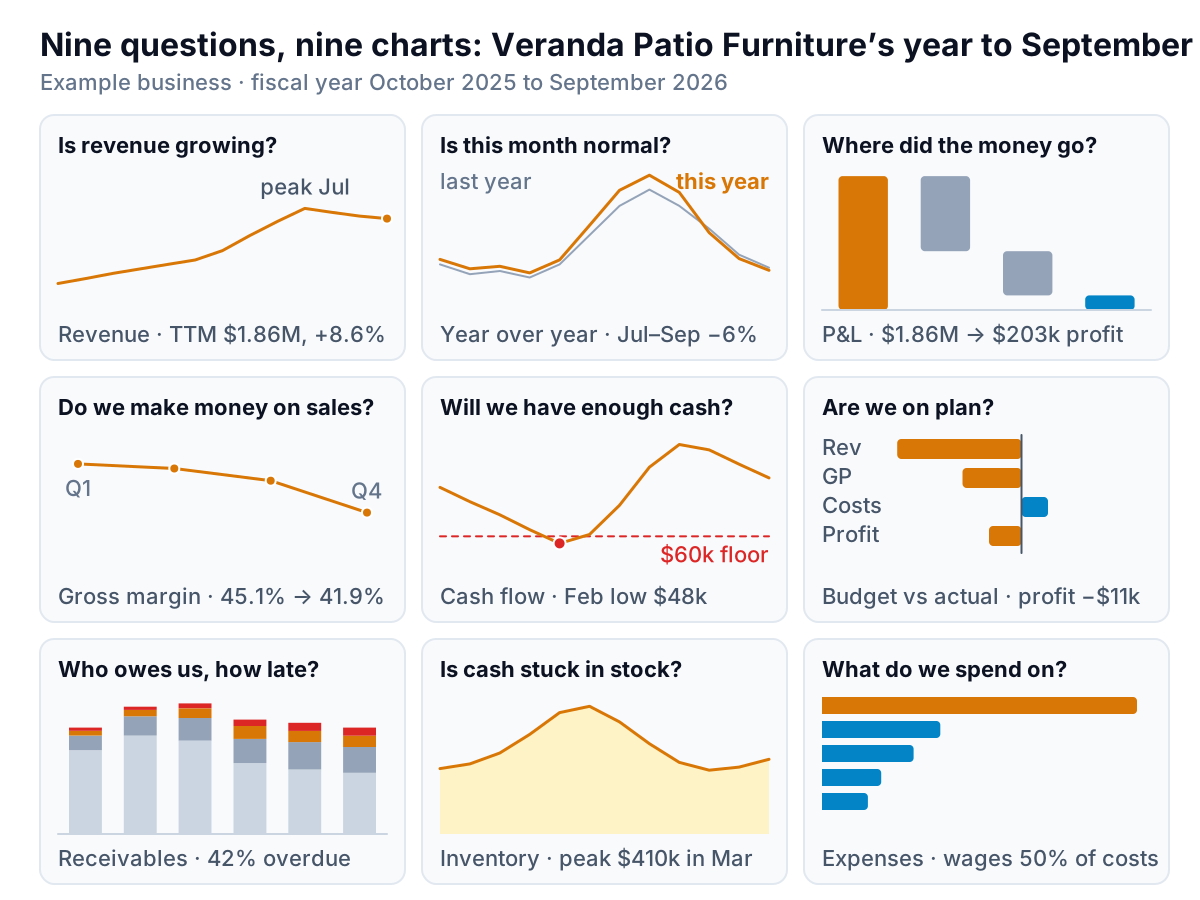
That is the whole game with financial charts. A financial chart turns one number from your books (sales, profit, cash, what customers owe) into a picture that answers one question about it, and the question decides the chart. This guide gives the nine financial charts a small business needs, one per question, and says which belong on a dashboard you check weekly and which in the monthly report you send. Each one has its own full guide with steps and example data; this page is the map.
Pick financial charts by the question, not the data
Open any spreadsheet tool's chart menu and you'll see the same advice: pick a chart by the shape of your data. The Financial Times' Visual Vocabulary, a poster its graphics desk made for choosing charts, sorts them by the relationship you want to show instead: change over time, ranking, part-to-whole, deviation and so on. That's closer, and for a business owner it gets even simpler, because the relationships come from a short list of questions you already ask:
| Question | Chart | Dashboard or report? |
|---|---|---|
| Is revenue growing? | Trailing-12-month line, monthly columns | Both |
| Is this month normal? | This year vs last year by month | Both |
| Where did the money go? | P&L waterfall | Report |
| Do we make money on what we sell? | Gross margin % line | Both |
| What do we spend on? | Sorted bar of cost categories | Report |
| Will we have enough cash? | Balance line with a floor, forecast dashed | Dashboard first |
| Are we on plan? | Variance bars, budget vs actual | Report |
| Who owes us, and how late? | Aging buckets stacked by month | Dashboard first |
| Is cash stuck in stock? | Stock value over time, days on hand | Dashboard first |
If a chart doesn't answer a question on that list, or one you can write down just as plainly, it probably doesn't need to exist. If you can't decide between two charts, ask which question the reader will have in their head when they look at it.
The nine charts, in brief
Sales and profit
Revenue. Monthly columns show each month; a trailing-12-month line shows the trend without the seasons, because each point is a full year. Veranda's peaked at $1,879,800 in July and has slipped to $1,856,800 since. The revenue chart guide covers both, plus how to annotate one-off months.
This year vs last year. For any seasonal business, the only fair comparison for September is last September. Overlay the two years by month, or chart the % change month by month. The year over year chart post handles 53-week years and partial months; the seasonality chart post shows how to separate the seasonal pattern from the trend.
Profit. A waterfall starts at revenue, steps down through cost of goods and each overhead, and lands on profit: $1,856,800 to $202,700 for Veranda. The P&L chart guide builds it and adds margin trend lines.
Gross margin. Chart the percentage as a line, next to (not on top of) revenue. Veranda's fell from 45.1% in the first quarter to 41.9% in the last, which on $368,800 of fourth-quarter sales is about $12,000 of gross profit. The gross margin chart post explains why one dual-axis chart is the wrong way to show it.
Costs. Sorted horizontal bars beat a pie once you have more than a handful of categories. Wages were 50% of Veranda's $612,800 of operating costs. The expense breakdown chart post has the rules for the "other" bucket and for costs as a share of revenue over time.
Cash and the plan
Cash. A month-end balance line with your minimum cash level drawn across it, actuals solid and forecast dashed. Veranda's dipped to $48,000 in February, below its $60,000 floor, while it stocked up for spring. The cash flow chart post adds the inflows vs outflows bars and a monthly cash waterfall. For any line that runs into the future, the forecast vs actual chart post shows how to draw the range honestly.
Budget vs actual. Variance bars, signed so that one direction always means better. Veranda's revenue came in $43,200 under budget, operating costs $9,200 under, and profit $11,300 short. The budget vs actual chart post covers bullet charts and when to show % instead of $. The break-even chart answers the related planning question: how much do we have to sell to cover fixed costs?
Money tied up
Receivables. Veranda sells on account to hotels and restaurants. Stacking its receivables by age each month shows the overdue share climbing from 21% in April to 42% in September, a trend no single aging report reveals. See the accounts receivable aging chart.
Inventory. Stock value peaked at $410,000 in March, a month after cash hit its low. A stock line with reorder points, plus days on hand by category, is in the inventory chart post.
When a financial chart hides the answer
Back to the chart from the opening. Here it is next to the one that would have caught the slowdown in August.
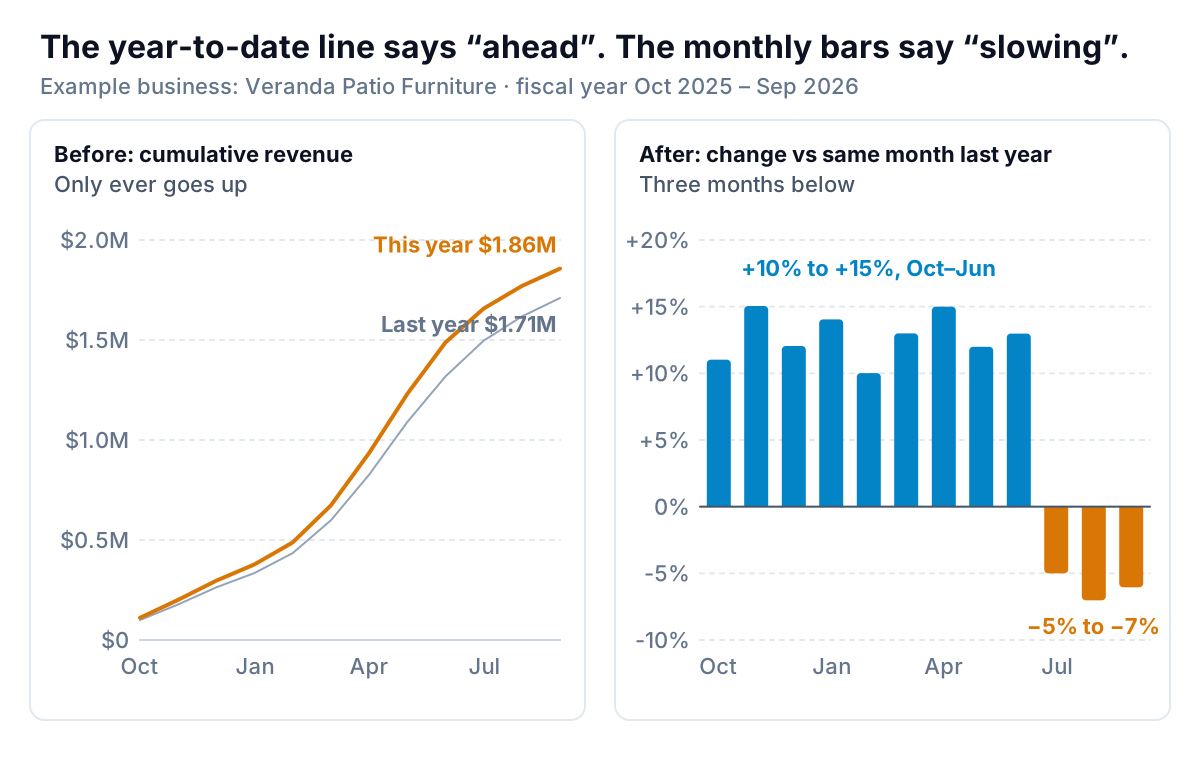
A cumulative line can only go up, so it rewards early strength and buries late weakness. Veranda's spring was so strong (October to June up 12.9%) that the year-to-date line stayed ahead even after three bad months. Cumulative lines are fine for one question, "will we hit the annual number?", and misleading for every other.
A few other traps catch nearly every set of financial charts:
- Bars that don't start at zero. People judge a bar by its length. Cleveland and McGill's experiments on graphical perception ranked judgments of position along a common scale as the most accurate, ahead of length, angle and area. Cut off the bottom of a bar and the length lies. A line, read by its position and slope, can start above zero if you say so.
- Two axes on one chart. Revenue in dollars on the left, margin in percent on the right. Where the lines cross depends entirely on how each axis was scaled, so the chart can be made to say anything. Use two charts stacked with the same months.
- Seasonality read as trend. May beats February at a patio furniture store every year. Compare with the same month last year, or use a trailing-12-month line.
- Percentages of tiny bases. A cost line that went from $400 to $900 is "up 125%". Show the dollars beside the percentage. The sales growth chart post has more on growth rates and small bases.
- Pies with many slices. A pie asks readers to compare angles, which rank below position and length in that same research. Five slices at most, or use sorted bars.
Charts for customers, products and sales
The nine above come from the books. A second set comes from the systems that sit in front of them, and they explain why the financial lines move. One short note on each:
- Subscription businesses: the MRR chart splits monthly recurring revenue into new, expansion, contraction and churn, so you see what moved the total.
- Losing customers: the churn chart shows the rate over time with a rolling line to tame small-number noise, and the cohort retention chart shows whether newer customers stay longer than older ones.
- Repeat business: new vs returning customers splits revenue and orders by whether the customer has bought before.
- Where sales leak: the funnel chart post compares the built-in funnel with plain bars and step conversion rates.
- What's coming: the sales pipeline chart shows open deals by stage, in value and count, weighted by how likely they are to close.
- Where and what: a sales map shows sales by region (and when a ranked bar is the better choice), and the sales by product chart shows which products carry the business, with a Pareto line.
- Hitting a number: the sales target chart compares cumulative actuals with a pace line, which is the one good use of a cumulative chart.
- Any KPI: the KPI chart post matches a chart to each kind of KPI: big number plus sparkline, bullet chart, target bands.
Dashboard or monthly report: where each chart goes
The same nine charts do different jobs depending on where they sit. A dashboard is for someone who comes back every week to see whether anything changed. A monthly report is for someone who wasn't watching and needs to be told what happened, why and what's next. Our dashboard vs report guide covers the difference at length; for charts it comes down to this.
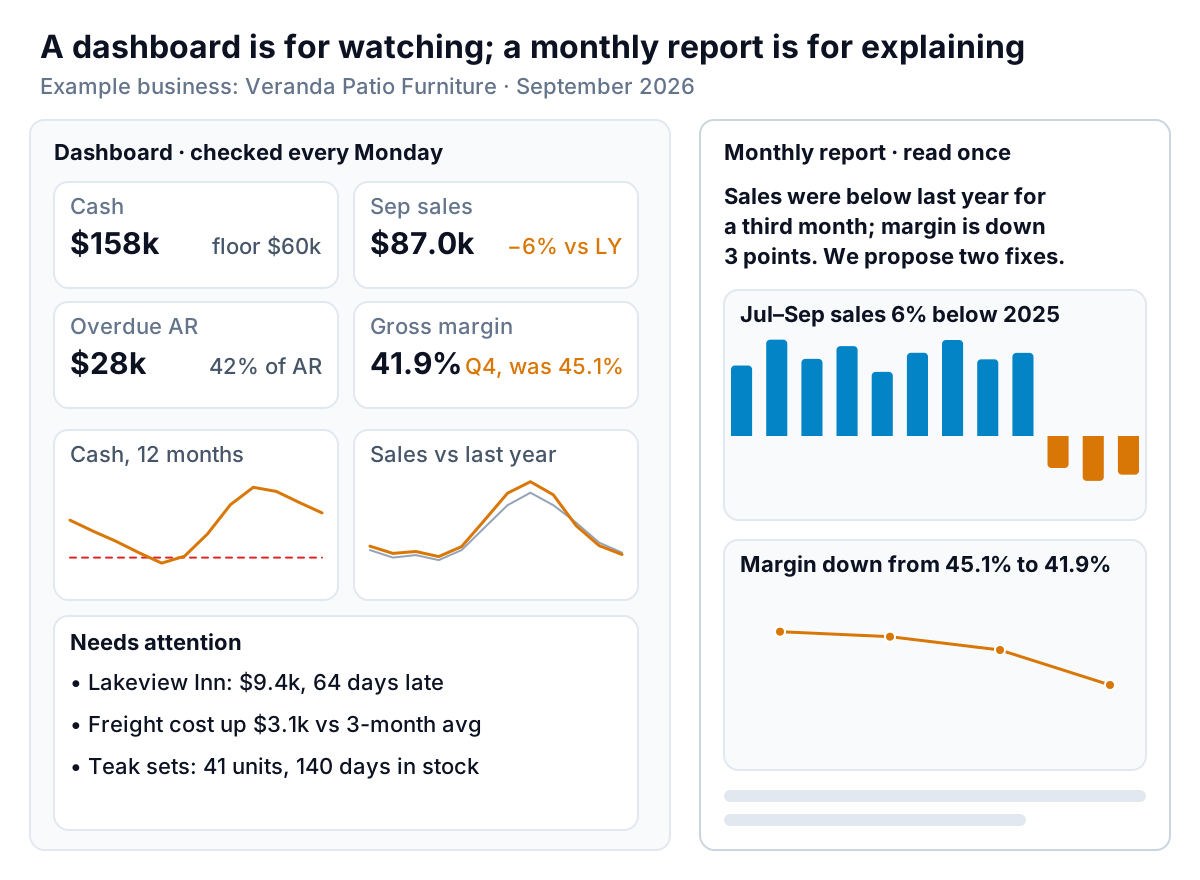
On the dashboard: the fast-moving ones. Cash, receivables, this month vs last year, gross margin, stock. Small charts, each with a comparison, and a list of the items that need action. If a chart on the dashboard hasn't changed what you did in three months, move it to the report. The financial dashboard guide lays out the tiles.
In the monthly report: the ones that explain. The P&L waterfall, budget vs actual, cost breakdown, and whichever trend chart carries this month's story. Three to five charts is plenty. Each gets a title that states the point ("Jul–Sep sales 6% below 2025", not "Monthly sales") and a sentence underneath on what you're doing about it. For a lender, partner or board, the guide to presenting financial data covers the order, the titles and when a table beats a chart.
Building the set from your books
Every chart above starts from the same raw material: one row per month, one column per number. Export a profit and loss report with a column for each month (our QuickBooks reports guide shows which one), then add month-end cash, receivables by age and stock value as extra columns. Keep last year's months in the same table so every comparison is one column away. With the data in that shape, each chart is a few clicks; Microsoft's list of available chart types includes the waterfall, line, combo and stacked bar charts used here, and the sibling guides give the steps for Excel and Google Sheets.
The hard part isn't building a chart once. It's rebuilding all nine every month without a broken range or a forgotten row. Parity does that from QuickBooks Online, Stripe, Shopify, Square, HubSpot or Google Sheets, or from an exported file: it builds a dashboard with headline numbers, charts, what explains them and what needs attention, and checks every number against queries on the full dataset. Ask, and it writes the monthly report from the same data.
Connect your books or upload an export, and get checked financial charts you can refine, share and update each month. Build a report from your data free
Veranda's owner now opens the year with two charts side by side: the cumulative line, for the question "will we hit the annual number?", and the monthly change vs last year, for "is anything slipping?". Had both been there in August, the slowdown would have been a conversation in August, not a surprise at year end.